Picking the right edge device for your computer vision project
See how to choose the right edge device for your computer vision project based on performance, power efficiency, and deployment requirements.
Edge AI is quickly becoming one of the biggest trends in artificial intelligence and computer vision. It brings real-time intelligence directly to devices instead of relying on cloud computing, where data is sent to another location for processing. In fact, the global edge AI market is expected to reach around $143.06 billion by 2034.
Thanks to recent tech advancements, edge AI is redefining real-time, vision-based automation across many industries. Quality inspection in manufacturing is a great example.
Here, vision AI cameras continuously analyze products on a conveyor belt. They can be used to quickly detect defects and anomalies. This is especially crucial in industries that require high precision, such as the manufacturing of surgical tools.
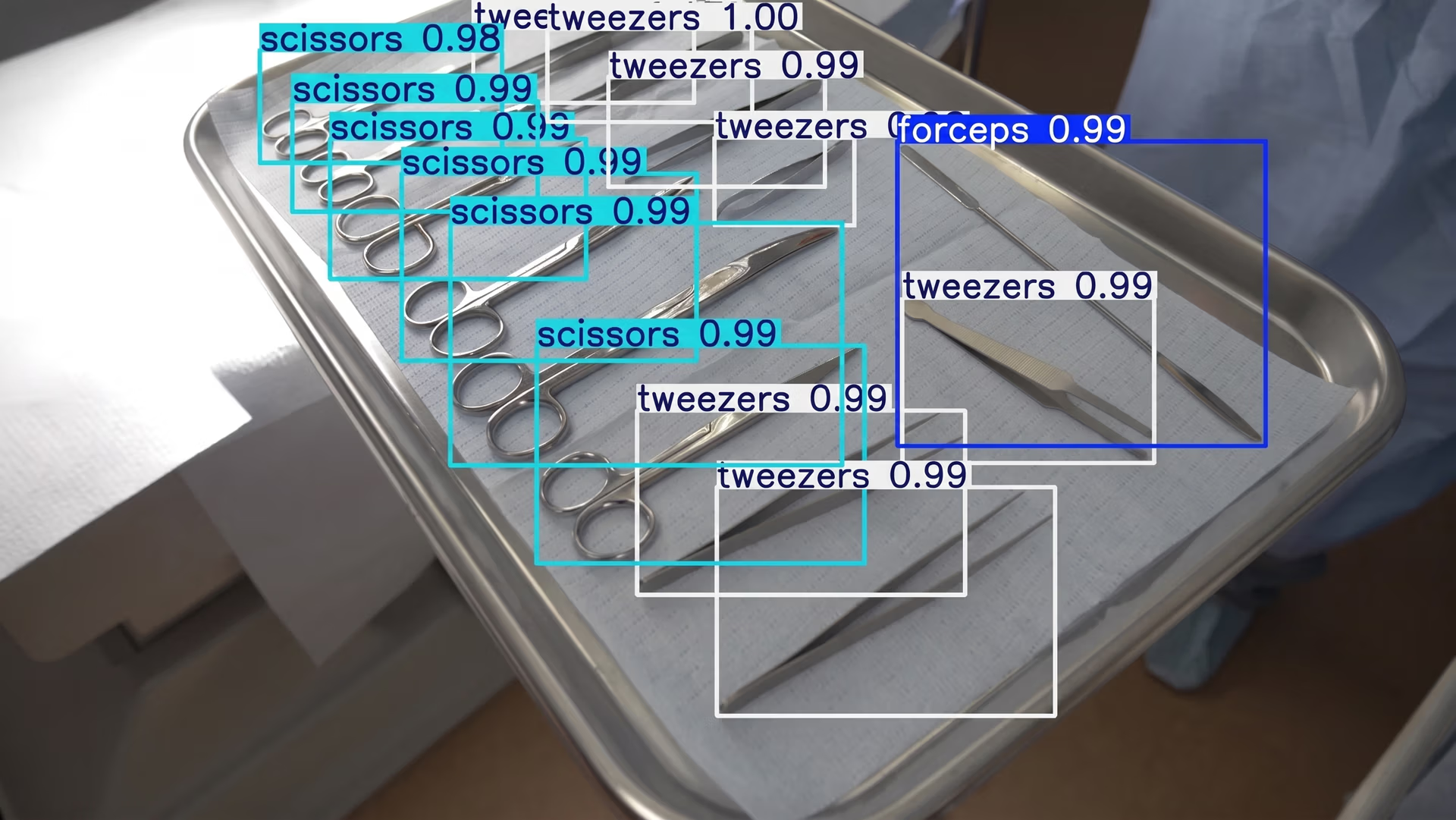
Fig 1. An example of using vision AI to detect surgical tools
But what exactly are edge devices? These are hardware systems capable of running AI models and computer vision models, such as Ultralytics YOLO26, at or near where the data is generated.
This could be on a factory floor, inside a smart camera, or onboard autonomous vehicles. By performing inference locally, these devices enable faster response times. They also reduce bandwidth usage because visual data doesn’t need to be streamed to the cloud.
However, choosing the right edge device for your computer vision project can be tricky. Hardware that works well in one environment may not be suitable for another.
For example, a device that performs reliably on a factory floor might not work for drone inspections, where weight and power constraints are very different. Choosing the wrong device can increase costs, slow rollouts, and complicate scaling.
That’s why teams should evaluate factors such as device size, power envelope, thermal limits, and industrial availability, rather than just computing power. In this article, we’ll explore edge AI and how to pick the right edge device for your computer vision application. Let’s get started!
Key benefits of using edge devices#
Before we dive into how to choose the right edge device for your specific vision AI project, let’s take a step back and discuss some of the advantages of using edge devices for vision AI projects.
Here are some of the key benefits of deploying vision AI at the edge:
- Real-time performance: Data is processed at or near where the camera is deployed, enabling instant responses for use cases such as defect detection, safety monitoring, and robotics. This local processing supports real-time decision-making, allowing systems to react immediately to changing conditions without relying on cloud connectivity.
- Lower bandwidth cost: Instead of streaming raw video to the cloud, edge devices transmit only metadata, alerts, or relevant insights. This significantly reduces network load and cloud storage expenses.
- Works offline: Most edge systems can continue running even with unstable or limited internet connectivity, which is common in factories, warehouses, and remote environments.
- Better privacy: Video data remains on-site, making it easier to meet privacy and compliance requirements while reducing the exposure of sensitive information.
- Scales easily across many locations: Edge architectures reduce reliance on centralized cloud infrastructure. This allows teams to replicate the same setup across multiple locations with consistent performance.
Understanding your application’s requirements#
The first step in choosing the right edge device is understanding what your application actually needs. The hardware you select should match what the system is expected to do, how fast it needs to run, and where it will be deployed.
You can start by defining the performance requirements. While some solutions require real-time AI inference at high FPS (frames per second), others can process frames in groups or batches.
Model complexity and size also play an important role. Lightweight object detection models can often run on smaller, lower-power devices, while more complex, heavy models or multi-stage pipelines require more compute power and memory.
Next, consider your data setup. This includes camera resolution, frame rate, the number of parallel streams, and sensor types such as RGB, thermal, or depth. These factors directly affect bandwidth, throughput, memory usage, and overall system load.
The accuracy vs latency trade-off#
Beyond hardware and data requirements, model selection plays a critical role in overall system performance. Most edge deployments involve a trade-off between latency and accuracy. Higher-accuracy models are typically more computationally intensive and may increase inference time.
Faster models, on the other hand, may sacrifice some precision. The goal is to find the right balance between speed and accuracy based on your specific use case and operational constraints.
For instance, in automated food production lines, computer vision systems are used to inspect products before they are packaged and shipped. These systems have to operate in real time to avoid slowing down the conveyor belt.
Consider a pizza assembly line, where the system needs to verify that each pizza has the correct toppings. A model such as Ultralytics YOLO26 can detect the pizza and its toppings in real time, identifying missing or incorrect ingredients. In this scenario, the model has to be accurate enough to catch errors while being fast enough to keep pace with production speeds on edge hardware.
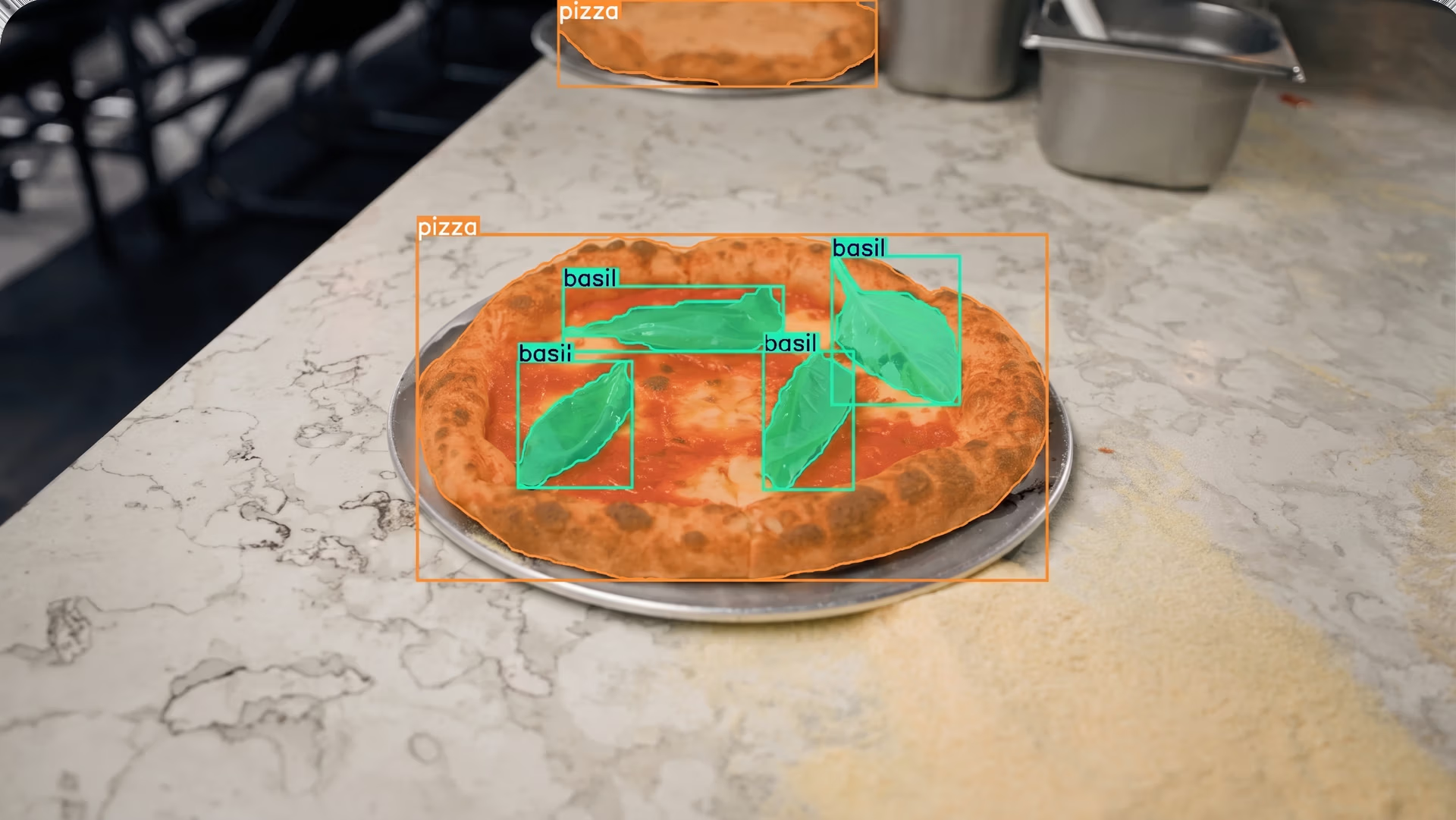
Fig 2. Using Ultralytics YOLO26 to detect and segment a pizza and its toppings.
Consider the size of the edge device#
Aside from compute performance, the physical size of the edge device is another important factor in deployment planning. The device’s form factor (its physical size, shape, mounting style, and expansion interfaces) directly influences how easily it integrates into the environment and how it performs under real-world conditions.
Types of edge AI devices and their form factors#
Edge AI hardware comes in many form factors, ranging from full rack-mounted servers and Peripheral Component Interconnect Express (PCIe) accelerator cards to compact M.2 modules, System-on-Module (SoM) platforms, single-board computers (SBCs), smart cameras, and even intelligent vision sensors with on-chip AI processing. Each format offers different trade-offs in performance, power efficiency, thermal design, and integration complexity.
Device size is closely tied to cooling requirements, power availability, and overall system architecture. Larger systems such as rack-mounted industrial PCs or tower workstations typically support full-height PCIe GPUs, multiple expansion cards, and active cooling. These platforms are well-suited for multi-camera processing, centralized edge hubs, or high-throughput video analytics.
In contrast, compact form factors such as M.2 accelerators, SoMs mounted on custom carrier boards, SBCs, or all-in-one smart cameras are designed for space-constrained environments. These smaller devices often prioritize power efficiency and passive cooling, making them ideal for embedded systems, mobile robots, drones, kiosks, and distributed inspection units.
At the extreme end of miniaturization, some deployments rely on intelligent vision sensors or microcontroller-based (TinyML) platforms, where inference runs directly on the image sensor or low-power processor. These systems significantly reduce physical footprint and energy consumption but are typically suited for narrower, highly optimized workloads.
These differences in size, modularity, and integration model generally lead to two common edge deployment categories: scalable deployments and space-constrained deployments. Each approach addresses different performance, power, and environmental constraints while shaping long-term maintainability and system design.
Scalable deployments#
PCIe accelerators and rack-mounted or industrial personal computers (PCs) are commonly used when a project requires high computing power or needs to process data from multiple cameras simultaneously. A PCIe accelerator is a hardware card installed inside a larger computer through a PCIe slot.
It adds dedicated compute resources, such as a graphics processing unit (GPU) or other AI accelerator, to increase the system’s ability to handle AI workloads. This is similar to how a graphics card improves performance in a desktop computer.
Rack-mounted or industrial PCs are larger, ruggedized systems designed for continuous operation in environments such as factories, production floors, or control rooms. They provide more space for cooling, hardware expansion, and higher-power components, making them well-suited for demanding workloads such as multi-camera quality inspection or large-scale video analytics.
Space-constrained deployments#
Space-constrained deployments are common in environments where an edge device has to operate within tight physical, thermal, or power limits. This often includes smart cameras mounted on production lines, mobile robots, drones, kiosks, or compact inspection systems.
In these cases, the hardware needs to be small, lightweight, and energy efficient while still delivering reliable AI performance. Two common hardware options for these deployments are M.2 modules and single-board computers.
An M.2 module is a compact expansion card that fits into an M.2 slot inside a host system. While M.2 is simply a form factor and interface standard, some modules are designed specifically for AI acceleration.
These AI accelerator modules allow small devices to run computer vision models more efficiently without significantly increasing size or power consumption. M.2 accelerators are often integrated into embedded systems where adding a full-sized PCIe expansion card wouldn’t be practical.
Meanwhile, a single-board computer is a complete computer built onto a single circuit board. It integrates the CPU, memory, storage interfaces, and input/output (I/O) connections into a compact form factor. Because everything is contained on one board, SBCs are widely used in embedded and edge applications where space is limited, and simplicity is important.
Although space-constrained systems typically offer less raw compute performance than larger rack-mounted systems, they enable on-device inference close to where the data is generated. This reduces latency, lowers bandwidth usage, and improves deployment flexibility in environments where larger hardware wouldn't fit.
Dedicated AI acceleration for embedded vision#
Many hardware vendors are focusing specifically on compact, power-efficient AI acceleration for embedded vision. For example, Axelera AI offers Metis® AI Processing Unit (AIPU) accelerators in multiple form factors, including PCIe cards, M.2 modules, and integrated compute boards for space-constrained deployments.
Through an integration with Ultralytics, supported YOLO models such as Ultralytics YOLOv8 and YOLO26 can be exported to the Axelera format using the Ultralytics Python package and optimized via the Voyager SDK, which handles compilation and INT8 quantization for efficient edge inference.
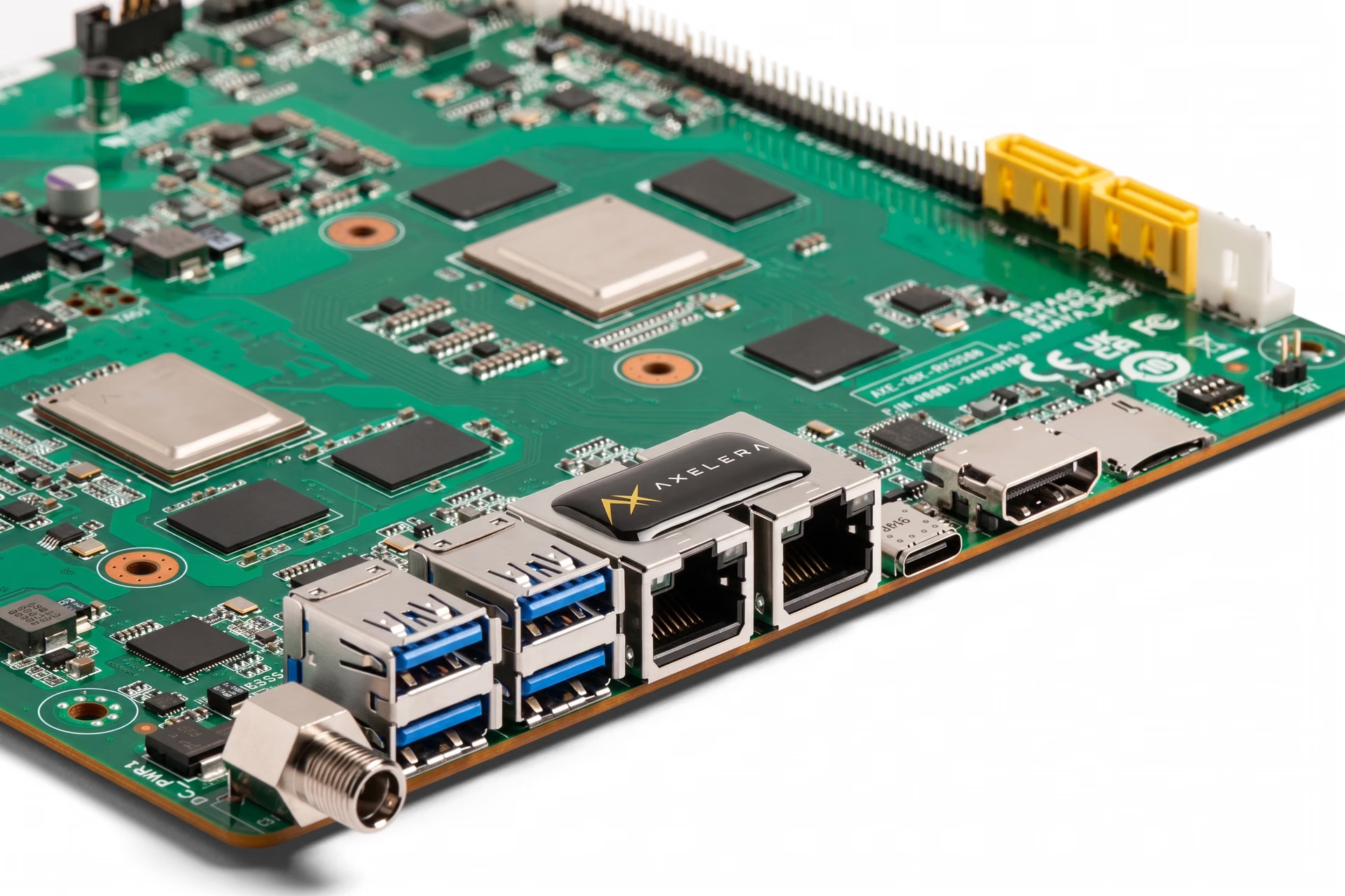
Fig 3. A look at Axelera AI’s Metis AI Processing Unit (Source)
Factor in power consumption#
Power consumption is also a key constraint in edge deployments because it directly affects heat generation and cooling requirements. It determines whether the system can operate reliably inside sealed enclosures or compact industrial housings.
This becomes especially vital in battery-powered environments such as mobile robots, drones, or remote monitoring stations, where every watt (W) impacts runtime and overall system stability.
Most edge devices fall into three broad power tiers. Here’s a closer look at each of them:
- Low-power devices (<10W): These are typically used in embedded systems where compact size and passive cooling are required.
- Mid-range devices (10–50W): These devices are common in edge gateways and factory endpoints that require higher throughput while still operating within controlled thermal limits.
- High-power devices (>50W): Such devices are usually PCIe accelerators or industrial PCs designed for multi-camera processing and heavy workloads. They are often paired with active cooling and larger enclosures.
It is important to keep in mind that workload characteristics play a major role in determining which power tier is appropriate. Higher frame rates, larger vision models, and multiple parallel camera streams all increase compute demand, which in turn raises power consumption.
Nowadays, many hardware vendors are focusing on power-efficient AI acceleration. For example, DEEPX’s edge modules are designed for low-power inference in edge deployments. Intel processors also offer power management and scaling features that allow performance to be tuned based on environmental and workload requirements.
Account for industrial availability and lifecycle support#
Let’s say you have successfully completed a pilot deployment. The model performs well, the hardware meets performance requirements, and the system runs reliably in testing.
The next challenge is scaling that solution into full production. This is where industrial availability and lifecycle support become critical.
Most edge systems are expected to operate continuously for years. Selecting hardware that may be discontinued shortly after rollout introduces significant risk. Even if a device performs well during a pilot, it can become a liability if it reaches end-of-life or becomes difficult to source once production begins.
Short market lifecycles can create supply chain disruptions, increase maintenance costs, and force unexpected redesigns. In multi-site deployments, replacing unavailable components can slow expansion and complicate system management.
Hardware designed for industrial use typically offers longer production timelines, clearer lifecycle policies, and ongoing firmware or software support. This stability makes it easier to scale deployments without major hardware changes mid-cycle.
Before finalizing an edge device, teams can review the manufacturer’s product roadmap, lifecycle commitments, and long-term support strategy.
The importance of team expertise and ease of use#
Choosing and deploying an edge device also depends on your team’s experience. Some platforms are easier to work with and provide clear documentation, simple setup steps, and ready-to-use tools. Others offer more control over performance but require deeper technical knowledge and more time spent on optimization and debugging.
For example, the Ultralytics Python package makes it straightforward to train, test, and deploy models like YOLO26. It simplifies common tasks and also supports exporting models to different formats used in edge deployments. This makes it easier for teams to move from development to real-world hardware without rebuilding their workflow from scratch.
For teams that are newer to edge AI, a strong and well-documented software ecosystem can reduce development time and lower deployment risk. More experienced teams may prefer platforms that allow deeper customization and fine-tuning, especially in applications that require multi-camera processing or strict latency requirements.
Simply put, vendor ecosystems and tooling can make a significant difference. Clear documentation, active support, and flexible deployment options help teams transition more smoothly from pilot projects to full production systems.
Key edge deployment factors that tend to get overlooked#
Now that we’ve covered the main factors involved in choosing an edge device, let’s walk through some practical details that can make a big difference in real-world deployments. These considerations may not seem urgent at first, but they often play a critical role in decision-making and shape how smoothly a project runs once it moves beyond the pilot stage.
I/O, bandwidth, and software compatibility#
Connectivity and I/O compatibility are often among the first practical challenges in edge deployments. Typically, an edge device has to support your camera and sensor configuration, including common interfaces such as USB 3.0, GigE with Power over Ethernet (PoE), and MIPI.
Industrial vision systems may also require hardware triggers, synchronization signals, or specific timing support to ensure reliable operation.
Bandwidth is another critical factor, especially in multi-camera setups. Even small mismatches between camera output and device input capacity can reduce throughput or introduce additional latency.
Software compatibility also plays a crucial role. Some deployments rely on lightweight inference frameworks such as NCNN and MNN, which are commonly used in mobile and embedded environments.
In smart sensor deployments, devices like the Sony IMX500 integrate AI processing directly on the image sensor, reducing data transfer and latency. In these cases, model compatibility and export support become especially important, since the model must be converted into a format supported by the sensor’s toolchain.
For instance, the Ultralytics Python package supports exporting models such as Ultralytics YOLO11 into formats compatible with edge deployment pipelines, including platforms built around devices like the Sony IMX500.
Thermal and environmental reliability#
When edge devices continuously process visual data, thermal and environmental reliability become critical factors. In this context, reliability means the device can operate for extended periods without overheating or failing, even in harsh conditions such as dust, vibration, or extreme temperatures.
As edge AI workloads grow more demanding, thermal efficiency has become a defining factor in system design. This emphasis on thermal performance was highlighted at CES 2026 in Las Vegas, where DeepX ran identical AI workloads on multiple chips with a small piece of butter placed on top.
While competing chips generated enough heat to melt the butter, the DeepX edge device didn’t, illustrating how lower power consumption and stronger thermal stability can directly affect real-world reliability.
Cooling design plays a central role in maintaining stable performance. As processors work harder, they generate heat, and that heat must be managed effectively.
In many industrial settings, passive cooling is preferred because mechanical fans can wear out or fail over time, especially in dusty or high-vibration environments. Fanless aluminum heat sinks are commonly used to dissipate heat without relying on moving parts, which improves long-term durability.
Environmental conditions can also have an impact. Every device has a rated operating temperature range, and deployments in sealed cabinets or outdoor locations can trap heat or expose hardware to fluctuating temperatures. In these cases, enclosure design and airflow become just as important as raw compute performance.
Software ecosystem and deployment readiness#
When selecting the right edge device, the strength of its software ecosystem is just as critical as its hardware specifications. A device may offer strong compute performance on paper, but without reliable tooling and platform support, moving from prototype to production can become slow and complex.
A well-supported platform streamlines the entire deployment path, from model preparation to optimized inference on the target hardware. Ecosystems that provide built-in tools for quantization, performance tuning, and debugging make it easier to validate models under real workloads and reduce unexpected issues during rollout.
For example, Ultralytics YOLO models like YOLO26 can be exported directly to the OpenVINO format, enabling optimized inference on Intel CPUs, integrated GPUs, and Neural Processing Units (NPUs). OpenVINO provides performance optimizations such as model conversion, quantization (including FP16 and INT8), and heterogeneous execution across supported Intel hardware.
Using the Ultralytics Python package, teams can export models with a simple command and run inference either through Ultralytics’ high-level interface or directly with the native OpenVINO Runtime, creating a streamlined and production-ready deployment workflow for Intel-based edge systems.
Real performance under load#
Many edge devices look impressive on paper, but performance can change once they are running a complete vision pipeline. In real deployments, the system isn't just running inference.
It also handles preprocessing, postprocessing, and sometimes multiple camera streams at the same time. Because of this, it’s important to look beyond average frames per second.
Consistent latency often matters more than peak performance. Watching for memory bottlenecks and checking how stable the system remains under steady load gives a clearer picture of how it will perform in production.
It’s helpful to test cold-start time, long-term high-performance over hours of operation, and how the device behaves when other tasks run alongside inference, such as encoding, logging, or networking. In most real-world use cases, stable and predictable performance is more vital than occasional speed spikes.
Security, lifecycle, and management after deployment#
Edge deployments need to stay secure and reliable over time, especially in environments like manufacturing, where systems are expected to run continuously. Features such as secure boot, encrypted storage, and regular vendor updates help protect devices from tampering and reduce the risk of vulnerabilities or unexpected downtime.
Managing devices after deployment is just as important as selecting the right hardware. Remote monitoring and update capabilities let teams maintain software, firmware, and models without needing physical access to each device. This becomes increasingly crucial as projects move from a small pilot to a larger rollout.
As deployments grow, centralized fleet management helps keep everything organized. It makes it easier for teams to track device health, manage updates, monitor performance, and troubleshoot issues across multiple locations. Without a clear management strategy, maintaining dozens or even hundreds of edge systems can quickly become difficult.
Common real-world applications of computer vision and edge AI#
As you consider the factors involved in selecting the right edge device, you might be wondering where these systems are actually used. Today, edge AI powers applications across nearly every industry, from manufacturing and retail to robotics and smart infrastructure.
Here are five common deep learning use cases where edge devices enable low latency, reduced bandwidth consumption, and reliable on-device processing:
- Safety monitoring in industrial sites: Computer vision pipelines deployed on edge computing hardware can provide instant alerts for personal protective equipment (PPE) compliance, meaning they automatically detect whether workers are wearing required safety gear such as helmets, gloves, safety vests, or goggles, as well as identify unsafe behavior. This improves operational reliability by reducing workplace incidents while keeping sensitive video data securely processed on-site.
- Retail analytics: Edge devices can process visual data locally for inventory management, shelf availability, and queue detection, reducing bandwidth and cloud costs while staying cost-effective and scalable across many stores.
- Robotics: In robotics, on-device AI enables real-time object detection and autonomous navigation. For example, NVIDIA Jetson edge devices can provide compact, GPU-accelerated computing platforms that allow robots to run computer vision models such as Ultralytics YOLO26 locally, delivering low-latency performance while maintaining power efficiency.
- Smart cities and traffic monitoring: Smart city deployments can use edge computer vision processors for real-time traffic flow analysis, incident detection, and pedestrian safety monitoring. By avoiding continuous video streaming to the cloud, these systems reduce bandwidth requirements and improve response times.
- Quality inspection in manufacturing: On production lines, edge devices can inspect products in real time to detect defects, missing components, or assembly errors before items move further down the conveyor. These systems can run models such as Ultralytics YOLO26 on CPUs, GPUs, or dedicated AI accelerators, depending on throughput and power constraints.
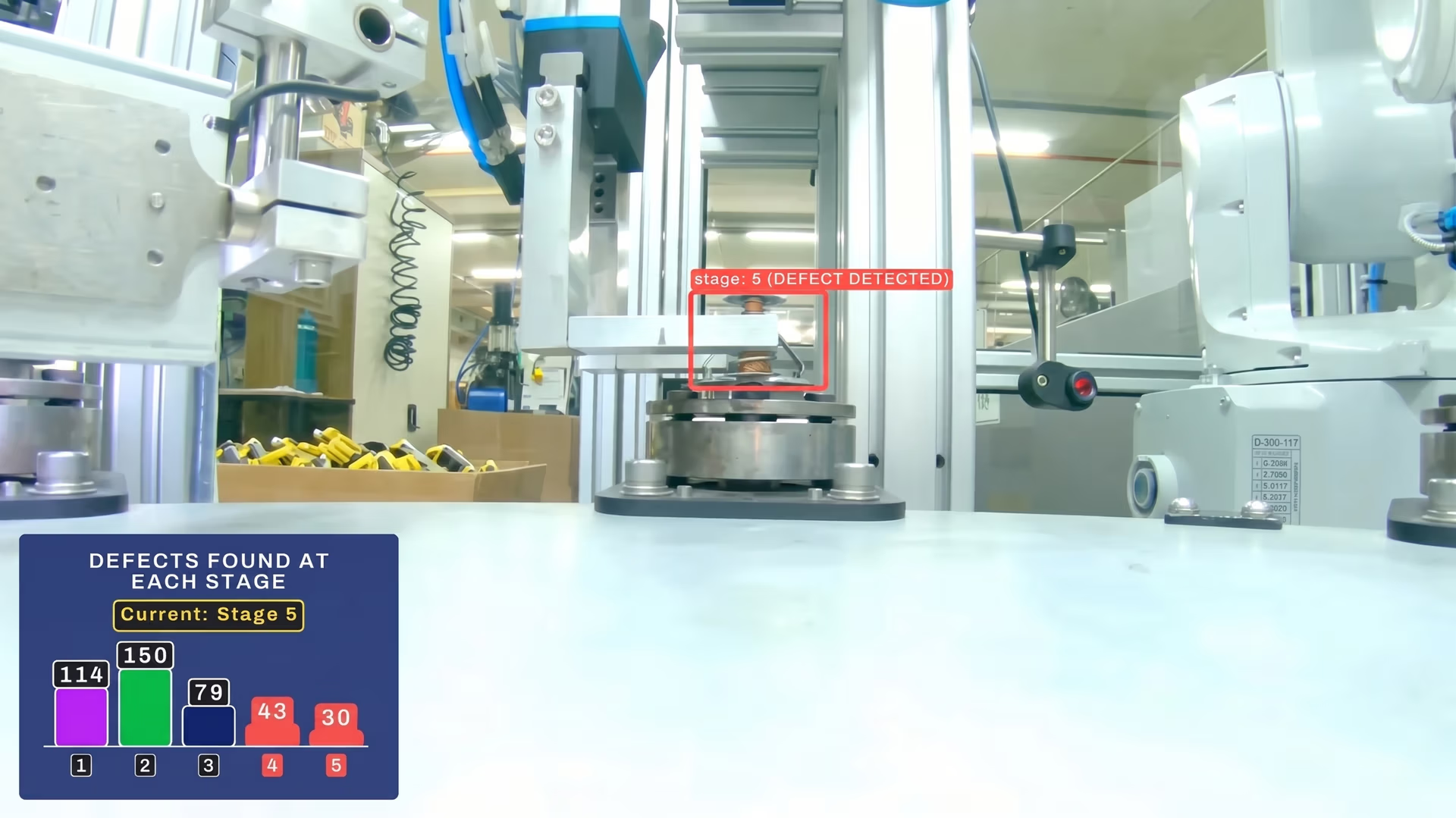
Fig 4. Ultralytics YOLO26 can be deployed on the edge to detect defects in manufacturing plants.
Key takeaways#
Selecting the right edge device for your computer vision project involves balancing performance, power efficiency, reliability, and long-term availability. Rather than focusing on just peak specifications, teams should evaluate real-world conditions, software ecosystem maturity, and lifecycle support. By validating your setup with a pilot deployment before scaling, you can reduce risk, control costs, and ensure a smoother path from prototype to production.
Join our community and explore our GitHub repository. Check out our solutions pages to discover various applications like AI in agriculture and computer vision in healthcare. Discover our licensing options and get started with vision AI today!








