Top 5 tips for deploying YOLO26 efficiently on edge and cloud
Learn the top 5 practical tips for deploying Ultralytics YOLO26 efficiently on edge and cloud, from choosing the right workflow and export format to quantization.
Last month, Ultralytics officially launched Ultralytics YOLO26, setting a new standard for vision AI, a branch of artificial intelligence that enables machines to interpret and understand visual information from images and video. Rather than simply capturing footage, computer vision models like Ultralytics YOLO models support vision tasks such as object detection, instance segmentation, pose estimation, and image classification.
Built for where computer vision actually runs, on devices, cameras, robots, and production systems, Ultralytics YOLO26 is a state-of-the-art model that delivers faster central processing unit (CPU) inference, simplified deployment, and efficient end-to-end performance in real-world environments. The YOLO26 models have also been designed to make it easy to move computer vision solutions from experimentation to production.
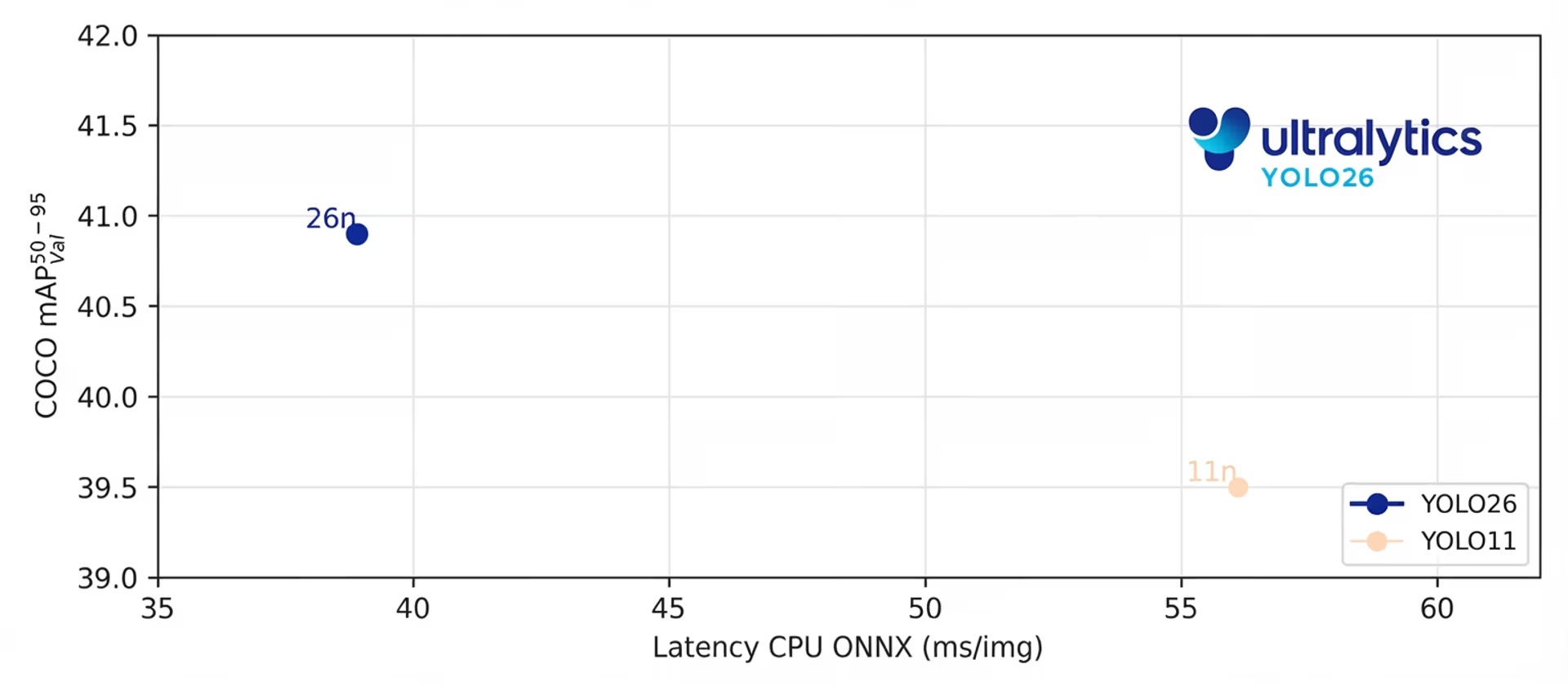
Fig 1. The YOLO26 nano model delivers up to 43% faster CPU inference than YOLO11. (Source)
Model deployment typically involves various considerations, such as selecting the right hardware, choosing an appropriate export format, optimizing for performance, and validating results under real-world conditions. Navigating these steps while deploying YOLO26 is straightforward, thanks to the Ultralytics Python package, which streamlines training, inference, and model export across multiple deployment targets.
However, even with simplified workflows, making the right deployment decisions is key. In this article, we’ll walk through five practical tips to help you deploy Ultralytics YOLO26 efficiently across edge and cloud environments, ensuring reliable and scalable vision AI performance in production. Let's get started!
What is model deployment in computer vision?#
Before we dive into deployment strategies for Ultralytics YOLO26, let’s take a step back and understand what model deployment means in computer vision.
Model deployment is the process of moving a trained deep learning model from a development environment into a real-world application where it can process new images or video streams and generate predictions continuously. Instead of running experiments on static datasets, the model becomes part of a live system.
In computer vision, this often means integrating the model with cameras, edge AI devices, APIs, or cloud infrastructure. It has to operate within hardware constraints, meet latency requirements, and maintain consistent performance under changing real-world conditions.
Understanding this shift from experimentation to production is essential because deployment decisions directly impact how well a model performs outside a lab or experimental setup.
Understanding Ultralytics YOLO26 deployment workflows#
Next, let’s look at what a Ultralytics YOLO26 deployment workflow actually involves. Simply put, it is the sequence of steps that takes an image from being captured to being analyzed and turned into a prediction.
In a typical setup, a camera captures an image or video frame. That data is then preprocessed, such as resizing or formatting it correctly, before being passed into Ultralytics YOLO26 for inference.
The model analyzes the input and produces outputs like bounding boxes, segmentation masks, or keypoints. These results can then be used to trigger actions, such as sending alerts, updating a dashboard, or guiding a robotic system.
Where this workflow runs depends on your deployment strategy. For instance, in an edge deployment, inference happens directly on the device or near the camera, helping reduce latency and improve data privacy.
Meanwhile, in a cloud deployment, images or video frames are sent to remote servers for processing, enabling greater scalability and centralized management. Some systems use a hybrid approach, performing lightweight processing at the edge and heavier workloads in the cloud.
Exploring Ultralytics YOLO26 model variants#
To make informed deployment decisions, it’s also important to understand that there are different Ultralytics YOLO26 model variants to choose from.
Out of the box, Ultralytics YOLO models are available in multiple sizes, making it easy to choose a version that fits your hardware and performance needs. YOLO26 comes in five variants: Nano (n), Small (s), Medium (m), Large (l), and Extra Large (x).
The smaller models, such as YOLO26n, are optimized for efficiency and are great for edge devices, Internet of Things (IoT) devices, embedded systems, and systems powered by a CPU, where low latency and lower power consumption are important. They offer strong performance while keeping resource usage minimal.
The larger models, such as YOLO26l and YOLO26x, are designed to deliver higher accuracy and handle more complex scenes. These variants typically perform best on systems equipped with graphics processing units (GPUs) or in cloud environments where more compute resources are available.
Selecting the right model size depends on your deployment goals. If speed and efficiency on constrained hardware are your top priorities, a smaller variant may be ideal. If your application demands maximum accuracy and you have access to more powerful hardware, a larger model may be the better choice.
Tips for deploying Ultralytics YOLO26 efficiently#
Now that we have a better understanding of Ultralytics YOLO26 model variants and deployment workflows, let’s explore some practical tips for deploying YOLO26 efficiently across edge and cloud environments.
Tip 1: Consider your model deployment options#
One of the first decisions you’ll need to make when deploying Ultralytics YOLO26 is where the model will run. Your deployment environment directly affects performance, latency, privacy, and scalability.
Start by evaluating your workflow. Does your application require low latency, meaning predictions must be generated almost instantly after an image is captured?
For example, in robotics or safety systems, even small delays can affect performance. In these cases, an edge deployment is often the best option. Running inference directly on a device or near the camera reduces the time it takes to process data and avoids sending images over the internet, which can also improve privacy.
On the other hand, cloud deployment provides greater scalability and compute power. Cloud servers can process large volumes of images, handle multiple video streams, and support higher throughput.
For instance, in agriculture, a farmer might collect thousands of leaf images and analyze them in batches to determine whether crops show signs of disease. In this type of scenario, immediate real-time performance may not be required, making cloud processing a practical and scalable choice.
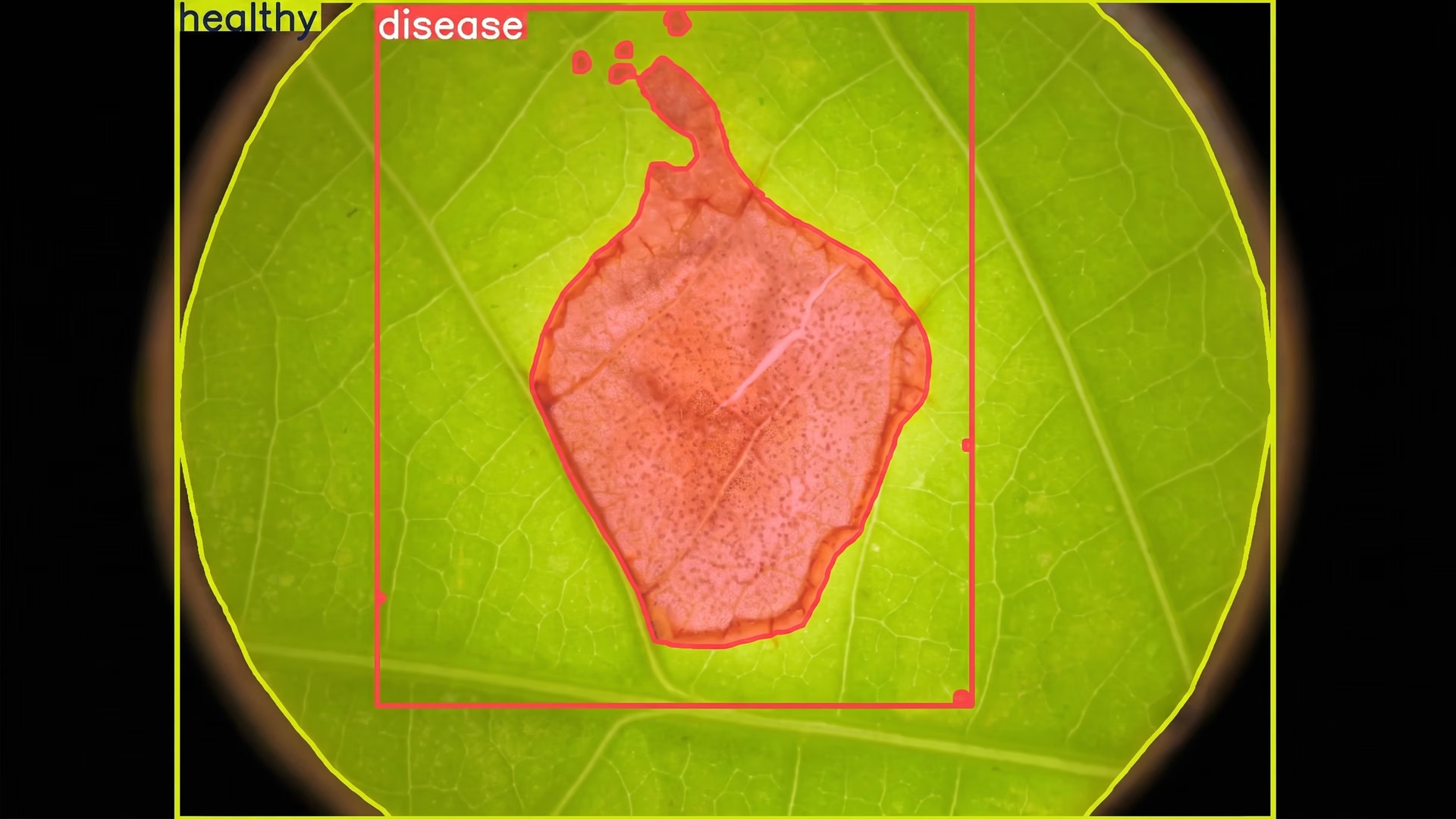
Fig 2. An example of using Ultralytics YOLO26 to analyze images of leaves
However, sending data to remote servers introduces network latency, which is the delay caused by transmitting images over the internet and receiving predictions in return. For applications that are not time sensitive, this trade-off may be acceptable.
There are also options between pure edge and pure cloud. Some companies use on-premise infrastructure located close to where data is generated. Others build hybrid pipelines, performing lightweight filtering on the edge and sending selected data to the cloud for deeper analysis.
Choosing the right deployment option depends on your application’s requirements. By clearly defining your needs for speed, privacy, and scalability, you can select a strategy that ensures Ultralytics YOLO26 performs reliably in real-world conditions.
Tip 2: Choose the export format that matches your hardware#
Once you’ve decided where your model will run, the next step is choosing the right export format. Exporting a model means converting it from the format used during training into a format that is optimized for deployment.
Ultralytics YOLO26 models are natively built and trained in PyTorch, but production environments often rely on specialized runtimes that are better suited for specific hardware. These runtimes are designed to improve inference speed, reduce memory usage, and ensure compatibility with the target device.
Converting YOLO26 into the appropriate format allows it to run efficiently outside the training environment. The Ultralytics Python package makes this process straightforward. It supports a wide range of integrations for building and deploying computer vision projects.
If you’d like to explore these integrations in more detail, you can check out the official Ultralytics documentation. It includes step-by-step tutorials, hardware-specific guidance, and practical examples to help you move from development to production with confidence.
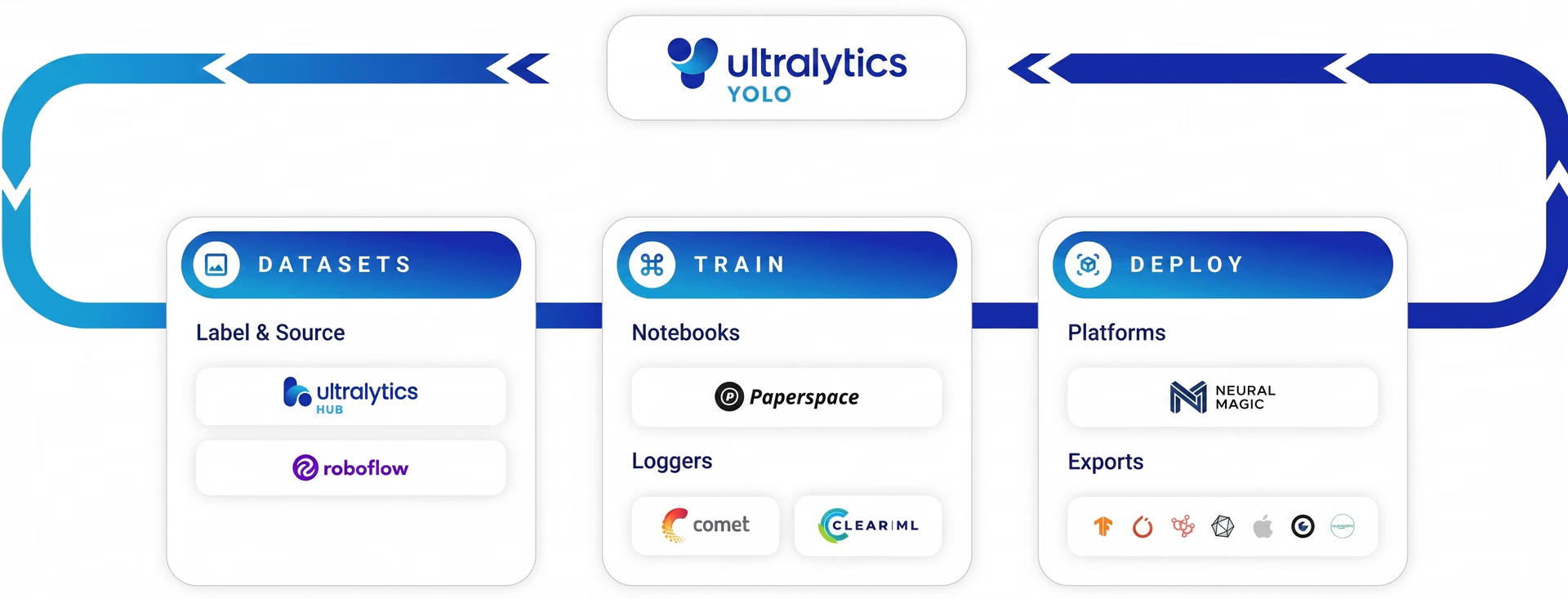
Fig 3. Ultralytics supports different integrations (Source)
In particular, the Ultralytics Python package supports exporting Ultralytics YOLO26 into multiple formats tailored for different hardware platforms. For example, the ONNX export format enables cross-platform compatibility, the TensorRT export format is optimized for NVIDIA GPUs and NVIDIA Jetson edge devices, and the OpenVINO export format is designed for Intel hardware.
Some devices support more than one export format, but performance can vary depending on which one you choose. Instead of selecting a format by default, ask yourself: which option is the most efficient for your device?
One format may deliver faster inference, while another may offer better memory efficiency or easier integration into your existing pipeline. That’s why it’s important to match the export format to your specific hardware and deployment environment.
Taking the time to test different export options on your target device can make a noticeable difference in real-world performance. A well-matched export format helps ensure that Ultralytics YOLO26 runs efficiently, reliably, and at the speed your application requires.
Tip 3: Ask if your model needs quantization#
After selecting an export format, it’s also a good idea to determine whether your model should be quantized.
Model quantization reduces the numerical precision of a model’s weights and computations, typically converting them from 32-bit floating point to lower precision formats such as 16-bit or 8-bit. This helps reduce model size, lower memory usage, and improve inference speed, especially on edge devices or systems powered by a CPU.
Depending on your hardware, export format, and runtime dependencies, quantization can noticeably improve performance. Some runtimes are optimized for lower precision models, allowing them to run faster and more efficiently.
However, quantization can slightly impact accuracy if not applied carefully. When performing post-training quantization, make sure you pass the validation images. These images are used during calibration to help the model adjust to lower precision and maintain stable predictions.
Tip 4: Factor in data drift#
Even the best-trained model can lose performance over time due to data drift. Data drift happens when the data your model sees in production is different from the data it was trained on.
In other words, the real world changes, but your model doesn't. As a result, accuracy can slowly decrease.
For example, you might train your Ultralytics YOLO26 model using images captured during the day. If that same model is later used at night, under different lighting conditions, performance may drop. The same issue can happen with changes in camera angles, weather conditions, backgrounds, or object appearances.
Data drift is common in real-world vision AI systems. Environments are rarely static, and small changes can affect detection accuracy. To reduce the impact of drift, you can make sure your training dataset reflects real-world conditions as closely as possible.
Include images captured at different times of day, under different lighting conditions, and across various environments. After deployment, you can continue monitoring performance and updating or fine-tuning the model when needed.
Tip 5: Benchmark in real-world conditions#
Before fully deploying your model, you can benchmark it in real-world conditions.
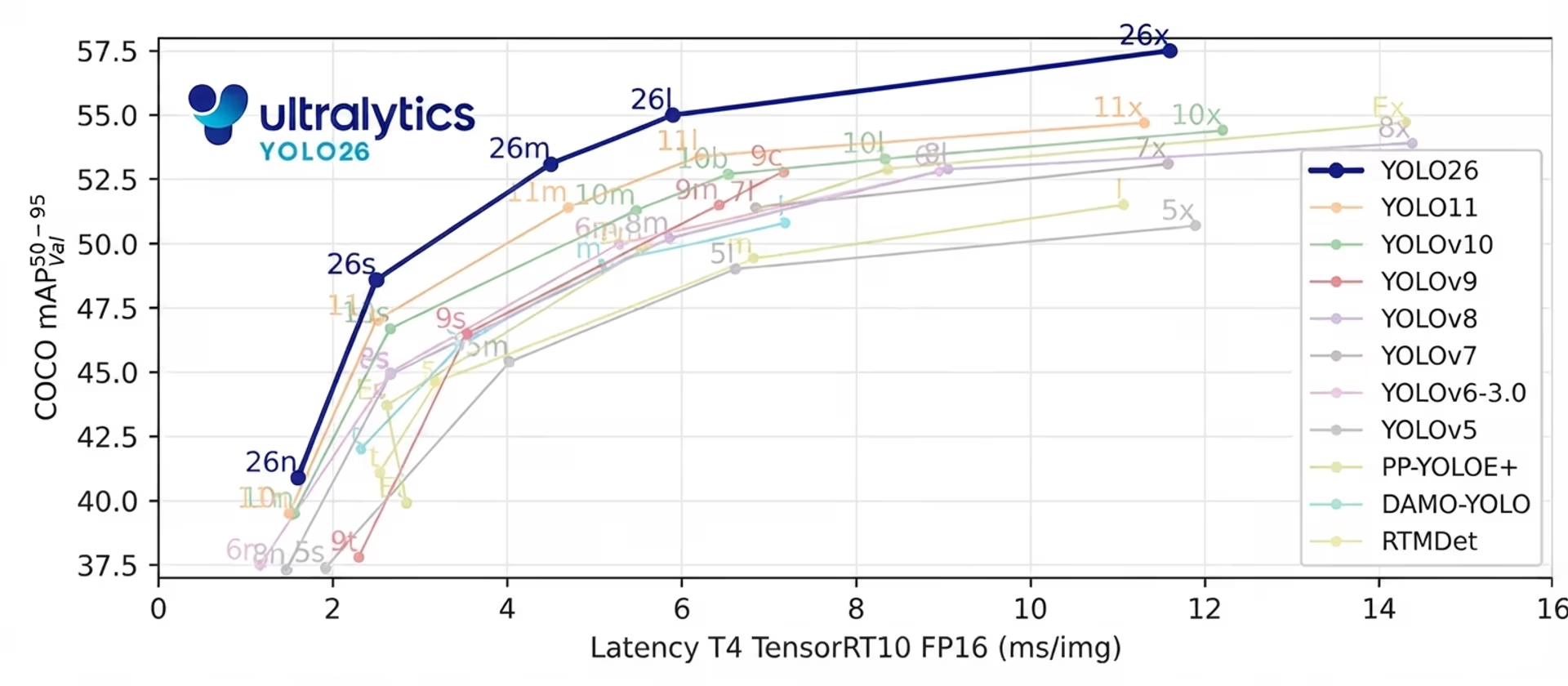
Fig 4. A look at benchmarking YOLO26 against other models (Source)
It’s common to test performance in controlled environments using sample images or small datasets. However, real-world systems often behave differently. Hardware limitations, network delays, multiple video streams, and continuous input can all affect performance.
Benchmarking refers to measuring how your model performs on the actual device and setup where it will run. This includes checking inference speed, overall latency, memory usage, and system stability. It’s important to test not just the model itself, but the entire pipeline, including preprocessing and any post-processing steps.
A model may perform well on a single image test, but struggle when processing live video continuously. Similarly, performance on a powerful development machine may not reflect how the model behaves on a low-power edge device.
By benchmarking under realistic conditions, you can identify bottlenecks early and make adjustments before going live. Testing in the same environment where Ultralytics YOLO26 will operate helps ensure reliable, stable, and consistent performance in production.
Other key model deployment considerations#
Here are some additional factors to keep in mind when deploying Ultralytics YOLO26:
- Monitoring and logging: Set up monitoring tools to track metrics such as latency, accuracy, and system health after deployment.
- Security and privacy: Implement safeguards to protect sensitive visual data, especially when using cloud or remote infrastructure.
- Optimization of pipeline bottlenecks: Evaluate the entire pipeline, including modules like preprocessing, inference, post-processing, and data transfer, since delays can occur outside the model itself.
- Scalability planning: Plan ahead for growth by ensuring your system can handle increased traffic, additional cameras, or expanded workloads.
Key takeaways#
Deploying YOLO26 efficiently starts with understanding where your model will run and what your application truly needs. By choosing the right deployment approach, matching the export format to your hardware, and testing performance in real-world conditions, you can build reliable and responsive vision AI systems. With the right setup, Ultralytics YOLO26 makes it easier to bring fast, production-ready computer vision to the edge and the cloud.
Join our community and explore our GitHub repository. Check out our solutions pages to discover various applications like AI in agriculture and computer vision in healthcare. Discover our licensing options and get started with vision AI today!








