What is image computing? A quick introduction
Learn what image computing is, how it works, and how it is applied in healthcare, autonomous driving, and other modern intelligent systems.

When you walk through a shopping mall or a busy public street, cameras mounted above entrances and walkways record the activity. They generate visual data every second, and most of the time, we don’t even notice it.
This constant stream of data feeds modern AI-powered systems, from smart security systems to self-driving cars. These innovations are driven by image computing, a versatile field that brings together computer science, mathematics, and physics.
Image computing helps machines understand what they see in an image. It allows systems to recognize what is happening in a scene and decide how to function or respond, such as stopping a self-driving car when an obstacle appears.
In this article, we’ll explore what image computing is and how it is used in cutting-edge artificial intelligence (AI) systems. Let’s get started!
Understanding image computing#
Image computing is the process of capturing, processing, and analyzing images using advanced algorithms. It treats images as data that machines can understand and work with.
In other words, every image is processed as a grid of numbers. This is done by converting pixels, the smallest units of an image, into a matrix made up of rows and columns. Each pixel has a numerical value that tells the machine how bright or dark a specific area of the image is.
The way these values are organized depends on whether the image is grayscale or color-based. In grayscale images, pixel values typically range from 0 (black) to 255 (white). In color images, multiple matrices are used to represent different color channels, such as Red, Green, and Blue (RGB) or Hue, Saturation, and Value (HSV).
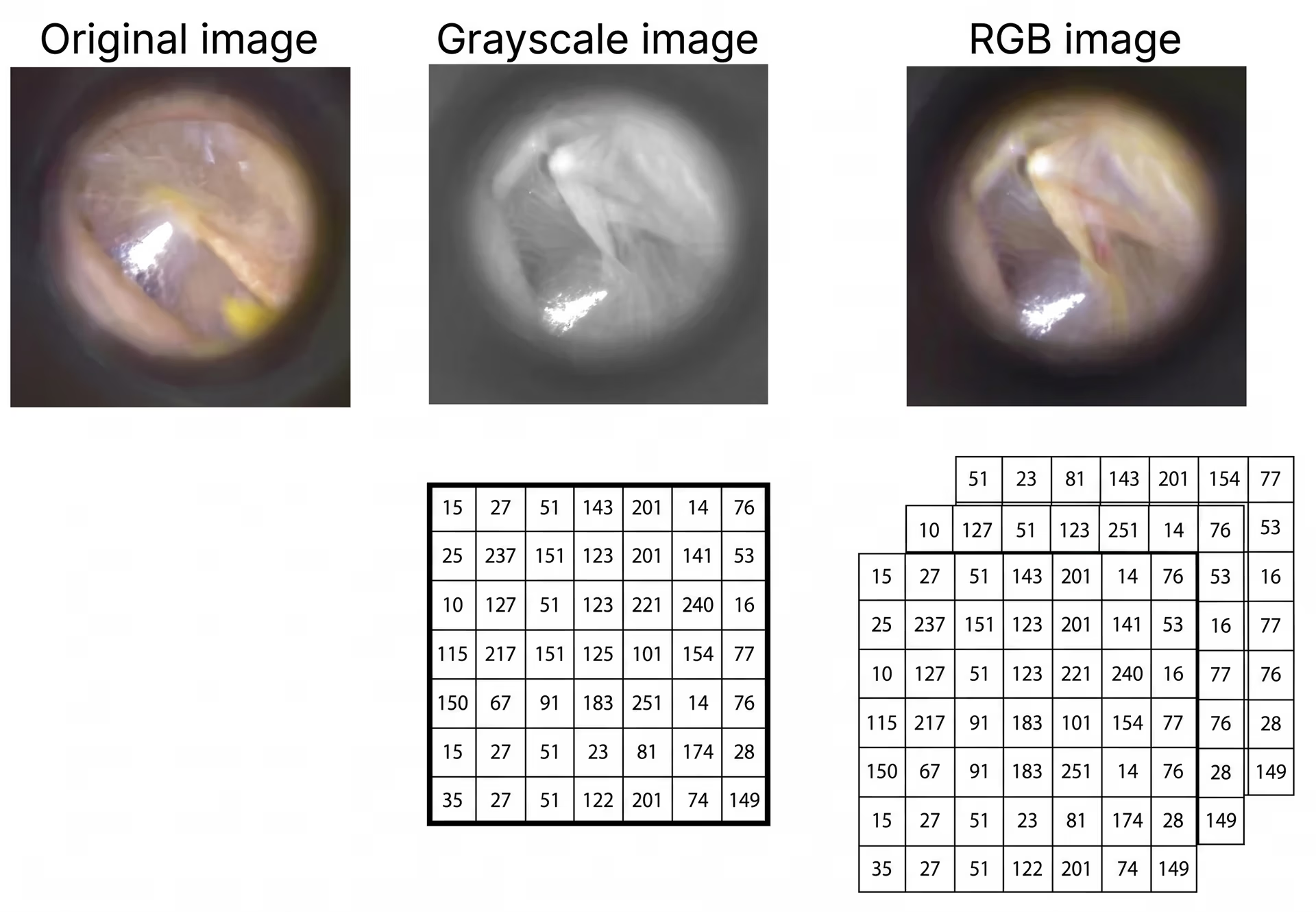
Fig 1. Matrix representations of images (Source)
In addition to pixel matrices, an image often contains hidden contextual information, known as metadata. Metadata provides important details such as image resolution, bit depth, camera or sensor settings, and the exact time the image was captured. Images are stored in specific file formats to preserve both visual data and metadata.
For example, in biomedical image computing, images are commonly stored using the Digital Imaging and Communications in Medicine (DICOM) format. DICOM combines visual image data with patient information, such as identification details and equipment settings, ensuring that medical image analysis is accurate, consistent, and safe.
How image computing works#
Now that we have a better understanding of what image computing is, let’s walk through the steps used to convert a camera feed into useful insights.
Although the exact workflow may vary by application, most image computing systems follow these main stages:
- Image acquisition: First, visual data is captured using cameras and sensors or gathered from open-source image datasets.
- Image preprocessing: Then, the acquired images are resized, denoised, enhanced, and converted to a specific color space to standardize the inputs.
- Feature extraction: Deep learning algorithms are used to learn important patterns in the image, such as edges, shapes, and textures.
- Interpretation: The extracted features are analyzed to perform tasks such as object detection, image segmentation, and object tracking.
- Output: Finally, the system generates structured outputs, such as class labels or bounding boxes, and presents them in a way that is easy for people or other systems to understand and use for visualization.
Image computing vs computer vision vs image processing#
When you come across image computing, you may also see terms such as image processing and computer vision. While these terms are often used interchangeably, they describe different ways AI systems interact with visual data.
For instance, image processing focuses on the enhancement of images or improving the quality of input images using basic operations such as noise removal, resizing, and contrast adjustment. Meanwhile, computer vision, which is a branch of AI, builds on image processing by enabling machines to recognize objects, interpret scenes, and understand what is happening in images or videos.
Image computing combines image processing and computer vision to transform visual data into meaningful and usable outputs for intelligent systems.
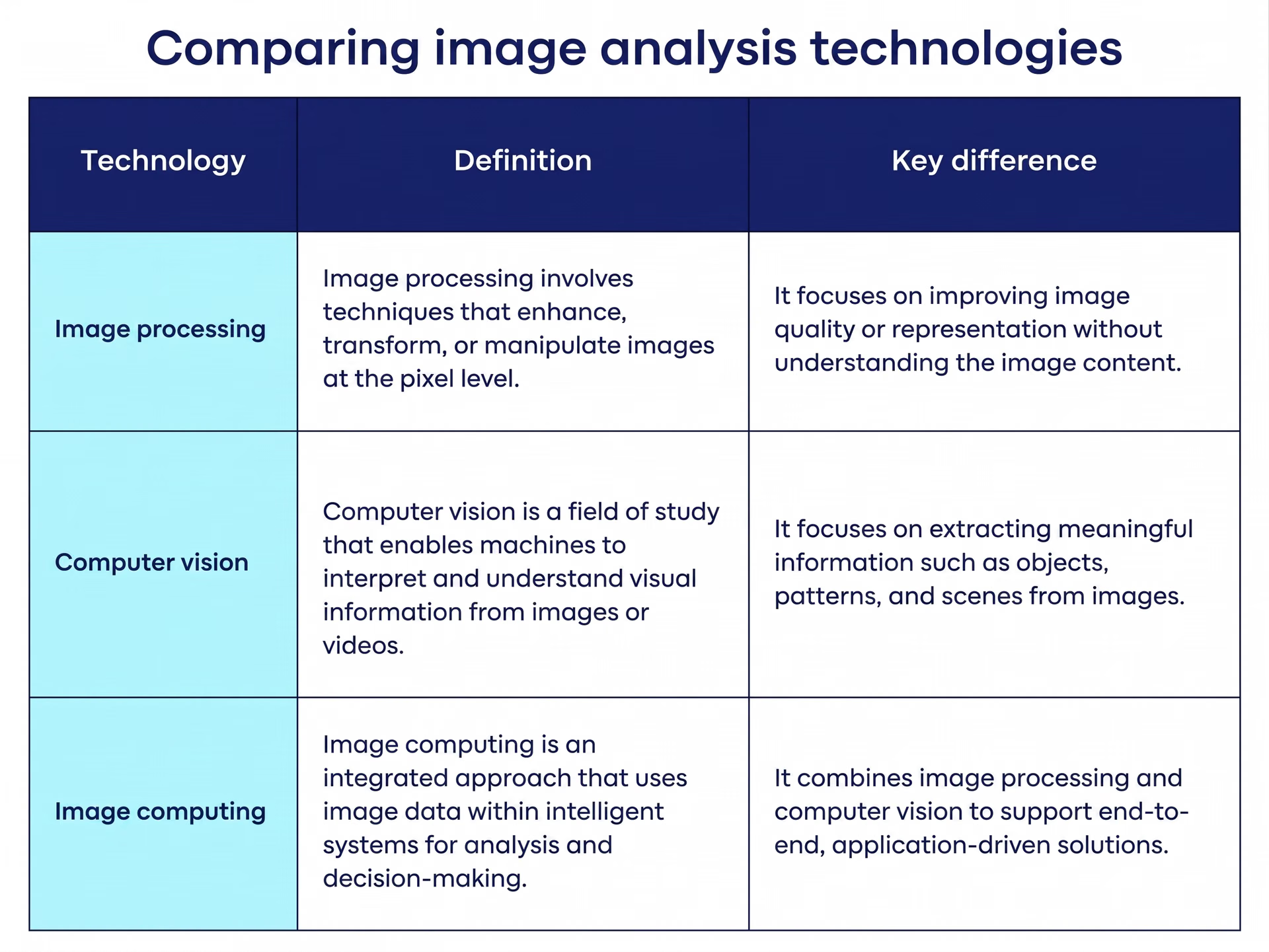
Fig 2. Image processing vs computer vision vs image computing. Image by author.
How image computing is implemented today#
Next, let’s take a look at how image computing is implemented today.
In the early stages of image computing, features such as edges, corners, and textures were manually defined using rule-based and handcrafted algorithms. While these methodologies worked reasonably well in controlled environments, they struggled to scale and adapt to complex, real-world conditions.
Modern image computing systems address these limitations by using deep learning–based approaches. Models such as convolutional neural networks (CNNs) and vision transformers automatically learn relevant features from large image datasets. This allows them to perform tasks like object detection, instance segmentation, and object tracking with greater accuracy and robustness.
Today, image computing workflows often rely on real-time vision models designed for deployment in cutting-edge AI systems. For example, vision AI models such as Ultralytics YOLO26 enable fast and efficient computer vision capabilities like object detection and instance segmentation across both edge devices and cloud environments.
Fig 3. An example of using Ultralytics YOLO26 to detect and segment objects in an image
Real-world applications of image computing#
Image computing is being widely used in real-world applications to understand and act on visual data. Let’s explore how image computing is applied across different domains.
Medical image computing for early disease detection#
Image computing can help doctors and clinicians spot diseases earlier and analyze medical scans more efficiently. These innovative healthcare systems can quickly process medical imaging data such as X-rays and magnetic resonance imaging (MRI) scans and often provide more consistent results than manual review.
For instance, models like Ultralytics YOLO26 can be trained on large sets of chest X-ray images to learn patterns linked to infections and abnormalities. Once trained, these models can help identify whether a scan appears normal or shows signs of conditions such as pneumonia or COVID-19.
Image computing for autonomous driving#
Autonomous vehicles use image computing to understand what is happening around them and make driving decisions. The technology turns raw camera footage into real-time information that helps the vehicle move safely and smoothly.
Image computing is commonly used in advanced driver assistance systems (ADAS). Instead of just recording video, these modules analyze each frame to spot lane markings, other vehicles, pedestrians, and obstacles. This makes it possible for the car to react to changing road conditions with little human involvement.
Another common use case is combining images from multiple cameras to create a 360-degree view of the vehicle’s surroundings. Image computing helps correct lens distortion, improve image clarity, and balance brightness and color across all camera feeds. The result is a clear, seamless view that lets the vehicle navigate safely, even in poor weather or low-light conditions.
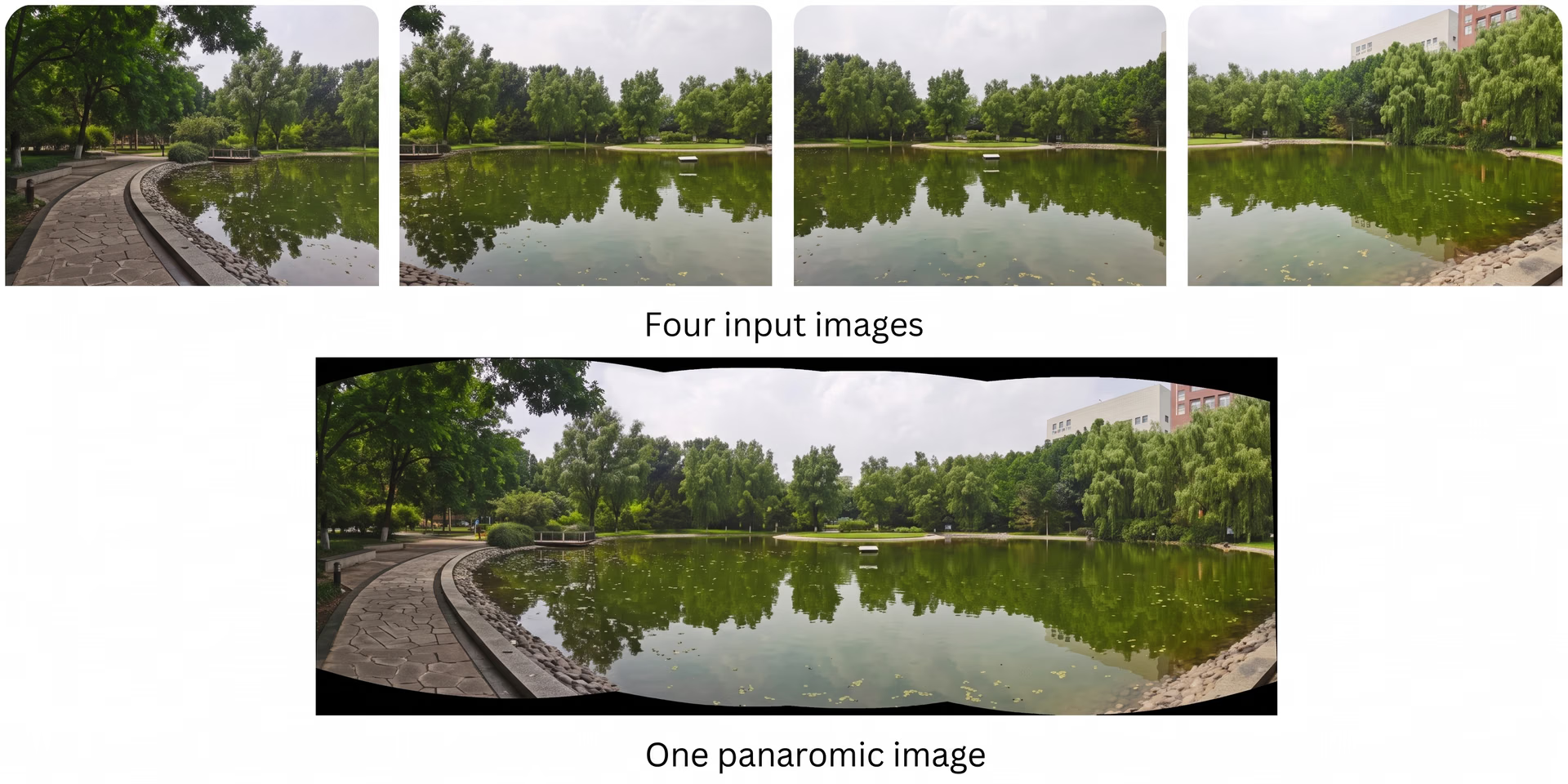
Fig 4. Image stitching using deep learning (Source)
Pros and cons of image computing#
Here are some of the advantages of image computing:
- Scalability: Once trained, image computing systems can analyze large volumes of visual data continuously and at scale.
- Decision-making: It supports time-critical applications such as autonomous driving, medical screening, and industrial monitoring.
- Cost efficiency over time: Although initial setup can be expensive, automated visual analysis can reduce long-term operational costs.
While there are many benefits related to image computing, there are also some limitations. Here are some factors to consider:
- Data quality: Image computing methods depend heavily on accurate labeling and high-quality datasets, which can be costly and time-consuming to create.
- Sensitivity to conditions: Changes in lighting, occlusion, motion blur, weather, or camera angles can negatively impact model performance.
- Limited explainability: Deep learning-based image models can act as black boxes, making it difficult to explain how decisions are made.
Key takeaways#
Image computing has evolved from basic image processing into a technology that allows AI systems to perceive and understand the real world in real time. As deep learning continues to advance, image computing is becoming an essential part of building smarter, more practical toolkits and applications.
Join our community and check out our GitHub repository to learn about AI. Explore our solutions pages to read about applications of AI in agriculture and computer vision in logistics. Discover our licensing options and start building vision AI models.








