What is template matching? A quick guide
Explore the image processing technique referred to as template matching, how it works, and its significance in the history of computer vision

Images often hold many minute details that humans can easily spot. However, for machines, this task isn’t so straightforward. Machines perceive a digital image as a grid of pixel values, and even slight changes in lighting, angle, scale, or sharpness can be confusing.
A machine’s image analysis capabilities generally come from two closely related computer science fields: image processing and computer vision. While they often work together, they have different core purposes.
Image processing focuses on images as raw data. It can enhance images, but it doesn’t attempt to understand their contents. That’s where computer vision makes a difference. Computer vision is a branch of artificial intelligence (AI) that allows machines to understand images and videos.
Basic image processing has been around for many years, but cutting-edge computer vision innovations are much more recent. A great way to understand the history of the field is to look back at how we used to solve these problems using older, more traditional methods.
Take image matching, for example. It’s a common vision task where a system has to find out if a specific object or pattern exists inside a larger image.
Nowadays, this can be done easily and accurately using AI and deep learning. However, before the rise of modern neural networks in the 2010s, the go-to method was a much simpler technique called template matching.
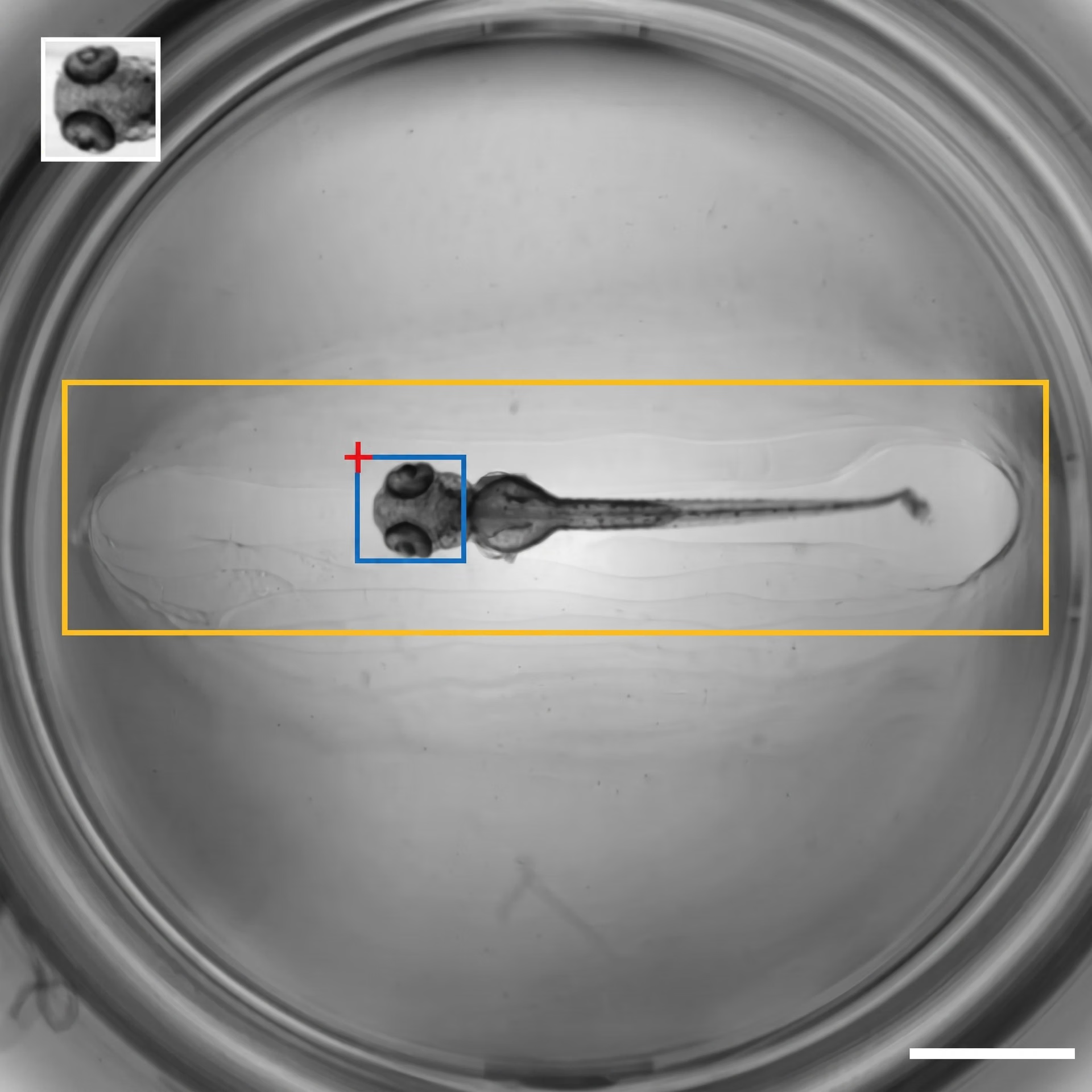
Fig 1. An example of template matching (Source)
Template matching is an image processing technique where a small template image is slid across a larger image pixel by pixel. This convolution-like sliding process allows the algorithm to find the location that most closely matches that specific pattern.
In this article, we’ll explore what template matching is and how modern improvements make it more reliable in real-world situations. Let’s get started!
What is template matching?#
Template matching can also be referred to as a classical computer vision technique, meaning it works directly with image pixels (the smallest unit of a digital image). It is used to find a smaller pattern inside a larger image.
Methods like this are defined using geometry, optics, and mathematical rules rather than training large models on massive datasets. In other words, a template matching system compares the brightness, color, and other pixel information across two inputs: the input image (the larger image) and a smaller template image (the pattern to find).
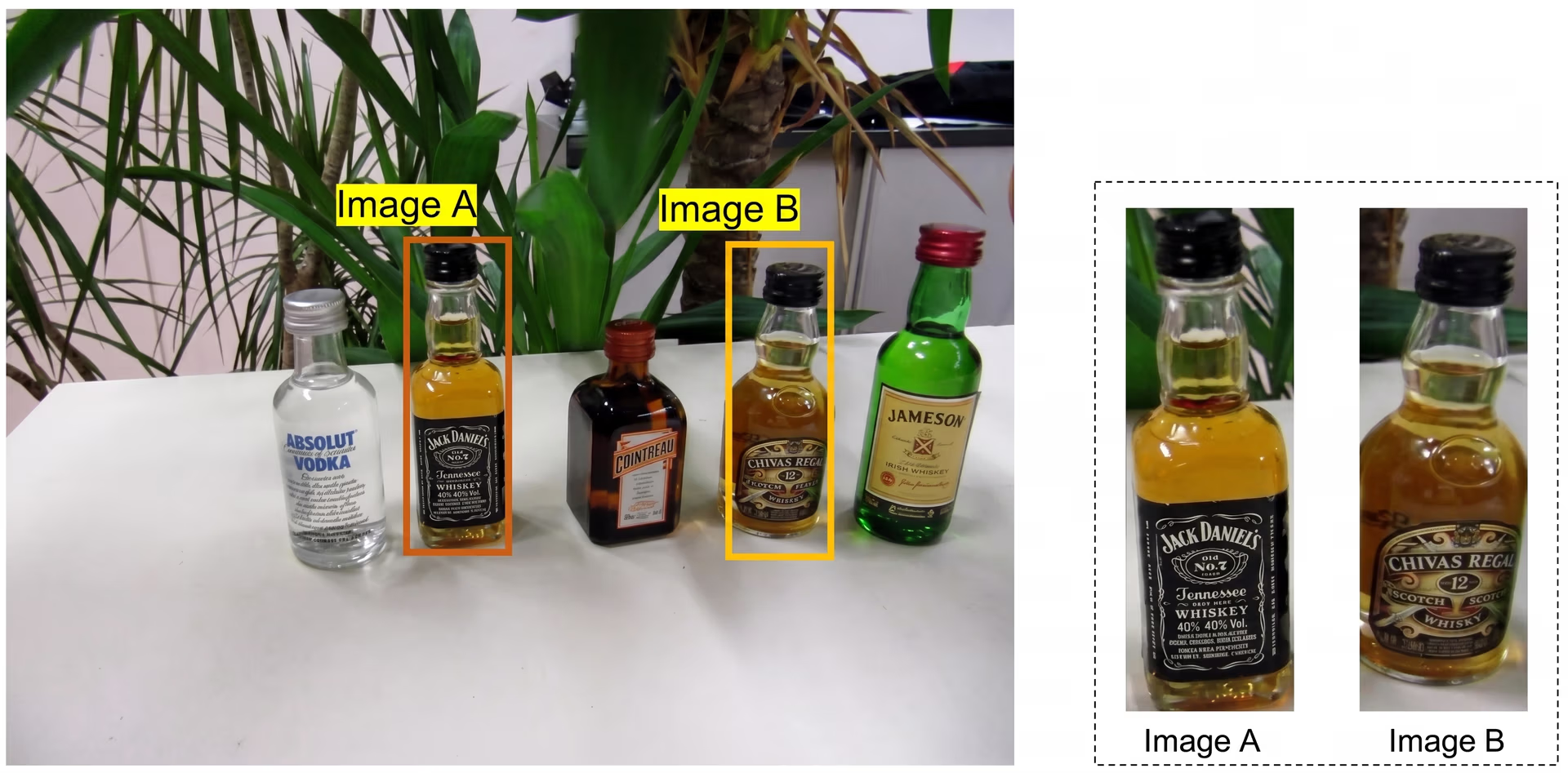
Fig 2. Image A and Image B are examples of templates. (Source)
The main goal of template matching is to locate where the template appears in the larger scene and measure how closely it matches with different regions of the image. The template matching algorithm does this by sliding the template across the larger image and calculating a similarity score at every position.
Regions with higher scores are considered the best match, meaning they closely resemble the template. Since this method relies on pixel-by-pixel comparisons, it works best in controlled environments, where the appearance of objects doesn’t change.
For instance, template matching can be used in label verification tasks in quality control. It can easily match the template image of labels with images of the finished product to check if the labels are present or not.
How template matching works#
Here’s a step-by-step overview of how template matching works:
-
Step 1 - Preparing the images: The process begins by loading the input image and template image, then converting both into a grayscale image. Since template matching relies on comparing pixel values, removing color information reduces noise and speeds up image processing.
-
Step 2 - Sliding the template across the image: Next, the template matching algorithm slides the template across the larger image one pixel at a time (starting from the top-left corner). Each step in this movement is an iteration, where the algorithm extracts an image patch from the source image that matches the template’s size.
-
Step 3 - Measuring how good the match is: Each image patch is compared with the template using a mathematical matching method to generate a correlation metric or correlation value for every possible position. Common approaches include squared differences (which measure the numerical distance between pixel intensities to calculate total mismatch), normalized cross-correlation (it multiplies pixel values to determine how well patterns of light and dark align), and the correlation coefficient (it subtracts average brightness to ensure the match remains accurate even if lighting changes a little).
-
Step 4 - Identifying the best match: After evaluating all positions, the algorithm selects the best match by finding the maximum value or minimum value, depending on the method used. A threshold is often applied to these results to ensure that only matches with a high enough confidence score are accepted, filtering out weak or incorrect detections.
-
Step 5 - Highlighting the result: Finally, the detected location is mapped back onto the original image. Typically, a bounding box is drawn around the matched region, clearly showing where the template appears.
Getting hands-on with template matching#
While image processing-based template matching isn't generally used in dynamic real-world computer vision solution deployments because of the drawbacks it comes with, if you are interested in testing it out, Python libraries like OpenCV make this process straightforward and also offer easy-to-follow tutorials. It features a built-in matchTemplate function that handles the complex mathematical comparisons.
Also, it supports other functions that help with simple tasks like loading images using the imread function and converting color using the cvtColor function to transform images into grayscale. Color conversion is a critical step because reducing an image to a single intensity channel makes the mathematical comparison within matchTemplate much faster and less sensitive to color noise.
Once you have generated the similarity map, OpenCV also includes a minMaxLoc function to finalize the detection. It can be used to scan the entire map to identify the global minimum and maximum values along with their exact coordinates. Depending on the matching method used, minMaxLoc lets you instantly pinpoint the location of the best match by finding the highest correlation or the lowest error value in the data.
In addition to OpenCV, libraries like NumPy are essential for handling the image arrays and applying a threshold to the results, while Matplotlib is commonly used to visualize the similarity map and final detection. Together, these tools provide a complete environment for building and debugging a template-matching solution.
Real-world applications of template matching#
Now that we have a better understanding of how template matching works, let’s take a closer look at its application in real-world scenarios.
Identifying traditional architectural styles#
In cultural heritage and architectural studies, researchers have to analyze photographs of historic buildings, temples, and monuments to understand how design patterns vary across regions. Before advanced computer vision models became widely adopted, they used image-matching techniques to study such structures.
Template matching allows researchers to focus on specific architectural cues such as roof outlines, window arrangements, or wall motifs. By sliding templates or reference images across larger images, they can identify recurring shapes and reduce manual image analysis, which can take hours.
An interesting example comes from a study related to Indonesian traditional houses. Researchers created small templates of characteristic features and compared them with full-scale photographs. This approach was used to highlight image regions that closely matched the template and classify architectural styles across regions.
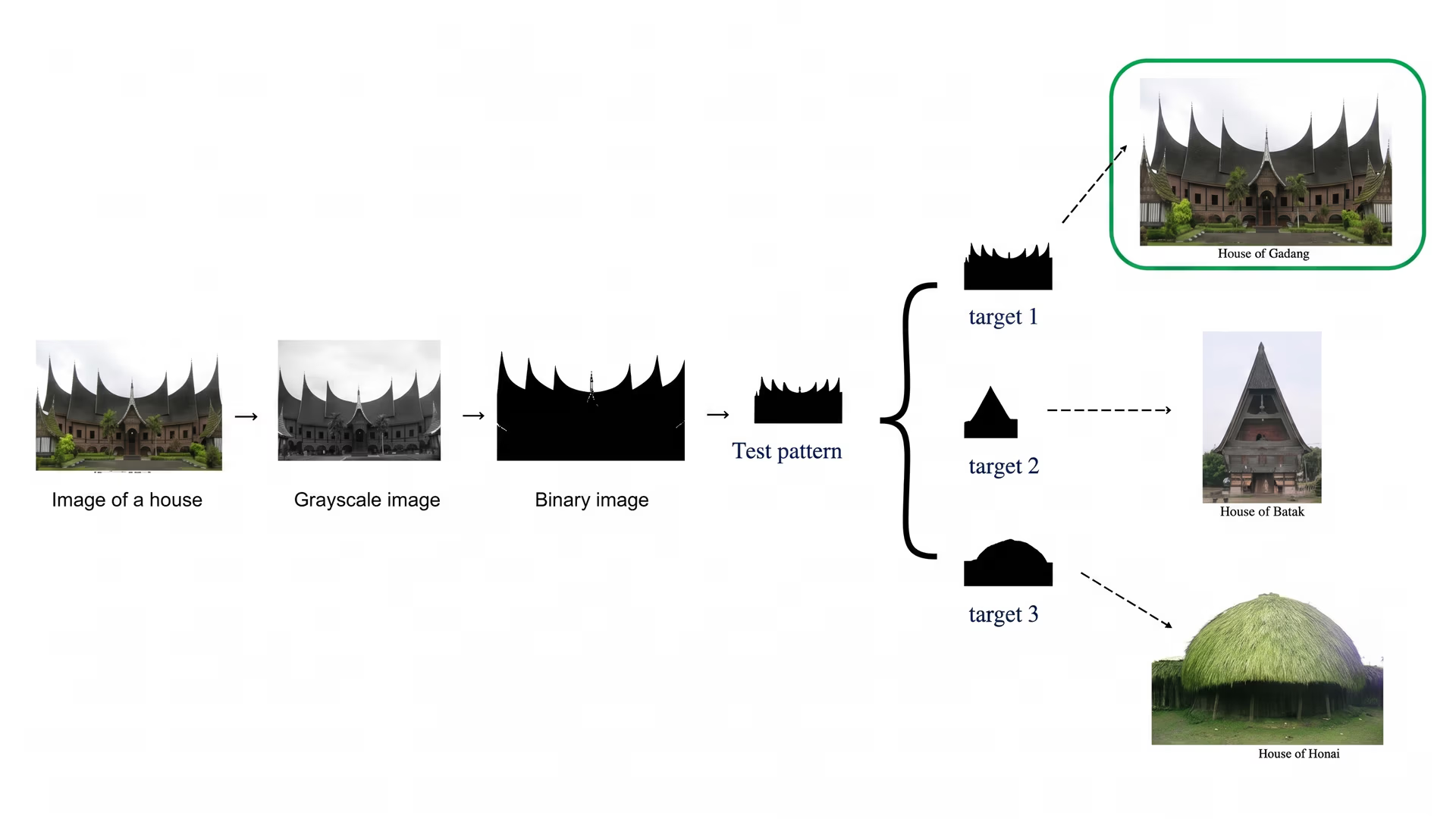
Fig 3. Using template matching to classify traditional houses in Indonesia (Source)
Object detection in industrial vision systems#
Industrial environments can benefit from vision systems that can quickly detect components, verify assemblies, or spot defects. Before deep learning became widespread in manufacturing, many teams experimented with image-matching methods to automate these tasks.
Simply put, a component reference template can be used to scan images from a production line and highlight regions that match the template. This works well when parts appear in consistent positions, and lighting is stable.
Template matching for lung tumour detection#
Even with cutting-edge technology making an impact in healthcare, diagnosing health issues from medical imaging like CT scans is still challenging. Traditionally, radiologists had to manually review every scan slice, a process that demands extreme precision and significant time.
Before deep learning was applied in healthcare, researchers attempted to use template matching to streamline the workflow and assist in identifying abnormalities. A good example of this technique is related to the detection of lung tumors or nodules.
In this method, researchers create reference templates representing the typical shape and intensity of a tumor. The system then slides these templates across patient scans, measuring similarity at every coordinate.
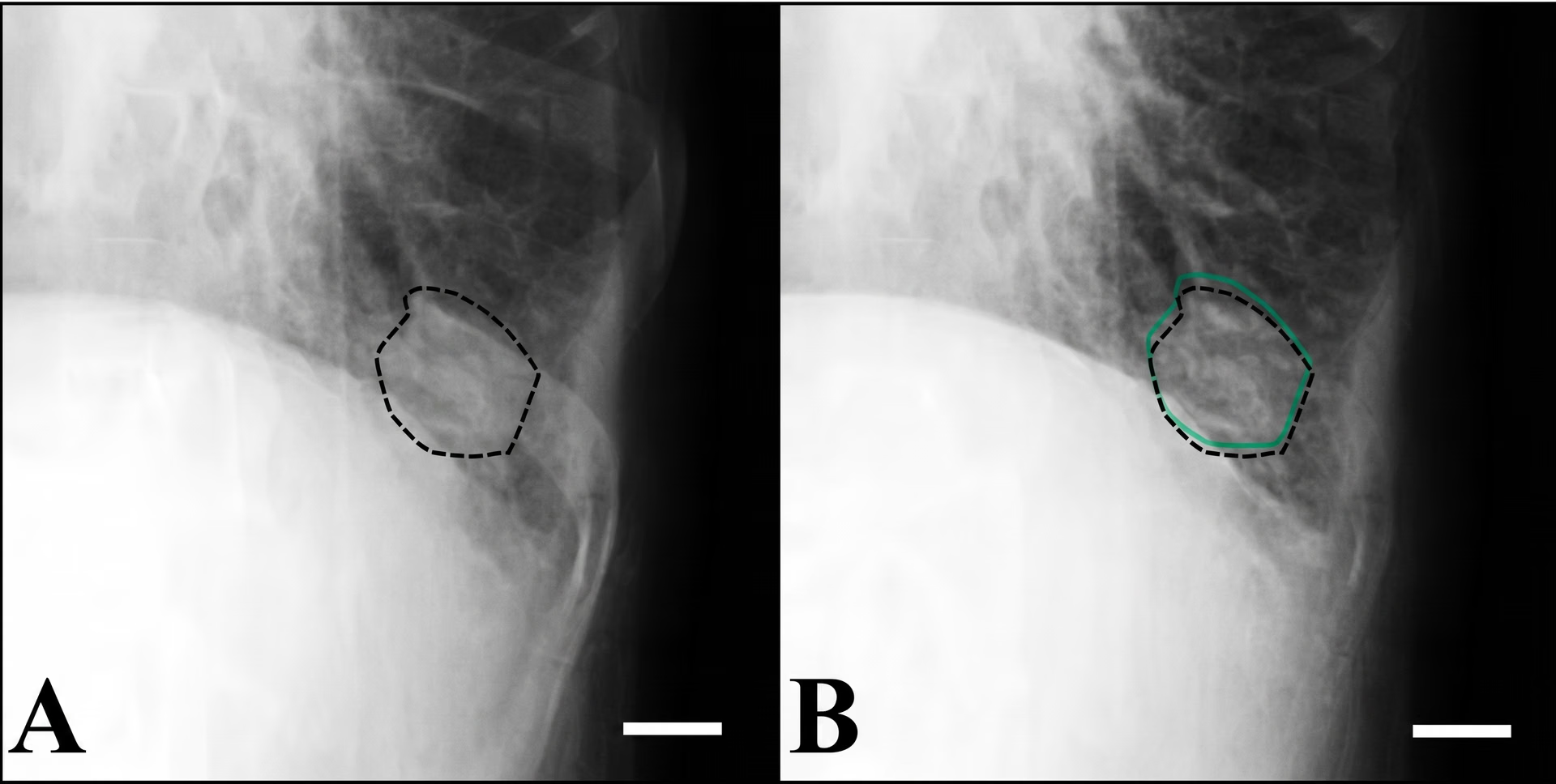
Fig 4. Lung tumour detection using template matching (Source)
Pros and cons of template matching#
Here are some key benefits of using template matching:
- Intuitive and straightforward: Template matching is easy to understand and implement, making it an ideal starting point for beginners in AI and computer vision.
- Reliable under controlled conditions: It performs well on grayscale images under consistent lighting, yielding accurate results when patterns and backgrounds are stable.
- Easy integration: Using Python libraries like OpenCV, template matching can be applied quickly to real projects without complex setup or heavy computation.
While template matching offers many benefits, it also has limitations. Here are a few challenges to keep in mind:
- Sensitive to scale and rotation: Variation in the template's size or orientation can reduce accuracy.
- Lighting and contrast dependency: Changes in lighting or contrast between the template and the image can cause incorrect matches or make the template harder to detect.
- Limited adaptability: Unlike AI-based methods, template matching can’t learn from data or improve over time. It works best in controlled or repetitive settings.
Key takeaways#
Computer vision is a vast field and covers various techniques. Learning about traditional image processing techniques, such as template matching, is a great starting point for understanding how image analysis works. Cutting-edge vision AI innovations build on the same core concepts and solve similar problems.
Want to explore more about AI? Join our community and check out our GitHub repository. Learn how AI in retail and vision AI in manufacturing are driving change. Explore our licensing options to build with vision AI today!








