Streamlining image annotation with the Ultralytics Platform
Learn all you need to know about image annotation with Ultralytics Platform, and its built-in tools for labeling datasets, managing annotations, and preparing data for models.
Ultralytics recently introduced Ultralytics Platform, an environment built to support the full lifecycle of computer vision development. The platform centralizes tools used to manage the various stages of vision AI workflows, including dataset preparation, image and video annotation, model training, and deployment.
Despite growing adoption across industries like autonomous driving and healthcare, building computer vision solutions can still be seen as a fragmented process. One of the main reasons is that computer vision models depend heavily on the quality of the data they are trained on. Before training even begins, datasets need to be created, organized, reviewed, and labeled so the model can learn what to detect or recognize.
When working with visual data, this process is known as data annotation, or image annotation. During image annotation, specific parts of an image are marked and assigned labels that guide the model during training.
For example, if the goal is to detect dogs in images, annotators might draw bounding boxes around each dog to show where they appear. In more detailed tasks, they may outline the shape of the dog using segmentation masks or mark keypoints to capture its posture. These labeled examples directly influence how well the model performs once deployed.
Managing image annotation workflows at scale can be challenging. Large datasets often require consistent labeling standards, collaboration between multiple annotators, and tools that make reviewing and refining annotations easier.
Ultralytics Platform brings this together with a built-in annotation editor. It supports multiple annotation task types and gives teams a simpler way to label data and prepare computer vision datasets within a single workflow.
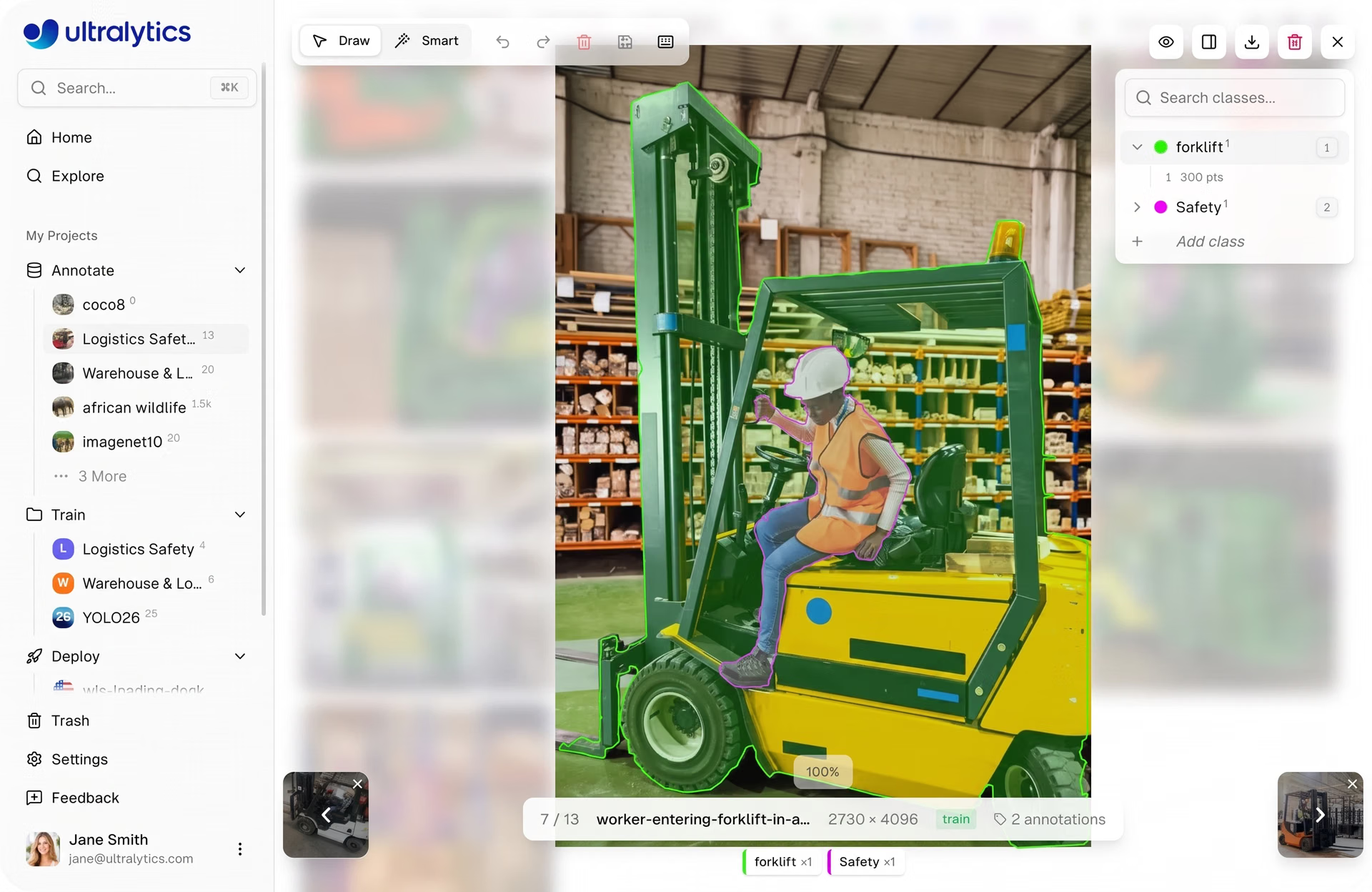
Fig 1. A look at the annotation editor in Ultralytics Platform (Source)
In this article, we’ll explore how Ultralytics Platform’s annotation editor helps teams annotate datasets efficiently and streamlines data preparation. Let’s get started!
Data annotation in computer vision#
Before exploring the image annotation tools available on Ultralytics Platform, let’s take a step back to understand what data annotation is and why it's important in building computer vision systems.
Computer vision models learn by analyzing large collections of images or videos known as datasets. However, raw images alone don’t provide enough information for a model to understand what it should detect or recognize. To make the data useful for training, images have to be labeled through data labeling so the model can learn what objects, shapes, or patterns to look for.
During image annotation, specific elements within an image are marked and assigned labels that describe what the model should learn. These labeled examples guide deep learning models and algorithms during training and help them recognize similar patterns when processing new images.
Different computer vision tasks require different types of image annotation depending on the application and use case. For example, annotators may draw bounding boxes around objects for object detection, outline regions in an image for semantic segmentation, define keypoints for pose estimation, or assign labels to an entire image for classification.
Managing and preparing data#
Preparing data for computer vision projects often involves working with various file formats and organizing datasets. It also includes ensuring everything is ready for annotation and training of machine learning algorithms. In many workflows, this process is spread across multiple tools, with data being uploaded, cleaned, and moved between systems before it can be used.
Ultralytics Platform simplifies this by handling data preparation, model training, and deployment within a single environment. Teams can upload images, videos, or dataset archives, and benefit from a fully customizable approach to preparing their data with manual or AI-automated annotations. Ultralytics Platform supports both raw data and standard formats like YOLO and COCO, making it easy to start new projects. It also provides access to existing datasets on the platform, including annotated datasets that teams can use to quickly start new projects or experiments.
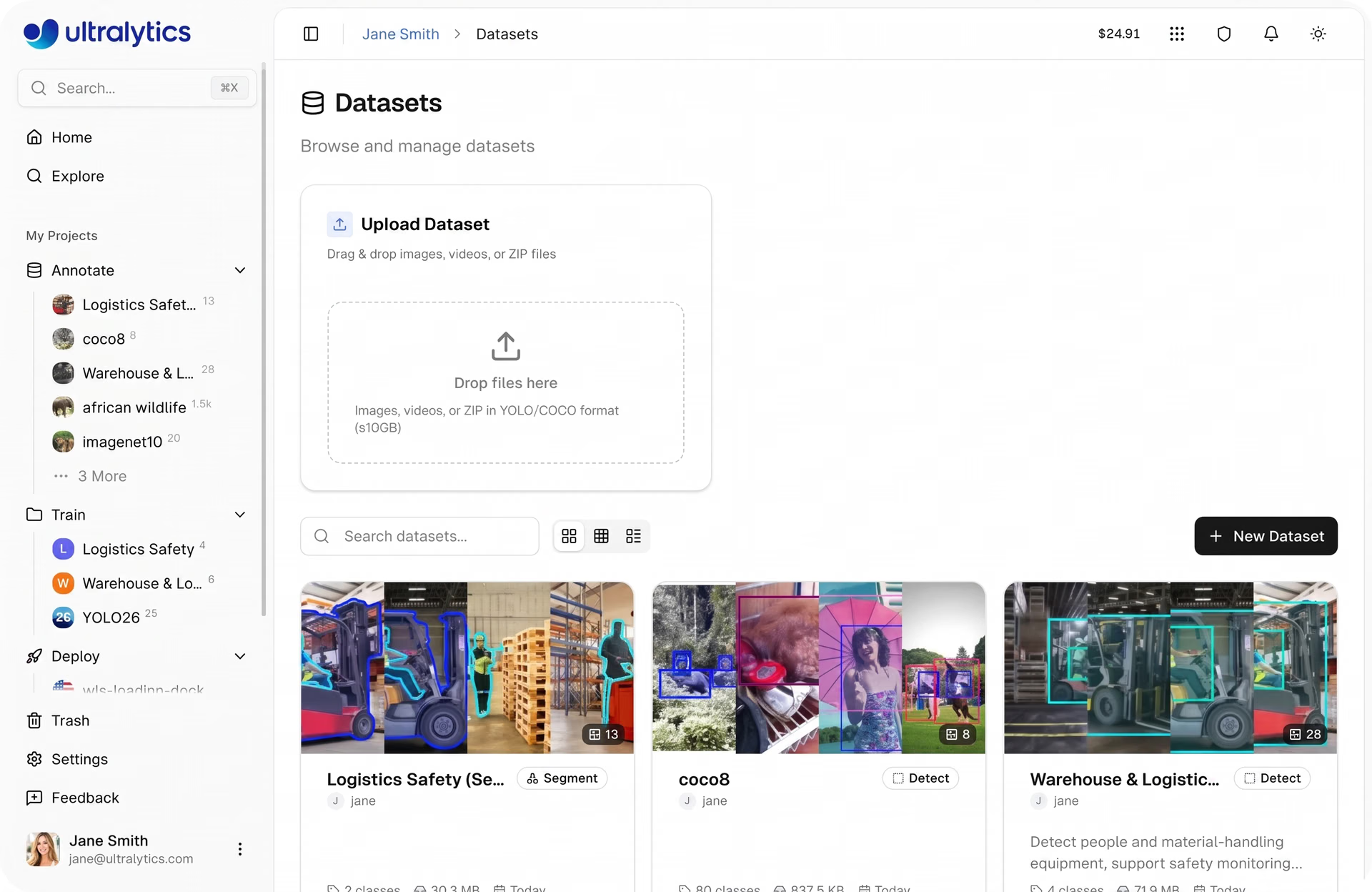
Fig 2. Upload and manage datasets in a single environment on the Ultralytics Platform. (Source)
Once the data is available, it can be managed directly on the platform. Developers can review images, monitor annotation progress, and use built-in visualizations to understand dataset distribution and identify potential gaps.
The platform also supports dataset versioning, helping teams to capture snapshots of their data as it evolves. This makes it easier to track changes, compare experiments, and maintain consistency during training.
With the data prepared, teams can move on to annotate images, where they are labeled to help models learn what to detect.
Annotating datasets on Ultralytics Platform#
Once the data is uploaded, the next step is annotation. This is where image data is labeled, laying the foundations to then train computer vision models. Ultralytics Platform includes built-in image annotation services through an annotation editor that enables teams to label and manage datasets directly within the same environment.
The annotation editor unfolds in a simple workspace where users can review images, add labels, and update annotations as needed. Everything is organized in one place, making it easier to keep datasets consistent and ready for data training.
Teams can upload datasets and start labeling images directly in the browser, defining and managing annotation classes to ensure labels stay consistent across the dataset. As annotations are created, users can review them visually in the editor, making it easier to check accuracy before moving on to model training.
Image annotation tools in Ultralytics Platform#
Ultralytics Platform also includes several capabilities that support efficient dataset labeling workflows, simplifying the annotation process using advanced algorithms.
Here are some of the key features available in Ultralytics Platform:
- Manual annotation: This approach allows users to have full control and flexibility when creating image annotations, such as bounding boxes, segmentation regions, or keypoints, directly on images.
- AI-assisted labeling: This feature automatically generates suggested annotations, reducing the need for manual labeling. It uses SAM (Segment Anything Model) to detect objects or regions in just one click, streamlining the annotation process, helping users review and confirm the suggestions before adding them to the dataset.
- Annotation editing: At any point, users can modify or refine the image annotations after they are created. This helps correct labeling mistakes and maintain consistent dataset labels throughout the annotation process.
- Class management: Teams and solo developers can define and organize annotation classes used during dataset labeling. This helps keep labels consistent across images, which is important for training models that can accurately recognize and differentiate between classes.
By combining manual tools, artificial intelligence, and automation, Ultralytics Platform helps users annotate images more efficiently. It also enables the preparation of high-quality training data for scalable computer vision models.
Supported annotation task types#
Different use cases such as product quality assurance will require different types of annotation depending on what needs to be detected within the images or videos. As we have touched on above, Ultralytics Platform supports five object detection tasks, each with its own type of annotation.
Let’s take a closer look at the annotation tasks supported on the platform and how they can be used to label datasets.
Object detection#
Object detection identifies and localizes objects within an image. Annotators mark each object of interest using bounding boxes, indicating where items appear in the image.
In the annotation editor, this is done using the bounding box tool. Users can enter “edit mode”, click and drag to draw a rectangle around an object, and assign a class label from a dropdown menu.
Bounding boxes can be adjusted after they are created. Annotators can resize them by dragging the corner or edge handles, move them by dragging the center of the box, or delete them using keyboard shortcuts. These annotations help vision models learn to detect objects across different scenes and conditions.
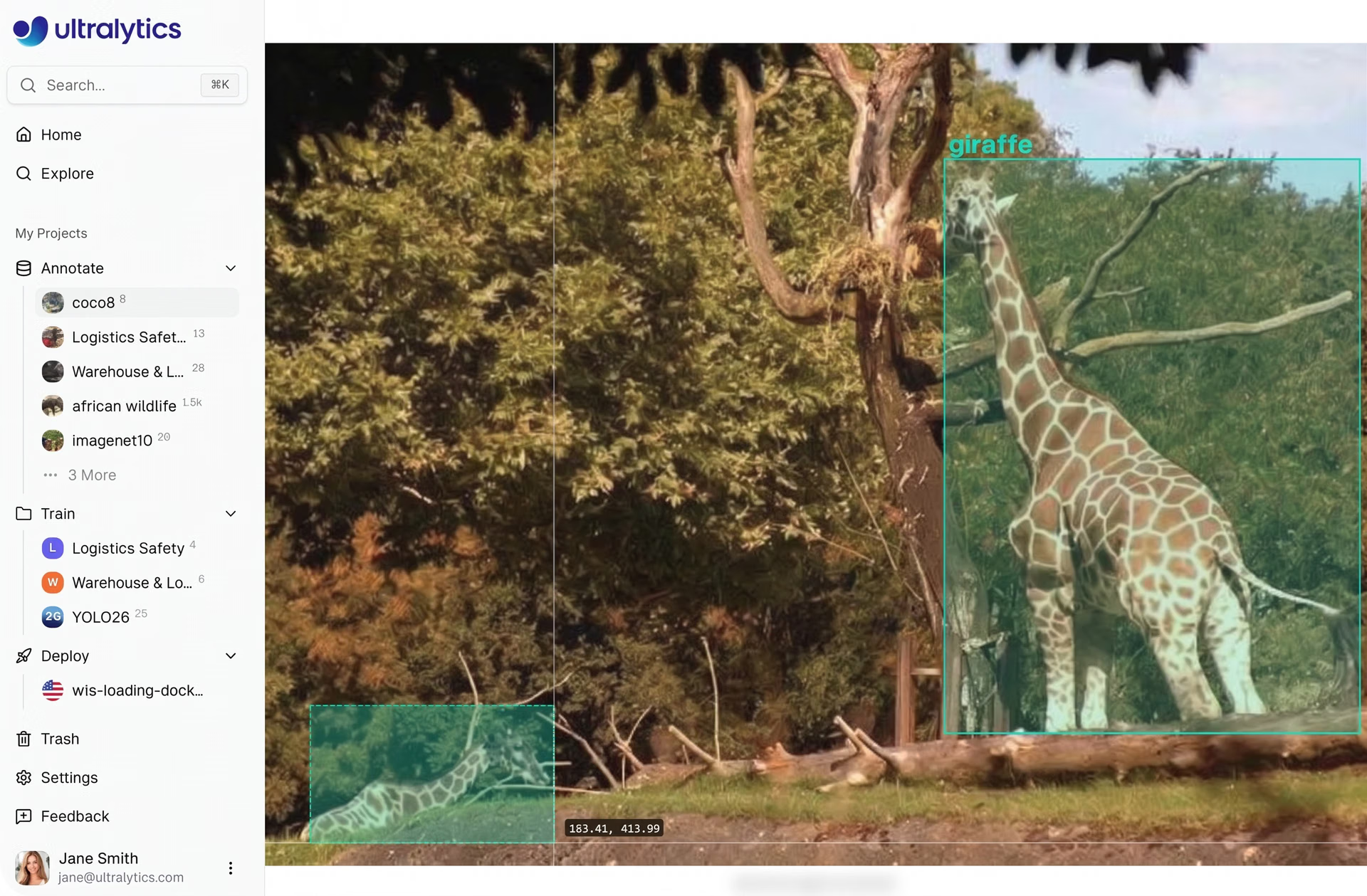
Fig 3. Object detection annotation using bounding boxes in the Ultralytics Platform. (Source)
Instance segmentation#
Instance segmentation provides more detailed annotations by defining the exact shape of objects within an image. Instead of drawing a simple box, annotators trace the object’s boundaries using polygon annotation to create precise masks for image segmentation tasks.
The annotation editor includes a polygon tool for this task. Annotators place multiple vertices around the edges of an object to outline its shape. Once the vertices are placed, the polygon can be closed to create a segmentation mask.
Vertices can be adjusted after the polygon is created. Individual points can be moved to refine object boundaries, and vertices can be removed if needed. These pixel-level annotations help models learn detailed visual structures and distinguish between objects that appear close together.
Pose estimation#
Pose estimation annotations capture the positions of body joints and relationships between them. This helps models to understand the structure and movement of people or animals in an image.
Using the keypoint tool, annotators place keypoints that represent body joints such as shoulders, elbows, wrists, hips, knees, and ankles. The platform supports several built-in skeleton templates, including the 17-point COCO human pose format as well as templates for hands, faces, dogs, and box corners.
Templates make it possible to place a full skeleton layout with a single click, after which individual keypoints can be adjusted to match the pose in the image. Each keypoint can also include a visibility flag to indicate whether it is visible or occluded.
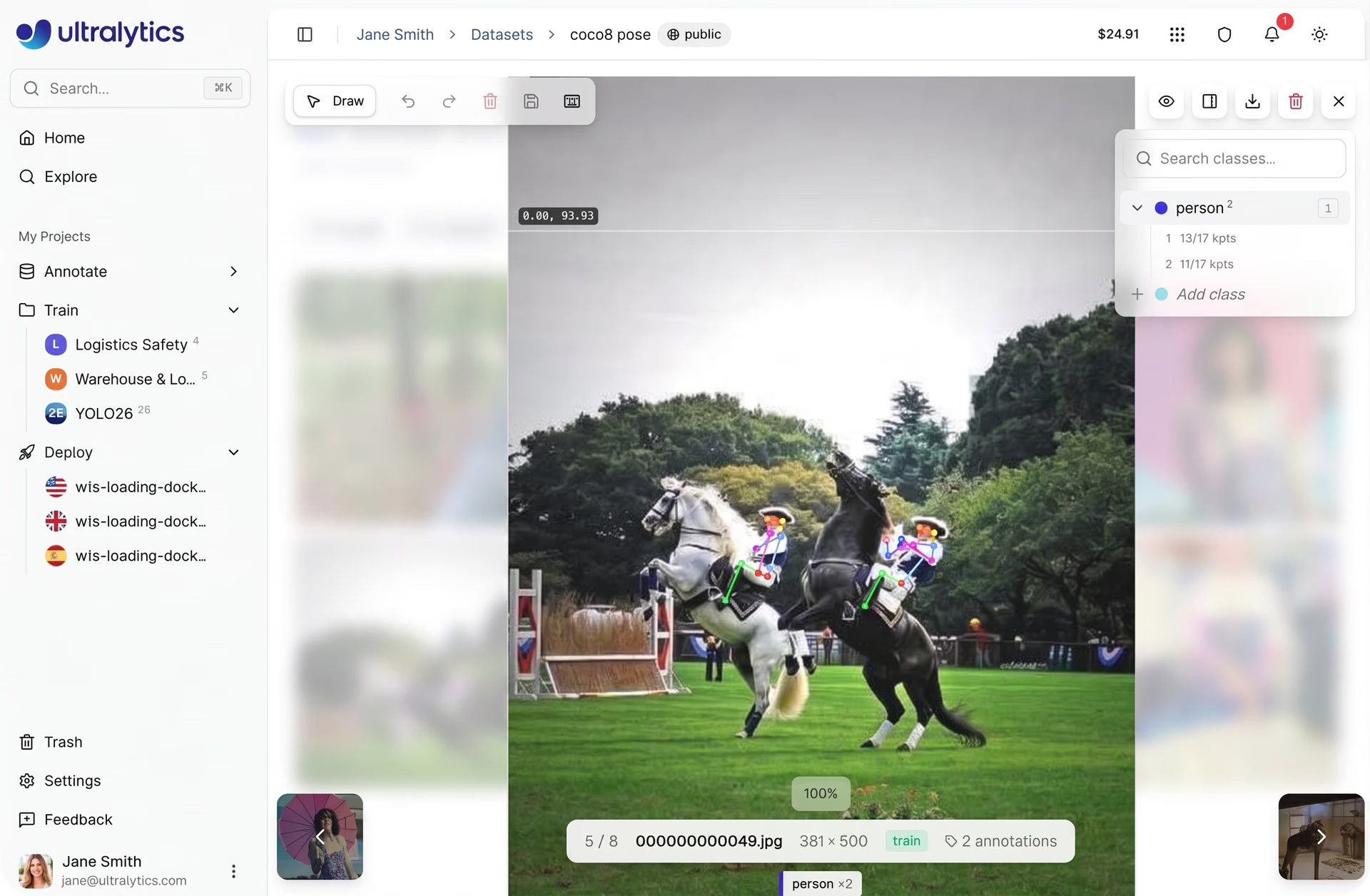
Fig 4. Pose estimation annotation using keypoints and skeleton templates. (Source)
Oriented bounding boxes (OBB)#
Oriented bounding boxes take traditional bounding boxes a step further by supporting rotation. This type of annotation is useful when objects appear at angles rather than being aligned with the image frame.
In the annotation editor, annotators can use the oriented bounding box tool to draw rotated rectangles around objects. After drawing the initial box, a rotation handle can be used to adjust the angle, while corner handles allow the box to be resized.
Rotated annotations are often used in aerial imagery, industrial inspection datasets, and other scenarios where objects appear diagonally or from different viewpoints.
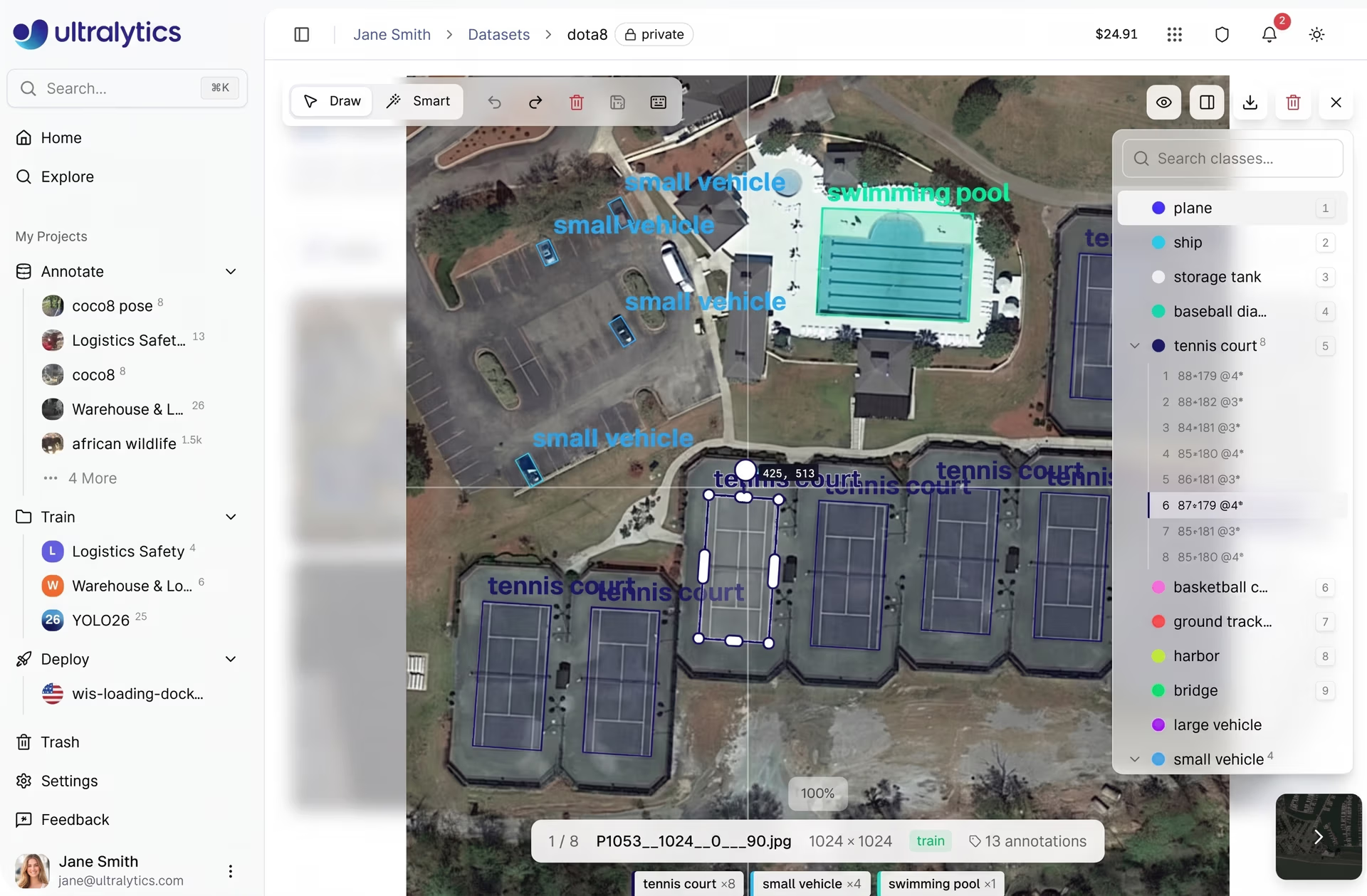
Fig 5. Oriented bounding box (OBB) annotation for rotated objects in aerial images. (Source)
Image classification#
Image classification assigns a label to an entire image rather than marking individual objects within it.
For classification datasets, the annotation editor provides a class selector panel. Annotators can assign labels to images by selecting a class from the sidebar or by using keyboard shortcuts for faster labeling.
These image-level labels help models learn high-level visual patterns that represent different categories.
AI-assisted annotation with SAM#
Labeling images for tasks like segmentation often requires careful, detailed work, especially when objects need to be outlined precisely. Ultralytics Platform includes AI-assisted annotation tools that speed up the process while keeping annotations accurate and easy to review.
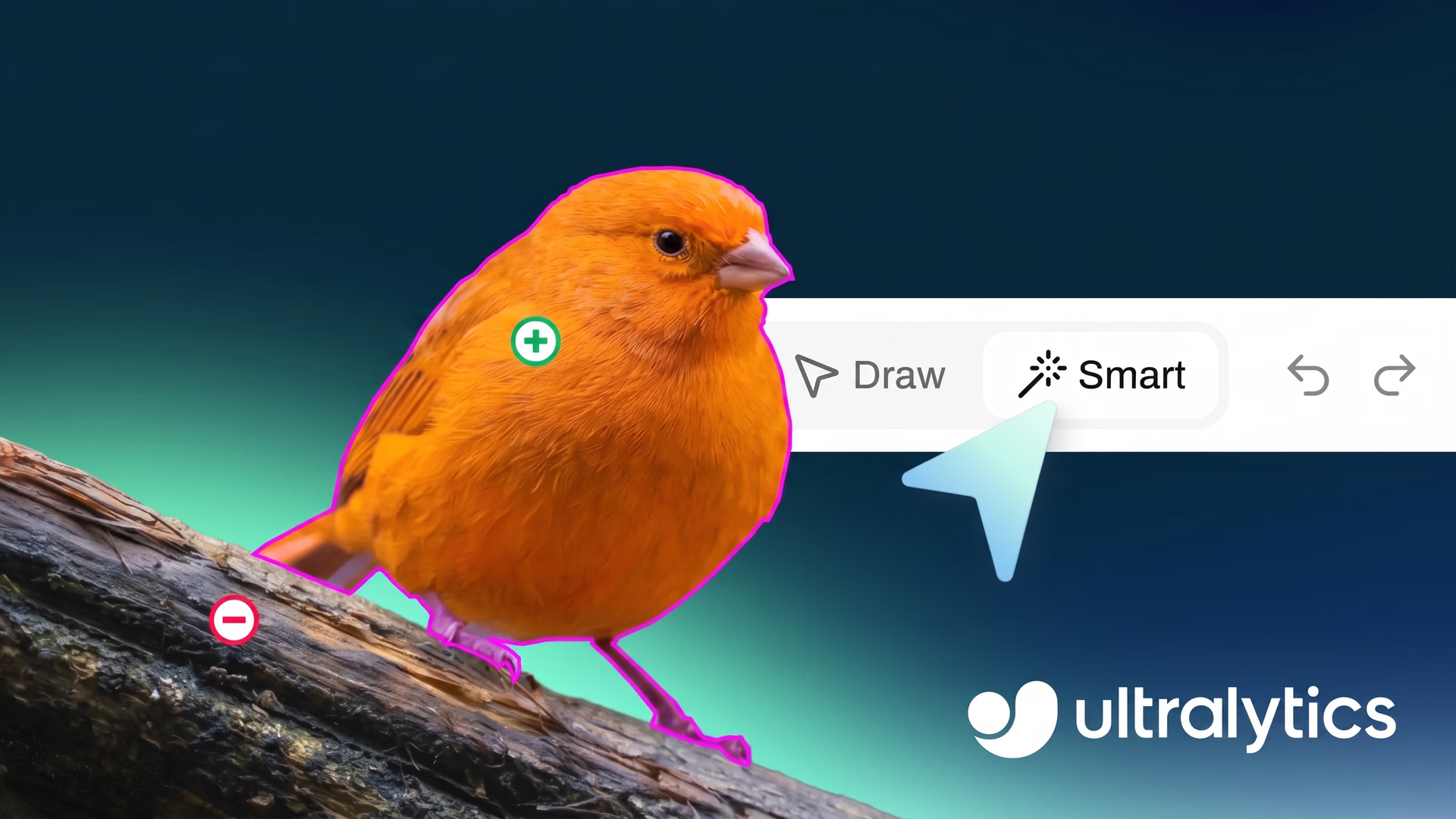
For example, annotators can interact with an image by clicking on parts of an object they want to include in the annotation. They can also mark areas that should be excluded to refine the result. Based on these inputs, the model generates a segmentation mask in real time, which can then be reviewed and adjusted before being saved.
This approach makes it easier to work through complex images without needing to manually trace every detail. At the same time, annotators remain in control of the final output, ensuring that annotations stay consistent across the dataset.
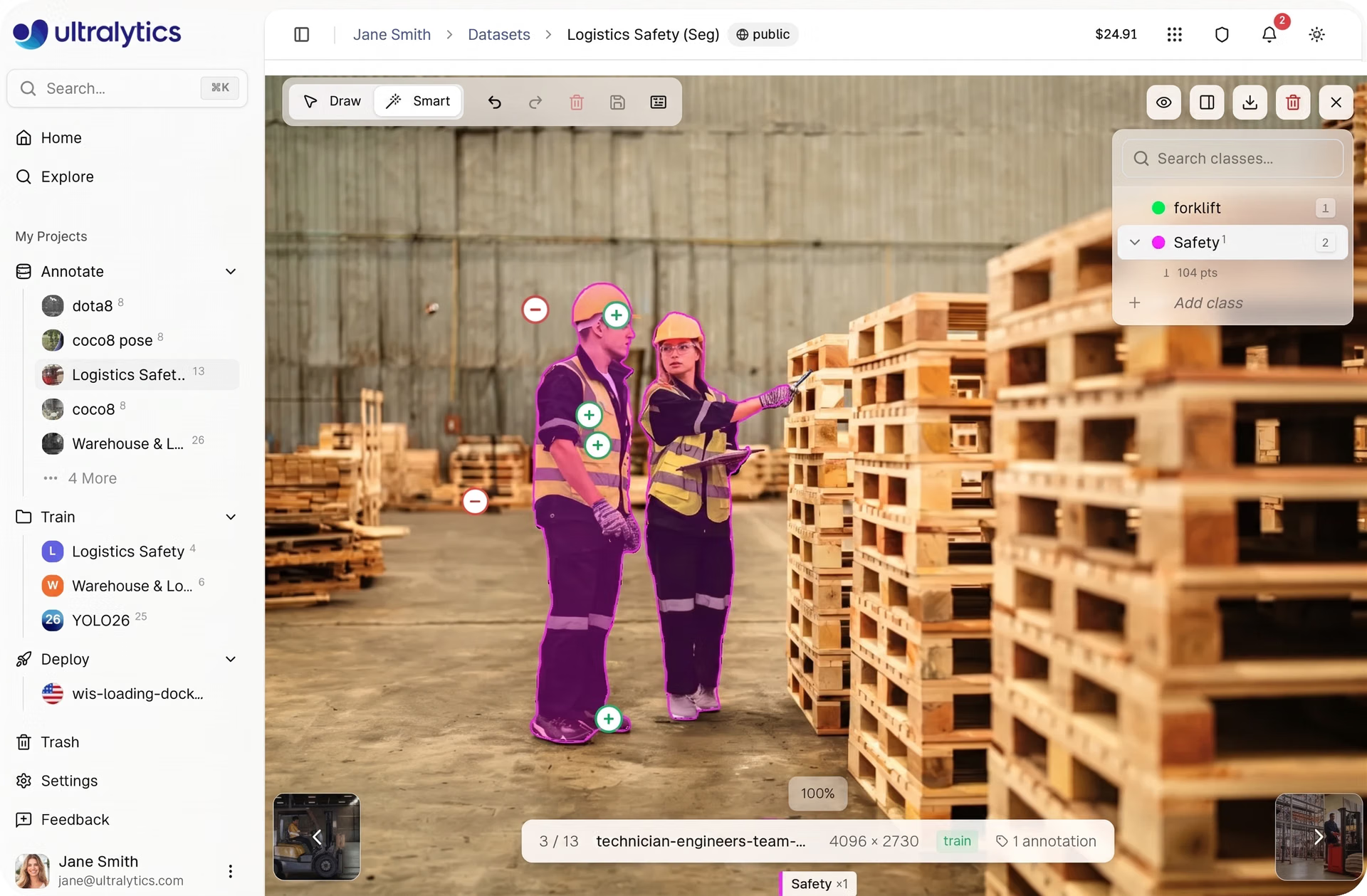
Fig 6. AI-assisted segmentation using the Smart annotation tool in the Ultralytics Platform. (Source)
These features are powered by Segment Anything Models (SAM). These models are part of a broader ecosystem of open source computer vision tools designed to generate high-quality segmentations from minimal input. The platform supports multiple SAM variants, including SAM 2.1 and SAM 3. This gives teams the flexibility to choose between faster performance and more detailed results based on their needs.
These AI-assisted tools can be applied across tasks such as object detection, instance segmentation, and oriented bounding box detection. This means teams can process large datasets more efficiently while maintaining the quality required for reliable model training.
Improving annotation workflows with built-in tools#
As annotation work progresses, it’s common to go back and adjust labels, fix any errors, or review images more closely. The Ultralytics annotation editor includes built-in tools that make these everyday tasks easier to handle and less time-consuming.
Some of the workflow features available in the editor include:
- Keyboard shortcuts: The editor includes shortcuts that speed up common actions, such as saving annotations, undoing or redoing changes, deleting labels, and selecting classes while annotating.
- Undo and redo history: Annotators can easily reverse or restore changes made during an editing session. This helps teams experiment with annotations and quickly fix mistakes without losing progress, supporting better quality control during dataset preparation.
- Flexible annotation editing: Annotations can be adjusted even after creation. Users can resize shapes, move annotations, rotate oriented bounding boxes, or update class labels as needed, especially when refining objects with irregular shapes.
- Visibility controls: The editor includes visibility toggles that let users show or hide annotations and class labels, making it easier to inspect images during labeling.
- Precision tools: Features such as zoom and a crosshair cursor with pixel coordinates help annotators place labels more accurately when working with detailed images.
Managing annotation classes on Ultralytics Platform#
Clear and consistent annotation classes play an important role in building reliable computer vision datasets. As projects grow, managing data labeling across large datasets can become difficult, especially when multiple annotators are involved. Keeping classes well organized helps ensure annotations stay consistent and models learn from structured data.
Ultralytics Platform simplifies this process by bringing class management directly into the annotation editor. Instead of handling labels separately, teams can create, update, and review classes while working on images, making it easier to stay consistent throughout the annotation workflow.
Within the editor, all classes are available in a sidebar alongside the annotation canvas. This makes it easy to select the correct label while annotating and keep track of how classes are being used across the dataset. Users can search for existing classes or create new ones as needed, without interrupting their workflow.
Class details can also be updated at any time. Names can be edited directly, and colors can be assigned to make different classes easier to identify across annotations. The editor also shows how many annotations are linked to each class and allows users to review them, helping teams check for consistency and accuracy.
All classes are managed through a centralized table where they can be sorted, searched, and updated. Any changes made here are automatically applied across the dataset, helping teams maintain consistency as annotation projects scale.
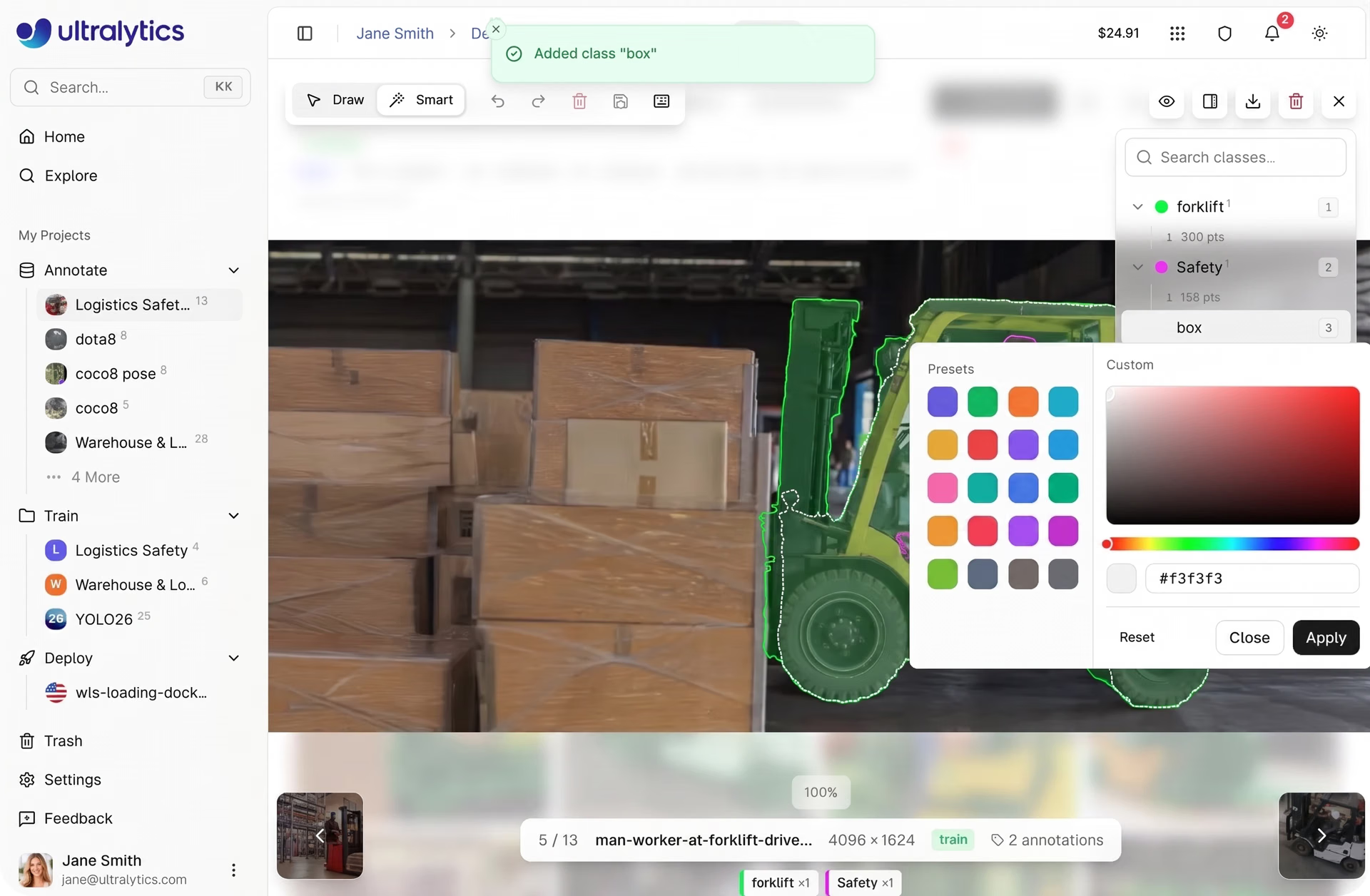
Fig 7. Class management in the annotation editor shows label organization and color customization. (Source)
How annotation quality affects real-world performance#
As computer vision systems move from development to real-world use, the quality of annotated data plays a key role in how models perform. Well-labeled datasets help models produce more accurate and consistent predictions, especially in dynamic or unpredictable environments.
In practice, even small inconsistencies in annotation can affect model behavior. Differences in how objects are labeled or how edge cases are handled may not be obvious during training but can lead to less reliable predictions once systems are deployed.
On top of this, these inconsistencies can become more noticeable in real-world applications. For instance, in robotics and healthcare systems, models rely on visual inputs to detect objects and guide actions in real time. Variations in labeling can influence how accurately these systems interpret their surroundings.
By maintaining consistent annotation practices and using platforms like Ultralytics to manage and refine datasets over time, teams can build models that perform more reliably beyond controlled testing environments.
Key takeaways#
High-quality data annotation is essential for training accurate computer vision models and supporting successful image annotation projects. Ultralytics Platform simplifies this process with a powerful annotation editor that supports multiple vision tasks. By combining manual annotation tools with AI-assisted labeling using SAM and built-in workflow features, teams can prepare datasets more efficiently and move faster from data preparation to model development.
Join our community and explore the GitHub repository to learn more about computer vision models. Read about applications like AI in automotive and computer vision in robotics on our solutions pages. Check out our licensing options and get started with building your own vision AI model.








