A guide to polygon annotation with Ultralytics Platform
Discover polygon annotation, how it enables precise object segmentation, and how to create annotations easily with Ultralytics Platform.
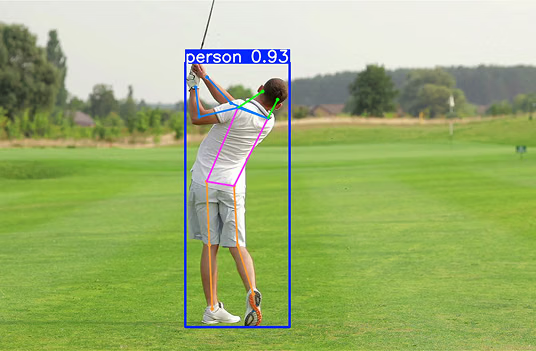
Cutting-edge AI technologies are making their way into a wide range of industries, from autonomous driving to precision farming. For example, dairy farmers are using AI and image analysis to detect illness in cattle. Health concerns like lameness can be monitored by observing changes in an animal's gait and posture, such as an arched back and asymmetric movement.
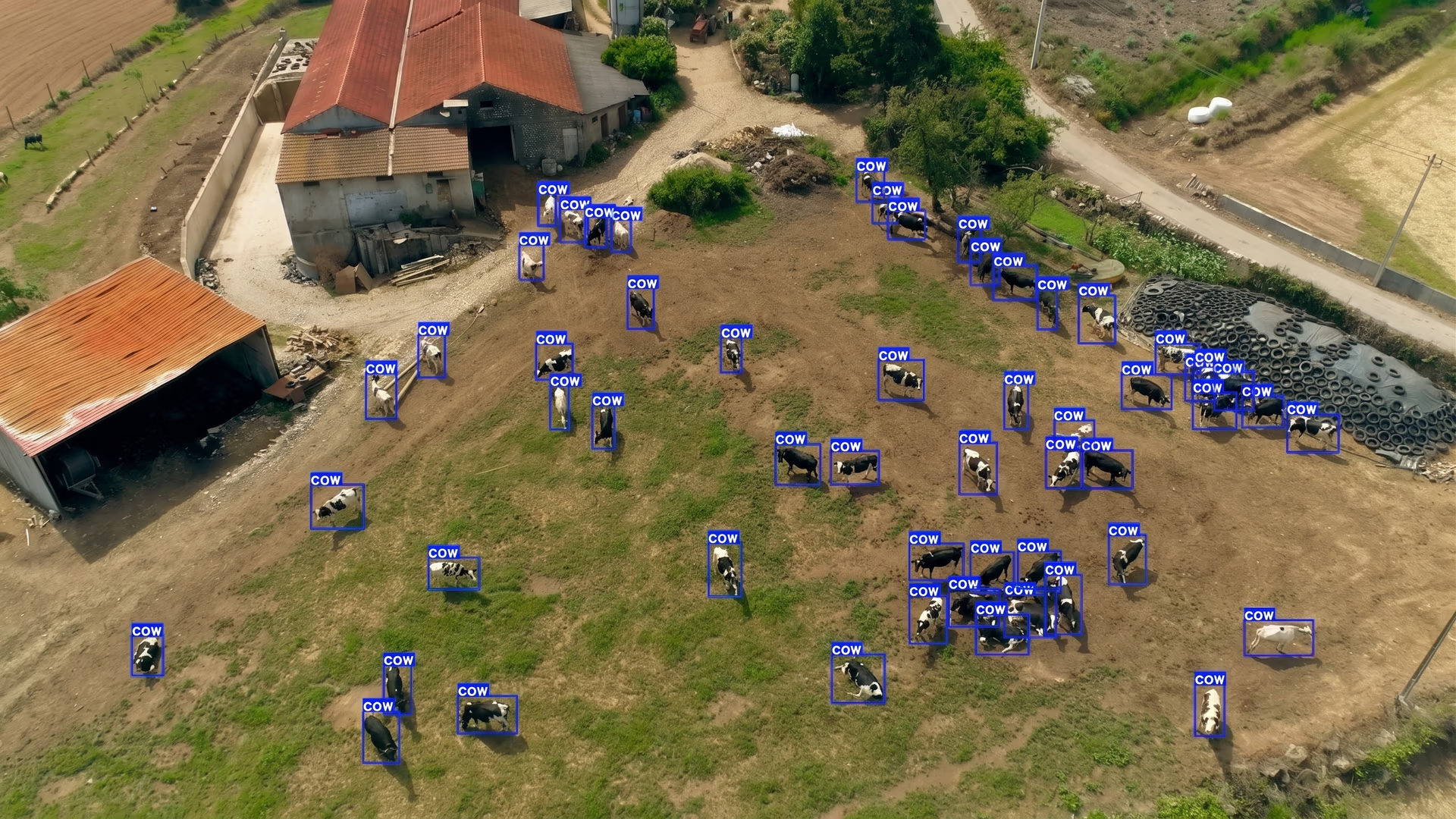
Fig 1. An example of monitoring cows using AI and image analysis.
Computer vision, a branch of artificial intelligence, enables such applications by allowing machines to interpret and analyze visual data. Specifically, instance segmentation is a computer vision task that identifies and segments each object in an image at the pixel level, making it possible to precisely detect and analyze individual animals.
Polygon annotation plays a key role in this process. It is a data annotation method used to carefully trace the exact shape of an object in an image by placing points along its edges. Unlike simple bounding box annotations, this approach follows the object’s true outline, helping create more precise training data and enabling vision AI models to better understand object boundaries.
Nowadays, there are many tools available for creating polygon annotations. However, these options can often feel fragmented, especially when they offer inconsistent or limited support for different types of annotations, making it harder to manage diverse labeling needs within a single workflow.
Ultralytics Platform, our new end-to-end vision AI workspace that bridges the gap between dataset management, annotation, training, deployment, and monitoring, solves this by supporting multiple annotation types and AI-assisted workflows in one seamless workspace, simplifying the entire annotation process.
In this article, we’ll explore what polygon annotations are and how to create them using Ultralytics Platform. Let’s get started!
A closer look at polygon annotation#
Before we dive into Ultralytics Platform and its polygon annotation features, let’s take a step back and understand what polygon annotation is.
Image annotation is the process of adding labels to visual data so that AI models can understand what they are seeing. It typically involves identifying objects in an image and marking them in a way that a model can learn from.
One of the most common methods is drawing rectangular boxes around objects, known as bounding boxes. However, bounding boxes only provide a rough outline of an object. Polygon annotation is a more precise approach.
It works by outlining an object (its borders) point by point rather than enclosing it in a box. To do this, annotators place multiple vertices (points) along an object's edges, tracing its contour until the entire shape is covered.
These connected points form a polygon that mirrors the object’s natural outline. Since the shape closely follows the object’s boundary, the annotation captures details that traditional labeling methods often miss. This is especially useful when objects have irregular shapes or complex edges, like leaves, human silhouettes, and overlapping objects.
Such precision in data helps machine learning models learn more effectively during model training. When annotations accurately capture the true boundaries of an object, models can better understand the object’s patterns at the pixel level. This leads to improved model performance, especially in segmentation tasks that require high accuracy.
The role of polygon annotations in computer vision workflows#
So, how are polygon annotations actually used? They are closely tied to vision AI models that support image segmentation tasks like instance segmentation.
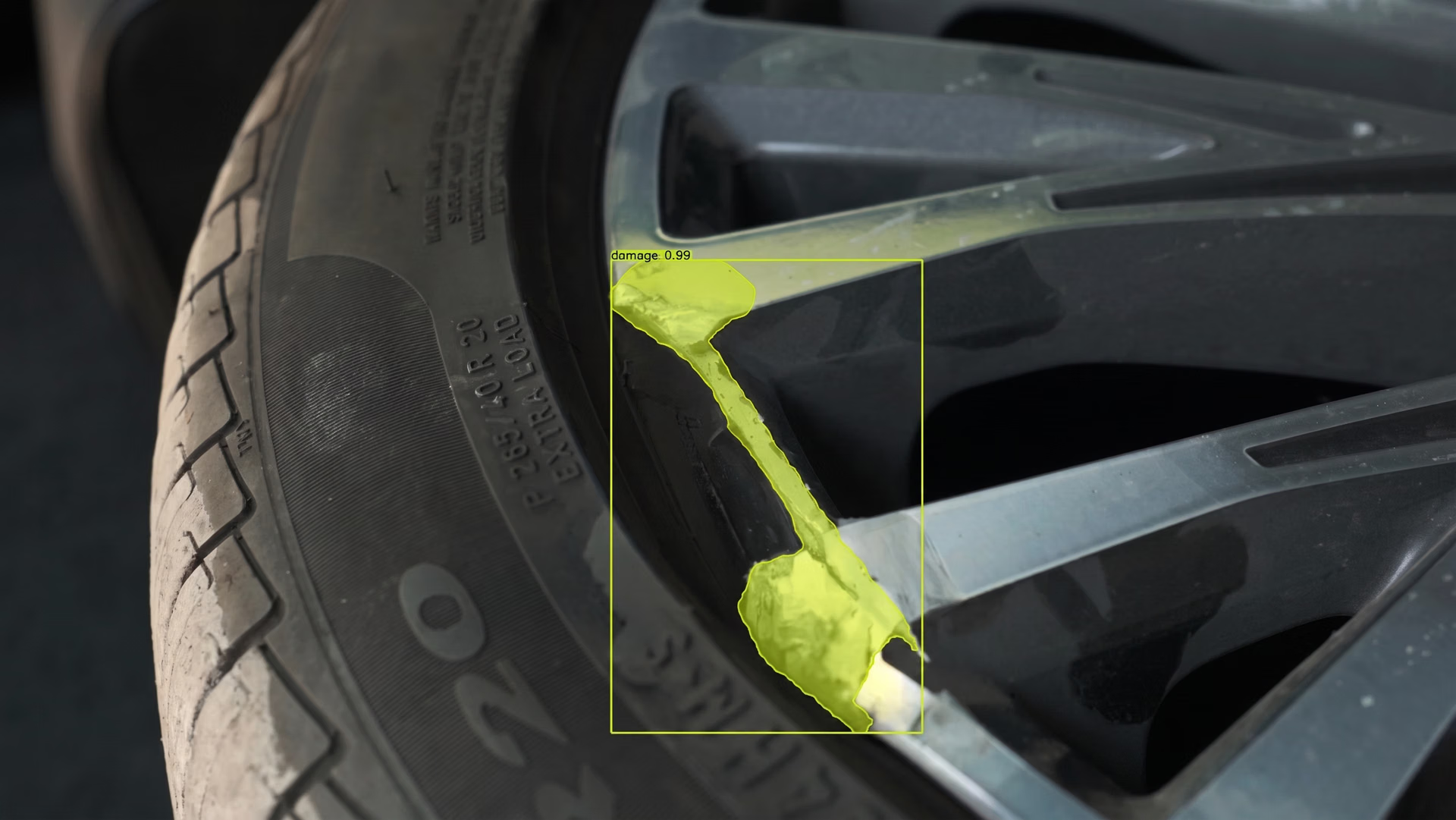
In many computer vision applications, it’s essential to know the exact area each object occupies in an image or video frame. A good example is car parts detection in manufacturing. In this case, models need to identify and precisely outline parts such as doors, windows, and headlights, even when they overlap or have complex shapes.
This is where instance segmentation comes in. It enables models to detect each object and map its exact boundaries at the pixel level. This is different from basic object detection, which uses bounding boxes.
Fig 2. Instance segmentation can also help distinguish damaged parts of a car. (Source)
Bounding boxes only provide rough rectangular regions around objects and often include extra background, making it harder to capture irregular shapes or separate overlapping items.
Polygon annotation plays a vital role in enabling this level of precision. Tracing the exact shape of each object in dataset images creates high-quality training data that reflects true object boundaries. These detailed annotations help models, such as Ultralytics YOLO26, better understand the structure of each component, leading to more accurate segmentation results.
Limitations of traditional image annotation tools#
Next, let’s walk through the limitations of traditional annotation tools to understand the need for more efficient and scalable solutions like Ultralytics Platform.
Here are some common challenges that annotators face when using traditional polygon annotation tools:
- Limited support for annotation types: Some tools focus on a single annotation technique, making it difficult to work with different types like polygons, bounding boxes, and keypoints in one place.
- Inefficient handling of complex annotations: Tools may lack features that make it easier to accurately annotate complex objects with fine details.
- Lack of AI-assisted features: Many tools rely entirely on manual work, without built-in AI support to speed up annotation.
- Fragmented dataset management: Managing datasets, versions, and annotations can be difficult, especially when tools don’t provide a centralized workspace.
Ultralytics Platform addresses these concerns with AI-assisted annotation features powered by both Segment Anything Models (SAM) and YOLO models. SAM enables users to generate high-quality segmentation masks from simple inputs like clicks, which can then be refined into precise polygon annotations.
Similarly, YOLO-based smart annotation uses pre-trained or custom-trained YOLO models to run inference on an image and add predictions, such as bounding boxes, segmentation masks, or oriented bounding boxes, as annotations, which can then be reviewed and adjusted as needed. Together, these capabilities make the annotation process faster, more consistent, and easier to scale.
Different types of annotations supported by Ultralytics Platform#
Ultralytics Platform includes an integrated annotation editor that lets users annotate images directly within the workspace. This makes it easier to build and manage datasets without relying on separate, often time-consuming data-labeling tools.
In addition to polygon annotations, Ultralytics Platform supports several other annotation types. Here’s a quick overview:
- Bounding boxes: Annotators can draw simple rectangular boxes around objects, making it easy to label and detect them in an image.
- Keypoints: This method is used to mark specific points, such as body joints or landmarks, for tasks like pose estimation.
- Oriented bounding boxes (OBBs): These allow users to capture rotated or angled objects more accurately compared to standard bounding boxes.
- Classification labels: For simpler tasks, users can assign labels to entire images instead of marking individual objects.
Annotating objects with polygons on Ultralytics Platform#
Now, let’s see how to create polygon annotations on the Ultralytics Platform, either manually or with AI-assisted tools.
Manually creating polygon annotations on Ultralytics Platform#
Here’s a quick step-by-step guide to creating polygon annotations manually:
- Step 1 - Navigate to your dataset: Open the dataset that contains the images you want to annotate. This is where your images and annotations are stored and managed.
- Step 2 - Open an image: Click on an image to open it in the annotation interface. The annotation workflow depends on the dataset task. For example, in an instance segmentation dataset, annotations are created using polygon masks.
- Step 3 – Start creating a mask: Click on the image to begin annotating. Each click adds a vertex along the object boundary.
- Step 4 – Trace the object outline: Continue clicking around the edges of the object to define its shape.
- Step 5 – Complete the polygon: You can either press “Enter” or click the first point to complete the polygon and assign a class label.
- Step 6 – Add additional annotations: Repeat the process to create more polygons for other objects in the image.
- Step 7 – Saving annotations: Annotations are saved automatically as you create them.
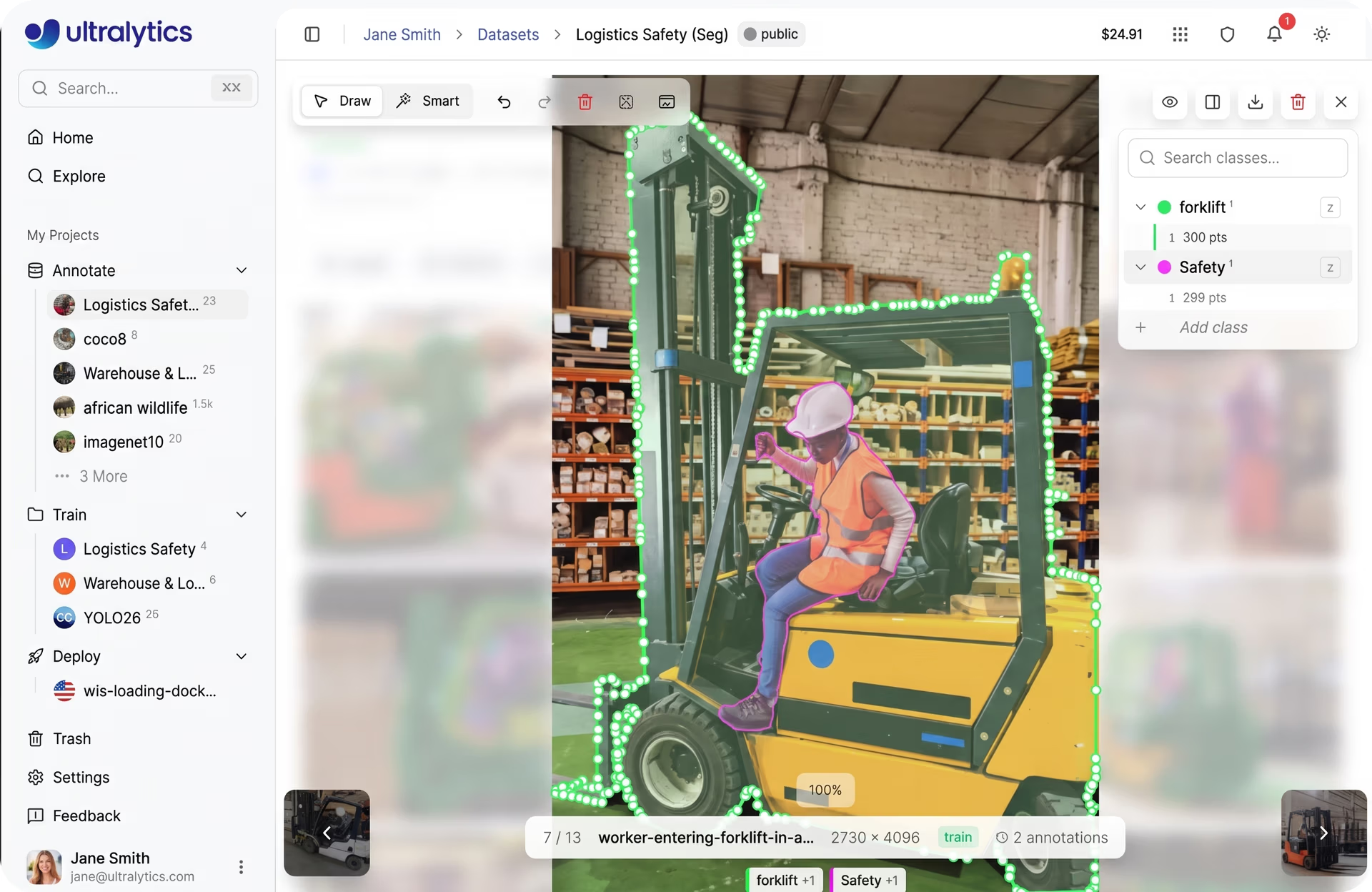
Fig 3. A look at manually creating polygon annotations using Ultralytics Platform (Source)
Smart polygon annotation on Ultralytics Platform#
Next, let’s look at the AI-assisted labeling features supported by Ultralytics Platform that speed up the annotation process.
The platform provides two approaches for smart annotation: one powered by Segment Anything Models for interactive, click-based annotation generation, and another powered by YOLO models for adding model predictions directly as annotations. Both approaches can be used for smart polygon annotation.
Smart annotation using SAM within Ultralytics Platform#
SAM-assisted annotation on Ultralytics Platform simplifies manual labeling by using the Segment Anything Model (SAM) to generate segmentation masks with minimal input. Instead of tracing objects point by point, users can interact with the image using simple prompts like clicks to indicate what should be included or excluded.
The platform supports multiple SAM models, including SAM 2.1 and SAM 3, allowing users to choose between faster performance or higher accuracy depending on their needs. Based on user input, SAM generates pixel-level masks in real time. These masks can then be refined and used as polygon annotations, making the process faster, more consistent, and easier to scale.
Here are the steps to use SAM for polygon annotation in Ultralytics Platform:
- Step 1 – Open an image: Navigate to your dataset and click on an image to launch the full-screen viewer.
- Step 2 – Enter annotation mode: Click “Edit”, then switch to Smart mode (or press S) to enable SAM.
- Step 3 – Select a SAM model: Choose a SAM model from the toolbar based on your speed and accuracy needs.
- Step 4 – Provide prompts: Left-click to add positive points (include areas) and right-click to add negative points (exclude areas).
- Step 5 – Generate and apply the mask: SAM predicts a segmentation mask in real time. Press “Enter” (or use auto-apply) to apply the annotation.
- Step 6 – Refine the annotation: Add more points or adjust the result if needed to improve accuracy before saving.
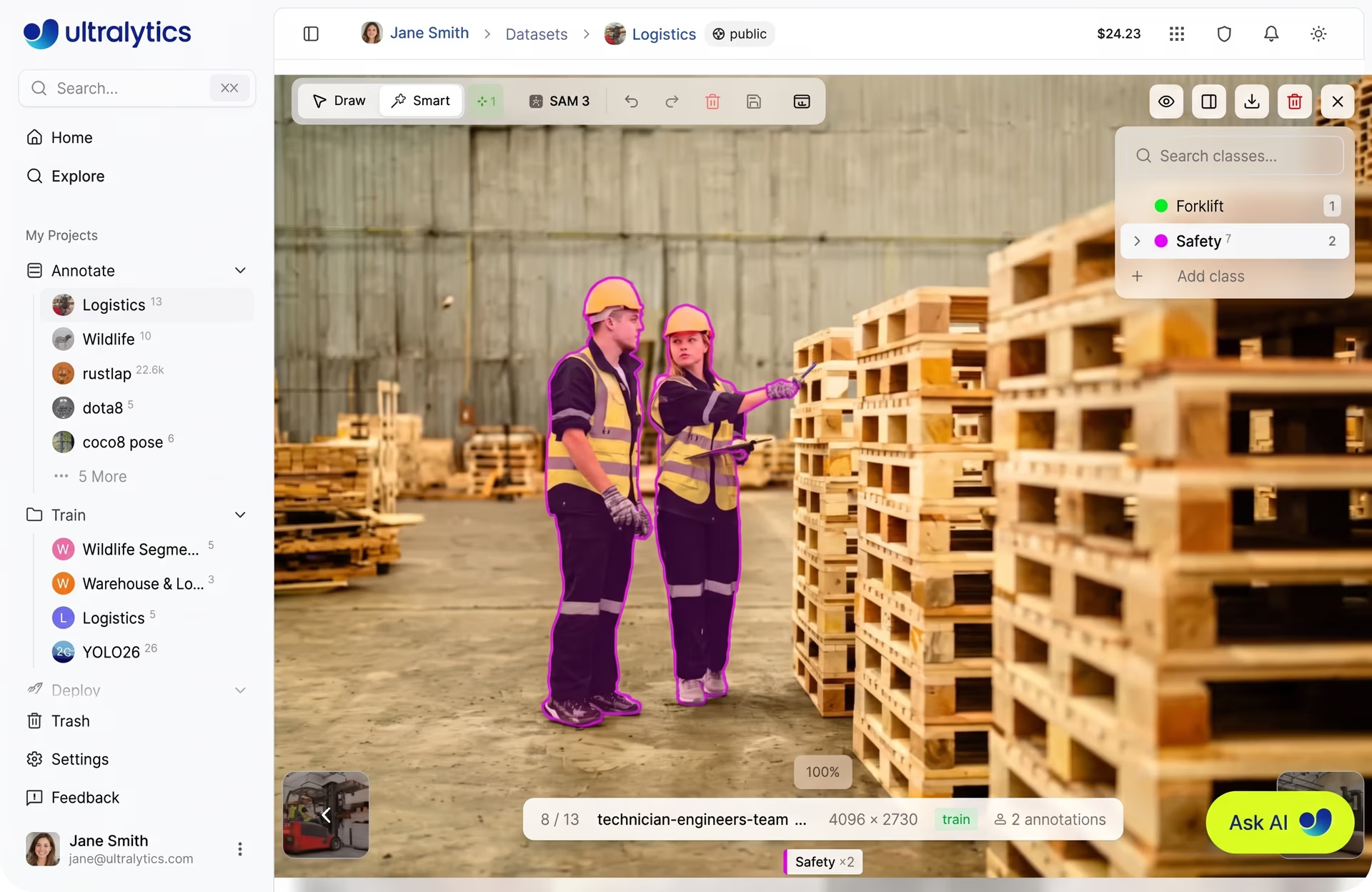
Fig 4. SAM-assisted polygon annotation within Ultralytics Platform (Source)
Smart annotation using YOLO within Ultralytics Platform#
YOLO-based smart annotation on the Ultralytics Platform accelerates labeling by using pre-trained Ultralytics YOLO models or fine-tuned YOLO models to generate predictions on an image and add them as annotations. These predictions can include bounding boxes, segmentation masks, or oriented bounding boxes, depending on the dataset task.
Users can then review and refine these annotations as needed. Here’s an overview of the steps involved in using YOLO-based smart annotation on Ultralytics Platform:
- Step 1 – Open an image: Navigate to your dataset and select an image to open it in the full-screen viewer.
- Step 2 – Enter annotation mode: Click “Edit”, then switch to Smart mode (or press S).
- Step 3 – Select a YOLO model: Choose a YOLO model from the model picker in the toolbar.
- Step 4 – Run prediction: Click “Predict” to let the model generate annotations automatically.
- Step 5 – Review annotations: Inspect the predicted bounding boxes, segmentation masks, or OBBs added to the image.
- Step 6 – Refine and save: Edit, adjust, or remove incorrect annotations as needed, then save your final labels.
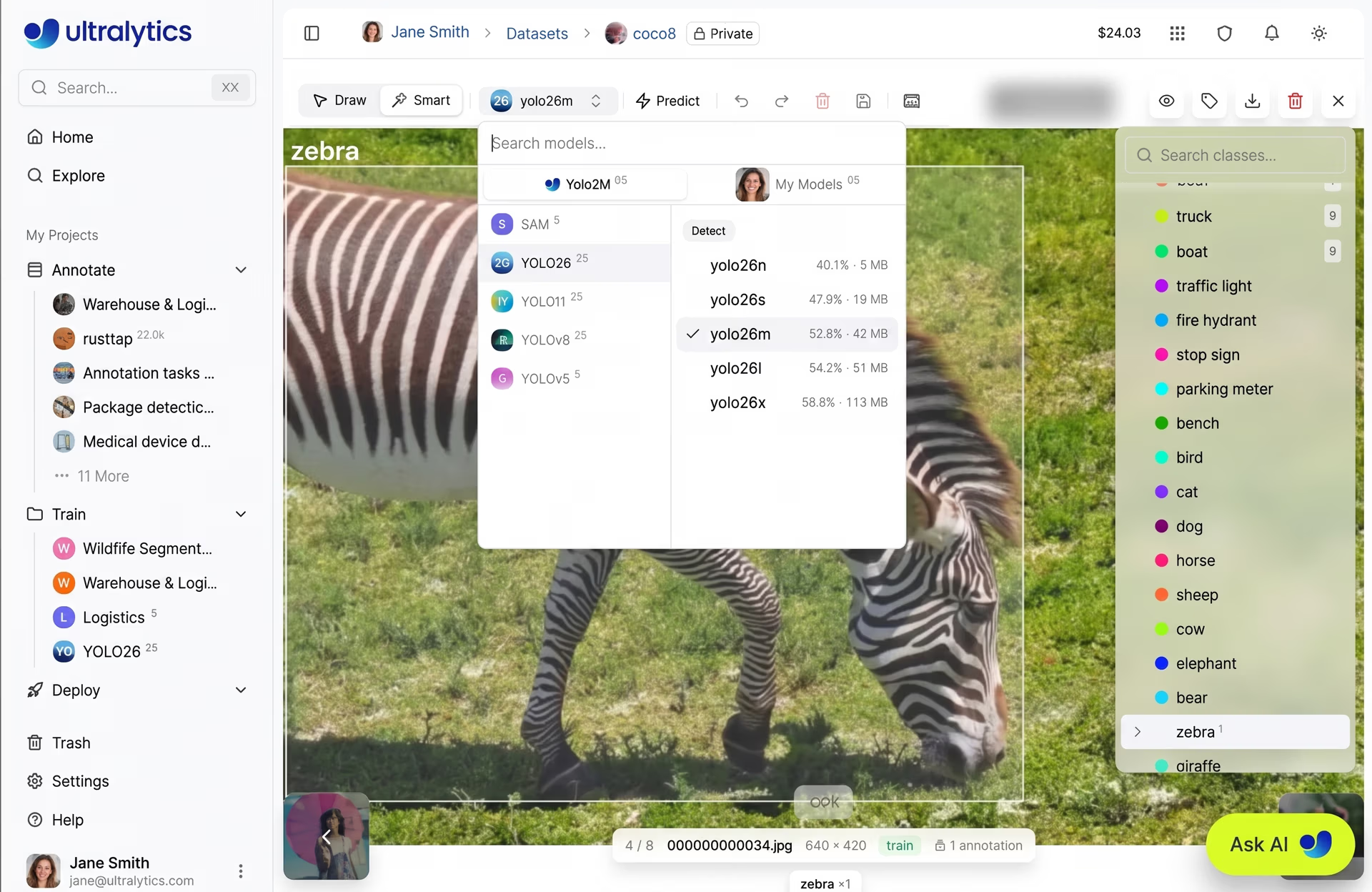
Fig 5. A glimpse at using YOLO smart annotation (Source)
Real-world use cases of polygon annotation#
Polygon annotation is making a real impact across industries, from quality control in manufacturing to agriculture and healthcare. Let’s explore some key real-world applications.
Identifying pest detection using computer vision#
In agriculture, monitoring crop health is critical for improving yield and reducing losses. Detecting pest-infected areas on crop leaves can be tricky since these regions often have irregular shapes and unclear boundaries.
This type of problem can be approached using image segmentation techniques like semantic segmentation, which labels all pixels belonging to a class (such as infected areas), or instance segmentation, which separates object contours more precisely.
With Ultralytics Platform, users can use polygon annotation to trace the exact shape of these infected areas. This helps create more accurate datasets and makes it easier for vision AI algorithms to spot subtle patterns in agricultural environments.
As a result, teams can build better training data that helps models identify exactly where pest infestations are present. This is more effective than using bounding boxes, which can include parts of the leaf that aren’t affected.
Medical image analysis powered by instance segmentation#
Similar to pest detection in agriculture, even small differences in boundaries can impact how diseases like cancer are analyzed in medical imaging. This is especially crucial when identifying healthcare anomalies such as tumors in CT scans.
Traditional annotation methods may miss fine edges or include surrounding tissue, which can reduce accuracy. With Ultralytics Platform, teams can use polygon annotation to precisely trace these regions in training data, helping models produce more accurate and reliable tumor segmentation.
Key takeaways#
Polygon annotation is key when models need to understand object shapes in images with high precision. It helps represent complex shapes more accurately, especially when using Ultralytics Platform. By combining precision with powerful tools, teams can build more reliable and high-performing AI models.
Ready to bring vision AI into your projects? Join our community and discover AI in the automotive industry and vision AI in robotics. Explore our GitHub repository to learn more. Check out our licensing options to get started today!