How to pick a cloud GPU for vision AI training on Ultralytics Platform
Learn how to pick the right cloud GPU for computer vision training on the Ultralytics Platform based on factors such as dataset size, model complexity, and cost.
Last month, we introduced Ultralytics Platform, an end-to-end environment designed to streamline the entire computer vision workflow, from dataset management to model training and deployment. Ultralytics Platform brings together everything needed to build and scale vision AI models into a single and unified experience.
A key part of this workflow is model training, where neural networks learn patterns from data to make accurate predictions, and access to the right compute resources plays a crucial role. Previously, we explored how Ultralytics Platform supports cloud graphics processing unit (GPU) powered model training, allowing users to train computer vision models without managing local infrastructure.
With on-demand access to powerful NVIDIA GPUs, users ranging from students and startups to researchers and large organizations can run AI workloads more efficiently than ever before. While getting started with cloud training is straightforward, choosing the right GPU involves considering factors like dataset size, model complexity, and cost.
With a wide range of options available today, from cost-effective RTX GPUs to high-performance NVIDIA H100 and next-generation Blackwell hardware, selecting the right configuration can significantly impact both model development and cost.
In this article, we’ll look at cloud GPU training for computer vision on the Ultralytics Platform and how to choose the right hardware for your workload. Let’s get started!
An overview of cloud training on Ultralytics Platform#
Before diving into how to select a GPU for cloud training on the Ultralytics Platform, let’s take a step back and look at how cloud training works.
What is cloud GPU training?#
Cloud GPU training refers to using GPUs hosted in a cloud computing environment to train machine learning and deep learning models, instead of relying on your own local hardware or workstation. On Ultralytics Platform, this allows you to access powerful GPUs on demand and run training jobs remotely, without needing your own setup.
This makes it easy to scale your resources based on your workload. You can choose more powerful GPUs or increase capacity as needed, without being limited by your system’s capabilities. You can think of it like accessing powerful machines, or nodes, in remote data centers, where you can scale up or down as needed.
It also removes the need to set up and maintain expensive hardware. You don’t have to buy GPUs, install drivers, or deal with compatibility issues.
The Ultralytics Platform handles everything through managed cloud services, from provisioning resources to environment setup, orchestration, and running training jobs, so you can focus on training, experimenting, and improving your models.
How model training works on the Ultralytics Platform#
On the Ultralytics Platform, the GPU-accelerated training workflow is straightforward. You can start by bringing in your dataset in several ways.
You can upload your own data, use public datasets available on the platform, or clone datasets shared by the community to build on existing work. Cloning a dataset creates a copy in your workspace, letting you edit and expand it while keeping the original unchanged.
Once you have selected a dataset, you can review and organize your images and annotations to ensure everything is properly structured. The platform also includes built-in annotation tools, allowing you to label data for tasks like object detection, segmentation, and classification, or speed up the process with AI-assisted features.
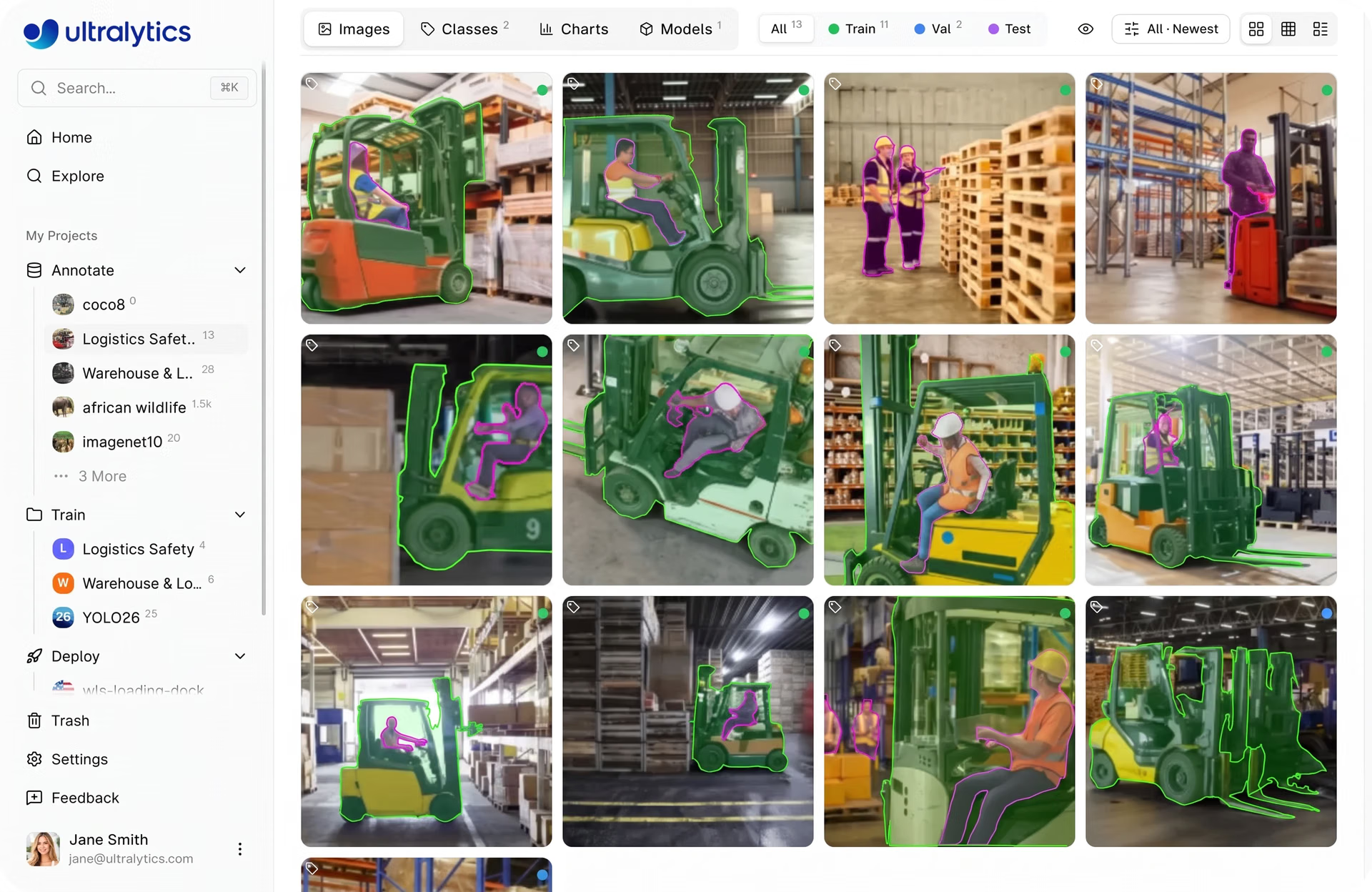
Fig 1. Viewing a dataset within Ultralytics Platform (Source)
Next, you can select or create a project to manage your training runs. Projects help you organize and compare models, track performance metrics, and keep related experiments in one place.
From there, you can move to cloud training, where you choose a model, configure parameters, and select a GPU based on your performance and budget needs. The platform handles the underlying cloud infrastructure for you.
It provisions the selected GPU instance, prepares your dataset, and runs the training job in the cloud. As training progresses, you can monitor metrics, logs, and system performance in real time, without needing to manage setup, CUDA environments, frameworks like PyTorch or TensorFlow, or hardware.
Key GPU training features on Ultralytics Platform#
Here are some key features of cloud GPU training on the Ultralytics Platform:
- One-click training: Start training jobs with minimal setup and move quickly from dataset to model training without complex configuration.
- On-demand GPUs: Choose from a range of GPU options based on your needs, and scale resources as required without long-term commitments.
- Real-time monitoring: Track training progress with live charts and logs, and view system metrics like GPU usage and memory in real time.
- Automatic checkpoints: Training progress is saved at regular intervals, making it easy to resume or recover work if needed.
- Easy deployment: Once training is complete, you can deploy your trained models and use them in applications or workflows through shared inference APIs, dedicated endpoints, or by exporting them for use on external systems. These deployment options enable low-latency inference, making it possible to power real-time applications such as video analytics, automation systems, and interactive AI solutions.
Different cloud GPU options within Ultralytics Platform#
Now that we’ve seen how training works on the platform, let’s look at the different GPU options available. The GPU you choose can affect how fast your model trains, how well it performs, and how much it costs.
The Ultralytics Platform offers a wide range of GPUs, starting with options like the RTX 2000 Ada and RTX A4500, moving through GPUs such as the RTX 4000 Ada, RTX A5000, RTX 3090, and RTX A6000, and extending to more powerful options like the RTX 4090 and RTX PRO 6000.
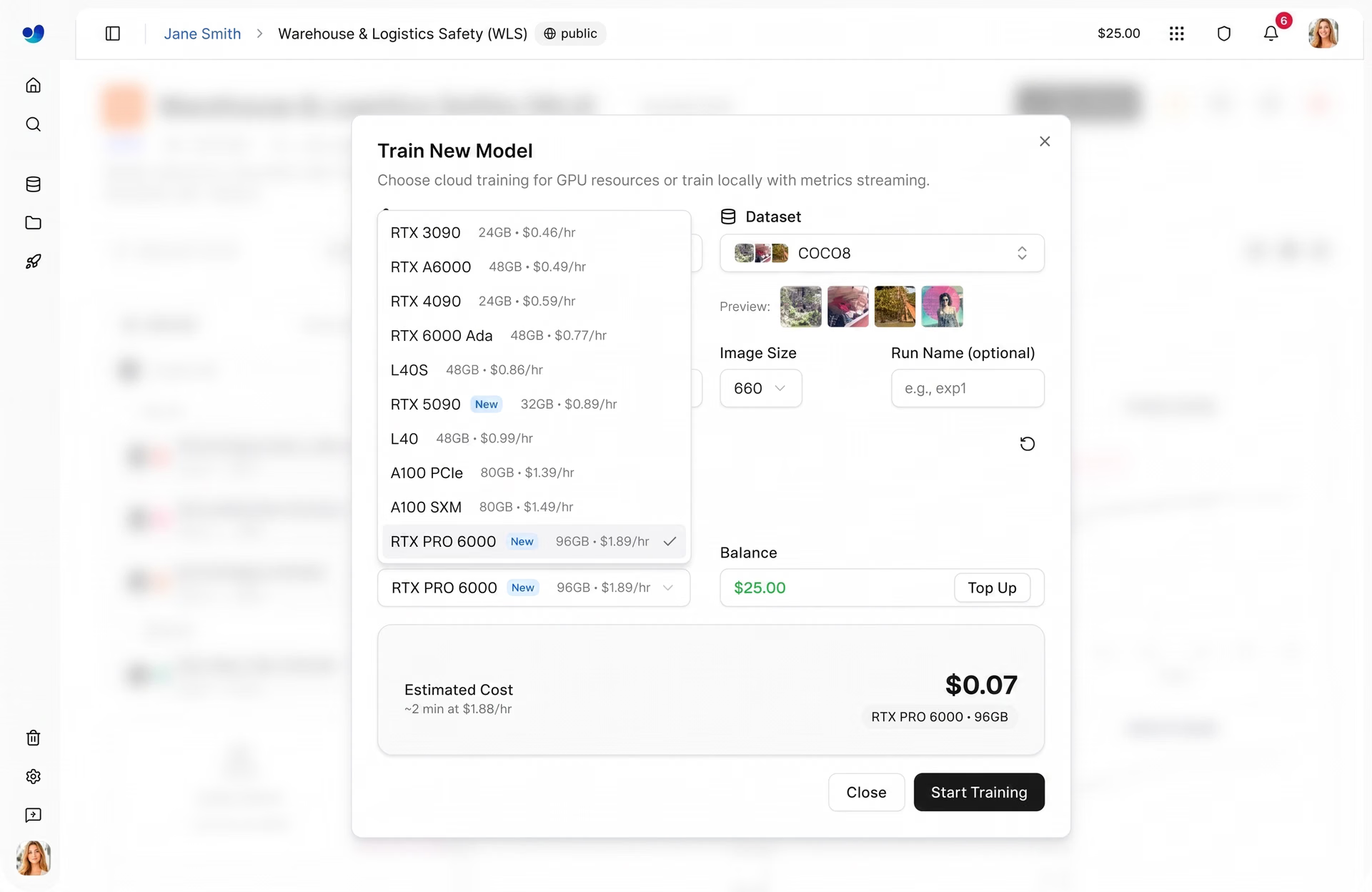
Fig 2. An example of the different GPU options supported by Ultralytics Platform (Source)
For most users, the RTX PRO 6000 is a balanced default choice. It delivers reliable performance across a variety of workloads without requiring much tuning. The RTX 4090 is another popular option, offering strong performance for its price.
For smaller tasks like quick experiments, prototyping, or working with lightweight datasets, GPUs such as the RTX 2000 Ada and RTX A4500 are a good place to start. As your workload grows, options like the RTX 4000 Ada, RTX A5000, and RTX 3090 provide more consistent performance for general training.
At the higher end, GPUs like the A100 (Ampere), H100 and H200 (Hopper), and B200 (Blackwell) are built for large-scale workloads. These are best suited for training very large models, handling massive datasets, or running jobs where speed and performance are critical.
Understanding different GPU types and their use cases#
Next, let’s look at how different types of GPUs compare and where they fit best.
RTX GPUs from NVIDIA are generally more cost-effective and are commonly used for everyday training, experimentation, and small to medium workloads. They offer a balance between performance and accessibility, making them suitable for a wide range of use cases.
In comparison, GPUs such as the A100, A40, and L40 are designed for heavier workloads and larger-scale training. They provide higher stability and scalability, particularly when working with larger datasets or more complex models.
At the higher end, GPUs like the H100 and those based on NVIDIA’s Blackwell architecture represent more recent AI hardware. These are designed for high-performance workloads and are typically used for large-scale training, advanced research, or time-sensitive tasks.
The range of GPU options available on the Ultralytics Platform provides flexibility across different workloads. Depending on your requirements, you can start with smaller setups and scale up as needed.
How to choose the right cloud GPU for your project#
When selecting a GPU for cloud training on the Ultralytics Platform, there are several factors to consider, including dataset size, model complexity, and cost. Let’s walk through each of these factors.
Matching GPU power to dataset size#
One of the main factors in choosing a GPU is your dataset size, since it affects how long training takes and how much compute you need.
For small datasets, usually fewer than 1,000 images, a lightweight GPU like the RTX 2000 is often enough. This works well for quick experiments and shorter training runs.
For medium-sized datasets, around 1,000 to 10,000 images, GPUs like the RTX 4090 or RTX A6000 offer a better balance of performance and efficiency, helping you train more smoothly without long delays.
For larger datasets, over 10,000 images, you’ll likely need more powerful hardware to keep training times reasonable. GPUs like the H100 GPUs are better suited for handling heavier workloads and scaling effectively.
Overall, it’s about matching your dataset size with the level of compute power and parallel processing capability you need.
Choosing a GPU based on model size and complexity#
Another important factor in choosing a GPU is the size and complexity of your vision AI model. Models of different sizes will need different amounts of power for computation.
For instance, smaller models need less GPU compute power and can run efficiently on GPUs like the RTX 2000 Ada, RTX A4500, or even the RTX 4090 if you want faster results. These are ideal for quick experiments, prototyping, and simpler tasks, allowing you to iterate faster and test ideas without high compute costs.
On the other hand, larger and more complex models require significantly more memory and processing power. GPUs like the RTX A6000, RTX PRO 6000, and high-end options such as the H100 are better suited for these workloads. They can handle bigger architectures, reduce training time, and prevent memory issues, which is especially important when working with high-resolution images, large batch sizes, or more advanced model designs.
Comparing batch size and GPU memory#
Similarly, batch size plays an important role in model training. It refers to the number of training samples the model processes at once in a single step.
Larger batch sizes can improve training efficiency by processing more data at once, but they also require more GPU memory (VRAM). In general, GPUs with higher memory bandwidth can support larger batch sizes, while GPUs with less memory may require smaller batches.
For example, GPUs like the RTX A6000, RTX PRO 6000, or A100 can handle larger batch sizes more easily due to their higher memory, while options like the RTX 4090 or RTX 2000 Ada may require smaller batch sizes depending on the workload.
However, using the largest GPU isn’t always necessary. Higher-end GPUs can improve speed and capacity, but they also come with higher costs. In many cases, adjusting the batch size on a smaller GPU can be a more efficient choice.
Ultimately, the goal is to find the right balance between batch size, available GPU memory, and cost based on your model and dataset.
The impact of training configuration on GPU performance#
Another factor that impacts GPU performance is the training configuration. This includes parameters like the number of epochs, image size, and other settings that control how a model is trained.
For example, larger image sizes increase the amount of computation required per step. This can slow down training and may require more computing power or memory to maintain good performance.
Likewise, increasing the number of epochs extends the total training time, especially on less powerful hardware. An epoch refers to one complete pass through the entire dataset during training.
Techniques like data augmentation also add additional processing during training. Data augmentation applies transformations such as flipping, rotation, or scaling to increase data diversity and improve model performance. While this can improve model robustness, it can also reduce training speed.
In general, more powerful GPUs can handle these increased demands more efficiently, but the impact will depend on the overall configuration and workload.
Balancing cost and training time#
When choosing a GPU for your project, there is often a tradeoff between training speed and GPU pricing.
The Ultralytics Platform makes it easy to estimate and understand these costs before starting a training job. Based on your configuration, including dataset size, model, and GPU, you can see an estimated cost and training duration upfront.
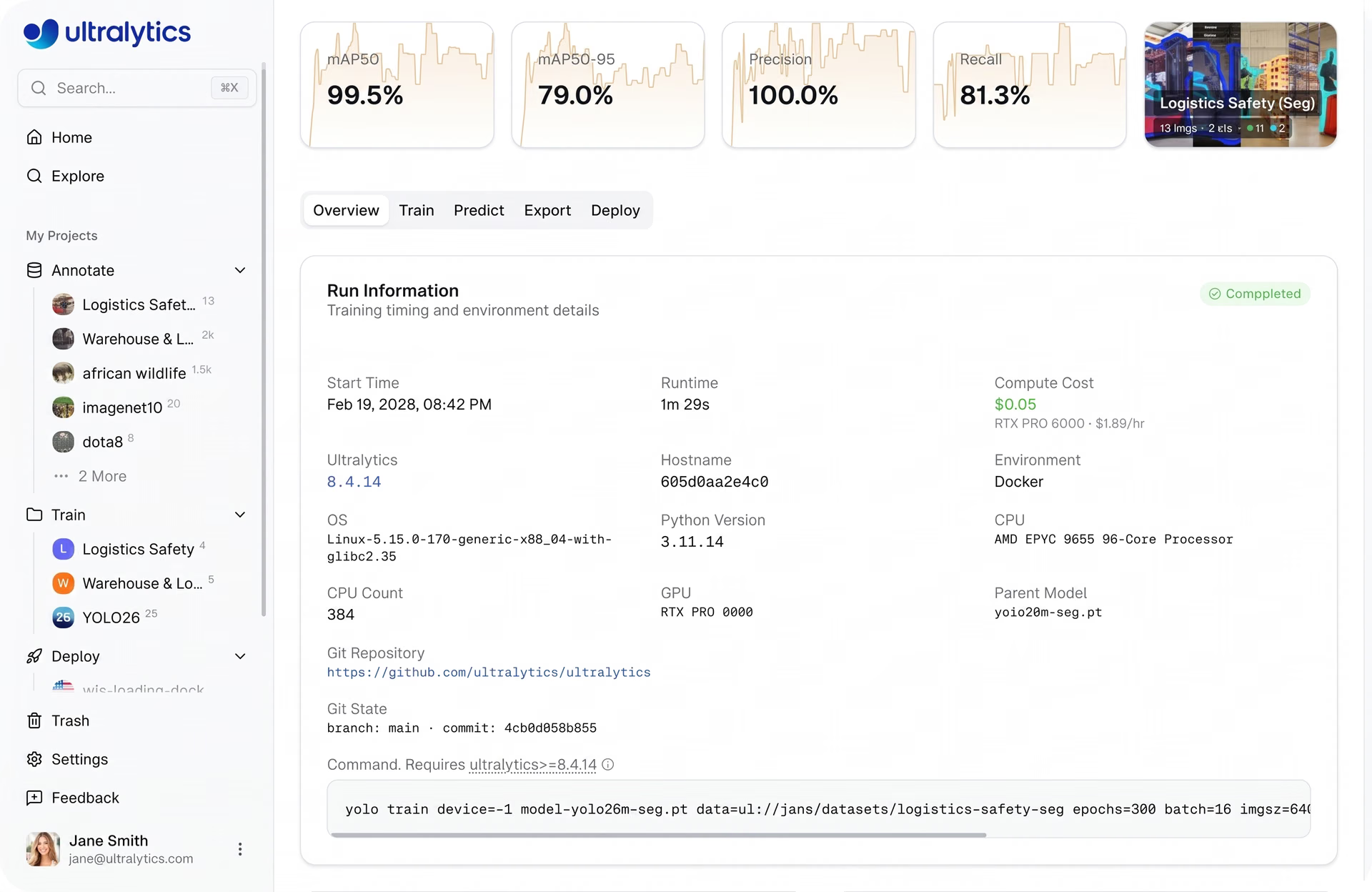
Fig 3. Ultralytics Platform makes cloud costs easy to estimate and understand. (Source)
Faster GPUs typically have a higher hourly cost but can reduce overall training time. GPUs such as the RTX 4090, RTX PRO 6000, and H100 are generally able to complete training more quickly due to their higher performance.
Slower GPUs tend to have a lower hourly cost but take longer to complete training. For instance, GPUs like the RTX 2000 Ada and RTX A4500 are often used for smaller workloads or longer-running jobs where lower cost is prioritized.
In addition to this, some of the highest-end GPUs, like the H200 and B200, are only available on Pro or Enterprise plans, while most other options are accessible on the Free tier as well.
A look at cost optimization strategies#
Beyond picking the right GPU, there are a few practical ways to keep training costs under control. One of the most effective approaches is to start with small test runs before scaling up.
Instead of jumping straight into full training, begin with fewer epochs to make sure your setup works as expected. This helps you quickly validate your data, annotations, and model configuration, and avoids spending time and compute on runs that may not produce useful results.
As training progresses, keep an eye on your metrics and stop runs early if performance plateaus or stops improving. Monitoring training curves can help you decide whether to continue or adjust your setup.
You can also tune parameters like batch size and image size. Smaller values reduce memory and compute usage, making it more practical to experiment, test different configurations, or run small-scale simulations before scaling up.
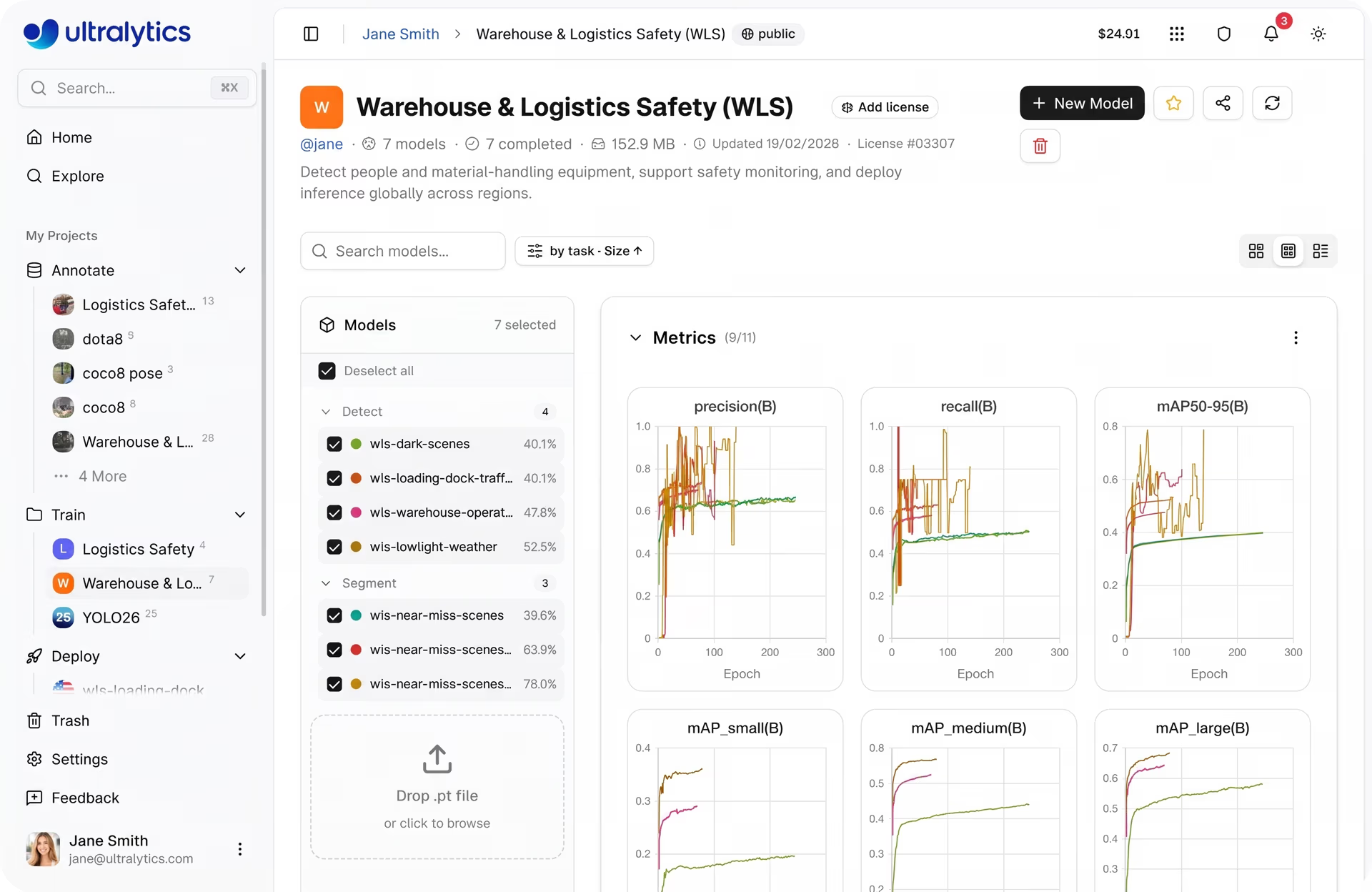
Fig 4. Training metrics visualizations on Ultralytics Platform (Source)
On top of this, Ultralytics Platform helps simplify cost management. It provides built-in cost estimation so you can understand expected expenses before starting a job.
With a pay-per-use, credits-based system, you only pay for the compute time you actually use. This makes it easier to stay within budget and scale up once you’re confident in your training setup.
Best practices related to cloud GPU training for computer vision#
Here are some best practices to keep in mind for cloud GPU training on the Ultralytics Platform:
- Validate datasets before training: Ensure your dataset is clean, well-annotated, and consistent before starting. Catching issues early helps avoid wasted compute and improves model performance.
- Run quick experiments first: Start with small test runs and fewer epochs to verify your setup. This helps identify problems early without committing to long, expensive training jobs. In a way, you’re creating a template that you can reuse and scale once everything is working as expected.
- Monitor key metrics: Track metrics like loss, mAP, precision, and recall throughout training. These metrics act as benchmarks to evaluate model performance and help you decide when to adjust or stop.
- Keep data processing pipelines efficient: Ensure data loading and preprocessing are efficient, as these functions rely on CPU resources and can become bottlenecks that impact overall training performance.
- Use built-in tools: Use charts, console logs, and system metrics to monitor training in real time and make informed decisions quickly.
Key takeaways#
Choosing the right cloud GPU for computer vision on Ultralytics Platform comes down to understanding your workload, including dataset size, model complexity, and training configuration. With a range of GPU options available, powered by cloud infrastructure and virtual machines, you can start with a balanced choice and scale up as your model training or fine-tuning needs grow. By combining the right hardware with good practices like monitoring and cost control, you can train state-of-the-art artificial intelligence models efficiently while making the most of high-performance computing flexibility.
Check out our growing community and GitHub repository to learn more about computer vision. If you're looking to build vision solutions, take a look at our licensing options. Explore our solution pages to know more about the benefits of computer vision in manufacturing and AI in agriculture.








