Train YOLO models faster with Ultralytics Platform
Find out how to train YOLO models faster with Ultralytics Platform, an end-to-end environment built to accelerate the path from data to deployment.
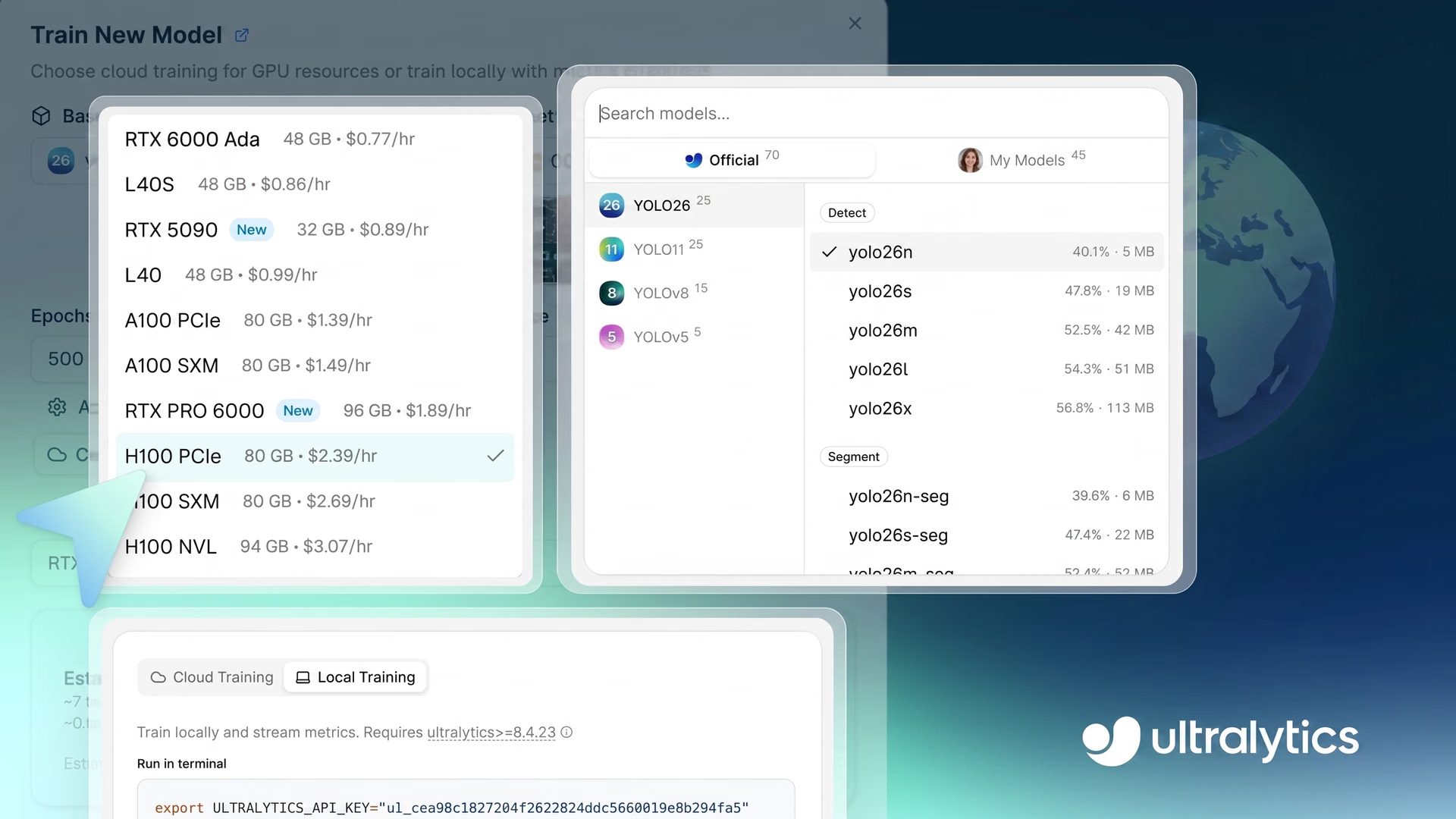
Last week, Ultralytics introduced the Ultralytics Platform, a unified workspace designed to simplify the way teams build, train, and deploy computer vision models. Instead of juggling multiple tools, the platform brings everything into one place. Going from idea to deployment with vision AI models becomes hassle-free.
This is crucial because computer vision is rapidly becoming a core part of various industries. It powers applications like manufacturing inspection, retail analytics, and autonomous navigation.
Turning these vision-enabled applications into reliable systems depends on how well models are trained. Model training involves learning from labeled data so the model can recognize patterns and make accurate predictions. In general, well-trained models lead to better model performance and more reliable results in real-world applications.
However, training a computer vision model isn’t always straightforward. It consists of various aspects, such as setting up environments, selecting appropriate compute resources, tuning hyperparameters, and tracking multiple training experiments. When these steps are spread across different tools and systems, the training workflow quickly becomes complex and difficult to manage.
The Ultralytics Platform solves this by bringing the entire training process into a single, unified dashboard. You can configure, run, and monitor training jobs in one place, whether you're working in the cloud, locally, or on Google Colab.
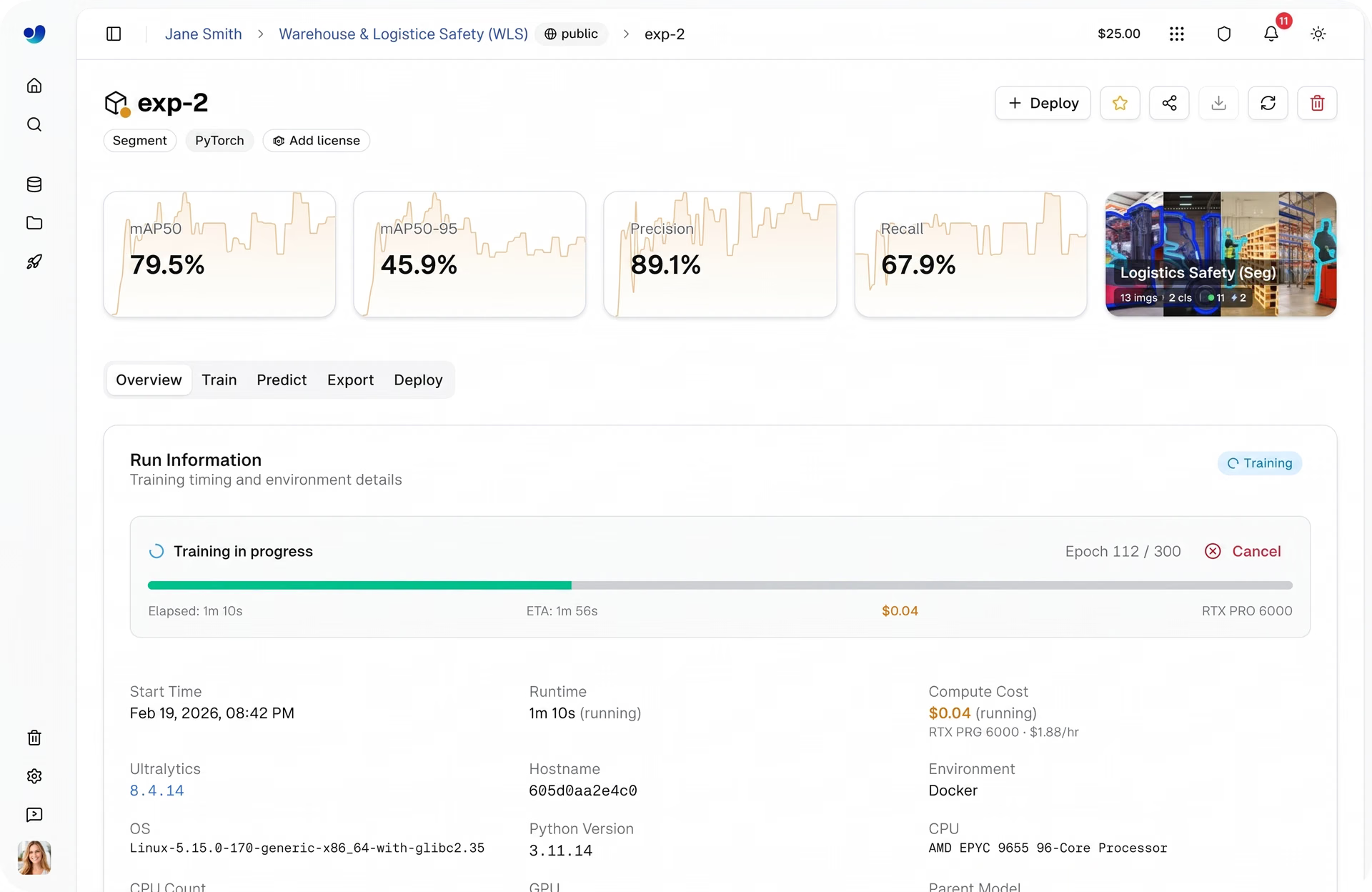
Fig 1. A glimpse of model training within Ultralytics Platform (Source)
In this article, we’ll explore how Ultralytics Platform streamlines model training and why it can give you an edge in your vision AI projects. Let’s get started!
Computer vision models learn from data through model training#
Before diving into how model training works on Ultralytics Platform, let’s first take a step back and walk through what model training is and what goes into it.
Model training is the process by which a computer vision model learns to interpret visual data. It analyzes images or videos and gradually adjusts its internal parameters to perform vision tasks like object detection, image classification, and instance segmentation accurately. Over time, the model improves by learning patterns directly from the data it sees.
The quality of training depends heavily on datasets. You can think of a dataset like a set of flashcards a teacher would use to train a student, where each example helps the model learn what to look for.
A typical computer vision dataset includes images, usually in formats like JPG or PNG, and annotations that describe what’s in each image. These annotations, often stored as JSON or TXT files, provide the labels and context the model needs to learn effectively.
But training isn’t just about feeding data into a model. It involves several key steps, from preparing the dataset to selecting the right model and configuring the training process. Next, let’s take a closer look at a few of these steps.
A look at how datasets are prepared#
It might seem like once you have a dataset, you can immediately start training a model, but there are a few steps you need to take first, such as splitting the dataset.
Generally, a dataset is split into three parts: training set, validation set, and testing set. The training images are used to teach the model patterns in the data, while the validation set helps monitor and fine-tune performance during training.
The testing set is used at the end to evaluate how well the model performs on completely new, unseen data. This setup helps ensure the model doesn’t just memorize the data but can generalize to real-world scenarios.
Selecting the right model for training#
Another important step before training is choosing the model you want to use. In many cases, this means selecting a pre-trained model. Models like Ultralytics YOLO models are already trained on large datasets and have learned general visual patterns, making them a strong starting point.
Using these models is an example of transfer learning, where you build on existing knowledge and adapt the model to your specific task. This approach helps speed up training and improve results, especially when working with limited data.
These models also come in different sizes, each offering a trade-off between speed and accuracy. Smaller models are faster and more efficient, while larger models tend to deliver higher accuracy but require more compute.
Configuring training parameters for vision models#
After you have a prepared dataset and you’ve selected a model, the next step is configuring how the model learns.
A computer vision model is trained using a set of parameters that determine how it processes data, updates its weights, and improves over time. These settings directly impact both training speed and final accuracy, making them essential for achieving strong results.
Here are some of the most commonly used training parameters:
- Epochs: It represents how many times the model goes through the entire dataset during training. Increasing the number of epochs gives the model more opportunities to learn patterns from the data.
- Batch size: This is the number of images processed together in a single training step. Larger batch sizes can speed up training but require more memory.
- Image size: It specifies the resolution of the input images used during training. Higher resolutions may improve detection accuracy but increase computational cost.
- Learning rate: This is the rate at which the model updates its internal parameters during training. Values that are too high or too low can make training unstable.
- Optimizer: This is the algorithm responsible for updating the model’s parameters based on the error calculated during each training iteration.
In Ultralytics YOLO-based workflows, these configurations are usually defined in a YAML file. This file specifies dataset paths, class names, and how the data is split. It acts as a central configuration that tells the model how to interpret the dataset.
From fragmented workflows to a unified experience with Ultralytics Platform#
We’ve just discussed some of the key steps involved in training a computer vision model, from preparing datasets to selecting a model and configuring training parameters. In practice, the process often goes further, including tracking experiments, comparing multiple training runs, and continuously refining models over time.
These steps are rarely handled in a single place. Datasets may be prepared in one tool, training runs executed in another environment, and experiment tracking managed separately. As projects grow, this fragmentation adds complexity, slows down iteration, and makes it harder to keep everything organized.
Ultralytics Platform removes this complexity by bringing the entire training workflow into one environment. Instead of switching between tools, you can manage datasets, configure training, run experiments, and monitor results all in one place.
Next, let’s dive into how Ultralytics Platform makes model training smarter.
Training options supported by Ultralytics Platform#
In real-world applications, training a computer vision model often requires flexible environments. Depending on the size of your dataset, the complexity of the model, and available hardware, you may choose to run training in the cloud, on a local machine, or through external notebook environments.
Ultralytics Platform supports the following training options to accommodate these needs:
- Cloud training: Training runs on Ultralytics-managed cloud graphics processing units (GPUs). This option is ideal for larger datasets or more complex models that require significant computational resources.
- Local training: This option uses the hardware available on your machine and is great for quick experiments, testing configurations, or working with smaller datasets. For more scalable workloads, training can also be run in your own cloud environment, such as AWS or GCP.
- Google Colab: With Ultralytics Platform, you can run training in Google Colab’s hosted notebook environment, enabling a flexible, browser-based workflow without configuring a local machine.
Exploring cloud training on Ultralytics Platform#
When it comes to computer vision projects, training models locally or through notebook environments isn’t always easy.
For instance, with local training, performance depends entirely on your hardware, which can limit compute power and slow down experimentation. GPUs are essential for efficient training, but not every setup has reliable access to them.
While notebook environments like Google Colab offer an alternative by providing cloud-based GPUs, sessions are often temporary and can interrupt longer training runs. As datasets grow and workflows become more complex, these limitations can quickly turn into bottlenecks, making training slower and less reliable.
Ultralytics Platform addresses this with its cloud training option. It provides a ready-to-use environment where Python dependencies and frameworks like PyTorch are pre-configured, allowing you to start training without additional setup.
From a single dashboard, you can launch training jobs and monitor progress in real time. This makes it easier to focus on improving your models instead of managing infrastructure.
Now, let’s see how to get started with cloud training on Ultralytics Platform.
Step 1: Select a base model#
The first step is choosing a base model for your training run. You can select a pre-trained Ultralytics YOLO model, clone a community model, or upload your own pretrained weights to meet custom requirements.
The platform supports all Ultralytics YOLO models, including Ultralytics YOLO26, Ultralytics YOLO11, Ultralytics YOLOv8, and Ultralytics YOLOv5, each available in different size variants such as nano (n), small (s), medium (m), large (l), and extra-large (x). With different model variants offering a trade-off between speed and accuracy, you can choose a model that fits your performance and compute requirements.
These models support a range of computer vision tasks that Ultralytics YOLO users are already familiar with, including object detection, instance segmentation, image classification, oriented bounding box (OBB) detection, and pose estimation.
If you have custom requirements, you can also upload your own pretrained model weights. This means you can continue training or fine-tune an existing model like an object detector within the platform, rather than starting from scratch. It’s especially useful if you’ve already trained a model elsewhere or want to adapt a model to a more specific use case.
Step 2: Select a dataset#
The next step is selecting a dataset for training. On the Ultralytics Platform, you can use pre-existing datasets like the COCO dataset, clone datasets from the community, or upload your own custom dataset tailored to your specific application.
The platform supports common annotation formats such as Ultralytics YOLO and COCO, and can also handle raw image uploads if you plan to annotate custom data directly on the platform.
Once uploaded, datasets are automatically processed, including validation, normalization, label parsing, and statistics generation. This gives you immediate visibility into your data, including class distributions and dataset structure, and helps ensure everything is ready for training.
Datasets are also automatically linked to training runs, letting you track which data was used for each model and maintain consistency across experiments.
Step 3: Configure training parameters#
After choosing the dataset, you can configure the training parameters that control how the model learns. These include epochs, batch size, image size, and run name for the training log. Many of these parameters influence both the training duration and the final performance of the model.
For more controlled training, the platform also lets you adjust advanced parameters such as learning rate, optimizer type, color augmentation settings, and other training options. These settings can fine-tune the training process to improve model accuracy and stability.
Step 4: Select a GPU#
Next, you can select the GPU configuration for your training run. Choosing the right GPU depends on factors like dataset size, batch size, image resolution, and model complexity. Finding the right balance helps keep training efficient without using more compute than needed.
Ultralytics Platform offers 22 GPU options with different levels of VRAM (memory on a GPU) and compute power, supporting everything from small tasks to large-scale workloads.
Using this, you can match the hardware to your specific needs, whether you're training lightweight models or working with large, complex datasets. To learn more, check out the list of available GPUs on the Ultralytics Platform training docs page.
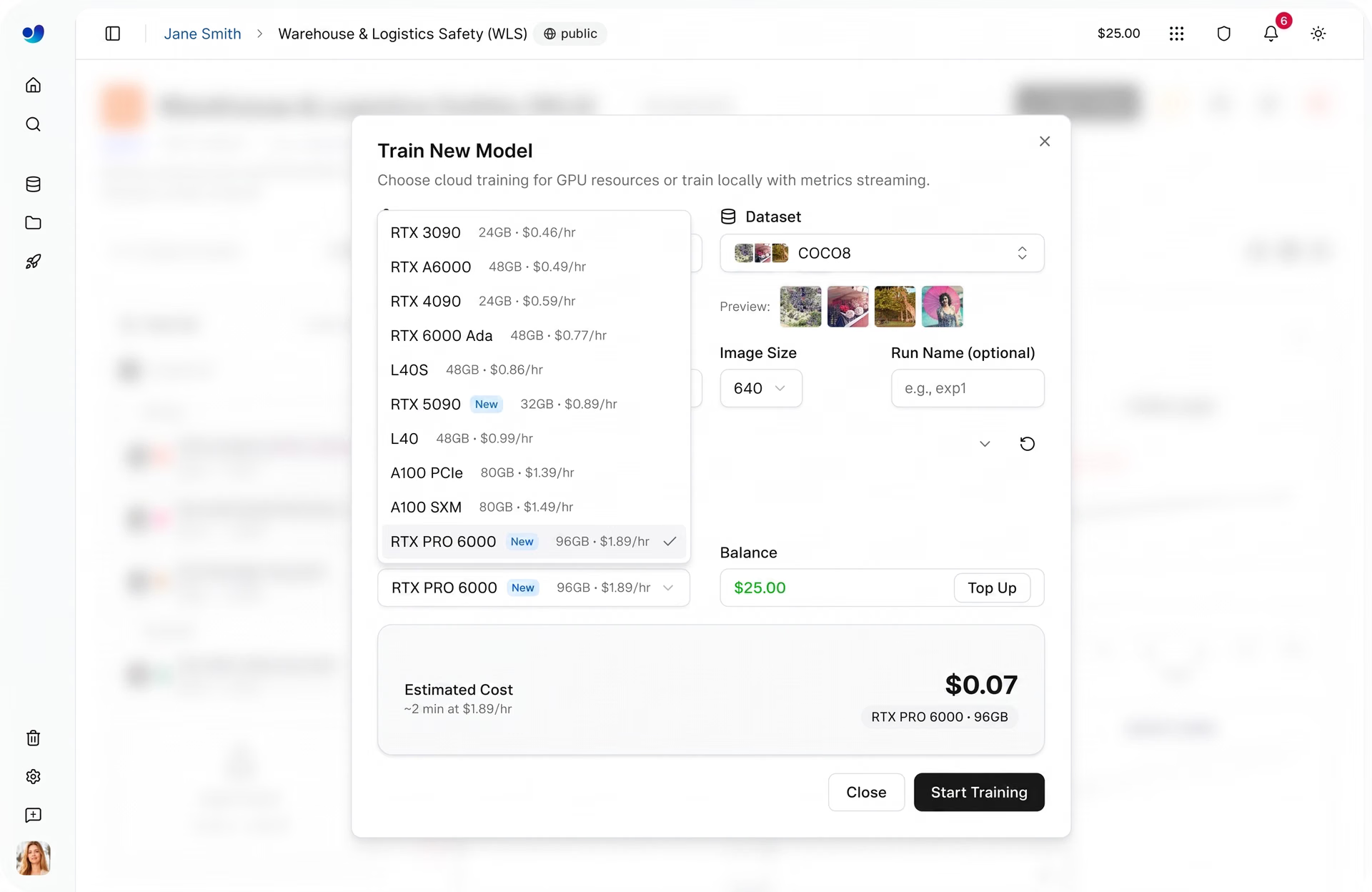
Fig 2. Some of the GPU options enabled through Ultralytics Platform (Source)
Step 5: Start cloud training#
Once you’ve selected the model, dataset, training parameters, and compute option, starting a training run is quick. From the dashboard, you can launch training with a single click, and the platform handles the rest by initializing the environment and running the job on the selected GPU.
As training begins, you can monitor progress directly within the platform. The Train tab provides real-time visibility into key metrics, including performance metrics, loss curves, system usage, and live training logs.
To learn more about training locally or using Google Colab with Ultralytics Platform, you can explore more tutorials within the official Ultralytics Platform documentation.
Evaluating and comparing models on Ultralytics Platform#
Once training is complete, the next step is evaluating how well your model performs. On Ultralytics Platform, you can compare multiple training runs within a project, giving you a clear view of how different experiments perform.
When developing models, training is often repeated multiple times with different settings, such as changing the learning rate, batch size, or model size, to improve results. Each of these runs produces a slightly different model, which is why comparing them is vital.
Projects act as a central hub where models and experiments are organized together. You can track progress, review results, and stay focused without switching between different tools or views.
From this unified view, you can also analyze key performance metrics such as precision, recall, and mAP (mean average precision) to understand how your model performs across different classes. You can also compare training runs side by side to identify which configurations deliver the best results.
To complement these metrics, you can use the Predict tab to quickly test trained models on sample images or data, helping you visually validate performance and spot potential issues.
With these insights, you can select the top-performing model, typically saved as the “best.pt” checkpoint, and move forward to the next stage, whether that’s further evaluation, using the model to run inference, or model deployment through the platform.
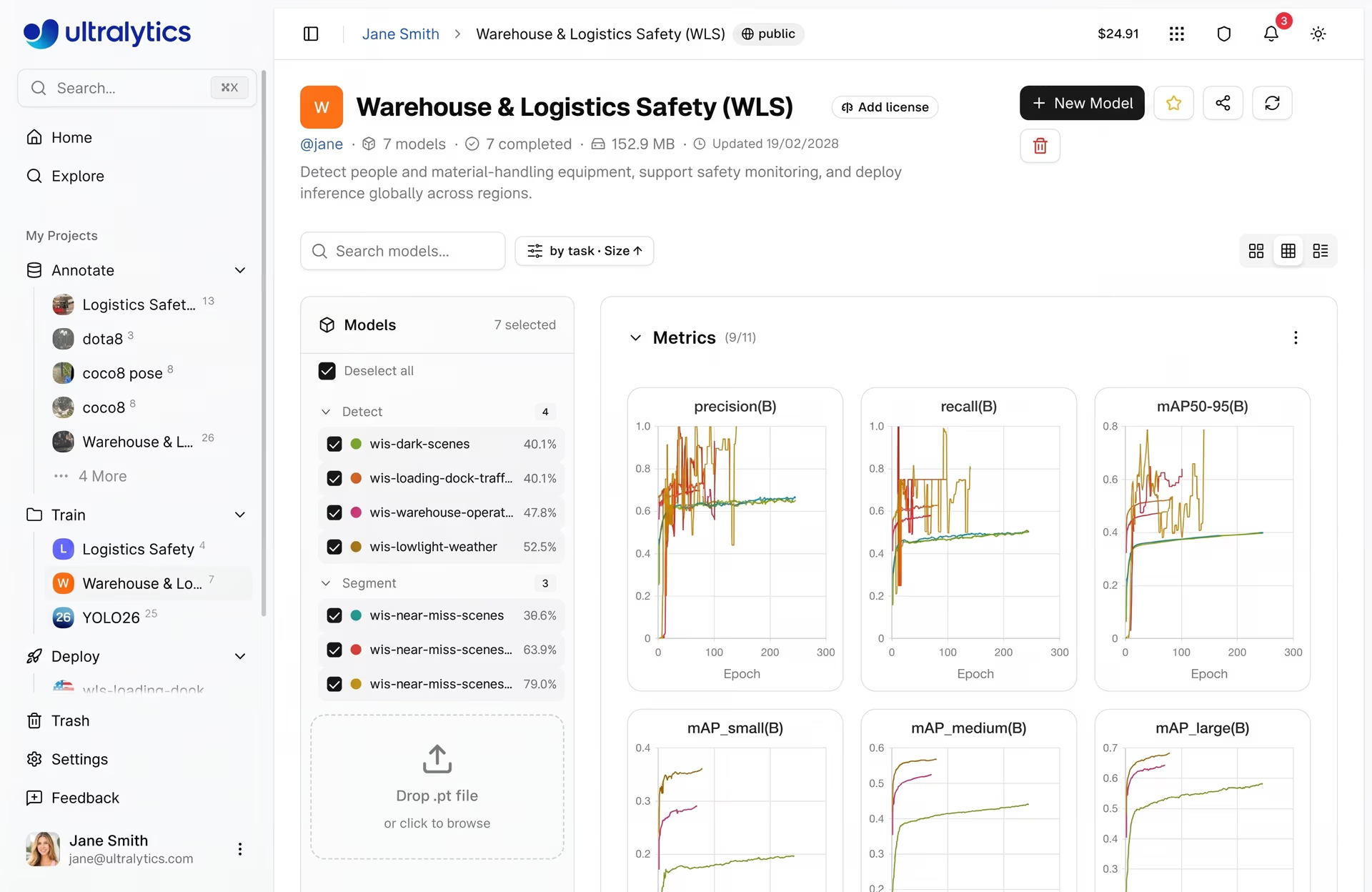
Fig 3. An example of viewing metrics on Ultralytics Platform (Source)
Estimating training cost within the Ultralytics Platform#
Training object detection models in the cloud incurs compute costs, especially when you access high-performance GPUs. To make this more convenient, Ultralytics Platform provides a cost estimate before training begins.
It gives you clear visibility into expected usage, helping you plan workloads, manage budgets, and avoid unexpected expenses before launching a training job. Here’s how you can check estimated costs before starting training.
How training time is estimated#
To estimate cost accurately, the platform first calculates how long a single training epoch will take. This depends on factors like dataset size, model size, image resolution, batch size, and the speed of the selected GPU.
Using these inputs, it determines the estimated time per epoch and scales it to the full training run. The total duration is calculated by combining the time across all epochs with a small startup overhead.
The overhead accounts for tasks such as initializing the environment, loading datasets, and preparing the GPU, ensuring that the estimate reflects the complete training process, not just the training loop.
How the training cost is calculated#
Once the total training time is estimated, the platform converts it to cost using the selected GPU's hourly rate.
By combining training duration with GPU pricing, we can get a clear estimate of how much the run will cost before it even starts.
Having upfront visibility makes it easy to adjust your setup, like tuning training parameters or selecting a different GPU, so you can balance performance and cost more effectively.
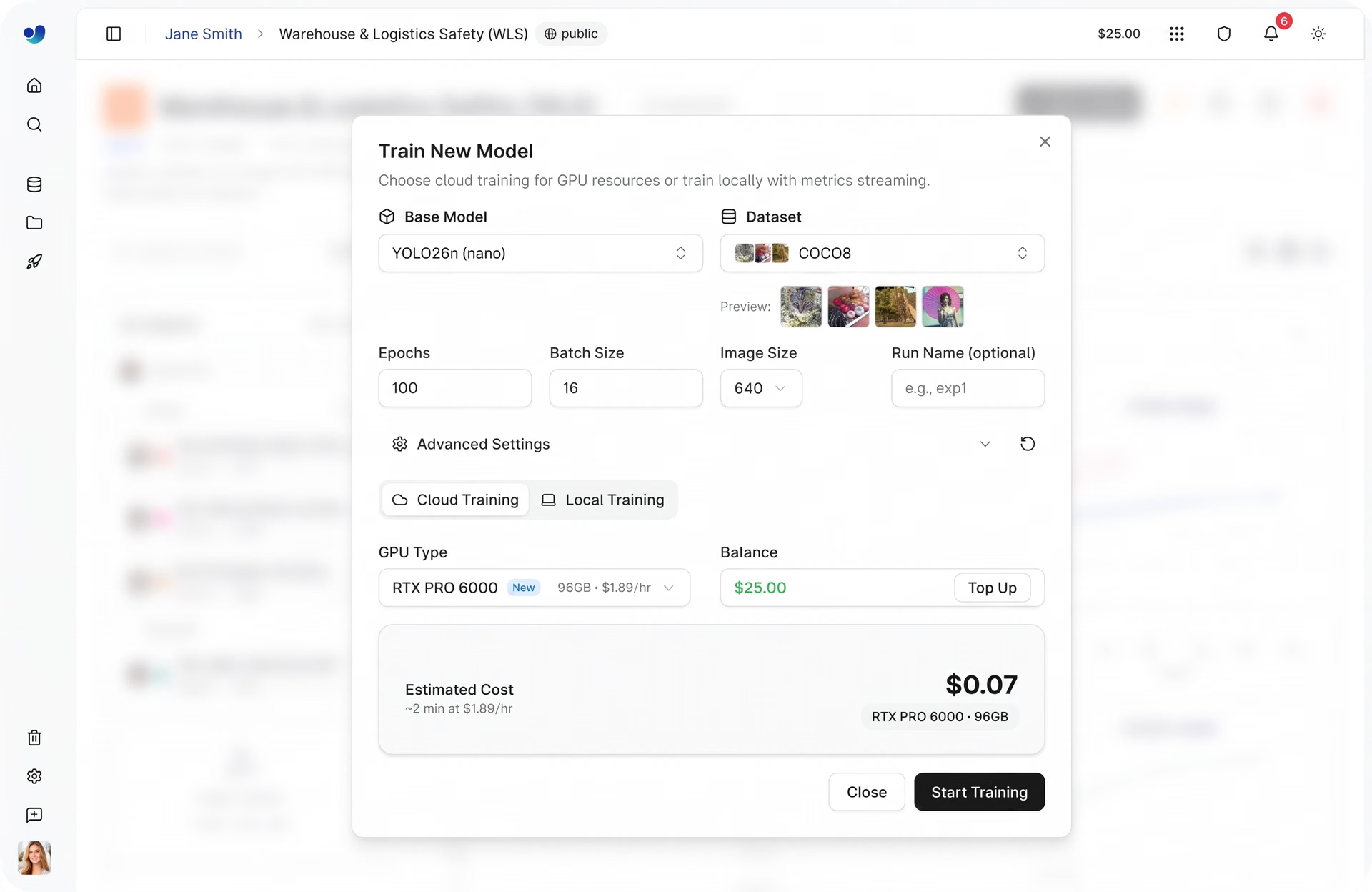
Fig 4. Setting up model training and estimating cost within Ultralytics Platform (Source)
Key advantages of using the Ultralytics Platform for model training#
Till now, we’ve walked through the key steps involved in training computer vision models and how they come together on the Ultralytics Platform.
Beyond these core features, there are additional capabilities that enhance the training workflow. Here’s an overview of some of the key benefits of using Ultralytics Platform for model training:
- Built-in experiment reproducibility: Every training run is automatically logged with its full configuration, including the model, dataset, parameters, and compute setup. This makes it simple to revisit experiments and reproduce results reliably.
- Training insights over time: Instead of just viewing final results, you can track how performance evolves across epochs, helping you better understand model behavior during training.
- Reduced operational overhead: By handling environment setup, dependency management, and infrastructure in the background, the platform lets you focus more on model development and less on setup.
- Centralized experiment organization: Projects act as a single place to manage models, datasets, and training runs, helping keep experiments structured as workflows grow more complex.
Key takeaways#
Training is one of the most important stages in the machine learning model lifecycle. It determines how accurately a model can recognize and interpret visual data.
By combining training data configuration, monitoring, experiment comparison, and cost estimation in one environment, the Ultralytics Platform streamlines the process of building high-performing computer vision models and preparing them for deployment.
Check out our growing community and GitHub repository to learn more about computer vision. If you're looking to build vision solutions, take a look at our licensing options. Explore our solution pages to know more about the benefits of computer vision in manufacturing and AI in agriculture.








