How to export Ultralytics YOLO models using Ultralytics Platform
Export vision AI models with ease using the Ultralytics Platform. Explore how to prepare models in a few clicks for edge, mobile, and cloud deployment.

Last month, we launched Ultralytics Platform, a unified workspace designed to simplify the entire computer vision workflow. It brings together key vision AI capabilities, including dataset management, annotation, model training, testing, deployment, and monitoring, into a single, streamlined interface.
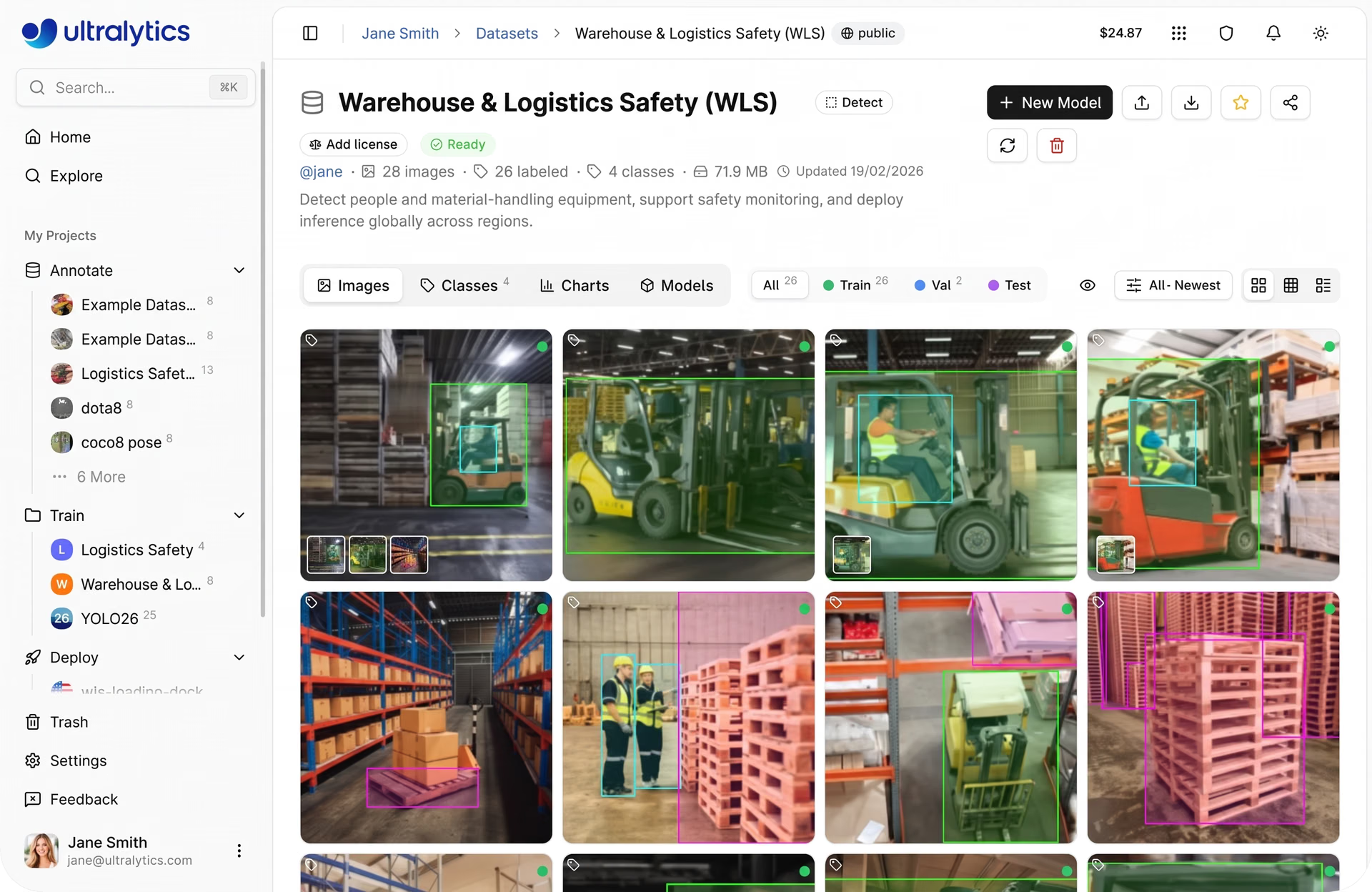
Fig 1. A glimpse of Ultralytics Platform (Source)
As part of this end-to-end workflow, deployment plays a crucial role in taking models from experimentation to real-world use. Previously, we explored the different deployment options available on the platform, including shared inference through APIs, dedicated endpoints for scalable production deployments, and exporting models to run on edge devices or external infrastructure.
Now, let’s take a closer look at model export and how it supports deployment across different environments. Unlike shared inference and dedicated endpoints, which execute models within Ultralytics Platform-managed infrastructure, model export enables models to be deployed and run in external environments such as edge devices, mobile applications, and custom infrastructure.
Before models can run in these environments, they need to be converted into formats supported by the target runtime. Each deployment setup has its own requirements, from lightweight formats for mobile and edge devices to high-performance formats for cloud and GPU-based systems.
Traditionally, this process can be time-consuming, involving scripts, dependencies, and multiple tools. With Ultralytics Platform, exporting is much simpler. Models can be converted and optimized in just a few clicks, without extra setup.
In this article, we’ll walk through what model export means, the formats supported by Ultralytics Platform, and how to choose the right one for your use case. Let’s get started!
An overview of exporting a model#
Exporting a model involves converting a pre-trained or custom-trained model into a format usable outside its original framework. Ultralytics YOLO models are built using PyTorch and stored in their native format, which works well for training, evaluation, and experimentation within the PyTorch ecosystem.
However, deployment environments often have different runtimes and hardware requirements. Because of this, the format used during training isn’t always suitable for deployment.
For instance, a mobile application may require a lightweight format optimized for low power consumption, while a browser-based app needs a format that runs efficiently in web environments.
Edge devices, such as cameras and embedded systems, benefit from compact and fast models, whereas cloud systems are designed for high-performance inference. To support these different scenarios, models need to be exported into compatible formats.
Why the option to export models is more important than ever#
Today, computer vision models are being deployed closer to where data is generated, especially on edge devices. Smartphones run real-time vision applications, CCTV cameras perform on-device monitoring, and autonomous systems rely on instant decision-making.
However, deploying in these environments comes with its own set of challenges. Edge devices have limited computational power, strict latency requirements, and constraints on memory and energy consumption. A model that performs well during training with sufficient resources may not run efficiently under these restricted conditions.
Exporting a model to the right format can help address these challenges. By converting the model appropriately, it can be optimized for speed, reduced in size, and made compatible with specific hardware.
At the same time, exporting provides flexibility. The same model can be adapted for different deployment environments by converting it into multiple formats based on specific requirements.
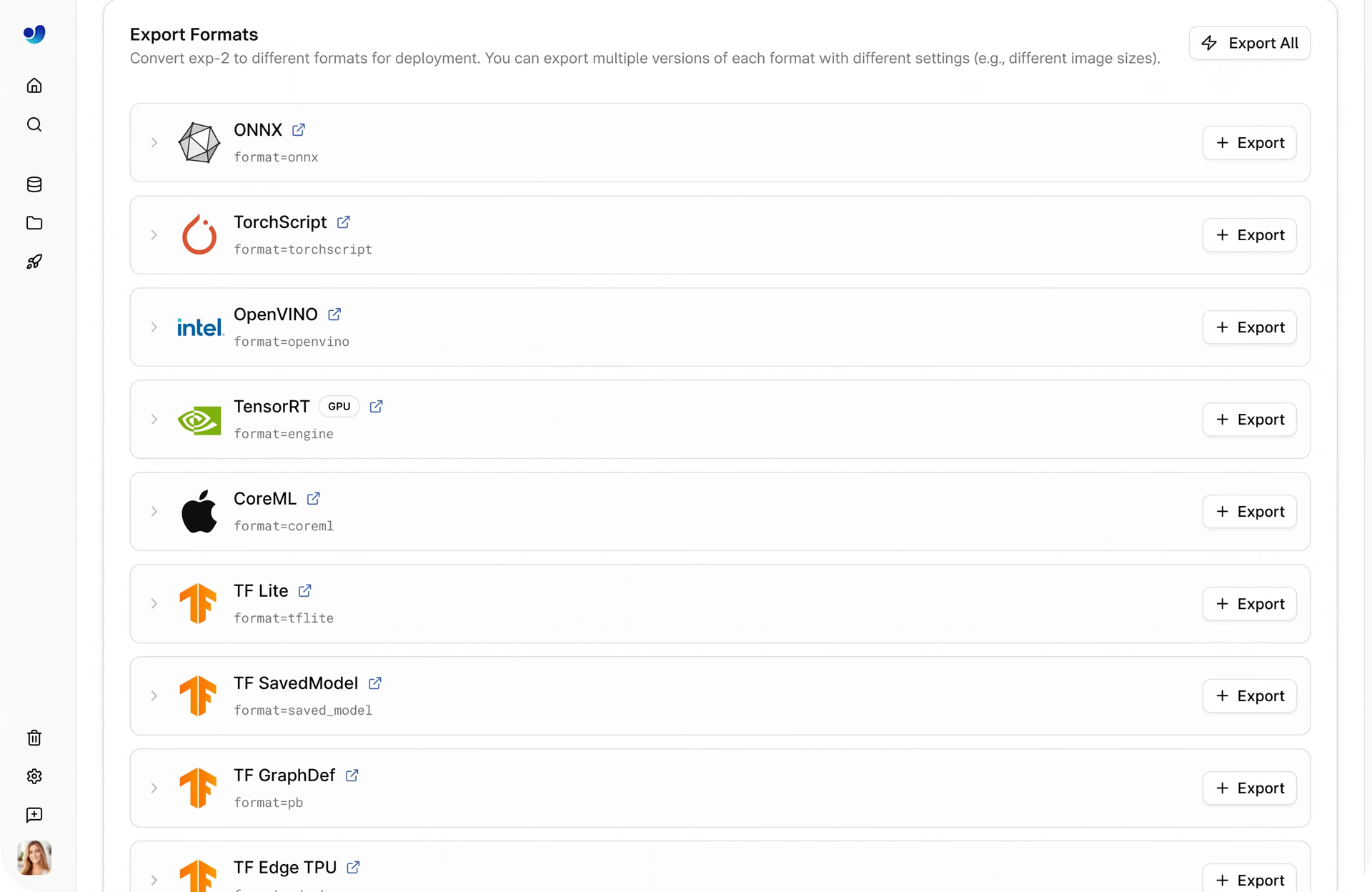
Fig 2. Some of the export formats available within Ultralytics Platform (Source)
For example, the NCNN model format is optimized for mobile and edge devices with low resource usage. Whereas the OpenVINO format is tailored for Intel hardware and delivers better performance on central processing units (CPUs), graphics processing units (GPUs), and neural processing units (NPUs).
In most cases, achieving this level of flexibility meant dealing with manual conversion, dependencies, and multiple tools, making the process time-consuming and complex. Ultralytics Platform streamlines this workflow by making model export more accessible and easier to manage.
How Ultralytics Platform simplifies model export#
Typically, exporting a model is treated as a separate and complex step in computer vision workflows. The Ultralytics Platform changes this by integrating the option to export a model directly into a single workspace that covers everything from training to deployment.
One of its key advantages is the no-code export experience. There is no need to write scripts, manage environments, or use framework-specific commands. Models can be exported in just a few clicks via a straightforward interface.
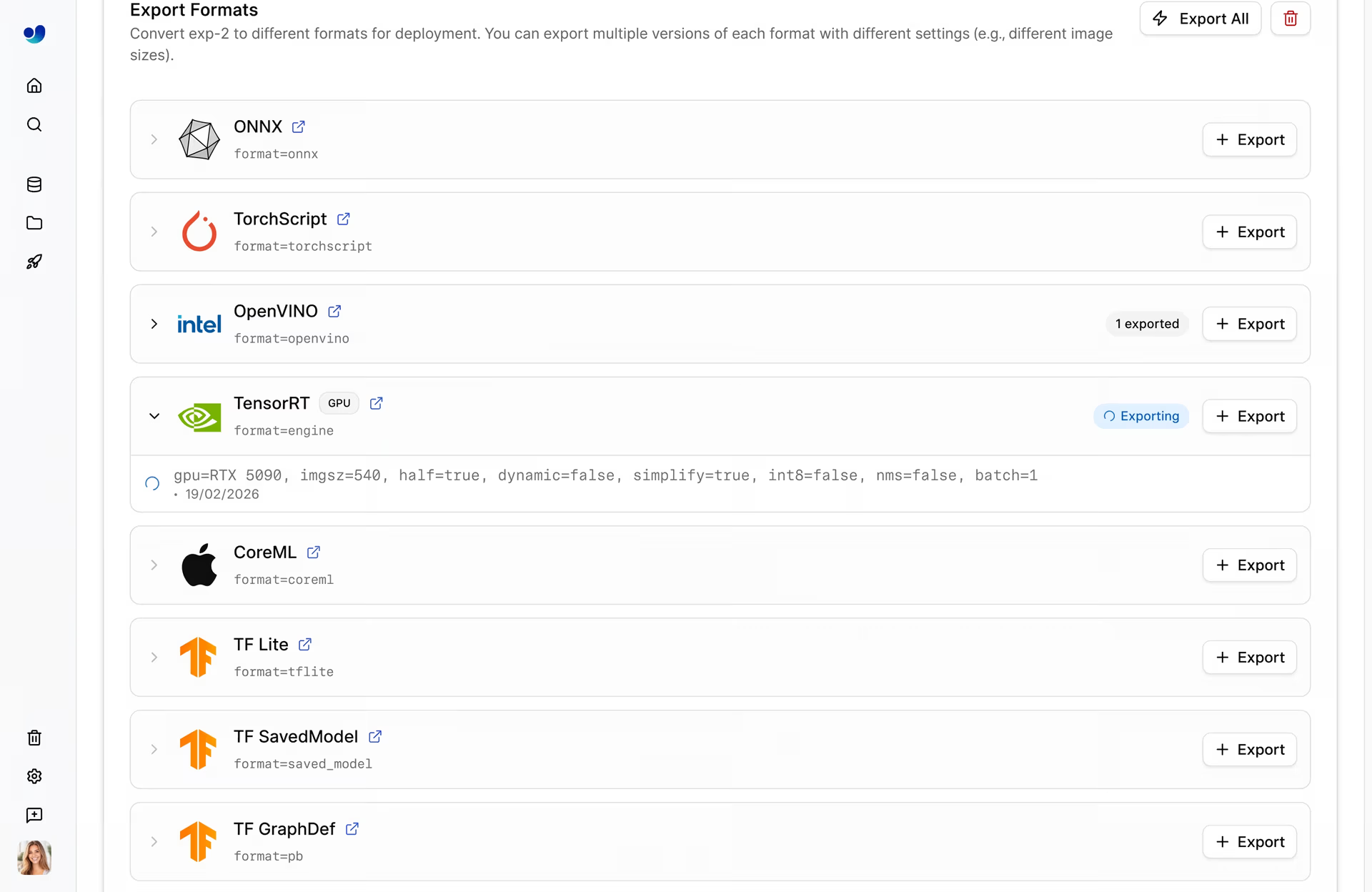
Fig 3. An example of exporting a model from Ultralytics Platform (Source)
Behind the scenes, the platform handles the heavy lifting. Tasks that would typically require multiple tools and manual setup are streamlined into a single process. You don’t have to install extra dependencies or deal with compatibility issues, making it much easier to go from a trained model to a production-ready solution.
Model export formats supported by Ultralytics Platform#
Ultralytics Platform supports 21 export formats, making it easy to prepare models for a wide range of deployment environments without added complexity.
Here’s an overview of some of the commonly used export formats:
- Cross-platform and interoperability: ONNX and TorchScript are widely used for running models across different frameworks and environments. ONNX acts as a bridge between ecosystems, making it easier to move models between tools, while TorchScript enables running PyTorch models in production without requiring a Python runtime.
- High-performance inference on GPUs: TensorRT is designed for NVIDIA GPUs and focuses on optimizing models for low latency and high throughput. It supports techniques like precision reduction and layer fusion to accelerate inference, making it a strong choice for real-time and production-scale applications.
- Mobile and edge deployment: CoreML, LiteRT (TensorFlow Lite), and NCNN are optimized for devices with limited compute and memory. These formats reduce model size and improve efficiency, enabling smooth performance on smartphones, embedded systems, and edge hardware. CoreML is typically used in Apple ecosystems, while LiteRT is common for Android.
- Hardware-optimized execution: OpenVINO is tailored for Intel hardware, including CPUs, GPUs, and VPUs, and helps improve inference speed and efficiency on those devices. Hardware-specific formats like this are useful when you need to get the best performance out of a particular system.
- Framework-specific and specialized runtimes: Formats such as PaddlePaddle and ExecuTorch support specific ecosystems and deployment needs, including running models efficiently on edge devices or integrating with particular deep learning stacks.
How to export a model using Ultralytics Platform#
Exporting a model on Ultralytics Platform is a simple, UI-based process. The entire workflow is handled through the interface, without the need for scripts or command-line tools.
Here’s how you can export a model using the platform:
- Log in and choose your model: Go to your project and open the trained model you want to export.
- Go to the Export tab: Within the model dashboard, click on the Export tab to view available export options.
- Select an export format: Choose a format like ONNX, TensorRT, or CoreML based on your deployment needs.
- Configure export settings (optional): Adjust parameters like image size, precision, or batch size to optimize performance.
- Start the export process: Click “Start Export” to begin the process. The platform handles the conversion automatically.
- Download the exported model: Once the export is complete, you can download the model and use it in your deployment pipeline.
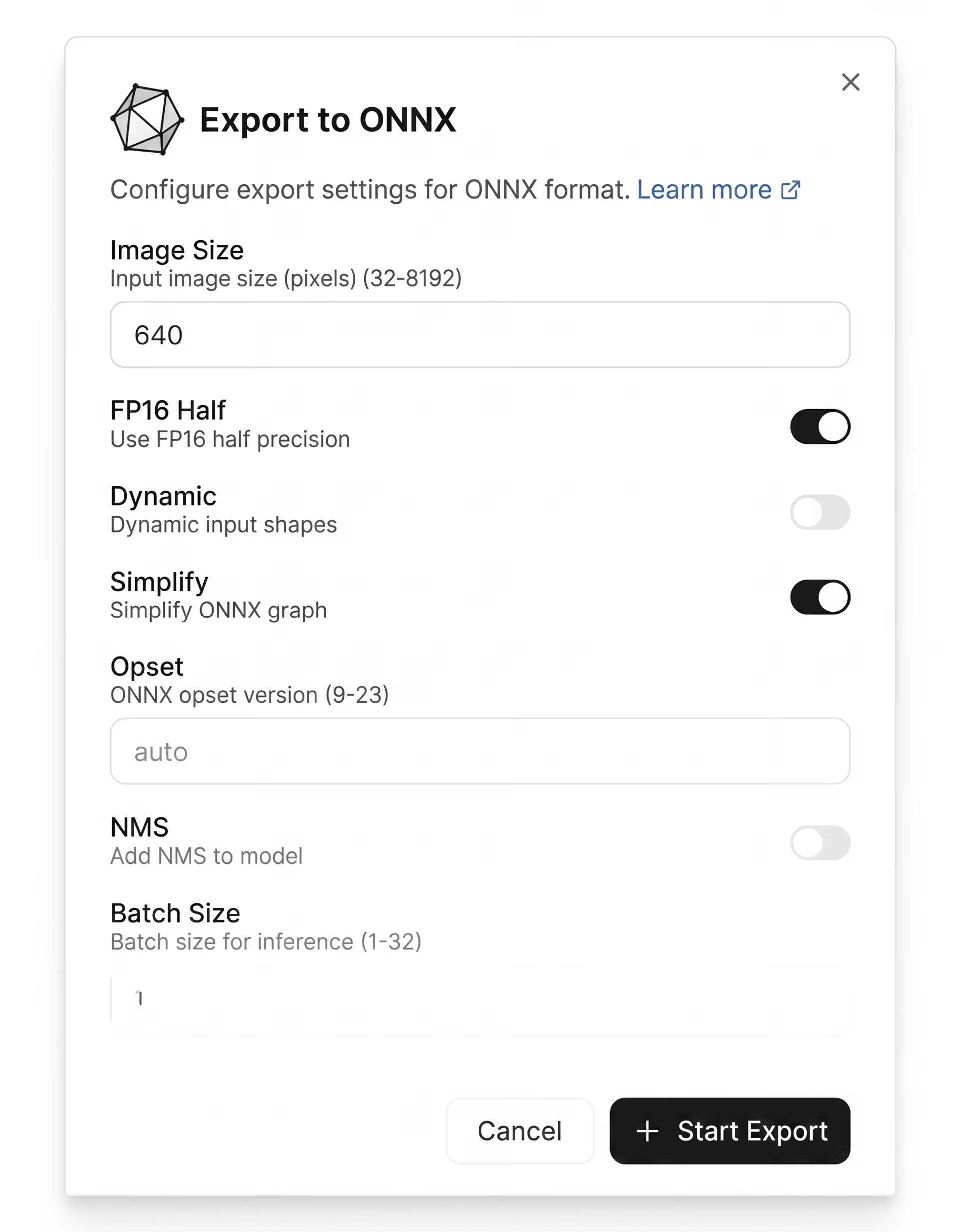
Fig 4. A look at configuring export settings in Ultralytics Platform
Choosing the right export format#
As you explore the different export formats supported by Ultralytics Platform, you might wonder which one to choose. The answer really depends on where and how you plan to use your model.
Here are a few factors to consider:
- Latency requirements: For real-time applications like video analytics or autonomous systems, low latency is critical. Formats optimized for high-performance inference, such as TensorRT, are often more suitable.
- Hardware constraints: Devices with limited memory and processing power, such as mobile phones or embedded systems, require lightweight formats like LiteRT or NCNN.
- Model size and power consumption: When working with edge devices, model size and power consumption become important. Smaller, optimized models help ensure consistent performance without draining resources.
- Deployment environment: If your model needs to run across different platforms, formats like ONNX offer flexibility. For platform-specific use cases, like iOS apps, CoreML is often the better choice.
There’s no one-size-fits-all format. It really comes down to balancing performance, compatibility, and the limitations of your target environment. Ultralytics Platform makes this easier by letting you try and compare different formats without extra effort.
Key takeaways#
Exporting is a vital step in getting your model ready for real-world use across different environments. With Ultralytics Platform, this process becomes much simpler, letting you convert and optimize models without extra setup or complexity. By choosing the right format for your use case, you can ensure your model runs efficiently wherever you deploy it.
Join our growing community and check out our GitHub repository to learn more about computer vision. Explore our solutions pages to know more about applications like AI in robotics and computer vision in logistics. Discover our licensing options and start building with vision AI!