Smart dataset management in computer vision with Ultralytics Platform
Explore how you can use Ultralytics Platform for better dataset management in your computer vision projects. Track, compare, and improve your datasets with ease.
Vision AI, or computer vision, has come a long way since its early days, evolving from experimental research into a key technology powering real-world applications. Today, AI enthusiasts can build powerful models for tasks like object detection and instance segmentation using accessible tools and frameworks.
However, as these applications move from experimentation to production, dataset management is still a critical and often overlooked challenge. As computer vision datasets grow in size and complexity, teams often struggle to maintain consistent annotations, track changes across versions, and ensure overall data quality.
Even cutting-edge models can underperform in real-world environments if the data they are trained on is incomplete, unbalanced, or poorly managed. This growing gap between development performance and real-world reliability is why a more structured approach to dataset management is needed.
Another common limitation is that data collection, annotation, and training are often handled using separate tools. A fragmented workflow makes it harder to manage datasets efficiently, increases the risk of inconsistencies, and slows down iteration.
To solve vision AI bottlenecks like dataset management and fragmented workflows, we recently launched Ultralytics Platform. It is an end-to-end workspace that brings dataset management, annotation, training, deployment, and monitoring into a single unified workflow.
By connecting each stage of the computer vision lifecycle, it becomes easier to track dataset changes, compare performance across versions, and continuously refine your data for better results.
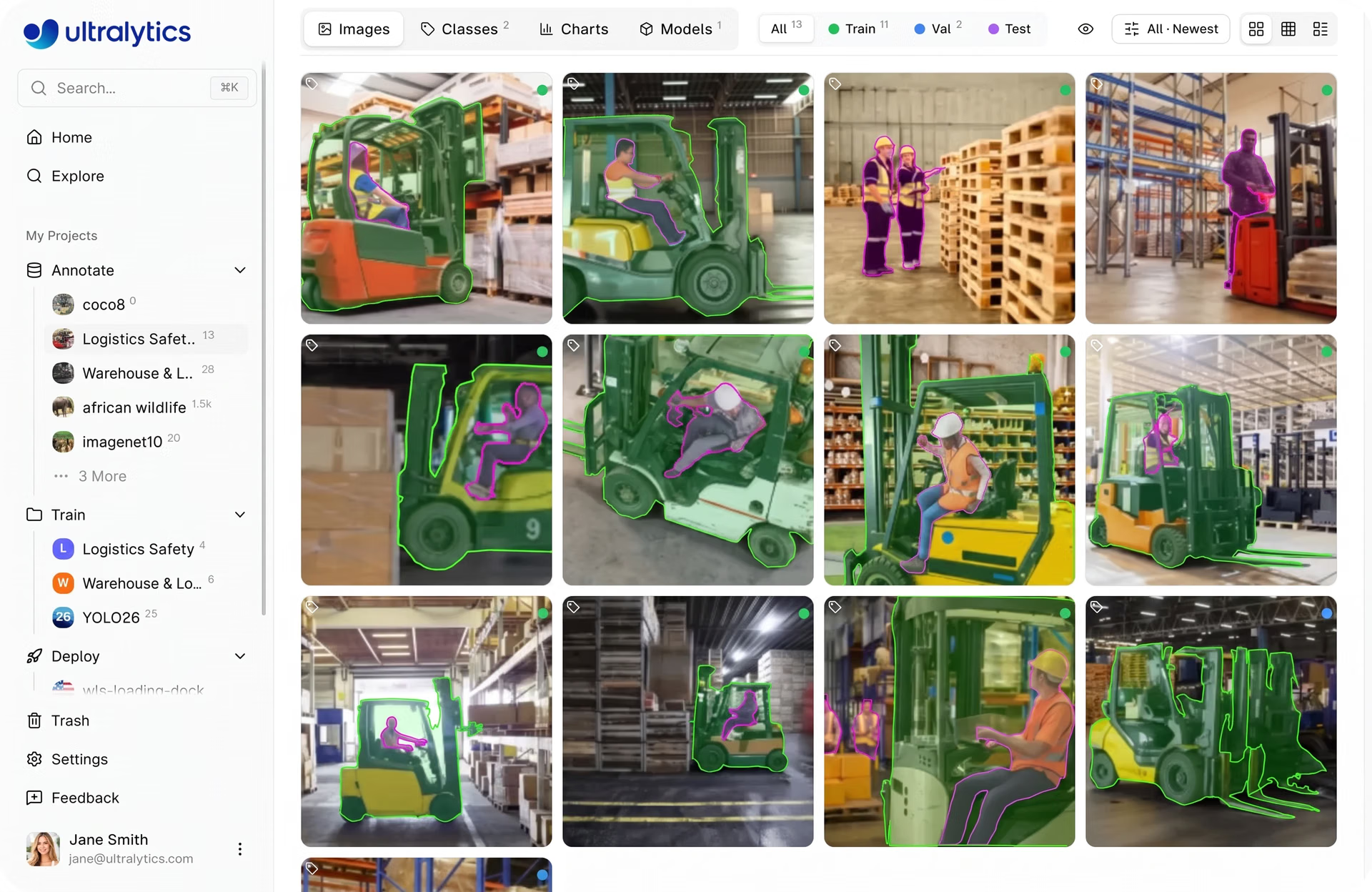
Fig 1. An example of viewing your dataset images within Ultralytics Platform (Source)
In this article, we’ll dive into how Ultralytics Platform helps you track, compare, and improve your datasets to build more reliable computer vision models. Let’s get started!
The importance of dataset management in computer vision#
The performance of a computer vision model is closely tied to the data it is trained on. Model accuracy, how often predictions are correct, depends not just on the algorithm, but on how well the dataset represents real-world conditions.
Simply put, a model learns patterns directly from the data, so any gaps, biases, or inconsistencies in the dataset can influence how it makes predictions. In other words, poor-quality data, incorrect annotations, or limited coverage of real-world variations in images, such as different lighting conditions, object angles, backgrounds, or levels of occlusion, can significantly reduce accuracy, even if the model architecture itself is strong.
This also applies when fine-tuning a model, where a pre-trained model is further trained on new or updated data to better adapt it to a specific use case or environment. Since model accuracy depends so heavily on data, managing that data properly becomes essential.
Dataset management includes organizing, labeling, and continuously updating data so it stays accurate and relevant. This makes it easier to improve performance over time, especially when retraining or fine-tuning models on new data.
How dataset quality affects real-world reliability#
Computer vision use cases, such as security monitoring systems, are a great example of why proper data management is vital. These systems need to work reliably across a range of real-world conditions, including different lighting environments, camera angles, levels of crowding, and partial occlusions.
If the training data doesn’t cover these variations or lacks diversity in how objects appear across different scenes and conditions, the model may struggle to detect objects accurately. For example, a model trained mostly on well-lit, uncluttered scenes may perform poorly in low-light environments or crowded settings. In security systems, this can lead to missed events or false alerts.
To avoid this, it’s important to maintain datasets that aren’t only clean and accurately labeled, but also well-balanced and continuously updated. This means identifying gaps in the data, adding new examples as conditions change, and making sure different classes and environments are represented evenly.
With a more complete and structured dataset, models are better equipped to handle real-world variability and produce more reliable predictions.
Key aspects of dataset management#
So, what does dataset management actually look like? It involves organizing, labeling, and maintaining data so it can be used effectively throughout the model development process.
Organizing data, for instance, includes structuring the dataset and splitting it into training, validation, and test sets. The training set is used to teach the model, the validation set is used to monitor performance and guide adjustments during development, and the test set is used to evaluate how well the final model performs on completely unseen data.
Meanwhile, labeling involves annotating images with details such as class labels, bounding boxes, or segmentation masks. Since the model learns from these annotations, accuracy and consistency are crucial for helping it learn meaningful patterns and make reliable predictions.
In addition to this, maintaining the dataset involves reviewing and updating data over time. This can include fixing annotation errors, removing low-quality or duplicate data, and adding new examples to cover missing cases or changing conditions.
More broadly, dataset management is an ongoing process. As models are evaluated and new data is collected, datasets need to be updated to reflect real-world conditions and edge cases. Tracking these updates and comparing different versions helps teams understand what’s improving performance and where further changes are needed.
Managing datasets with Ultralytics Platform#
Ultralytics Platform provides a structured workflow for managing datasets within a single environment, covering everything from data preparation to export. It is designed to support both individual developers and teams, making it easier to manage datasets consistently, whether you're working independently or collaborating across projects.
Each stage is designed to simplify how datasets are organized, processed, and used throughout the model development lifecycle. By bringing these steps into one place, the platform reduces fragmentation and makes it more straightforward to maintain consistency across workflows.
Next, let’s walk through the key steps involved and how the platform supports each of them.
Uploading datasets to Ultralytics Platform#
Getting started with datasets on the platform is flexible, with multiple ways to bring in or reuse data. You can upload your own data or get started faster by using public datasets available through the platform. You can also clone existing datasets shared by the community and build on top of them.
The platform’s community features make it easy to explore and reuse existing work. With access to datasets created by other users, including millions of images and annotations, you can quickly get started without having to collect and label everything yourself. Cloning a dataset creates a copy in your workspace, allowing you to modify and extend it while preserving the original.
For uploads, the platform supports individual images, videos, and dataset archives such as ZIP, TAR, or GZ files. It also supports widely used dataset formats like YOLO and COCO, making it easy to import existing datasets and annotations without additional conversion. Beyond this, you can upload a dataset using an NDJSON file exported from the platform, making it seamless to recreate or reuse datasets across projects.
Once data is uploaded, the platform processes data through a structured pipeline. This includes validating file formats and sizes, resizing images when needed, parsing annotations, and generating dataset statistics.
For example, videos are converted into frames so they can be used for training, while images are optimized and prepared for easier browsing and analysis. After processing, datasets are ready to be used for annotation, analysis, and model training within the platform.
Data annotation on Ultralytics Platform#
Once uploaded, datasets can be reviewed and annotated directly within the platform. The platform includes built-in image annotation tools for a range of computer vision tasks, such as object detection, instance segmentation, pose estimation, oriented bounding box (OBB) detection, and image classification.
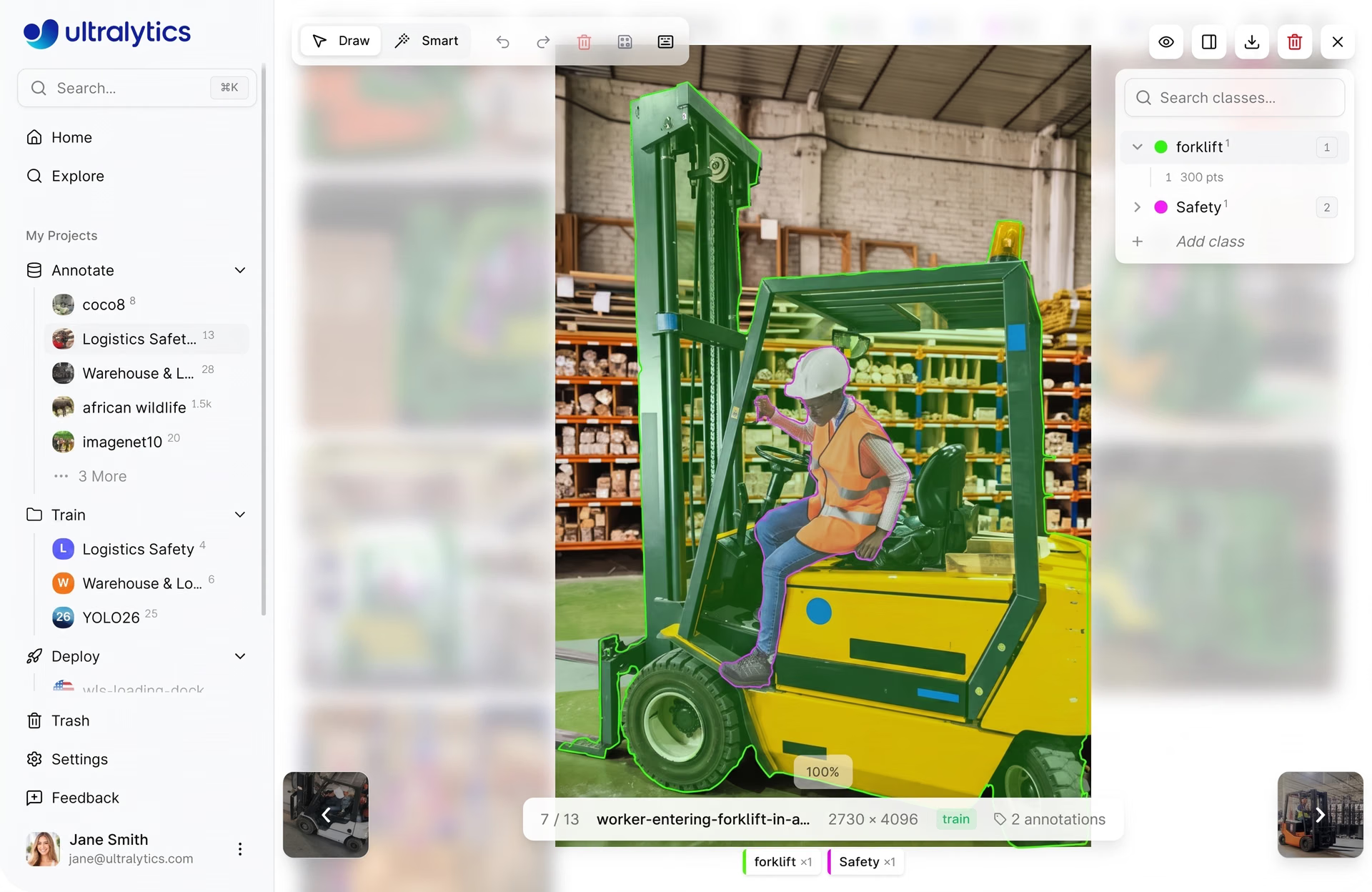
Fig 2. Using Ultralytics Platform for data labeling (Source)
Annotations can be created manually using these tools or accelerated with AI-assisted features like SAM-powered smart annotation. With SAM, you can generate masks, bounding boxes, or oriented boxes by interacting with the image, helping speed up the labeling process while maintaining accuracy.
Analyzing dataset quality through Ultralytics Platform#
In addition to preparing and annotating data, understanding dataset quality is essential for building reliable computer vision models. Without clear visibility into factors like class distribution, annotation quality, dataset splits, and how data is represented across different conditions, it can be difficult to spot issues that impact model performance.
Ultralytics Platform includes built-in features to help analyze datasets more effectively. These insights are available directly within the dataset interface, across tabs like Images, Classes, and Charts.
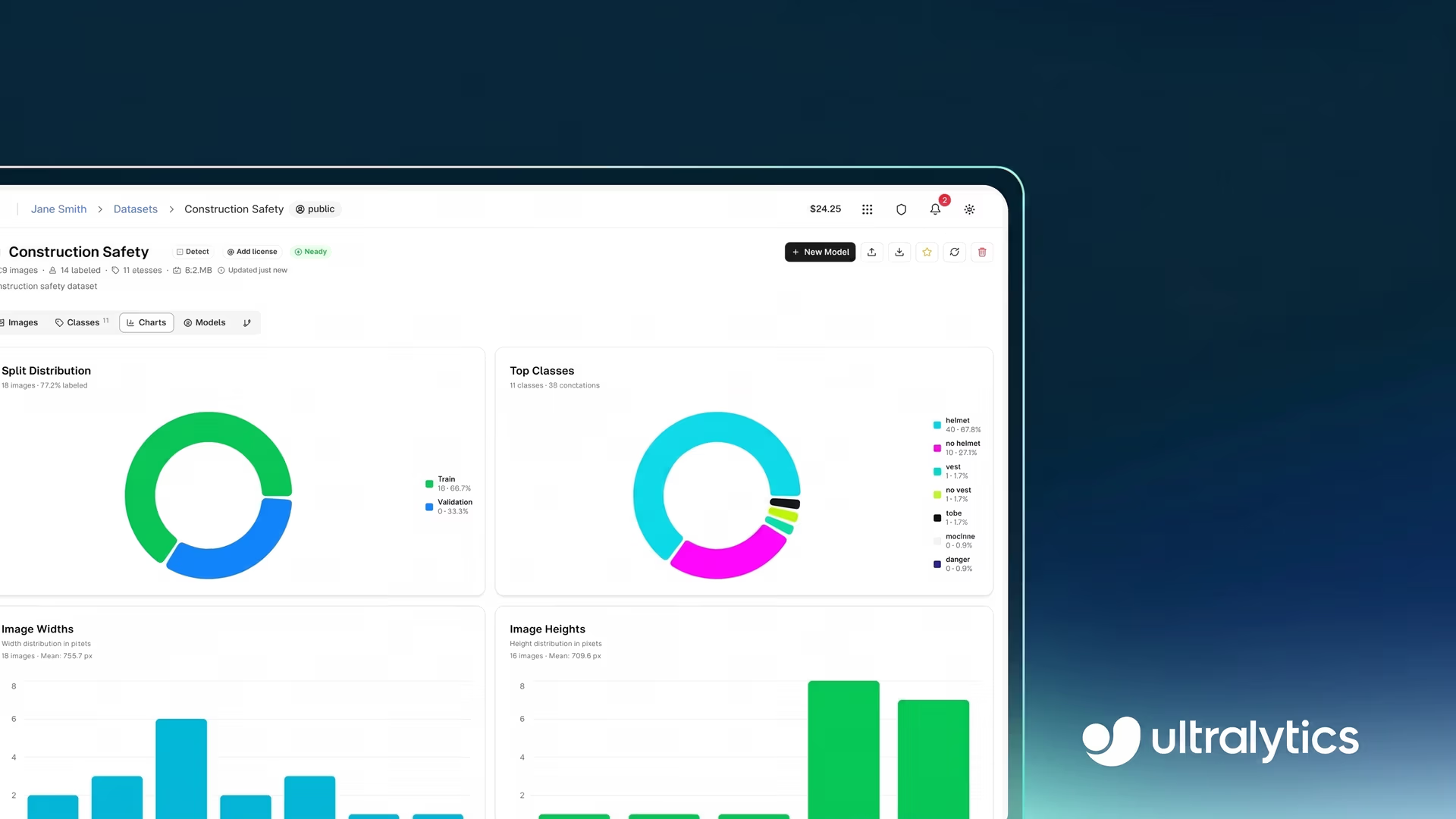
In the Charts tab, you can view dataset-level statistics such as split distribution (training, validation, and test), class frequency, and annotation heatmaps that show where objects appear within images.
The Classes tab provides a breakdown of annotation counts per class, making it easier to spot class imbalance. Meanwhile, the Images tab shows image-level details such as dimensions, annotation counts, and how labels are distributed across individual images.
These insights make it easier to identify issues such as class imbalance, missing scenarios, or uneven data distribution. For instance, you might notice that certain classes have very few examples or that most annotations are concentrated in specific areas of an image.
Beyond data analysis, the platform supports dataset curation and augmentation, meaning refining datasets by fixing or removing problematic data and creating variations of existing data to improve model performance. These improvements can be made directly within the platform by updating annotations, adding new data, or reorganizing dataset splits based on insights from analysis.
Exporting datasets from Ultralytics Platform#
Once a dataset is prepared and validated, it can be exported for use in different environments. This gives you the flexibility to use your computer vision data wherever you prefer, whether that’s training models locally, in the cloud, or in other tools and workflows.
The Ultralytics Platform supports multiple export formats, including YOLO, COCO, and NDJSON, making it easy to integrate datasets into different training workflows and tools.
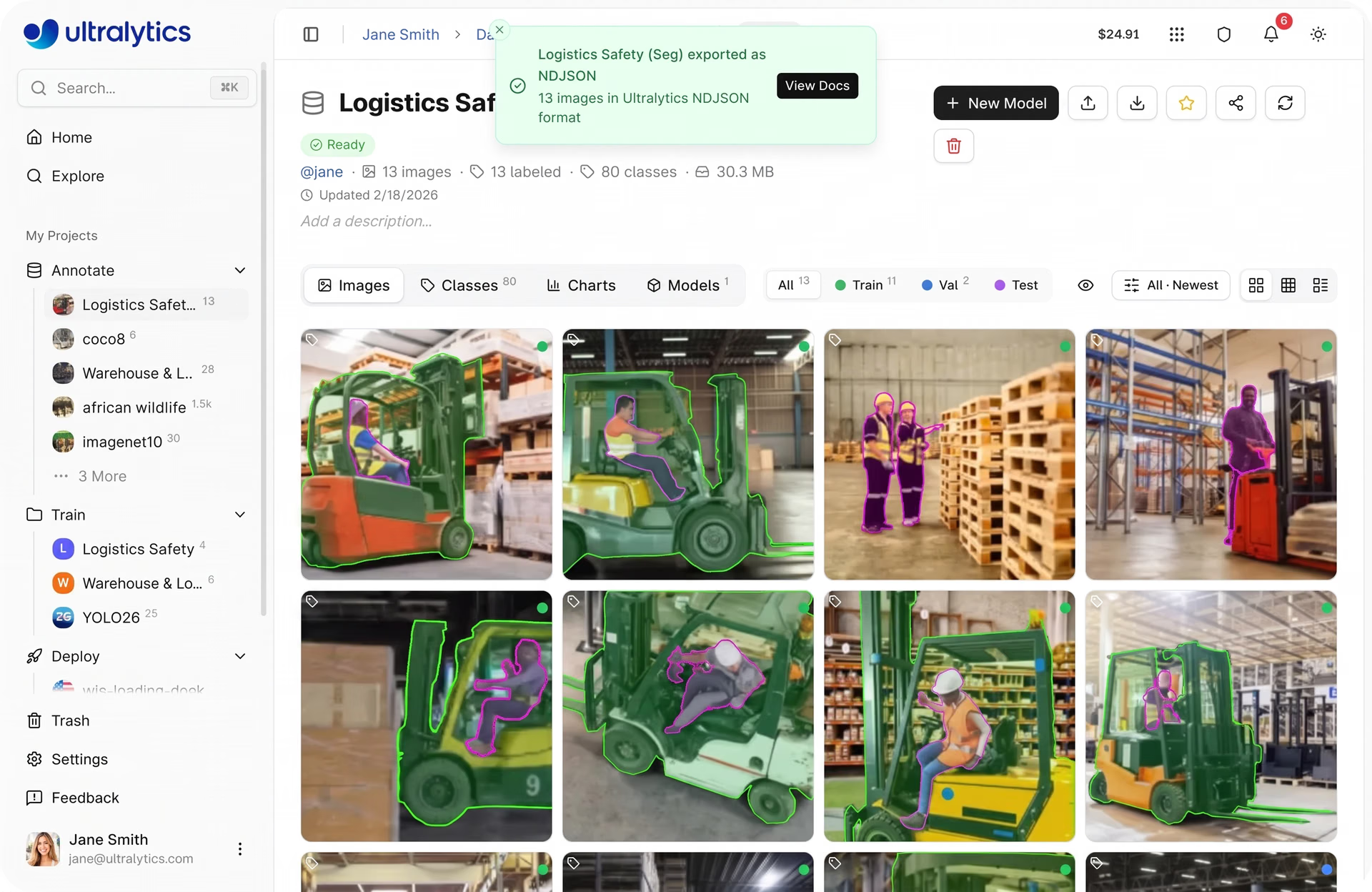
Fig 3. Exporting a dataset from Ultralytics Platform (Source)
Exporting a dataset creates a fixed snapshot of the data at a specific point in time, including its images, annotations, and structure. This is useful because datasets often change as new data is added, annotations are updated, or splits are adjusted. By exporting a snapshot, you can preserve the exact version of the dataset used for a particular training run.
This makes it simpler to reproduce results later, since you can train a model on the same data setup again, and compare performance across different dataset versions. For example, you can evaluate whether adding new images or fixing annotations actually improves model accuracy, rather than guessing what changed.
Exports are handled asynchronously, and once ready, datasets can be downloaded and used in local, cloud, or offline training environments.
Improving dataset quality through iterations on Ultralytics Platform#
In machine learning and deep learning workflows, dataset management continues even after deployment because real-world data often differs from the data used during training.
As models encounter new inputs, gaps in the dataset, such as missing conditions like low-light environments, different camera angles, occlusions, or crowded scenes, as well as annotation errors, become more apparent, making it necessary to refine the data over time.
There are several ways to improve a dataset. You can add new images or videos to cover missing conditions, such as low-light environments, different camera angles, occlusions, or crowded scenes, helping reduce blind spots in the data.
At the same time, ensuring annotations are accurate and consistent, such as correctly labeled objects and precise bounding boxes or masks, helps the model learn more reliable patterns.
This typically follows a simple loop: train the model, evaluate the results, identify errors, improve the dataset, and retrain. Each step helps highlight issues such as incorrect annotations, missing data, or underrepresented cases.
Let’s say you are working on a real-time retail shelf monitoring system used to detect products in stores. Early versions of the dataset might not include certain product types, lighting conditions, or crowded shelf arrangements. During evaluation, you may notice that the model struggles to detect items in these situations.
To improve performance, you can collect new images that cover these missing scenarios and update annotations where needed. Over time, repeating this process helps the model become more accurate and reliable in real-world conditions.
Ultralytics Platform supports this workflow by connecting dataset updates with training and evaluation. With built-in experiment tracking and performance metrics, it becomes easier to monitor progress and continuously improve datasets over time.
Tracking dataset changes using Ultralytics Platform#
We briefly discussed how datasets evolve over time as part of the model development process. As new data is added, annotations are refined, and classes are updated, keeping track of these changes becomes key for maintaining data quality and ensuring consistent model performance.
Here are some of the key Ultralytics Platform features that support dataset tracking and version control:
- Dataset versioning: You can create fixed dataset versions as NDJSON snapshots. Each version captures key details such as image count, class count, annotation count, and dataset size at a specific point in time. These versions are stored and can be downloaded later, making it easier to reproduce experiments and compare results across different dataset states.
- Versions tab: All dataset versions are organized in the Versions tab, where you can view version history, add descriptions to changes, and track how the dataset evolves over time.
- Linking with models: The Models tab shows all models trained on a dataset, including metrics like mAP and training details. Dataset versions are tied to training runs, helping you understand how changes in data impact model performance.
- Errors tab: The Errors tab highlights files that failed during processing, along with error details and suggestions. This lets you identify and fix issues such as corrupted files or unsupported formats before training.
- Dataset interface (Images and Classes tabs): These views allow you to browse images, review annotations, manage class labels, and analyze class distribution. Features like filtering, sorting, and identifying unannotated images make it simpler to monitor dataset quality over time.
- Statistics and charts: Built-in data visualizations, such as split distribution, class frequency, and annotation heatmaps, help track changes in data distribution and identify imbalances as the dataset evolves.
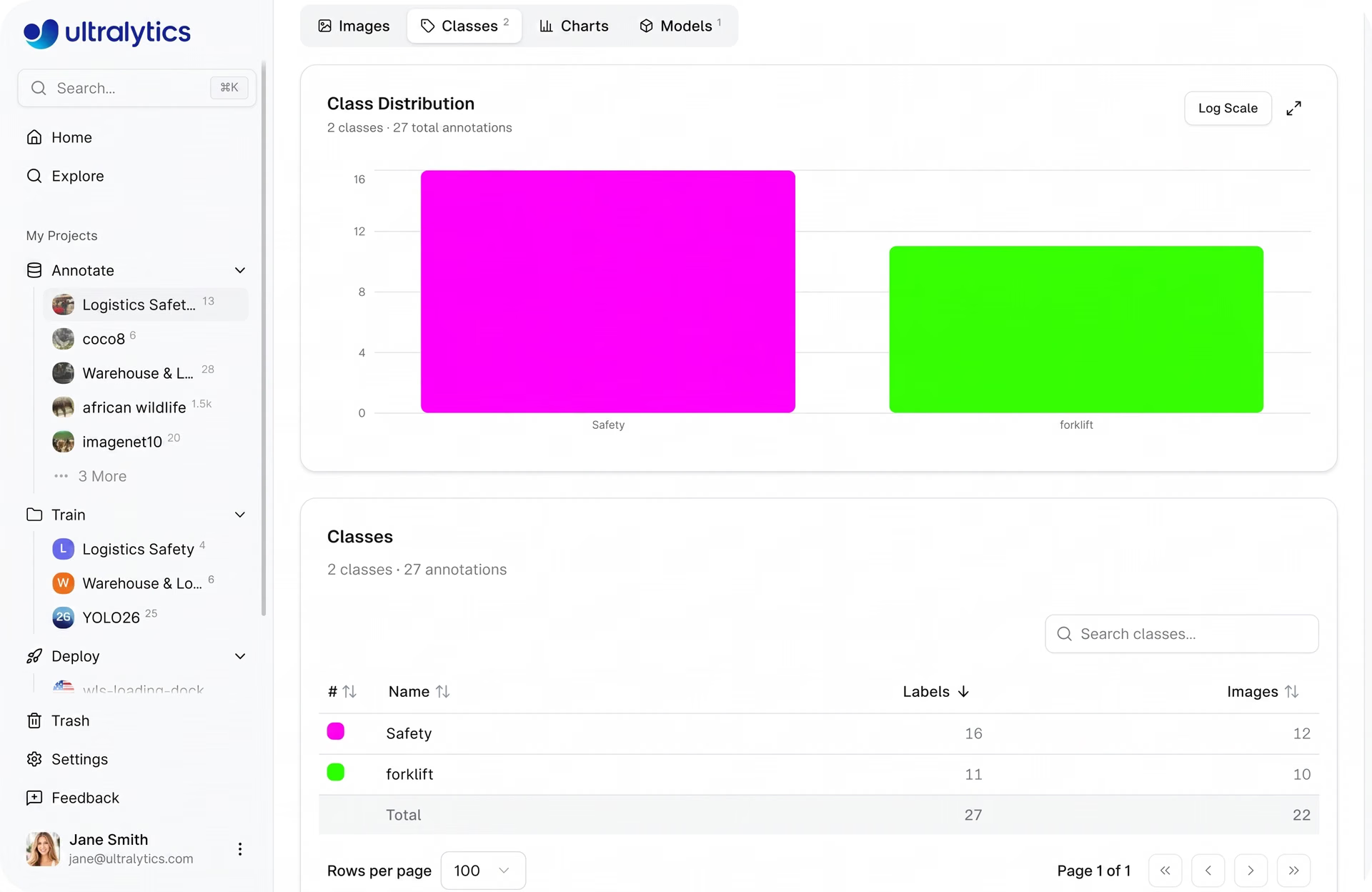
Fig 4. A look at analyzing a dataset’s class distribution on Ultralytics Platform (Source)
Connecting datasets to training and deployment within the Ultralytics Platform#
Ultralytics Platform connects different stages of AI model development into a single pipeline. This streamlines the process of going from raw data to production-ready vision AI applications.
Once datasets are prepared and annotated, they can be used to train computer vision models, such as Ultralytics YOLO26, directly within the platform. During training, you can monitor performance metrics, track experiments, and evaluate how well the model is learning using built-in dashboards.
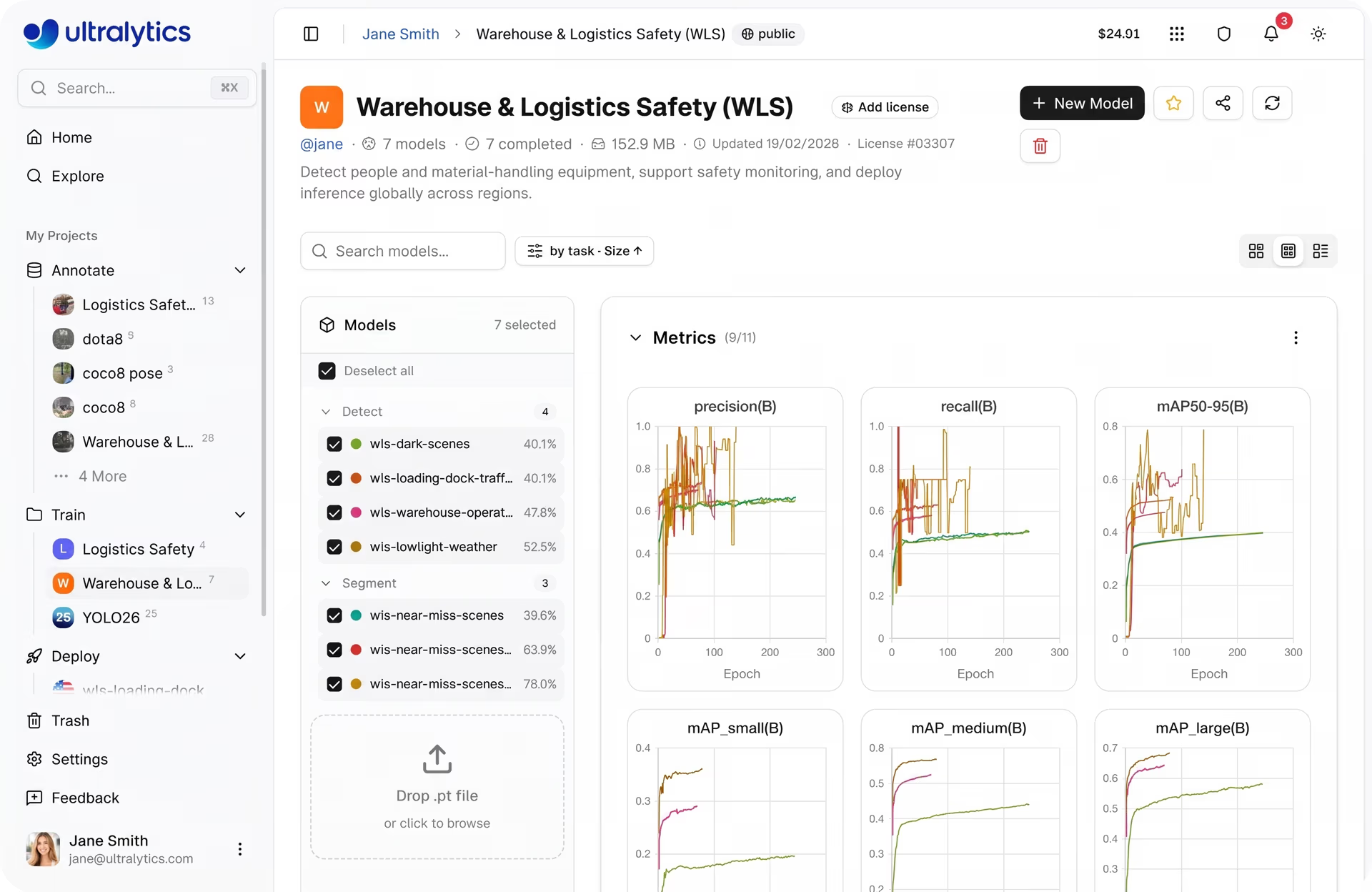
Fig 5. A glimpse of viewing model training metrics on Ultralytics Platform (Source)
After training, models can be tested on new images directly in the browser to evaluate predictions and identify areas for improvement before deployment. When the model performs well, it can be deployed into production.
The platform supports exporting models to multiple formats or deploying them through inference services and dedicated endpoints, allowing them to run across different environments.
Once deployed, built-in monitoring tools help track system performance over time, including metrics related to usage and model behavior. This makes it more straightforward to maintain and improve vision AI systems in real-world applications.
Best practices for dataset management with Ultralytics Platform#
Here are some key factors to keep in mind when managing your datasets using the Ultralytics Platform:
- Use filters to find gaps: Identify unlabeled or underrepresented data using filtering tools, making it more seamless to complete annotations and improve coverage.
- Fix errors early: Use the Errors tab for quality control to catch failed uploads, corrupted files, or unsupported formats before training.
- Continuously update datasets: Add new data, fix annotations, and include edge cases as they appear. This helps improve coverage and ensures models perform reliably in real-world scenarios.
- Manage dataset splits carefully: Ensure a good balance between training, validation, and test sets. You can reorganize splits manually or use automatic redistribution when needed.
To learn more about Ultralytics Platform, check out the official Ultralytics documentation.
Key takeaways#
As computer vision projects scale, managing datasets effectively becomes just as important as model development. A structured approach to dataset management helps improve data quality, streamline workflows, and support better model performance over time.
Ultralytics Platform simplifies this process by bringing dataset management, training, and deployment into a single workflow. By adopting a structured approach to dataset management, teams can reduce complexity, improve efficiency, and build more scalable and dependable computer vision systems.
Join our growing community and explore our GitHub repository for AI resources. To build with vision AI today, check out our licensing options. Learn how AI in agriculture is transforming farming and how vision AI in healthcare is shaping the future by visiting our solutions pages.








