Ultralytics Platform: Deploying computer vision models to any region
Learn how to deploy your computer vision models to any region using Ultralytics Platform for scalable, fast, and flexible AI deployment.

Earlier this week, Ultralytics launched Ultralytics Platform, a new end-to-end environment designed to make shipping computer vision (CV) systems faster by streamlining every stage of the vision AI workflow from data preparation and model development to deployment.
One of the key motivations behind developing Ultralytics Platform is that taking a computer vision solution that enables machines to analyze images and videos from idea to making an impact involves more than building a strong model. Once a model has been trained and passed validation, it has to be deployed so that applications can send images, receive predictions, and run inference reliably in real-world environments.
This stage of the machine learning lifecycle is where computer vision models move beyond experimentation and begin powering practical systems. Even if earlier steps such as dataset preparation, annotation, model training, and testing progress smoothly, without a reliable way to deploy models, those results can’t make a difference.
The reality across many computer vision projects is that deployment can be one of the most complex steps in the workflow.
Teams often need to configure inference APIs, manage compute resources, deploy models close to users to reduce latency, and monitor performance once systems are running in production.
Ultralytics Platform streamlines and automates this process by providing multiple deployment options, including model export formats, shared inference services, and dedicated endpoints across global regions. With managed infrastructure and built-in monitoring, teams can easily move from trained models to production-ready computer vision systems.
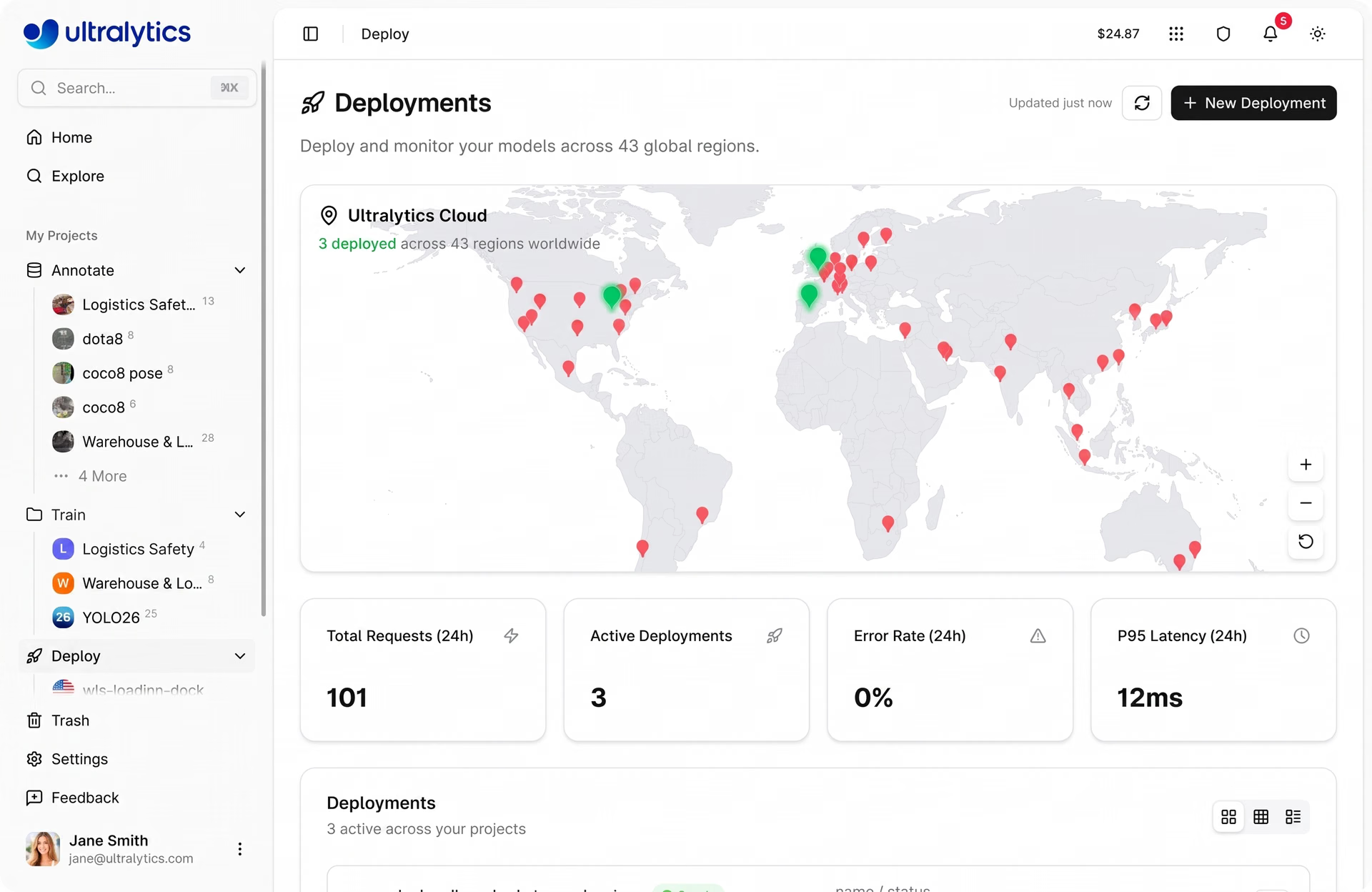
Fig 1. A look at deploying models using Ultralytics Platform (Source)
In this article, we’ll explore how to deploy computer vision models to any region using dedicated endpoints on Ultralytics Platform. Let’s get started!
What is CV model deployment?#
Before we dive into how to deploy deep learning models using Ultralytics Platform, let's get a better understanding of what computer vision model deployment actually means.
Computer vision model deployment is the process of taking a trained model and making it available for real-world use. Instead of running only in a training environment, the model is set up so applications can send images or videos to it and receive predictions in return.
For example, a model might detect objects in an image, perform image segmentation, identify items in a warehouse, or recognize patterns in video footage. In most real-world systems, this happens through an API or inference endpoint.
An application sends an image to the model, the model processes it, and it returns a prediction within milliseconds. This is what allows computer vision models like Ultralytics YOLO to enable real-time applications.
Models can be deployed in different environments depending on the use case. Some run in the cloud (through cloud platforms) and many applications can access them, while others run on edge devices, such as on-premise cameras, robots, or embedded systems that need fast local predictions.
AI model deployment options on Ultralytics Platform#
While Ultralytics Platform addresses many challenges the computer vision community faces, particularly when it comes to deploying models, it provides flexible ways to run inference depending on the needs of your application.
Here’s a quick look at the model deployment options available on the platform:
- Model export: You can export models to 17 different formats, including ONNX, TensorRT, CoreML, and TFLite, making it possible to run models across a wide range of environments such as edge devices like Raspberry Pi and NVIDIA Jetson, mobile apps, Docker containers, and custom infrastructure.
- Shared inference: The platform lets you run predictions through a managed shared inference service, which is ideal for quickly testing models.
- Dedicated endpoints: Easily deploy models as independent services with unique API URLs that can run across 43 global regions, with built-in auto-scaling, monitoring, and health checks for production deployments.
Deploying using dedicated endpoints#
One of the most scalable ways to run pre-trained models or custom-trained computer vision models in production on Ultralytics Platform is through dedicated endpoints. A dedicated endpoint lets you deploy a trained model as its own service, so applications can send images to it and receive predictions via an API.
Instead of running a model only in a training environment or a local notebook, deploying it as an endpoint makes it accessible to real applications. For example, a warehouse system could send images of packages for object detection, a smart camera could analyze video frames, or a robotics system could use predictions to guide actions.
Each dedicated endpoint runs as a single-tenant service, meaning the infrastructure running your model isn’t shared with other users. This provides more predictable performance and makes it easier to monitor how the model behaves in production.
Understanding the functionality of dedicated inference endpoints#
You can think of a dedicated endpoint as a hosted service for your model. Ultralytics Platform provides a unique endpoint URL that acts as the entry point for applications.
When an application sends a request to that URL, it includes an image and optional parameters such as confidence thresholds or image size, along with an API key for authentication.
The service runs inference on the image using your model and returns the predictions in a structured response. This setup allows developers to integrate computer vision models into real systems using standard web tools.
Applications can send requests using Python, JavaScript, cURL, or other HTTP clients, making it easy to connect models to dashboards, robotics systems, or cloud applications. Since the endpoint runs independently, it can also support scaling, monitoring, and global deployment, helping teams build reliable production computer vision systems.
Multi-region deployment improves real-time inference#
A key advantage of dedicated endpoints on Ultralytics Platform is the ability to deploy models across 43 global regions. These regions span multiple parts of the world, including North America, South America, Europe, the Asia Pacific, and the Middle East and Africa.
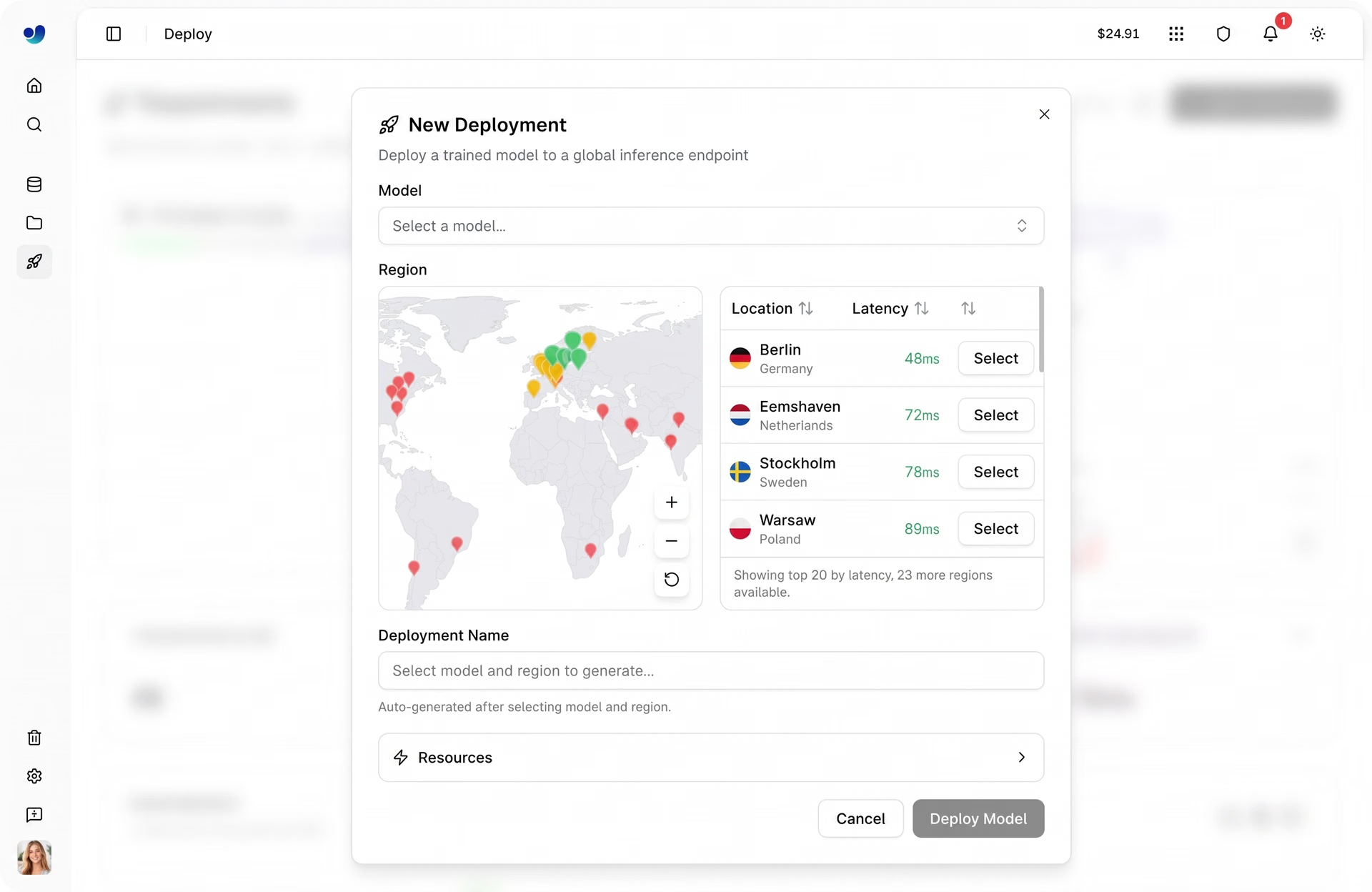
Fig 2. Ultralytics Platform supports 43 global regions (Source)
Deploying models in regions closer to where applications are running helps reduce latency, which is the time it takes for an application to send an image and receive a prediction. It can also help organizations meet data privacy and data residency requirements by keeping data processing closer to where it originates.
Low latency is important for many computer vision applications that rely on real-time inference, such as robotics systems, Internet of Things (IoT) devices, industrial inspection pipelines, and smart city infrastructure.
For example, if an application is being used primarily in Europe, deploying the model in a European region can significantly improve response times compared to running the model in a distant region.
How to deploy to any region with Ultralytics Platform#
Deploying a model to a specific region is simple and usually takes only a couple of minutes. The platform handles the infrastructure setup so developers can focus on integrating the model into their applications. Let’s walk through the steps involved.
Step 1: Train or upload a model#
Before deploying, you need a trained model available in your project. This can be a model trained directly on Ultralytics Platform, a model uploaded after training elsewhere, or a model cloned from a community project found in the “Explore tab,” where public projects shared by other users can be copied to your own account in one click.
Once the model is ready, open its model page inside your project to proceed.
Step 2: Open the Deploy tab#
Navigate to the Deploy tab for the model. This section of the platform lets you configure and launch deployments.
On that page, you’ll see a region table and an interactive map showing available deployment locations around the world. The platform measures latency from your location and sorts regions accordingly to help you choose the most suitable region.
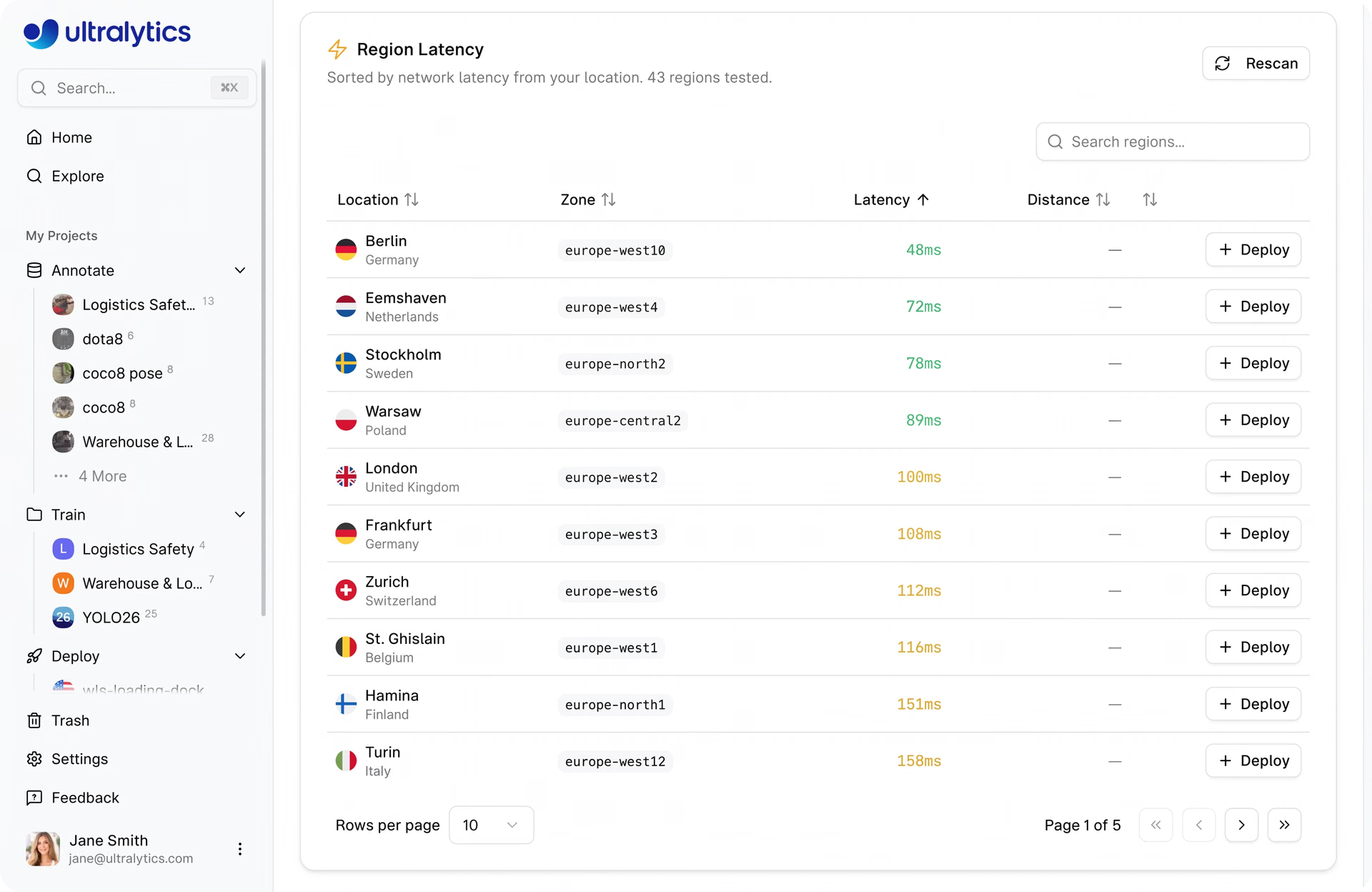
Fig 3. Regions sorted by latency on Ultralytics Platform (Source)
Step 3: Choose a deployment region#
Select a region based on where your users or applications are located. Deploying the model closer to the source of requests can significantly reduce response times.
Step 4: Deploy the endpoint#
After selecting the region and confirming the configuration, you can click Deploy.
The platform then prepares the deployment environment, pulls the model image, starts the service, and performs a health check to ensure the endpoint is ready. This process typically takes about one to two minutes.
Once the deployment is complete, the platform generates a unique endpoint URL that applications can use to send inference requests.
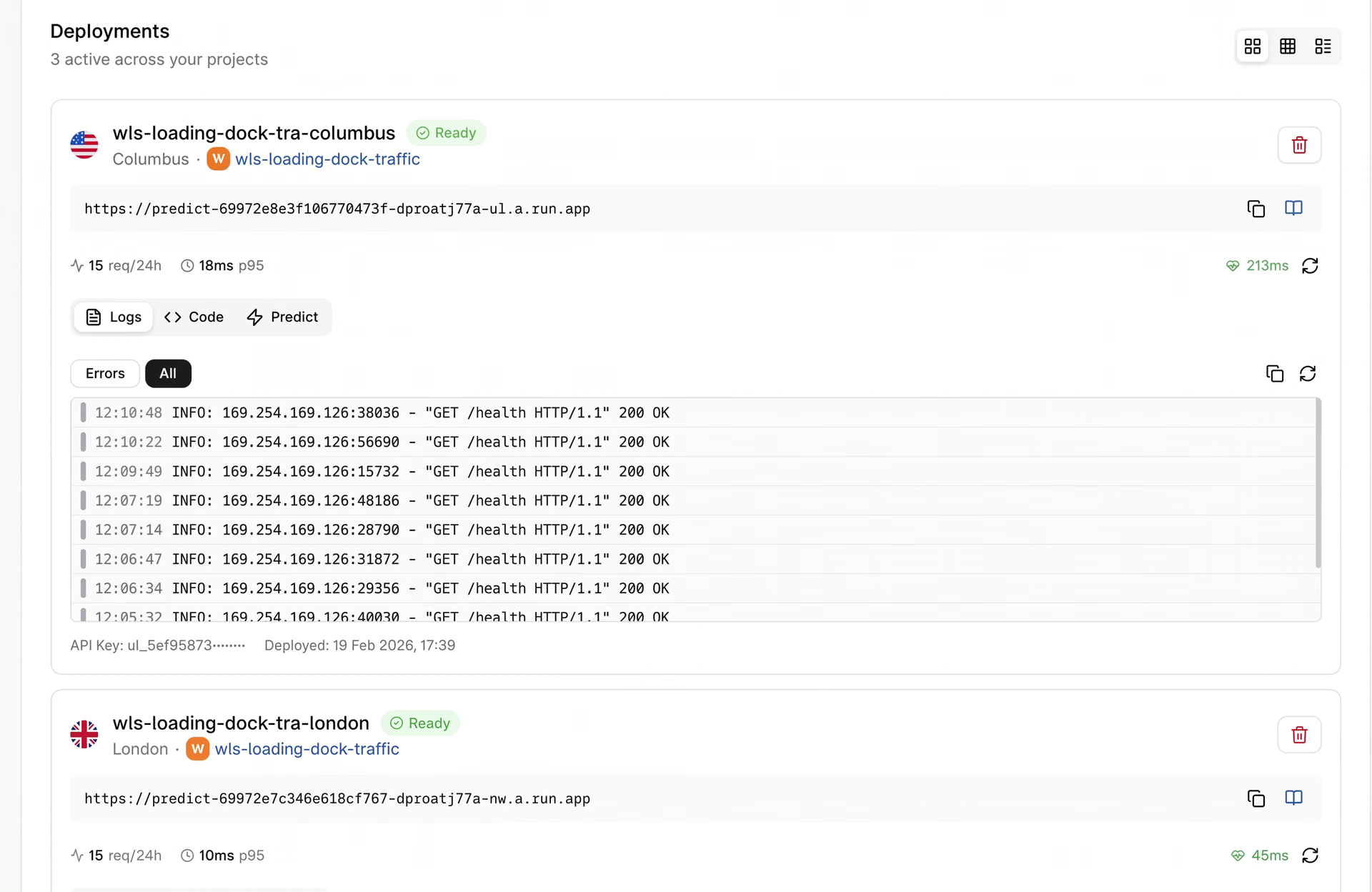
Fig 4. An example of a deployed endpoint (Source)
Step 5: Start sending inference requests#
With the endpoint running, applications can begin sending images to the model using the provided REST API endpoint and an API key passed in the Authorization header. The endpoint processes each request and returns predictions such as detected objects, bounding boxes, or other task-specific outputs.
For more details related to model deployment, check out the official Ultralytics Platform docs.
Monitoring model performance and metrics for deployed endpoints#
Once a computer vision model is deployed, monitoring its performance becomes an important part of maintaining system reliability and robustness. Even a well-trained model needs to be observed in production to ensure it continues to respond quickly, handle incoming requests properly, and deliver accurate predictions.
Ultralytics Platform provides built-in monitoring tools that give teams visibility into how deployed endpoints are performing. The Deploy page of the platform acts as a monitoring dashboard, offering a centralized view of all running endpoints along with key metrics that help track system health and usage.
Here are some of the metrics you can monitor using the Platform:
- P95 latency: This metric measures the 95th percentile server-side response time for inference requests. It provides insight into how long most inference requests take and identifies performance slowdowns.
- Error rate: It represents the percentage of requests that failed or returned errors within the selected monitoring window. Monitoring error rates lets teams quickly detect problems with deployments or incoming requests.
- Total requests: This metric shows the total number of inference requests processed across deployed endpoints during the selected time period (for example, the last 24 hours). It assists teams in understanding traffic levels and how frequently their models are being used.
In addition to these metrics, the platform also provides endpoint health checks and deployment logs. Health checks indicate whether an endpoint is responding correctly, while logs provide detailed information about recent requests and system activity.
Key takeaways#
Deploying computer vision models is a crucial step in turning trained models into systems that power real-world applications. With Ultralytics Platform, teams can easily deploy models through dedicated endpoints across 43 global regions, run real-time inference through APIs, and monitor performance from a single environment. By combining flexible deployment options, built-in monitoring, and scalable infrastructure, the platform helps developers move from trained machine learning models to reliable computer vision applications faster.
Become a part of our growing community! Dive into our GitHub repository to learn more about AI. If you're looking to build computer vision solutions, check out our licensing options. Explore the benefits of computer vision in healthcare and see how AI in logistics is making a difference!








