Accelerating Ultralytics YOLO26 with OpenVINO on Intel Core Ultra Series 3 (Panther Lake)
Find out how to export Ultralytics YOLO26 models to OpenVINO format and accelerate inference across Intel hardware, including CPU, GPU, and NPU.

Over the past few years, AI and computer vision have gone from being experimental to a key part of everyday business operations. In fact, surveys show that around 88% of organizations are already using AI in at least one part of their business.
However, turning that adoption into real value, whether in production systems or personal projects, often comes down to how well models actually run once deployed. In many real-world scenarios, computer vision models like Ultralytics YOLO26 are deployed on edge devices and a range of hardware, often CPUs, integrated GPUs, or NPUs, rather than high-end GPUs.
That’s where performance can start to vary, and where optimization becomes critical. A model that works well in one environment might struggle in another if it isn’t properly optimized for the underlying hardware.
To streamline this, the Ultralytics Python package supports exporting YOLO26 models to optimized formats like OpenVINO, so they can run smoothly across Intel hardware without requiring changes to your workflow.
For example, when a Ultralytics YOLO26 model is exported to the OpenVINO format, it can run more efficiently on Intel Core Ultra Series 3 processors, with GPU inference speeds improving by up to three times.
In this article, we’ll explore how the updated Ultralytics and OpenVINO integration makes it easier to deploy YOLO26 models across Intel Core Ultra Series 3 hardware. Let’s get started!
An overview of the Ultralytics x OpenVINO integration#
The Ultralytics Python package provides a single interface for training, running inference, and deploying Ultralytics YOLO models like YOLO26. It supports a range of integrations that help with different parts of the vision AI workflow, from training and experimentation to deployment and optimization.
One of the deployment-focused integrations is with the OpenVINO toolkit, which enables you to export Ultralytics YOLO26 models to an optimized format for Intel hardware. This process converts YOLO models into a format that runs more efficiently on Intel CPUs, GPUs, and NPUs, including systems powered by Intel® Core™ Ultra™ series processors.
This makes it more streamlined to run models across different Intel devices without needing to manually adjust them for each setup. Whether you're working on a local machine, an edge device, or a larger deployment, the same exported model can be reused.
What makes this integration especially practical is how seamlessly it fits into the existing Ultralytics workflow. You can export a model using the same interface you use for training and inference, without needing additional tools or a complex setup.
Once exported, the model can be used for inference either through the Ultralytics Python package or the OpenVINO Runtime, depending on how much control and flexibility you need.
A closer look at OpenVINO and Intel Panther Lake hardware for AI inference#
Before we see how efficiently an exported Ultralytics YOLO26 model can run on Intel hardware, let’s take a step back and understand how OpenVINO and Intel hardware work together to enable efficient inference.
OpenVINO is an open-source toolkit designed to optimize and run AI inference across Intel hardware, including CPUs, integrated GPUs, and NPUs. It provides a unified runtime, so the same model can run across these different compute units without needing to be rewritten.
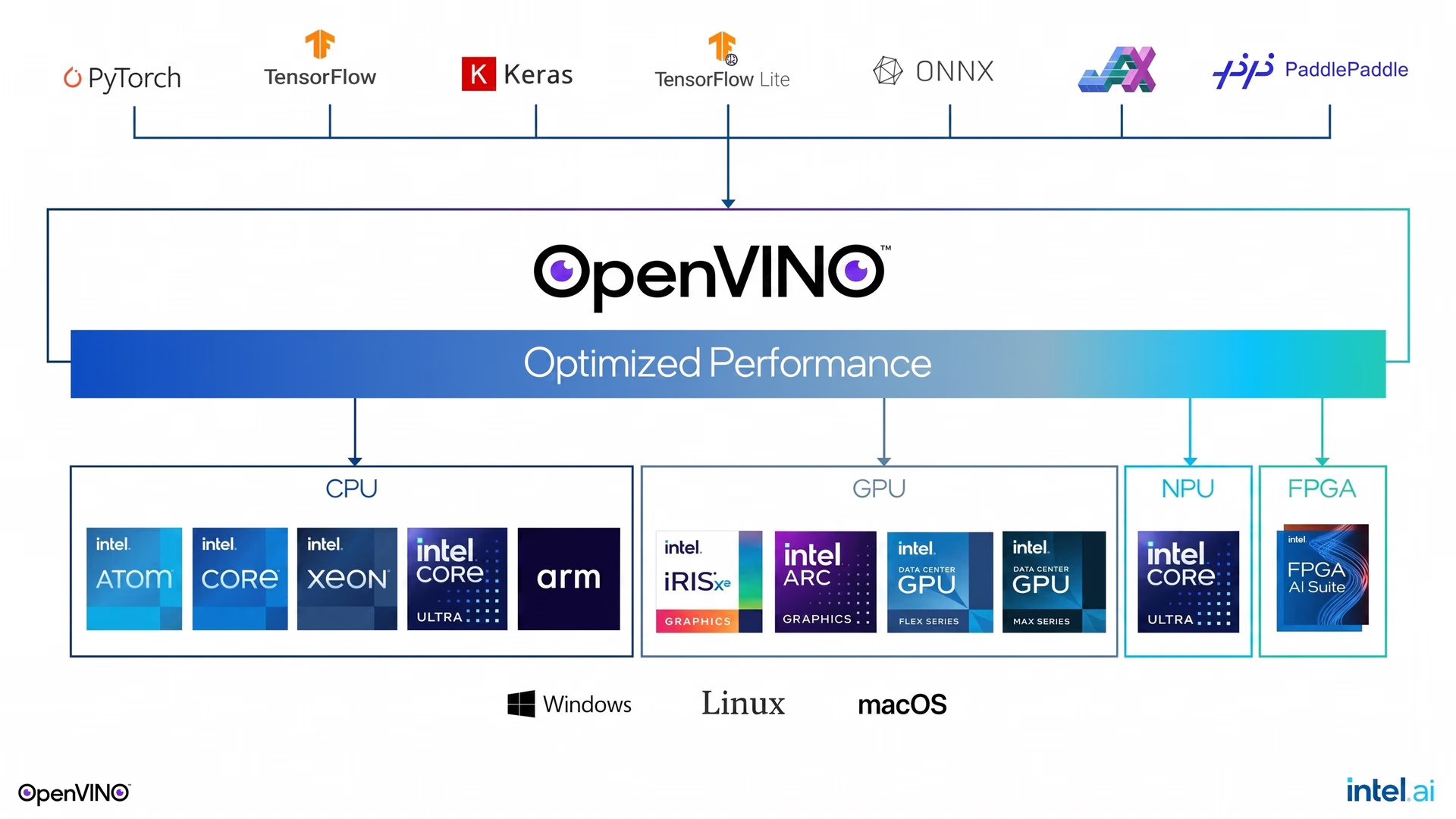
Fig 1. OpenVINO makes it easy to deploy models on multiple hardware targets. (Source)
On new Intel® Core™ Ultra™ Series 3 processors (code-named Panther Lake), AI workloads run across multiple compute units within the same processor. Each chip combines CPU cores for general-purpose tasks, an integrated GPU for parallel processing, and a dedicated NPU designed specifically for AI inference.
OpenVINO provides a unified API that lets you target any of these compute units, whether CPU, GPU, or NPU, without changing your code. You can simply specify which device to run inference on at runtime, making it straightforward to switch between all three depending on your performance and efficiency needs.
Benchmarking Ultralytics YOLO26 on the Intel® Core™ Ultra™ series#
As you explore the Ultralytics and OpenVINO integration, you might be wondering: what kind of model performance gains can you expect from exporting YOLO26 to the OpenVINO format?
The difference in inference speed becomes clear when benchmarking YOLO26 models across different formats and precision levels. For instance, when running the nano variant of YOLO26 (YOLO26n) on an Intel Core Ultra X7 358H, a Panther Lake processor, inference time drops from 25.18 ms per image in PyTorch at FP32 precision to 2.64 ms with OpenVINO at the same precision with the integrated NPU.
That’s faster than the original PyTorch FP32 baseline, which can make a noticeable difference in real-time and edge applications where latency is critical. These gains become even more apparent when running the same model on the integrated Intel Arc GPU.
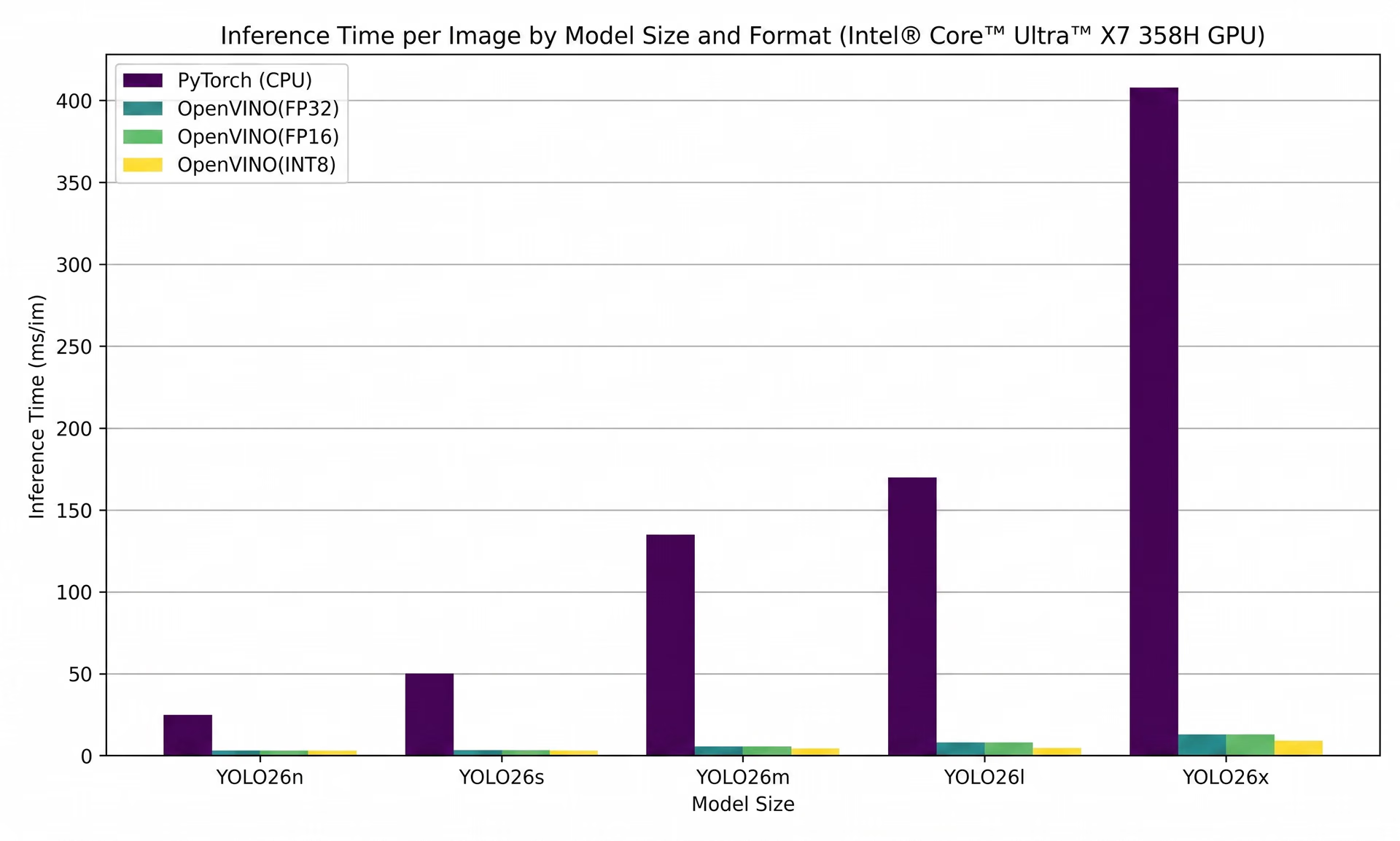
Fig 2. Benchmarking Ultralytics YOLO26 inference on Intel Panther Lake GPU using OpenVINO (Source)
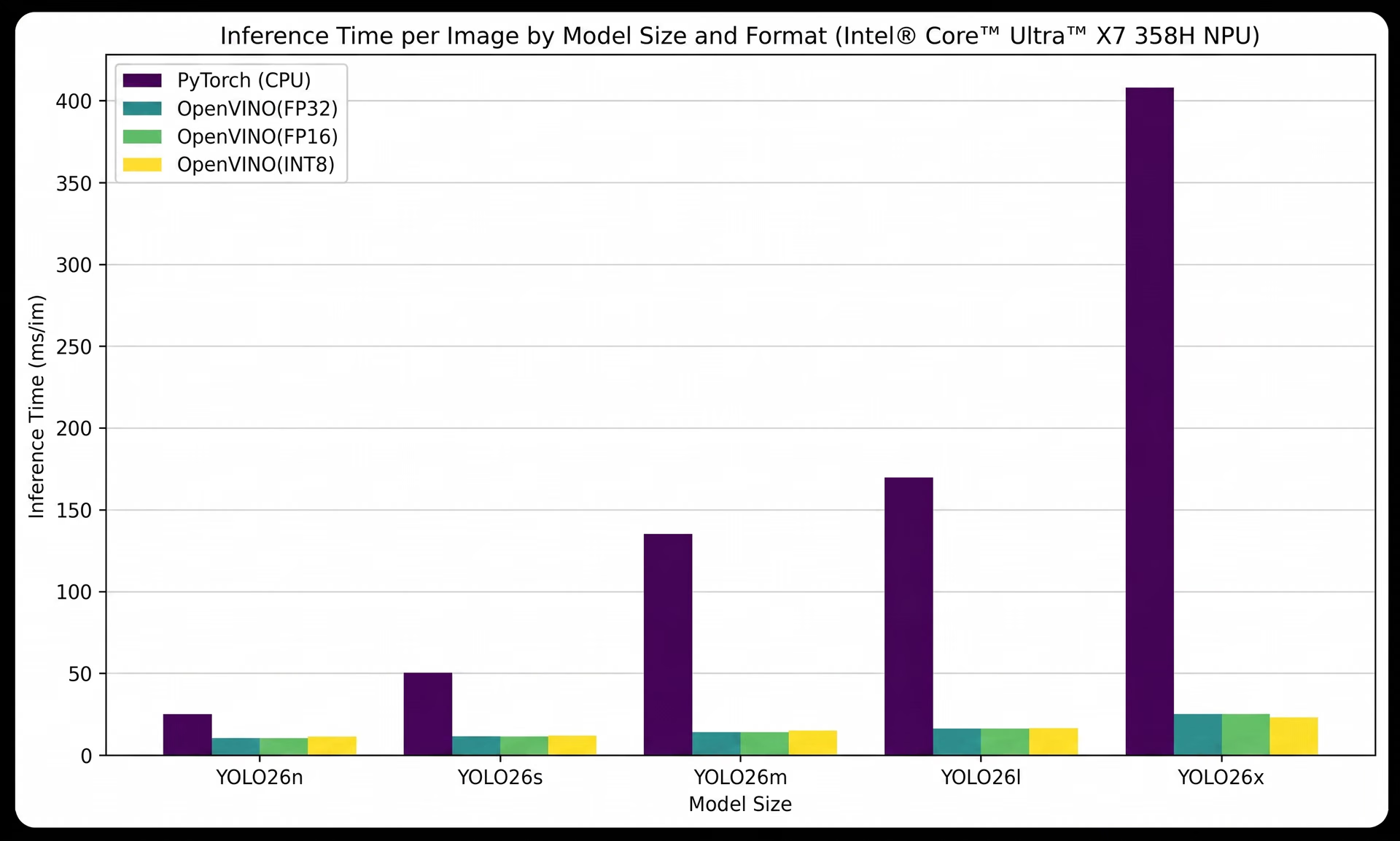
Fig 3. Benchmarking Ultralytics YOLO26 inference on Intel Panther Lake NPU using OpenVINO (Source)
Exploring two ways to export Ultralytics YOLO26 to OpenVINO format#
There are two main ways to export YOLO26 models to the OpenVINO format. You can either use the Ultralytics Python package or export directly through Ultralytics Platform, an end-to-end workspace for building and managing computer vision workflows in one place. Next, we’ll walk through both approaches.
Using the Ultralytics Python package to export YOLO26#
The Ultralytics Python package provides a straightforward way to export YOLO26 models to the OpenVINO format within a code-based workflow. Since the same interface is used for training and inference, exporting a model fits naturally into existing pipelines without requiring additional tools.
To get started, you can install the Ultralytics package. This can be done by running the command “pip install ultralytics” in a terminal or command prompt. If you're working in an interactive environment like Jupyter Notebook or Google Colab, you can run the same command by prefixing it with an exclamation mark.
Once installed, you can load a trained YOLO26 model and export it directly to the OpenVINO format. As shown below, a pre-trained YOLO26n model (yolo26n.pt) is loaded and then converted into the OpenVINO format using the export method.
from ultralytics import YOLO

model = YOLO("yolo26n.pt")

model.export(format="openvino")
After running the code, the converted model is saved to a new directory, where it can be used for deployment.
Exporting YOLO26 on Ultralytics Platform#
If you’re looking for a simpler, no-code approach, you can export YOLO26 models directly through Ultralytics Platform. The platform brings together the full computer vision workflow into a single workspace, making it easy to move from training to deployment without additional setup.
Once your model is ready, you can open it within the platform and navigate to the Export tab. From there, you can select OpenVINO as the export format and optionally adjust settings like image size or precision.
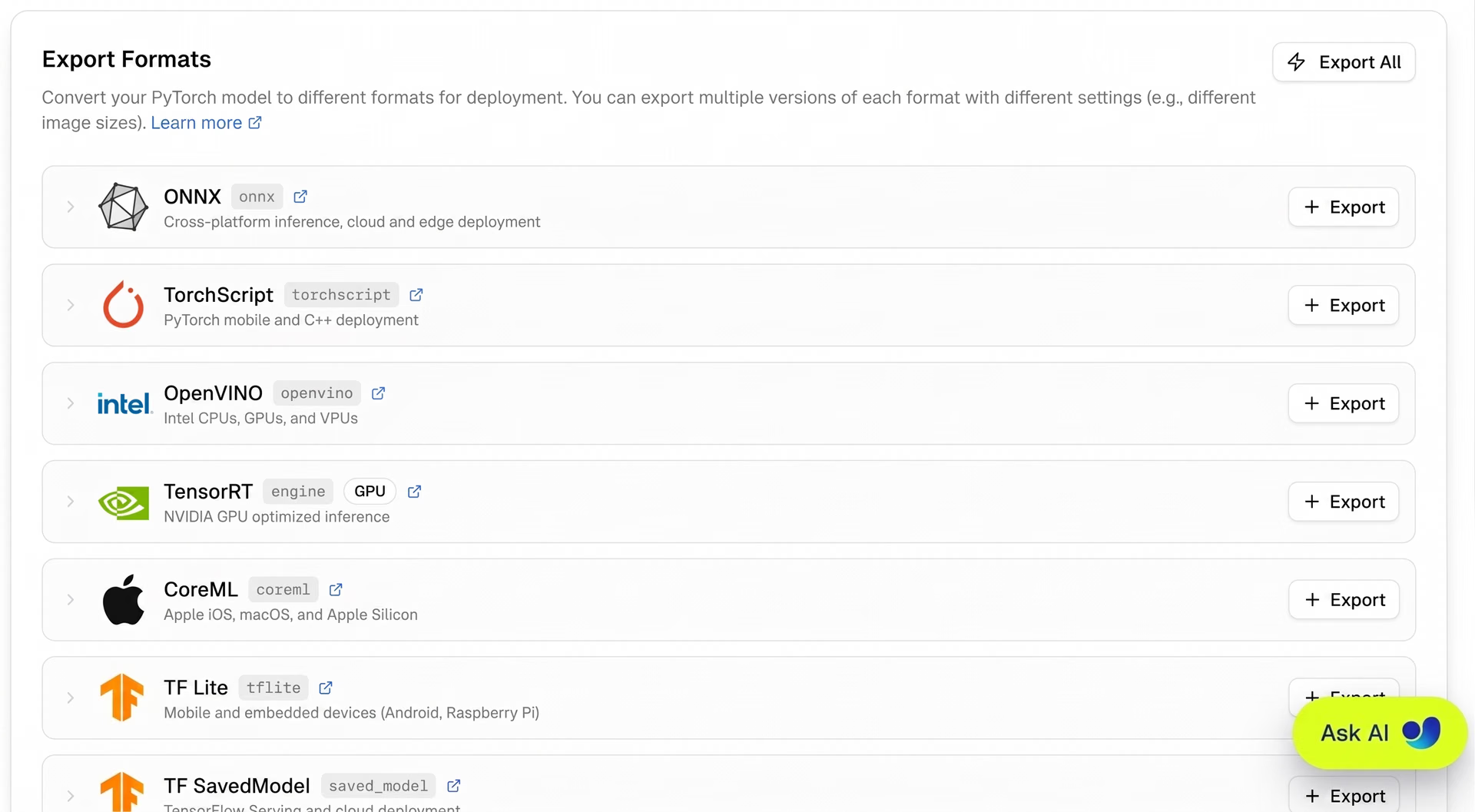
Fig 4. A look at exporting YOLO26 within Ultralytics Platform
The platform handles the conversion automatically, so there’s no need to manage scripts, dependencies, or environment configuration. After the export is complete, the optimized model can be downloaded and used for deployment across Intel CPUs, GPUs, and NPUs.
Deployment options enabled by the Ultralytics x OpenVINO integration#
Once a YOLO26 model has been exported to the OpenVINO format, there are a couple of ways to run inference depending on your workflow and level of control needed. You can either use the Ultralytics Python package for a simpler, integrated approach or use the native OpenVINO runtime for more flexibility and control.
Running inference with the Ultralytics Python package#
Once your model has been exported to the OpenVINO format, you can run inference using the Ultralytics Python package. This approach is ideal for quick testing and streamlined deployment, since it uses the same interface as training and export.
With this approach, you can load the exported OpenVINO model from its directory and run inference on an input such as an image or video. You can also choose which device to run on by specifying options like "intel:cpu", "intel:gpu", or "intel:npu", depending on the hardware available on your system.
The code snippet below shows how to load the exported model and run inference on an image while targeting the GPU. After inference is complete, the output image is saved to the “runs/detect/predict” directory.
ov_model = YOLO("yolo26n_openvino_model/")

results = ov_model("https://ultralytics.com/images/bus.jpg", device="intel:gpu")
Leveraging the native OpenVINO package for inference#
If you need more control over how your model runs in production, you can use the native OpenVINO runtime for inference. This method is useful when integrating models into larger applications or when you want to fine-tune how inference is executed on specific hardware.
OpenVINO provides a unified way to run models across Intel CPUs, GPUs, and NPUs, along with features like asynchronous execution and efficient use of available compute resources. To set this up, you can work directly with the exported model files, including the .xml file that defines the model structure and the .bin file that contains the trained weights.
Depending on your use case, you can also adjust settings like input size or preprocessing steps. Setting up inference involves initializing the OpenVINO runtime, loading and compiling the model for a target device, preparing the input data, and then running inference.

Fig 5. An example of a typical inference pipeline with OpenVINO (Source)
This allows you to control how the model is executed and how it fits into your overall deployment. To learn more about setting up and running inference with the OpenVINO runtime, you can explore the official Ultralytics documentation.
Real-world applications of Ultralytics YOLO26 on Intel hardware#
The real value of the Ultralytics and OpenVINO integration shows up in production, where reliable, low-latency inference can make a tangible difference. Here's a look at some key industries where this integration drives meaningful results:
- Manufacturing: By exporting Ultralytics YOLO26 to OpenVINO, production line systems can automatically detect visual defects such as missing components, misalignment, or surface damage on Intel hardware, helping improve product quality and reduce costly errors.
- Healthcare: Medical imaging and patient monitoring systems can run exported Ultralytics YOLO26 models locally on Intel hardware, supporting strict data privacy requirements while maintaining reliable inference performance.
- Smart cities: Traffic monitoring and crowd analysis can be deployed using exported Ultralytics YOLO26 models on Intel-powered edge cameras, enabling real-time insights such as vehicle counting, pedestrian tracking, and incident detection.
- Automotive: Low latency and power efficiency are critical in driver monitoring and in-cabin sensing, making Intel hardware paired with exported Ultralytics YOLO26 models a strong fit for embedded automotive systems.
If you want to know more about this integration, join us for the Intel OpenVINO DevCon workshop series, “From Annotation to Deployment: Building an Object Detection Pipeline with Geti, Ultralytics YOLO26, and OpenVINO™”, where our Partnership and Ecosystem Manager, Francesco Mattioli, will join Intel’s AI Software Evangelist, Adrian Boguszewski, for a live demonstration and walkthrough of how to build production-ready computer vision pipelines for real-world industrial scenarios. The workshop will feature a complete, end-to-end object detection workflow, from dataset creation and model training to optimization and edge deployment.
Benefits of using the OpenVINO export format#
Here are some of the key advantages of using the OpenVINO export format:
- Accessible and easy to integrate: With a unified API and more than 80 tutorial notebooks, OpenVINO makes it easier to move from experimentation to deployment without introducing significant complexity.
- Run the same model across different hardware: OpenVINO lets you use a single exported model across supported Intel hardware, deploying it on CPUs, GPUs, or NPUs without needing to rewrite or adapt it for each device.
- Built-in optimization during export: Exporting to OpenVINO converts models from popular frameworks like PyTorch and TensorFlow into an optimized format ready for inference, removing the need for separate conversion steps.
- Better utilization of hardware resources: OpenVINO supports asynchronous inference and load balancing across Intel hardware, helping improve efficiency in real-world applications.
Running Ultralytics YOLO26 with ExecuTorch and the OpenVINO backend#
If you're deploying Ultralytics YOLO26 in more demanding production environments, there is another option available that combines on-device efficiency with advanced model compression.
ExecuTorch, PyTorch's on-device inference framework, supports an OpenVINO backend that lets you deploy Ultralytics YOLO26 on Intel hardware through a different export and runtime path.
The way it works is that ExecuTorch handles the model export and runtime execution, while OpenVINO acts as the hardware acceleration layer underneath, handling the actual computation across Intel CPU, GPU, or NPU. The two work together so that you get the portability and on-device efficiency of ExecuTorch combined with the hardware-specific optimizations that OpenVINO provides.
To learn more about how this works and how to get started with Ultralytics YOLO26 on ExecuTorch and the OpenVINO backend, check out the Intel blog covering the latest ExecuTorch and OpenVINO updates.
Key takeaways#
Exporting YOLO26 models through the Ultralytics and OpenVINO integration improves performance across Intel hardware without adding complexity to your workflow. You can move from training to deployment without reworking your pipeline. Overall, this provides a straightforward way to run models efficiently across Intel CPUs, GPUs, and NPUs in real-world applications.
Join our community and explore our GitHub repository to learn more about Vision AI. Check out our licensing options to kickstart your computer vision projects. Interested in innovations like AI in manufacturing or computer vision in the automotive industry? Visit our solutions pages to discover more.