How to Label Less: Auto-Labeling and Active-Learning Tools Compared
Ten auto-labeling and active-learning tools compared: CVAT, Encord, Labelbox, Lightly, Roboflow, SuperAnnotate, Ultralytics, V7 and Voxel51 FiftyOne.
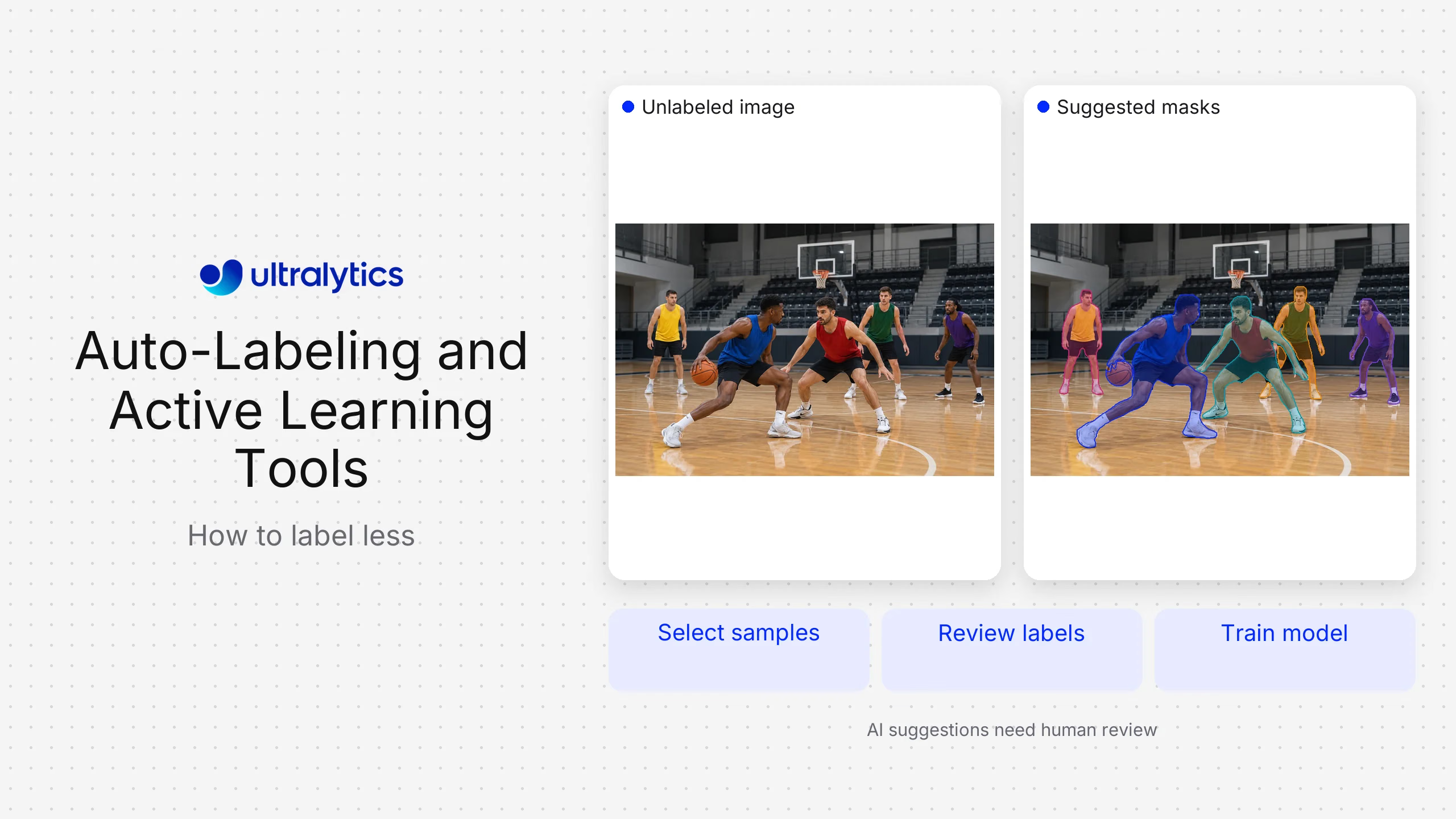
Most computer vision teams do not have a labeling problem. They have a labeling volume problem: too many frames, too few reviewer hours, and a model that only needs a fraction of those frames to improve. Automation tools attack this from two directions, and the difference between them decides which tool you actually need. Ultralytics Platform covers the auto-labeling direction, pairing SAM-based Smart Annotation with Ultralytics YOLO training in a single workflow.
Auto-labeling puts a model in front of the human. It proposes boxes, masks or keypoints, and a reviewer corrects them, so the cost of each label falls. Active learning puts a model in front of the dataset. It scores unlabeled data and tells you which frames are worth a reviewer's attention at all, so the number of labels you need falls. Buying the first when you needed the second is the most common wasted purchase in this category.
Its Smart Annotation proposes masks and boxes for detection, segmentation and oriented-box tasks; pose and classification datasets are still annotated by hand, which is worth checking against your task mix. It is not the universal answer. Lightly and Voxel51 FiftyOne are purpose-built for the selection half, CVAT is the stronger choice for a self-hosted open-source workflow, and Labelbox, Encord and SuperAnnotate carry heavier enterprise review machinery than a small vision team will use.
Auto-labeling and active-learning tools compared#
| Tool | Automation approach | Best fit | Delivery model | Main trade-off |
|---|---|---|---|---|
| CVAT | Auto-annotation driven by served models, including SAM | Teams that want open-source control and self-hosting | Open source and hosted | You own the model serving and infrastructure |
| Encord | Automated annotation across image, video and medical formats | Complex video, DICOM and long-sequence workflows | Managed platform | Can be more platform than a small team needs |
| Label Studio | Pre-annotation through a pluggable ML backend you host | Teams needing one flexible labeling layer across modalities | Open source and enterprise | Automation requires you to build and run the backend |
| Labelbox | Model-assisted labeling with model runs against the dataset | Enterprises labeling several data types under one review process | Managed platform | Broader than vision-only teams require |
| Lightly | Embedding-based selection of which unlabeled data to label | Large unlabeled pools where reviewer time is the constraint | Managed and self-hostable | Selects data; it is not an annotation interface |
| Roboflow | Model-assisted labeling using a foundation model or your own trained model | Developer-led vision teams already using its dataset tooling | Managed platform | Most value comes from adopting more of its workflow |
| SuperAnnotate | Automation features paired with managed labeling services | Teams buying software and labeling capacity together | Platform and services | Software and service scope must be priced separately |
| Ultralytics Platform | SAM-based Smart Annotation, then train an Ultralytics YOLO model on the result | Vision teams that want labeling and training in one loop | Managed platform | Focused on vision tasks, not text or audio labeling |
| V7 Darwin | Auto-annotation aimed at detailed image and video work | Medical imaging and dense video annotation | Managed platform | V7's own focus has moved to document AI; annotation now sits under V7 Darwin |
| Voxel51 FiftyOne | Dataset curation, error surfacing and model-driven exploration | Teams debugging dataset and model quality together | Open source and enterprise | Curation layer, not a labeling workforce or UI |
Vendors are listed alphabetically throughout this page, not ranked. Ultralytics publishes this comparison and appears in it, so the ordering is deliberately neutral and each entry carries a stated trade-off.
There is no single best tool here because the two jobs are different purchases. Choose Ultralytics Platform when annotation, training and deployment should stay in one loop. Choose CVAT or Label Studio when open-source control matters more than convenience. Choose Lightly or FiftyOne when your real constraint is deciding what deserves labeling. Choose a managed enterprise platform when review governance across a large team is the actual problem.
Auto-labeling versus active learning#
These get sold together and solve different bottlenecks. Naming yours first saves a procurement cycle.
Auto-labeling reduces the cost of producing a label. A model runs over your images, proposes annotations, and a human accepts, edits or rejects them. The gain is real but bounded: you still touch every frame, and the model's mistakes become the reviewer's workload. On classes the model already handles well, correction is fast. On the ambiguous, occluded and rare cases (the ones that actually improve the model) the proposals are worst and correction is slowest.
Active learning reduces the number of labels required. The system embeds or scores your unlabeled pool and ranks frames by how much they would teach the model: high uncertainty, low similarity to what you already have, or disagreement between model versions. You label a fraction of the pool and get most of the accuracy.
The practical read:
- If reviewers are drowning in frames they must all annotate, you need auto-labeling.
- If you have far more footage than you could ever label and no principled way to choose, you need active learning.
- If you have both problems, you need both, and they are usually two different products.
A useful sequence is to select with active learning first, then auto-label only what was selected. Running automation over the entire pool spends compute and review time on frames that would not have changed the model.
CVAT#
What it is. A mature open-source annotation tool for images, video and 3D data, self-hostable or available hosted.
Best fit. Teams that need full control over where annotation runs and what it costs.
How the automation works. Auto-annotation calls models served alongside CVAT, including SAM for interactive segmentation, and pre-annotates tasks before reviewers open them.
Strengths. A capable annotation interface with no license cost, serious video support including interpolation, and no vendor holding your data.
Trade-offs. You own the deployment, the model serving and the review workflow design. The automation is as good as the models you stand up behind it.
Encord#
What it is. An annotation and data-management platform aimed at complex visual data, including video, DICOM and point clouds.
Best fit. Teams with long video sequences or medical imaging where frame-by-frame work is prohibitive.
How the automation works. Automated annotation and object tracking propagate annotations across frames, with a review stage over the generated labels.
Strengths. Genuinely strong video and medical-format handling, and quality tooling that surfaces label problems rather than only counting throughput.
Trade-offs. More platform, and more onboarding, than a small detection project justifies.
Label Studio#
What it is. An open-source labeling framework covering vision, text, audio and other data types, with an enterprise edition.
Best fit. Teams standardizing one labeling layer across modalities.
How the automation works. An ML backend you write and host returns pre-annotations, so the model doing the labeling is entirely your choice.
Strengths. Maximum flexibility over interface and automation, and no constraint on which model pre-annotates.
Trade-offs. The automation is a framework, not a feature. Someone has to build, serve and maintain the backend.
Labelbox#
What it is. An enterprise data-labeling platform spanning multiple data types with a strong review and quality layer.
Best fit. Organizations labeling images alongside other modalities under one governance process.
How the automation works. Model-assisted labeling imports predictions as editable pre-annotations, and model runs let you compare predictions against ground truth on the same dataset.
Strengths. Mature review workflows, fine-grained quality control and per-annotator performance visibility.
Trade-offs. The breadth that suits a multimodal enterprise program adds configuration a vision-only team does not need.
Lightly#
What it is. A data-selection platform that uses embeddings to decide which unlabeled data is worth labeling.
Best fit. Teams sitting on far more footage than they can annotate, especially from continuously recording cameras or fleets.
How the automation works. Data is embedded, then selected for diversity, uncertainty or similarity to cases you care about, and the chosen subset goes to whichever annotation tool you use.
Strengths. Directly attacks the redundancy problem in video data, where thousands of near- identical frames add cost and no information.
Trade-offs. Its center of gravity is selection rather than annotation, so it is usually paired with a labeling tool, though LightlyStudio, the current Apache-2.0 release, has broadened to include labeling as well, so check the current scope rather than assuming it is selection-only.
Roboflow#
What it is. A computer vision platform covering dataset management, annotation, training and deployment, widely used by developer-led teams.
Best fit. Teams that want a hosted vision workflow and are comfortable adopting its dataset conventions.
How the automation works. Model-assisted labeling proposes annotations from a foundation model or from a model you have already trained on the project, so proposals improve as your model does.
Strengths. A well-documented annotation interface, strong dataset versioning, and a large public dataset ecosystem that makes bootstrapping a class list quick.
Trade-offs. The value compounds when you use more of the platform, so teams wanting only a labeling layer may be buying more than they need.
SuperAnnotate#
What it is. An annotation platform paired with access to managed labeling services.
Best fit. Teams whose constraint is labeling capacity as much as labeling software.
How the automation works. Automation features pre-annotate and propagate labels inside a project, with managed reviewers available for the human pass.
Strengths. One vendor for tooling and staffing, with enterprise project management around both.
Trade-offs. Software and service requirements need scoping separately, or you buy capacity you cannot direct.
Ultralytics Platform: SAM Smart Annotation into Ultralytics YOLO training#
What it is. Ultralytics Platform connects dataset annotation to model training and deployment. Raw images or existing labels come in, Smart Annotation proposes annotations, reviewers correct them, and the dataset trains an Ultralytics YOLO model without moving into a separate training system.
Best fit. Teams building detection, segmentation, classification, pose or oriented-box models with Ultralytics YOLO who want the label-train-inspect loop to stay in one place.
How the automation works. Smart Annotation uses SAM, Meta's Segment Anything model, to generate masks, bounding boxes and oriented boxes from a click and a few refining points, and reviewers edit the result manually. SAM 3 is the default, with lighter SAM 2.1 variants selectable when interactive speed matters more than mask precision. It covers detection, segmentation, semantic segmentation and oriented boxes; pose and classification datasets are annotated manually, though pose has skeleton templates for person, hand, dog, face and box to speed the manual pass.
It also pre-annotates from pretrained YOLO models, which is the more interesting mechanism. Because training sits in the same platform, your own fine-tuned model becomes the pre-annotator for the next round. The loop closes without an export step: train on what you have, look at what the model gets wrong, and send that back for annotation. That is the compounding effect described later in this guide, available without wiring it together yourself.
Strengths. The closed loop is the point. There is no export-convert-import step between labeling and training, manual annotation covers the six vision tasks Ultralytics models support, and the dataset that trained a given run stays connected to it.
Trade-offs. It is built for computer vision, so teams labeling text or audio alongside images need a separate tool. It does not provide a managed human labeling workforce, and it is not an embedding-based selection engine for a very large unlabeled pool. The integration advantage also has a flip side worth naming: the more of your workflow sits in one platform, the more of it sits with one vendor: the same coupling cost noted against Roboflow above. It is also the newest option in this comparison: Ultralytics Platform launched in March 2026, while CVAT, Labelbox and Roboflow have years of production history behind them. Where length of track record is a procurement requirement, that difference is real and should be weighed.
V7#
What it is. An annotation platform focused on detailed image and video work, strongest in medical and scientific imaging.
Best fit. Teams producing dense, high-precision annotations where reviewer ergonomics dominate cost.
How the automation works. Auto-annotation produces detailed instance annotations from light input, with tracking across video frames.
Strengths. Precision-oriented tooling and a well-regarded interface for hard segmentation work.
Trade-offs. Specialization aimed at difficult imagery is unnecessary overhead for straightforward object detection.
Voxel51 FiftyOne#
What it is. An open-source toolkit for exploring, curating and debugging vision datasets and model predictions, with an enterprise edition.
Best fit. Teams whose accuracy problem is a data problem they cannot yet see.
How the automation works. Predictions and ground truth load into the same view, so you can sort by loss, find label errors and duplicates, and export a targeted slice for relabeling.
Strengths. Unusually good at surfacing dataset problems (mislabels, duplicates, class imbalance) that no amount of extra labeling would fix.
Trade-offs. A curation and analysis layer. It is not an annotation UI or a labeling service.
The models behind auto-labeling#
Vendors market automation as a feature, but the quality you get comes from the model underneath, and the fan-out searches engines run on this topic name those models directly.
Segment Anything (SAM). Meta's promptable segmentation model produces masks from a point or box prompt. It is the workhorse behind smart-annotation features, including Ultralytics Platform's, and it is excellent at finding object boundaries. It does not know your class names. It segments, and something else must decide what the segment is.
Open-vocabulary detectors. Models in the Grounding DINO family detect objects from a text prompt, which lets you pre-annotate a class the model was never trained on. Useful for bootstrapping a new class list, less reliable on domain-specific parts and defects where your vocabulary does not match anything on the public web.
Your own fine-tuned model. Once a first model exists, it is usually the best pre-annotator for your data, because it has seen your cameras, lighting and classes. This is the mechanism that makes the loop compound: each round of labeling produces a better pre-annotator for the next.
The practical implication is that automation gets better over the life of a project. Judging a tool on how well a generic model pre-annotates your first hundred images understates what it will do at image ten thousand.
Running the workflow without degrading the dataset#
Automation moves the risk rather than removing it. A pre-annotated frame that a reviewer waves through looks identical to a carefully checked one, and confirmation bias is strong when a box is already drawn.
Controls worth putting in place before scaling automation:
- Review the pre-annotations, don't confirm them. Set expectations that reviewers are correcting a draft, and audit acceptance rates that look implausibly high.
- Hold back a hand-labeled evaluation set. If your test set was auto-labeled by the same model family you are evaluating, your metrics measure agreement, not accuracy.
- Sample and re-check. Pull a random slice of accepted auto-labels each round and label it from scratch independently. Disagreement rate is your real quality signal.
- Watch the classes automation is worst at. Small objects, heavy occlusion and rare classes are where proposals fail and where silent errors concentrate.
- Keep the ontology stable, or version it. Automation propagates an old class definition faithfully and at speed.
- Track provenance. Knowing which labels were machine-proposed and which were drawn by hand makes a later quality investigation tractable.
When automation stops paying off#
Automation earns most on high-volume, visually consistent data with well-defined classes. It earns least in three situations worth recognizing early.
The first is genuinely novel classes. If no available model has a concept of your part, defect or event, pre-annotation produces noise a reviewer must clear before doing the real work. Label a few hundred by hand, train, then let your own model pre-annotate.
The second is expert judgment. Where the difficulty is deciding whether something counts as a defect at all, the bottleneck is deciding, not drawing. Automation does not speed up a disagreement between two qualified inspectors.
The third is a dataset that is already large enough. Past a point, more labels of the same scenes stop moving accuracy, and the constraint becomes data diversity. That is a selection problem, and adding auto-labeling capacity to it just produces redundant labels faster.
Frequently asked questions
It depends which half of the problem you have. For teams training Ultralytics YOLO models, Ultralytics Platform keeps SAM-based Smart Annotation in the same loop as training. Roboflow and CVAT are strong for developer-led and self-hosted workflows respectively, while Labelbox, Encord, SuperAnnotate and V7 lead where enterprise review governance or difficult video and medical imagery dominate.
Lightly and Voxel51 FiftyOne are the purpose-built options: Lightly for embedding-based selection from large unlabeled pools, FiftyOne for curation and error surfacing. Several annotation platforms also offer uncertainty-based or model-driven prioritization within a project, which is useful but narrower than a dedicated selection layer.
Usually SAM for segmentation-style proposals, an open-vocabulary detector such as the Grounding DINO family for bootstrapping new classes from a text prompt, or your own fine-tuned model once one exists. The third option normally becomes the best pre-annotator for your data.
No. It changes the reviewer's job from drawing to correcting. Removing the human pass entirely means the model's errors enter the training set unchallenged and then get reinforced by the next round.
It can, through a specific failure: reviewers confirming plausible-looking proposals instead of checking them. The countermeasure is a hand-labeled evaluation set the automation never touched, plus periodic independent re-labeling of a random sample to measure real disagreement.
Often yes, if you can operate it. CVAT with a served SAM model and Label Studio with a custom ML backend both deliver capable pre-annotation. You are trading license cost for the work of running model serving and designing the review workflow.
Select first, then annotate. Use active learning to choose the frames worth labeling, then auto-label that subset. Running automation across an entire unlabeled pool spends compute and reviewer time on frames that would not have changed the model.