Azure Custom Vision is retiring: a migration checklist for your vision models
Azure Custom Vision retires on September 25, 2028. Plan your migration, export your labeled data and retrain on Ultralytics Platform.
 Jing Qiu13 min read
Listen to this article
Azure Custom Vision retires on September 25, 2028. Teams that use its cloud training or prediction need a replacement before then, and teams running exported models will still want somewhere to retrain them as products and cameras change. It is a good moment to move to a platform you can keep labeling, training and deploying on for years.
This checklist walks through five steps that help a migration go smoothly: inventory what you run today, get your labeled data out, choose where to move, prove the new model on your own images, then switch over with a fallback. Along the way, it shows how each part of a Custom Vision project carries over to Ultralytics Platform, where you label, train and deploy Ultralytics YOLO models in one place, so the move gives your team a long-term home rather than a stopgap.
What is changing, and when#
According to Microsoft's Custom Vision migration guidance:
- September 25, 2028: Custom Vision is retired and the service becomes unavailable. Microsoft provides full support for existing customers until then.
- September 25, 2026: the date by which Microsoft asked customers to make a plan to transition away.
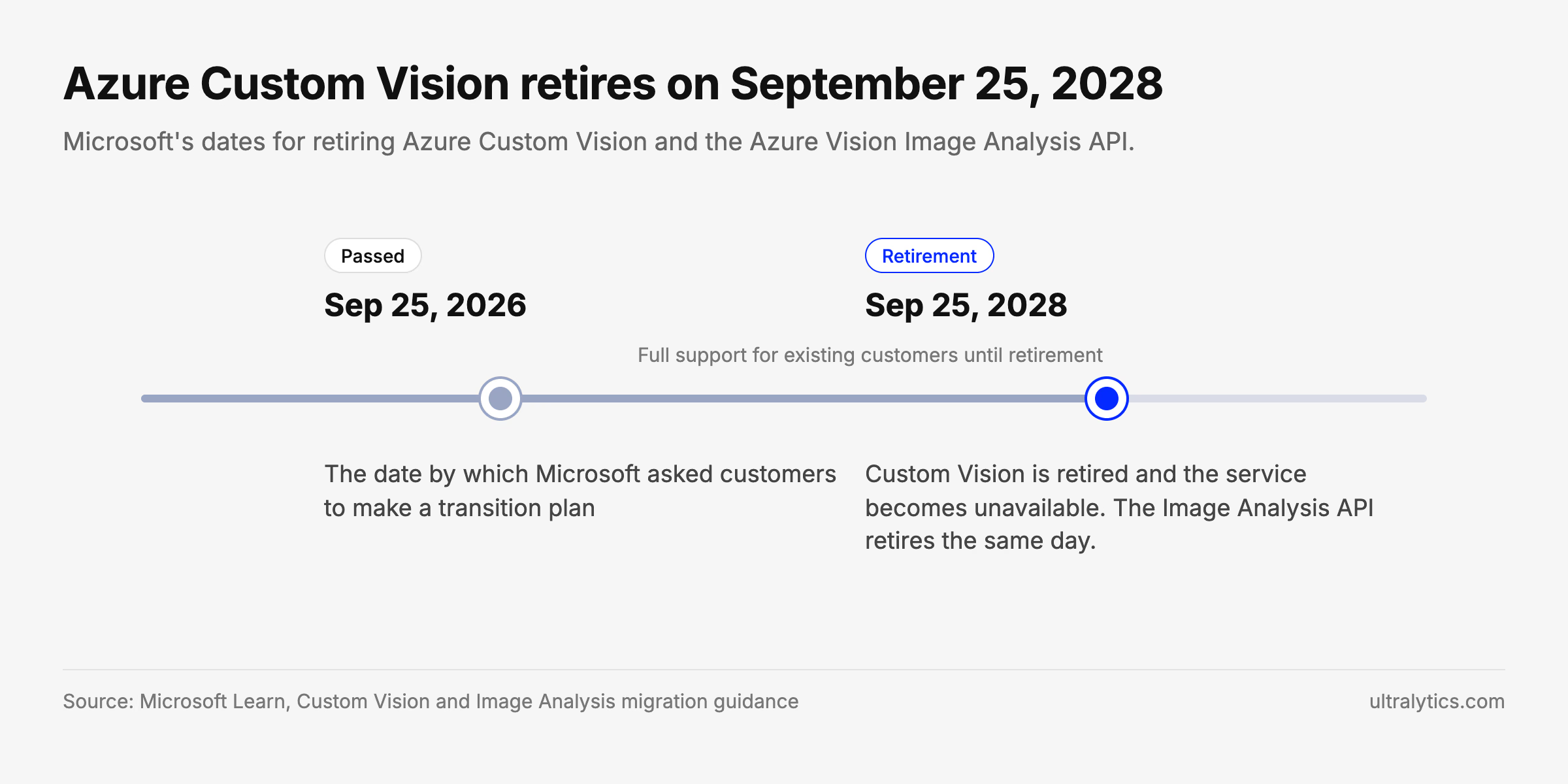
Microsoft's retirement dates for Azure Custom Vision and the Image Analysis API, from its migration guidance.
What that means in practice:
- Cloud training and prediction stop. Any application that calls a Custom Vision prediction endpoint needs a new endpoint before the retirement date.
- Exported models can support continuity. Custom Vision can export a model to ONNX, TensorFlow, TensorFlow.js, CoreML or a Docker container to run on your own hardware. Model files such as ONNX don't call the service; Microsoft describes the Docker container as including service code for the Custom Vision API, so test it with the service unavailable before you rely on it. Exports only work for projects using a compact domain, and Microsoft notes compact models may be slightly less accurate than standard-domain models. You also can't retrain an exported model in Custom Vision after retirement, so its performance may deteriorate as your products, cameras and defects change.
- The Image Analysis API shares the retirement date. According to Microsoft, the Image Analysis API retires on the same date, September 25, 2028, including connected and disconnected containers. If you use both services, plan one migration, not two.
- Preserve your images and labels for migration. A retrained model can only be as good as the dataset behind it, so preserve your labeled data alongside any supported model exports.
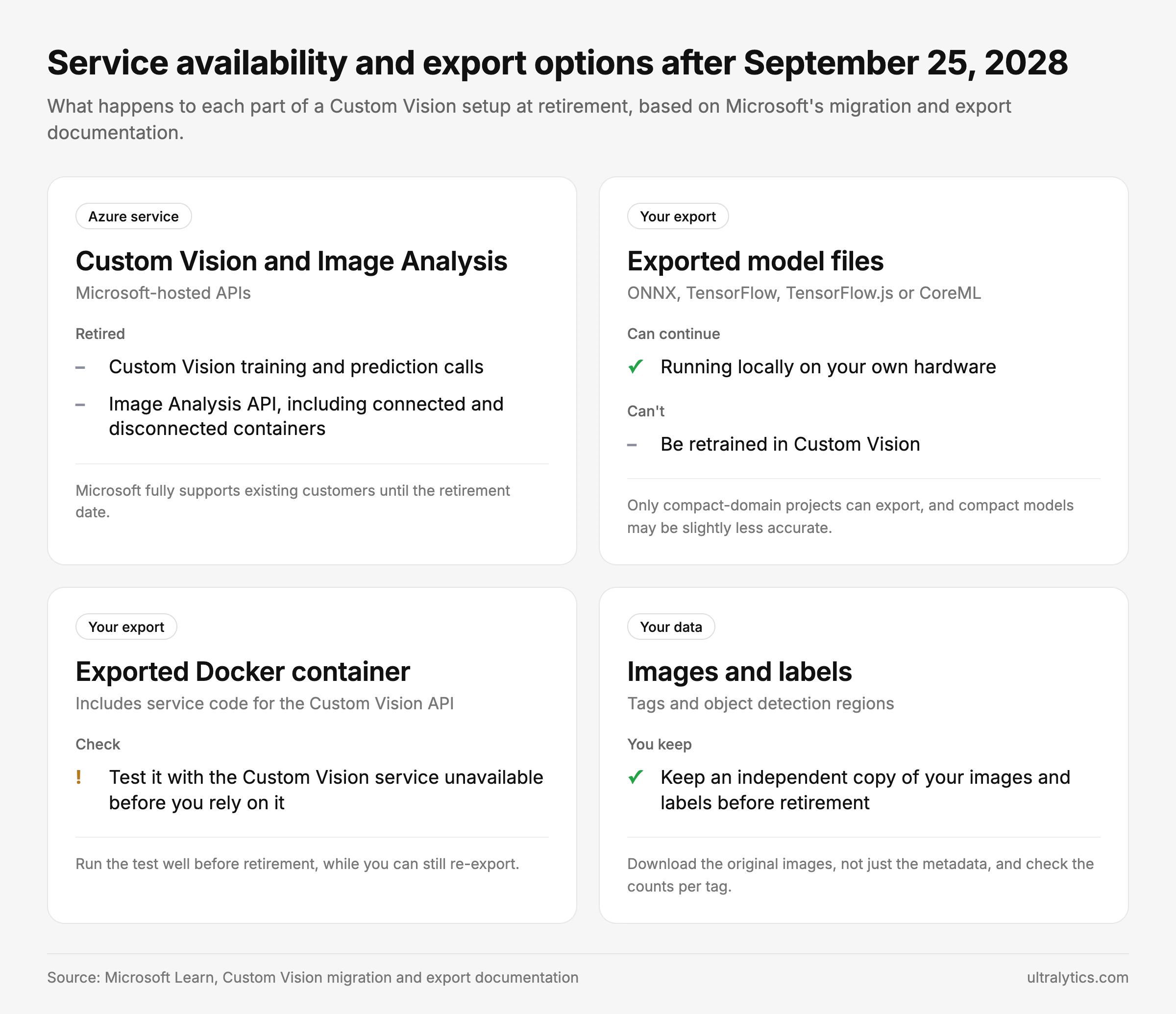
Service availability and export options at retirement, based on Microsoft's migration and export documentation.
Step 1: Inventory what you run today#
Before you compare anything, write down what you have. For each Custom Vision project, record:
- Project type: image classification (multiclass or multilabel) or object detection.
- Domain: a standard domain or a compact domain. Only compact-domain projects can export a model.
- Where predictions are used: every application, script, device or workflow that calls the prediction endpoint, and who owns it.
- The current model's acceptance criteria: the precision and recall you rely on today, and which mistakes cost the most. A missed defect and a false reject rarely cost the same.
- The dataset: number of images, tags, and how many images are tagged versus untagged.
- Constraints: latency, where inference must run (cloud, factory floor, mobile, offline), data residency and who needs access.
| Project | Type | Domain | Called by (owner) | Acceptance criteria | Images (tagged / untagged) | Tags | Constraints |
|---|---|---|---|---|---|---|---|
| Example: weld-defects | Object detection | General (compact) | Line 3 QA app (Plant IT) | Recall at least 95% on cracks; false rejects under 2% | 4,200 / 1,100 | 3 | On-site, under 200 ms |
The first row is an example of the level of detail to record, not data from a real project.
This list becomes your requirements for the replacement and your test plan for the cutover.
Step 2: Get your labeled data out early#
Microsoft's guidance is to export your labeled datasets and model metadata first, then convert them into the format your new platform needs. Do this while the service is fully supported, allowing time to validate the export.
- Images and labels: the Custom Vision Training API's Get Tagged Images operation returns image metadata, tags and, for object detection, regions. Set
taketo 256, page through withskip, and download each original image through itsoriginalImageUri. The metadata alone is not a backup of your images. Projects with the VNET feature enabled return relative paths that you fetch with GetArtifact instead. - Check the counts: confirm that the number of images and labels you exported matches what each project reports, per tag, before you rely on the export.
- Record the settings around the data: project and tag IDs, your tag-to-class mapping, the domain, the published iteration, and the confidence thresholds and preprocessing your applications use.
- Know what ExportProject does: Microsoft's ExportProject API copies a project to another Custom Vision account using a temporary token. It is not a portable backup of your dataset.
- Bounding boxes: detection regions come back as
left,top,widthandheightin normalized coordinates, relative to the image size. Converting them to YOLO format (normalized center x, center y, width, height) or COCO takes coordinate conversion, class mapping and a validation pass to catch boxes that land in the wrong place.
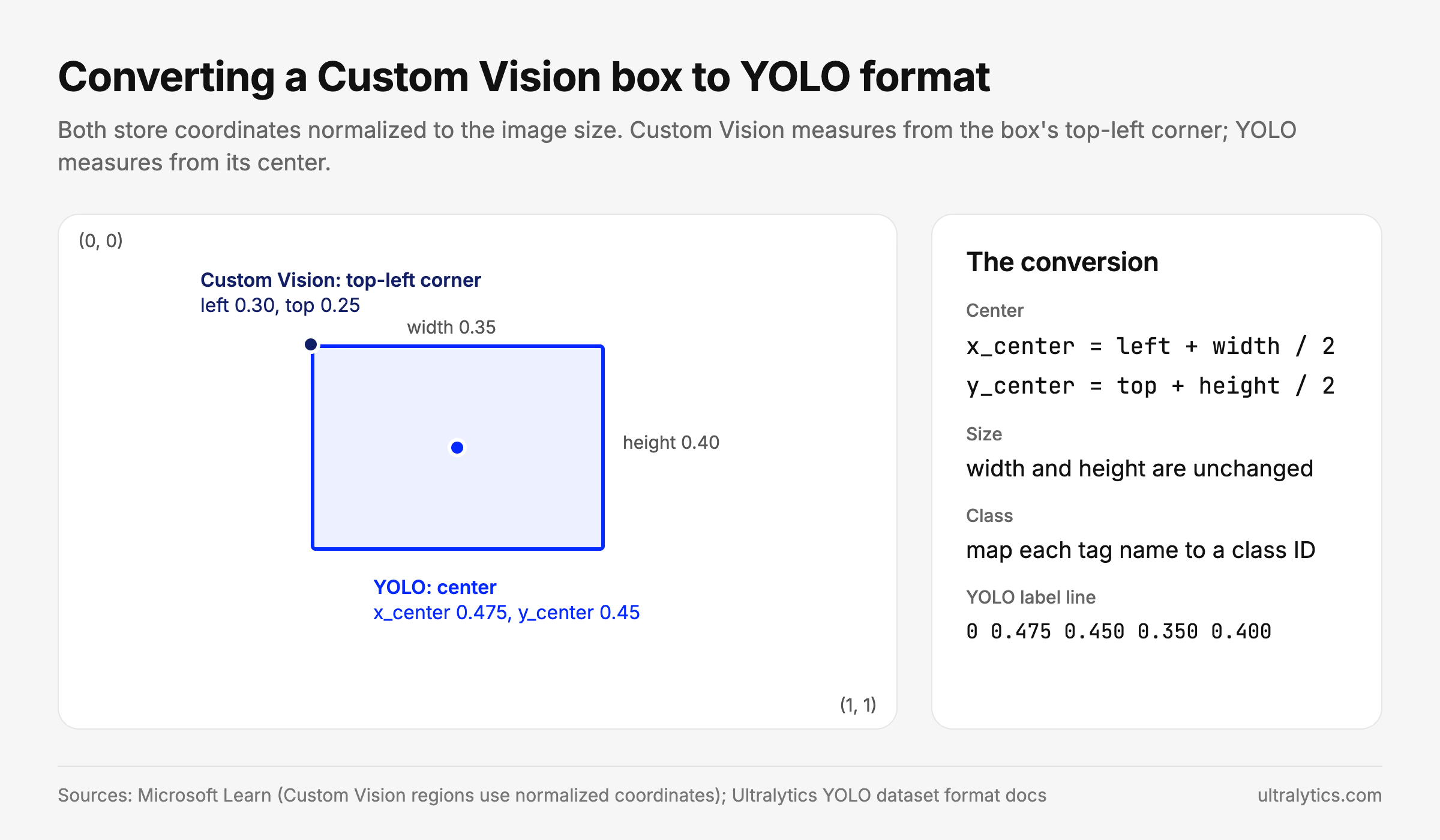
The same box in both formats. Both use coordinates normalized to the image size.
def to_yolo_line(region, class_ids):
    """Custom Vision region (normalized left, top, width, height) -> YOLO label line."""
    x_center = region["left"] + region["width"] / 2
    y_center = region["top"] + region["height"] / 2
    class_id = class_ids[region["tagName"]]
    return f"{class_id} {x_center:.6f} {y_center:.6f} {region['width']:.6f} {region['height']:.6f}"


# {"tagName": "scratch", "left": 0.30, "top": 0.25, "width": 0.35, "height": 0.40}
# -> "0 0.475000 0.450000 0.350000 0.400000"- Untagged images: export these too, with the Get Untagged Images operation. They may provide useful additional training examples once you can label them.
Check two numbers on Microsoft's limits page before you export. Custom Vision needs at least 5 labeled images per tag for classification and 15 for object detection, and recommends 50 or more for both. It also stores prediction images for only 30 days, so save any you want for retraining now.
- Models: for compact-domain projects, export the current model as a fallback you can run during the transition. A standard-domain project has to be switched to a compact domain and retrained before it can export, and the compact model may be slightly less accurate.
Keep the raw export unchanged and convert a copy, so you can always go back to the original. If you are moving to Ultralytics Platform, YOLO format is a natural target, since Platform imports YOLO, COCO and Ultralytics NDJSON datasets directly.
Step 3: Choose the kind of replacement#
Teams that relied on Amazon Lookout for Vision, which AWS retired on October 31, 2025, went through the same choice. There is no single right answer. The best replacement depends on your scenario and on how much of the pipeline your team wants to own.
| Option | Best for | What your team manages | Things to check |
|---|---|---|---|
| Azure Machine Learning with AutoML (Microsoft's suggested path) | Teams staying inside Azure that want custom classification and detection | Azure ML workspace, compute and deployment | Effort to rebuild training and deployment workflows in Azure ML |
| Another cloud provider's managed ML service, such as Amazon SageMaker AI, Amazon Rekognition Custom Labels or Gemini Enterprise Agent Platform on Google Cloud | Teams standardizing on that cloud | The provider's training, deployment and monitoring setup | Export options, migration effort and whether you can move your model later |
| Generative AI services in Microsoft Foundry (Microsoft's suggested path) | Teams willing to redesign the solution around prompt-based or generative models | Prompt design, evaluation and operating the solution | Accuracy on your specific defects or objects, latency and consistency |
| A dedicated trainable vision platform, such as LandingLens from Landing AI or Ultralytics Platform | Teams that want labeling, training and deployment in one place, with managed training and deployment infrastructure | Datasets, labeling, evaluation and integration with your applications | Supported tasks, import formats, deployment targets, portability of trained models and team access controls |
| Build on open-source frameworks | Teams with ML engineers who want full control | Training code, infrastructure and monitoring | Long-term maintenance and staffing |
| A turnkey inspection system | Production lines that want hardware, software and integration from one vendor | Vendor coordination, acceptance testing and ongoing support | Flexibility when products and defect types change |
Score each option against your inventory from step 1, including migration effort, ongoing compute and support costs, procurement requirements and whether a service is still in preview. If your team valued having labeling, training and deployment in one place, a dedicated trainable vision platform offers a similar integrated labeling, training and deployment workflow, and the "Moving to Ultralytics Platform" section below maps each part of your project. If inference must run on a device or offline, check export formats first. If several people label and review data, check team roles and permissions.
Step 4: Validate on your own images#
Supplement vendor examples with evaluation on your own data:
- Split your data three ways: training, validation and an untouched test set the new model never sees, including your hardest and rarest cases. Where it applies, split by production lot, camera or time period, and remove near-duplicate images across splits, so the test reflects new conditions.
- Retrain on your exported dataset using the same tags or classes.
- Compare against your acceptance criteria from step 1, not just a single accuracy number. Look at missed detections and false alarms separately.
- Test where it will actually run: the same cameras, devices or network path as production.
- Adapt the integration: check authentication, request and response formats, preprocessing, confidence thresholds and error handling for the replacement, then update and test each application rather than assuming a new endpoint URL is enough.
- Test under production load: check concurrency, cold starts, retries and what happens during an outage.
On Ultralytics Platform, you can train on the converted dataset with cloud training and follow the metrics in real time, then test the model in production conditions.
If the new model falls short, investigate labels, preprocessing, model suitability and deployment behavior before choosing the fix. Migration is a good moment to fix inconsistent labels and add examples of the cases the old model struggled with.
Step 5: Plan the cutover#
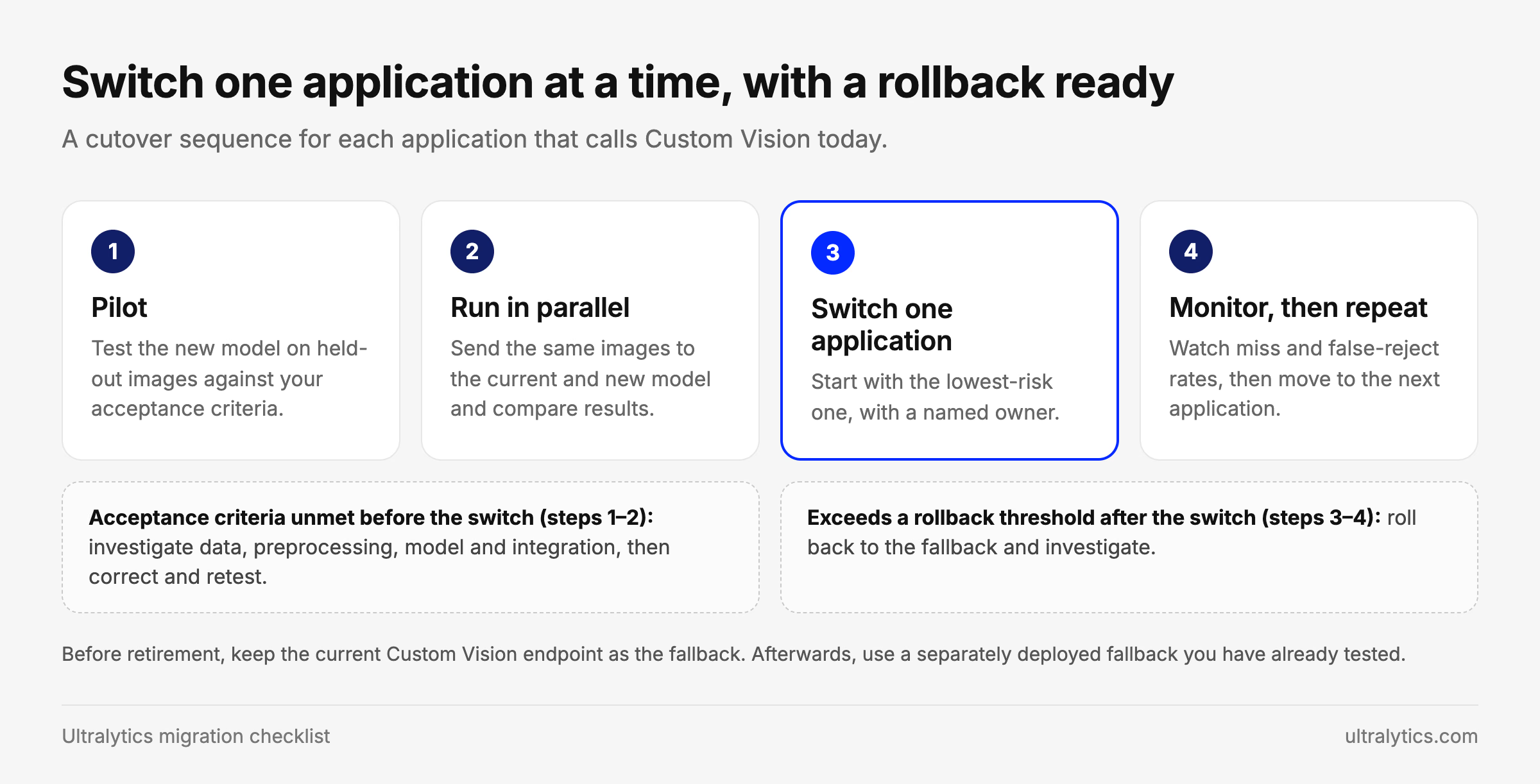
A cutover sequence for each application that calls Custom Vision today.
- Run in parallel. Send the same images to the old and new model for a period and compare results before switching.
- Switch one consumer at a time, starting with the lowest-risk application.
- Define rollback triggers in advance, such as a miss rate or false-reject rate above an agreed limit, and keep a fallback until you are confident: the current Custom Vision endpoint before retirement, or, afterwards, a separately deployed fallback you have already tested, such as an exported compact model.
- Name an owner for the cutover of each application, so nothing is left calling a retired endpoint.
- Match how each application runs today. On Ultralytics Platform, a model can serve predictions from a dedicated endpoint or be exported to run on your own hardware, so cloud callers and on-device apps each have a path.
- Decide who owns retraining. Products, lighting and defect types change. Agree who reviews new data and how often the model is retrained, so the new system can adapt as production conditions change.
Moving to Ultralytics Platform#
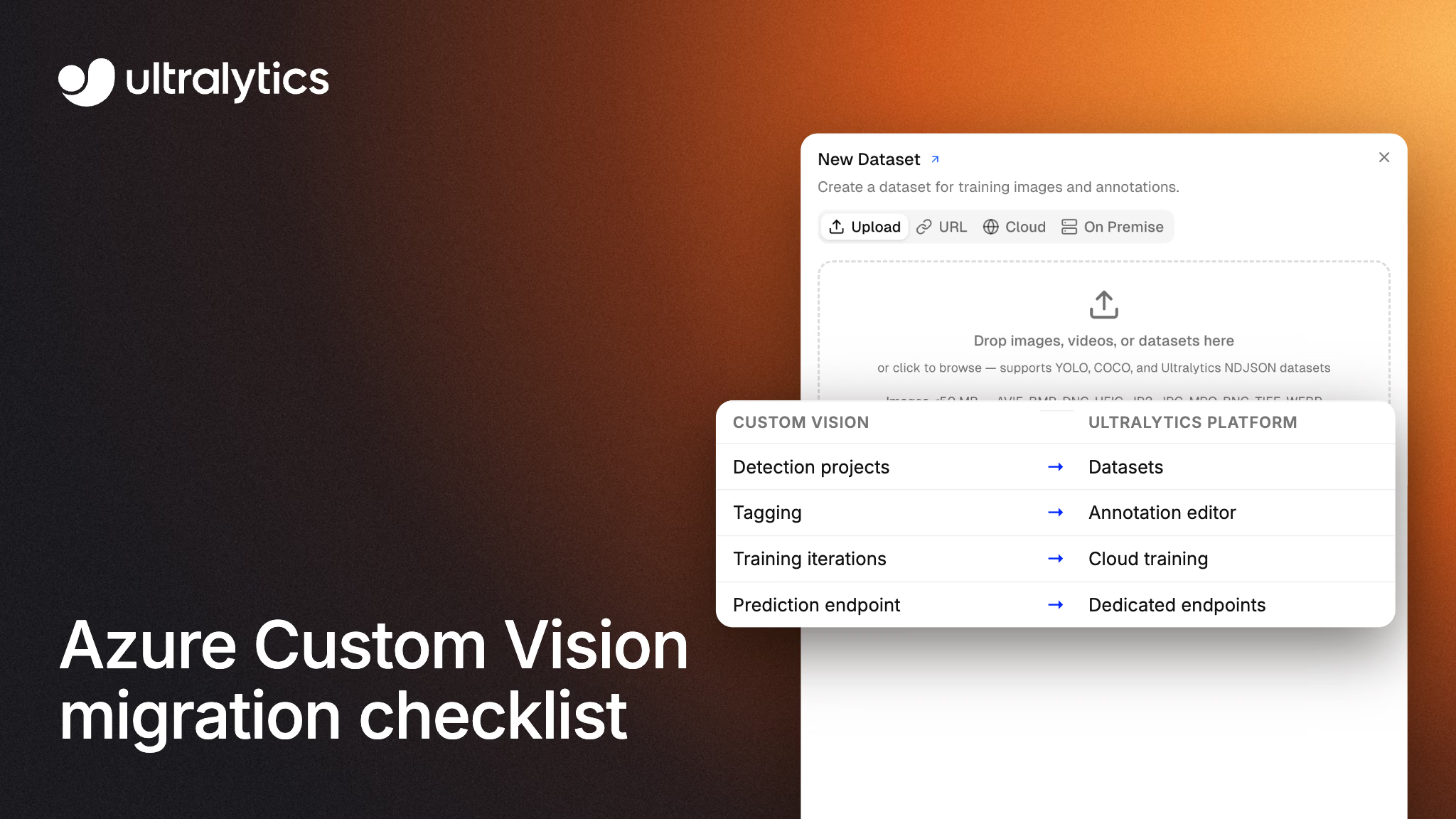
If your team liked the Custom Vision workflow of labeling, training and deploying in one place, Ultralytics Platform offers that same end-to-end workflow, built around Ultralytics YOLO models. Here is where each part of a Custom Vision project lives after the move:
| In Custom Vision | In Ultralytics Platform |
|---|---|
| Classification and object detection projects | Datasets for classification and detection, plus segmentation, pose and oriented bounding boxes |
| Tagged images and regions | Upload your converted export in YOLO, COCO or Ultralytics NDJSON format |
| Tagging in the portal | An annotation editor with smart annotation for detection, using SAM, pretrained YOLO models or your own fine-tuned model. Classification images are labeled manually |
| Training iterations | Cloud training on GPUs, with metrics streamed in real time and checkpoints saved automatically |
| Prediction endpoint | Dedicated endpoints in 42 regions |
| Compact-domain exports for devices | Model export to formats such as ONNX, TensorRT and CoreML, subject to model and task compatibility |
| Shared project access | Team workspaces with Owner, Admin, Editor and Viewer roles (check the team requirements), in a US, EU or Asia-Pacific data region |
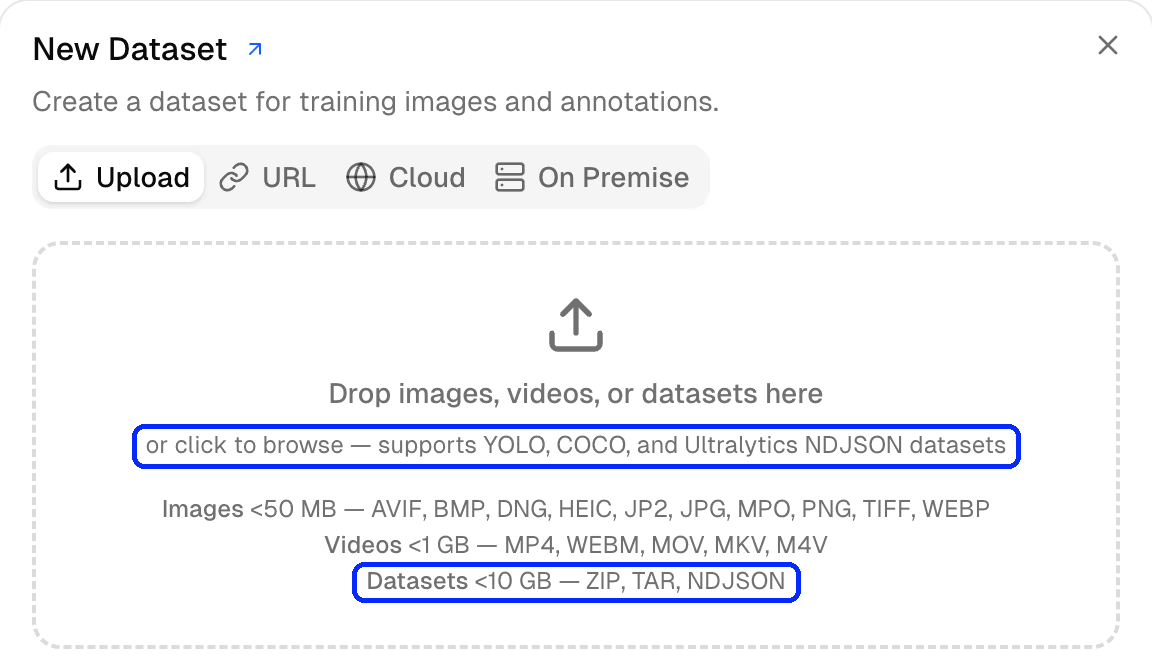
The New Dataset dialog in Ultralytics Platform accepts YOLO, COCO and Ultralytics NDJSON datasets. Upload limits shown are for the account used in this screenshot.
A few things to plan for:
- Retrain rather than import. Custom Vision models can't be uploaded, so you train a YOLO model on your exported data.
- Multilabel classification. Platform classification datasets use one label per image, so decide how to handle multilabel projects before you migrate them.
- Privacy and region. New datasets start public or private depending on your workspace's default visibility, so set proprietary datasets to Private when you create them. Your data region is chosen when you sign up and can't be changed yourself later.
- Serving capacity. Each dedicated endpoint runs one active instance. The default size scales to zero when idle, while custom sizes keep a warm instance, so benchmark throughput and cold starts against your production requirements, or export the model to run on your own infrastructure.
- Scope. A vision platform replaces the model side of an inspection system, not the cameras, lighting or line integration around it.
Start with one project: convert a representative Custom Vision dataset export to a supported format, upload it to Ultralytics Platform, train a model and compare it against the acceptance criteria you agreed in step 1. Planning a larger migration? Talk to our team about your project count, task types, dataset sizes, latency targets and deployment constraints.
Frequently asked questions
On September 25, 2028. Microsoft supports existing customers until then and asked them to plan their transition by September 25, 2026.
A model file exported to ONNX, TensorFlow, TensorFlow.js or CoreML runs on your own hardware without calling the Custom Vision service, so it can keep running. If you use the exported Docker container, test it with the service unavailable before relying on it. You won't be able to retrain it in Custom Vision, and exports are only available for compact-domain projects.
Yes. The Training API's Get Tagged Images operation returns image metadata, tags and object detection regions, up to 256 images per request, with an
originalImageUrifor each original image (projects with the VNET feature enabled return relative paths that you fetch with GetArtifact). Download the images themselves, then convert the regions to the format your new platform uses, such as YOLO or COCO.Microsoft's migration guidance points to Azure Machine Learning with AutoML for custom classification and detection, and to generative AI options in Microsoft Foundry, including Azure Content Understanding for custom classification.
For a move to Ultralytics Platform, plan to train a supported YOLO model on your converted dataset, because Custom Vision model exports aren't supported Platform model uploads. Keep your labels, review their quality and validate the new model before cutover.
Written by
Senior Machine Learning Engineer · Ultralytics
Comments
Ask a question, share your results, or help someone else.