Best object detection models for iOS apps on Apple silicon chips
Build smarter iOS apps with the best object detection models. Learn which models deliver fast, accurate, real-time performance on iOS devices like the iPhone and iPad.
Android devices and iPhones have become an everyday necessity. People use them to shop, navigate, take photos, scan products, and interact with apps throughout the day.
With the rapid growth of artificial intelligence, many smartphones now include features that can understand images and videos captured by the device’s camera. The ability to run these features efficiently depends largely on the underlying hardware.
For instance, in the Apple ecosystem, devices such as iPhones, iPads, and Macs are powered by Apple Silicon chips, including the A-series and M-series. These system-on-chip (SoC) designs integrate central processing units (CPU), graphics processing units (GPU), and dedicated machine learning accelerators, enabling on-device inference for AI workloads.
In particular, image analysis capabilities are made possible through computer vision, a field of AI that allows machines to interpret and understand visual information from images and videos using tasks like object detection.
Specifically, object detection models analyze images and identify objects by drawing bounding boxes around them. These models can be optimized to run efficiently on mobile hardware, such as Apple Silicon chips, enabling real-time visual analysis directly on-device on iOS devices.
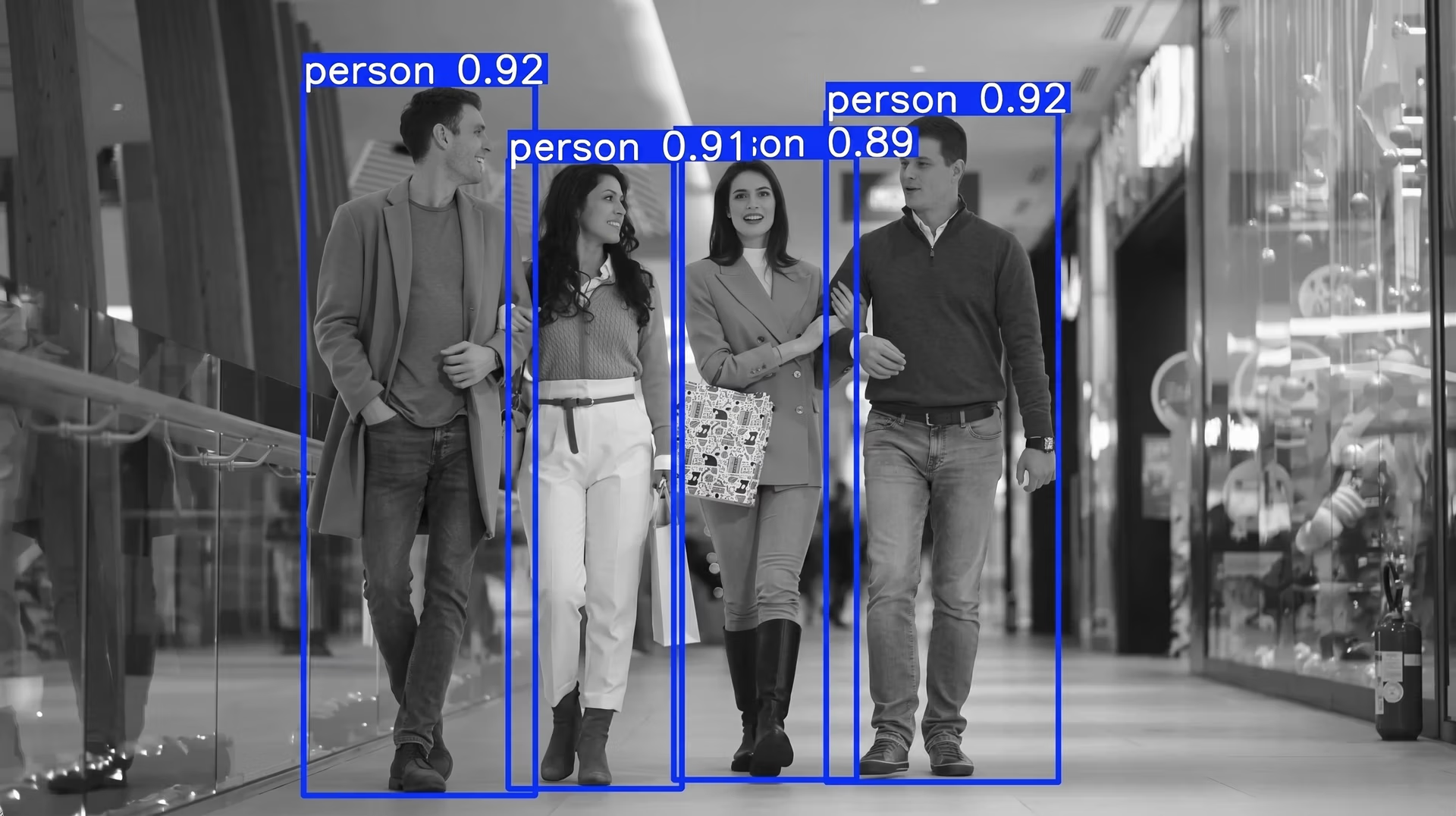
Fig 1. An example of object detection, with objects identified by bounding boxes. (Source)
In this article, we’ll explore some of the best object detection models for building fast, real-time iOS apps. Let’s get started!
How object detectors work on iOS devices#
Object detection assists apps with recognizing and locating objects in an image. When an app processes an input image, an object detection model can analyze the scene and identify different objects by placing bounding boxes around them and assigning labels.
Most object detection systems rely on neural networks that can recognize patterns in training data. For image tasks, these models learn visual representations by analyzing pixel-level information from large training datasets.
Convolutional neural networks (CNNs) are often used as the backbone for object detection models. CNNs are great for image predictions because they learn hierarchical visual features such as edges, shapes, and textures, which help the model recognize objects within a scene.
Researchers are also exploring transformer-based architectures for computer vision tasks. These models analyze relationships between different regions of an image and capture broader contextual information across the scene.
Beyond the type of model architecture, efficiency is a crucial consideration for object detection on iOS devices. Since these models run directly on mobile devices, they have to process images quickly while using limited computational resources.
Efficient models maintain low latency and support real-time object detection in mobile apps, especially when analyzing continuous camera input.
What makes an object detection model well-suited for iOS?#
Before diving into some of the best object detection models for iOS, let’s take a step back and understand what makes a model great for mobile applications.
The ideal object detection model for an iOS app balances performance, efficiency, and reliability. Here are some key factors that define a strong model for iOS deployment:
- Low latency: The model should process images quickly to support real-time object detection, particularly for applications that rely on continuous camera input.
- Efficient model size: Compact models run more efficiently on mobile devices and typically require less memory and computational resources.
- Detection accuracy: Accurate detection ensures objects are correctly classified, and bounding boxes remain precise across different scenes, object scales, and lighting conditions.
- Inference stability: Consistent inference time across frames is important for real-time applications. Large fluctuations in processing time can cause dropped frames or unstable camera experiences.
- Memory footprint: The amount of RAM required during inference affects how smoothly a model runs alongside other app processes on iOS devices.
A look at the best object detection models for iOS#
Next, let’s take a look at some of the most widely used object detection models for iOS devices.
1. Ultralytics YOLO models#
Ultralytics YOLO models are a popular family of object detection models designed for real-time computer vision applications. Over the years, Ultralytics has released vision models like Ultralytics YOLOv5, Ultralytics YOLOv8, Ultralytics YOLO11, and the latest state-of-the-art model, Ultralytics YOLO26.
Each new release has introduced improvements in detection accuracy, model efficiency, and runtime performance. These updates have made Ultralytics YOLO models increasingly suitable for edge devices such as smartphones.
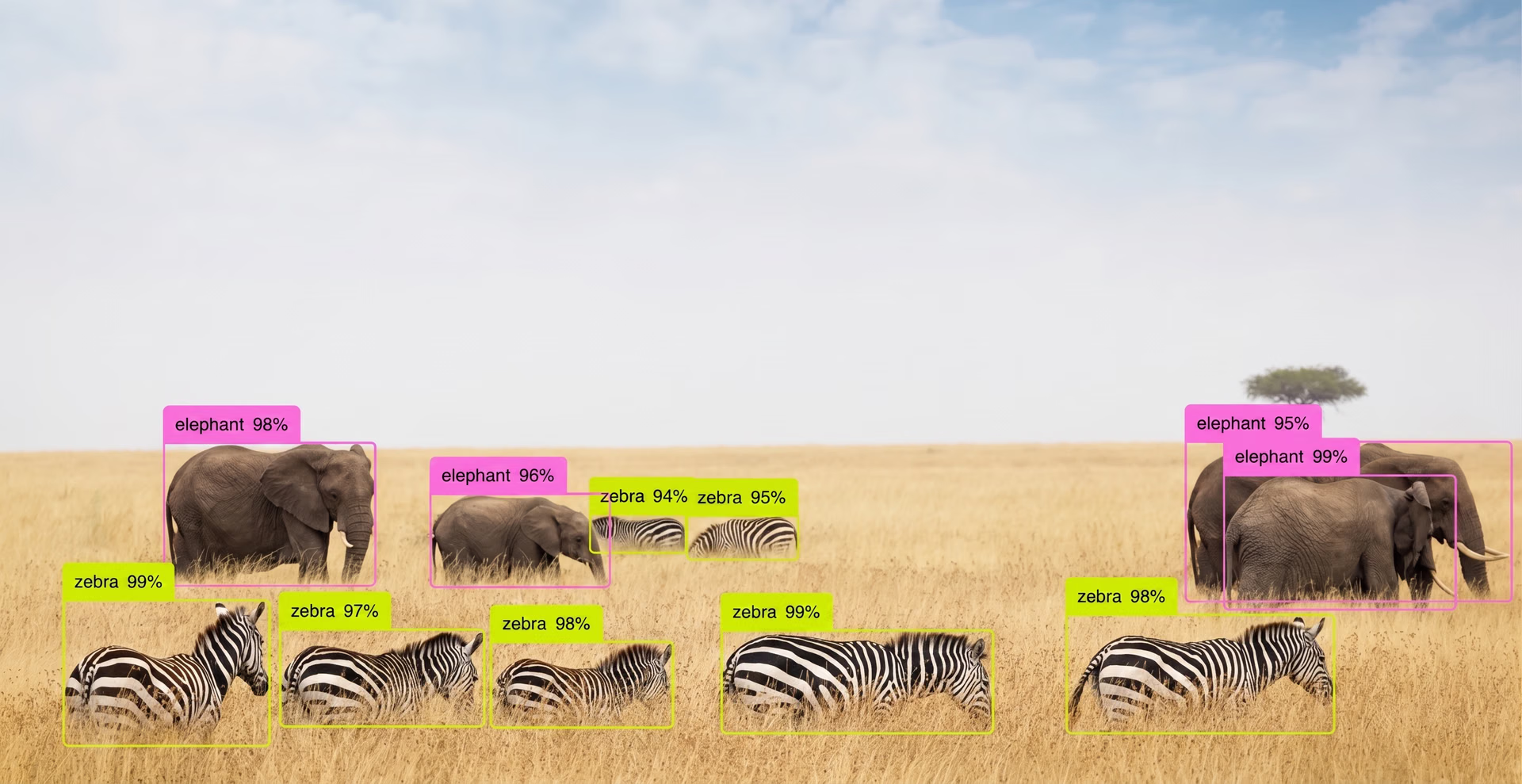
Fig 2. YOLO26 can be used to detect multiple objects in a real-world scene. (Source)
One of the key benefits of using Ultralytics YOLO models for iOS apps is the CoreML integration provided through the Ultralytics Python package. This open-source library helps developers train, test, and export Ultralytics YOLO models with a simple workflow.
The package supports exporting trained models to CoreML, Apple’s machine learning format used for deploying models on iOS devices. After export, the CoreML model can be integrated into an app and run directly on the device using hardware such as the CPU, GPU, and Apple Neural Engine.
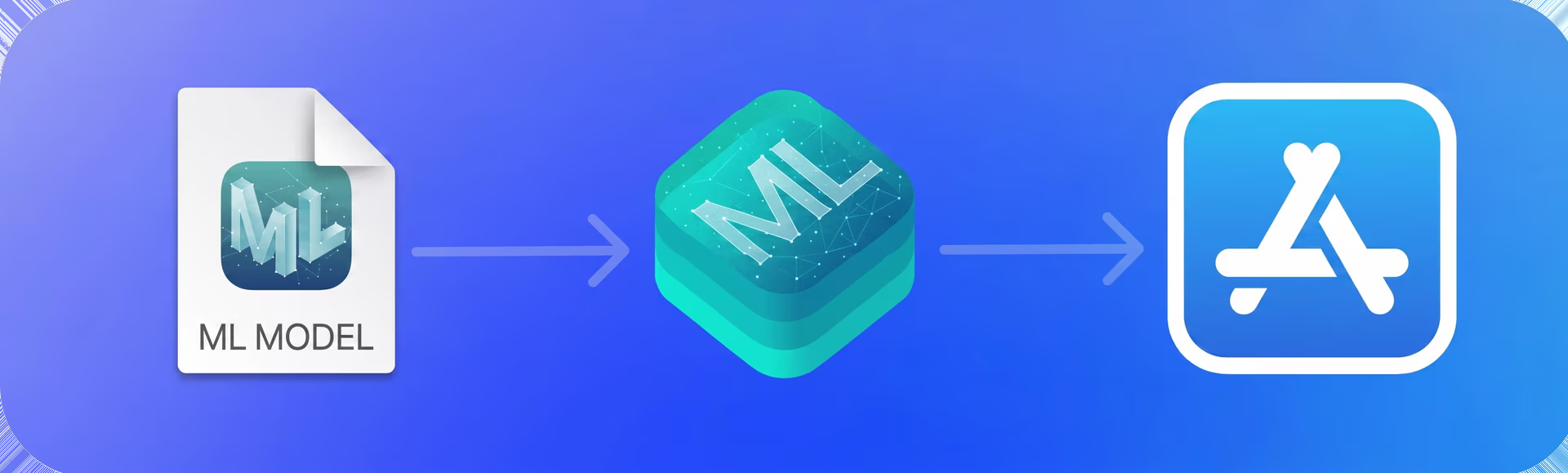
Fig 3. CoreML is Apple’s framework for integrating and running AI models within apps. (Source)
This makes it straightforward for developers to integrate real-time object detection into iOS apps while keeping model inference on-device.
Deployment options for Ultralytics YOLO models on Apple Silicon#
Beyond the models themselves, the Ultralytics ecosystem offers a range of options that make it easier to deploy YOLO models on Apple Silicon chips.
For example, Ultralytics recently introduced Ultralytics Platform, which brings together dataset management, model training, validation, and deployment in a single environment. This unified workflow reduces the need for multiple tools and helps streamline the path from experimentation to real-world applications.
As part of the platform, trained models can be exported to multiple formats, including CoreML for Apple devices. This makes it possible to export an Ultralytics YOLO model for on-device inference in just a few clicks.
On top of export capabilities, Ultralytics provides an open-source Swift (Apple’s programming language used to build iOS apps) implementation for iOS. This includes a ready-to-use YOLO iOS app written in Swift that demonstrates how CoreML models can be integrated, run on camera input, and used for real-time object detection.
Additional advantages of Ultralytics YOLO models#
Here are some other key characteristics that make Ultralytics YOLO models a great option for building iOS applications:
- Supports a range of vision tasks: In addition to object detection, Ultralytics YOLO models can be used for instance segmentation, pose estimation, object tracking, oriented bounding box (OBB) detection, and image classification.
- Multiple model sizes: Ultralytics provides different model variants (such as nano, small, medium, large, and extra-large), allowing developers to choose a version that fits the performance constraints of mobile devices.
- Pre-trained models: The Ultralytics YOLO models are available as pre-trained models that can be used out of the box or fine-tuned for specific tasks, reducing development time.
2. EfficientDet#
EfficientDet is an object detection architecture introduced by researchers at Google in 2019. It was designed to balance detection accuracy and computational efficiency, making it suitable for environments with limited resources.
A key idea behind EfficientDet is a scaling method known as compound scaling. Instead of increasing only one part of the model, such as network depth or image resolution, this approach scales multiple components of the architecture together.
By adjusting these elements simultaneously, the model maintains stable performance whether it is configured for high accuracy or optimized for lightweight deployments.
The architecture is available in several variants, ranging from EfficientDet-D0 to EfficientDet-D7. Smaller models are designed for faster inference and lower resource usage, while larger versions focus on achieving higher detection accuracy.
3. MobileNet SSD#
MobileNet SSD is a lightweight object detection model designed to run efficiently on mobile and edge devices. It gained popularity around 2017.
The model combines the MobileNet backbone, which focuses on efficient feature extraction, with the SSD (Single Shot Detector) approach for detecting objects. The SSD method detects objects and generates bounding boxes in a single forward pass.
This design keeps the model relatively fast and simple, which is useful for applications that need quick detection results. MobileNet SSD is often used in situations where smaller model sizes and faster inference speeds are important.
The MobileNet architecture reduces the amount of computation required, making it easier to run the model on devices with limited processing power. While MobileNet SSD may not achieve the same level of accuracy as some newer detection architectures, it still performs well for many common object detection tasks.
4. CenterNet#
CenterNet is an object detection model that identifies objects by predicting their center points. It was introduced in 2019.
Instead of generating many candidate regions, the model detects the center of an object and then predicts the size of the bounding box around it. This approach simplifies the detection pipeline and reduces the number of steps involved during inference.
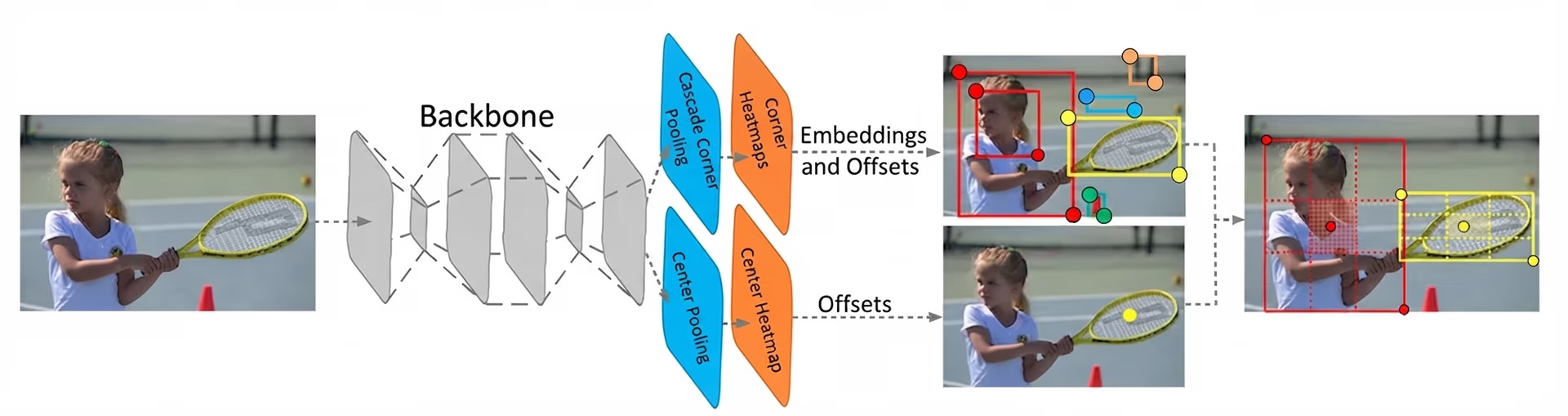
Fig 4. An overview of the object detection stages in CenterNet (Source)
CenterNet can be used for real-time detection tasks and is known for its relatively simple architecture compared to some multi-stage detectors. Variants such as CenterNet with ResNet backbones are commonly used in different computer vision applications.
Its efficient design makes CenterNet suitable for systems that need fast object detection, including applications running on iOS devices.
5. NanoDet#
NanoDet is a lightweight object detection model designed for real-time applications on edge and mobile devices. It was introduced in 2020 with the goal of providing efficient object detection while keeping model size and computational requirements very low.
The model uses a single-stage detection architecture, enabling it to predict object locations and categories in a single pass through the network. This design keeps the model fast and suitable for systems with limited hardware resources.
NanoDet uses a compact backbone and an optimized detection head to reduce the number of parameters and computations required during inference. These design choices help maintain reasonable detection accuracy while prioritizing speed and efficiency.
Choosing the right object detection model for your iOS app#
Selecting an object detection model for an iOS app often depends on the use case's specific requirements. Because these models run directly on devices such as the iPhone and iPad, several factors influence which option will work best.
Here are some important considerations:
- Energy efficiency: Models that consume less power help preserve battery life, which is important for mobile apps that perform continuous camera processing.
- Model optimization support: Some models support optimization techniques like quantization or pruning, which can reduce model size and improve performance on iOS devices.
- Hardware compatibility: The model architecture you pick should run efficiently on iOS hardware, including the CPU, GPU, and Apple’s Neural Engine.
- Scalability: Some architectures provide multiple model sizes or variants, allowing developers to choose versions that best match performance and hardware requirements.
Key takeaways#
Object detection models bring advanced computer vision capabilities to smart mobile apps. Running directly on iOS devices, these models make it possible for apps to analyze images and video from the device’s camera in real time. By choosing the right model, developers can build responsive vision-driven mobile apps that deliver reliable real-time performance.
Join our growing community and explore our GitHub repository for hands-on AI resources. To build with vision AI today, explore our licensing options. Learn how AI in agriculture is transforming farming and how vision AI in robotics is shaping the future by visiting our solutions pages.








