Best platforms for training custom image classifiers
Image classifier training platforms compared: no-code AutoML, developer platforms and edge tools, and how to choose by control, deployment and cost.
 Miles Deans10 min read
Listen to this article
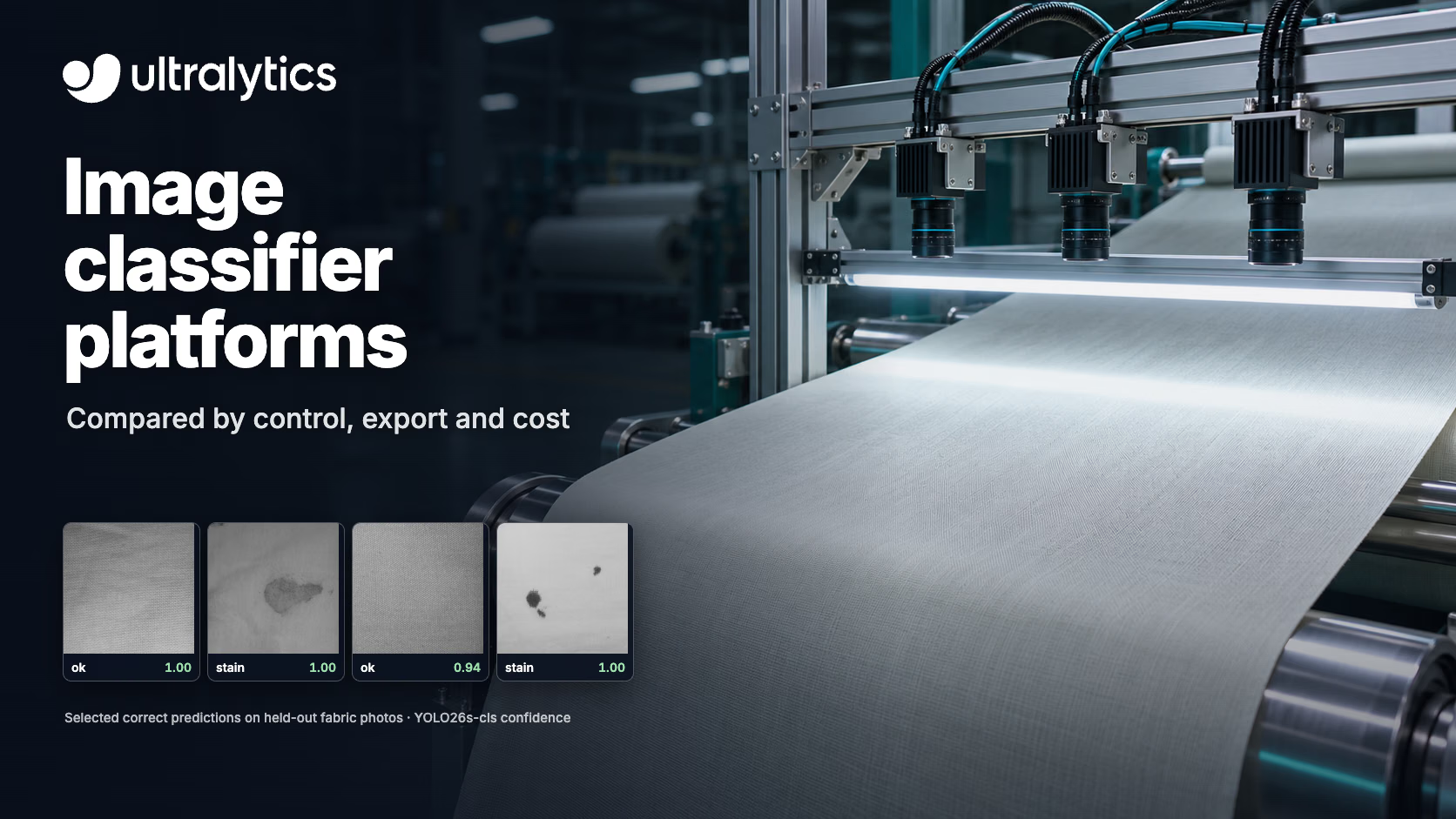
Illustrative AI-generated inspection scene. Tiles show four correctly classified test photos, selected for visual clarity, from the Fabric Stain Dataset. Our trained Ultralytics YOLO26s-cls model classified 65/71 test images correctly, including 7/11 clean images and 58/60 stained images. Tiles are square crops of the test photos. Scores show model confidence, not accuracy.
The best platform for training a custom image classifier depends on where the model will run and how much control you need. No-code cloud platforms such as Amazon Rekognition Custom Labels, AutoML on Gemini Enterprise Agent Platform (formerly Vertex AI AutoML), LandingLens and Ultralytics Platform let you upload labeled images and train without code. Developer workflows such as Amazon SageMaker AI, Azure Machine Learning AutoML and Hugging Face Transformers give you more control over the model and the training job. Edge-focused tools such as Edge Impulse target small devices, and Teachable Machine is a free way to prototype in the browser.
Service status matters when you choose. Microsoft is retiring Azure Custom Vision on September 25, 2028, and Hugging Face AutoTrain is no longer maintained. Google now calls Vertex AI AutoML AutoML on Gemini Enterprise Agent Platform; this guide shortens that to Google Cloud AutoML.
This guide compares tools for training a classifier on your own labeled images, explains how to choose, and shows how to test a classifier before you commit. For choosing the model architecture, see image classification models compared. For serving a model you already have, see computer vision inference platforms compared. Ultralytics publishes this comparison and offers one of the platforms included.
What to compare#
Image classification assigns one or more labels to a whole image, such as "defective" or "OK" for a part on a production line. Platforms that train classifiers differ in five ways that matter more than their feature lists:
- Labels: single-label (one class per image) or multi-label (several classes per image). Not every platform supports both.
- Control: AutoML picks the model and settings for you; developer platforms let you choose the architecture, image size and training settings.
- Where the model runs: some platforms only serve the model from their own cloud, while others let you export it to run on your own hardware.
- Cost model: training time, hosting hours and per-image prediction fees add up differently. A model that must stay running can cost more than training it.
- Data location: where your images are stored and processed, which matters for regulated data.
Image classifier training platforms compared#
These are different kinds of tools: managed AutoML services, developer workflows and browser prototypes. Shortlist by label support and where the model must run before you compare cost, and first check whether an existing pretrained model already does the job.
Platforms are listed alphabetically. Vendor documentation was checked on November 9, 2026; this is a capability comparison, not a hands-on benchmark. On small screens, scroll the table sideways to see every column.
| Platform | Approach | Where the trained model runs | Cost model | Best fit |
|---|---|---|---|---|
| Amazon Rekognition Custom Labels | No-code AutoML in the AWS console | AWS only, through the Custom Labels API | Training hours plus inference hours while the model is running | Teams already on AWS who want a managed API |
| Amazon SageMaker AI | Developer platform: built-in image classification algorithms or your own training code | SageMaker endpoints, or anywhere you deploy the exported model | Pay for training and hosting instances | ML teams that want full control inside AWS |
| Azure Custom Vision | No-code portal | Azure API; compact-domain models can also be exported | Training compute hours, prediction transactions and image storage | Existing customers planning migration; retiring September 25, 2028 |
| Azure Machine Learning AutoML | AutoML image training through the Python SDK or CLI; inspect results in the studio | Azure endpoints or exported models | Pay for compute | Microsoft's recommended path off Custom Vision |
| Edge Impulse | Transfer learning in a web studio (a Qualcomm company) | Microcontrollers, embedded Linux and other edge devices | Free Developer plan for exploration and prototyping; check production rights; Enterprise pricing by quote | Classifiers for small, low-power devices |
| Google Cloud AutoML (AutoML on Gemini Enterprise Agent Platform, formerly Vertex AI AutoML) | No-code AutoML in Google Cloud | Google Cloud endpoints, or AutoML Edge models for devices | Pay for training node hours and hosting | Teams already on Google Cloud |
| Hugging Face Transformers | Code-based fine-tuning of pretrained image classifiers such as ViT, with models shared on the Hugging Face Hub | Your own infrastructure or a hosting service you configure | Your own compute, or paid training and hosting resources; check each model's license | Developers who want to choose the checkpoint and control training. AutoTrain, the older no-code option, is no longer maintained |
| LandingLens | No-code platform with classification, detection and segmentation projects | Cloud or edge, from a Windows app to an API | Free plan with usage limits, including one model download for noncommercial use; paid plans above that | Manufacturing inspection teams |
| Teachable Machine | Free browser tool from Google Creative Lab | Exported TensorFlow, TensorFlow.js or LiteRT (.tflite) models | Free | Learning and quick prototypes |
| Ultralytics Platform | Upload, label and train YOLO26 classification models on cloud GPUs | Platform endpoints, or export to formats such as ONNX, TensorRT, CoreML and LiteRT | Cloud GPU hours paid with credits (from $0.24 an hour); signup credit available | Teams that want an exportable classifier they can run on their own hardware |
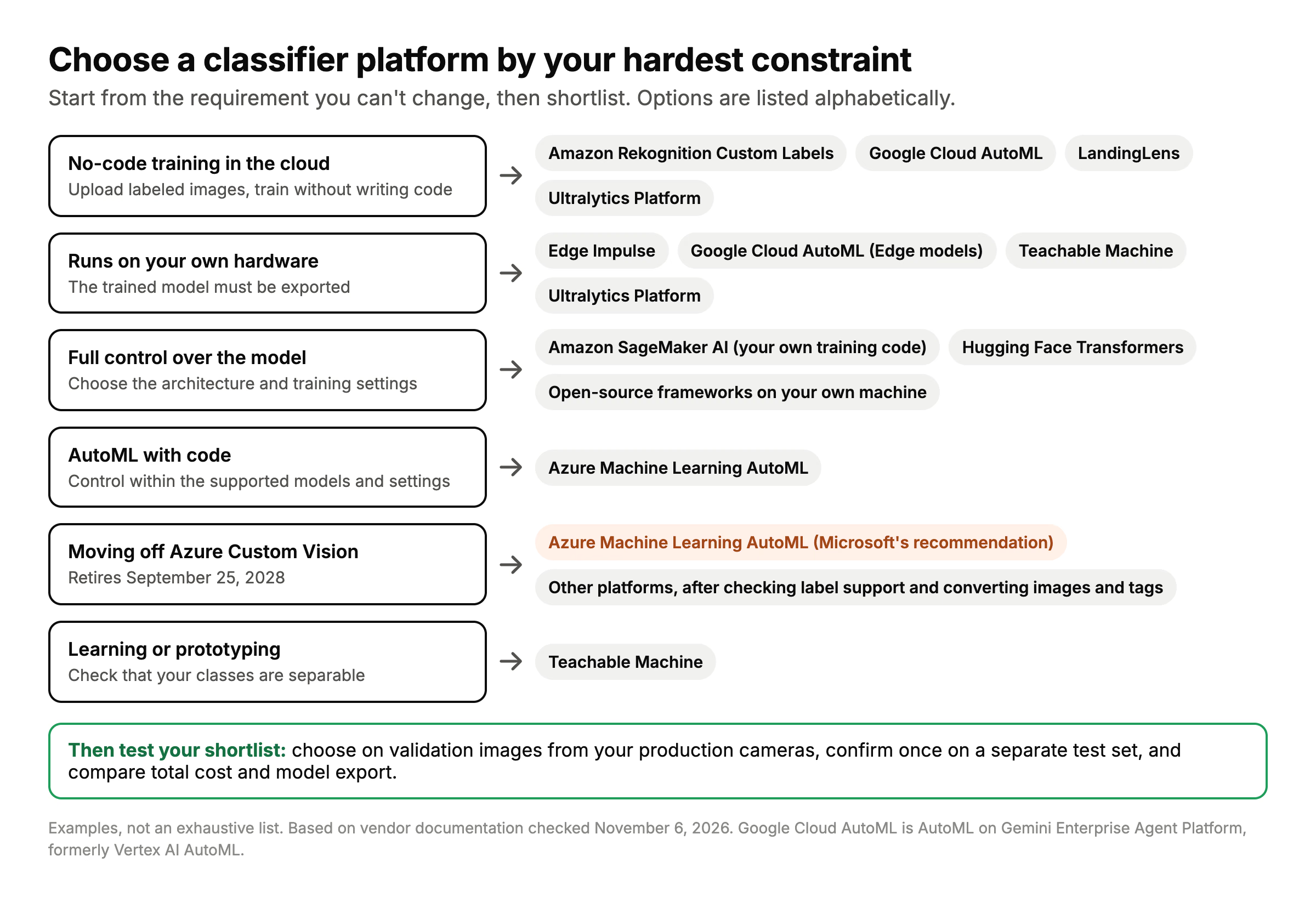
Example shortlists by requirement. These groups overlap; confirm label support, deployment rights and runtime compatibility before choosing.
Ultralytics Platform trains single-label classifiers, where each image gets one class. If you need multi-label classification, consider Azure Machine Learning AutoML or Google Cloud AutoML.
How to choose#
Start from the decision you are least flexible on.
You want no code and a managed API#
Choose the AutoML service in the cloud you already use: Amazon Rekognition Custom Labels on AWS, or Google Cloud AutoML on Google Cloud. Both handle the model and the settings for you. Check how long the model must stay running, because Rekognition Custom Labels bills for every hour a model is started, even when it isn't analyzing images.
You need the model to run on your own hardware#
Choose a platform that exports the trained model. Edge Impulse, Google Cloud AutoML (Edge models), Teachable Machine and Ultralytics Platform offer model export; check the supported runtime, plan limits and license terms before choosing. For factory PCs, cameras and GPUs, an exported YOLO26 classification model runs with ONNX, TensorRT or OpenVINO. For microcontrollers, Edge Impulse is built for that class of device.
You want full control over the model#
For control over architecture and training settings, use SageMaker with your own training code or build a workflow with PyTorch, TensorFlow, Keras, Hugging Face Transformers or the Ultralytics YOLO package. Check which architectures each library supports. AutoML tools such as Azure Machine Learning AutoML offer control within their supported models and settings. Expect more setup either way.
You are moving off Azure Custom Vision#
Microsoft will fully support existing customers until September 25, 2028, and recommends Azure Machine Learning AutoML for custom classification. To move, export your images and tag assignments, keep multiple labels where you used them, and convert them to the new platform's import format before retraining.
You are learning or prototyping#
Teachable Machine is free and trains in the browser, which makes it a good way to test whether your classes are separable before you collect a full dataset.
How to check a classifier before you commit#
A platform's demo accuracy tells you little about your own images. Run the same short test on each shortlisted platform:
- Keep separate training, validation and test sets. Take the test images from the cameras and conditions the model will see in production, and keep near-duplicates and images from the same capture sequence in the same set.
- Train a baseline on the same training images with each platform's defaults, and note any limits on compute, training budget or image size.
- Choose using the validation set. Compare per-class precision, recall and the confusion matrix, plus speed on the hardware you will use, and set any thresholds here.
- Test the final choice once on the untouched test set: top-1 accuracy for single-label classifiers, or precision, recall and F1 for each label in multi-label classifiers.
- Check the full cost: training plus the hosting or prediction fees at your expected volume.
- Check the exit: can you download the trained model, in which format, and under what license?
Reuse the same images, labels and splits on every platform, converting them to each one's import format. As an optional example, this is the final test with Ultralytics YOLO:
from ultralytics import YOLO

model = YOLO("yolo26n-cls.pt")  # pretrained on ImageNet
model.train(data="path/to/dataset", epochs=50, imgsz=224)  # dataset/train/<class>/, dataset/val/<class>/

metrics = model.val(split="test")  # dataset/test/<class>/, never used in training (needs its own test folder)
print(f"top-1 accuracy: {metrics.top1:.3f}, top-5 accuracy: {metrics.top5:.3f}")
See the classification dataset format for the folder layout, the Classify docs for classification examples, and the train settings for every training option. Keep separate train, val and test folders: if the test folder is missing, the final check falls back to the validation images.
Where Ultralytics fits#
Ultralytics supports single-label classifier training and export. Compare its results on your own data before choosing it.
- Train in the cloud or locally. Ultralytics Platform trains YOLO26 classifiers on cloud GPUs from your browser, and the open-source
ultralyticsPython package trains the same models on your own machine. - Prepare data and train in one workflow. Import class-folder datasets with the Platform dataset instructions, review labels and splits, then train in Ultralytics Platform.
- Run the model where you need it. Export to ONNX, TensorRT, CoreML, LiteRT and other formats, or deploy to a Platform endpoint.
- Know the limits. Classifiers are single-label. Platform endpoints run on CPU, so high-volume GPU serving is better handled on your own hardware or another cloud. Ultralytics offers AGPL-3.0 and Enterprise licensing: proprietary deployments that can't meet the AGPL-3.0 obligations need an Enterprise License.
Frequently asked questions
Teachable Machine is free and runs in the browser, which suits prototypes. The Ultralytics YOLO package runs on your own hardware without a software fee under AGPL-3.0; proprietary deployments that can't meet the AGPL-3.0 obligations need an Enterprise License. Ultralytics Platform offers a signup credit.
There is no universal number. Start with varied examples from your production cameras and conditions, use validation errors to decide which classes need more examples, and keep a separate test set for the final check. Fine-tuning a suitable pretrained model can reduce the amount of labeled data needed compared with training from scratch.
On some platforms, yes. Edge Impulse, Google Cloud AutoML (Edge models), Teachable Machine and Ultralytics Platform offer model export; check the supported runtime, plan limits and license terms. Amazon Rekognition Custom Labels models run only through the AWS API.
Microsoft recommends Azure Machine Learning AutoML for custom classification models, and supports existing Custom Vision customers until September 25, 2028. To move to another platform, export your images and tag assignments and convert them to that platform's import format.
Yes. Google now calls it AutoML on Gemini Enterprise Agent Platform, and AutoML image classification continues with the same training workflow.
Use classification when one label for the whole image is enough, such as "OK" or "defective". Use object detection when you need to know where objects are or how many there are.
Written by
Comments
Ask a question, share your results, or help someone else.