PPE Detection and Workplace Safety with Ultralytics
Build PPE detection with Ultralytics Platform: annotate site images, train YOLO26, deploy to cloud or edge, and validate workplace safety monitoring.
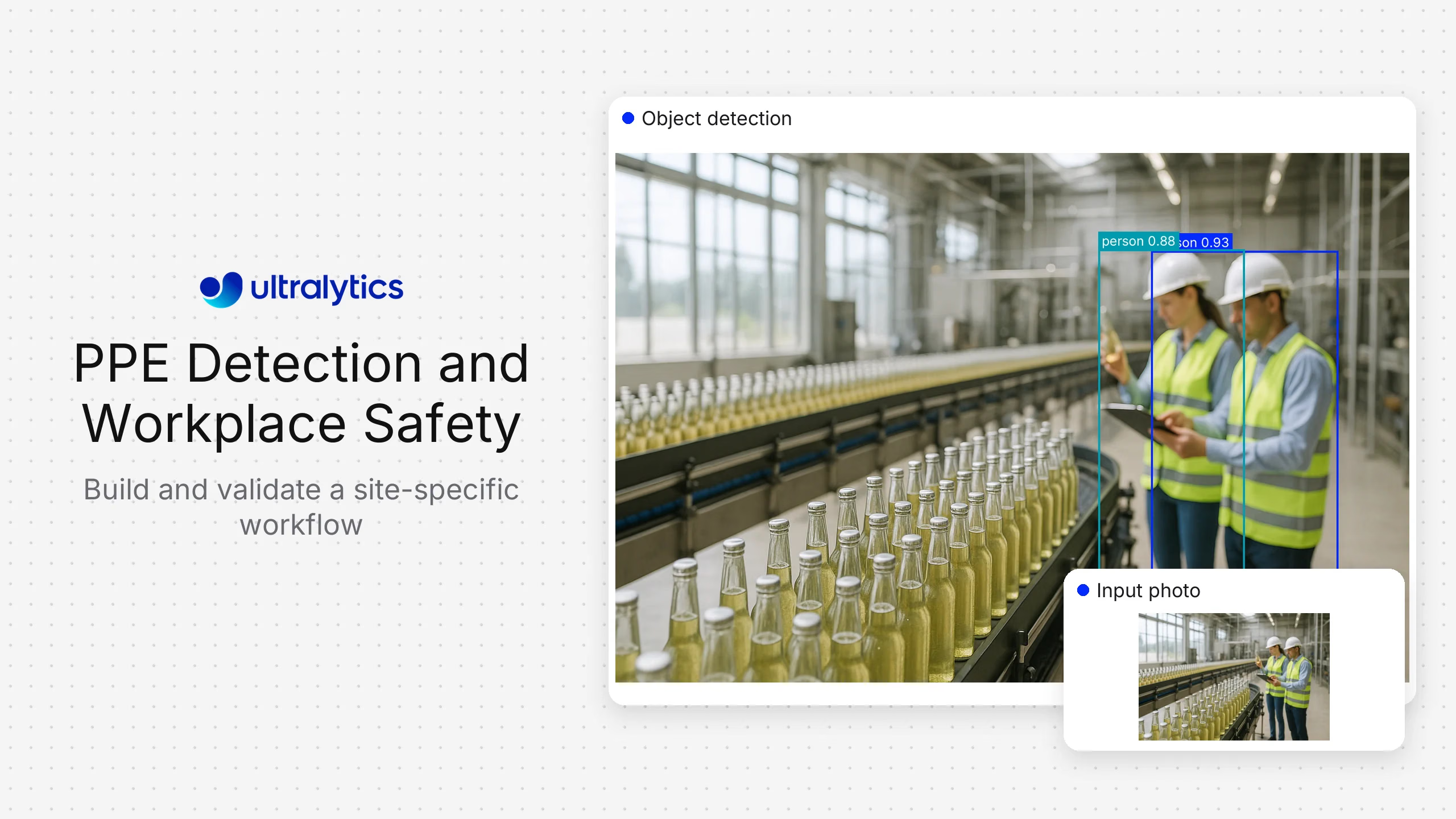
Workplace safety teams need to know where required protective equipment is missing and which conditions deserve attention. Computer vision makes those checks measurable by detecting people, hard hats, high-visibility vests, and other visible equipment in images and video.
Ultralytics Platform brings the complete PPE detection workflow into one workspace: prepare data, annotate equipment, train an Ultralytics YOLO model, deploy it, and monitor deployment performance. Teams can build around their own cameras and site requirements with Ultralytics as their computer vision solution throughout the project.
This guide explains how to use that workflow for practical PPE monitoring, from the first camera sample to a validated deployment.
What is PPE detection?#
Personal protective equipment (PPE) detection uses object detection to locate protective equipment and assign class labels to it. A model can return a bounding box and confidence score for each visible hard hat or vest, alongside detections of people.
The monitoring application then connects those predictions to a specific workplace rule. For example, a loading-bay check could look for a person whose visible upper body lacks the required vest. Making that decision requires associating the equipment with the correct person and handling views where the equipment is obscured.
Start with equipment that the camera can resolve clearly. Hard hats and vests are often more practical first targets than small items such as earplugs or glove details. Train and evaluate the classes your site needs; a general-purpose pretrained model should not be assumed to recognize every type of PPE.
| Monitoring objective | Ultralytics capability | What to validate at your site |
|---|---|---|
| Hard hat and vest checks | Custom YOLO object detection | Equipment visibility and association with the correct person |
| Eye protection or glove checks | Object detection trained on relevant examples | Sufficient image detail at the working distance |
| Restricted-zone entry | Person detection and video tracking | Zone placement, camera perspective, and entry rules |
| Pedestrian and vehicle awareness | Detection and tracking | Occlusion, track continuity, and the definition of a reviewable event |
| Posture analysis | Pose estimation | Relevant movements and the limits of visible body keypoints |
Ultralytics provides the vision capabilities for these workflows. Site-specific rules determine how model outputs become events for a safety team to review.
Why use Ultralytics for workplace safety computer vision?#
PPE projects depend on a repeatable path from camera footage to a model that performs well at the site. Ultralytics Platform connects dataset management, annotation, training, model export, hosted inference, and deployment monitoring. The same workspace supports the initial pilot and subsequent model updates.
That continuity matters when a new helmet design arrives, a camera moves, or a production line changes. Teams can update their data, refine labels, compare training runs, and deploy an improved model through the same workflow.
Use Ultralytics YOLO26 as the starting point for a new PPE detection project. Choose the model size by measuring both detection quality and inference speed on the hardware you intend to use.
How to build PPE monitoring with Ultralytics Platform#
1. Define one visible rule and collect representative data#
Begin with a concrete objective, such as checking for hard hats at a construction-site entrance. Define the camera view, required equipment, operating hours, and what a reviewer should do when the application flags an event.
Collect examples from the actual cameras across different shifts and conditions. Include backlighting, partial occlusion, groups of workers, empty scenes, and equipment being carried. These examples help distinguish the intended condition from visually similar situations.
Keep training and evaluation footage separate by recording session or camera. Adjacent frames from the same clip should stay in the same split, so validation measures performance on new scenes.
The Construction-PPE dataset is a useful starting resource for exploring PPE classes. Use representative site footage to determine whether a model is ready for your deployment.
2. Annotate PPE consistently#
Upload your training images to Ultralytics Platform and define the classes you need. Its annotation editor supports manual bounding boxes and Smart Annotation with compatible models on Platform-hosted datasets. Review suggested labels, correct missed equipment, and remove incorrect boxes before training.
Write a short labeling guide so everyone treats difficult cases consistently. A hard hat carried in a hand is visible equipment, but it does not establish that the person is wearing it. An occluded head also should not automatically become a missing-hard-hat example.
If incorrect wear is part of the objective, define the visible states explicitly and collect enough examples to evaluate them. Only include distinctions the camera can actually show.
3. Train and compare YOLO26 models#
Create a project, select the labeled dataset and YOLO26 model, and start cloud training in Ultralytics Platform. Track the training metrics and compare runs as you improve the data or adjust the model configuration.
Inspect performance for each PPE class. A strong overall score can hide weak detection of small goggles or helmets partly hidden behind machinery. Review missed detections and false positives alongside precision and recall.
Test candidate models on held-out examples from the intended deployment, including the most difficult camera views. Select a model that meets your quality and latency requirements together.
4. Deploy where your cameras operate#
Ultralytics supports hosted inference and model export. Deploy a dedicated endpoint for application requests, or export the model to a supported format for inference on compatible local hardware. ONNX and TensorRT are examples of deployment formats available through the Ultralytics workflow.
For continuous camera streams, measure throughput and latency with the actual number of streams, image sizes, and hardware. The application consuming those streams also owns the event rules: equipment-to-person association, zone checks, persistence across frames, and routing events to reviewers. Ultralytics tracking can maintain object tracks across video frames to support that logic.
Choose the deployment path around your latency, connectivity, and data-handling needs, then validate the exported model or endpoint before rollout.
5. Review results and improve the model#
Start with a limited pilot and have a safety reviewer check the flagged events. Measure both false alerts and missed events; reducing alerts alone can hide a detector that misses too much.
Use deployment monitoring to inspect service health, request latency, and errors. Separately review sampled camera results against human labels to assess detection quality. Infrastructure metrics alone do not establish PPE accuracy.
Bring difficult examples back into the dataset, correct their annotations, and retrain in Ultralytics Platform. Repeat that review after meaningful changes to camera placement, equipment, lighting, or site layout.
What makes a PPE detection pilot useful?#
A practical pilot answers specific questions about the conditions it will encounter:
- Can the camera see the equipment? Check object size, focus, lighting, and obstructions at the relevant distance.
- Does the application match PPE to the correct person? Review groups and overlapping workers, including equipment carried nearby.
- How often does it miss a relevant event? Review a labeled sample of normal operation as well as flagged clips.
- How many false alerts reach reviewers per shift? Measure the complete event workflow, including repeated detections of the same situation.
- Does it respond quickly enough? Measure the time from image capture through inference to the review queue or notification.
Agree on acceptance criteria before rollout. A report reviewed at the end of a shift and an immediate notification have different timing and error requirements.
Design monitoring around useful observations#
PPE monitoring can work with object detections and temporary tracks without adding facial recognition. Define the purpose of the system, restrict access to images, and set clear retention periods for any stored footage.
Have reviewers interpret uncertain detections in context. A camera cannot assess equipment certification, hidden damage, or protection it cannot see. Use the results to support site inspections, training, and established safety procedures.
Get started with Ultralytics#
Choose one camera view and one PPE requirement. Collect representative images, label them, train a YOLO26 model, and evaluate the results against clear pilot criteria. Ultralytics gives your team a single computer vision workflow to improve and expand as the project grows.
Start your PPE detection project in Ultralytics Platform, or follow the Platform quickstart to build your first model.
Frequently asked questions
Use Ultralytics Platform to manage the full computer vision workflow, with Ultralytics YOLO26 for custom PPE detection. You can prepare and annotate data, train and compare models, and choose hosted inference or export for your deployment in one environment.
Yes, where the camera stream is accessible to your inference application and provides enough detail for the PPE you want to detect. Validate resolution, viewing angle, lighting, and processing capacity using representative footage before expanding to more cameras.
PPE capabilities depend on the model's training data and classes. Fine-tune a YOLO26 detection model on labeled examples of your equipment and evaluate it on footage it has not seen during training.
Yes. Ultralytics models can run on compatible local hardware, including through supported export formats. Choose the runtime for your device and verify speed and detection quality after export.
It can detect visible equipment and support checks against defined rules. Actual results depend on the camera view, training data, and application logic. Validate the complete workflow and use human review for ambiguous events.