Running Ultralytics object detection and segmentation models in a few lines of code
A step-by-step guide on how to run Ultralytics object detection and segmentation models in a few lines of code.
Welcome to another blogpost where we'll dive into the capabilities of Ultralytics' YOLOv5 and YOLOv8 models when it comes to object detection and segmentation. We'll explore how to integrate these easy-to-use models into your projects with just a few lines of code. Whether you're a beginner or an experienced developer, you'll see how Ultralytics supports various models and architectures, including different YOLO versions and transformer-based models.
In his video Nicolai Nielsen walks us through the process of setting up and using various models within the Ultralytics framework. Let's break it down step-by-step and see how you can get started with these incredible tools.
Getting started with Ultralytics models#
Ultralytics offers a comprehensive framework that supports multiple object detection and segmentation models. This includes the popular YOLO models, ranging from YOLOv3 to the latest YOLOv8, as well as YOLO-NAS and SAM models. These models are designed to handle a variety of tasks such as real-time detection, segmentation, and pose estimation.
To start, visit the Ultralytics documentation page. Here, you can find detailed information about each model, including their key features, architectures, and how to use them in your Python scripts.
Setting Up Your Environment#
First, ensure you have Ultralytics installed. You can do this by running:
pip install ultralyticsOnce this is done, you can start using these models in your projects. Let's start with the Ultralytics YOLOv8 model as an example.
Key features of Ultralytics YOLOv8#
Ultralytics YOLOv8 comes with several enhancements over its predecessors. It’s designed to be faster and more accurate, making it perfect for real-time applications. Some key features include:
- Enhanced speed and accuracy
- Pre-trained weights for multiple tasks
- Support for object detection, segmentation, and classification
- Improved model architecture for better performance
Running Ultralytics YOLOv8 in Python#
Here's how you can get started with Ultralytics YOLOv8 in just a few lines of code:
from ultralytics import YOLO

# Load a pretrained YOLOv8 model
model = YOLO("yolov8n.pt")

# Run inference on an image
results = model("path/to/image.jpg")
That's it! You’ve just run a YOLOv8 model on an image. This simplicity is what makes Ultralytics models so powerful and user-friendly.
Live webcam detection#
Want to see Ultralytics YOLOv8 in action on a live webcam feed? Here's how you can do it:
from ultralytics import YOLO

# Load a pretrained YOLOv8 model
model = YOLO("yolov8n.pt")

# Run inference on the webcam feed (source=0) and display the results
results = model.predict(source=0, show=True)
This script will open your webcam and apply the Ultralytics YOLOv8 model to detect objects in real-time.
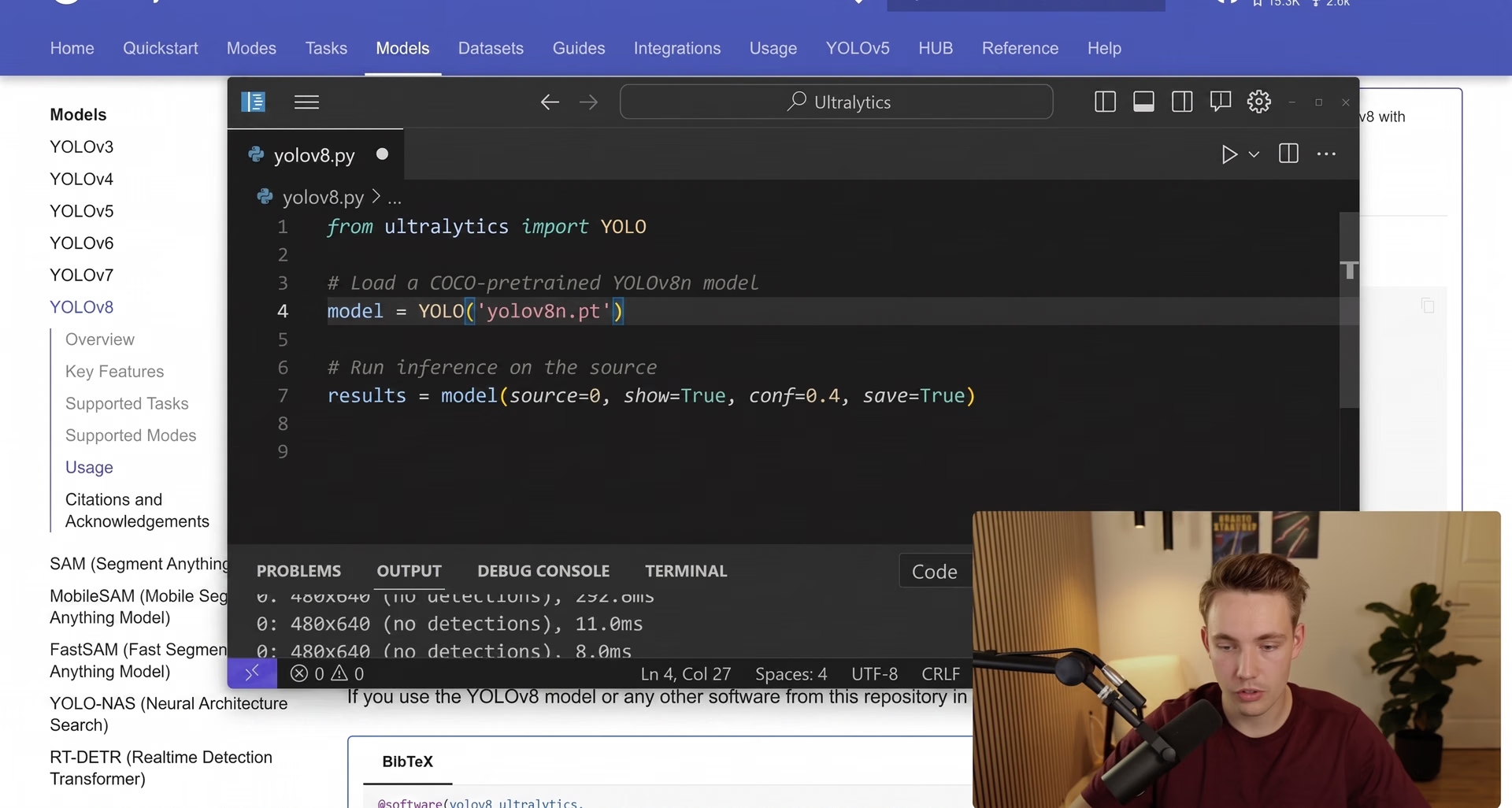
Fig 1. Nicolai Nielsen outlining how to run Ultralytics object detection and segmentation models.
Exploring other models#
Ultralytics doesn't just stop at YOLOv8. They also support various other models like YOLOv5, YOLO-NAS, and transformer-based models for real-time detection. Each model has its own strengths and use cases.
Transformer models and how to run them#
The RT-DETR model developed by Baidu and supported by Ultralytics, is a state-of-the-art, end-to-end object detector that offers real-time performance and high accuracy. It uses a conv-based backbone and an efficient hybrid encoder for real-time speed, excelling on CUDA with TensorRT, and supports flexible inference speed adjustment.
Here's how you can run a RT-DETR model:
from ultralytics import RTDETR

# Load a COCO-pretrained RT-DETR-l model
model = RTDETR("rtdetr-l.pt")

# Run inference on an image
results = model("path/to/image.jpg")
Segment Anything Models#
Ultralytics also offers models for segmentation tasks, such as MobileSAM and FastSAM. These models are designed to segment out everything in an image, providing detailed insights into the scene.
Running FastSAM#
FastSAM is optimized for real-time segmentation, and here's how you can run it:
from ultralytics import FastSAM

# Create a FastSAM model
model = FastSAM("FastSAM-s.pt")  # or FastSAM-x.pt

# Run inference on an image
results = model("path/to/image.jpg", device="cpu", retina_masks=True, imgsz=1024, conf=0.4, iou=0.9)
This model is perfect for applications that require quick and accurate segmentation.
Performance and comparisons#
One of the great features of the Ultralytics framework is the ability to compare different models side by side. You can easily determine which model works best for your specific application by looking at performance metrics such as inference speed and mean average precision (mAP).
Main takeaways#
Ultralytics makes it incredibly easy to run object detection and segmentation models with just a few lines of code. Whether you’re working on real-time applications or need high-precision models, Ultralytics has a solution for you. Make sure to check out Nicolai Nielsen's full tutorial on the Ultralytics YouTube channel for more in-depth information and examples.
Stay tuned for more tutorials and updates from the Ultralytics community!








