Budgeting for Image Annotation: Seats, AI and Exports
Compare image annotation software costs, free-plan limits and AI allowances. Estimate software and project costs with a worked three-person team example.
 Miles Deans16 min read
Listen to this article
If your team labels its own images, four important factors in the software bill are: how the tool charges (per seat, per workspace, by usage or by quote), what its free plan still allows, how it meters AI-assisted labeling, and whether exports include your images. This guide compares the published costs and limits of nine image annotation tools, including Ultralytics Platform, so you can estimate what labeling a computer vision dataset will cost before you commit. If you are still choosing a tool on features rather than cost, start with our guide to image annotation platforms for vision teams.
How this comparison was made: Ultralytics wrote this article, and Ultralytics Platform is our product (it launched in 2026). Tools are listed alphabetically, not ranked. Prices and limits come from each vendor's own pricing page or documentation, checked on November 10, 2026; the pages used are listed under Sources at the end. Where we say a price or allowance isn't listed, we mean we didn't find it on those pages. Screenshots of Ultralytics Platform are from our own test runs. Pricing can change, so confirm the current terms before you buy. The list is not exhaustive.
Annotation software costs versus labeling service costs#
Annotation software and labeling services are priced differently because they sell different things. Software fees pay for the tool your own people label in: seats, storage, AI assistance and exports. A labeling service quote also covers the annotation work, review and delivery, and service pricing can be per image, per object or per hour of labor.
This guide covers software only. If you plan to outsource labeling, compare service quotes on the same images, label types and acceptance criteria, and remember that you may still need annotation software to review what comes back.
Image annotation software costs at a glance#
Prices and limits captured on November 10, 2026, from each vendor's own pricing page or documentation (linked from the tool name; full list under Sources). On a phone, swipe the table sideways to see every column.
| Tool | Free option | Lowest published paid price | How it bills | AI-assisted labeling on the free option |
|---|---|---|---|---|
| CVAT | CVAT Online Free; CVAT Community is free to self-host (MIT) | Solo $33/month ($23/month billed yearly) | Per user on Team plans | SAM 2 and SAM 3, 100 uses a month |
| Encord | Not listed on pricing page | Not listed on pricing page | Plan tiers (Starter, Team, Enterprise) | Not listed on pricing page |
| Label Studio | Community Edition, free to self-host (Apache-2.0) | Starter Cloud $99/month, plus $49/month per additional user | Base subscription plus additional-user fees | Connect your own ML backend |
| Labelbox | 500 Labelbox Units (LBUs) a month | Not listed in the pages we checked | Usage (LBUs) | Consumes LBUs |
| makesense.ai | Free, runs in the browser (GPL-3.0) | None; free and open source | Free | AI suggestions in the browser |
| SuperAnnotate | Not listed on pricing page | Not listed on pricing page | Plan tiers (Starter, Pro, Enterprise) | Not listed on pricing page |
| Supervisely | Community: 2 members, 5 GB storage | Pro from €199/month with 3 members | Per member, per labeling member or per labeling hour | Smart Tool, 500 requests a day |
| Ultralytics Platform | Free plan with $5 signup credit ($25 with a verified work email) | Pro $29/seat/month or $290/seat/year, including $30/seat/month of credit | Per seat plus metered compute credits | SAM 3.1 and Ultralytics YOLO Smart annotation in the editor |
| V7 Darwin | Not listed on pricing page | Quote | Platform fee, user licenses and data processing | Not listed on pricing page |
When a free plan is enough#
A small dataset alone doesn't mean a free plan is enough. Before you start, check whether the plan covers the number of people who need to label and review, the storage and file count of the full dataset, the export you need at the end, and the AI assistance you expect to use. These limits decide whether you'll have to upgrade or move mid-project:
- Capacity: CVAT's pricing page lists 1 GB of uploaded data, 1 project and 3 tasks in a personal workspace on Online Free. Supervisely lists 5 GB and 10,000 files on Community and notes that inactive projects are archived after 30 days. Ultralytics Platform Free includes 100 GB of storage with a 10 GB limit per dataset upload.
- What the export contains: CVAT's pricing page shows Online Free exports as annotations only, with full dataset export starting on Solo.
- AI allowances: free plans meter AI assistance differently: CVAT sets a monthly SAM allowance, Labelbox's billing documentation describes a monthly LBU allowance shared across Catalog storage, labeling and model-assisted work, and Supervisely sets a daily Smart Tool limit. The table above and the AI-assisted labeling section below give the current figures.
If none of those limits bites, a free or self-hosted tool such as CVAT Community, Label Studio Community or makesense.ai may be all you need. makesense.ai runs in the browser, and its homepage says images aren't sent anywhere.
Per seat, per workspace or usage: how annotation tools bill#
These tools combine per-user fees, base subscription fees, usage charges and unpublished pricing. Compare each model at your actual headcount and image volume.
- Per seat or per user. CVAT prices its Team plan per user for 2 to 50 seats, with a lower rate billed yearly. Ultralytics Platform Pro is priced per seat, monthly or yearly, for teams of up to five members, and each seat includes monthly credit. Ultralytics Platform Pro prices are in the table above; CVAT Team rates are in the worked example below.
- Base subscription with seat add-ons. HumanSignal lists Label Studio Starter Cloud as a monthly base price plus a fee for each additional user, up to 12 users. Supervisely lists Pro with three members included. Extra full members cost €85 per member per month, labeling-only members are listed at €35 per user (billing period not shown on the pricing page), and pooled labeling hours cost €0.65 an hour.
- Usage-based. Labelbox's billing documentation describes Labelbox Units (LBUs) as a normalized unit of data consumed across its Catalog, Annotate and Model products. Ultralytics Platform credits cover cloud training, batch annotation, whole-dataset face blurring and custom-resource endpoint uptime. Manual annotation is included in the plan, and hosted editor predictions are documented as free.
- No public list price found. We didn't find a public software list price on the Encord, SuperAnnotate or V7 Darwin pricing pages; contact each vendor for pricing. V7's pricing page describes Darwin pricing as a platform fee plus user licenses plus data processing charges.
Per-seat billing is predictable when a small, stable team does the labeling. If you bring in many short-term annotators, look for labeling-only seats or hourly pools such as Supervisely's.
Worked example: software cost versus project cost for a three-person team#
The subscription#
Compare three full-access users for one month at monthly list prices captured on November 10, 2026, before tax. Prices come from the pricing pages listed under Sources, in each vendor's listed currency (Supervisely in euros); no conversion is applied. Assume a 20,000-image detection dataset that fits each plan's storage and file limits. These are subscription costs only, excluding annotation and review labor, self-hosting, conversion work, optional modules and external model charges.
| Tool | Monthly software cost for three people | Notes |
|---|---|---|
| CVAT Team | $99 | 3 × $33; yearly billing is $828/year for three seats, equivalent to $69/month |
| Label Studio Starter Cloud | $197 | $99 plus 2 × $49 |
| Supervisely Pro | €199 | Three members included, 50 GB and 50,000 files; optional Image Max is listed at an additional €99 (billing period not shown on the pricing page) |
| Ultralytics Platform Pro | $87, including $90 of credit | Processing all 20,000 images in one Batch Annotation run with a hosted model costs $20 in credits; paid provider models add provider charges. Unused monthly credits expire |
The project#
The subscription is only one part of an image-labeling budget. A fuller estimate looks like this:
project cost =
  subscription
  + annotation hours × annotator rate
  + review hours × reviewer rate
  + usage not covered by the plan
  + hosting and conversion costs
Annotation and review time can materially change the total. Estimate them from a pilot that includes difficult images, corrections and rejected labels: label a few hundred images with each shortlisted tool, time the drawing and the corrections, and count how many labels a reviewer rejects.
This illustration uses arbitrary inputs, not measured product performance. Either workflow could use free or paid software, with or without AI assistance. Assume both label the same 20,000 images to the same acceptance criteria: workflow A costs $0 and takes 60 seconds per image; workflow B costs $200 and takes 20 seconds. Both require another 10 seconds per image for review, at $30 an hour, and all other costs are zero for this calculation.
| Workflow | Software cost | Labeling and review hours | Labor cost | Project total |
|---|---|---|---|---|
| A | $0 | 389 | $11,667 | $11,667 |
| B | $200 | 167 | $5,000 | $5,200 |
Hours and dollar totals are rounded independently from unrounded calculations. At this volume and labor rate, saving 1.2 seconds per image exactly covers a $200 subscription; larger savings lower the project total. If both workflows take the same time, the free workflow costs $200 less.

Arbitrary inputs, not measured product performance: A takes 60 seconds per image and B takes 20, plus 10 seconds of review each, at $30 an hour. All other costs are zero; totals are rounded independently. Either workflow could use free or paid software, with or without AI assistance.
Other costs to include:
- Rework. Relabeling when class definitions change or a reviewer rejects labels.
- AI assistance at volume. Monthly allowances, daily rate limits and per-image batch charges add up on large datasets.
- Storage and exports. Check storage caps and whether the plan you're pricing exports the images or only the labels.
- Hosting. CVAT Community (MIT) and Label Studio Community (Apache-2.0) are open source with no license fee, but self-hosting needs servers, updates and backups.
- Licensing. Open-source annotation tools carry their own licenses (MIT, Apache-2.0, GPL-3.0). The model and training software you use with your labels may have separate terms.
Private datasets on free plans#
Free options for private image datasets include browser-local tools, self-hosted software and hosted plans that explicitly permit private data.
- Nothing uploaded: makesense.ai runs in the browser, and its homepage says it doesn't store your images because it doesn't send them anywhere.
- Self-hosted: CVAT Community and Label Studio Community keep data on infrastructure you control. In exchange, you run the servers, updates and backups yourself.
- Hosted private datasets: the FAQ on Supervisely's pricing page says data is private on every plan; Community capacity and inactivity limits are listed above. Ultralytics Platform Free includes unlimited private projects and datasets within its storage limit. Free and Pro workspaces default new datasets to Public until an owner or admin changes the setting, so select Private before creating a confidential dataset (dataset docs).
Dataset privacy and software licensing are separate checks. Ultralytics Platform Free and Pro use AGPL-3.0; Enterprise includes the Ultralytics Enterprise License. Review the licensing terms for your intended software and model deployment.
What AI-assisted labeling costs, and what happens when allowances run out#
Free-tier allowances for AI-assisted labeling, such as click-to-segment with the Segment Anything Model (SAM), vary widely: some tools set monthly allowances, some daily limits, and some meter usage.
- CVAT: its pricing page lists SAM 2 and SAM 3 image segmentation at 100 uses a month on Free, 10,000 a month on Solo and 10,000 a month per paid seat on Team. Batch automatic annotation starts on Solo.
- Label Studio Community: HumanSignal lists ML backend integration. If you connect your own model backend, budget for whatever compute, hosting or model-provider charges your setup incurs.
- Labelbox: its billing documentation says model-assisted labeling consumes LBUs, and Foundry can also incur separate inference charges.
- Supervisely: its pricing page lists Smart Tool on Community with 500 requests a day.
- Ultralytics Platform: SAM 3.1 and YOLO Smart annotation are included on every plan for supported tasks and datasets, with hosted editor predictions shown as free (annotation docs). Classification is labeled manually, cloud storage datasets need AI features turned on, and Smart annotation isn't available for On-Premise datasets or images with more than three channels. Batch Annotation costs $1.00 per 1,000 processed images, with a $0.01 minimum per run; paid provider models also bill your own key.
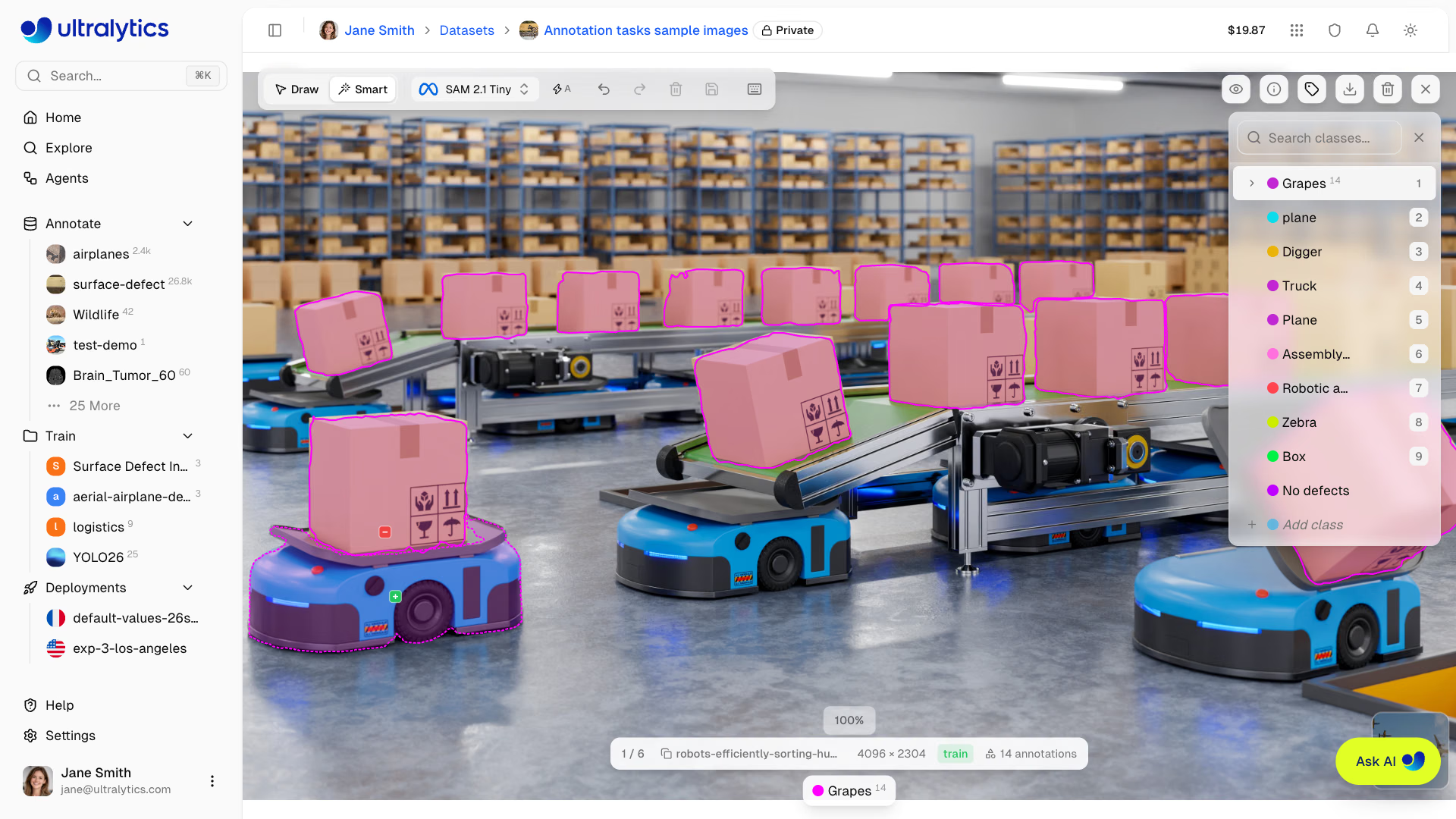
From our own test run: SAM 2.1 Tiny in the Ultralytics Platform editor's Smart mode. Positive clicks add to a mask and negative clicks subtract from it.
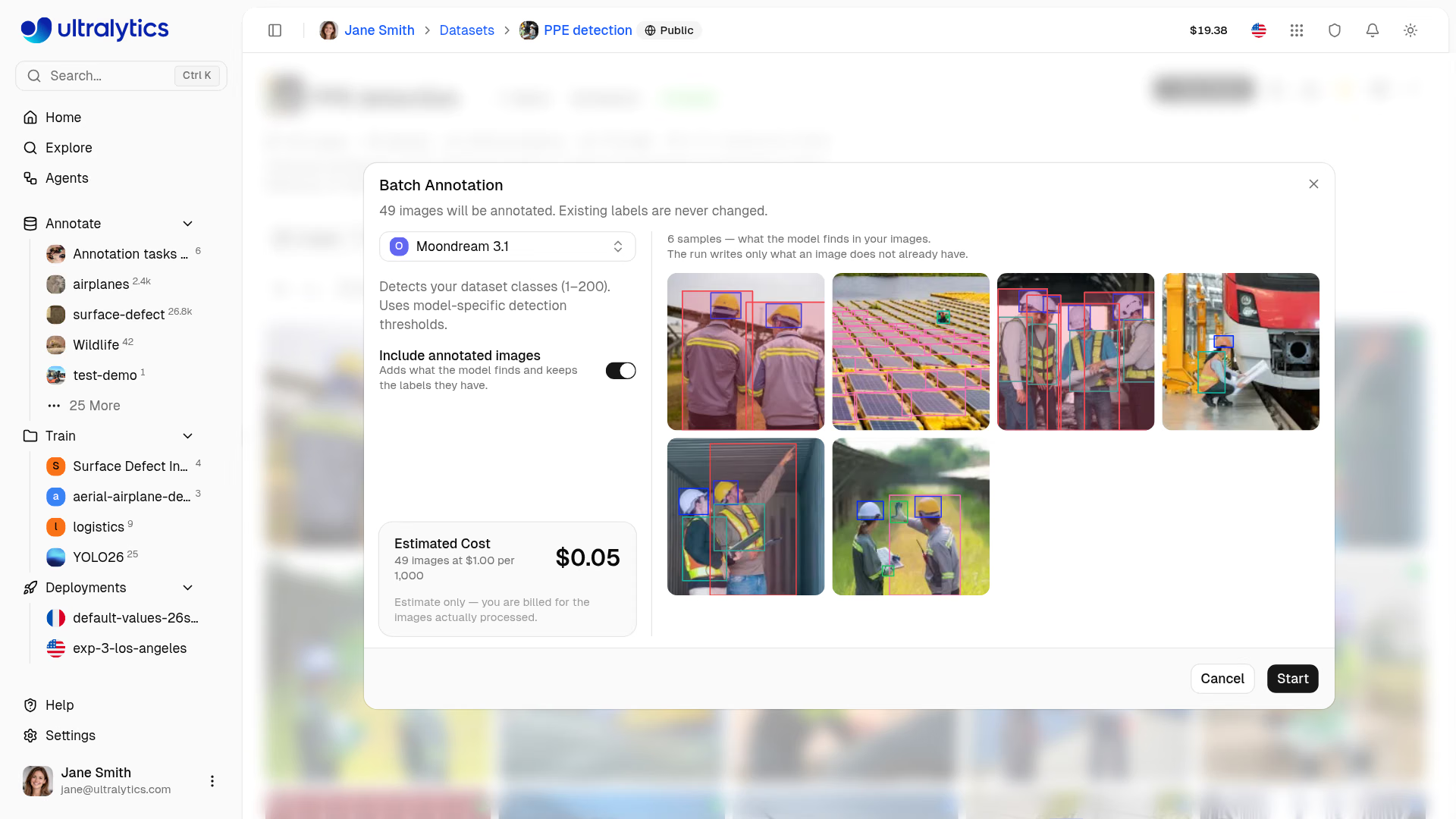
From our own test run: Batch Annotation shows an estimate before a run starts, here $0.05 for 49 images at $1.00 per 1,000, with Moondream 3.1 selected. Unlabeled images are processed by default (this run also includes annotated images, keeping their existing labels), and billing is based on the images actually processed.
Manual-labeling access after an allowance runs out depends on what the allowance meters. Labelbox's billing documentation says that once free accounts reach 500 LBUs, they can't add new labels until the next billing period, while existing data stays accessible and exportable. CVAT's pricing page lists manual editing separately from its monthly AI allowances, and Ultralytics Platform documents manual annotation and free hosted editor predictions. We didn't find explicit confirmation in CVAT's pricing page or the Ultralytics docs that manual annotation stays available once those allowances or credits run out, so test it on a free account before you rely on it.
Export limits that add cost later#
Allow time for any format conversion, and check what each tool exports on the plan you're pricing.
- CVAT documents import and export support for the Ultralytics YOLO format. Its pricing page shows Online Free exports as annotations only.
- Label Studio exports YOLO-format labels for object detection, and for keypoints when each keypoint label has a
model_indexand is linked to a parent bounding box (Label Studio export docs). - makesense.ai exports straight from the browser. Its GitHub README lists rectangles to YOLO, Pascal VOC XML and CSV, and polygons to VGG JSON and COCO JSON.
- Supervisely lists an Export to YOLOv8 format app in its export documentation.
- Ultralytics Platform exports datasets only as Ultralytics NDJSON, containing image links rather than image files. Links are signed for seven days; cached exports can have less validity remaining. On-Premise datasets can't be exported.

Check export contents on the plan you are pricing. CVAT's pricing page shows image-inclusive dataset export starting on Solo; makesense.ai details come from its homepage and README. Platform image links are signed for seven days; cached exports can have less time remaining, and On-Premise datasets cannot be exported.
For automation features beyond cost, see our comparison of auto-labeling and active learning tools.
Frequently asked questions
Free options cost nothing to start; as checked on November 10, 2026, CVAT Solo lists $33/month with monthly billing. Paid costs depend on the billing model and team size. Of the nine tools compared, CVAT, Label Studio, Supervisely and Ultralytics Platform publish paid list prices, shown in the table above with the date they were checked; for three full-access users, the worked example compares their monthly subscriptions. We didn't find a public software list price on the Encord, SuperAnnotate or V7 Darwin pricing pages. Free and open-source options can fit projects that stay within their limits. Labeling services are priced separately because they include annotator labor.
CVAT Team and Ultralytics Platform Pro charge per seat. Label Studio Starter Cloud and Supervisely Pro charge a base subscription plus additional-user fees. Labelbox's billing documentation describes usage-based billing in Labelbox Units.
CVAT Online Free, CVAT Community, Label Studio Community, the Labelbox free tier, makesense.ai, Supervisely Community and Ultralytics Platform Free all cost nothing to start. They differ in storage, project limits, export contents and AI-assisted labeling allowances.
Not always. CVAT's pricing page shows Online Free exports as annotations only, with full dataset export including images starting on Solo. makesense.ai exports label files for images that stay on your computer. Ultralytics Platform exports NDJSON containing image links rather than image files. Links are signed for seven days, but cached exports can have less validity remaining; download the images before the links expire. Self-hosted CVAT Community and Label Studio Community keep the images on your own storage.
CVAT Online Free includes a monthly SAM 2 and SAM 3 allowance, with a larger allowance on Solo. Supervisely separately lists a daily Smart Tool limit on Community; we didn't find the underlying model named on its pricing page. Ultralytics Platform Free includes SAM 3.1 annotation in the editor, and hosted model predictions are shown as free. Current allowances are listed in the AI-assisted labeling section above.
Labelbox's billing documentation says free accounts can't add new labels after using their monthly LBU allowance until the next billing period. CVAT and Ultralytics Platform list manual annotation separately from AI allowances and credits, but we didn't find explicit confirmation in their pricing pages or docs that manual annotation stays available once those run out, so confirm it on a free account.
makesense.ai says images stay in your browser, and self-hosted CVAT Community or Label Studio Community keep data on your own servers. Among hosted free plans, Supervisely's pricing page says data is private on every plan, and Ultralytics Platform Free includes unlimited private projects and datasets within its storage limit; Platform Free and Pro default new datasets to Public, so select Private when you create one.
Sources#
All pages checked on November 10, 2026.
- CVAT: CVAT Online pricing page; Ultralytics YOLO format documentation; MIT license in the CVAT GitHub repository.
- Encord: pricing page.
- Label Studio (HumanSignal): HumanSignal pricing page; Label Studio export documentation; Apache-2.0 license in the Label Studio GitHub repository.
- Labelbox: homepage; billing documentation ("A guide to Labelbox's LBUs").
- makesense.ai: homepage; README and GPL-3.0 license in the make-sense GitHub repository.
- SuperAnnotate: pricing page.
- Supervisely: pricing page, including its FAQ; export documentation.
- Ultralytics Platform: Ultralytics pricing page; Platform documentation for annotation, billing, datasets, settings and teams; screenshots from our own test runs.
- V7 Darwin: pricing page.
Written by
Comments
Ask a question, share your results, or help someone else.