Using Ultralytics YOLO26 for planogram compliance detection
Learn how to build a planogram compliance system using vision AI models like Ultralytics YOLO26 to detect misplaced products and automate retail shelf checks.
We’ve all walked into a store to buy something like bread or cereal, spent a few minutes scanning the shelves, and then realized we can’t find it. Sometimes it’s in the wrong spot, sometimes it’s out of stock, and sometimes it just blends in with everything else on the shelf.
For retailers, keeping products in the right place is more important than it might seem. It affects how easily customers can find items and can directly impact sales and overall customer satisfaction. To manage this, stores use a planogram, a simple layout showing where each product should be placed on a shelf.
Planogram compliance is the process of checking whether the actual shelf matches the expected layout. In many stores, this is still done through manual audits and checklists, which can be time-consuming and inconsistent.
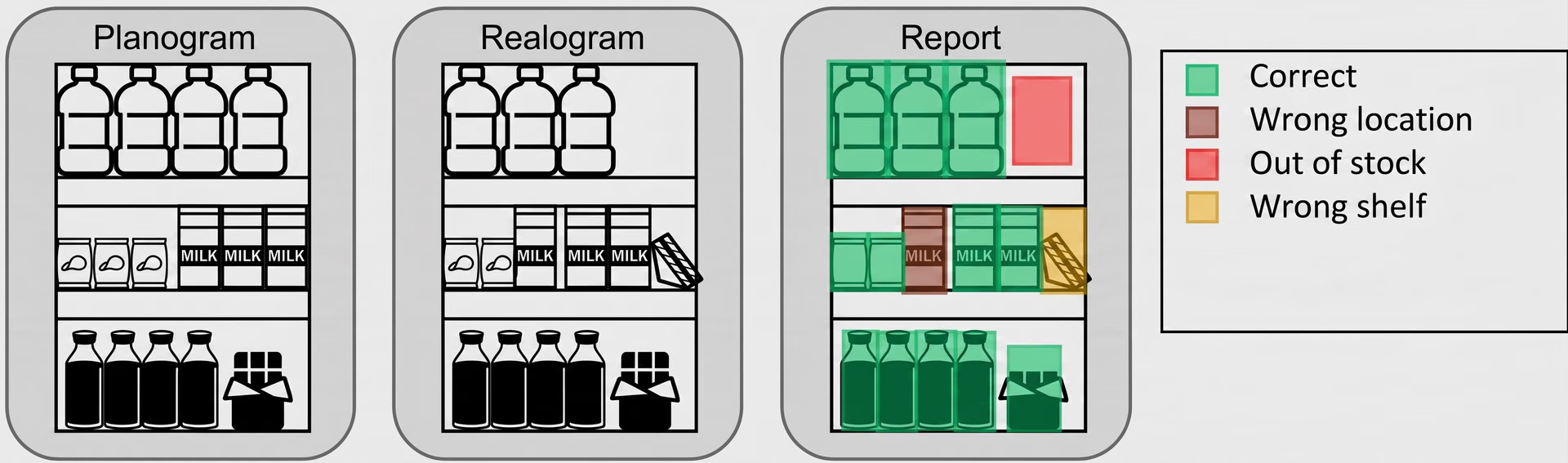
Fig 1. A planogram vs. an actual shelf (realogram) with compliance detection results (Source)
Even small discrepancies like misplaced SKUs (stock keeping units), incorrect pricing, or out-of-stock products can make a difference. SKUs are unique codes used to identify and track individual product variants, such as different sizes or flavors. These issues reduce on-shelf availability and can lead to lost sales.
That’s why retailers are increasingly turning to computer vision and image recognition. These AI technologies can analyze shelf images captured from in-store cameras, automatically detect products, and check whether they are placed correctly. Vision AI models like Ultralytics YOLO26 make this process fast, accurate, and practical to use in real store environments.
In this article, we’ll walk through how to build a planogram compliance detection system using Ultralytics YOLO26. Let’s get started!
What is planogram compliance?#
Planogram compliance helps keep store layouts consistent, supports accurate pricing and promotions, improves inventory management, and makes it easier for customers to find products on the shelf.
It refers to arranging products according to a predefined layout or a planogram. This layout defines where each product should be placed, how many facings it should have (the number of products placed at the front of the shelf and visible to customers), and which products should be positioned next to each other.
Retailers and consumer packaged goods (CPG) brands both rely on planograms. Retailers use them to organize shelves and maintain consistency across stores, while CPG brands use them to ensure their products are displayed correctly and get proper visibility.
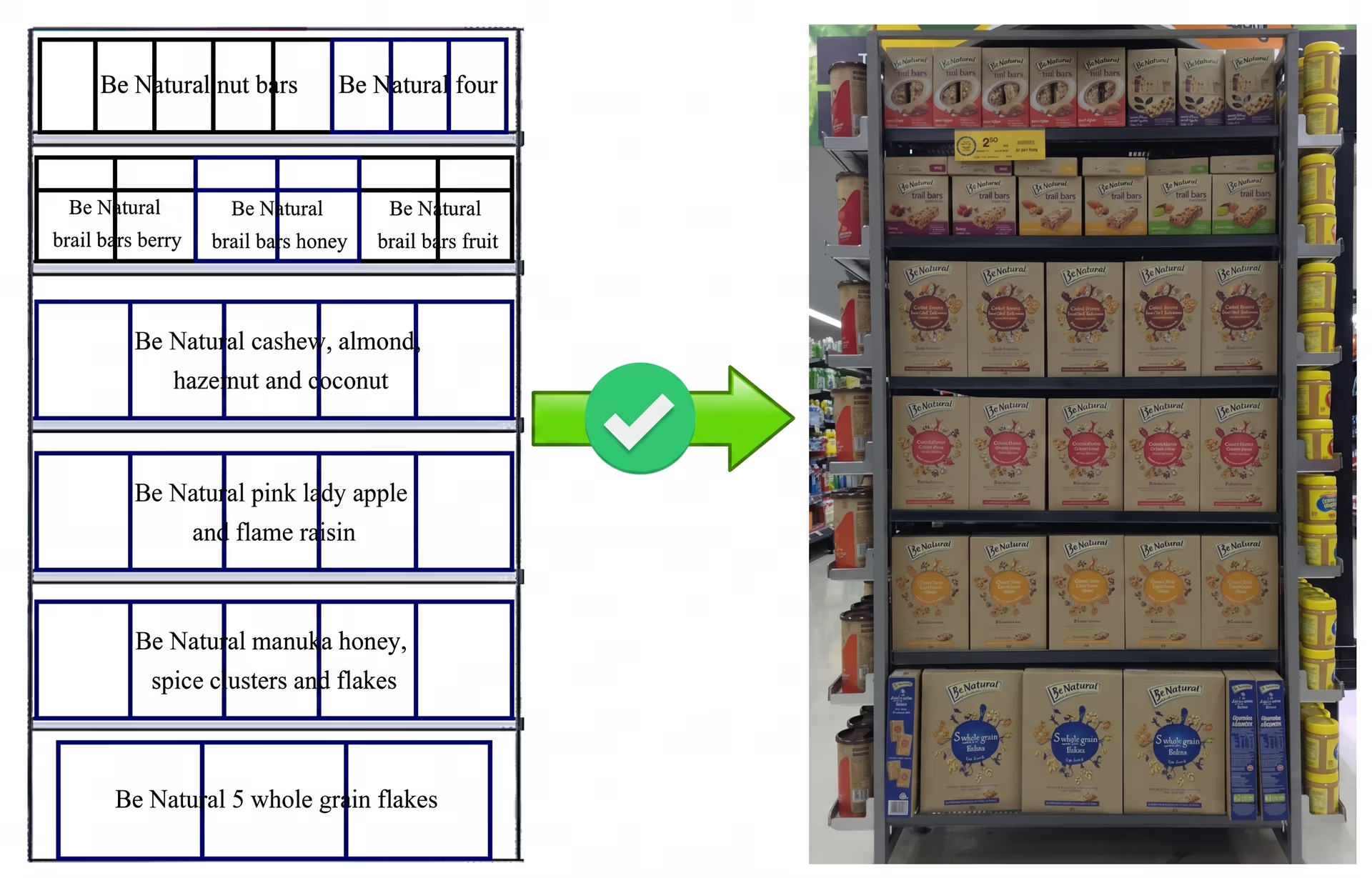
Fig 2. A look at a planogram matching with an actual shelf layout (Source)
The process of planogram audits involves comparing an actual shelf with an expected layout. This includes checking whether the correct SKUs are in the right positions and whether the required number of facings is maintained.
You might be wondering if the placement of a product on a shelf really makes a difference. But when products look similar, even small placement errors can make items harder to find or confuse customers.
This can impact pricing accuracy and customer decisions. Maintaining compliance keeps shelves organized and enhances the customer experience.
Using computer vision for planogram compliance#
Traditionally, retail stores have maintained planogram compliance through manual audits and checklists. Store staff inspect shelf layouts, verify product placement and facings, and record observations.
However, this process can be time-consuming, difficult to scale across multiple stores, and often leads to inconsistencies in how checks are performed. The retail industry is rapidly adopting computer vision, a field of artificial intelligence that enables systems to analyze and understand images, to better handle these compliance checks.
These systems use cameras to capture shelf images and process them using trained models to recognize individual products. Computer vision models like Ultralytics YOLO26 support vision tasks such as object detection and instance segmentation, making it possible to accurately identify and locate products on retail shelves.
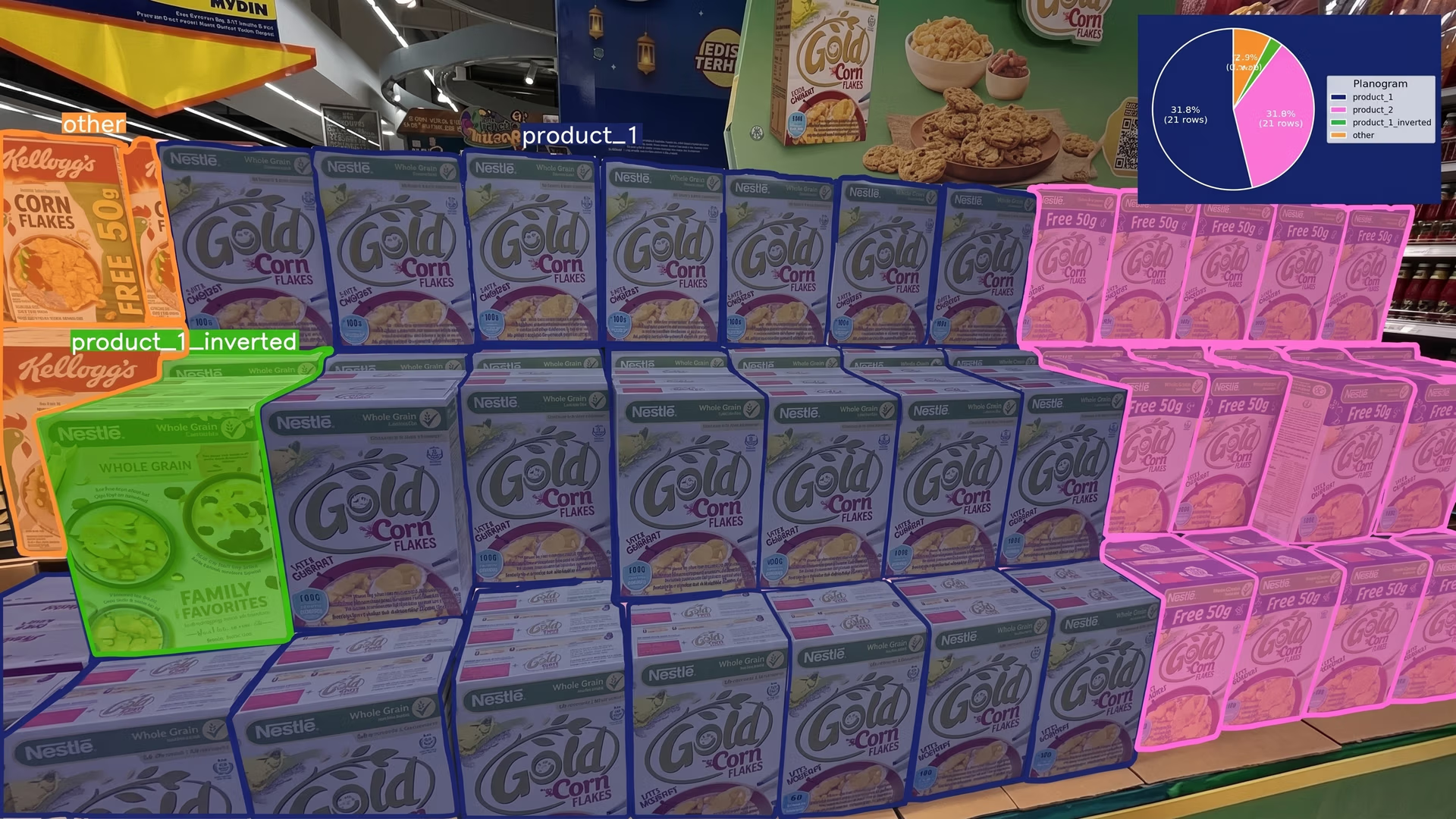
Fig 3. An example of using YOLO26 to detect and segment products on a retail shelf (Source)
Using Ultralytics YOLO26 for this use case is also straightforward, since it is available out-of-the-box as a pretrained model, providing a strong starting point, and can be custom-trained on retail shelf data to recognize specific products.
Based on these detections, a planogram compliance detection system can map product positions on the shelf and compare them with expected layouts. With this approach, retailers can move beyond manual checks and monitor shelves continuously at the store level.
They can detect products at the SKU level, identify placement errors, and improve on-shelf availability and overall execution.
Understanding how AI-powered planogram compliance detection works#
Before we dive into how to use Ultralytics YOLO26 for planogram compliance detection, let’s take a step back and understand how product detection and layout comparison come together in these systems.
A planogram compliance system typically works in two main stages. First, a model like Ultralytics YOLO26 analyzes shelf images to detect and classify products. Along with each detection, the model provides location information that shows where each product appears on the shelf.
Next, these detections are organized into a structured shelf layout. Products are grouped based on their positions, typically into shelf rows, to reflect how items are arranged in the real world.
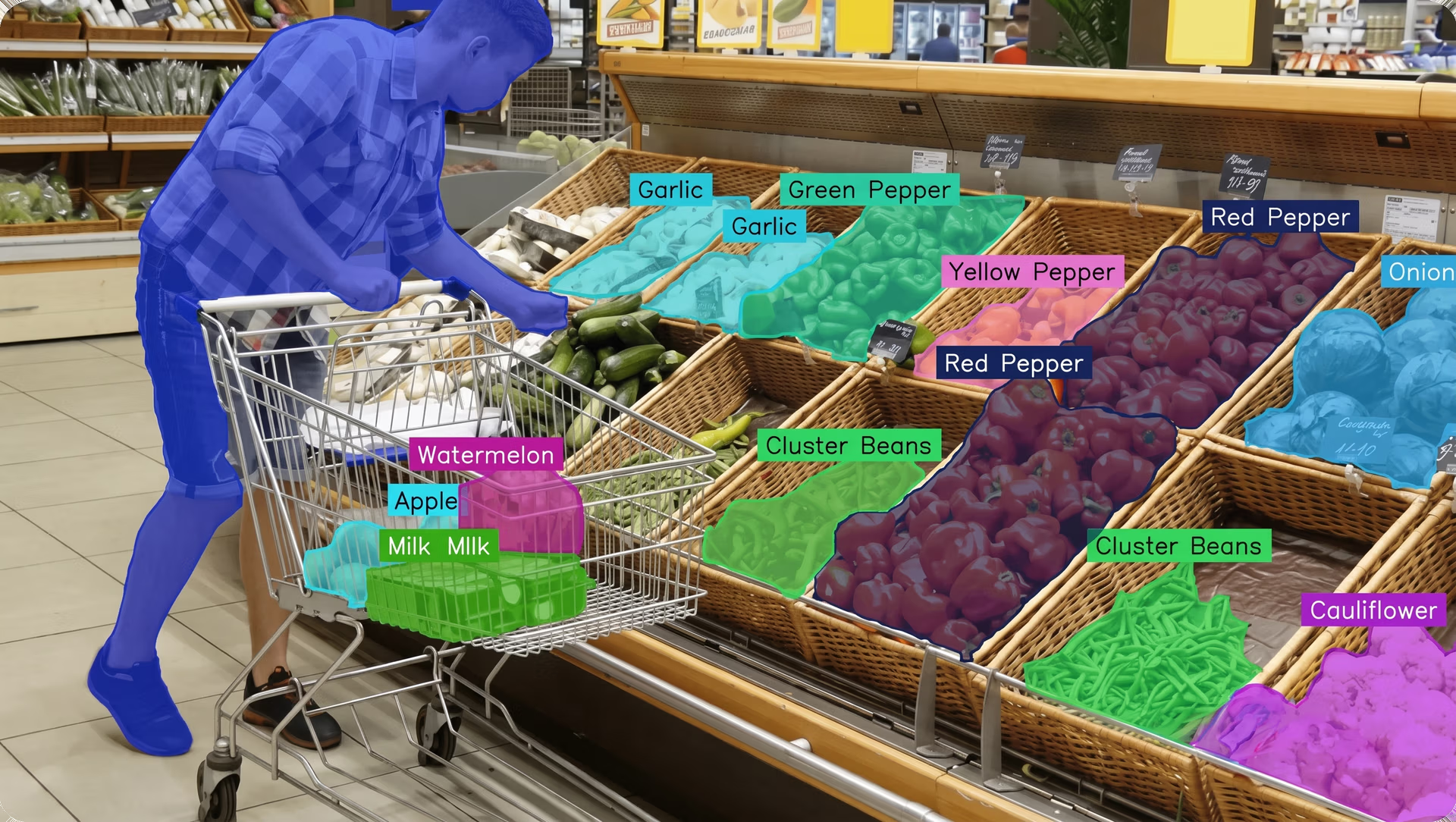
Fig 4. Ultralytics YOLO26 can enable planogram compliance. (Source)
This structured layout is then compared with the expected planogram. The system checks whether the correct SKUs are in the right positions, whether the required number of facings is maintained, and whether any products are missing or misplaced.
By combining product detection with layout comparison, the system can identify differences between the expected and actual shelf arrangement. The results can be presented as compliance reports or dashboards that highlight issues at the store level.
This makes it seamless for store teams to quickly understand what’s wrong, take corrective action, and maintain consistent retail execution.
Preparing a dataset to build a planogram compliance system#
The first step in building a planogram compliance system is preparing a well-structured dataset. This involves gathering shelf images from different retail environments. The quality and diversity of this data directly impact how well the model performs.
Public datasets can also be used as a starting point. However, since store layouts, product assortments, and shelf arrangements vary across retailers, they often don't fully match real-world conditions.
Creating a custom dataset tailored to the target store environment is usually necessary for reliable performance. Data can be collected using shelf photos captured from in-store cameras or mobile devices across different retail locations.
In addition to real-world data, simulated shelf setups can be used to create controlled scenarios. Combining both enables a model to perform more reliably across different store environments.
It is also crucial to capture different real store conditions, such as changes in layouts, shelf arrangements, product placement, lighting, camera angles, and shelf organization. By collecting diverse and realistic data, the model can learn to generalize across stores and support accurate planogram compliance detection at scale.
An overview of labeling a retail dataset#
Once the data is collected, the next step is annotation. Each product in an image is labeled by drawing bounding boxes around it so the model can learn to recognize different SKUs.
While labeling, it is important to define clear classes. This can be done at different levels of detail, depending on the planogram.
At the SKU level, each product variant, such as a specific brand, size, or flavor, is labeled separately. At the category level, similar products can be grouped together, such as all soft drinks or all snacks.
Tools like the Ultralytics Platform, an end-to-end environment for managing datasets, annotation, training, and deployment, can simplify this process. It supports both manual annotation and AI-assisted labeling, where models can suggest annotations that can be reviewed and refined, helping improve speed and consistency.
Training Ultralytics YOLO26 for product detection#
Once the dataset is prepared and labeled, the next step is training YOLO26 to detect products on retail shelves. This can be done using the Ultralytics Python package or Ultralytics Platform.
The Ultralytics Python package offers flexibility for building custom pipelines and integrating training into existing workflows. Similarly, the Ultralytics Platform provides a unified environment where you can handle annotation, manage datasets, configure training, run experiments, and monitor results from a single dashboard.
It also offers cloud GPU options for scalable training and supports deployment, reducing the need to set up infrastructure or manage dependencies.
Before starting training, here are a few other key factors to consider:
- Dataset split: The dataset should be divided into training, validation, and test sets. This helps evaluate how well the model generalizes to new data and avoids overfitting.
- Model selection: Ultralytics YOLO26 models come in different sizes, allowing you to balance speed and accuracy based on your deployment needs.
- Training configuration: Parameters such as batch size, image size, and number of epochs can impact both training speed and model performance.
After training is complete, the model can be evaluated using metrics such as precision, recall, and mAP (mean average precision). These metrics let you measure how accurately the model detects products and how well it avoids errors.
If the model’s performance isn’t strong enough, the dataset and training setup can be improved. This may include applying data augmentation, adding more diverse images, or balancing classes where some SKUs appear less frequently.
Integrating planogram compliance logic#
The next step after training and evaluating a model is to build the logic that performs planogram compliance checks. This involves structuring the shelf data and comparing it with the expected layout.
Here’s an overview of how this process works:
- Define the expected shelf layout: First, the expected shelf layout is defined using the planogram and represented as a structured grid with rows and columns. Each position in the grid corresponds to a specific SKU, reflecting how products should be arranged on the shelf space.
- Organize detected products: Then, the model’s detections are arranged based on their position on the shelf. Using their coordinates, products are sorted and grouped into shelf rows, converting raw detections into a structured layout that reflects the actual shelf arrangement.
- Compare expected and actual layouts: Next, the structured shelf layout is compared with the expected planogram to identify differences. If a detected product doesn’t match the expected SKU, it is marked as misplaced. If a product is missing from a position, it is flagged as missing. This step can also be used to verify whether the required number of facings is maintained.
- Generate compliance results: Finally, a compliance report for each shelf can be produced, highlighting non-compliance, deviations, and discrepancies. These outputs can be shared through dashboards to help teams quickly identify and address issues.
Deploying a vision model for planogram compliance#
After building a solution that integrates product detection and compliance logic, the next step is deploying it in a retail store environment. There are a few different options to consider when approaching deployment, depending on the use case and infrastructure.
One option is deploying the model on edge devices, such as in-store servers or embedded hardware. These systems are placed close to cameras so shelf images can be processed where they are captured, enabling low latency and real-time monitoring.
Another option is cloud-based deployment, where images are sent to remote servers for processing. This can make it easier to manage and scale deployments across multiple locations, especially when centralized monitoring is required.
Within the Ultralytics ecosystem, there are several options that support these different deployment scenarios. For instance, using the Ultralytics Python package, trained YOLO26 models can be exported to different formats such as ONNX, TensorRT, or CoreML.
This makes it possible to run models on a wide range of hardware, including graphics processing units (GPUs), central processing units (CPUs), mobile devices, and embedded systems, depending on the deployment needs.
Meanwhile, the Ultralytics Platform provides built-in deployment options that simplify testing, integration, and production deployment. Models can be tested directly in the browser, integrated into applications using shared inference APIs, or deployed to dedicated endpoints for scalable production use.
It also supports exporting models for running on external systems or edge devices, making it easier to move from development to real-world deployment. In addition to this, the platform includes monitoring tools that help track performance after deployment and ensure reliable operation over time.
Benefits of using vision AI for planogram compliance detection#
Here are some of the key advantages of using Ultralytics YOLO26 to build a planogram compliance system:
- Adaptable to different retail environments: Ultralytics YOLO26 can be retrained or fine-tuned on new data, making it adaptable to different store layouts, product assortments, and regional variations.
- Optimizes data-driven decision making: Compliance data can be aggregated across stores to identify trends, measure performance, and improve retail strategies.
- Real-time continuous monitoring: Ultralytics YOLO26 is optimized for low-latency inference, enabling continuous analysis of shelf images and real-time detection of product placement changes on edge devices.
- Integration with retail systems: A planogram compliance detection system powered by Ultralytics YOLO26 can be integrated with inventory, POS (point of sale), or analytics systems to provide a more complete view of store performance.
Key takeaways#
Planogram compliance is vital for maintaining accurate product placement and consistent retail operations. By combining product detection with layout comparison, stores can reduce manual audits and check shelves more accurately. With models like Ultralytics YOLO26, such systems can be used across multiple stores and can also support better decisions using store-level data.
Want to bring vision AI into your projects? Join our active community and learn about vision AI in retail and computer vision in robotics. Explore our GitHub repository to find out more. Check out our licensing options to get started!