Ultralytics YOLO11とそのアプリケーションについて知っておくべきこと
新しいUltralytics YOLO11モデルの機能と、さまざまな業界でのリアルタイムアプリケーションについて詳しく学びます。知っておくべき内容をすべて解説します。
9月30日(月)、Ultralyticsは、年次ハイブリッドイベントである YOLO Vision 2024 (YV24)での初披露に続き、最新の コンピュータービジョン技術である Ultralytics YOLO11を正式に発表しました。AIコミュニティでは、モデルの能力を検証しようとする動きが広がり、大きな期待が高まっています。処理速度の向上、精度の改善、エッジデバイスとクラウドデプロイの両方に最適化されたモデルにより、YOLO11はリアルタイムのコンピュータービジョンアプリケーションで可能なことを再定義します。
インタビューで、Ultralyticsの創業者兼CEOである Glenn Jocherは次のように述べています。「世界は クリーンエネルギーへ移行していますが、そのペースは十分ではありません。私たちは、より少ないエポック数、より少ないデータ拡張、より少ないデータでモデルを学習できるようにしたいと考えており、その実現に向けて懸命に取り組んでいます。最小の物体検出モデルである YOLO11nのパラメーター数はわずか260万個で、JPEGほどのサイズしかありません。本当に驚くべきことです。最大の 物体検出モデルであるYOLO11xでも、パラメーター数は約5,600万個で、他のモデルと比べると非常に小規模です。5年前のNvidia製GPUのような安価なGPUでも、少しの熱意とコーヒーがあれば学習できます。」
この記事では、Ultralytics YOLO11を詳しく取り上げ、その機能、改善点、パフォーマンスベンチマーク、実際の用途を紹介し、このモデルで何ができるのかを理解できるようにします。それでは始めましょう。
Ultralytics YOLO11を理解する:過去のバージョンからの改善点#
YOLO11は、YOLO(You Only Look Once)シリーズの最新の コンピュータービジョンモデルであり、YOLOv5や YOLOv8などの以前のバージョンから大幅に改善されています。Ultralyticsのチームは、コミュニティからのフィードバックと最先端の研究成果を取り入れ、YOLO11をより高速、高精度、かつ効率的にしました。YOLO11は、YOLOv8と同じ コンピュータービジョンタスクにも対応しており、物体検出、インスタンスセグメンテーション、画像分類などを実行できます。既存のワークフローを変更することなく、簡単にYOLO11へ切り替えられます。
YOLO11の主な特徴の一つは、従来モデルと比べて精度と速度の両方で優れたパフォーマンスを発揮することです。YOLOv8mよりパラメーター数が22%少ないYOLO11mは、COCOデータセット上でより高い 平均適合率(mAP)を達成しており、物体をより正確かつ効率的に検出できます。処理速度の面でもYOLO11は以前のモデルを上回っているため、迅速な検出と応答が重要で、1ミリ秒も無駄にできないリアルタイムアプリケーションに適しています。
以下のベンチマークグラフは、YOLO11が以前のモデルと比べてどのように優れているかを示しています。横軸は、物体検出の精度を測定する COCO Box Average Precision(AP)を示しています。縦軸は、NVIDIA T4 GPU上で TensorRT10 FP16を使用した場合のレイテンシを示し、モデルがどれだけ高速にデータを処理できるかを表しています。
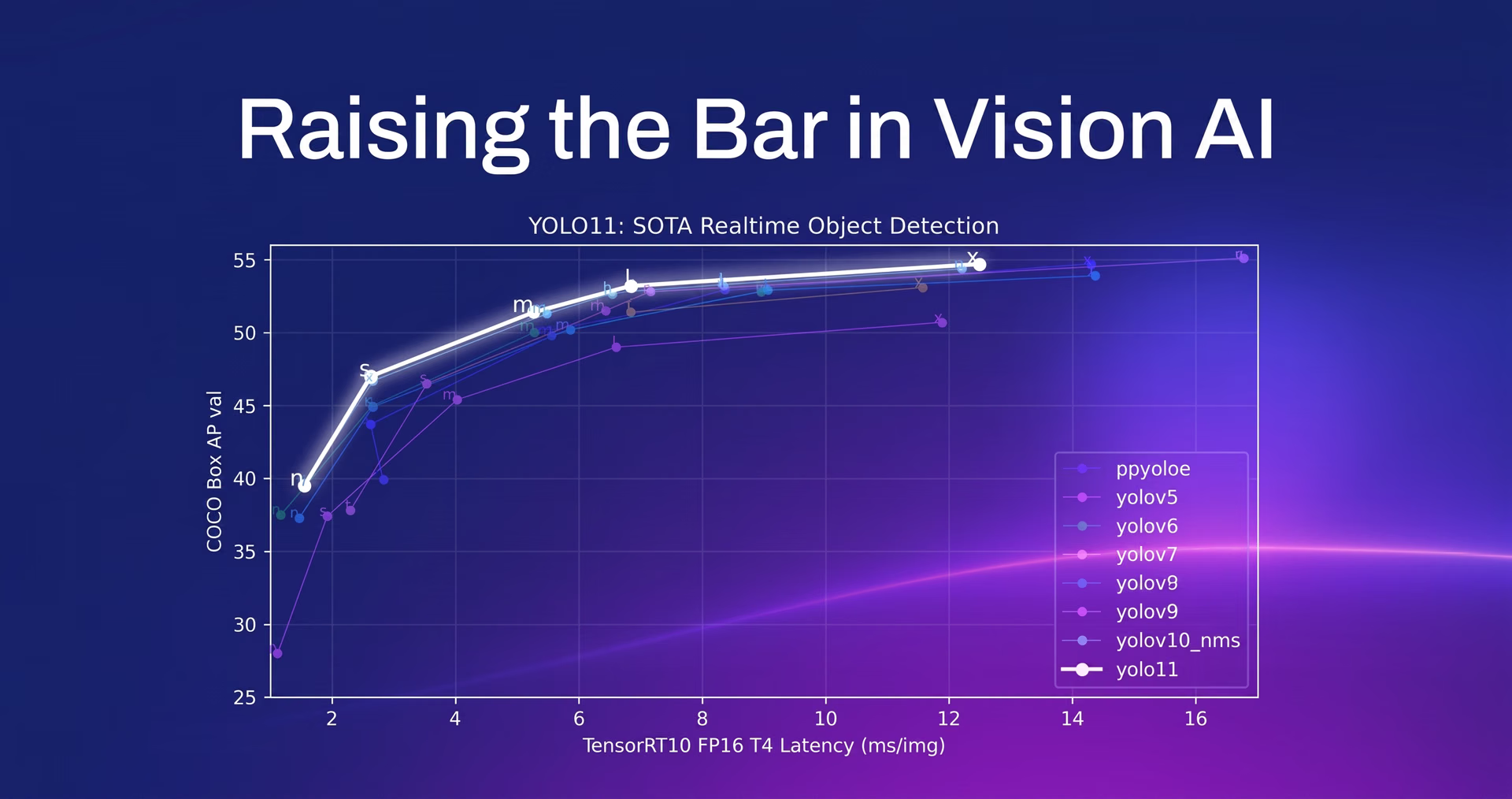
図1. Ultralytics YOLO11は、最先端のリアルタイム物体検出機能を提供します。
Ultralytics YOLO11のモデル発表:オープンソースとエンタープライズの選択肢#
Ultralytics YOLO11の発表により、Ultralyticsは、各業界で高まる需要に応えるため、オープンソースモデルと エンタープライズモデルの両方を提供し、YOLOシリーズを拡充しています。
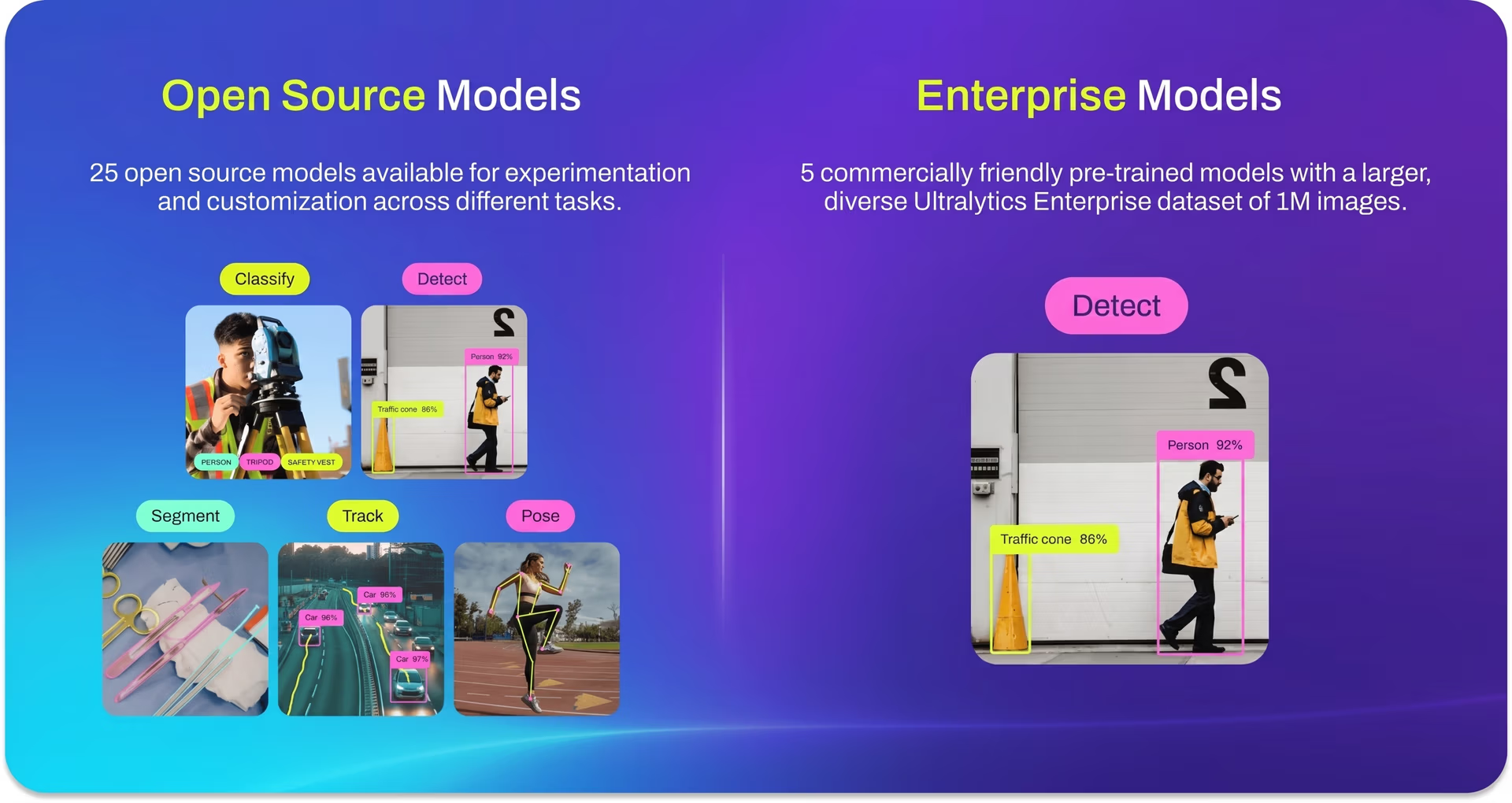
図2. 今回の発表で、Ultralyticsは30種類の新しいモデルを提供します。
YOLO11には、Nano、Small、Medium、Large、Xという5つの異なるモデルサイズがあります。ユーザーは、コンピュータービジョンアプリケーションの具体的なニーズに応じて最適なモデルを選択できます。5つのサイズは、画像分類、物体検出、インスタンスセグメンテーション、トラッキング、姿勢推定、方向付きバウンディングボックス(OBB)物体検出など、さまざまなタスクに柔軟に対応します。各サイズには各タスク用のモデルが用意されており、合計25種類の オープンソースモデルがUltralyticsの提供製品の中核を構成しています。これらのモデルは、YOLO11nモデルが優れた効率性を発揮するエッジデバイス上の軽量タスクから、YOLO11lおよびYOLO11xモデルを必要とする 大規模アプリケーションまで、幅広い 用途に適しています。
Ultralyticsは今回初めて エンタープライズモデルを導入します。これは製品提供における大きな節目であり、これらの新しいイノベーションをユーザーに紹介できることを嬉しく思います。YOLO11では、商用ユースケース専用に設計された5種類の独自モデルを導入します。来月提供予定のこれらのエンタープライズモデルは、100万枚を超える画像で構成されたUltralyticsの新しい独自 データセットで学習され、より堅牢な事前学習済みモデルを実現します。これらは、正確な物体検出が不可欠な 医用画像解析や 衛星画像処理など、要求の厳しい実環境のアプリケーション向けに設計されています。
次世代Ultralytics YOLO11の機能を探る#
Ultralytics YOLO11が提供する内容について説明したところで、YOLO11を特別なものにしている特徴を見ていきましょう。
YOLO11の開発における主な課題の一つは、モデルを小型化、高速化、高精度化するという、相反する優先事項の適切なバランスを見つけることでした。Ultralyticsの創業者兼CEOであるGlenn Jocherは、次のように説明しています。「YOLOの研究開発に取り組むことは非常に困難です。モデルを小さくしたい、より高精度にしたい、さらにCPUやGPUなど異なるプラットフォームで高速化したいという、3つの異なる方向に進もうとするからです。これらはすべて相反する要件であるため、妥協し、どこを変更するかを選ばなければなりません。」こうした課題にもかかわらず、YOLO11は優れたバランスを実現し、YOLOv8などの以前のバージョンを上回る速度と精度の向上を達成しています。
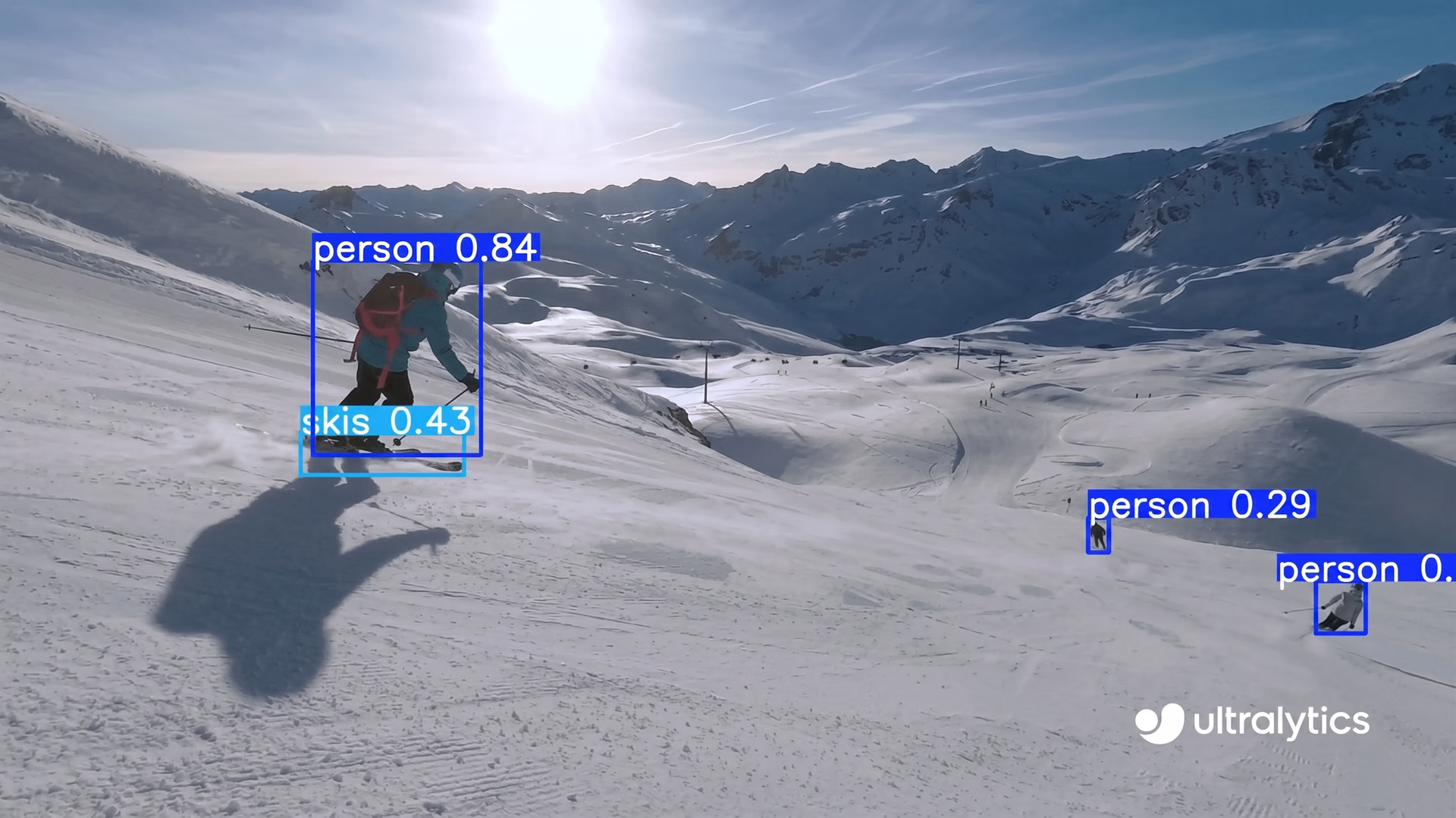
図3. Ultralytics YOLO11を物体検出に使用する例です。
Ultralytics YOLO11は、バックボーンとネックのアーキテクチャを再設計することで 特徴抽出を改善し、より正確な物体検出を実現するなど、大幅な機能強化をもたらします。また、高い精度を維持しながら処理時間を短縮できるよう、速度と効率性も最適化されています。これらの利点に加えて、YOLO11はさまざまな環境に高い適応性を備えています。エッジデバイス、クラウドプラットフォーム、NVIDIA GPUを使用するシステムでシームレスに動作します。この適応性により、モバイルデバイスから大規模サーバーまで、さまざまな ハードウェア構成に対応する柔軟な デプロイオプションを必要とするユーザーにとって、理想的な選択肢となります。
リアルタイムUltralytics YOLO11の用途#
Ultralytics YOLO11は汎用性が高く、特に 複雑なユースケースに対応する際に、さまざまな業界で信頼性の高いツールとして利用できます。たとえば、エッジデバイス上でシームレスに動作し、計算能力が限られた環境でリアルタイム分析を必要とする アプリケーションに利用できます。優れた例が 自動運転です。自動運転車は、全員の安全を守るために一瞬で判断する必要があります。YOLO11は、低照度や対象物の一部が隠れているような厳しい条件でも、歩行者や他の車など、道路上の物体を検出して分析することで支援します。高速かつ正確な検出により、事故を防ぎ、自動運転 車両が安全に走行できるようにします。
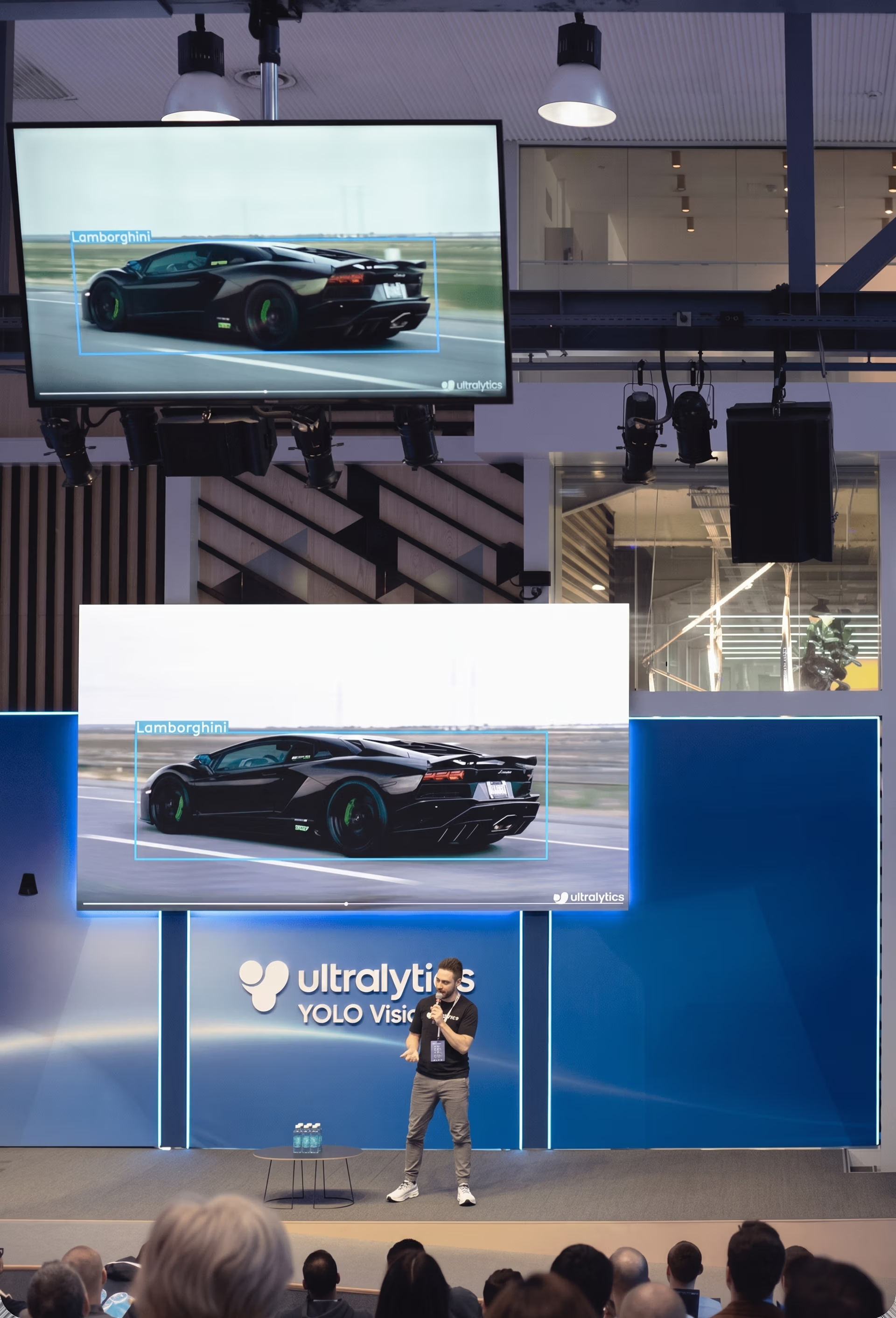
図4. YV24のステージ上でUltralytics YOLO11の用途について語るGlenn Jocher。
Ultralytics YOLO11の対応範囲を示すもう一つの興味深い例は、方向付きバウンディングボックス(OBB)を扱えることです。これは、完全には整列していない物体を検出するために不可欠です。OBB物体検出は、農業、マッピング、監視などの業界で特に役立つ機能です。これらの分野では、航空画像や衛星画像に作物や建物などの 回転した物体が含まれることが多くあります。従来のモデルとは異なり、YOLO11はあらゆる角度の物体を識別でき、精度が求められるタスクでより正確な結果を提供します。
AI開発者向けUltralytics YOLO11:実際に試してみる#
YOLO11は、コーディングを好む場合でもノーコードの方法を好む場合でも、簡単に利用を開始できます。コードを使ってYOLO11を操作するには、Ultralytics Pythonパッケージを使用してモデルを簡単に学習・デプロイできます。ノーコードの方法を希望する場合は、Ultralytics Platformで数回クリックするだけでYOLO11を試すことができます。
Ultralytics YOLO11のコード解説#
YOLO11をPythonで使用するには、まずUltralyticsパッケージをインストールする必要があります。好みに応じて、pip、conda、またはDockerを使用してインストールできます。インストール手順とベストプラクティスの詳細については、Ultralyticsインストールガイドを確認してください。YOLO11に必要なパッケージのインストール中に問題が発生した場合は、解決策とヒントを掲載した よくある問題ガイドを参照してください。
Ultralyticsパッケージをインストールしたら、YOLO11は簡単に使用できます。以下のコードスニペットでは、モデルの読み込み、学習、パフォーマンスのテスト、ONNX形式への エクスポートの手順を説明しています。より詳しい例や高度な使用方法については、公式Ultralyticsドキュメントを参照してください。ここでは、YOLO11を 最大限に活用するための詳細な ガイドとベストプラクティスを確認できます。
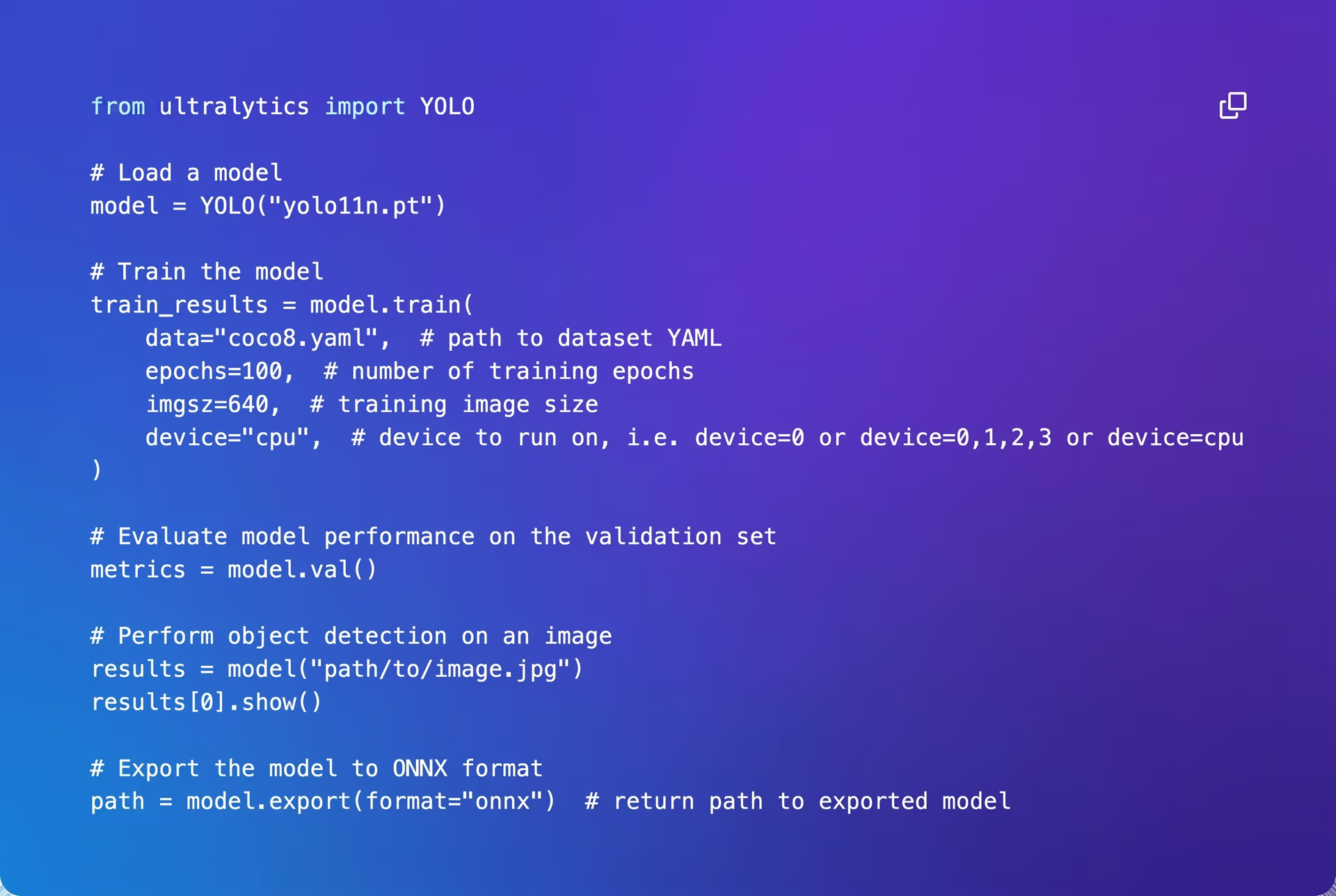
図5. Ultralyticsパッケージを使用したYOLO11。
ノーコードの方法を好むユーザーには、Ultralytics Platformが、数回クリックするだけでYOLO11モデルを学習・デプロイできる簡単な方法を提供します。Ultralytics Platformを始めるには、Ultralytics Platformでアカウントを作成するだけで、直感的なインターフェースを通じてモデルの学習と管理を開始できます。
Ultralytics YOLO11:ビジョンAIの未来を形作る#
AIコミュニティは、実際の用途向けにより高速で高精度なモデルを開発しようと取り組み、コンピュータービジョンの分野を絶えず進歩させています。Ultralytics YOLO11はこの取り組みにおける大きな節目であり、速度、精度、柔軟性を向上させています。リアルタイムアプリケーションとエッジアプリケーション向けに設計されており、ヘルスケアや自動運転などの業界に適しています。Ultralytics PythonパッケージでもノーコードのUltralytics Platformでも、YOLO11は複雑なビジョンAIタスクを簡素化します。強力なコンピュータービジョン機能を提供するため、開発者や企業にとって優れた選択肢となります。
AIについて詳しく学ぶには、GitHubリポジトリをご覧いただき、活発なコミュニティに参加してください。ビジョンAIが医療や農業などの分野でイノベーションを推進している方法をご覧ください。








