Raspberry Pi object detection: YOLO26 on a Pi 5 CPU, no accelerator
YOLO26n runs at 67.03 ms per image with NCNN on a Raspberry Pi 5 CPU, and Arm's open-source runtime measures 36.60 ms in its own test. Here's how to run both.
 Onuralp Sezer11 min read
Listen to this article
Can a Raspberry Pi 5 run object detection on its CPU alone, with no AI HAT or USB accelerator? Yes. In our own benchmark, Ultralytics YOLO26n exported to NCNN takes 67.03 ms of inference per image on the Pi 5's four Arm Cortex-A76 cores, about 15 inference frames per second. Arm has also released an open-source runtime built for this model and board, which it measures at 36.60 ms per image in its own test, about 27 inference FPS.
This article separates the conditions behind each number and explains what each one shows. It then walks through running YOLO26n on a Raspberry Pi 5 CPU step by step, from install to live camera, shows how to run Arm's runtime on the same board, and covers when an accelerator is still worth adding.
If you're new to the task itself, start with what object detection is. This page is about getting it running on a Pi.
Arm's runtime runs YOLO26n on a Raspberry Pi 5 CPU at 36.60 ms per image#
Arm's Optimized-Runtimes repository collects Arm-optimized inference runtimes for specific models and platforms. Its currently listed runtime is YOLO26n object detection on a Raspberry Pi 5. Each runtime sits in its own directory with its build, conversion, examples, benchmarks, tests and release documentation.
Arm's learning path compares its runtime with NCNN in one test: 36.60 ms per image for the Arm runtime against 67.20 ms for NCNN, both with YOLO26n at 640 x 640, batch 1, on Arm's coco-128-by-sa dataset of 128 images. Accuracy was close, at 0.4863 mAP50-95 for the Arm runtime and 0.4902 for NCNN. Those timings work out to about 27 inference FPS against about 15, roughly 84% more throughput for Arm's runtime in that test. Arm notes its NCNN model used FP32 weights with FP16 arithmetic enabled.
For a team building on a cost- and power-limited board, cutting inference time nearly in half leaves more of each frame's budget for capture, tracking and the rest of the application. These are inference times only; capture, pre-processing, drawing and display add to every frame, so measure your complete camera pipeline on the device. The runtime also continues a collaboration we covered from Arm Create 2026, where Ultralytics YOLO joined the Arm AI Portal as a pre-optimized model at launch.
Our NCNN benchmark puts YOLO26n at 67.03 ms per image on a Raspberry Pi 5#
The Ultralytics team benchmarked YOLO26 on a Raspberry Pi 5 across eight export formats for the Raspberry Pi guide. The conditions: models exported at FP32 precision, the default 640-pixel input, Ultralytics 8.4.108, accuracy on COCO128, and inference time only, excluding pre- and post-processing. Our benchmark used an FP32 export. Arm's separate NCNN test enabled FP16 arithmetic. The two NCNN timings, 67.03 ms and 67.20 ms, are not directly comparable.
NCNN was the fastest Ultralytics export format by a clear margin:
| YOLO26n format | Inference time (ms/image) | mAP50-95(B), COCO128 |
|---|---|---|
| PyTorch | 299.09 | 0.4760 |
| ONNX | 125.99 | 0.4734 |
| LiteRT | 123.30 | 0.4730 |
| OpenVINO | 104.55 | 0.4734 |
| MNN | 91.87 | 0.4749 |
| NCNN | 67.03 | 0.4784 |
NCNN runs about 4.5 times faster than the PyTorch weights (67.03 ms against 299.09 ms), and on COCO128 it scored 0.4784 mAP50-95 against 0.4760 for PyTorch. The bigger YOLO26s takes 172.88 ms with NCNN, so for the highest frame rate on a Pi CPU, the nano model is the one to start with.
YOLO26 also beats its predecessor on this board. In a separate ONNX benchmark at 640 pixels, YOLO26n runs at 7.79 FPS against 6.79 FPS for YOLO11n, about 15% faster, while scoring 40.1% mAP50-95 on COCO validation against 39.5% (Ultralytics 8.4.14). YOLO26 can also run without non-maximum suppression when exported with nms=False to formats that support it, such as ONNX and OpenVINO; NCNN falls back to the standard head with NMS, as the end-to-end detection guide explains.
Compare Raspberry Pi numbers only under matched conditions#
Arm's test is useful because it holds the model, input size, batch and dataset fixed across runtimes. Most Pi benchmarks you'll find online don't. Three settings move a result more than anything else: precision (FP32, FP16 or INT8), input size, and what the clock includes, the model's forward pass alone or the whole path from image to final boxes.
Accuracy needs the same care. Our mAP comes from COCO128, a 128-image sample, so check accuracy on your own validation images before you ship any model, and especially a quantized one.
Run YOLO26n on a Raspberry Pi 5 CPU in five steps#
Here's the fastest supported path with the Ultralytics Python package. It assumes a Raspberry Pi 5 with 64-bit Raspberry Pi OS; the Raspberry Pi guide covers flashing the OS and Docker setup.
- Install Ultralytics in a virtual environment. Current Raspberry Pi OS blocks
pipinstalls into system Python, so create an environment that can still see the system camera library:
sudo apt update
sudo apt install -y python3-venv python3-picamera2 rpicam-apps
python3 -m venv --system-site-packages ~/yolo
source ~/yolo/bin/activate
pip install ultralytics- Export YOLO26n to NCNN and test it. The export mode writes a
yolo26n_ncnn_modelfolder you load like any other model:
from ultralytics import YOLO

# Export once on the Pi; creates the 'yolo26n_ncnn_model' folder
model = YOLO("yolo26n.pt")
model.export(format="ncnn")

# Load the NCNN model and run it on the CPU
ncnn_model = YOLO("yolo26n_ncnn_model")
results = ncnn_model("https://ultralytics.com/images/bus.jpg")
print(results[0].speed)  # preprocess, inference and postprocess times in ms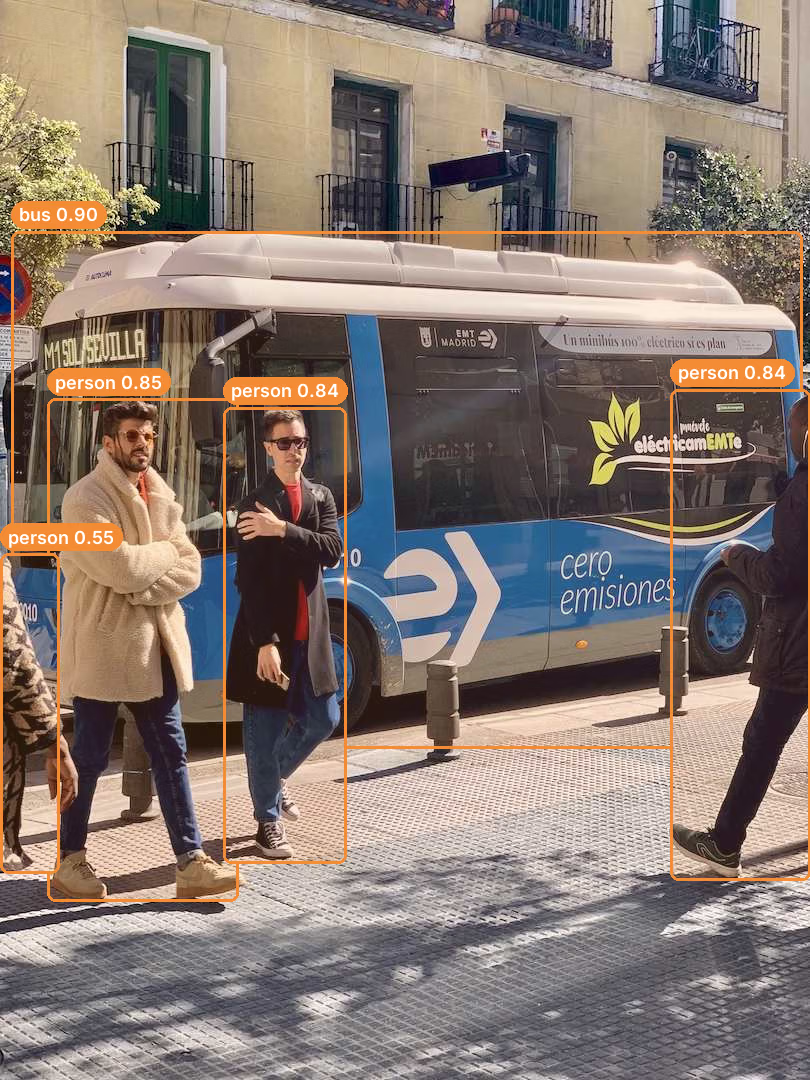
YOLO26n exported to NCNN, run on the bus.jpg test image from step 2: one bus and four people detected. Recorded on a desktop CPU; boxes and scores on a Pi can differ slightly.
- Connect a camera. Check the feed with
rpicam-hello. The Pi 5 has two 22-pin camera/display connectors, so 15-pin camera modules need an adapter cable. - Run live detection.
picamera2hands frames straight to the model. Thecv2.imshowwindow needs a desktop session; on a headless Pi, drop the display lines and use the results in code instead:
import cv2
from picamera2 import Picamera2

from ultralytics import YOLO

picam2 = Picamera2()
picam2.preview_configuration.main.size = (1280, 720)
picam2.preview_configuration.main.format = "RGB888"
picam2.preview_configuration.align()
picam2.configure("preview")
picam2.start()

model = YOLO("yolo26n_ncnn_model")

while True:
    frame = picam2.capture_array()
    results = model(frame)
    cv2.imshow("Camera", results[0].plot())
    if cv2.waitKey(1) == ord("q"):
        break

cv2.destroyAllWindows()- Benchmark on your board.
yolo benchmark model=yolo26n.pt data=coco128.yaml imgsz=640attempts each export format on your own Pi, so you see what your cooling, OS image and power supply deliver. Some formats can't be exported on the Pi itself: LiteRT, for example, exports only on Linux x86_64 or macOS, so export it there, copy the file to the Pi and validate it separately. For steadier accuracy numbers, use a larger validation set such asdata=coco.yaml.
Run Arm's runtime next to NCNN on the same Pi#
Arm's runtime is a separate project, not an Ultralytics export format, and its setup steps target 64-bit Raspberry Pi OS Trixie with Python 3.13. To try it and compare it with NCNN:
- Clone arm/Optimized-Runtimes, open the
yolo26-raspberry-pi-5directory, follow its prerequisites, and build the runtime withmake runtime. - Run
make example-videoto see detections on a sample video. - Run
make ultralytics-benchmarkto benchmark the Arm runtime on your board. - Export YOLO26n to NCNN as in step 2 above, then validate it on the same generated
coco-128-by-sadataset, using the environment, checkpoint and commands on Arm's comparison page, so both runtimes see the same images at the same input size. - For your own model, convert a compatible fine-tuned YOLO26n checkpoint with
make model CHECKPOINT=/path/to/checkpoint.pt, as the runtime's model card describes, and compare accuracy on your own validation set as well as speed.
In Arm's comparison, its runtime was the faster CPU path for YOLO26n detection. The Ultralytics NCNN export covers the rest: other YOLO26 sizes and tasks, including segmentation and pose, from the same two lines of code, within the limits listed in the NCNN guide.
Cooling, overclocking and a lighter OS buy extra frames#
Once the model runs, the board sets the ceiling. The Raspberry Pi guide's best practices list what helps:
- Cool the board. Sustained inference heats the CPU, and thermal throttling lowers the clock speed your benchmark assumed. A heatsink and fan keep frame times steady.
- Overclock if you can cool it. Some Pi 5 boards run the CPU at 3.0 GHz instead of its base 2.4 GHz with
arm_freq=3000andforce_turbo=1in/boot/firmware/config.txt, followed by a reboot. Stability varies from board to board, so if the system becomes unstable, step back by 100 MHz. - Skip the desktop. Raspberry Pi OS Lite leaves more RAM for vision work.
- Use an SSD for 24/7 runs. An SD card can wear out under continuous writes; the Pi 5's PCIe connector takes an NVMe adapter.
- Shrink the input when objects are large. A smaller
imgszmeans fewer pixels per frame. Measure the speed and accuracy change on your own footage, since small or distant objects suffer first. Our guide to FPS in computer vision explains how to set a frame-rate budget.
Add an accelerator when one Pi CPU isn't enough#
A CPU-only Pi 5 suits one camera at moderate frame rates. For several streams, larger models, or headroom for other software, an accelerator moves the model off the CPU. Our measured YOLO26n inference times on a Raspberry Pi 5 (inference only, COCO128), from separate tests with quantized models and different Ultralytics versions:
- Hailo-8 on the AI HAT+: 21.7 ms at 0.455 mAP50-95, Ultralytics 8.4.174.
- DEEPX DX-M1 M.2 module: 34.6 ms at 0.4660 mAP50-95, Ultralytics 8.4.48.
- Coral Edge TPU: a USB option with its own export path; that guide's timings were recorded with YOLOv8 models.
Each adds hardware, power and a model-compilation step, and accelerated models run quantized, so check accuracy after export. For a wider view, see picking the right edge device and the NVIDIA Jetson guide if you need more compute than a Pi offers.
Train a custom detector, then deploy it the same way#
COCO's 80 classes are a starting point. Most Pi projects need their own objects: a part on a line, a product on a shelf, a pest on a leaf. Ultralytics Platform handles that end to end: upload and annotate a dataset, train in the cloud from the YOLO26n checkpoint, then export to NCNN and copy the folder to the Pi.
Start with the nano model, then validate accuracy and measure speed with your custom model on representative footage from the camera you'll deploy. Our model training tips and the Academy lesson on choosing a deployment target cover the rest.
Who should run YOLO26 on a Raspberry Pi 5 CPU#
Run YOLO26n on the Pi 5 CPU if you have one camera, can work within the frame rate you measure end to end on the device, and want the simplest bill of materials: a Raspberry Pi, a camera, a fan and a power supply. Retail counters, home and wildlife cameras, conveyor counting and robotics prototypes all fit.
Use Arm's runtime when YOLO26n detection is your whole workload and every millisecond counts. Add an accelerator when you need several cameras, larger models, or CPU time left for the rest of your application.
Ultralytics YOLO is available under AGPL-3.0 or an Ultralytics Enterprise License. See the Ultralytics licensing options for what your deployment needs.
Frequently asked questions
Yes, for single-camera jobs at moderate frame rates. In the Ultralytics benchmark, YOLO26n exported to NCNN takes 67.03 ms of inference per image on a Raspberry Pi 5 CPU (FP32 export, 640-pixel input), about 15 inference FPS. Separately, Arm measured 36.60 ms for YOLO26n with its open-source runtime in its own comparison; that is a different test, not a speedup over our 67.03 ms result. Camera capture and drawing add time, so measure the full pipeline.
In Arm's comparison test, its Optimized-Runtimes YOLO26n runtime was fastest at 36.60 ms per image, against 67.20 ms for NCNN. In our separate benchmark of Ultralytics export formats, NCNN was fastest at 67.03 ms, ahead of MNN at 91.87 ms and OpenVINO at 104.55 ms. These are separate benchmarks using different datasets, COCO128 and Arm's coco-128-by-sa, so the timings do not establish a speedup between tests.
Yes. In a separate ONNX benchmark at 640 pixels on a Raspberry Pi 5, YOLO26n runs at 7.79 FPS against 6.79 FPS for YOLO11n, about 15% faster, while scoring 40.1% mAP50-95 on COCO validation against 39.5%.
Not for one camera at moderate frame rates. An accelerator pays off for several streams or larger models: in our tests, a quantized YOLO26n on a Hailo-8 AI HAT+ took 21.7 ms of inference per image, against 67.03 ms for the FP32 NCNN export on the CPU. These come from separate tests with different versions and precision.
Yes. Train your model in Python or on Ultralytics Platform, export it with
format="ncnn", copy the_ncnn_modelfolder to the Pi, and load it withYOLO("your_model_ncnn_model"). Update the model path in the camera code, and benchmark it against your own dataset YAML and classes. Arm's runtime also converts compatible fine-tuned YOLO26n checkpoints.
Written by
Senior Machine Learning Engineer · Ultralytics
Comments
Ask a question, share your results, or help someone else.