Ultralytics YOLO segmentation in dense scenes: 1,000 masks
In Ultralytics 8.4.213, YOLO26n-seg predicts and summarizes 1,000 masks on a synthetic 1080p image in 56.4 ms on an RTX PRO 6000, down from 821.2 ms.
 Glenn Jocher11 min read
Listen to this article
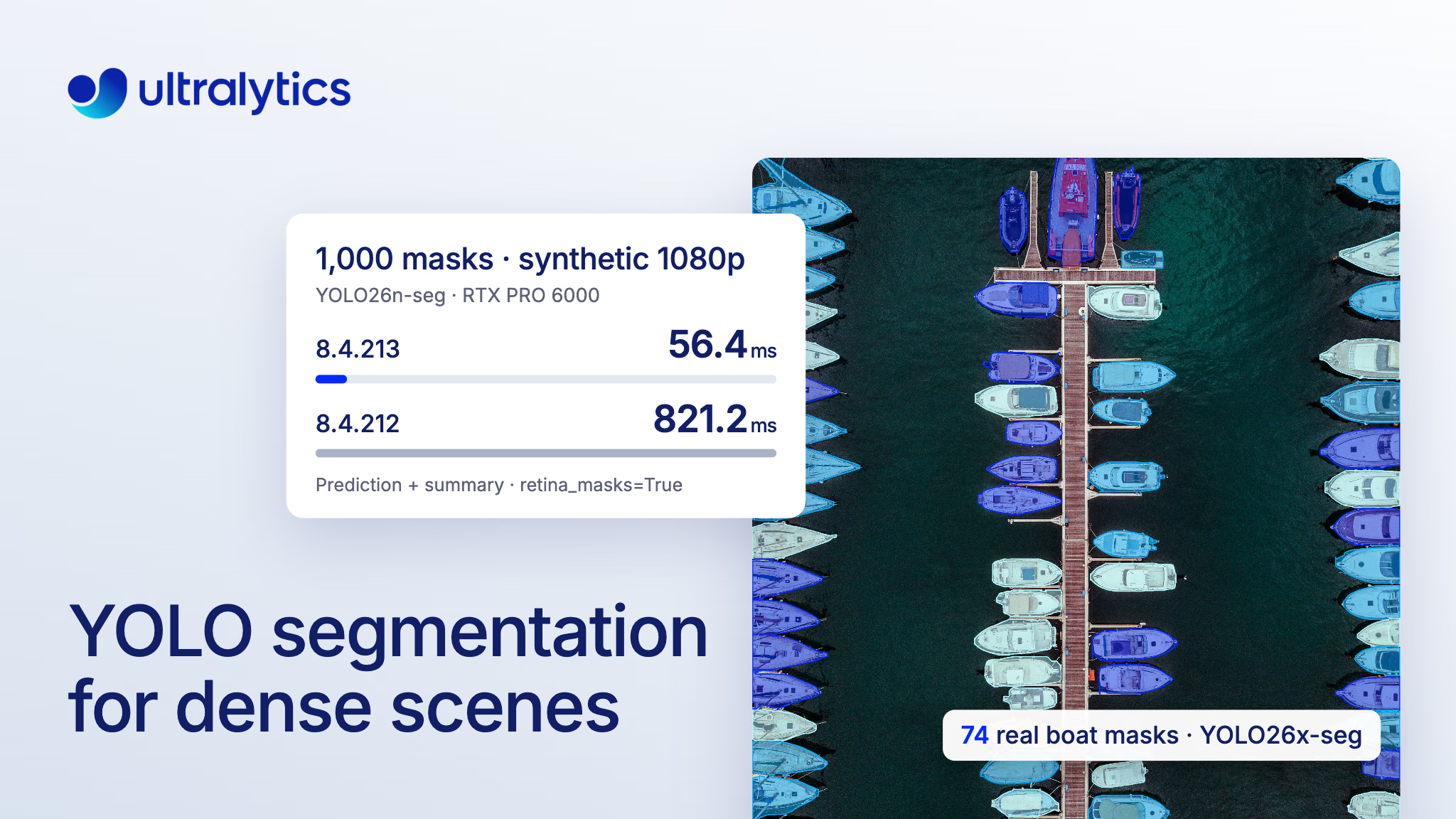
Ultralytics 8.4.213, released on November 14, 2026, speeds up YOLO segmentation in dense scenes by decoding large mask stacks inside each detection box. If you segment shelves, parcels, crowds or aerial imagery, you have probably hit the point where a segmentation model finds the objects but the mask step after it runs short of time or memory; this release pushes that point much further out. In our benchmark on a synthetic, densely tiled 1080p image, YOLO26n-seg returned 1,000 full-resolution instance masks (retina_masks=True), with prediction plus a results summary, in 56.4 ms and 321 MiB of peak GPU memory on an RTX PRO 6000, down from 821.2 ms and 4,291 MiB in 8.4.212.
The model itself didn't change. What changed is how YOLO segmentation turns the model's output into masks: large mask stacks are now decoded inside each object's box instead of across the whole frame. In Ultralytics Platform, the Predict tab and API return up to 1,000 results per image. This post covers why dense scenes were expensive, what 8.4.213 does differently, the measured results, and how to run 1,000-mask predictions yourself.
Dense scenes used to pay for pixels outside every box#
Instance segmentation gives every object its own mask, which is what you need to measure area, cut objects out or tell touching items apart. A YOLO segmentation model predicts a small set of shared prototype masks plus a few coefficients per detection, and post-processing combines them into one mask per object.
Until now, that step built every mask at frame size: the model's inference size by default, or the original image size with retina_masks=True or tiling. For N objects on an H x W frame, it allocated, cropped, filtered and scanned an N x H x W stack, even though each mask is zero everywhere outside its bounding box. On a dense 1080p scene, the summed area of 1,000 boxes, counting overlaps, is about twice the frame area, yet the stack was 1,000 times the frame area. Cost grew with max_det and image size rather than with the boxes in the image.
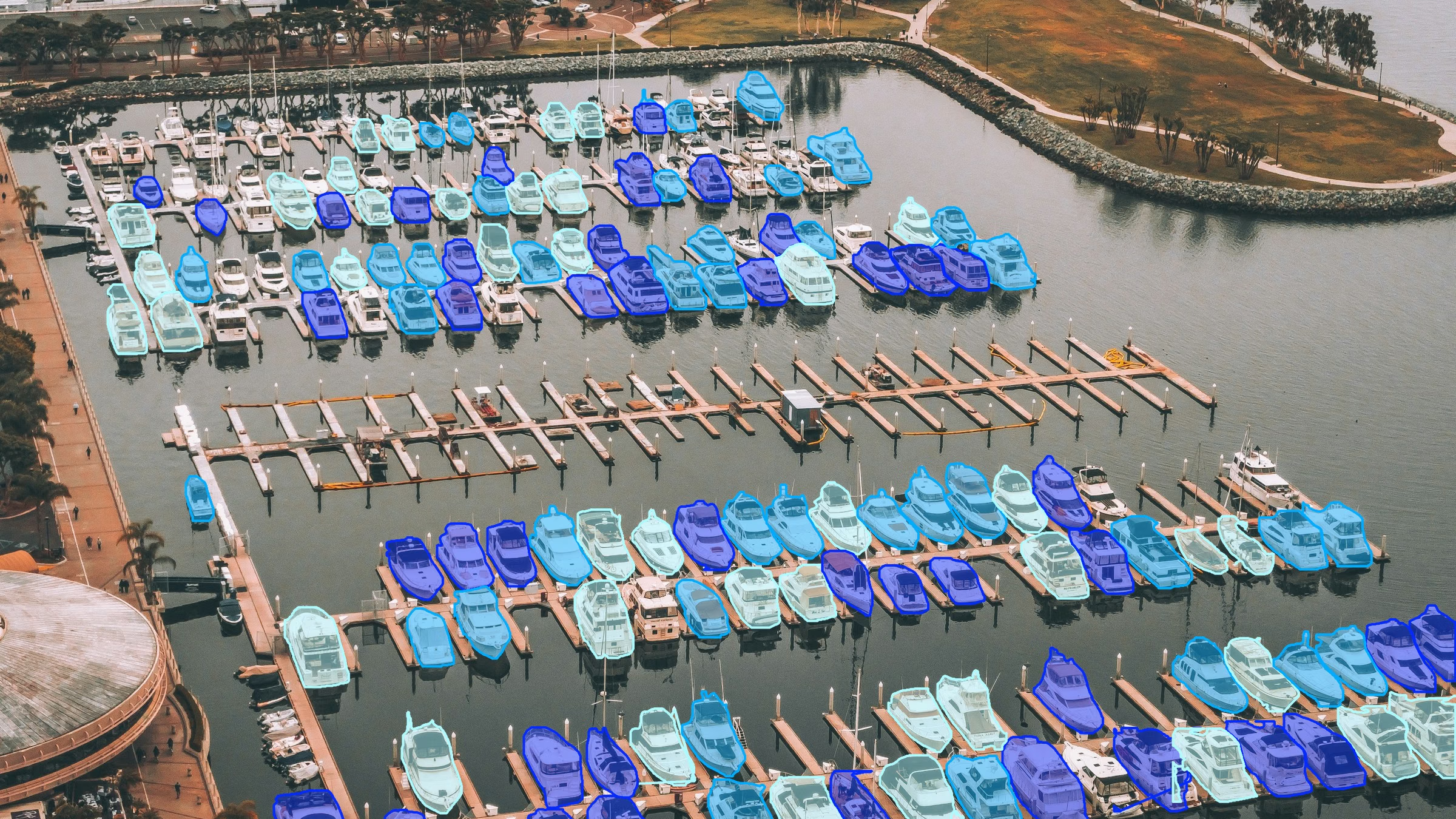
YOLO26x-seg returned 127 boat masks on this marina photo, shown cropped (imgsz=1920, conf=0.25, max_det=1000, retina_masks=True). Photo: Unsplash.
That is why raising max_det above its default of 300 was impractical for segmentation, and why large images with many instances could exhaust memory. Dense retail shelves like SKU-110K, parcel piles and aerial frames are exactly the scenes where you want room for more than 300 objects.
Ultralytics 8.4.213 decodes large mask stacks inside each box#
The new path, from PR #27197, interpolates the prototype logits only at each box's pixels. It uses separable bilinear sampling, the same sampling PyTorch's interpolation does, and batches boxes of similar size together. For large stacks, decoding cost now follows the summed area of the boxes.
Three details matter in practice:
- It switches on above a fixed mask-stack size. The segmentation predictor uses box-local masks when the dense stack would exceed 33,554,432 pixels on CUDA or 4,194,304 on CPU and other devices. Smaller stacks keep the existing dense path, which is as fast or faster for a handful of masks.
- On that path, outlines come straight from the box-local masks.
masks.xyandmasks.xyntrace polygons per box, sosummary(),to_json()andsave_txtdon't build the full stack. - The output format is unchanged.
masks.datastill returns a dense N x H x W tensor. On the box-local path it's built the first time you read it.
Reading the dense tensor still costs its allocation, but the PR measured less of it: on GPU, reading masks.data for 300 masks at 1080p with retina_masks=True went from 14.1 ms and 1,366 MiB to 9.1 ms and 795 MiB.
1,000 masks at 1080p went from 821.2 ms to 56.4 ms on GPU#
The PR benchmarks YOLO26n-seg running the full model.predict(...) plus result.summary() (boxes and polygons), reporting the median of warm runs with one process per row. Dense scenes are a synthetic tiled image at conf=0.01 and imgsz=1280; the typical scene is the standard bus.jpg at default settings, with 5 masks. "Before" is 8.4.212. These are post-processing-heavy measurements of prediction plus summary, not a general inference-speed figure.
| Scene (GPU, RTX PRO 6000) | Masks | retina_masks | 8.4.212 | 8.4.213 |
|---|---|---|---|---|
Typical (bus.jpg) | 5 | False | 4.3 ms, 59 MiB | 4.4 ms, 59 MiB |
| 1920 x 1080 | 300 | False | 118.5 ms, 1,673 MiB | 16.3 ms, 174 MiB |
| 1920 x 1080 | 300 | True | 248.7 ms, 1,366 MiB | 18.0 ms, 201 MiB |
| 1920 x 1080 | 1,000 | True | 821.2 ms, 4,291 MiB | 56.4 ms, 321 MiB |
| 4000 x 3000 | 300 | True | 1,352.1 ms, 7,070 MiB | 26.5 ms, 172 MiB |
| 4000 x 3000 | 1,000 | True | 4,323.1 ms, 23,305 MiB | 130.7 ms, 258 MiB |
Time and peak GPU memory, PyTorch 2.15.0 with CUDA 13.2. Source: PR #27197.
The typical five-mask image is unchanged, as designed. The gains appear where the old stack grew large, and they are largest for full-resolution masks, which were the most expensive case before.
Large images need a fraction of the memory#
At 4000 x 3000 pixels with 1,000 predicted masks, the old path peaked at 23,305 MiB of GPU memory. The new path peaked at 258 MiB and finished in 130.7 ms instead of 4,323.1 ms. That reduction leaves more GPU memory for the rest of the pipeline when you work with 12-megapixel drone, satellite and inspection frames.
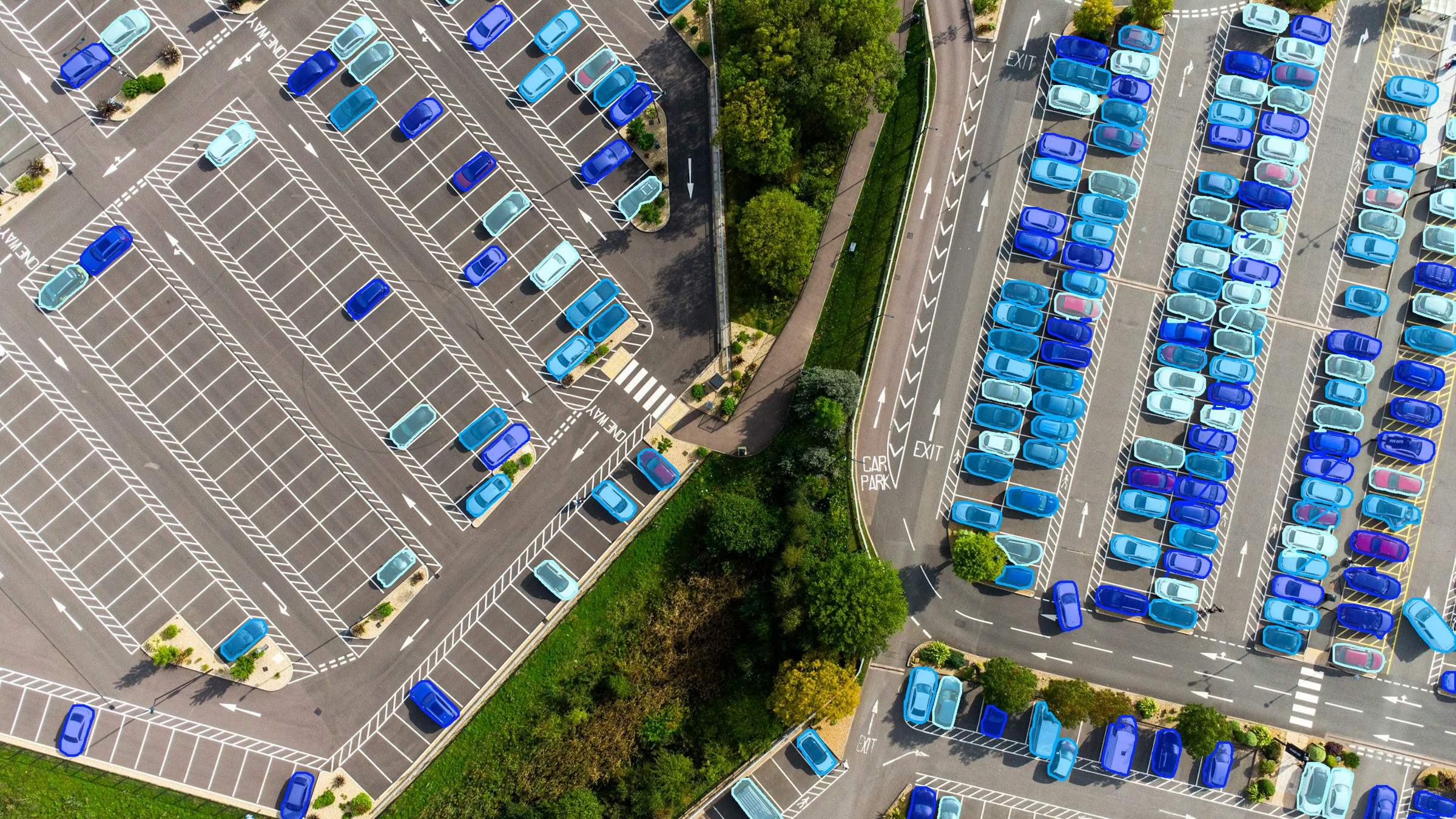
YOLO26x-seg returned 222 car masks on this aerial frame (imgsz=1920, conf=0.15, max_det=1000, retina_masks=True). Photo: Unsplash.
CPU predictions get much faster too#
On a Linux x86 CPU with 8 threads, the process sits at about 840 MiB before any masks are made. At 1080p with 1,000 full-resolution masks, peak process memory fell from 5,217 MiB to 1,072 MiB, and time fell as shown below.
300 and 1,000 masks at 1920 x 1080, and 300 masks at 4000 x 3000 (12MP). YOLO26n-seg, prediction plus summary, 8.4.212 before and 8.4.213 after. Source: PR #27197.
Masks match 8.4.212, with tiny edge differences in one mode#
A faster path is only useful if it returns the same answer. The PR compared 8.4.213 with 8.4.212 on 96 predictions, using YOLO26n-seg and YOLO11n-seg on two images at six sizes, conf of 0.25 and 0.01, both mask modes, with the box-local path forced on:
- Default masks (
retina_masks=False): boxes, masks and polygons are identical; 0 of 7.6 million mask pixels differ. - Full-resolution masks (
retina_masks=True): identical whenever the old code interpolated once. For the other image shapes, 0.07% of mask pixels differ (18,105 of 24.8 million), all on mask edges, because the old code interpolated twice there and the new code samples the prototypes once at the exact coordinate. - Apple MPS: masks, boxes and polygons are identical on a dense 1080p scene with 179 masks, in both mask modes.
How to segment 1,000 objects per image in Python#
Upgrade with pip install -U ultralytics (8.4.213 or later), then raise max_det above its default of 300. The rest of your code stays the same.
from ultralytics import YOLO

model = YOLO("yolo26n-seg.pt")  # COCO classes; load your own trained model for shelves or parcels
results = model.predict("crowd.jpg", imgsz=1280, conf=0.25, max_det=1000, retina_masks=True)

r = results[0]
print(len(r.boxes), "objects")
if r.masks is not None:
    polygons = r.masks.xy  # one (P, 2) array per object, in original image pixels
rows = r.summary()  # boxes and polygons
max_det is a ceiling, not a target: how many objects come back still depends on the model, the image and your confidence threshold. To get the most from the change:
- Read outlines when you can.
masks.xy(pixels) andmasks.xyn(normalized) come from box-local masks on the large-stack path, as doto_json()andsave_txt. The Results reference lists every attribute. - Read
masks.datafor direct pixel math. Areas and overlaps are simplest on the dense tensor; cutouts can also come frommasks.xycontours. Our Academy lesson on using masks in code shows when to use each view, and the object isolation guide builds cutouts from contours. - Use
retina_masks=Truewhen you need source-resolution masks. In the 300-mask 1080p GPU benchmark, it now costs 18.0 ms against 16.3 ms for default masks. For tiny objects in very large frames, see our post on small object detection with image tiling and the high-resolution tiling guide. Tiled prediction returns source-sized masks, so a tiled run still needs memory in proportion to the original image. - Tune
confandioufor crowded scenes. Raisingmax_detkeeps more of the detections that already passconf; loweringconfadmits weaker ones. The predict settings coverconf,iouandmax_det, and our guide to the NMS IoU threshold explains how to handle touching objects.
The change sits in Python post-processing, so it applies to the PyTorch model and to exported models run through the Ultralytics predict API. The PR tested YOLO26n-seg and YOLO11n-seg, and the same post-processing serves every YOLO26 and YOLO11 segmentation model, from YOLO26n-seg at 2.7M fused parameters to YOLO26x-seg at 62.8M. To train one on your own dense data, follow our guide to custom-training YOLO26 for instance segmentation.
Ultralytics Platform now returns up to 1,000 results per image#
The same ceiling now applies in Ultralytics Platform. A model's Predict tab returns up to 1,000 results per image, and so does the REST API behind it. RT-DETR models are the exception at 300, the number of queries in their decoder.
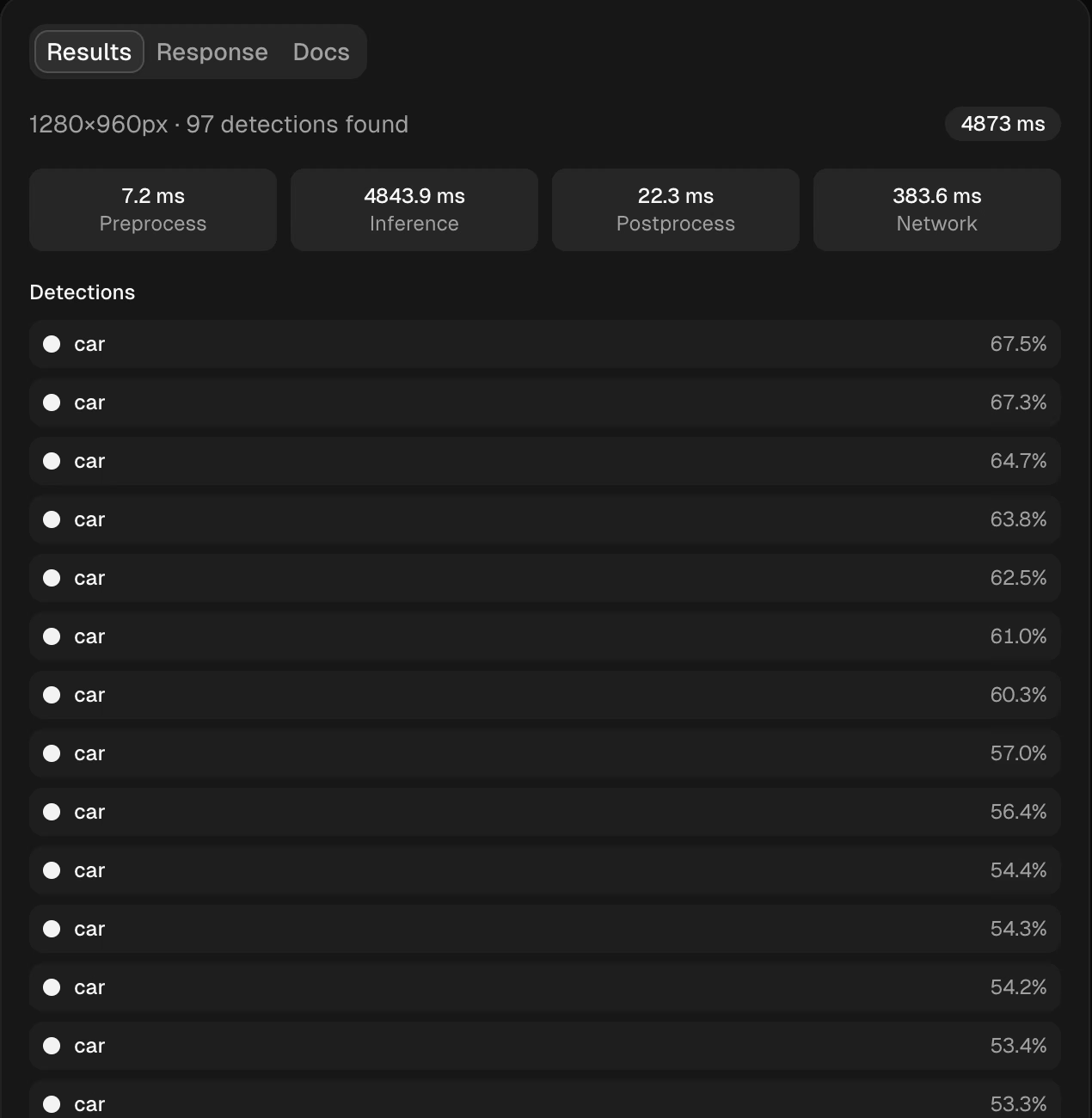
The Predict tab for YOLO26x-seg at image size 1280, listing 97 car detections on the aerial photo above. The Platform inference docs cover the panel in detail.
The results panel was built for long lists. With more than 10 results, the image shows boxes without labels so they don't hide the objects, the list names each result, and the enlarged image keeps the labels. Hover a row to highlight its object, or hover an object to find its row.
To try it on your own data, start from the Package-Seg parcel segmentation dataset, train in the cloud, and run the result in the Predict tab or behind a dedicated endpoint.
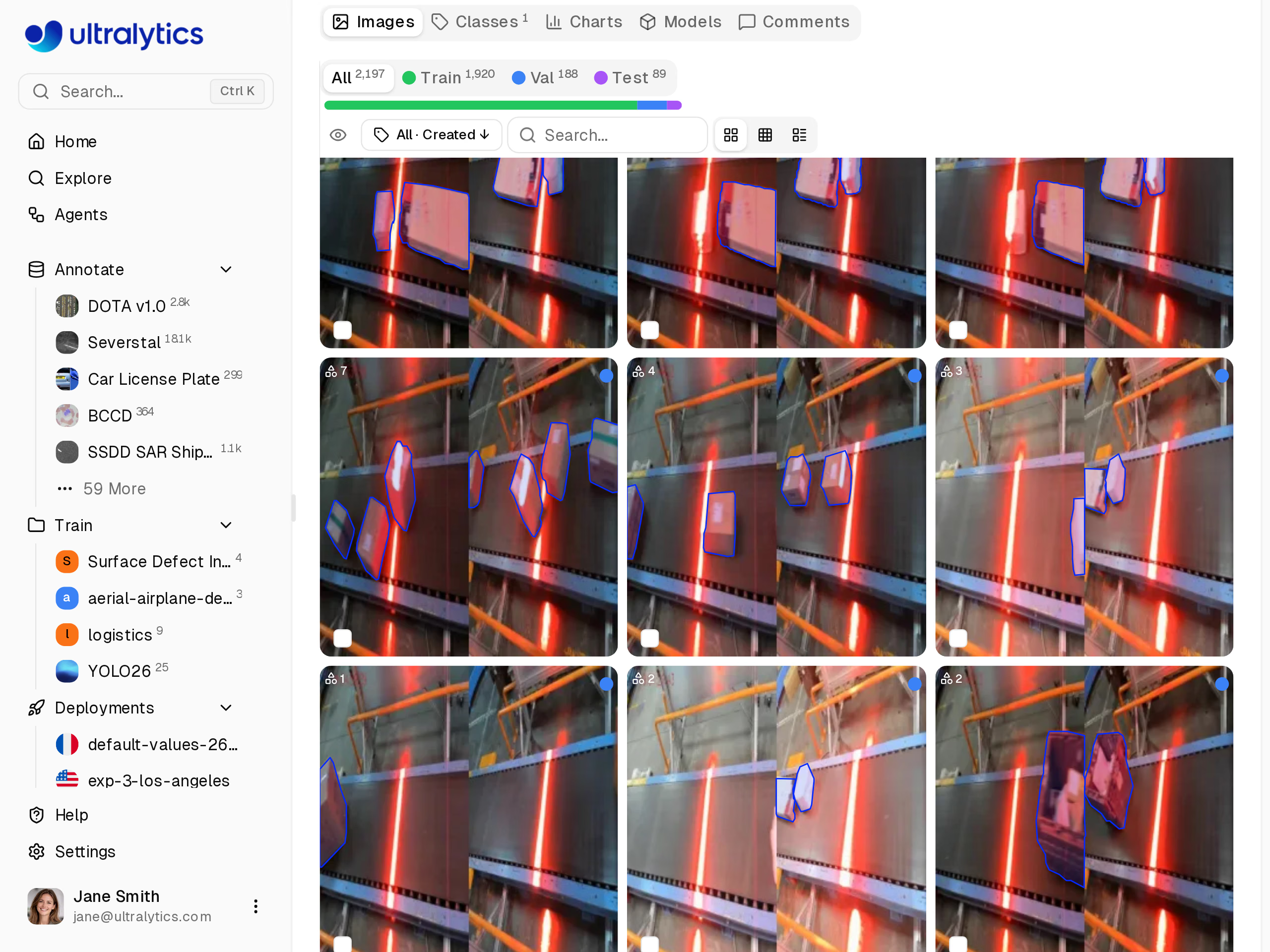
The Package-Seg dataset on Ultralytics Platform, a ready-made starting point for logistics segmentation.
Who should upgrade#
Upgrade now if you segment crowded scenes or large images: retail shelves, parcel sorting, aerial and drone survey, cell microscopy, or anywhere you have capped max_det, cut image size or dropped retina_masks to stay within memory. You can revisit those workarounds.
If your mask stacks stay under the threshold, they keep the existing dense path; note that the threshold counts objects times image size, so even a few masks on a very large image can cross it. If your pipeline always reads masks.data, you still build the dense tensor; in the PR's 300-mask 1080p GPU test it cost less time and memory than before. For a refresher on whether you need instance masks at all, see semantic vs instance segmentation.
Frequently asked questions
YOLO segmentation is the instance segmentation task in Ultralytics YOLO: for each object, the model returns a class, a box, a confidence score and a pixel mask. YOLO26 segmentation models come in five sizes, from YOLO26n-seg to YOLO26x-seg, pretrained on COCO's 80 classes and ready to fine-tune on your own data.
max_detsets the ceiling, 300 by default; the number returned also depends on the model, the image and the confidence threshold. Since 8.4.213, a ceiling of 1,000 is practical for workloads like the benchmark: on a synthetic 1080p image, YOLO26n-seg predicted and summarized 1,000 full-resolution masks in 56.4 ms with 321 MiB of peak memory on an RTX PRO 6000. Ultralytics Platform returns up to 1,000 results per image.Earlier versions built every mask at frame size, so memory grew with the number of objects times the frame area. In the synthetic 4000 x 3000 benchmark with 1,000 full-resolution masks, that peaked at 23,305 MiB of GPU memory. Version 8.4.213 decodes large stacks inside each box and peaked at 258 MiB for the same case.
Upgrade to
ultralytics8.4.213 or later; no other code change is needed, because the box-local path turns on automatically for large mask stacks.masks.datakeeps the same dense format, so existing code keeps working; readingmasks.xyor callingsummary()instead avoids building it on that path.retina_masks=Truereturns masks at the original image resolution instead of the model's inference size, which aligns the dense mask with the original image. With 300 masks on a synthetic 1080p image, YOLO26n-seg prediction plus summary on an RTX PRO 6000 took 248.7 ms in 8.4.212 and 18.0 ms in 8.4.213 with this setting on.
Written by
Founder & CEO · Ultralytics
Comments
Ask a question, share your results, or help someone else.