ControlNet
ControlNet adds spatial control to text-to-image diffusion models, steering layout with edge maps, depth maps, or pose skeletons. How it works, with code.
ControlNet is a neural network architecture that adds spatial control to a pretrained text-to-image diffusion model such as Stable Diffusion. Alongside the text prompt, it takes a condition image, such as an edge map, a depth map, a human pose skeleton, or a segmentation map, and the generated image follows that structure while the prompt decides content and style. A prompt like "a knight in silver armor" combined with a pose skeleton yields a knight in exactly that pose. Lvmin Zhang, Anyi Rao, and Maneesh Agrawala of Stanford University introduced it in 2023 in Adding Conditional Control to Text-to-Image Diffusion Models, which shared the Marr Prize for best paper at ICCV 2023. The base model's weights stay frozen, so ControlNet adds control without degrading what the model already knows.
How ControlNet Works#
Stable Diffusion generates an image by repeatedly denoising a latent with a U-Net. ControlNet locks that U-Net and makes a trainable copy of its encoder, the 12 encoding blocks and the middle block. A small convolutional network first converts the 512×512 condition image into a 64×64 feature map that matches the latent. The trainable copy processes the latent plus these condition features, and its outputs are added to the locked U-Net's 12 skip connections and its middle block, so the locked decoder receives the control signal:
The copy connects to the locked model only through zero convolutions: 1×1 convolutions whose weights and biases start at zero. At the first training step they output zeros, so the combined model behaves exactly like the original and no random noise reaches the pretrained layers. The output zero convolution still receives a nonzero weight gradient, because its input is not zero, so the first update moves it away from zero and the control signal grows from there. This PyTorch code shows one block:
import copy

import torch
from torch import nn

# A frozen block from the pretrained model and a trainable copy of it
torch.manual_seed(0)
locked = nn.Conv2d(64, 64, 3, padding=1).requires_grad_(False)
trainable = copy.deepcopy(locked).requires_grad_(True)

# Zero convolutions: 1x1 convolutions whose weights and biases start at zero
zero_in, zero_out = nn.Conv2d(64, 64, 1), nn.Conv2d(64, 64, 1)
for conv in (zero_in, zero_out):
    nn.init.zeros_(conv.weight)
    nn.init.zeros_(conv.bias)

x = torch.randn(1, 64, 32, 32)  # features entering the block
condition = torch.randn(1, 64, 32, 32)  # encoded edge, depth, or pose map
y = locked(x) + zero_out(trainable(x + zero_in(condition)))

# At step 0 the output equals the frozen block's, and only the outer zero conv gets a gradient
print(torch.equal(y, locked(x)))
y.sum().backward()
print(f"zero_in grad: {zero_in.weight.grad.norm():.1f}, zero_out grad: {zero_out.weight.grad.norm():.1f}")
It prints True and zero_in grad: 0.0, zero_out grad: 2040.6. The block's output is identical to the frozen model's, the outer zero convolution receives a gradient because its input is nonzero, and the inner one starts learning once the outer one has moved away from zero.
Condition Types#
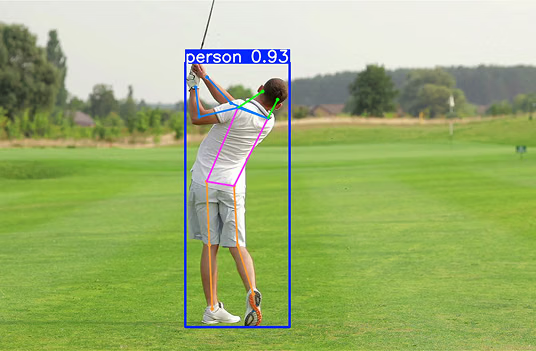
The original paper trained separate ControlNets for Canny edges, depth maps, surface normal maps, M-LSD straight lines, HED soft edges, ADE20K segmentation maps, OpenPose human poses, and user sketches. Each condition image is extracted from a reference photo with an off-the-shelf model, such as OpenCV's Canny edge detector or a depth estimation network, and several ControlNets can be applied at once, each with its own strength. Ultralytics YOLO26 pose estimation models extract this kind of pose condition, predicting 17 COCO keypoints for each person, which can be drawn as skeletons on a blank canvas:
import cv2
import numpy as np
from ultralytics import YOLO

# Load a YOLO26 pose model that predicts 17 keypoints per person
model = YOLO("yolo26n-pose.pt")
results = model("https://ultralytics.com/images/bus.jpg")
result = results[0]

# Draw only the skeletons, on a black canvas the size of the photo
skeletons = result.plot(img=np.zeros_like(result.orig_img), boxes=False)
cv2.imwrite("pose_condition.png", skeletons)
The saved image shows each person's limbs as colored lines on black, with the photo's colors, textures, and background removed.
ControlNet vs. Related Methods#
- LoRA: Fine-tunes a small set of added weights to teach a model a new style, character, or object. LoRA changes what the model draws, while ControlNet fixes where things go, and the two are often combined.
- T2I-Adapter: A lighter alternative with about 77 million parameters that adds condition features to the frozen U-Net's encoder features instead of running a full copy of the encoder. Adapters for different conditions can be combined at generation time.
- Image-to-image generation: Starts denoising from a noised copy of an input photo, so the output inherits that photo's colors and rough layout. ControlNet constrains only the extracted structure, such as edges, and leaves colors and textures to the prompt.
- Image inpainting: Regenerates a masked part of an image to match the rest. It controls which region changes, while ControlNet controls the structure of what is generated.
Real-World Applications#
- Architecture and interior design: Sketches, CAD line drawings, or M-LSD line maps of a room become photorealistic renderings in different materials and styles with the same geometry.
- Character art and animation: Pose skeletons keep a character's posture fixed across style variations, and per-frame poses extracted from reference video drive consistent animated sequences.
- Product and marketing imagery: Depth or edge maps of a product shot keep its shape and placement while the prompt changes the setting, lighting, and background.
- Synthetic data: Generating images from segmentation maps or poses produces new training images whose labels are known in advance, because the layout was specified before generation.
Training a ControlNet#
Training requires pairs of images and their condition maps, produced automatically by running the condition extractor over a captioned image dataset. The locked weights need no gradient updates, so each training iteration takes only about 23% more GPU memory and 34% more time than optimizing Stable Diffusion without ControlNet, and the paper reports robust training on datasets from under 50,000 to over a million images. Training also shows a "sudden convergence": the model ignores the condition for thousands of steps and then abruptly starts following it, usually within 10,000 optimization steps, at step 6,133 in the paper's example.