Jetson Orin Nano Super vs Raspberry Pi 5 for YOLO26 object detection
YOLO26n inference: 4.57 ms on a Jetson Orin Nano Super (TensorRT FP16) vs 67.03 ms on a Pi 5 CPU, in separate tests. Choose by model, FPS and cameras.
 Onuralp Sezer15 min read
Listen to this article
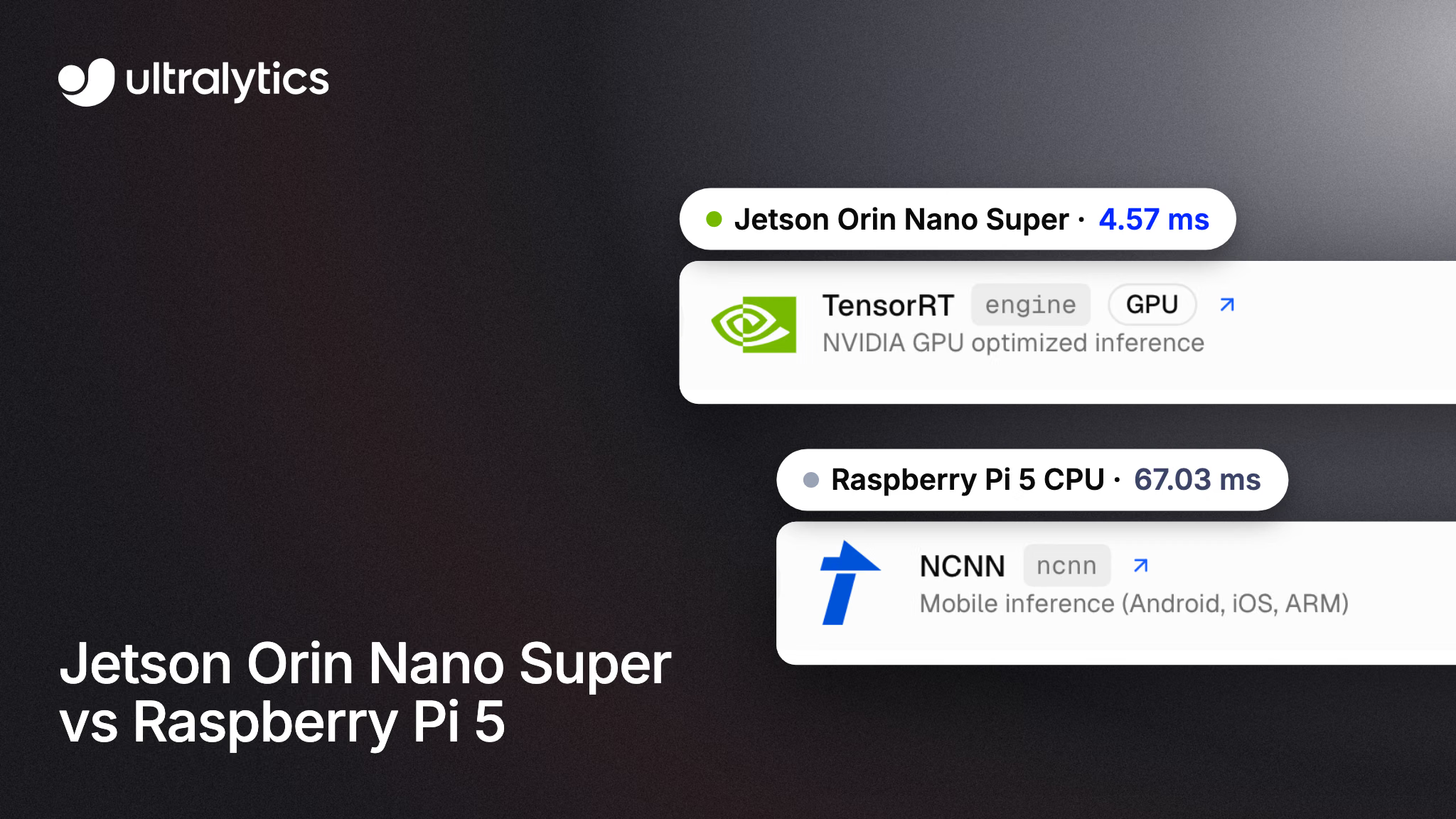
Should you run object detection on a Raspberry Pi 5 or an NVIDIA Jetson Orin Nano? For one camera, a low frame-rate target and a small model, a Pi 5 CPU can be enough: in our published benchmark, Ultralytics YOLO26n exported to NCNN takes 67.03 ms of inference per image on its four Arm cores, about 15 inference frames per second. When you need more cameras, a bigger model or more frame-rate headroom than your Pi delivers, a Jetson earns its place: on a Jetson Orin Nano Super Developer Kit, the same model takes 4.57 ms as a TensorRT FP16 engine.
Ultralytics publishes this comparison and makes YOLO26, which runs on both boards; we don't make either board. Our Jetson numbers come from the Orin Nano Super Developer Kit, NVIDIA's entry-level Orin developer kit, and our Pi numbers from a Raspberry Pi 5, in separate tests. Many people still search for "Jetson Nano", the original 2019 board. It runs YOLO26 through JetPack 4, but our Jetson guide doesn't include YOLO26 benchmarks for it, so it appears here for specifications only.
Below: how the boards compare by model size, frame-rate target and number of camera streams, why FPS drops as you add cameras, how to measure both boards yourself, and which one fits your project. Setup steps live in the NVIDIA Jetson guide and the Raspberry Pi guide, and our walkthrough of object detection on a Raspberry Pi 5 CPU covers the Pi side in depth.
The Pi 5 runs YOLO on its CPU; the Orin Nano Super brings a GPU#
The boards solve the same problem with different silicon. The Raspberry Pi 5 is a general-purpose computer with four Arm Cortex-A76 cores and no dedicated AI accelerator, so our Pi benchmarks run YOLO on the CPU. The Jetson Orin Nano Super Developer Kit pairs an Orin Nano module, built around an Ampere GPU, with a carrier board, and NVIDIA's TensorRT runtime compiles models for that GPU. It's an edge AI platform designed for this kind of workload.
| Jetson Nano 4GB (2019) | Jetson Orin Nano Super | Raspberry Pi 5 | |
|---|---|---|---|
| Compute for YOLO | 128-core Maxwell GPU | 1024-core Ampere GPU, 32 Tensor Cores | 4-core Arm Cortex-A76 CPU |
| CPU | 4-core Cortex-A57, 1.43 GHz | 6-core Cortex-A78AE, up to 1.7 GHz | 4-core Cortex-A76, up to 2.4 GHz |
| Memory | 4 GB LPDDR4, 25.6 GB/s | 8 GB LPDDR5, 102 GB/s | Varies by model |
| AI performance (NVIDIA peak figure) | 472 GFLOPS | 67 sparse INT8 TOPS | — |
| JetPack / OS | JetPack 4 only | JetPack 5 to 7 | Raspberry Pi OS |
| Ultralytics deployment path | TensorRT, including DeepStream | TensorRT (fastest in our benchmark) | NCNN (fastest in our benchmark) |
Specifications, not measurements, checked November 19, 2026. NVIDIA's peak figures use different number formats, so they aren't directly comparable. The Orin Nano Super's 67 TOPS is a sparse INT8 figure; NVIDIA lists 33 TOPS dense. Jetson rows from the comparison and JetPack tables in the NVIDIA Jetson guide and the DeepStream guide; Pi 5 rows from the Raspberry Pi documentation.
Power is part of the choice too. NVIDIA lists the Orin Nano Super Developer Kit at 7 W to 25 W. When the board is flashed with a Super-enabled configuration, the Orin Nano 8GB offers 15 W, 25 W and MAXN SUPER power modes; with the default configuration it keeps its original 7 W and 15 W modes. Whichever board you pick, measure the whole system's draw with your cameras attached, since that's what your power supply and enclosure have to handle.
Price the whole build, not just the board: storage, power, cooling and cameras add up on both. Raspberry Pi has raised Pi 5 prices more than once in 2026 as memory costs climbed. As of November 2026 the 2GB Pi 5 lists at $77.50 and the 16GB board at $385. For current Jetson pricing and availability, check NVIDIA's developer kit page, and add the cost of any accelerator a Pi needs, such as the Raspberry Pi AI HAT+. For production, NVIDIA sells Jetson modules for your own carrier board; the developer kit we benchmarked is for development and prototyping.
A Pi 5 CPU suits low-FPS YOLO26n workloads#
The Pi 5 handles single-camera detection without extra hardware when the frame rate you need is modest. In the Ultralytics benchmark (FP32 export, 640-pixel input, COCO128, Ultralytics 8.4.108, inference time only), NCNN was the fastest export: 67.03 ms per image for YOLO26n at 0.4784 mAP50-95. That's about 15 inference FPS, which can suit a counting station, a shelf camera or a robotics prototype that doesn't need fast motion. Validate the full camera pipeline, not just inference. Arm also publishes an open-source runtime for YOLO26n on the Pi 5 that it measured faster than NCNN in its own test; our Raspberry Pi 5 walkthrough compares the two.
Model size is where the Pi runs short. The bigger YOLO26s takes 172.88 ms with NCNN on the Pi 5, under 6 inference FPS. The Raspberry Pi guide's multi-format comparison (Ultralytics 8.4.108) covers only n and s. Its older ONNX comparison (Ultralytics 8.4.14) also reports m, l and x, and there YOLO26m takes 993.78 ms. If small objects or hard-to-separate classes push you toward a larger model or a higher input size, test that model on the board before you commit.
Adding an AI HAT+ to the Pi 5#
There's a third setup to consider: a Pi 5 with Raspberry Pi's AI HAT+, which adds a Hailo accelerator in a 13 TOPS or a 26 TOPS version. In the Ultralytics Hailo integration benchmark (Ultralytics 8.4.174, COCO128), YOLO26n exported for the 26 TOPS Hailo-8 version takes 21.7 ms per image at 0.455 mAP50-95, against 364.6 ms for the unexported PyTorch model on the same Pi. That test doesn't state its input size and runs INT8, so treat it as a separate benchmark rather than a row in the comparison below. Hailo models need a compilation step, so check accuracy on your own images after export.
On the Orin Nano Super, YOLO26n through YOLO26l take under 18 ms#
On a Jetson, larger models become practical. The Ultralytics benchmarks on the Orin Nano Super Developer Kit (640-pixel input, COCO128, Ultralytics 8.4.33, inference only) put every size from n to l under 18 ms of inference per image as a TensorRT FP16 engine:
| YOLO26 model | Raspberry Pi 5 CPU (ms/image) | Orin Nano Super, TensorRT FP16 (ms/image) | Orin Nano Super mAP50-95, FP16 |
|---|---|---|---|
| YOLO26n | 67.03 (NCNN FP32, 8.4.108) | 4.57 | 0.4800 |
| YOLO26s | 172.88 (NCNN FP32, 8.4.108) | 7.17 | 0.5649 |
| YOLO26m | 993.78 (older ONNX test, 8.4.14) | 13.59 | 0.6225 |
| YOLO26l | 1259.46 (older ONNX test, 8.4.14) | 17.42 | 0.6225 |
Published results from separate tests. Orin Nano Super: Ultralytics 8.4.33. All rows 640-pixel input, inference time only, excluding pre- and post-processing.
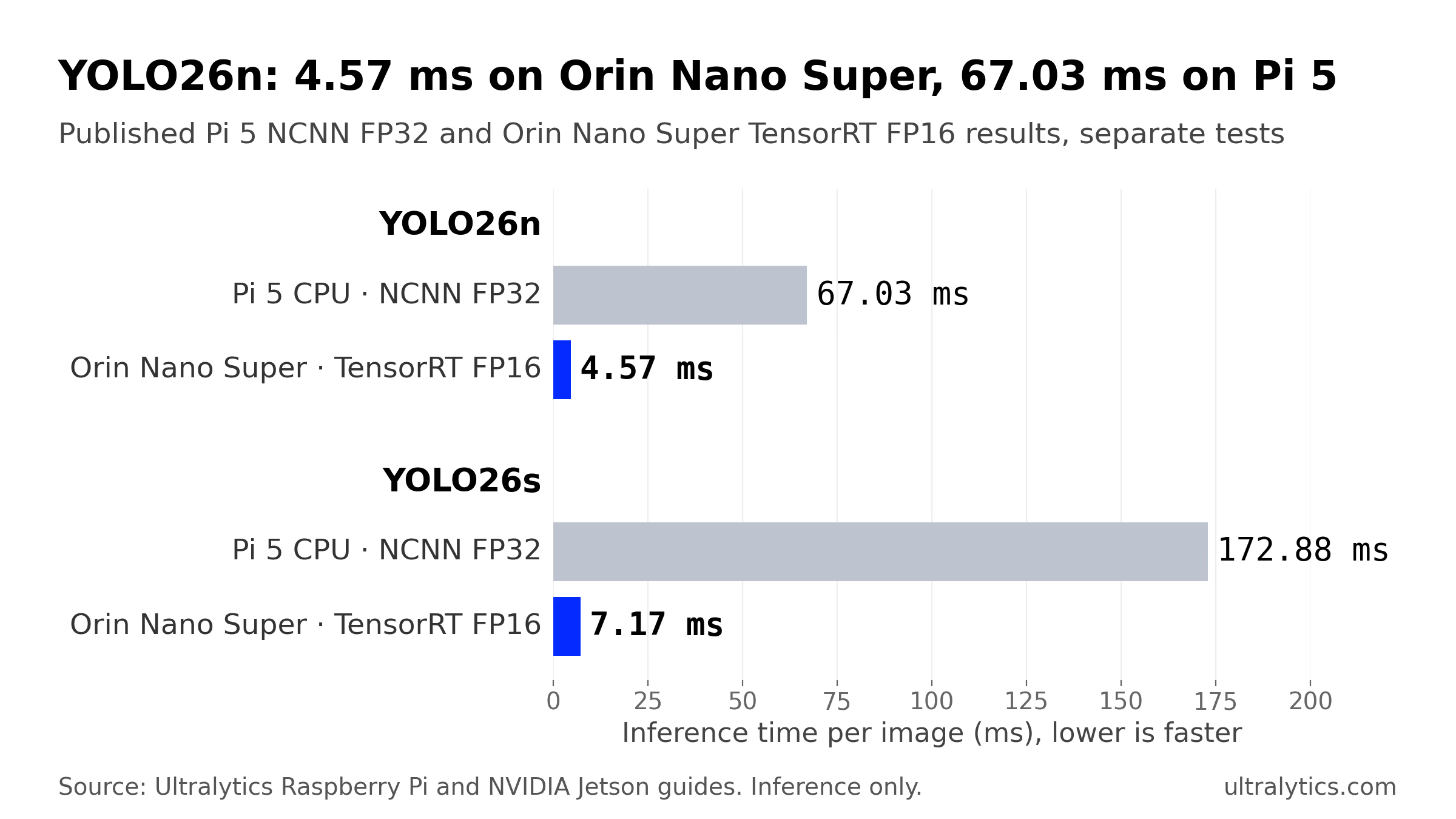
Published NCNN FP32 and TensorRT FP16 results from separate tests: Raspberry Pi 5 with Ultralytics 8.4.108, Orin Nano Super Developer Kit with Ultralytics 8.4.33. Inference only, excluding pre- and post-processing. Source: the Ultralytics Raspberry Pi and NVIDIA Jetson guides.
For YOLO26n, that's about 93% less inference time than the Pi 5 CPU. Part of the gap is precision, so compare the FP32 exports too: the Orin Nano Super's FP32 TensorRT engine takes 7.53 ms, still almost nine times faster than the Pi's FP32 NCNN export, though the runtimes and test versions differ. The bigger story is YOLO26m: 0.6225 mAP50-95 at 13.59 ms, a model the Pi 5 CPU ran at about one frame per second in the older ONNX test.
INT8 shaves a little more. YOLO26n drops to 3.80 ms as an INT8 engine, but its mAP50-95 falls from 0.4800 to 0.4490 on COCO128, so start with FP16 and move to INT8 quantization only if FP16 misses your budget and you can calibrate on images from your own cameras. Our Academy lesson on optimizing with TensorRT walks through that decision.
FPS drops as you add cameras because every stream shares one budget#
A common pattern when scaling up: one camera runs smoothly, and the processed frame rate falls as you add a third or fourth. Each frame costs decode, preprocessing, inference and postprocessing, and every camera draws from the same pool of compute. On a Pi 5, the same four CPU cores decode the video and run the model, so each added stream takes time from both.
Ultralytics handles the plumbing. List one source per line in a .streams file and pass it to Predict mode: each stream gets its own reader thread, and the loader groups the latest frame from every camera into one batch, so one slow or dropped source can hold up the batch. Backends that accept batches run it as one forward pass; NCNN processes the frames one at a time, and a fixed-shape TensorRT engine has the batch split or padded to fit its export size. By default (stream_buffer=False), a slow model skips stale frames rather than queuing them, which keeps the backlog inside your application short, though buffering in the camera, decoder or network can still add latency.
Single-image latency is a starting point, not a camera count. Batching changes throughput, and decode, tracking and drawing add their own cost. The multi-stream inference lesson in Ultralytics Academy gives the sizing rule: streams per device are roughly sustained throughput at your real batch size divided by the FPS each stream needs, with 20 to 30% headroom for peaks. Measure that throughput on the board with your cameras connected, as the hands-on section below shows. For multi-camera pipelines on Jetson, DeepStream runs several sources through one TensorRT engine in a single tiled application.
Choose by measured FPS per camera, model size and accuracy#
Start with the cheapest board that could work, measure it on your own cameras, and step up only where it falls short:
| If your measurements show… | Start with |
|---|---|
| YOLO26n meets your accuracy target and per-camera FPS | A Pi 5 CPU with NCNN. A low-FPS job may fit more than one camera. |
| The Pi is short on frame rate, but you want to stay on it | A Pi 5 with an accelerator such as the Hailo-8 AI HAT+ or the DEEPX DX-M1. Both run quantized models and add a compilation step, so check accuracy after export. |
| You need a larger model at higher FPS, more streams than the Pi sustains, or CPU time for other software | A Jetson Orin Nano Super with TensorRT, stepping up to the Orin NX or AGX Orin when your measured throughput runs short. |
Frame rate is a business requirement before it's a benchmark number. Our guide to FPS in computer vision explains how to set one from the speed of what you're watching, and picking the right edge device covers boards beyond these two.
Measure both boards with your own cameras#
The numbers above were measured under fixed conditions, and yours will differ with cooling, power mode, OS image, software version and your own model. The Ultralytics package uses the same API on both boards, so you can run the same measurement on each. The commands below were checked against Ultralytics 8.4.215.
Step 1: Benchmark the export formats on each board#
Run yolo benchmark model=yolo26n.pt data=coco128.yaml imgsz=640 on the board. Benchmark mode reports size, mAP50-95 and inference time for each export format the board supports; add quantize=16 or quantize=8 to measure FP16 or INT8 where a format supports it. On an Orin Nano Super Developer Kit flashed with a Super-enabled configuration, first select the MAXN SUPER power mode; in NVIDIA's Super Mode post for JetPack 6.2 on Orin Nano, that's sudo nvpmodel -m 2. Then run sudo jetson_clocks. Watch temperatures during long runs.
Step 2: Export the fastest format on each board#
On the Raspberry Pi 5, export to NCNN as shown in our Raspberry Pi 5 walkthrough. On the Jetson, build the engine on the device itself, because TensorRT engines are tied to the GPU and TensorRT version that built them. An engine exported without dynamic has a fixed input shape. One option is to set batch to your camera count, and re-export at a smaller imgsz if you need more speed:
from ultralytics import YOLO

# Jetson only: needs an NVIDIA GPU. FP16 TensorRT engine, 640 pixels, batch of four cameras
YOLO("yolo26n.pt").export(format="engine", quantize=16, imgsz=640, batch=4)  # writes yolo26n.engine
Step 3: Measure processed FPS per camera#
Put one RTSP URL per line in cams.streams, run the board's model on it for about a minute, and compare each camera's processed FPS with the rate it sends. The timer starts after the first full batch, once streams are connected and the model is warm, and stops on a complete batch:
import time
from collections import Counter

from ultralytics import YOLO

model = YOLO("yolo26n.engine")  # on the Pi 5: YOLO("yolo26n_ncnn_model")
cameras = open("cams.streams").read().split()
n_streams = len(cameras)

frames, start = Counter(), None
for i, result in enumerate(model("cams.streams", stream=True)):
    if i < n_streams:  # first batch: connection and warm-up
        if i == n_streams - 1:
            start = time.perf_counter()
        continue
    frames[i % n_streams] += 1  # results arrive in stream order within each batch
    if (i + 1) % n_streams == 0 and time.perf_counter() - start > 60:
        break

elapsed = time.perf_counter() - start
for slot, count in sorted(frames.items()):
    print(f"{cameras[slot]}: {count / elapsed:.1f} processed FPS")
This measures processed-result throughput for this pipeline. If a camera's processed FPS sits well below its frame rate as you add streams, the board isn't keeping up. Confirm it with explicit per-stream drop counters from the producer-consumer example in the Academy's multi-stream lesson, add the tracking or drawing your application needs, then re-export at a smaller imgsz, move to a smaller model or a faster export, or step up the hardware, and rerun.
If you'd rather not set up a build environment, the Export tab in Ultralytics Platform builds TensorRT engines for Jetson targets, including the Orin Nano 8GB Super. The Orin selections are built on an AGX Orin and validation on the Orin Nano itself is still pending, so check that your device's TensorRT and CUDA runtime is compatible with the engine and validate each engine on the device you deploy. For ONNX Runtime versus TensorRT on NVIDIA GPUs, see ONNX vs TensorRT.
Which board to choose#
Choose a Raspberry Pi 5 when YOLO26n meets your accuracy target and the processed FPS you measure on the board covers every camera you need. At about 15 inference FPS, it's a simple build for retail counters, conveyor counting, wildlife and home cameras, and early robot prototypes. Add an accelerator when you need more frames but want to stay on the Pi.
Choose a Jetson Orin Nano Super when you need a model larger than nano at a usable frame rate, more streams than a Pi sustains, or CPU time left for tracking, navigation and the rest of your application. YOLO26s through YOLO26l take under 18 ms of inference per image there, and that headroom is what you spend as cameras are added. Measure the complete application to confirm it.
Where Ultralytics fits#
Ultralytics doesn't make either board; we make the models and tools that run on both. The same YOLO26 weights export to NCNN for the Pi 5, to Hailo for a Pi with the AI HAT+, and to TensorRT for a Jetson, so you can prototype on a Pi and move to a Jetson when the workload grows, without retraining; validate accuracy after each export. Ultralytics Platform handles the steps before deployment: annotate a dataset, train in the cloud when your project needs more training compute than you have locally, and export for either board.
The limits: our published benchmarks are inference-only and measured on the named test devices, not on your cameras, enclosure or production module, and our Jetson guide doesn't include YOLO26 results for the original Jetson Nano. Ultralytics YOLO is available under AGPL-3.0 or an Ultralytics Enterprise License; see Ultralytics licensing for what your deployment needs.
Frequently asked questions
It's much faster per image. In our published benchmarks from separate tests, YOLO26n takes 4.57 ms as a TensorRT FP16 engine on a Jetson Orin Nano Super Developer Kit, against 67.03 ms with NCNN on a Raspberry Pi 5 CPU (640-pixel input, inference only), and YOLO26m takes 13.59 ms on the Jetson. Whether you need that depends on your model, camera count and FPS target: if a Pi 5 meets them in your own measurements, it's the simpler build.
No. The original Jetson Nano launched in 2019 with a 128-core Maxwell GPU and 4 GB of memory, and supports JetPack 4 only. The Jetson Orin Nano is a newer module with a 1024-core Ampere GPU; the Orin Nano Super Developer Kit we benchmarked has 8 GB of memory and supports JetPack 5 to 7. This article's performance comparison covers the Orin Nano Super, not the original Nano.
Yes. The 2019 Jetson Nano supports JetPack 4, Ultralytics provides a JetPack 4 Docker image, and our DeepStream guide for YOLO26 with TensorRT was tested on a Jetson Nano 4GB with JetPack 4.6.4. Our Jetson guide doesn't include a YOLO26 benchmark for it, and its hardware is well below the Orin Nano Super's.
Every stream shares the board's compute: each added camera needs its own decode, preprocessing, inference and postprocessing. With a
.streamsfile, Ultralytics groups frames from all cameras into batches and skips stale frames when the model falls behind, so each camera's processed FPS can fall once the shared pipeline becomes the bottleneck. A faster export, a smaller model orimgsz, or more capable hardware raises it.Yes. Train once, then export the same weights with
format="ncnn"for the Pi 5 andformat="engine"for the Jetson, building the TensorRT engine on, or for, the target device. Validate accuracy on your own data after each export.
Written by
Senior Machine Learning Engineer · Ultralytics
Comments
Ask a question, share your results, or help someone else.