ONNX vs TensorRT for computer vision inference: benchmarks and how to choose
ONNX Runtime vs TensorRT for computer vision inference: measured Ultralytics YOLO26 speed and accuracy on 19 NVIDIA GPUs, and how to choose.
 Miles Deans11 min read
Listen to this article
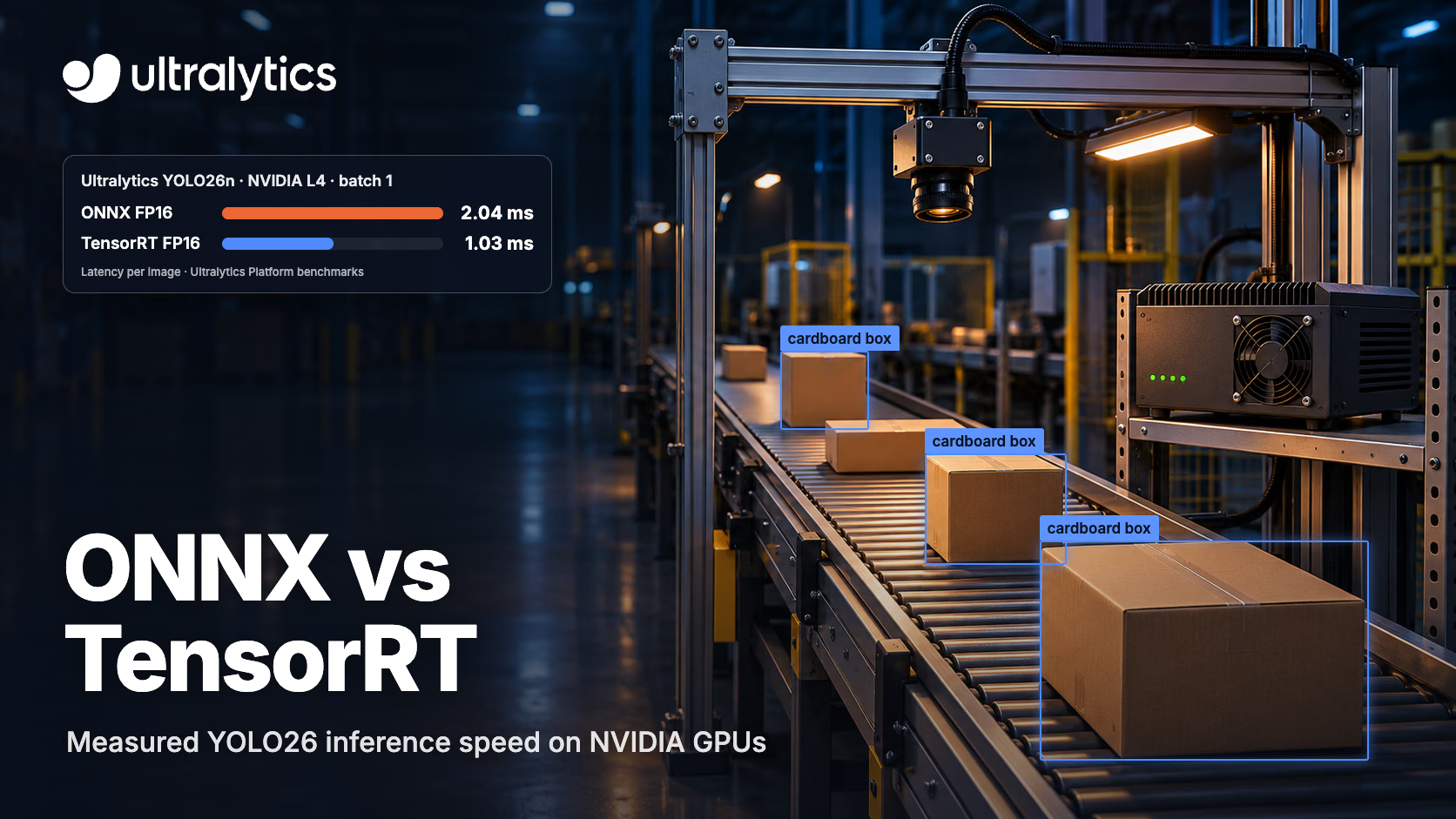
ONNX and TensorRT aren't really rivals. ONNX is a model format, and TensorRT is NVIDIA's inference engine, which usually takes an ONNX file as its input. The real choice is how you run that file: with ONNX Runtime, which works across hardware and can even hand work to TensorRT, or compiled into a standalone TensorRT engine, which only runs on NVIDIA GPUs. In Ultralytics Platform benchmarks of Ultralytics YOLO26 on 19 NVIDIA GPUs, TensorRT FP16 was faster than the published ONNX FP16 results on every GPU and model size, with accuracy within 0.001 mAP50-95. Median speedups ranged from 1.85x to 2.55x across model sizes. The benchmark doesn't say which ONNX Runtime execution provider produced the ONNX results, so they don't settle how ONNX Runtime compares in general, or with its TensorRT execution provider. For Ultralytics YOLO26 on NVIDIA GPUs, start with TensorRT FP16 when latency matters, and use ONNX Runtime when one model file has to run on more than one kind of hardware. Ultralytics YOLO exports to both with a single argument.
Where to start with Ultralytics YOLO:
| Deployment | Start with | Ultralytics YOLO export |
|---|---|---|
| NVIDIA GPU, latency matters | TensorRT FP16 | format="engine", quantize=16 |
| CPU, non-NVIDIA hardware or mixed fleets | ONNX Runtime | format="onnx" |
| ONNX Runtime's API on an NVIDIA GPU | ONNX Runtime with the TensorRT execution provider | format="onnx" |
ONNX vs TensorRT: format, runtime and engine#
Three different things hide behind the comparison:
- ONNX (Open Neural Network Exchange) is a file format that stores a trained model's graph and weights in a framework-neutral way. You export from PyTorch to ONNX so other tools can read the model.
- ONNX Runtime runs ONNX models. It hands work to hardware back ends called execution providers, such as CPU, CUDA and TensorRT, so the same file can run on a laptop CPU or a cloud GPU.
- TensorRT reads a model, typically an ONNX file, through its ONNX parser. It fuses layers, picks the fastest kernel for each operation on the GPU it's built on, and writes an optimized engine.
So the question is really ONNX Runtime vs TensorRT. ONNX Runtime can also call TensorRT through its TensorRT execution provider, which lets you keep ONNX Runtime's API while TensorRT runs the subgraphs it supports. ONNX Runtime recommends registering the CUDA execution provider after it, so any nodes TensorRT doesn't support can run on CUDA instead.
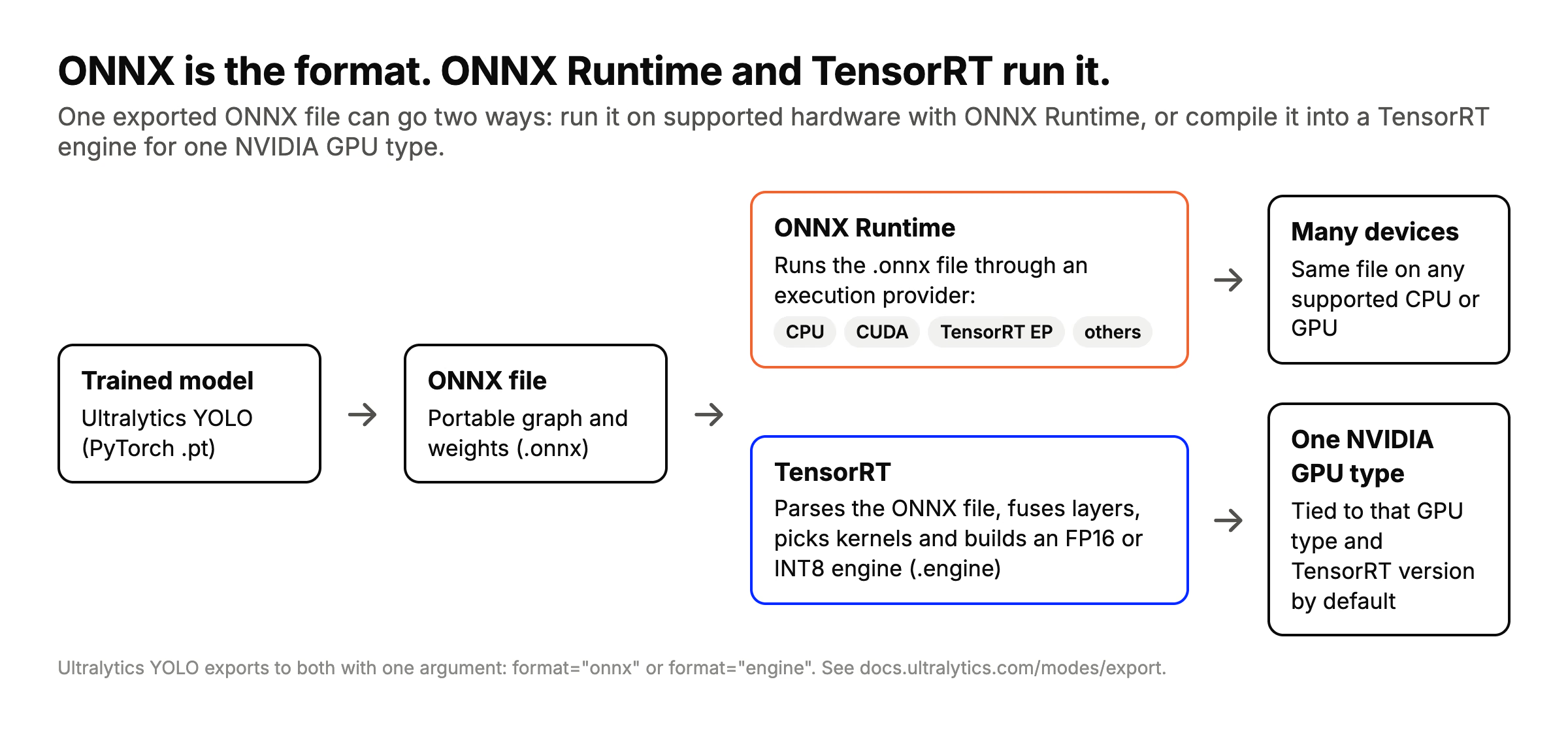
One ONNX file, two paths: ONNX Runtime runs it on supported hardware, while TensorRT compiles it into an engine for one NVIDIA GPU type. Ultralytics YOLO exports to both.
Benchmarks: YOLO26 on ONNX Runtime vs TensorRT#
The numbers below come from the Ultralytics Platform inference benchmarks. Each Ultralytics YOLO26 detection model was exported to the format shown, then its inference latency was timed on Ultralytics Platform GPUs at batch 1 and 640 pixels on COCO val2017, with warm-up excluded and per-run times sigma-clipped. Accuracy is mAP50-95 on COCO val2017, measured once per format and precision. The comparison uses the 19 NVIDIA GPUs (Ampere, Ada and Hopper) that have results for all four formats.
The benchmark page doesn't identify which ONNX Runtime execution provider produced the ONNX results, and it doesn't label any results as using ONNX Runtime's TensorRT execution provider, which hands supported parts of the model to TensorRT. These ONNX results describe the benchmarked configuration; performance can vary with the ONNX Runtime execution provider. If you want ONNX Runtime's API with TensorRT underneath, benchmark that combination on your own hardware.
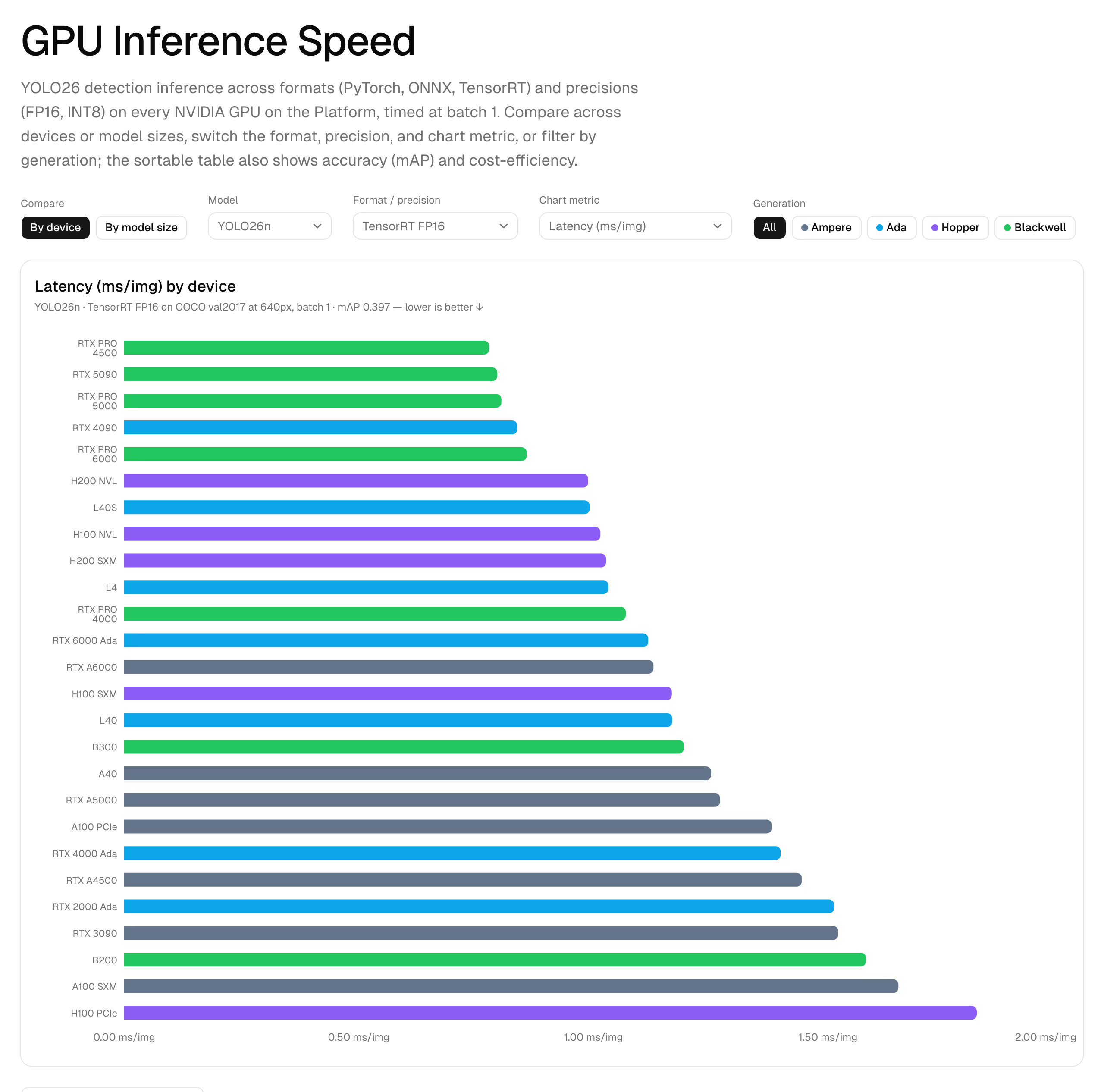
The Inference tab lets you switch model size, format and precision, then sort every GPU by latency, accuracy or cost.
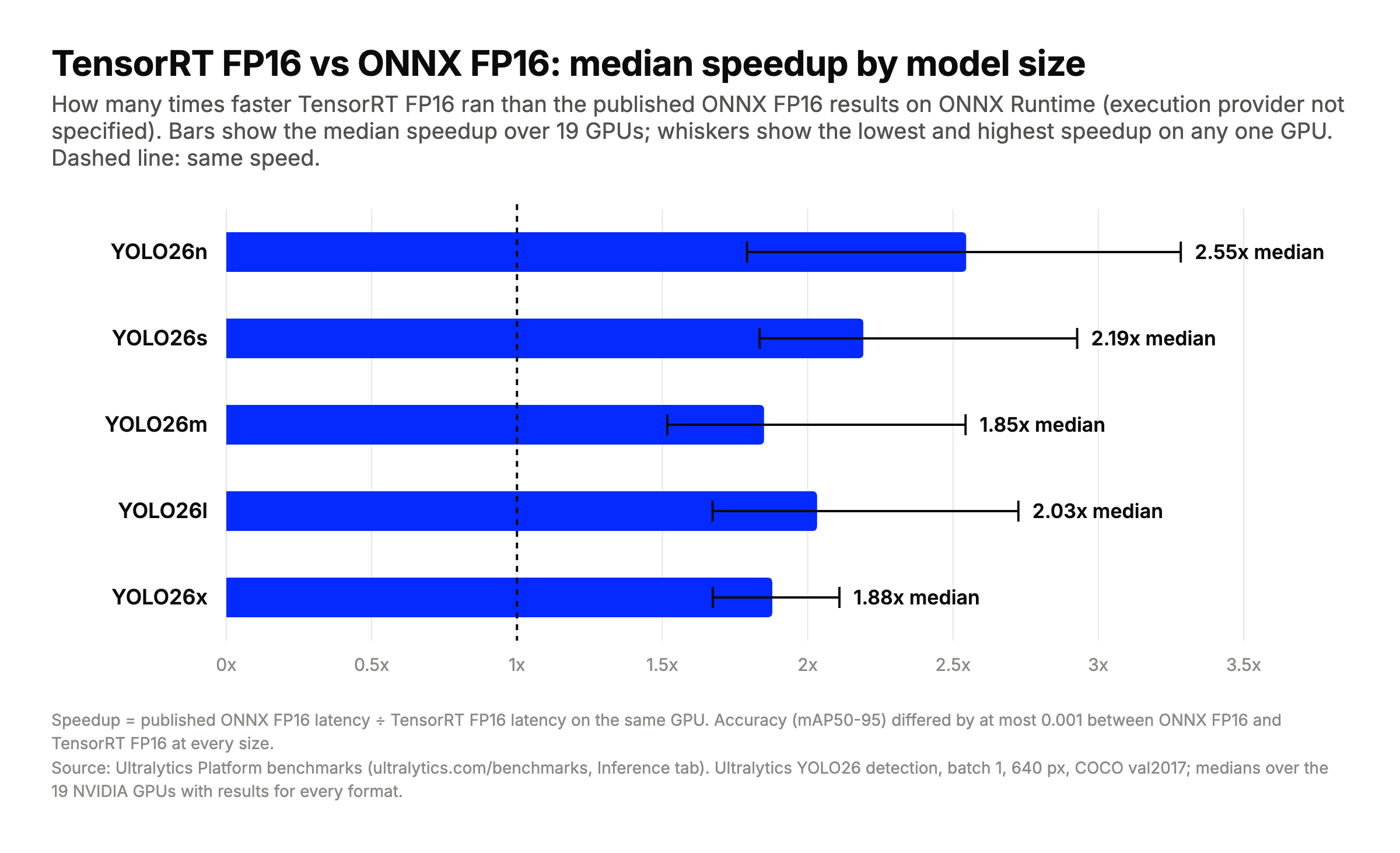
TensorRT FP16 was faster than the published ONNX FP16 results on every GPU at every model size; the page doesn't specify which ONNX Runtime execution provider produced them. Bars show the median speedup across 19 GPUs; whiskers show the lowest and highest speedup on any one GPU. Calculated from the Ultralytics Platform inference benchmarks.
| Model | mAP50-95: ONNX FP16 | mAP50-95: TensorRT FP16 | mAP50-95: TensorRT INT8 | TensorRT FP16 speedup over ONNX FP16 (median, range) | TensorRT INT8 speedup over TensorRT FP16 (median, range) |
|---|---|---|---|---|---|
| YOLO26n | 0.397 | 0.397 | 0.357 | 2.55x (1.79–3.28x) | 0.90x (0.79–1.07x) |
| YOLO26s | 0.471 | 0.471 | 0.436 | 2.19x (1.83–2.93x) | 1.04x (0.89–1.19x) |
| YOLO26m | 0.519 | 0.519 | 0.470 | 1.85x (1.52–2.54x) | 1.20x (0.90–1.38x) |
| YOLO26l | 0.536 | 0.535 | 0.501 | 2.03x (1.67–2.73x) | 1.08x (0.92–1.33x) |
| YOLO26x | 0.563 | 0.564 | 0.488 | 1.88x (1.67–2.11x) | 1.19x (0.92–1.67x) |
Calculated from the Ultralytics Platform inference benchmarks. Speedup is ONNX FP16 latency ÷ TensorRT FP16 latency, or TensorRT FP16 latency ÷ TensorRT INT8 latency, on the same GPU, so values above 1x mean TensorRT FP16 (or INT8) was faster. Medians use the 19 NVIDIA GPUs with all four formats, and ranges are the minimum and maximum ratios across those GPUs. Accuracy is the reported mAP50-95 for each format and precision. ONNX FP16 means the published ONNX Runtime results, whose execution provider isn't specified.
Latency on four common GPUs, in milliseconds per image, as published on the benchmarks page:
| GPU | Model | PyTorch FP16 | ONNX FP16 | TensorRT FP16 | TensorRT INT8 |
|---|---|---|---|---|---|
| L4 | YOLO26n | 4.98 | 2.04 | 1.03 | 1.09 |
| L4 | YOLO26x | 7.76 | 9.80 | 5.73 | 3.43 |
| RTX 4090 | YOLO26n | 6.67 | 2.56 | 0.84 | 1.00 |
| RTX 4090 | YOLO26x | 10.94 | 5.20 | 2.68 | 2.25 |
| A100 SXM | YOLO26n | 8.72 | 3.98 | 1.65 | 1.79 |
| A100 SXM | YOLO26x | 15.02 | 7.25 | 3.86 | 3.91 |
| H100 SXM | YOLO26n | 6.36 | 3.09 | 1.17 | 1.48 |
| H100 SXM | YOLO26x | 10.26 | 5.53 | 2.66 | 2.62 |
Three things stand out:
- TensorRT FP16 beat the published ONNX FP16 results on every GPU and every model size, with accuracy within 0.001 mAP50-95. If you deploy on these NVIDIA GPUs and need low latency, TensorRT FP16 is the place to start.
- INT8 isn't an automatic win. On YOLO26n it was slower than TensorRT FP16 on 17 of the 19 GPUs, and it cost 0.04 mAP50-95. On larger models it helped more often, up to 1.67x on YOLO26x on an L4, but it cost 0.034 to 0.076 mAP50-95.
- There are no ONNX results for the seven Blackwell GPUs. The benchmark page puts this down to ONNX Runtime having no Blackwell kernels in its test environment. TensorRT ran on all seven.
These results cover the setup on the benchmarks page, batch 1 at 640 pixels, so benchmark your own model on your deployment device, with your own data, before choosing.
FP16 vs INT8 with TensorRT#
Lower precision is the other big lever, and the benchmark shows why it needs testing:
- FP16 (half precision) halves the size of weights and activations compared with FP32. In the Ultralytics Platform benchmarks, TensorRT FP16 matched the accuracy of ONNX FP16 and PyTorch FP16 to within 0.003 mAP50-95.
- INT8 stores weights and activations as 8-bit integers, a form of model quantization. It needs calibration: a representative set of images is run through the model to measure activation ranges. The Ultralytics Platform benchmark used NVIDIA ModelOpt with COCO128 as calibration data.
As the benchmark methodology notes, INT8 pays off most on larger, compute-bound models. On the smallest models, the extra quantization work can match or even slow down FP16. Calibrate on images from your own domain, then validate accuracy on your own data before you deploy an INT8 engine.
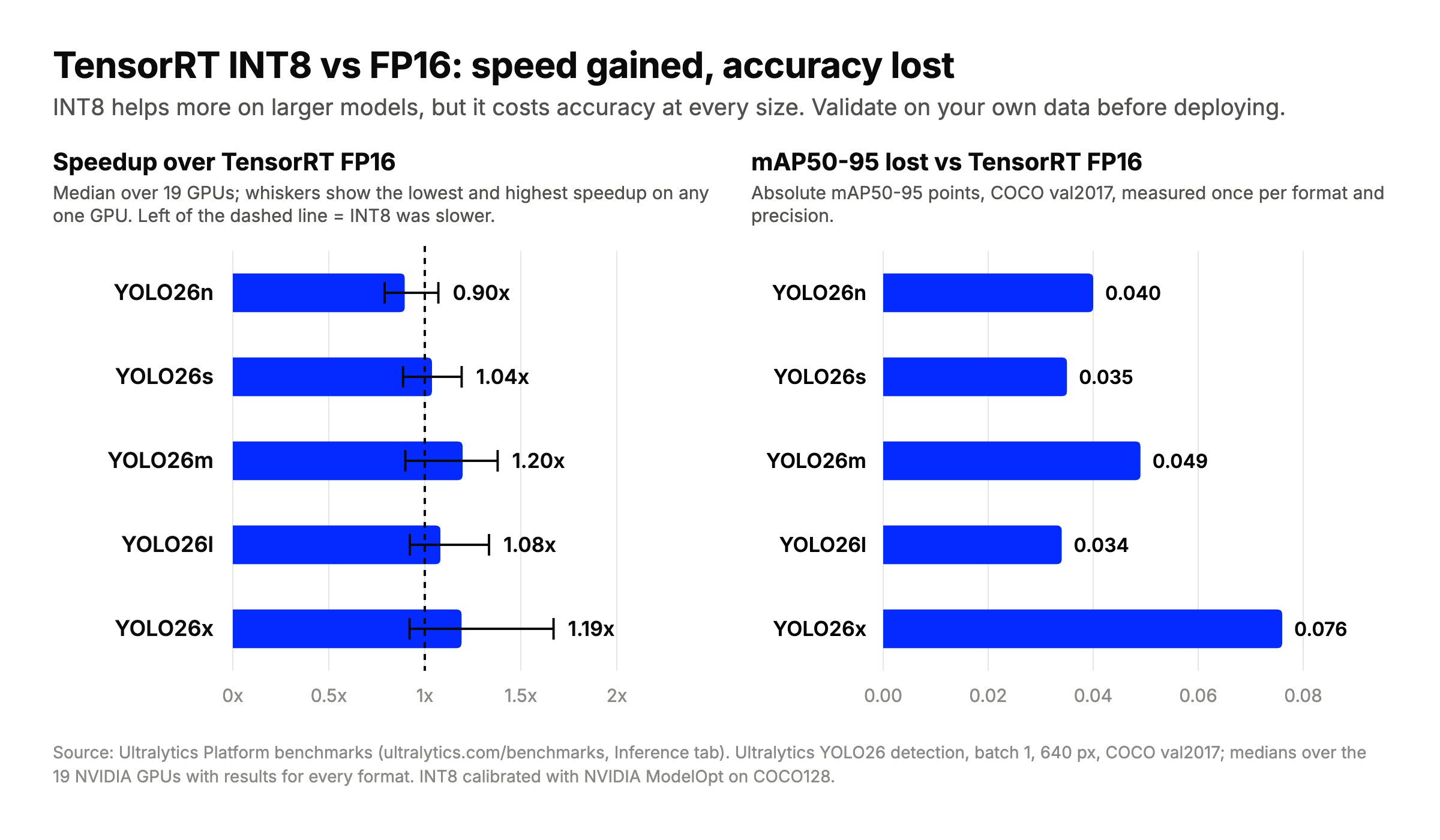
At the median, INT8 was slower than FP16 on YOLO26n and up to about 1.2x faster on larger models across the 19 GPUs, while costing 0.034 to 0.076 mAP50-95 at every size. Calculated from the Ultralytics Platform inference benchmarks.
Engine portability and dynamic input sizes#
By default, a TensorRT engine is tied to the GPU it's built on and the TensorRT version that built it, so an engine built on an RTX 4090 isn't meant to be copied to an H100 or a Jetson. TensorRT has hardware and version compatibility options that relax this, but the safe default is to build on, or for, the device you'll deploy to, and to rebuild after a TensorRT upgrade. On Ultralytics Platform, the Export tab asks you to pick a GPU type for TensorRT exports for this reason. An ONNX file has no such tie: the same file runs wherever ONNX Runtime and a suitable execution provider are available.
Both formats support variable input sizes. For TensorRT, dynamic shapes need an optimization profile that sets the minimum, optimal and maximum input dimensions, and inputs at run time must fit within it. When exporting Ultralytics YOLO models, dynamic=True enables dynamic input shapes for ONNX and TensorRT. Fixed shapes give TensorRT more room to optimize, as NVIDIA's dynamic shapes guide explains, so use dynamic shapes when your inputs really vary and benchmark both.
When to choose ONNX Runtime and when to choose TensorRT#
- NVIDIA GPU in the cloud or on premises, latency matters: TensorRT, starting with FP16. Try INT8 on larger models after calibrating and validating it.
- NVIDIA Jetson at the edge: TensorRT. See the NVIDIA Jetson guide.
- CPU, non-NVIDIA hardware, or mixed fleets: ONNX with ONNX Runtime, using the execution provider each machine supports.
- You don't know the deployment hardware yet: export to ONNX first. You can build a TensorRT engine from the same model later.
- Intel CPUs, GPUs or NPUs: consider OpenVINO, Intel's inference toolkit.
For the full list of formats and how they compare, see the model deployment options guide. Precision isn't the only lever either: model size and input resolution matter too, and our guide to pruning and quantization covers two more ways to shrink a model.
Exporting Ultralytics YOLO to ONNX and TensorRT#
Ultralytics YOLO exports to both formats with one format argument, and you can run prediction or validation directly on the exported model:
from ultralytics import YOLO

model = YOLO("yolo26n.pt")

model.export(format="onnx", quantize=16)  # ONNX FP16, for ONNX Runtime
model.export(format="engine", quantize=16)  # TensorRT FP16 engine, built on this GPU
# For INT8 instead, calibrate with a dataset YAML (coco8.yaml is a small demo set; use your own):
# model.export(format="engine", quantize=8, data="coco8.yaml")

trt_model = YOLO("yolo26n.engine")
results = trt_model("https://ultralytics.com/images/bus.jpg")
quantize=16 selects FP16 and quantize=8 selects INT8. Both engine exports write yolo26n.engine, so run one or the other. For INT8, point data at your own dataset YAML so calibration uses images like the ones you'll deploy on. See the export arguments and the ONNX and TensorRT integration guides for every option, or follow our step-by-step posts on exporting to ONNX and optimizing with TensorRT. You can also export trained models in your browser on Ultralytics Platform.
Frequently asked questions
ONNX is a model format, not an engine, so the fair comparison is ONNX Runtime vs TensorRT. In Ultralytics Platform benchmarks of Ultralytics YOLO26 on 19 NVIDIA GPUs, TensorRT FP16 was faster than the published ONNX FP16 results on ONNX Runtime on every GPU, with calculated median speedups of 1.85x to 2.55x across model sizes and mAP50-95 differences of at most 0.001. The benchmark doesn't say which ONNX Runtime execution provider produced the ONNX results, and none are labeled as using its TensorRT execution provider, so test that combination yourself if you need ONNX Runtime's API.
Yes. ONNX is TensorRT's usual input: its ONNX parser reads the model and builds an engine from it. ONNX Runtime can also call TensorRT through its TensorRT execution provider.
No. In the Ultralytics Platform benchmarks, TensorRT INT8 was slower than TensorRT FP16 for YOLO26n on 17 of 19 GPUs. It was faster more often on larger models, with a median of about 1.2x on YOLO26m and YOLO26x across the 19 GPUs that ran every format. Each time it cost 0.034 to 0.076 mAP50-95, so validate an INT8 model on your own data first.
Don't count on it. By default, a TensorRT engine is tied to the GPU and TensorRT version it was built with, so build it on, or for, the device you'll deploy to. Keep the ONNX file as your portable copy and rebuild the engine for each target.
TensorRT is the usual choice: NVIDIA JetPack includes TensorRT, and building the engine on the Jetson itself tunes it for that device. The benchmarks above don't include Jetson, so measure on your module before you decide. The NVIDIA Jetson guide walks through setup and export for Ultralytics YOLO.
Written by
Comments
Ask a question, share your results, or help someone else.