Leveraging color detection in computer vision applications
Explore how color detection bridges human and computer vision, using RGB and HSV color spaces to automate computer vision solutions.
Colors play a vital role in how humans experience the world, helping us recognize, understand, and connect with our surroundings. However, unlike us, machines don’t see colors - they process them as data, translating shades and hues into numerical values.
A self-driving car doesn’t just see a red traffic light - it processes the color as a signal to stop. This ability to recognize and interpret colors helps bridge the gap between human vision and computer vision.
Computer vision is a branch of AI that enables machines to analyze and understand visual data. A key aspect of this is color detection, which allows machines to identify and differentiate objects based on color. By analyzing pixel values in different color spaces, color detection can be used in applications like object tracking, medical imaging, and automation.
In this article, we’ll take a closer look at how color detection works, why it matters, and how it’s used in computer vision applications. Let’s get started!
What is color detection?#
Color detection helps machines identify objects and understand scenes based on color. When combined with other computer vision tasks, it improves accuracy and enhances real-world applications. Before diving into how color detection works, it's helpful to understand how colors are represented digitally.
Digital images are made up of tiny squares called pixels, each holding color information. For instance, with respect to the RGB (Red, Green, Blue) color model, colors are created by mixing different intensities of red, green, and blue.
Each color is defined by three values, ranging from 0 to 255, where 0 means no color and 255 means full intensity. For example, pure red is (255, 0, 0) because it has the highest red value and no green or blue. White is (255, 255, 255) because all three colors are at full intensity.
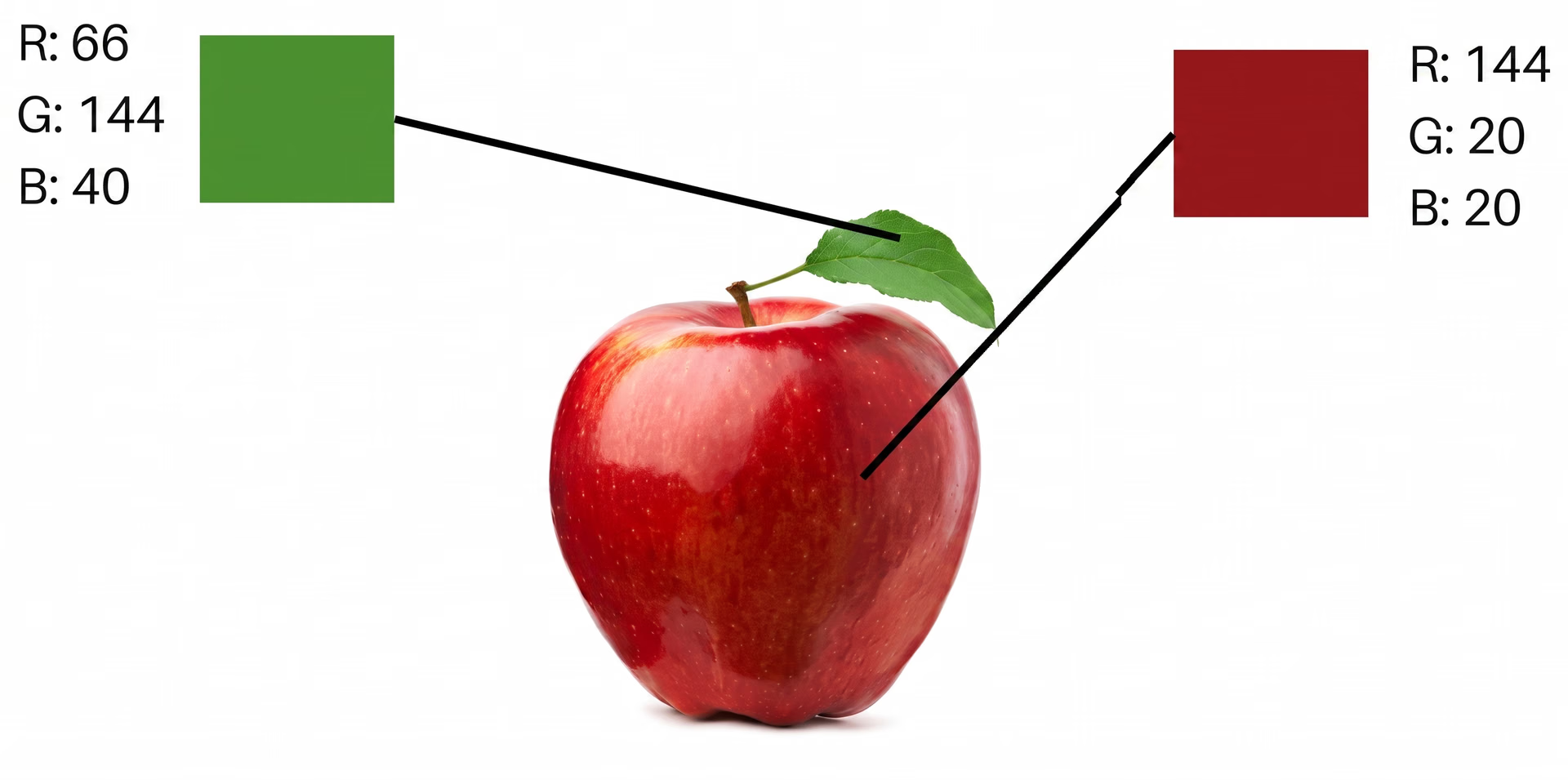
Fig 1. An example of how a computer sees the colors of an apple.
If you're familiar with computer vision models like Ultralytics YOLO11, you might wonder why color detection is a separate technique from object detection. While both analyze images, they serve different purposes.
Color detection focuses on identifying specific colors in an image, while object detection recognizes and classifies objects regardless of their color. In the self-driving car scenario, color detection detects the red in a traffic light, while object detection identifies the traffic light itself, helping the car make safe driving decisions.
Introduction to color spaces#
A color model or color space is a system used to represent colors in digital images and is a critical part of color detection. It assigns numerical values to colors, allowing computers to interpret them consistently across different devices. Color spaces provide a structured way to store, adjust, and display colors in digital systems.
Some commonly used color spaces include RGB for digital displays, HSV (Hue, Saturation, Value) for image processing, and CMYK (Cyan, Magenta, Yellow, Black) for printing. RGB and HSV are the most frequently used color spaces for detecting colors. Let’s dive into how they function.
An overview of the RGB color space#
The RGB color space is widely used in digital imaging, found in screens, cameras, and display devices. It works by combining different levels of red, green, and blue light to create various colors. When all three colors are at full intensity, the result is white, and when none are present, it appears black.
This color space is often visualized as a color cube, where each axis represents one of the primary colors. The corners of the cube show pure red, green, and blue, along with their combinations, while the inside holds all possible shades.
While RGB is simple and popular, it has some limitations. Colors may not always look the same to the human eye because RGB doesn’t evenly match how we perceive color differences. It’s also affected by lighting conditions, meaning colors can appear different depending on the brightness and environment.
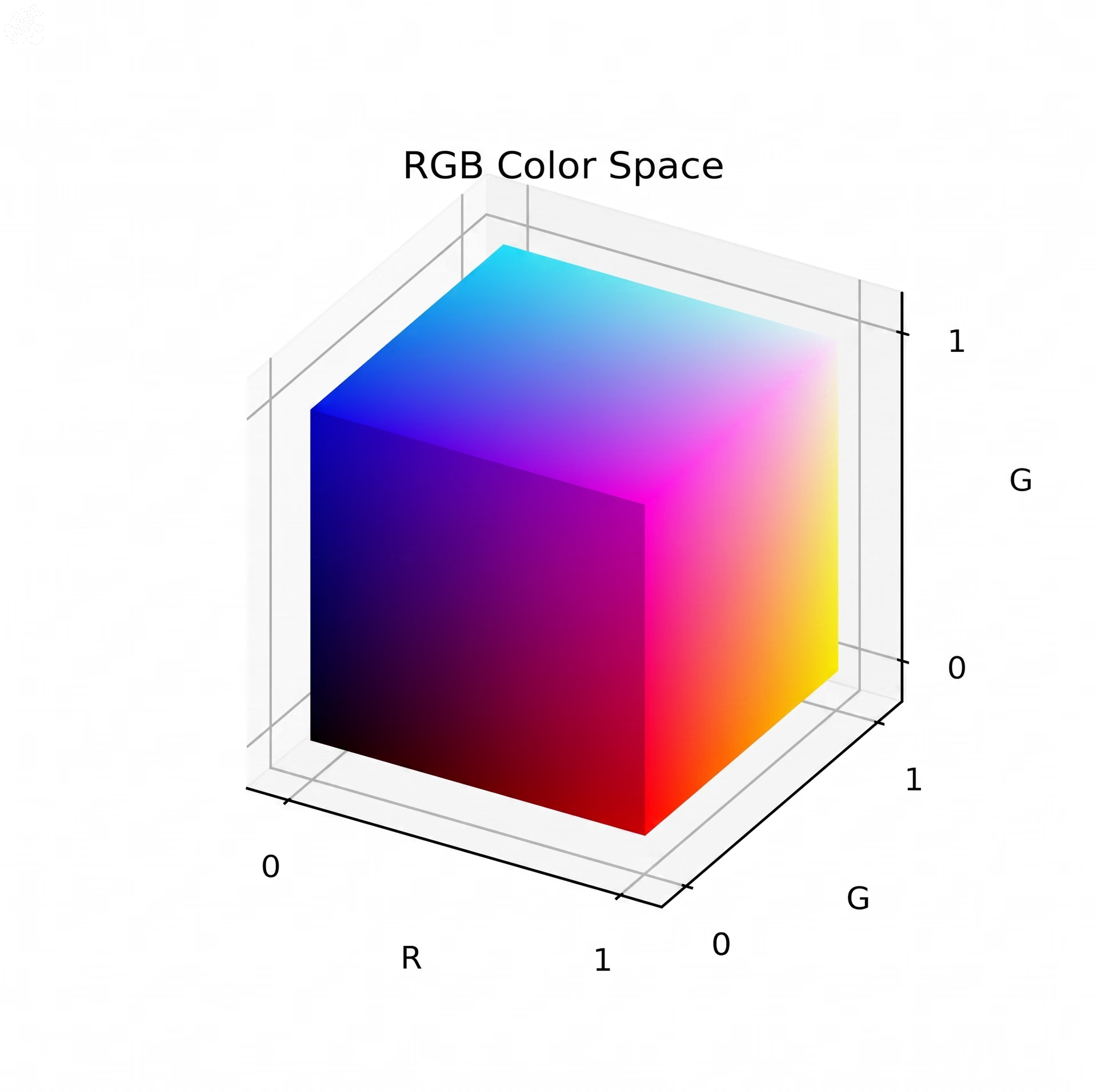
Fig 2. The RGB color cube.
An overview of the HSV color space#
The HSV (Hue, Saturation, Value) color space represents colors based on three components: hue (the type of color), saturation (its intensity), and value (its brightness). Unlike RGB, which mixes light intensities, HSV is closer to how humans perceive colors, making it a more practical choice for many image-processing tasks.
In particular, the hue represents the actual color and is measured in degrees on a color wheel, with red at 0° and blue at 240°. Meanwhile, saturation controls how vivid or dull a color looks, where 0% is completely gray and 100% is fully vibrant. On the other hand, the value determines brightness, ranging from 0% (black) to 100% (full brightness).
Interestingly, the HSV color space is often visualized as a cone, where hue wraps around the edge, saturation moves outward, and brightness increases from bottom to top. Because it separates color from brightness, HSV is widely used in computer vision applications.
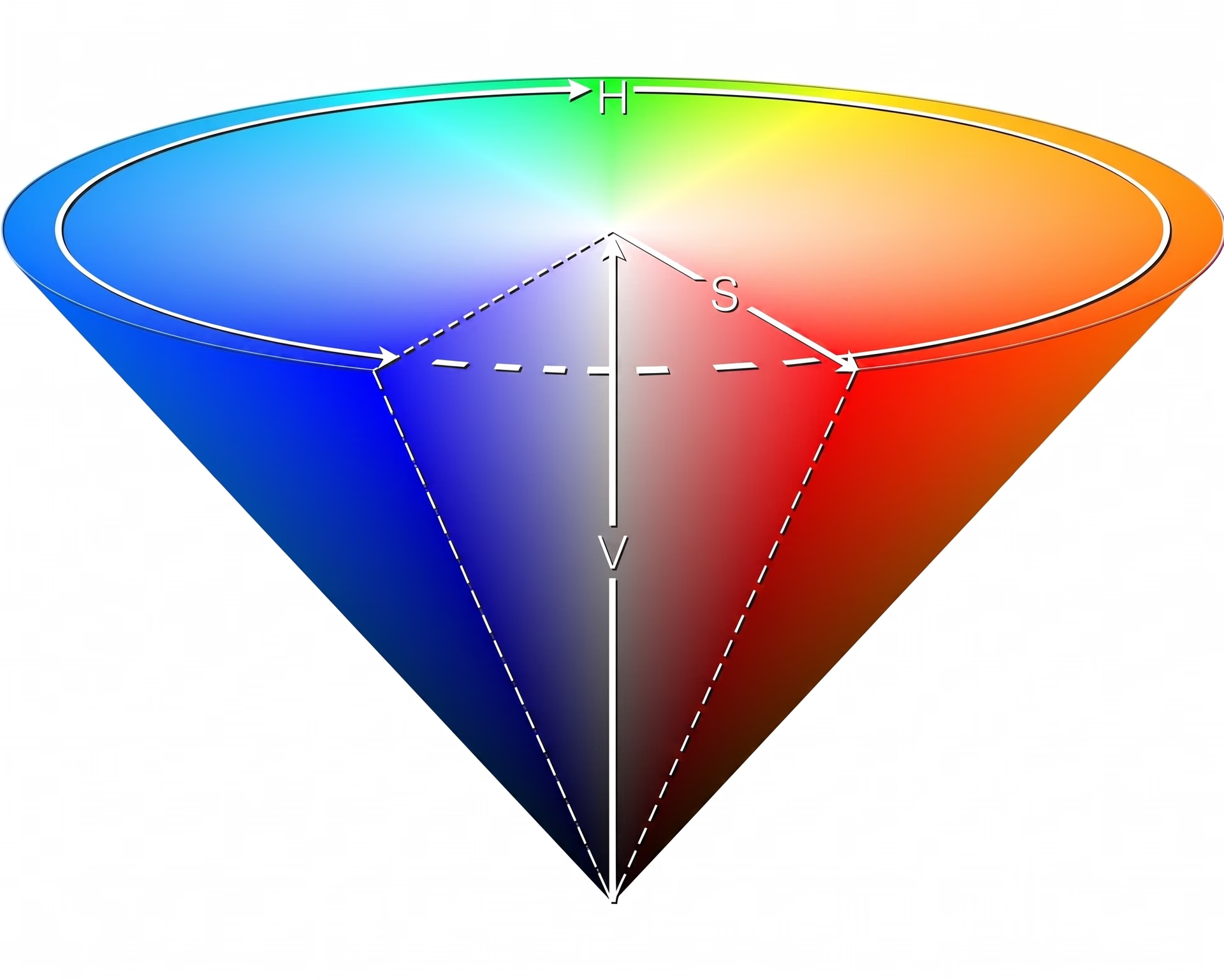
Fig 3. The HSV cone.
Comparing the RGB and HSV color space#
To compare RGB and HSV side by side, let's take the color orange as an example. In the RGB color space, orange is created by mixing red and green at specific intensities, typically represented as (255, 165, 0) - which means full red, some green, and no blue. However, since RGB doesn’t separate color from brightness, it can be less intuitive for tasks that require precise color manipulation.
In HSV, orange is defined differently. Its hue is around 30°, which determines its position on the color wheel. Its saturation is close to 100%, meaning it's a vivid, pure color, and its value is also 100%, indicating full brightness. Because HSV separates color from brightness, it is often more useful in color detection applications where lighting conditions may change.
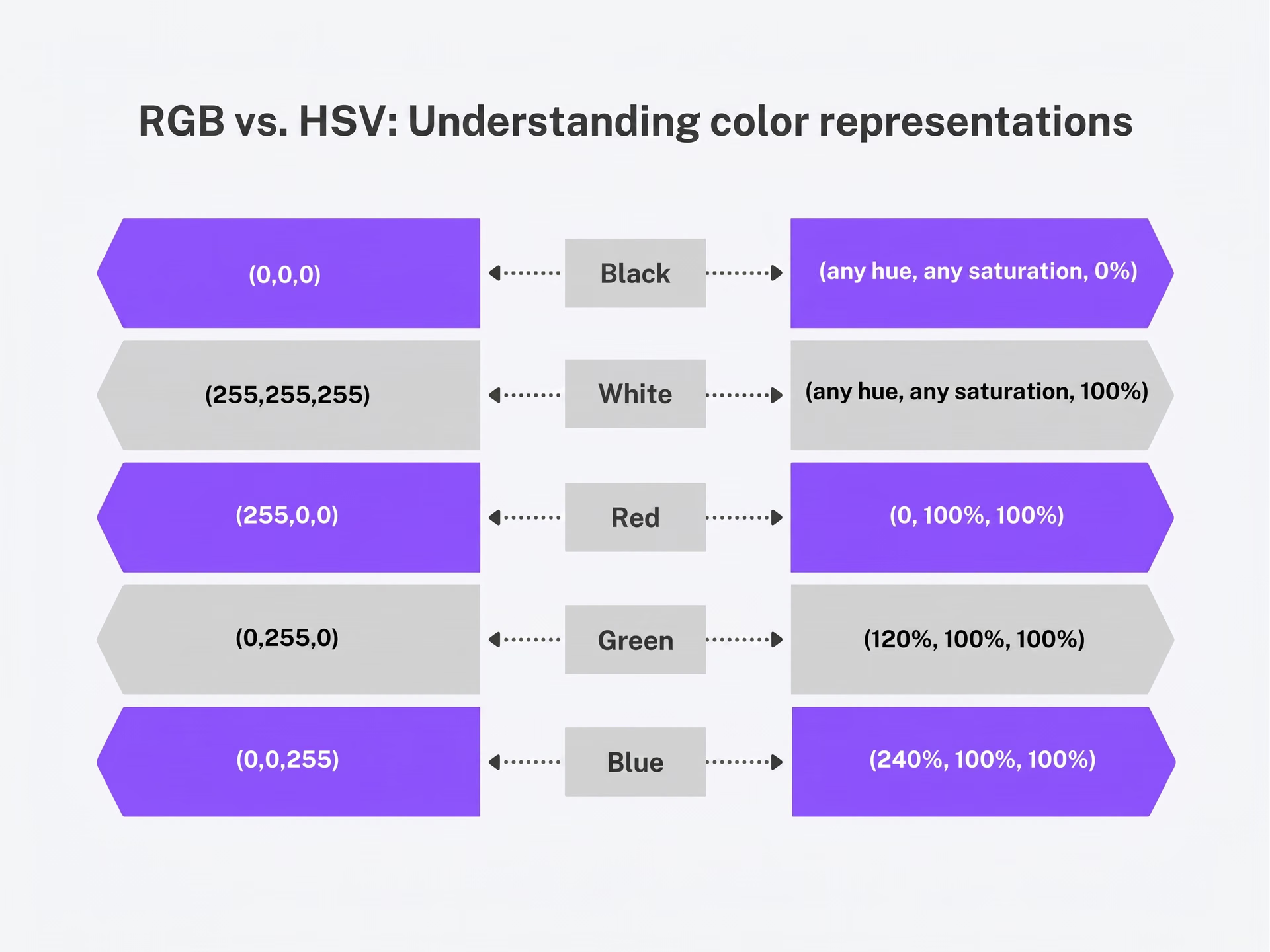
Fig 4. Comparison of RGB and HSV values. Image by author.
How color detection works#
Typically, color detection is approached as an image-processing technique used to identify and isolate colors from images or videos. Colors detected in images using image processing rely on color spaces and thresholding techniques to differentiate specific hues, shades, and intensities.
Here’s a quick overview of the key steps involved in color detection using image processing:
- Image acquisition: The process begins by capturing an image or video frame using a camera. The image is usually stored in RGB format as a matrix of pixels.
- Color space conversion: Since RGB is not always ideal for color detection, the image is converted to the HSV color space. This helps separate color from brightness, making detection more stable under different lighting conditions.
- Color thresholding: A specific range is defined for the target color in the HSV format. This step creates a binary mask, where pixels within the selected color range appear white, and all others appear black.
- Masking: The binary mask is applied to the original image to isolate the detected color, filtering out everything else. This highlights only the areas that match the desired color.
Once the color is detected and isolated, it can be used in various computer vision tasks, such as object tracking, image segmentation, and automated decision-making in applications like robotics, medical imaging, and autonomous vehicles.
The role of color detection in computer vision#
Now that we’ve learned how color detection works, let’s explore how it supports computer vision applications.
In certain cases, color detection can be a simpler alternative to computer vision models, especially in controlled environments where color is the main factor in distinguishing objects. Instead of training a model with a massive dataset, color detection provides a quick and efficient solution without the need for extensive labeling or high computational power.
For example, in an automated apple sorting system, a computer vision model like Ultralytics YOLO11 could be trained to classify apples by ripeness, but it would require a dataset of labeled images to handle variations in lighting, texture, and apple types.
A more straightforward approach is to first detect the apples using object detection and then analyze their color to determine ripeness. Since this method relies on predefined color thresholds instead of training a model, it works well in stable conditions where lighting and backgrounds don’t change drastically.
While a custom-trained model may be better for more complex and variable environments, color detection is a fast, practical, and accessible solution for real-time applications. It’s also a great starting point for those learning about image processing and computer vision before moving on to more advanced solutions.
Real-world applications of color detection#
Color detection is used in a wide range of industries for various applications. Let’s take a glimpse at some real-world use cases.
Color detection for fabric quality assessment#
Color detection is crucial in fabric and textile production. It is commonly used in automated quality control and defect identification systems. Unlike manual inspection, which is time-consuming and prone to human error, automated systems provide accurate and real-time defect detection.
Specifically, by analyzing images of fabric, computer vision systems can identify defects such as uneven dye distribution, fading, and contamination. Advanced color detection techniques make more precise quality control possible by measuring color consistency across different batches.

Fig 5. Color detection plays a key role in creating colorful fabric.
Using color detection in agriculture#
As mentioned earlier, color is a key indicator of ripeness, and color detection technology can be used in agriculture to monitor crop health and improve harvesting.
By analyzing color variations, farmers can evaluate plant health, detect diseases, and determine when crops are ready for harvest. Advanced robots equipped with color sensors and computer vision help automate the process by ensuring that only ripe crops are picked. These systems can increase efficiency and productivity, especially in areas with labor shortages.
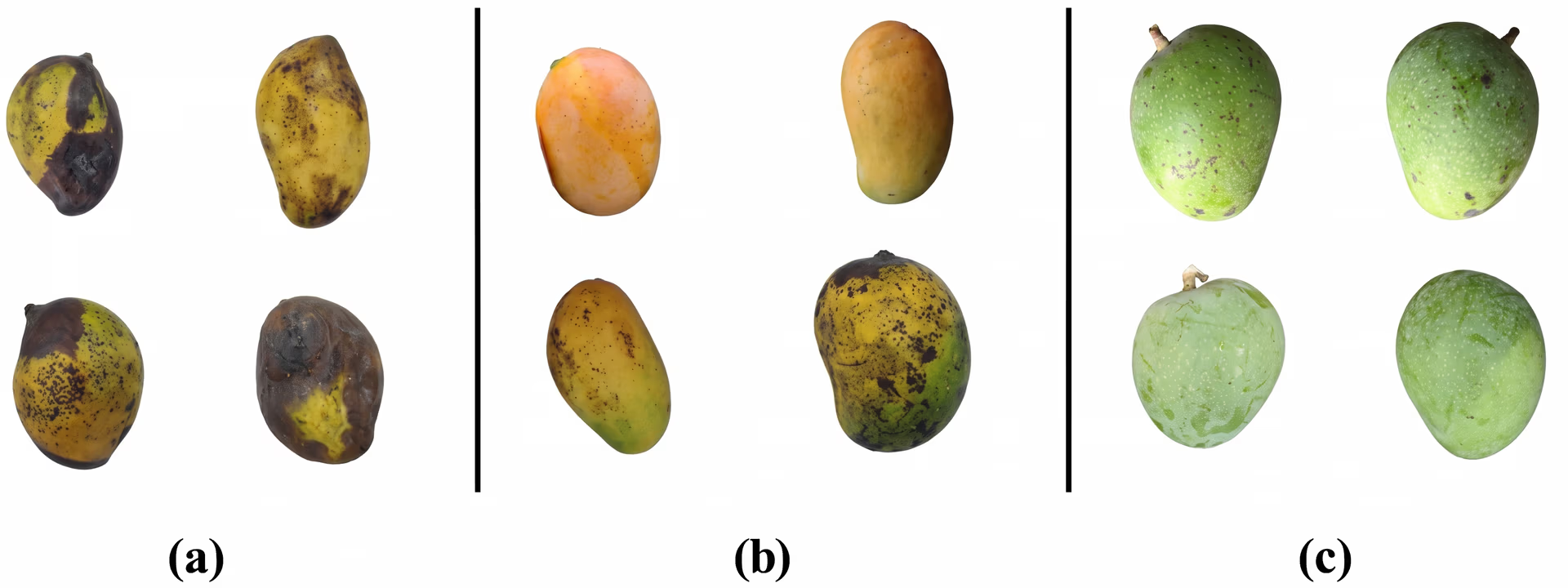
Fig 6. Mangoes at different ripeness levels: (a) rotten, (b) ripe, and (c) unripe.
Key takeaways#
Color detection is an innovative computer vision technique with applications in agriculture, manufacturing, healthcare, and automation. It helps machines recognize and interpret colors for object tracking, quality control, and decision-making.
While advanced AI models continue to evolve, color detection remains a simple and effective solution, especially in controlled environments. As technology advances, it will likely continue to play a key role in improving real-world applications.
Dive deeper into AI by exploring our community and GitHub repository. Learn about innovations in AI in manufacturing and computer vision in healthcare, and discover how to start leveraging vision AI with our licensing options.








