Managed Training Platforms vs Self-Hosted GPUs for Computer Vision, Compared
Compare managed GPU training platforms, cloud ML services, rented GPUs and your own hardware for computer vision: costs, setup, break-even and when each fits.
 Miles Deans10 min read
Listen to this article
Managed training platforms run the training infrastructure for you and bill for GPU time; self-hosted GPUs make your team responsible for the hardware and environment, whether you rent machines or own them. Managed training usually suits intermittent workloads and teams that want less infrastructure work. Owning GPUs can cost less at sustained utilization, but the result depends on how busy the hardware stays, its useful life, electricity and engineering time.
This guide compares four common options for training vision models in 2026, shows how to work out the break-even point for your own workload, and explains where Ultralytics Platform fits.
The four options for training a vision model#
"Managed vs self-hosted" usually hides four different setups:
- A managed vision training platform. You upload or connect a dataset, pick a model and a GPU, and the platform runs training. Ultralytics Platform works this way for YOLO models.
- A general-purpose ML platform. Services such as Amazon SageMaker, Google Vertex AI and Azure Machine Learning run training jobs on cloud instances for many frameworks. You configure the training job, its environment, permissions and storage, and compute and related services are billed separately, so compare each provider's official pricing page rather than GPU rates alone.
- A rented cloud GPU. GPU clouds such as RunPod and Lambda rent you a machine by usage time. Unless the provider's image already includes what you need, you set up the drivers, CUDA, Python packages and training code, and you stop the instance when you finish.
- Your own GPU. A workstation or server in your office or data center. You buy the hardware once and pay for power, cooling, upkeep and the time spent keeping it running.
Managed training vs self-hosted GPUs at a glance#
| Decision factor | Managed vision platform | General ML platform | Rented cloud GPU | Own GPU |
|---|---|---|---|---|
| Hardware purchase required | No | No | No | Yes |
| You pay for | GPU time used | Instance time and related services | Instance time while it runs | Hardware, power, upkeep |
| Setup before first run | Choose dataset, model and GPU | Configure job, environment, permissions and storage | Set up or verify the environment, code and dependencies | Hardware, OS, drivers, packages |
| Training environment | Run by the platform; you choose settings | Shared between service and your team | Mostly your team | Your team |
| Getting a bigger GPU | Select another available GPU | Select another instance type | Rent another machine | Buy another GPU |
| Data location | Platform storage, a connected cloud bucket (Pro and Enterprise) or on-premises data (Enterprise) | Your cloud account | Wherever you copy it | On your premises |
| Consider when | Fast, repeatable vision training | Teams already standardized on one cloud's ML tooling | Engineers comfortable managing machines | Steady, near-continuous training or strict on-premises rules |
How managed GPU training is billed#
On Ultralytics Platform, the GPU part of a training run is simple to estimate:
GPU cost = selected GPU hourly rate × billable GPU hoursWhen you compare providers, use the same workload and target accuracy, and add any subscription, storage, data transfer and engineering time on top.
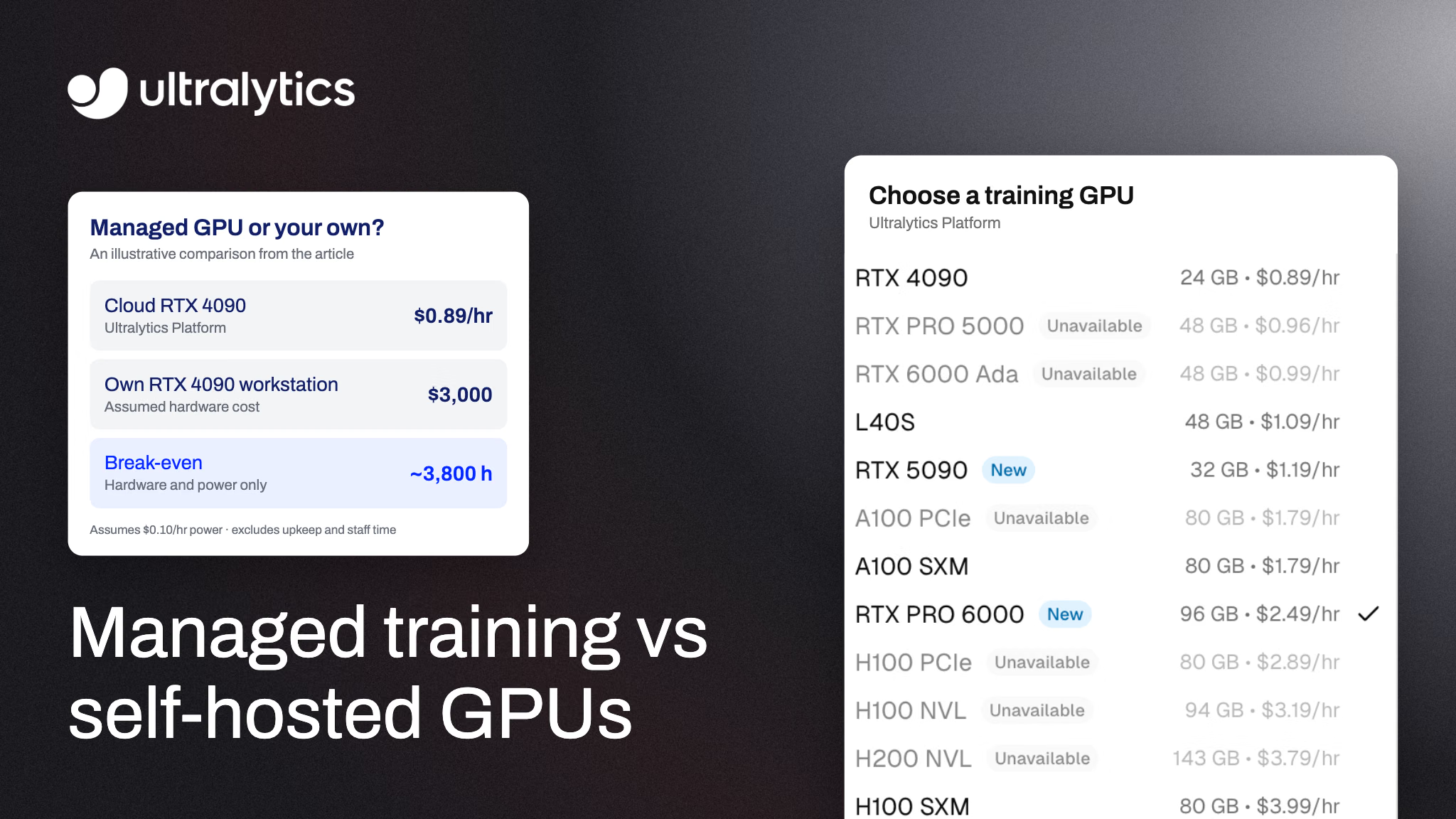
Ultralytics Platform lists 26 NVIDIA GPU types priced from $0.24/hr, with no minimums or commitment; the Free plan can use 24 of them, and Pro and Enterprise all 26. A few common choices:
| GPU | VRAM | Price per hour |
|---|---|---|
| RTX 4090 | 24 GB | $0.89 |
| A100 SXM | 80 GB | $1.79 |
| RTX PRO 6000 (recommended default) | 96 GB | $2.49 |
| H100 SXM | 80 GB | $3.99 |
| B200 (Pro and Enterprise plans) | 180 GB | $7.99 |
Billing follows actual GPU time. Completed runs, cancelled runs and runs that fail after the GPU starts are charged for the elapsed GPU time; a failure before the GPU starts costs nothing. The training dialog estimates duration and cost before you start, and each estimate reserves at least 15 minutes of GPU time against your balance; that reservation sets the balance you need to start, while billing follows actual GPU time.
To put that in context, Ultralytics' typical training times for 1,000 images and 100 epochs on an RTX PRO 6000 are about 15 minutes for YOLO26m and about 30 minutes for YOLO26x. At $2.49 an hour, that's roughly $0.62 and $1.25 of GPU time. Real runs vary with image size, augmentation and batch size, so treat these as starting points rather than quotes.
What self-hosted GPUs really cost#
A GPU you own has no hourly bill, but it isn't free per run. The total cost includes:
- The hardware, plus the rest of the workstation or server around the GPU.
- Power and cooling for every hour it trains.
- Engineering time for drivers, CUDA versions, package conflicts and broken environments.
- Idle time. A GPU that trains for two hours a day is idle the rest of the time, and its cost per training hour rises accordingly.
- Capacity limits. When a model needs more VRAM than you own, or several experiments need to run at once, you wait or buy more hardware.
A simplified hardware-and-power comparison, assuming the owned GPU trains as fast as the cloud GPU, is:
Break-even hours = hardware cost ÷ (cloud hourly rate − your power cost per hour)As an illustration with assumed numbers, say an RTX 4090 workstation costs you $3,000 and its power costs about $0.10 per training hour. Against an RTX 4090 at $0.89 an hour, it reaches break-even after about 3,800 hours of training: about 5.3 months of round-the-clock use, or 15.8 months at eight hours every day. That excludes cooling, idle power, repairs, financing, resale value and your own time, and ownership only pays off if that much training happens within the hardware's useful life. Use your actual hardware quote, electricity price and expected training hours; the result changes a lot with utilization.
When self-hosted GPUs make sense#
Owning hardware is the better fit when:
- Your GPUs stay busy. Continuous retraining, large hyperparameter searches or a team sharing one machine all day raise utilization toward the break-even point.
- Data can't leave your premises. Some regulated or air-gapped environments rule out cloud training entirely.
- You already have the hardware. If a capable GPU is sitting idle, compare its running cost and training time with cloud options before paying for more.
- You need full control over drivers, kernels or custom training code that a managed platform doesn't support.
When managed training makes sense#
A managed platform is the better fit when:
- Training is bursty. You train when data changes, then not at all for days.
- You want to start today. No driver installs, CUDA mismatches or environment debugging before the first run.
- Model sizes vary. You can train a nano model on a small GPU and a large model on an 80 GB or bigger GPU without buying either.
- Several people train. Runs, metrics and checkpoints live in one place instead of on individual machines.
The hybrid option: own GPUs and a managed dashboard#
You don't have to choose one or the other. Ultralytics Platform supports remote training: you train on your own GPU with the ultralytics package, stream live metrics to the same Platform dashboard used for cloud runs, and upload the final weights when training ends. Remote runs use your own GPU, not Ultralytics cloud GPUs, so they don't consume cloud GPU time.
from ultralytics import YOLO

model = YOLO("yolo26n.pt")
model.train(
    data="coco8.yaml",
    epochs=100,
    project="username/my-project",  # your Platform project
    name="local-gpu-run",
)
Set your API key first with export ULTRALYTICS_API_KEY="YOUR_API_KEY". Platform integration requires Python 3.11 or later and ultralytics 8.4.120 or later. A common pattern is to run quick experiments on a local GPU, then send larger or time-sensitive runs to a cloud GPU when the local machine is busy.
How to train YOLO26 on a managed GPU with Ultralytics Platform#
- Create an account at platform.ultralytics.com. New accounts receive a $5 signup credit, or $25 after verifying a work email.
- Add a dataset by uploading images and labels, or connect an Amazon S3 bucket on a Pro or Enterprise plan.
- Open the training dialog, choose a YOLO26 model and set epochs and image size.
- Pick a GPU. RTX PRO 6000 is the recommended default; see how to pick a cloud GPU for the trade-offs.
- Check the cost estimate, start training and follow live metrics until the run finishes.
The Free plan runs up to 3 cloud training jobs at once. Pro, at $29 per seat per month, raises that to 10 and includes $30 of credit per seat each month.
Once training is done, you can export the model or deploy it as an API. If you're also deciding where inference should run, our guide to cloud vs self-hosted vision AI compares cost, latency and data control for deployment.
Frequently asked questions
It can be, especially when training is intermittent, because you pay only for the GPU hours you use. Compare the same workload's total cost and completion time; the break-even calculation above (hardware cost divided by the cloud hourly rate minus your power cost per hour) is a starting point, not a guarantee.
A rented cloud GPU gives you a machine, and your team configures the training workload and checks or sets up the environment. A managed training platform operates more of the workflow: on Ultralytics Platform you choose a dataset, model and GPU, and the platform provisions the GPU, runs training, streams metrics and saves checkpoints.
On Ultralytics Platform, a run that fails after the cloud GPU has started is charged for the elapsed GPU time, and a failure before the GPU starts is free. Cancelled runs are charged for the GPU time up to cancellation.
Yes. Remote training runs on your own hardware, streams live metrics to Platform and uploads the final weights, so it doesn't use cloud GPU time.
The RTX PRO 6000 (96 GB) is the recommended default for most jobs. Ultralytics lists the RTX 4090 for general training, the A100 SXM for large batch sizes or bigger models, and H100, H200, B200 and B300 GPUs for time-sensitive, high-memory and the largest workloads.
New Ultralytics Platform accounts receive a $5 signup credit, raised to $25 after verifying a work email. Pro plans include $30 of credit per seat each month.
No. Kubernetes can schedule GPU workloads, but its GPU scheduling documentation requires GPU drivers and a vendor device plugin on the nodes. A self-managed training cluster still needs someone to own environments, permissions, job monitoring and checkpoints, so budget for that work alongside compute.
Written by
Comments
Ask a question, share your results, or help someone else.