Missing PPE detection: train Ultralytics YOLO on Construction-PPE
See how Construction-PPE labels missing helmets, vests and gloves, then train Ultralytics YOLO to detect missing PPE on your own site cameras.
 Paula Derrenger11 min read
Listen to this article
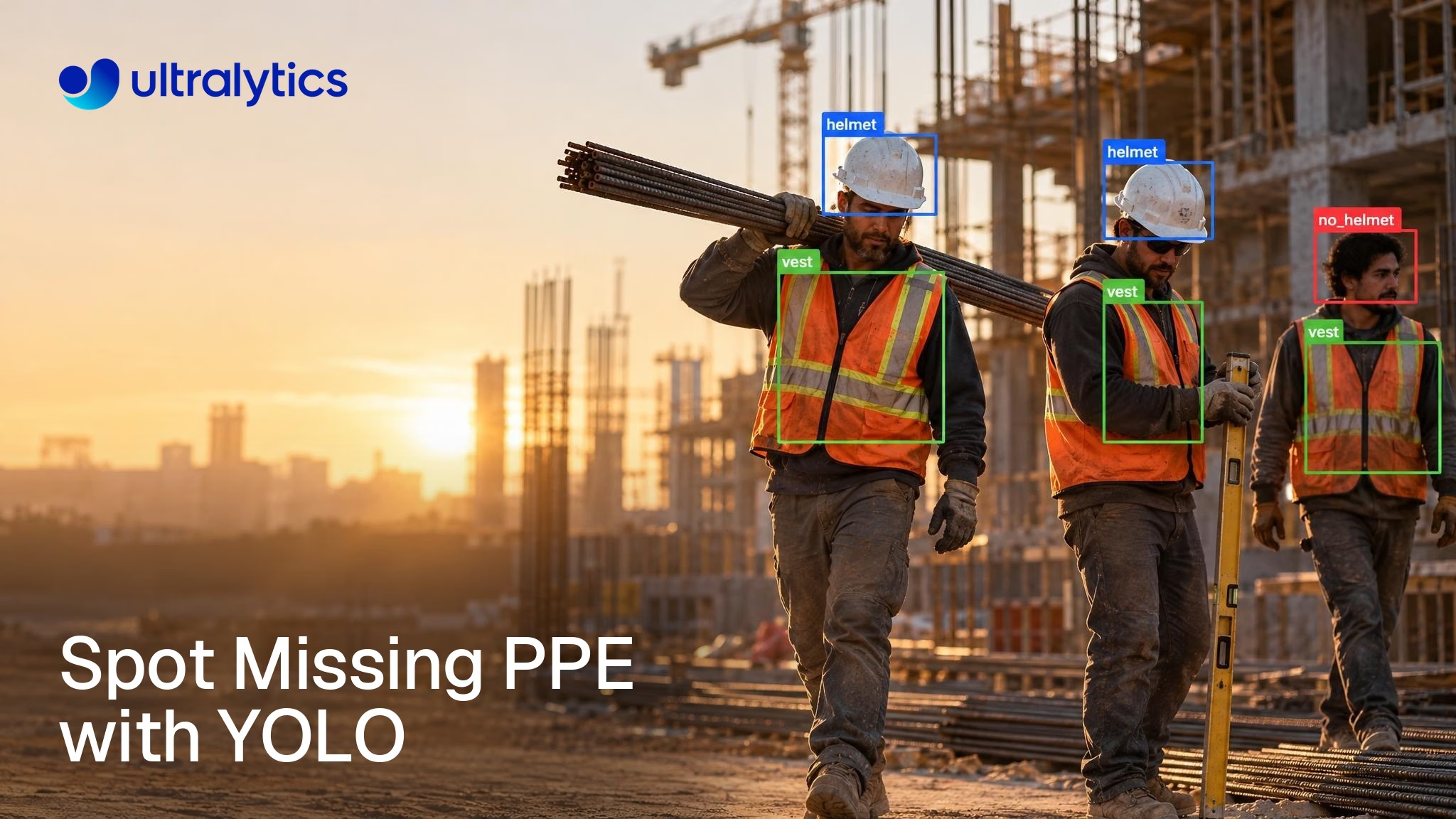
To detect missing PPE reliably, label only what the camera can see. In the new Ultralytics Construction-PPE dataset, a head hidden behind a steel beam is not a missing helmet. Only a head you can actually see, with no helmet on it, gets a no_helmet box, while an occluded or out-of-frame head gets no missing-equipment label at all.
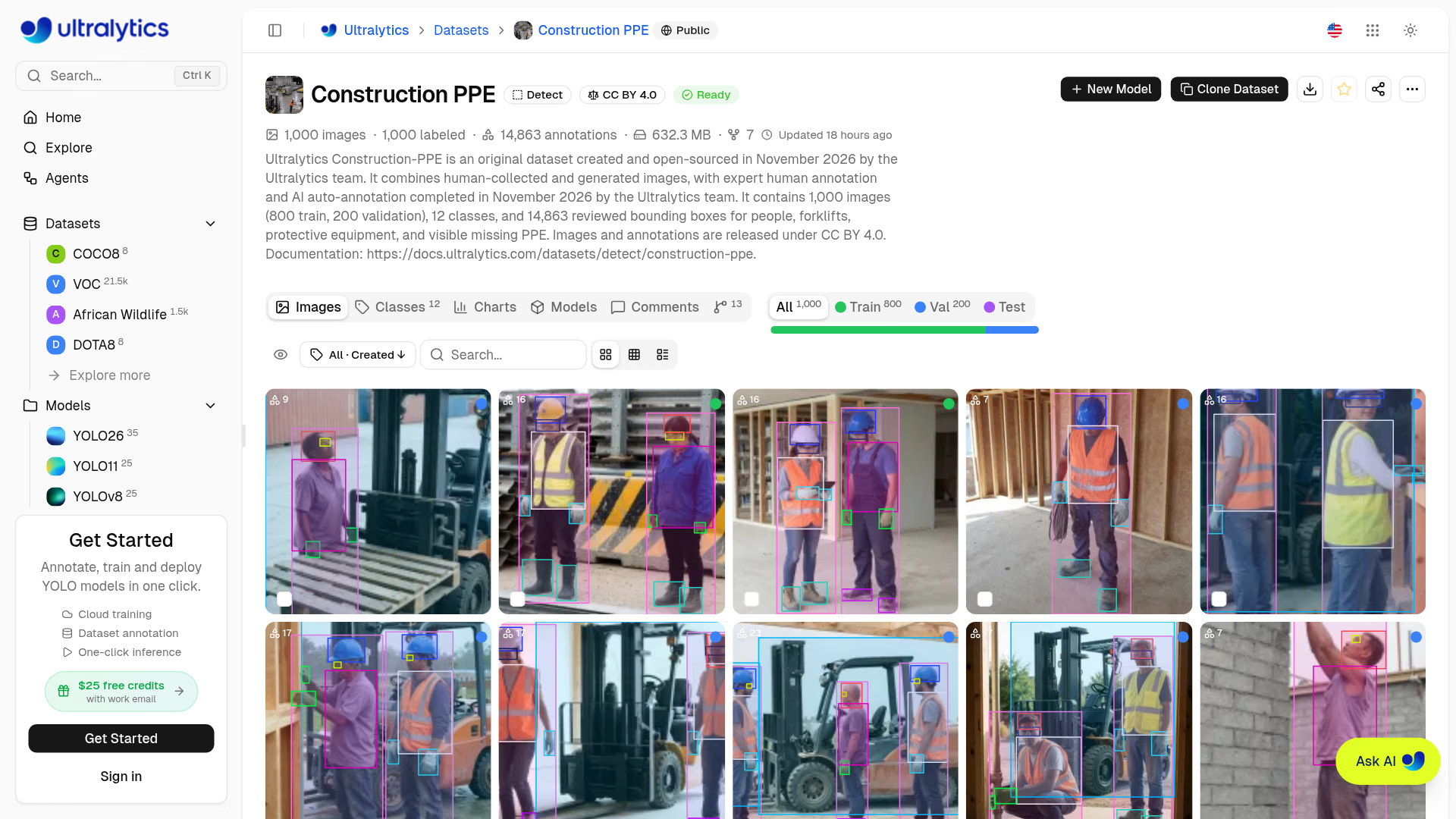
We released the dataset on November 3, 2026, in Ultralytics 8.4.200: 1,000 images, 12 classes and 14,863 reviewed bounding boxes for people, forklifts, protective equipment and visible missing equipment, with images and annotations licensed under CC BY 4.0. Its classes include a dedicated no_vest and a forklift, and its annotations were reviewed by the Ultralytics team. This guide covers what is in the dataset, how its missing-PPE labeling rules work, and how to train, validate and deploy an Ultralytics YOLO26 model on it.
Construction-PPE is a reviewed PPE detection dataset with 12 classes#
Construction-PPE is an original object detection dataset for construction and industrial sites, created and open-sourced in November 2026 by the Ultralytics team. Its images cover construction sites, workshops, warehouses, loading areas and maintenance work, with varied viewpoints, lighting, worker arrangements and forklift activity. It is built to teach a detector both what protective equipment looks like and what its visible absence looks like.
Here are the facts that matter before you train, from the Construction-PPE dataset documentation:
- Size: 1,000 images and 14,863 bounding boxes across 12 classes
- Split: a fixed 800/200 train/validation split, with no separate test split
- Format: bounding boxes in Ultralytics YOLO format, ready for training with no conversion
- Images: human-collected and generated images in landscape, portrait and square compositions at varied resolutions
- Annotation: expert human annotation combined with AI auto-annotation, completed in November 2026 by the Ultralytics team
- License: images and annotations under Creative Commons Attribution 4.0 International, which permits commercial use with attribution
Generated images are not photographs of real events, which is why the final test of any model trained here belongs on footage from your own cameras.
You can browse every image and annotation on Ultralytics Platform, clone the dataset into your workspace, or train on it directly.
Every PPE class has a missing-equipment partner#
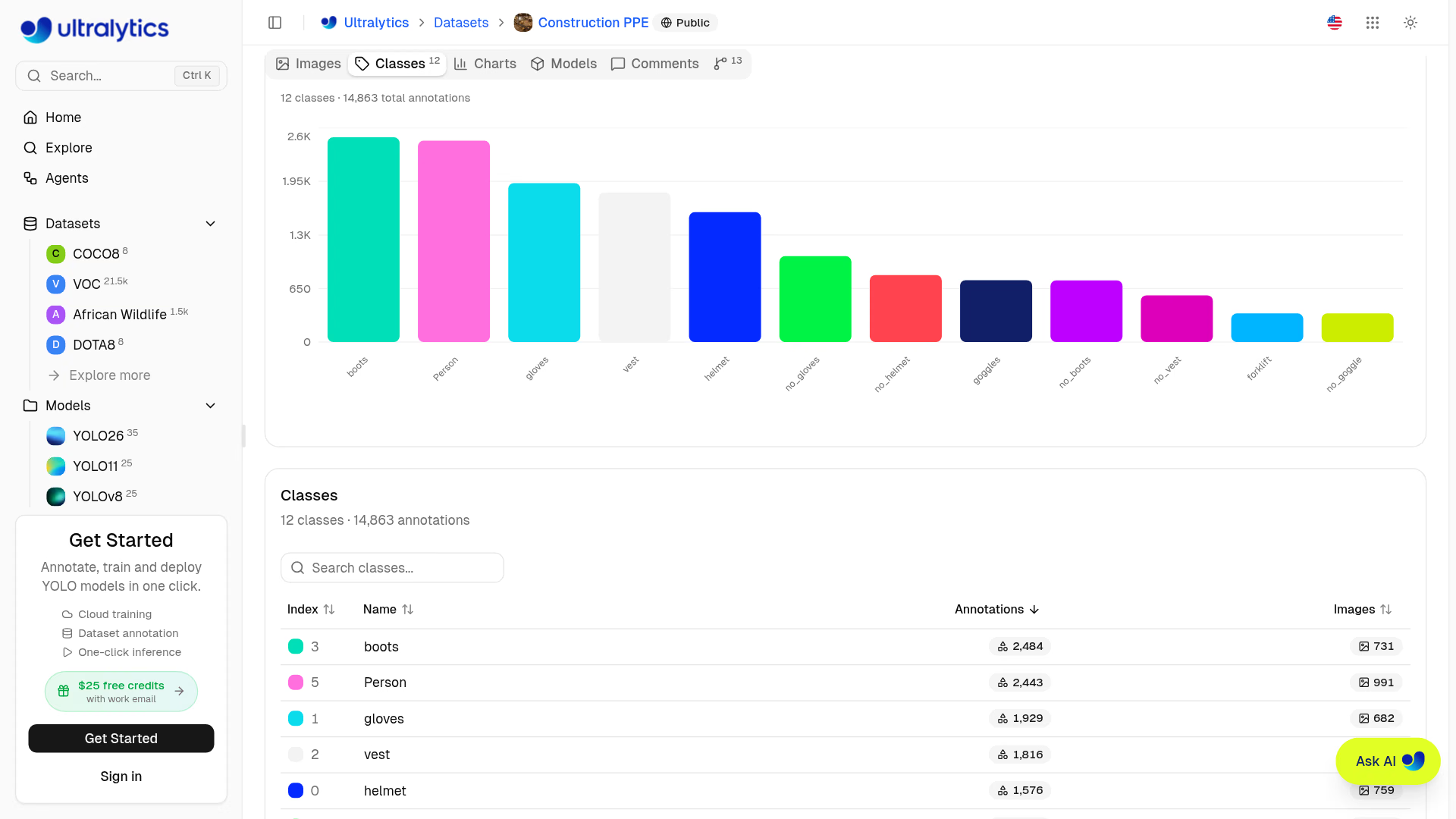
The 12 classes fall into three groups: five equipment classes, five missing-equipment classes, and two classes for the people and vehicles that move around a site. The IDs below match the annotations and construction-ppe.yaml:
| ID | Class | What gets a box |
|---|---|---|
| 0 | helmet | Protective helmet or hard hat |
| 1 | gloves | Work gloves |
| 2 | vest | High-visibility safety vest, jacket or shirt |
| 3 | boots | Protective work boots or work shoes |
| 4 | goggles | Protective eyewear |
| 5 | Person | Person |
| 6 | no_helmet | Visible head without a helmet |
| 7 | no_goggle | Visible eye region without protective eyewear |
| 8 | no_gloves | Visible hand without a glove |
| 9 | no_boots | Visible foot or footwear without protective work footwear |
| 10 | forklift | Forklift |
| 11 | no_vest | Visible torso without high-visibility safety clothing |
Each equipment class has a matching "missing" class. That pairing gives the model direct examples of what absence looks like, so it can mark a bare head or an unvested torso as its own detection rather than leaving your code to infer absence from a missing box.
Missing-PPE labels mark visible body parts, not assumptions#
Missing-equipment classes need a precise definition. If annotators boxed every head they could not see a helmet on, including heads hidden behind beams or cut off by the frame edge, the model would learn that occlusion itself means a violation.
Construction-PPE applies one consistent rule across all five missing classes: a missing-equipment box marks the visible body region where the equipment should be, and an occluded or out-of-frame body part does not by itself establish missing equipment. In practice:
- A
no_helmetbox goes on a head you can see that has no helmet on it. - A
no_glovesbox goes on a visible bare hand, not on a hand tucked behind a toolbox. - A
no_vestbox goes on a visible torso without high-visibility clothing. - A
no_bootsbox goes on a visible foot or shoe that is not protective work footwear. - A
no_gogglebox goes on a visible eye region without protective eyewear. - Equipment classes box the visible item itself, so a vest is one box and the person wearing it is another.
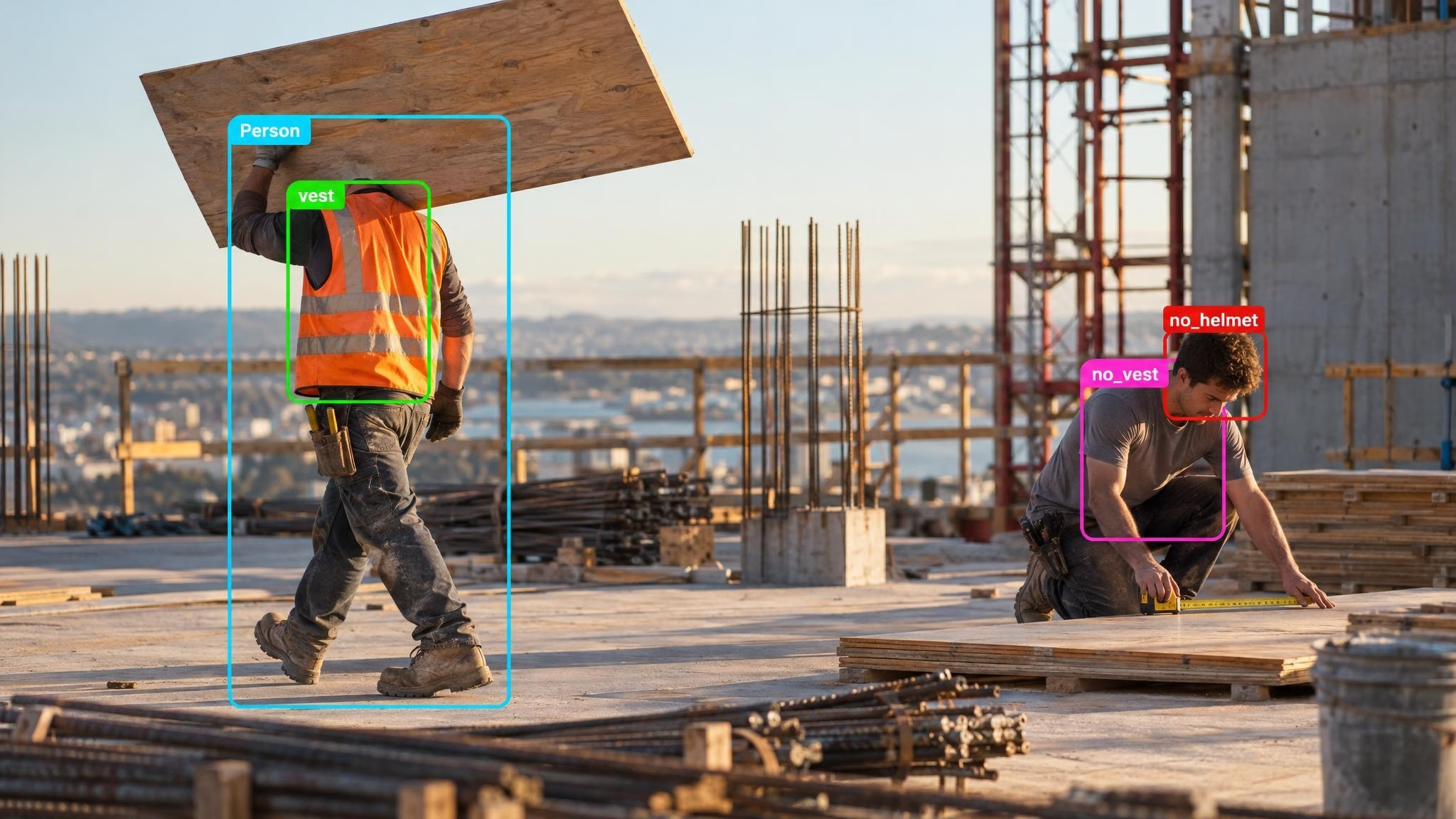
On the left, the worker's head is behind the plywood sheet he carries, so the labels say nothing about a helmet either way. On the right, a visible bare head and a visible torso without high-visibility clothing both get missing-equipment boxes.
This matters for data labeling beyond this dataset. If you extend Construction-PPE with images from your own cameras, label them by the same rule, or the model receives two conflicting answers to the same question. Our Academy lesson on annotation best practices shows how to write that kind of rule into a labeling guide, and why a human-in-the-loop review catches the cases automation misses.
Forklift and no_vest bring vehicle zones into the same model#
Many site rules involve people and vehicles sharing space, not just missing gear. The forklift class puts vehicles and workers in the same detector, so one YOLO26 model can return a forklift, the people near it, and visible torsos without high-visibility clothing in a single pass.
With a dedicated no_vest class, a model trained on Construction-PPE can return forklift, Person and no_vest boxes for a loading bay in one pass.
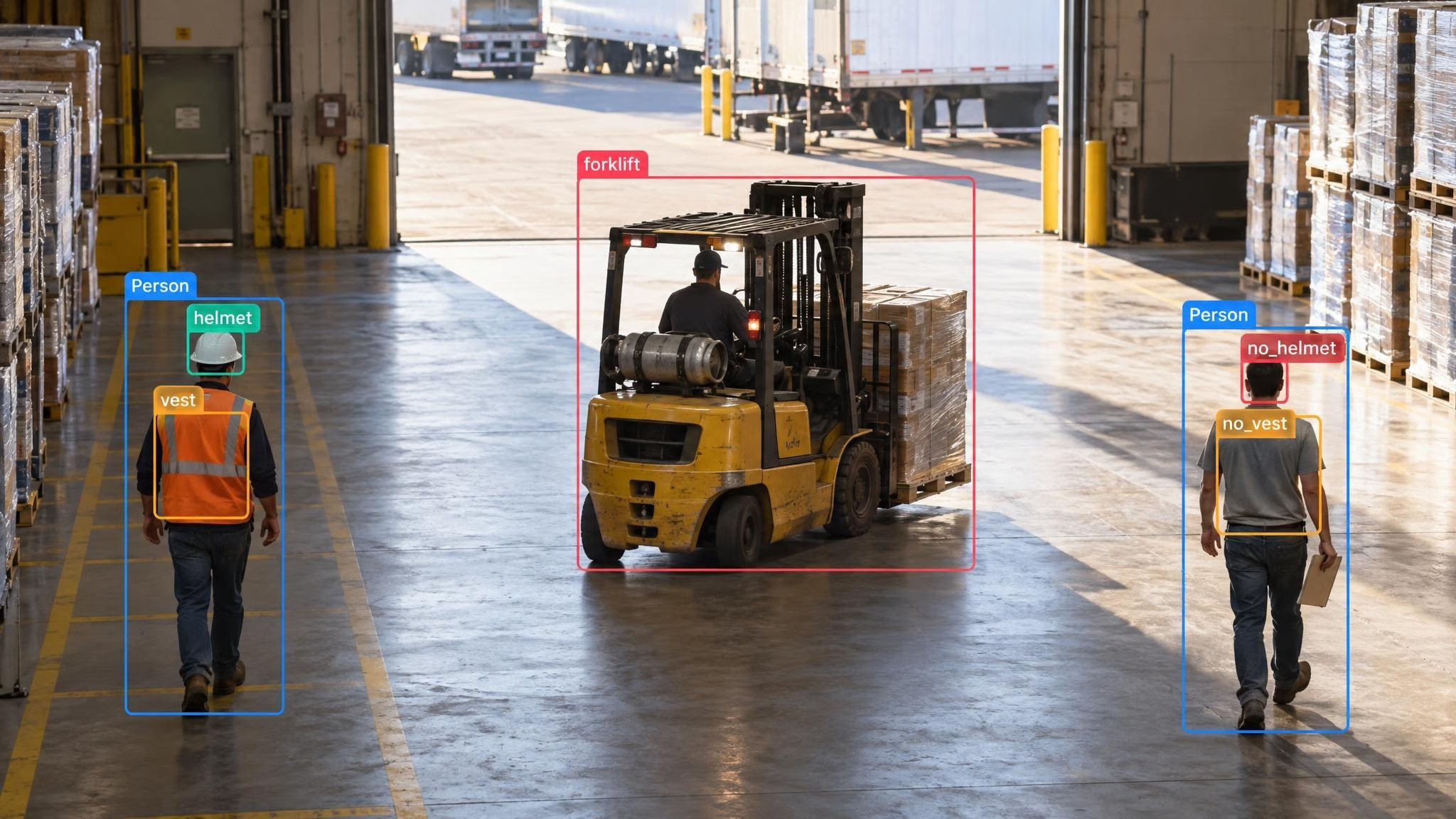
Linking those boxes into an event is application logic: matching each no_vest box to the right person, deciding what counts as "near" the forklift, and setting how long a condition must persist. If you want a proximity measure, the distance calculation guide computes the pixel distance between selected box centers; real-world distances need camera calibration.
Train YOLO26 on Construction-PPE in a few lines#
Start with the Ultralytics Python package. YOLO downloads and extracts the dataset archive on first use.
from ultralytics import YOLO

# Start from a COCO-pretrained YOLO26 nano model
model = YOLO("yolo26n.pt")

# Train on the Construction-PPE archive
model.train(
    data="https://github.com/ultralytics/assets/releases/download/v0.0.0/construction-ppe.zip",
    epochs=100,
    imgsz=640,
)
The CLI equivalent is one line:
yolo detect train model=yolo26n.pt data=https://github.com/ultralytics/assets/releases/download/v0.0.0/construction-ppe.zip epochs=100 imgsz=640The YOLO26n model is a sensible first run for checking the pipeline. Gloves, goggles and boots are small objects at site-camera distances, so compare a larger size such as YOLO26s or YOLO26m before you commit; the training docs cover image size, batch size and every other argument. Ultralytics also publishes a Colab notebook for Construction-PPE if you prefer a free GPU in the browser.
Prefer no code? Train it on Ultralytics Platform#
On Ultralytics Platform, open the Construction-PPE dataset and start cloud training with a YOLO26 model, choosing epochs, image size and GPU in the browser. Platform tracks loss curves, precision, recall and mAP per epoch, and lets you compare runs side by side. To add your own camera images, clone the dataset from Explore (see the Ultralytics Platform Explore guide), upload them, and label them in the annotation editor, where Smart Annotation can draft boxes for your review.
Judge the model per class, not on one average#
A single mAP number hides what a safety team needs to know. A model can score well overall because it finds people, helmets and vests reliably while missing most no_gloves or no_goggle cases. Validate with per-class metrics:
from ultralytics import YOLO

model = YOLO("runs/detect/train/weights/best.pt")
metrics = model.val()  # uses the dataset's 200-image validation split

print(f"mAP50: {metrics.box.map50:.3f}  mAP50-95: {metrics.box.map:.3f}")
for c in metrics.box.ap_class_index:
    print(f"{model.names[c]:>10}  mAP50-95: {metrics.box.maps[c]:.3f}")
Read the missing-equipment rows first, and open the confusion matrix that validation saves. If helmet and no_helmet are confused, or a missing class is rarely detected, inspect the missed images and check how many instances of that class the training split contains before you change anything else. The YOLO performance metrics guide explains how to read each chart.
The 200 validation images come from the same collection as the training set. Before you deploy, collect an independent set from the cameras you will actually run on and validate on that too, and use it to measure performance on your site.
Turn missing-PPE detections into reviewable events#
Because missing equipment is its own class, the first version of a review rule can be short: flag any frame that contains a missing-PPE box above a confidence threshold.
from ultralytics import YOLO

MISSING = {"no_helmet", "no_goggle", "no_gloves", "no_boots", "no_vest"}

model = YOLO("runs/detect/train/weights/best.pt")
for r in model.predict("site_camera_frame.jpg", conf=0.4):
    for cls, conf in zip(r.boxes.cls.int().tolist(), r.boxes.conf.tolist()):
        if r.names[cls] in MISSING:
            print(f"Review: {r.names[cls]} ({conf:.2f})")
For video, swap predict for track. Object tracking assigns IDs to detections across frames. Your application then associates each missing-PPE box with a person track, for example by checking which Person box contains it, and applies persistence and event rules so reviewers see one event instead of a burst of frames:
Since Ultralytics 8.4.202, predictions saved from RTSP streams and webcams use each stream's own frame rate, so recorded clips play back at the right speed. When the model is ready, export the model to ONNX, TensorRT, OpenVINO or another format for your edge device, or deploy it from Platform to a dedicated endpoint.
A detector reports what the camera can see. It cannot judge whether a helmet is certified or a vest is damaged, so route its events to a person who can.
Who should use Construction-PPE#
Use Construction-PPE as the starting point for detecting its five PPE types, and their absence, on construction sites, workshops, warehouses or loading areas. It is the right fit if you need:
- Missing-equipment detection, not just equipment detection. Five dedicated missing classes, labeled by a consistent visible-body-part rule, give the model direct examples of absent gear.
- Vehicle and pedestrian awareness in one model.
forklift,Personandno_vesttogether cover the loading-bay case. - Clear dataset licensing and ready-to-train labels. The images and annotations are CC BY 4.0, which permits commercial use with attribution, and the YOLO-format labels train in YOLO26 with no conversion. The YOLO models you train on it are licensed separately; see the license question below.
If your project only needs hard hats and vests at scale, Ultralytics Platform also hosts Safety Helmet and Reflective Jacket, with 10,138 images and 2 classes. For helmet-only work, Safety Helmet Detection has 5,000 images labeled head, helmet and person. For the end-to-end site workflow, from defining the first rule to monitoring a deployment, read our guide to PPE detection and workplace safety with Ultralytics.
Frequently asked questions
Train on dedicated missing-equipment classes such as
no_helmetandno_vest, label them only where the body part is visible, and check their per-class metrics on images from your own cameras before you rely on alerts. Construction-PPE ships five of these classes with a consistent visibility rule.It depends on the classes you need. Ultralytics Construction-PPE covers 12 classes, including five missing-equipment classes,
forkliftandPerson, across 1,000 reviewed images under CC BY 4.0. For helmets and vests only, Safety Helmet and Reflective Jacket on Ultralytics Platform adds volume, and Safety Helmet Detection covers helmets alone; for site deployment, add images from your own cameras either way.The November 2026 release has 1,000 images, 14,863 bounding boxes and 12 classes, with an 800/200 train/validation split. The classes are helmet, gloves, vest, boots, goggles, Person, no_helmet, no_goggle, no_gloves, no_boots, forklift and no_vest.
Install or update the
ultralyticspackage, loadyolo26n.pt, and callmodel.train()with the Construction-PPE archive URL asdata, for example withepochs=100andimgsz=640. You can also train it without code using cloud training on Ultralytics Platform.Dedicated missing classes give the model direct examples of what absence looks like, so it can detect a visible bare head as its own object. A simple "no helmet box inside the person box" rule can mistake a hidden head for a bare one unless it also checks visibility. Construction-PPE labels missing equipment only where the body part is visible, which supports the first approach.
Yes. The images and annotations are released under Creative Commons Attribution 4.0 International, which permits sharing and adaptation, including commercial use, with attribution. Credit the Ultralytics team, link to the dataset and license, and indicate any changes. This covers the dataset only: the Ultralytics YOLO models you train on it are licensed separately (see the next question).
All Ultralytics YOLO trained models fall under AGPL-3.0 by default, including models trained on Construction-PPE. To use Ultralytics YOLO code or models, either open-source your entire project under AGPL-3.0 or obtain an Ultralytics Enterprise License. This also applies to internal use and R&D. If you want to keep your project private, you need an Enterprise License.
Written by
VP of Growth · Ultralytics
Comments
Ask a question, share your results, or help someone else.