HIPAA compliant AI for medical imaging: what a BAA covers and how to train on patient data
Learn what HIPAA compliant AI requires for medical imaging, what an Ultralytics BAA covers, and how to annotate, train and deploy with patient data.
Listen to this article

Ultralytics has completed a HIPAA Security Rule self-assessment covering Ultralytics Platform and Ultralytics YOLO, and Ultralytics Platform now offers a business associate agreement (BAA) to eligible Enterprise customers. HIPAA has no official certification, so a signed BAA and a working security program are what a hospital security reviewer actually checks.
For a radiology, pathology or medical device team, that changes what you can do with identifiable scans. Use PHI only in the services and configurations covered by your executed BAA, and keep your own safeguards in place for everything else. Below is what the self-assessment and the BAA cover, how to annotate, train and deploy a medical imaging model inside that boundary, and how that compares with keeping every pixel in-house on self-hosted Ultralytics YOLO.
"HIPAA compliant AI" means a signed BAA plus your own controls#
HIPAA has three main parts: the Security Rule, the Privacy Rule and the Breach Notification Rule. None of them lets a product pass a test and display a badge. Google Cloud's HIPAA page puts it plainly: HHS "doesn't offer a certification program for HIPAA compliance", and compliance is shared between vendor and customer.
The working mechanism is the BAA. In its guidance on HIPAA and cloud computing, HHS says a covered entity may use a cloud service to store or process electronic protected health information (ePHI) only if it signs a HIPAA-compliant BAA with the provider and otherwise follows the HIPAA Rules. Three points from that guidance matter for vision AI:
- Status follows the service, not the paperwork. A cloud provider that creates, receives, maintains or transmits ePHI for a covered entity is a business associate, even if the data is encrypted and the provider holds no key.
- Skipping the BAA is the violation. A covered entity that has a provider maintain ePHI without a BAA in place breaks the HIPAA Rules.
- A BAA doesn't authorize every use. The business associate may use PHI only as the contract permits, and the covered entity must itself be allowed to make that use or disclosure, as HHS's business associate guidance explains. Training a model on patient records is a use your organization has to assess on its own terms.
For a medical image analysis team, "HIPAA compliant AI" in practice means three things: your vendor signs a BAA before any PHI arrives, the vendor runs a security program that meets the Security Rule, and your team still handles access, de-identification and its own risk analysis.
What Ultralytics' self-assessment and BAA actually cover#
Our Trust and Security page lists several kinds of security evidence. They differ in who checked the controls and how, and a hospital reviewer will ask about each separately.
| Evidence | What it is | Who verified it | Scope |
|---|---|---|---|
| ISO/IEC 27001:2022 | Certified information security management system | Insight Assurance, 2026 | Ultralytics YOLO and Ultralytics Platform |
| SOC 2 Type I | Attestation of security, availability and confidentiality controls | Insight Assurance, 2026 | Full Platform in scope |
| Penetration test | External test with a letter of attestation | Independent third party, 2026 | Ultralytics Platform |
| HIPAA Security Rule self-assessment | Assessment based on NIST SP 800-66 Rev. 2 | Ultralytics (self-assessment) | Ultralytics Platform and Ultralytics YOLO |
| Business Associate Agreement | Contract meeting 45 C.F.R. § 164.504(e) | Signed by both parties | Eligible Enterprise customers |
The self-assessment shows the program, not a certificate#
The Ultralytics Trust Center FAQ says we completed the HIPAA Security Rule self-assessment using NIST SP 800-66 Rev. 2, the NIST guide to implementing the Security Rule. It covers Ultralytics Platform and Ultralytics YOLO and builds on our ISO/IEC 27001:2022 certified ISMS and our SOC 2 report. The Ultralytics security team handbook records it as completed in October 2026. It is a self-assessment, not an independent audit.
The controls behind it apply to every Platform plan: encryption at rest and in transit, enforced MFA, least-privilege IAM and annual penetration testing. Certificates, audit reports and policies are available through the Trust Center, as our security policy documentation explains.
A BAA defines permitted PHI use and safeguarding duties#
HHS's sample business associate agreement provisions set out what any BAA must address. These are the HIPAA-required provisions in general, not quoted clauses from an Ultralytics agreement:
- Permitted uses and disclosures. The business associate may use or disclose PHI only as the contract allows or as the law requires.
- Safeguards. It must apply appropriate safeguards, including Security Rule protections for ePHI.
- Reporting. It must report uses or disclosures the contract doesn't permit, including breaches of unsecured PHI and security incidents.
- Subcontractors. Any subcontractor that handles the PHI must agree to the same restrictions.
- Termination. It must return or destroy PHI when the agreement ends, where feasible.
Section 3.5 of the Ultralytics Terms of Service sets how this works on Platform:
- No PHI without a BAA. Unless a BAA is in effect, you must not upload PHI.
- Enterprise only. Enterprise customers may be eligible for a BAA; no other plan can get one. It is a separate agreement that takes effect only once both parties sign.
- Scope is set in the contract. Ultralytics may limit a BAA to specified services or configurations. Confirm the exact scope while contracting, before you design your workflow around it.
- Your obligations stay yours. You decide whether you are a covered entity or business associate, and you own your HIPAA compliance, including any de-identification under 45 C.F.R. § 164.514.
The Trust Center adds what stays on your side after signing: classifying the data you upload, managing user access and securing the workstations your team uses. The Platform billing docs list the HIPAA BAA as an Enterprise feature for eligible customers, alongside SSO/SAML and On Premise data and compute.
De-identified scans don't need a BAA#
Not every medical image is PHI. Our healthcare solutions page notes that de-identified data is not PHI, so properly de-identified datasets can go to Platform on any plan.
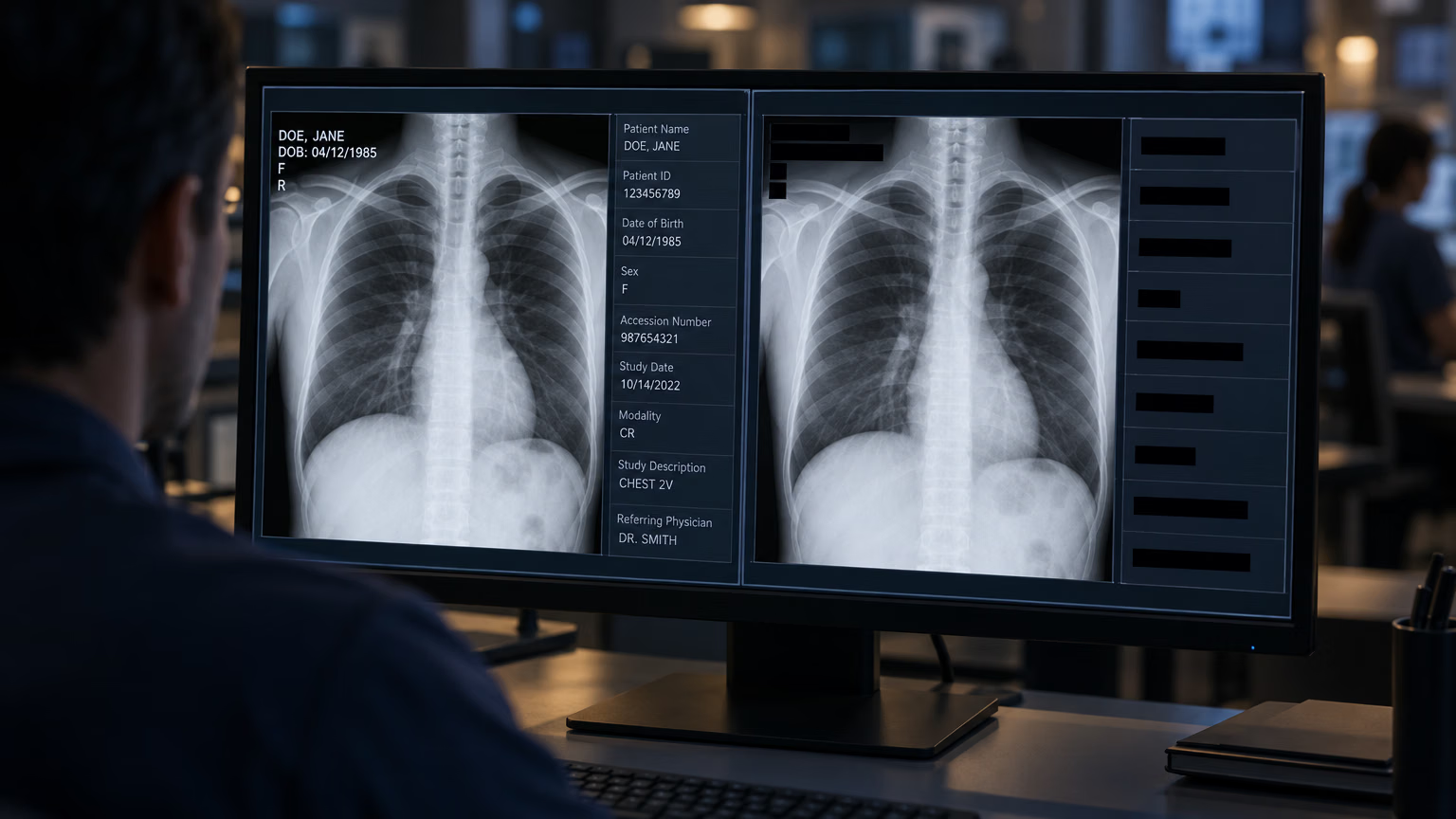
HHS's de-identification guidance describes two methods. Safe Harbor removes the 18 identifier types listed in 45 C.F.R. § 164.514(b)(2) and requires no actual knowledge that the rest could identify someone; it allows a qualifying re-identification code. Expert Determination uses a qualified expert who documents that the re-identification risk is very small, which can accommodate data such as dates when the expert's analysis supports it. Imaging has its own traps: DICOM headers carry patient identifiers, full-face photographs are one of the 18 identifiers, and text burned into the pixels needs checking as well as the metadata.
If the dataset does not meet Safe Harbor or Expert Determination, treat it as PHI. That leaves three paths:
Annotating, training and deploying under a signed BAA#
Use PHI only in the services and configurations covered by your executed BAA. Inside that scope, these are the decisions to make at each step.
1. Prepare model-ready images locally#
Prepare model-ready PNG or TIFF images locally, check metadata and burned-in identifiers, and inspect the converted images before upload. Platform accepts common image formats listed in its supported upload formats, so convert DICOM studies to one of them as part of your own pipeline and keep the conversion script under version control. Converting doesn't de-identify on its own: a header that's dropped is gone, but text burned into a frame travels with the pixels.
2. Set up the workspace before the first upload#
Choose your data region during onboarding. According to the Platform documentation, datasets, models and managed training data stay in your region: US (Iowa), EU (Belgium) or AP (Taiwan). You can't change the region yourself afterward; a move needs a support request. Account-level data such as profile and billing records is processed globally, as the Data Processing Agreement describes.
Enterprise defaults to Private until an owner or admin changes it; verify each dataset and project is Private before uploading PHI. The default visibility setting is configurable, and individual resources can change visibility later.
Use the four team roles (Owner, Admin, Editor, Viewer) for least privilege. Viewer permits read-only inspection; clinicians who correct and save labels need Editor or higher. Turn on SSO/SAML so access follows your identity provider.
3. Annotate inside your BAA scope#
The annotation editor offers manual tools for detection, segmentation, classification, pose and OBB. It also supports SAM 3.1 click-to-segment, your own trained YOLO models, and class-prompted models that label your dataset's classes across a whole image. Ten class-prompted models, including Moondream 3.1, Qwen3.8 27B and SAM 3.1 Text, are hosted on Platform. "No provider key" describes billing, not BAA coverage, so confirm that any hosted model you use on PHI sits inside your BAA scope.
Paid models from OpenAI, Anthropic, Google and other providers run on your own provider API key, and each image goes to that provider under your account. Treat that provider as a separate vendor decision: the provider's BAA must cover the exact API, model and configuration used by Platform. Google is a clear example. Platform's Gemini integration uses an AI Studio API key, governed by the Gemini API terms, while Google Cloud's BAA covers the Google Cloud services listed in its HIPAA scope. PHI eligibility of the Gemini integration in Platform is unverified, so don't use it on PHI.
Whichever tool drafts the boxes, clinicians should check, correct and approve them. Human-in-the-loop annotation is what makes a data labeling pipeline clinically defensible.
4. Train YOLO26 in your region#
Cloud training starts from the project page. Pick the dataset version, an Ultralytics YOLO26 model and a GPU, and Platform streams metrics, console output and the best checkpoint as the run goes. Save a dataset version for each run: when an auditor asks which labels produced the model in production, the version is your answer.
The data region is a storage guarantee. If a contract also restricts where processing happens, confirm GPU locations and BAA coverage with Ultralytics before training.
5. Deploy to a single-tenant endpoint or export#
Dedicated endpoints run in 42 regions, 9 of them in the US. Each one is a single-tenant service with its own URL and its own API key binding, so only that key can call it. Deleting or deactivating the bound key does not revoke direct endpoint access. Stop or delete the deployment; recreate it after rotating the key.
The endpoint region is separate from your data region, and every request image is processed where the endpoint runs, so pick a region your agreement allows. Endpoint monitoring keeps example images only in the serving instance's memory, and stopping or redeploying can clear them. If inference has to run inside the hospital, export the model to formats such as ONNX, TensorRT or OpenVINO and run it on your own servers or devices.
Keeping patient data in-house with self-hosted YOLO#
Some organizations decide that patient pixels never leave their network, whatever contract is in place. Ultralytics supports that with two options that draw the line in different places.
| Platform under a BAA | Platform On Premise | Self-hosted Ultralytics YOLO | |
|---|---|---|---|
| Where image pixels live | Your Platform data region | Your connected computer only | Your environment only |
| What reaches Ultralytics | Images, labels, models | Labels, annotations, metrics, best checkpoint | No images; analytics and crash reporting are enabled by default |
| AI-assisted annotation | Within BAA scope | No | Your own tooling |
| Plan | Enterprise, eligible customers | Enterprise | Python package |
| Who runs the infrastructure | Ultralytics | Shared | You |
Platform On Premise keeps pixels on your hardware#
The On Premise integration connects a Linux, macOS or Windows computer to an Enterprise workspace with one install command. Source and derived dataset pixels stay on that computer for ingest, preview and training. Your browser loads previews directly from the connected machine, so open Platform in a browser on that computer. The dataset folder is mounted read-only, and training runs locally on CPU or an NVIDIA GPU with no data sent to cloud compute.
Read the boundary carefully. Classes, labels and annotations are stored in Platform, and training metrics and the best checkpoint upload there. The docs warn that weights, labels and metrics can encode information learned from your images, so only the pixels are strictly local. Research on model inversion is why the checkpoint belongs in your risk analysis, and why On Premise use with PHI-derived labels should fall within your BAA scope. Because the images never leave your host, Platform's smart annotation, auto-annotation and cloud training don't work on On Premise datasets.
Self-hosted YOLO keeps images on your network#
Running the ultralytics Python package on your own servers keeps training and inference images inside your network. Our security FAQ says that when YOLO runs outside Platform, Ultralytics doesn't process or store inference data, and the Terms of Service add that the DPA doesn't apply there and you are responsible for HIPAA wherever it applies. The package's anonymous analytics are on by default and never include images, according to our data collection documentation. Setting sync=False in Ultralytics settings turns analytics and crash reports off.
That setting doesn't stop downloads. Weights, fonts and missing dependencies are fetched on first use by the package's download and dependency checks. For air-gapped use, preinstall dependencies, weights and fonts, disable external logging integrations, and block outbound traffic.

Here is a local training, validation and export example with analytics disabled:
from ultralytics import YOLO, settings

# Turn off anonymous analytics and crash reports on this machine
settings.update({"sync": False})

# On an air-gapped server, copy yolo26n.pt in beforehand
model = YOLO("yolo26n.pt")

# Train on a local dataset in YOLO format
model.train(data="path/to/your_dataset.yaml", epochs=100, imgsz=640)

# Validate, then export for on-site inference
metrics = model.val()
print(f"mAP50-95: {metrics.box.map:.3f}")
model.export(format="onnx")
Before patient data touches the pipeline, test it on a connected development machine with the public brain tumor dataset (1,116 MRI and CT images, 2 classes). Passing data="brain-tumor.yaml" downloads it automatically, so keep that test outside the air-gapped environment.
The trade-off is operations. Your team runs the GPUs, labeling tool, versioning, deployment and monitoring that Platform otherwise handles. Our comparison of managed cloud and self-hosted computer vision breaks down those costs.
Which path fits your team#
Choose Platform under a BAA if your organization accepts a cloud business associate and the services you need are covered by your executed BAA. Annotation, training and deployment share one workspace, with versioning and access control built in.
Choose Platform On Premise if your policy keeps pixels inside the building but you still want manual labeling on the connected computer, experiment tracking and model management. Put the uploaded labels and checkpoints into your risk analysis and BAA scope.
Choose self-hosted YOLO if nothing derived from patient data may leave your network, or if inference has to run on devices beside the scanner. You get the same YOLO26 models and the most control, and your team runs the infrastructure.
On every path, the model is a decision aid. Diagnostic sign-off stays with the clinician, under whatever regulatory clearance your use case requires. Our overview of AI in radiology covers where these models fit in clinical workflows, and our enterprise procurement guide helps security teams prepare a vendor review. To start a BAA, contact your Ultralytics account representative or request an Enterprise demo from the pricing page. They'll confirm your eligibility, agree the scope with you and execute the BAA before any PHI is uploaded. That includes self-hosted YOLO customers whose PHI could reach us through support requests or professional-services work.
Frequently asked questions
No. HHS doesn't offer a HIPAA certification program for any product, AI or otherwise. What you can check is whether a vendor signs a BAA, whether it has assessed its controls against the Security Rule, and what independent evidence it holds, such as ISO 27001 certification or a SOC 2 report.
A BAA limits how a business associate may use and disclose PHI and requires it to safeguard that PHI, report unauthorized disclosures and breaches, bind subcontractors to the same terms, and return or destroy PHI at termination where feasible. It must meet 45 C.F.R. § 164.504(e). It doesn't make a product "HIPAA compliant" for your use: your access controls, de-identification and risk analysis still apply.
Ultralytics has completed a HIPAA Security Rule self-assessment based on NIST SP 800-66 Rev. 2, covering Ultralytics Platform and Ultralytics YOLO. It builds on our ISO/IEC 27001:2022 certified ISMS and SOC 2 Type I report, and a BAA is available to eligible Enterprise customers. Because HIPAA has no certification, compliance depends on both the vendor's program and how you use the service.
Only under a signed BAA, which only eligible Enterprise customers can get, and only into the services and configurations that BAA covers. Without a BAA, you must not upload PHI. Images that meet Safe Harbor or Expert Determination aren't PHI and can be used on any plan.
When you run the YOLO Python package in your own environment, Ultralytics does not receive training or inference images. You remain responsible for HIPAA compliance on that infrastructure. Setting
sync=Falseturns off the package's anonymous analytics and crash reports, which are on by default.Paid provider models in Platform run on your own provider API key, so the images go to that provider. The provider's BAA must cover the exact API, model and configuration used by Platform, and the setup must fit your Ultralytics BAA scope. Platform's Gemini integration uses an AI Studio key, and its PHI eligibility is unverified, so don't use it on PHI.
Comments
Ask a question, share your results, or help someone else.