YOLO26 on STM32N6: why whole-graph INT8 is the hard part
Export Ultralytics YOLO26 for the STM32N6 NPU with format="stedgeai": whole-graph INT8, calibration on your own images and compiling with ST Edge AI Core.
 Onuralp Sezer13 min read
Listen to this article
How do you get an Ultralytics YOLO26 model onto an STM32N6 microcontroller? As of November 20, 2026, one export command gives you an ONNX model for ST's compiler. Ultralytics 8.4.216, released November 20, 2026, adds format="stedgeai", which writes an ONNX file shaped for ST Edge AI Core, the STMicroelectronics toolchain that compiles neural networks for STM32 devices. You then compile that file with ST's tools and build it into your application. STMicroelectronics compiled the INT8 exports of all seven YOLO tasks for the STM32N6 before release.
The command is the easy part. The hard part, and the reason this export exists, is quantizing the whole YOLO graph, head included, to INT8 without wrecking its outputs. This post explains what we changed in the graph to make that work, what it costs in accuracy for each task, and how to go from a trained model to C code for the board.
The STM32N6 brings an NPU to a microcontroller#
The STM32N6 series runs on an Arm Cortex-M55 core at 800 MHz with 4.2 MB of contiguous embedded RAM, and its STM32N6x7 line is the first STM32 to embed ST's Neural-ART Accelerator, an in-house neural processing unit. ST lists the accelerator at up to 600 GOPS at 1 GHz. The STM32N6570-DK Discovery kit pairs an STM32N657 chip with a camera module and LCD for prototyping.
That makes on-device vision, the TinyML end of edge AI, possible for products built on a microcontroller budget, such as a smart camera on a production line or a presence sensor, provided the model fits and meets your latency target. In our STMicroelectronics customer story, ST measured an earlier INT8 Ultralytics YOLOv8n model at 256 x 256 on the STM32N6 at 34 inferences per second, about 29 ms per inference, using 9.4 mJ per inference, in its published performance measurements.
The trade-off is memory. With megabytes of RAM, every float tensor that stays in the graph enlarges the activation buffers, so the more of the network that runs in INT8, the better it fits. That is where a standard export falls short.
One INT8 scale cannot hold pixels and probabilities#
Model quantization maps an activation tensor's float values onto 256 integer levels with one per-tensor scale and zero point, so the values in that tensor need to share a range. A YOLO detection head breaks that rule: it joins box coordinates in pixels, about 0 to 640 at the default 640-pixel input, with class scores from 0 to 1 in one output tensor.
Give that tensor one INT8 scale and the boxes set it. Each integer step then covers about 2.5 pixels, so class scores, which live between 0 and 1, lose almost all of their resolution. This is why the standard ONNX export with quantize=8 quantizes only the convolution and matrix-multiplication layers and leaves the head in float. On a GPU or CPU, that is a sensible trade. On a microcontroller, a float head costs activation memory you would rather keep.
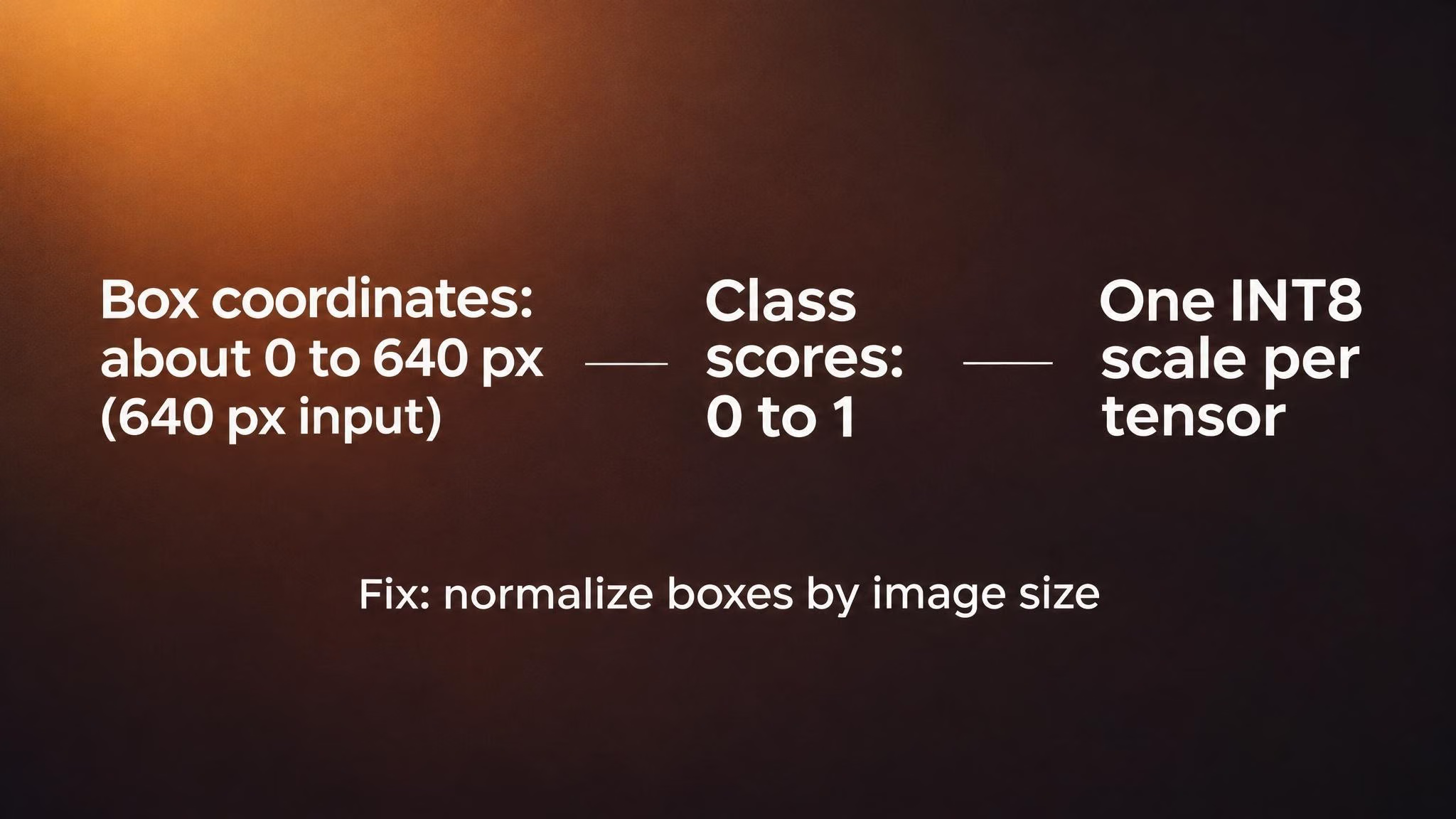
Why a standard YOLO head resists whole-graph INT8, and the fix the ST Edge AI export applies.
The ST Edge AI export reshapes the graph for INT8#
The stedgeai format changes three things in the exported graph so that every operator, head included, can be quantized:
- Normalized coordinates. Box and keypoint coordinates are divided by the input width and height, which puts them on the same scale as the class scores. It is the same normalization Ultralytics uses for the Edge TPU export.
- Smaller dense outputs. Semantic segmentation stops at 1/8-resolution class logits, 64 times fewer spatial positions per class than full-resolution logits, and depth estimation stops at 1/4-resolution log-depth, a 16x smaller output than full-resolution depth. Keeping depth in log space spreads INT8 levels evenly in log-depth space.
- No post-processing in the graph. Embedded NMS and YOLO26's optional NMS-free head add TopK and gather operators after the head. The export leaves them out and always returns raw predictions, so NMS runs in your application. When we asked in the pull request, STMicroelectronics preferred this, because its C post-processing already handles decoding, selection and NMS.
With quantize=8, Ultralytics then quantizes the whole graph with ONNX Runtime static quantization, in the scheme ST Edge AI Core recommends: QDQ format with float inputs and outputs, signed asymmetric INT8 activations, symmetric per-channel INT8 weights, and MinMax calibration over your data images, preprocessed exactly as during validation. At opset 12, Ultralytics falls back to per-tensor weight scales, which ST does not recommend. If you would rather quantize with ST's tools, export the float model and pass it to the STM32 AI Model Zoo Services.
Here is what each task returns at imgsz=640, per the ST Edge AI integration docs:
| Task | Exported output |
|---|---|
| Detection | [1, 4 + nc, 8400], normalized boxes and class scores |
| Instance segmentation | [1, 4 + nc + 32, 8400] plus mask prototypes [1, 32, 160, 160] |
| Semantic segmentation | Class logits [1, nc, 80, 80] at 1/8 resolution |
| Depth estimation | Log-depth [1, 1, 160, 160] at 1/4 resolution |
| Classification | Class probabilities [1, nc] |
| Pose estimation | [1, 4 + nc + nk, 8400], normalized boxes and keypoints |
| Oriented detection | [1, 4 + nc + 1, 8400], angle in radians, square imgsz only |
The exported model has a fixed batch size of 1 with static shapes. nc is the number of classes and nk the number of keypoint values.
In small host tests, detection, semantic and depth hold up under INT8; segment and OBB lose the most#
In the tests recorded in the pull request, Ultralytics measured YOLO26n three ways: the standard ONNX float export, the ST Edge AI float export and the ST Edge AI INT8 export. Each ran at the input sizes the docs list (640 for most tasks, 1024 for semantic segmentation, 768 for depth) on each task's small default validation dataset, such as COCO8 for detection, calibrated on the same images, with ONNX Runtime on CPU.
| Task | Metric | ONNX float | ST Edge AI float | ST Edge AI INT8 |
|---|---|---|---|---|
| Detect | mAP50-95 | 0.686 | 0.686 | 0.639 |
| Segment | box / mask mAP50-95 | 0.638 / 0.540 | 0.638 / 0.540 | 0.356 / 0.401 |
| Semantic | mIoU | 0.610 | 0.610 | 0.609 |
| Depth | delta1 | 0.852 | 0.852 | 0.840 |
| Pose | box / pose mAP50-95 | 0.697 / 0.459 | 0.697 / 0.459 | 0.650 / 0.267 |
| OBB | mAP50-95 | 0.894 | 0.894 | 0.806 |
Two findings stand out. First, the ST Edge AI float export matched the standard ONNX export on every task in this small test, so the reshaped graph showed no loss before quantization. Second, the INT8 cost is uneven. Semantic segmentation barely moves (0.610 to 0.609 mIoU) and depth drops from 0.852 to 0.840 delta1, while mean average precision for detection falls from 0.686 to 0.639.
These default datasets hold 4 to 8 images each, so read the table as illustrative results from these checkpoints and samples, not as a benchmark of your model.
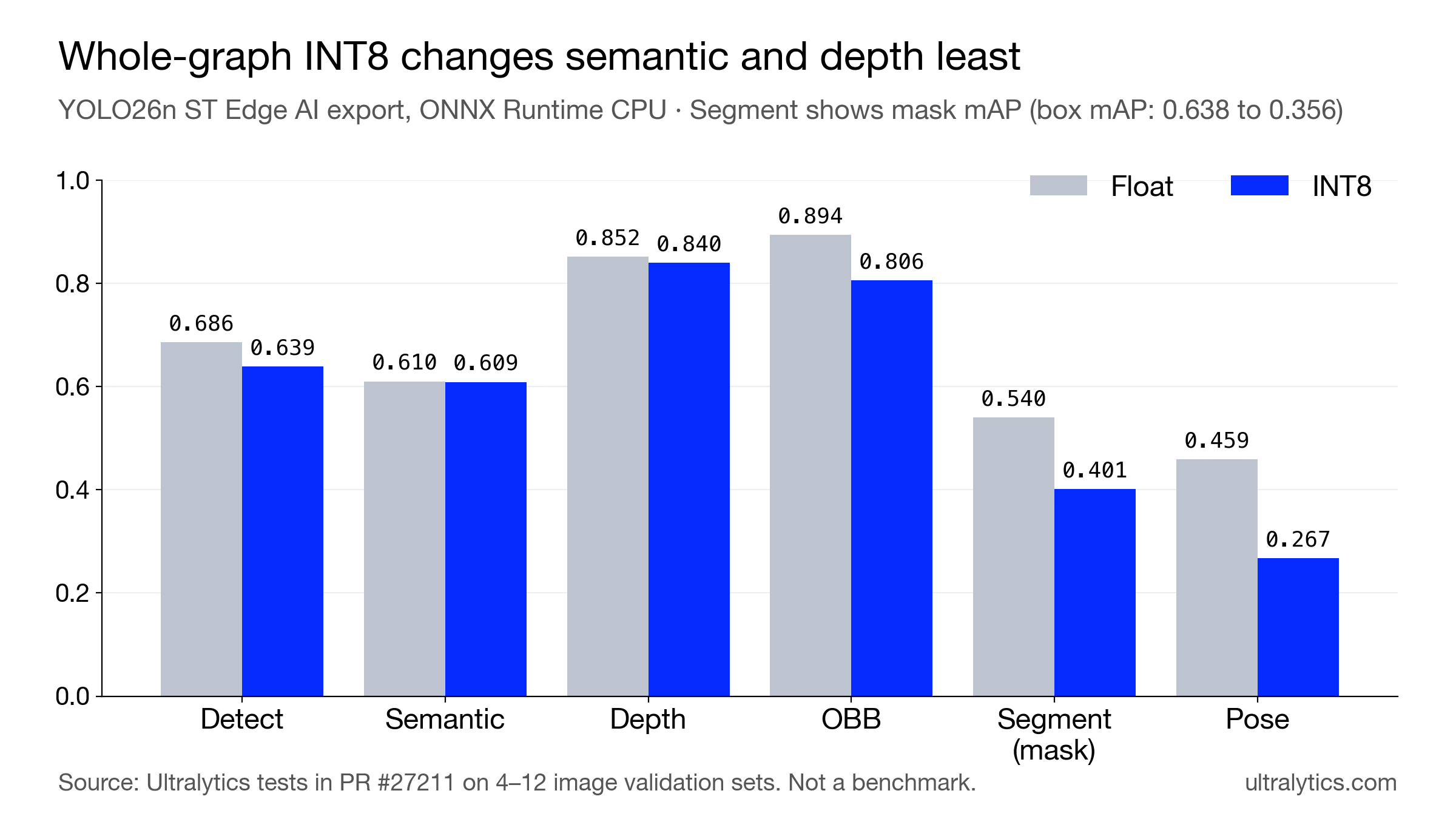
YOLO26n, ST Edge AI float vs whole-graph INT8 export, ONNX Runtime on CPU, from the tests in the pull request. Semantic segmentation and depth change least; instance segmentation and pose show the largest losses. Selected metrics: segment shows mask mAP, pose shows keypoint mAP.
Masks and keypoints share one scale with the boxes#
Instance segmentation and pose estimation take the largest hits. Instance segmentation box mAP50-95 drops from 0.638 to 0.356 and mask mAP50-95 from 0.540 to 0.401, and pose mAP50-95 falls from 0.459 to 0.267. The cause is the same problem the export solves for scores, one level down: the 32 mask coefficients per detection, or the keypoints, share one output scale with the boxes, and their values do not fit that scale well.
For segmentation, ST's engineers weighed the obvious fix, keeping the head concat in float, and recommended against it as the default. ST Edge AI Core handles the float concat fine, but in float the large head output makes the activation buffer bigger, which matters more on a microcontroller than anywhere else. Full INT8 stays the default, and advanced users can keep selected layers in float with a custom quantizer when they would rather spend memory than accuracy.
For a detection or depth project, whole-graph INT8 is ready to evaluate as is. For segmentation or pose, calibrate on your own images, validate both exports with yolo val, and decide from your numbers.
Calibration data decides INT8 accuracy#
MinMax calibration sets each activation's range from the images you pass in data. If those images look like your deployment scene, the ranges fit; if they are a handful of public samples, they may not. The default calibration datasets, such as coco8.yaml for detection, hold only a few images. Calibration reads the dataset's validation split, so we recommend that split holds at least 300 representative images from your own camera. Then validate on a separate set of images, not the calibration images.
The export bakes in its input size. On the device, resize and pad frames to that exported size exactly as Ultralytics does, then map boxes back to the original frame by undoing the resize and padding.
From trained model to STM32N6 in four steps#
Train your model locally or with cloud training on Ultralytics Platform, then export it from the model's Export tab on Platform or with the ultralytics package. Use the package when you want to calibrate INT8 on your own data. Start from a pretrained YOLO26n if you are prototyping; it is the size STMicroelectronics compiled.
Step 1: Export at the input size you will run on the device#
from ultralytics import YOLO

model = YOLO("yolo26n.pt")  # or your trained best.pt

# Float model: writes yolo26n_stedgeai.onnx
model.export(format="stedgeai", imgsz=640)

# Whole-graph INT8, calibrated on your data: writes yolo26n_int8_stedgeai.onnx
model.export(format="stedgeai", imgsz=640, quantize=8, data="calibration.yaml")
Step 2: Validate on your computer#
Ultralytics recognizes the _stedgeai.onnx ending, scales coordinates back to pixels and reports the same metrics as for any other model, so you can compare float and INT8 before touching a board. Validate on a held-out dataset whose images are not in the calibration set:
yolo val model=yolo26n_stedgeai.onnx data=heldout.yaml
yolo val model=yolo26n_int8_stedgeai.onnx data=heldout.yaml
Keep the _stedgeai.onnx ending if you rename the file; a plain .onnx name loads as a standard ONNX model and returns normalized boxes.
Step 3: Compile with ST Edge AI Core#
These commands follow ST's command-line documentation:
# Report memory and operator usage for the STM32N6 Neural-ART Accelerator
stedgeai analyze -m yolo26n_int8_stedgeai.onnx --target stm32n6 --st-neural-art

# Generate the C model for the STM32N6 Neural-ART Accelerator
stedgeai generate -m yolo26n_int8_stedgeai.onnx --target stm32n6 --st-neural-art
Step 4: Deploy the generated model#
Deploy the generated model in your STM32 application. The STM32 AI Model Zoo Services provide application code and tutorials for Ultralytics YOLO models on the STM32N6. The generated C model takes INT8 inputs and returns INT8 outputs by default, so quantize each frame on the way in and dequantize the outputs on the way out, using each tensor's generated scale and zero point, or request float I/O when you generate it, as ST's CLI documentation describes. Then, in your own C post-processing, multiply x and w by the input width and y and h by the input height, run NMS, upsample semantic logits before the argmax, and apply exp to depth before upsampling.
The ST Edge AI integration guide lists every export argument, including fraction for using part of a calibration set, and opset.
STMicroelectronics compiled all seven tasks for the STM32N6#
The export was built with STMicroelectronics. ST engineers opened the original contribution, and our team reworked it to reuse the existing ONNX exporter and quantizer instead of adding a parallel code path. Before merge, ST compiled the INT8 exports of the YOLO26n family, all seven tasks, with ST Edge AI Core v4.1.0 for stm32n6 with the Neural-ART Accelerator. Every one compiled with exit code 0 and no warnings, per the reports in the pull request.
That check covers compilation. Ultralytics validates accuracy on the host with ONNX Runtime; latency, memory and on-device accuracy are measured with ST's tools after you compile, and on-device accuracy can differ from the host result.
The work builds on a longer partnership with STMicroelectronics; as our customer story describes, ST has showcased the STM32N6 with Ultralytics YOLO for object detection, classification and tracking.
Who should use the ST Edge AI export#
Use format="stedgeai" if you are building vision into an STM32 product and want one path from a trained YOLO26 model to the Neural-ART Accelerator. In the host measurements, detection, oriented detection, semantic segmentation and depth stay closest to float under whole-graph INT8, and classification exports and compiles like the rest. Segmentation and pose also compile, but plan time to calibrate on your own data and check the INT8 results first.
If you deploy on a Jetson, a phone or a PC instead, use the standard export modes, several of which can embed NMS (YOLO26 N and S models use NMS by default); our guide to picking the right edge device helps you choose the hardware. For more on YOLO26's NMS-free head, read how YOLO26 removes NMS.
Ultralytics YOLO is available under AGPL-3.0, subject to its terms, or under an Ultralytics Enterprise License for closed-source products.
Frequently asked questions
You can export and compile it. Export with
format="stedgeai"andquantize=8(see the ST Edge AI integration guide), then compile with ST Edge AI Core forstm32n6with the Neural-ART Accelerator. STMicroelectronics compiled the INT8 exports of all seven YOLO26n tasks this way with no warnings; measure speed and accuracy on your board with ST's tools.Yes, on microcontrollers with enough memory and, ideally, an NPU. This is TinyML, machine learning on resource-constrained, low-power devices, where INT8 quantization is one way to cut memory use. In ST's published measurements, an earlier INT8 Ultralytics YOLOv8n at 256 x 256 ran on the STM32N6 at 34 inferences per second, and the
stedgeaiexport brings Ultralytics YOLO26 to the same chip.It can, and the change depends on the model, task, quantization method and calibration data. In the small host tests in this post, whole-graph INT8 quantization of YOLO26n moved semantic segmentation from 0.610 to 0.609 mIoU and detection from 0.686 to 0.639 mAP50-95, while pose fell from 0.459 to 0.267. Calibrate on images from your own camera and compare float and INT8 with
yolo valbefore you deploy.Install
ultralytics8.4.216 or later and, as the ST Edge AI integration guide shows, runyolo export model=yolo26n.pt format=stedgeai quantize=8 data=your_dataset.yaml. Validate the result withyolo val, then runstedgeai generatewith--target stm32n6 --st-neural-art.The export divides box and keypoint coordinates by the input width and height so they sit on the same scale as the class scores, which lets the whole graph quantize to INT8. Multiply x and width by the input width, and y and height by the input height, to get pixels back. Ultralytics does this automatically for
_stedgeai.onnxfiles.No. It always returns raw predictions so the graph stays free of TopK and gather operators, and
nms=Truefalls back to raw outputs with a warning. Run NMS in your application or use the post-processing in the STM32 AI Model Zoo Services.
Written by
Senior Machine Learning Engineer · Ultralytics
Comments
Ask a question, share your results, or help someone else.