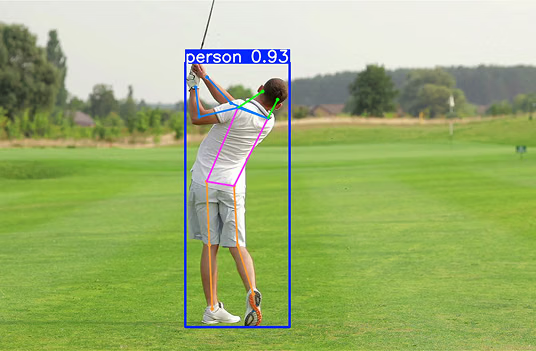
Build a camera-based vision inspection system without AI expertise
Find out how to build a camera-based vision inspection system without AI expertise using the Ultralytics Platform, from labeling to deployment.

Every product we use, whether it is a phone, a packaged item, or a car part, goes through some form of quality inspection before it reaches us, the end consumer. This has been traditionally done using manual checks or simple rule-based systems. While these methods work, they are often slow, inconsistent, and hard to scale as production increases.
To improve the quality inspection process, many industries are turning to computer vision, a branch of artificial intelligence that helps machines understand images and video. For example, vision AI models like Ultralytics YOLO26 can help detect, classify, and locate defects with a high level of accuracy.
In real production environments, these models can be used to analyze images captured directly from high-speed assembly lines. As products move through different stages, industrial cameras track them, and the system checks for issues such as scratches, missing parts, or misalignment. This makes defect detection faster and more consistent while supporting high-throughput inspection.
In the past, building these systems required multiple tools and strong technical expertise, which made the process complex and time-consuming. Ultralytics Platform, our new end-to-end solution for computer vision, simplifies this by bringing data preparation, annotation, model training, and deployment into one place.
In this article, we'll explore how you can use Ultralytics Platform to build practical, camera-based vision inspection systems without needing deep AI expertise. Let's get started!
The role of computer vision in quality control#
Before we dive into how Ultralytics Platform makes building inspection systems easier, let’s take a step back and understand the role of computer vision in quality inspection.
Inspection is a key part of the manufacturing process that ensures products meet quality standards and are free from defects. However, results can vary, especially during long shifts or high-volume production.
To make inspection more reliable, many industries use computer vision, also known as machine vision, to analyze images from the production line and identify defects. These systems use deep learning, where models and algorithms learn patterns from large sets of high-quality labeled images.
During model training, a model is shown examples of both normal products and different types of defects. Over time, it learns to recognize these patterns on its own. Once trained, a model can inspect large volumes of products and apply the same criteria consistently, improving accuracy.
Common computer vision tasks used in quality inspection#
Machine vision applications are enabled by computer vision models like Ultralytics YOLO models that can support different types of vision tasks. Here is an overview of how these vision AI tasks are used for automated inspection workflows:
- Image classification: This task is used to assign a single label to an entire image, such as “good” or “defective.” It provides a high-level assessment of product quality without indicating the location of defects.
- Object detection: It helps identify defects within an image and localize them using bounding boxes. This makes it possible to detect and locate issues such as cracks, scratches, or missing components.
- Instance segmentation: Going a step beyond object detection, it predicts pixel-level masks for each detected defect. This supports precise analysis of the shape, size, and boundaries of defects.
- Object tracking: When tracking products over multiple frames, it follows items as they move through the production line. This maintains consistency and ensures that defects aren’t missed.
- Oriented bounding box (OBB) detection: This task detects objects using rotated bounding boxes instead of axis-aligned ones. It is particularly useful when defects or components appear at different angles, allowing for more accurate localization.
A look at quality inspection applications across industries#
Computer vision is widely used across industries to maintain product quality, meet standards, and reduce the need for manual inspection. It performs key functions such as defect detection, classification, object recognition, measurement, and anomaly detection.
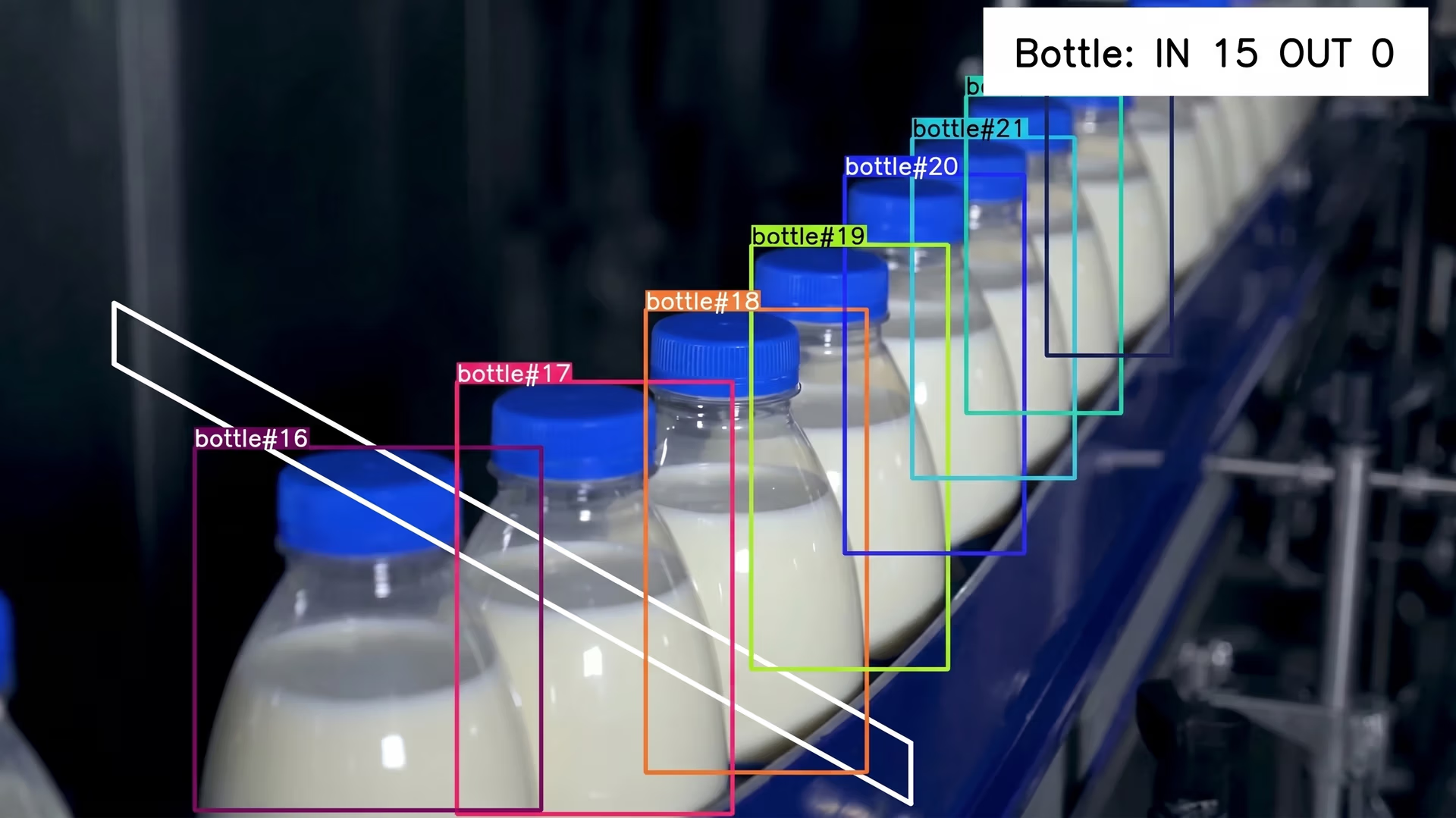
Fig 1. An example of detecting and tracking products using machine vision systems (Source)
Here are some examples of real-world use cases where it is applied:
- Manufacturing: Surface defect detection is used to identify issues such as scratches, dents, cracks, and discoloration by analyzing images of products on the production line for in-line defect detection. It can also detect missing parts or assembly errors in real time, supporting continuous inspection.
- Automotive: Computer vision systems analyze engine parts and body panels to verify alignment and detect damage. They are especially impactful for inspecting complex shapes and hard-to-reach areas, often working alongside robotic systems for precise positioning and automated inspection.
- Electronics and semiconductors: These systems detect small defects in components such as printed circuit boards (PCBs), including soldering issues, micro-cracks, and damaged circuits. With high-resolution image analysis, even very fine defects can be detected that are often missed during manual inspection.
- Packaging and logistics: Visual systems perform barcode scanning, read product labels, and check packaging quality. They ensure products are properly packed, sealed, and ready for shipping, reducing errors.
- Food and beverage: Inspection systems powered by vision cameras or vision sensors analyze product appearance to identify issues such as improper sealing, contamination risks, incorrect labeling, or visual inconsistencies, helping maintain quality and safety.
- Pharmaceuticals: Computer vision is used to inspect tablets, vials, and packaging for defects such as cracks, contamination, incorrect labeling, or fill level inconsistencies, ensuring compliance with strict regulatory standards and maintaining product safety.
Streamlining visual inspection workflows with Ultralytics Platform#
Consider a manufacturing line where products move through different stages while cameras continuously capture images for inspection. These images are used to check for defects such as scratches, missing parts, or misalignment.
Till now, building and managing such inspection systems has required multiple tools and a fair amount of technical expertise.
In fact, at Ultralytics, we have seen consistent feedback from the vision AI community about how fragmented and time-consuming this process can be, with common bottlenecks including scattered tooling, complex environment setup, inefficient data labeling workflows, delays in model training, and challenges in deployment. This feedback played a key role in shaping the Ultralytics Platform.
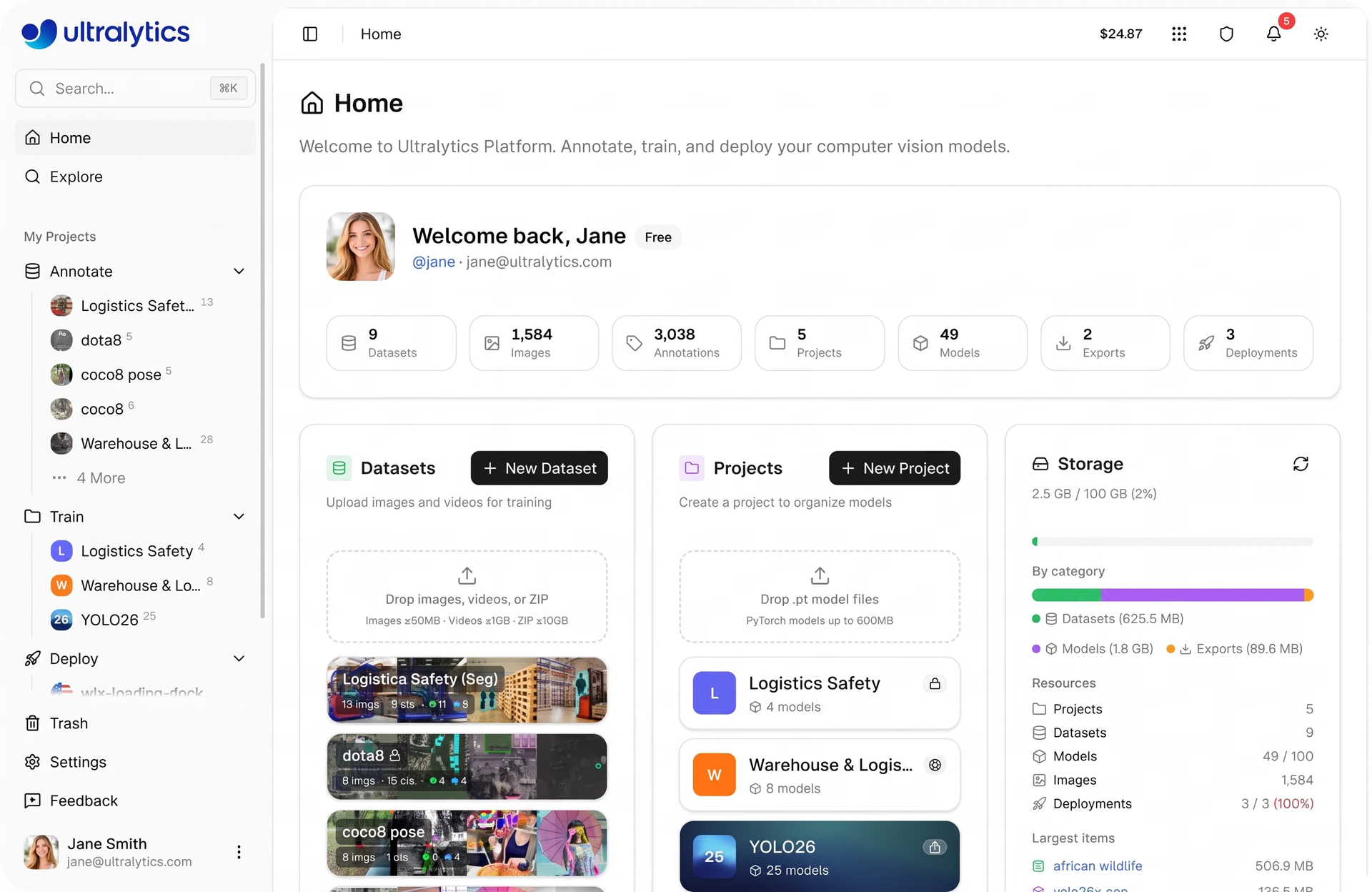
Fig 2. A glimpse of Ultralytics Platform (Source)
With the Ultralytics Platform, the entire development and deployment process can be handled in one place. Raw data can be uploaded and annotated to create training datasets, which are then used to train models to detect defects. Once trained, these models can be deployed to analyze new images from the production line, with built-in tools to monitor performance over time.
In addition to bringing the entire workflow into one place, Ultralytics Platform is designed to be easy to use. Even users with limited machine learning experience can go from ideation to production quickly.
Using Ultralytics Platform to label defects in images#
Now that we have seen how the Ultralytics Platform brings the workflow together, let’s walk through how to use it at each stage of the vision AI pipeline, starting with data upload and defect labeling.
Inspection dataset management on Ultralytics Platform#
The first step is bringing data into the platform. You can upload images, videos, or dataset archives such as ZIP, TAR, or GZ files. Common dataset formats like YOLO and COCO are supported, so existing datasets can be imported without extra steps.
You can also get started faster by using datasets shared by the community. These datasets can be explored and cloned into your workspace, letting you build on existing data instead of starting from scratch. Once cloned, they can be updated and extended for your specific use case.
If you are working on various experiments, datasets can be reused by importing them as NDJSON files, making it easier to recreate or share them without additional conversion.
After the data is uploaded, the platform prepares it automatically. It checks file formats, processes annotations, resizes images if needed, and generates basic dataset statistics. Videos are split into frames so they can be used for training, and images are optimized for easier browsing and analysis.
Data annotation powered by Ultralytics Platform#
Once the data is ready, the next step is data annotation. This is where defects are labeled so the model can learn what to detect. Ultralytics Platform includes a built-in annotation editor that supports tasks such as object detection, instance segmentation, image classification, pose estimation, and oriented bounding box detection.
You can label data manually using tools like bounding boxes, polygons, or keypoints, depending on your use case. To speed things up, the platform also offers AI-assisted labeling.
For example, SAM-based smart annotation allows you to label objects using simple clicks. By selecting regions to include or exclude, the system generates a mask in real time, which can then be adjusted if needed.
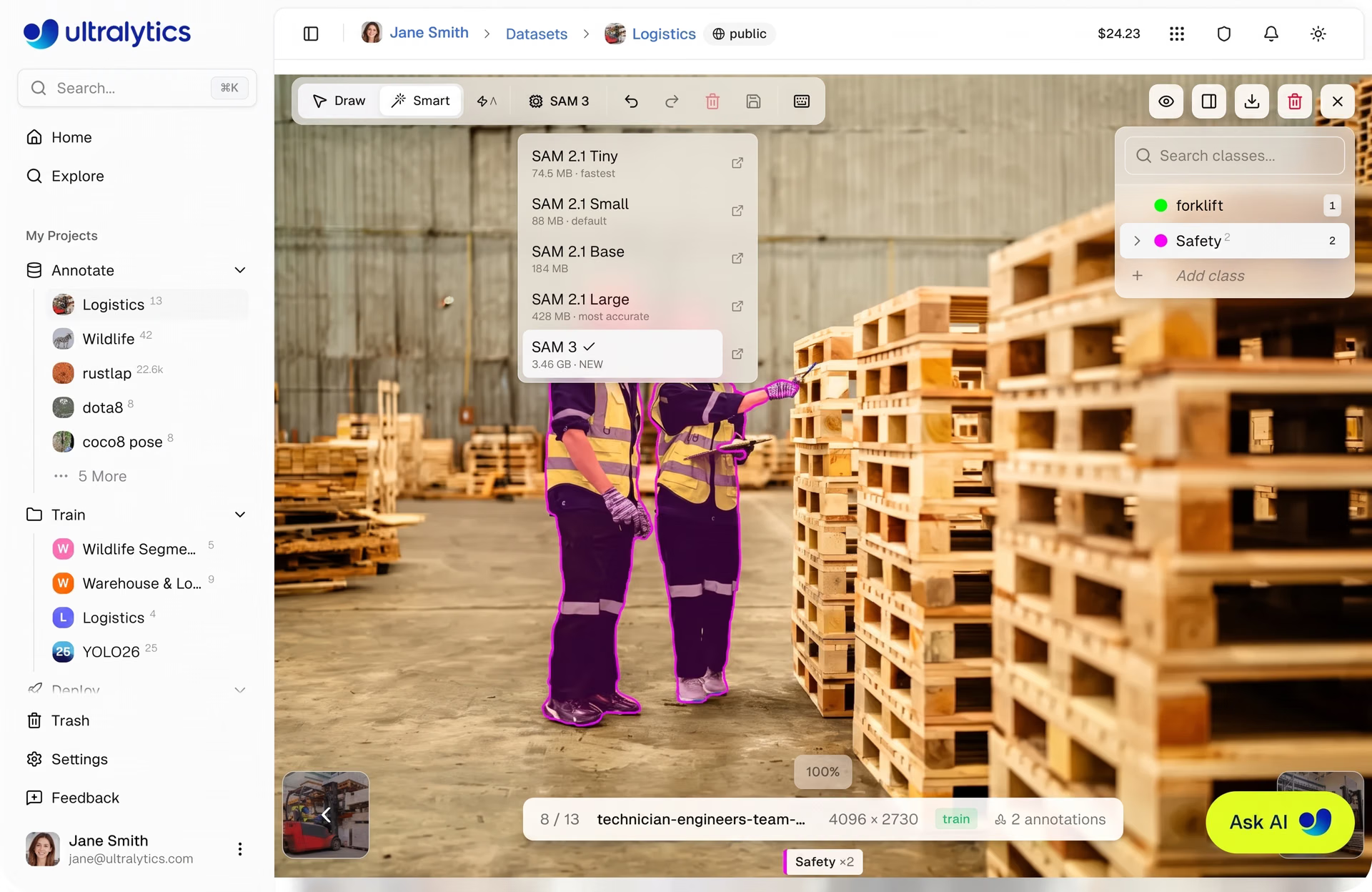
Fig 3. SAM-driven smart annotation within Ultralytics Platform (Source)
In addition, YOLO-based smart annotation can generate labels automatically using model predictions. These can be reviewed and refined, making it easier to work through large datasets without labeling everything manually.
The annotation editor also includes features such as class management, annotation editing, keyboard shortcuts, and undo or redo options. These make it easier to stay consistent and review annotations as your dataset grows.
As you label data, the platform provides insights such as class distribution and annotation counts. This helps identify gaps, fix inconsistencies, and improve dataset quality before moving on to training.
Training YOLO26 for defect detection on Ultralytics Platform#
The next step is to train a model to automatically detect defects using the labeled data. The Ultralytics Platform supports training with Ultralytics YOLO models, including YOLO26, which can be used for tasks such as object detection, instance segmentation, and image classification.
Training is managed through a unified dashboard where you can configure, run, and monitor training jobs in one place. To get started, you can select a dataset, including one you uploaded, annotated on the platform, sourced from public datasets available on the platform, or cloned from the community.
Once selected, the dataset is automatically linked to the training run, making it easier to track experiments and maintain consistency.
Next, you can configure training parameters such as the number of epochs, batch size, image size, and learning rate. These settings control how the model learns and directly impact both training time and performance.
Running and monitoring training#
You can then choose how to run training. The platform supports cloud training on managed GPUs, local training using your own hardware, and browser-based workflows through environments like Google Colab.
When using cloud training, you can choose from a range of GPU options such as RTX 2000 Ada and RTX A4500 for smaller experiments, RTX 4090 or RTX A6000 for more demanding workloads, and high-performance options like A100 or H100 for large-scale training.
When training begins, progress can be monitored directly within the platform. The dashboard provides real-time visibility into key metrics such as loss curves and performance metrics, along with system usage and training logs. This makes it seamless to understand how the model is learning and identify potential issues early.
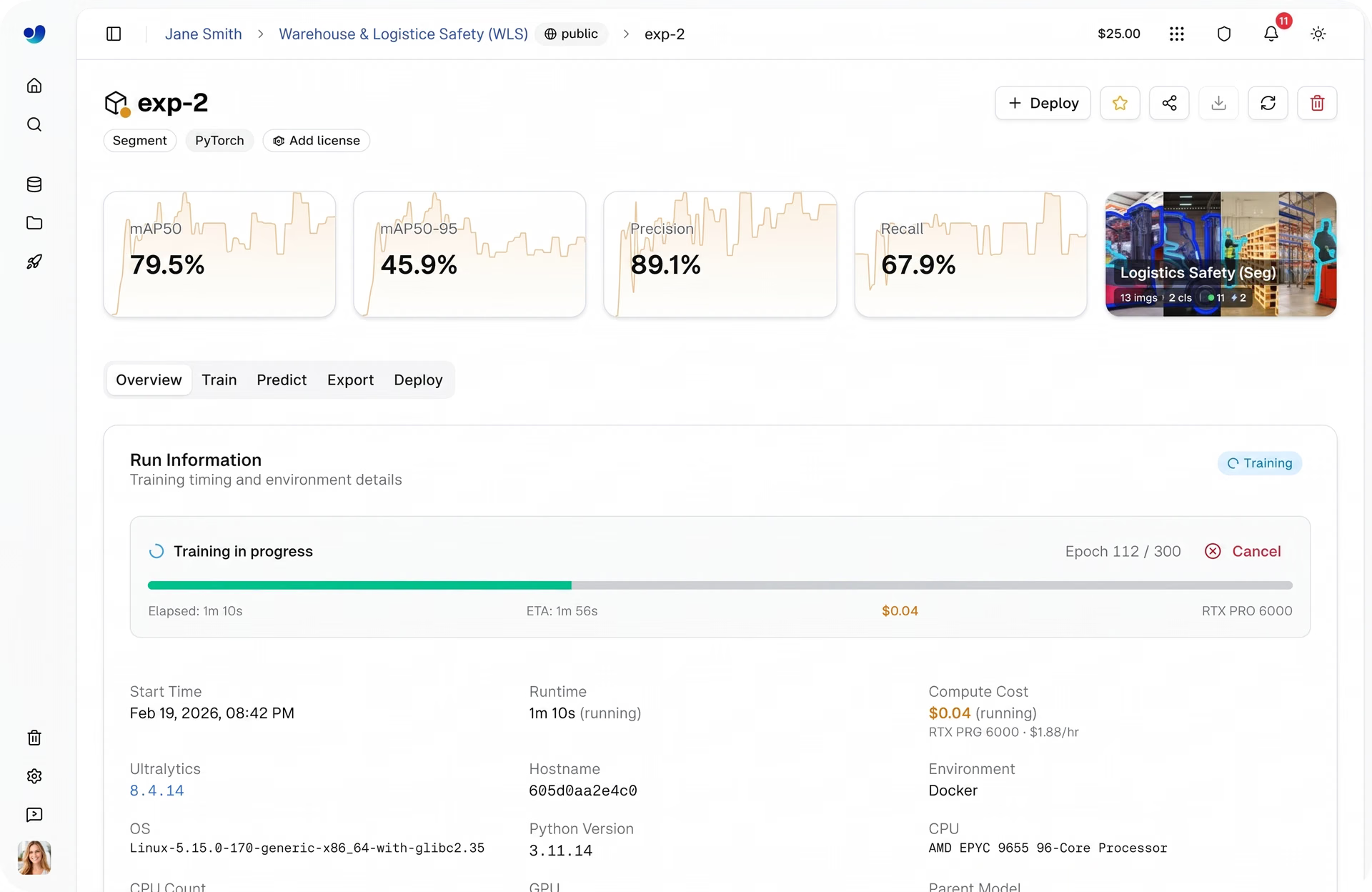
Fig 4. You can monitor training progress easily using Ultralytics Platform (Source)
As you run multiple experiments, the platform keeps track of configurations, datasets, and results in one place. This makes it straightforward to compare different training runs, evaluate performance using metrics like precision, recall, and mAP, and select the best-performing model for deployment.
Deploying a vision model through Ultralytics Platform#
After training, the next step is to validate how the trained model performs on new, unseen data before moving to deployment. Ultralytics Platform includes a built-in Predict tab that allows you to test models directly in the browser without any setup.
You can upload images, use sample data, or capture inputs through a webcam, and results appear instantly with visual overlays and confidence scores. This means you can quickly check model performance and identify any issues before integrating it into real-world systems.
Once the model has been validated, it can be deployed using different options depending on your use case. Here’s a closer look at the model deployment options supported by Ultralytics Platform:
- Shared inference: This option lets you access the model through a REST API, making it easy to integrate into applications or workflows. It runs on a multi-tenant system across a few core regions, where requests are automatically routed to the nearest available service. This makes it a good fit for development, testing, and lighter usage before moving to production.
- Dedicated endpoints: For production use, models can be deployed as dedicated endpoints with their own compute resources. These run as single-tenant services across 43 global regions, helping reduce latency by deploying closer to end users. They also support autoscaling and scale-to-zero, allowing resources to adjust automatically based on traffic.
- Model export: Models can be exported and run outside the platform on local systems or edge devices. The platform supports 17 formats, including ONNX, TensorRT, OpenVINO, CoreML, and TensorFlow Lite. Export options also support optimizations like FP16 and INT8 quantization to reduce model size and improve inference speed for different hardware environments.
Monitoring deployed models using Ultralytics Platform#
The lifecycle of an image processing or computer vision solution doesn’t end with model deployment. This is true for vision inspection systems as well. Once a model is running in production, it needs to be monitored continuously to make sure it performs reliably as conditions change.
Ultralytics Platform provides a built-in monitoring dashboard that gives a clear view of how deployed models are performing. From a single interface, you can track request activity, view logs, and check the health status of each deployment. You can understand how models are being used and how they behave over time.
The dashboard includes key metrics such as total requests, error rates, and latency, helping you evaluate performance and responsiveness. These metrics are updated regularly and provide insights into both usage patterns and system reliability.
A built-in world map shows where requests and deployments are distributed across regions. With support for deployments across multiple global locations, this view helps track usage geographically and understand how models perform in different environments.
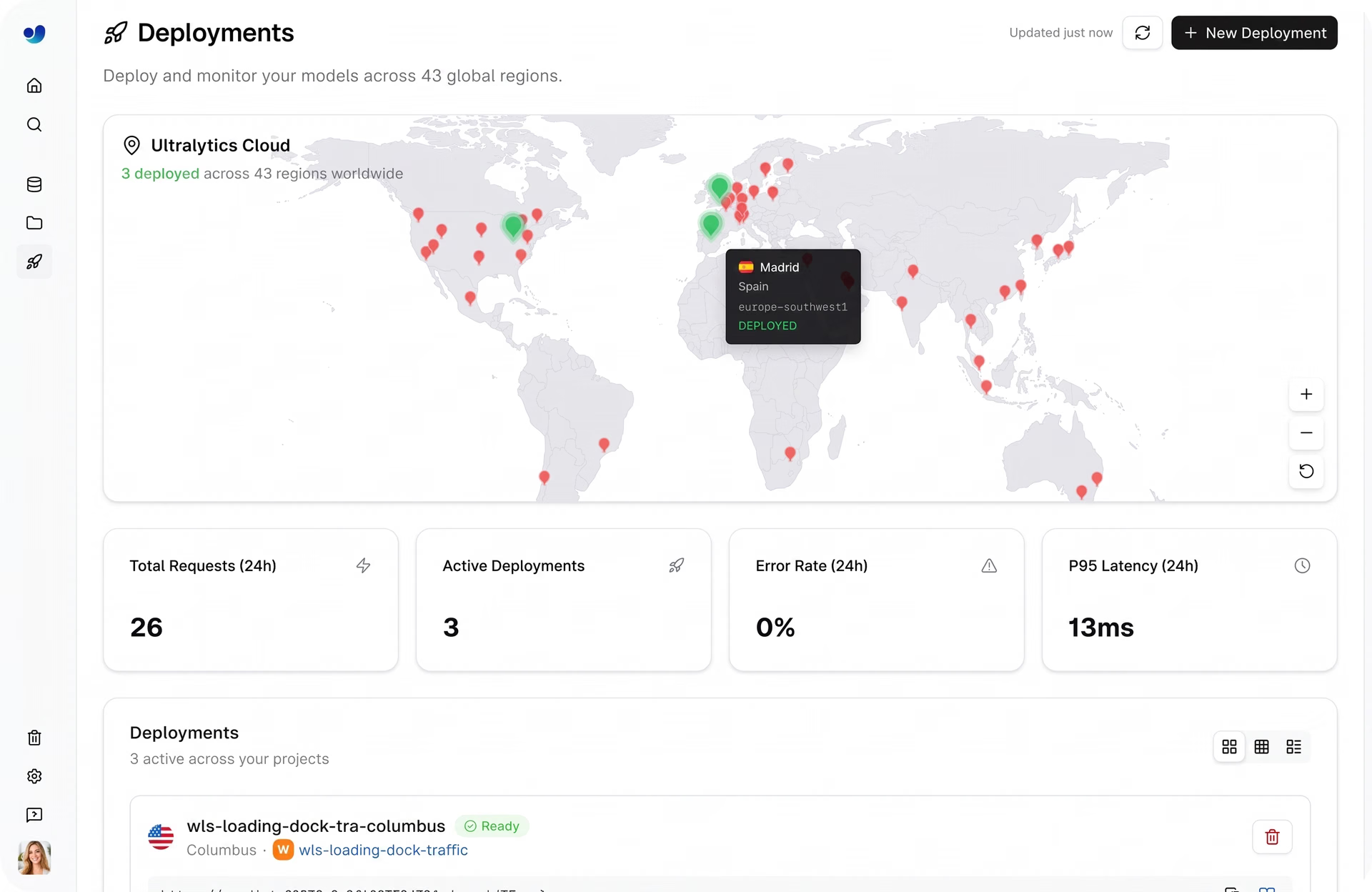
Fig 5. Monitoring deployed models on Ultralytics Platform (Source)
For deeper analysis, each deployment includes detailed logs with timestamps, request details, and error messages. Logs can be filtered by severity, making it simple to debug issues and identify failures quickly. In addition, health checks provide real-time status indicators, showing whether a deployment is running as expected or needs attention.
Monitoring also plays an important role in optimization. As input data, traffic, or usage patterns change, performance may vary. By tracking metrics and logs, you can identify issues such as high latency, increased error rates, or scaling limitations and take action to maintain consistent performance.
Benefits of using the Ultralytics Platform to build vision solutions#
Here are some of the key advantages of using the Ultralytics Platform for building and scaling vision inspection systems:
- Optimized for real-world use: Features like autoscaling endpoints, edge deployment, and model export ensure the system can run reliably in production environments.
- Faster development cycles: Built-in tools and default configurations help move from raw data to a working system more efficiently.
- Ease of use: Intuitive interfaces, streamlined workflows, and minimal setup requirements make the platform accessible to both beginners and experienced users.
- Less manual work: Features like AI-assisted annotation and automated data processing reduce time spent on repetitive tasks.
- Scalable over time: As requirements change, the system can be updated by adding new data and retraining models, enabling adaptation to new defect types, conditions, and multi-camera setups.
Key takeaways#
Building a camera-based vision inspection system doesn’t have to be complex or require deep AI expertise. With the Ultralytics Platform, you can go from raw data to a working system and monitor its performance, all in one place. This streamlines how inspection systems are built, improved, and run in real-world settings.
Join our community and explore our GitHub repository to learn more about vision AI. Check out our licensing options to kickstart your computer vision projects. Interested in innovations like AI in manufacturing or computer vision in the automotive industry? Visit our solutions pages to discover more.