How Ultralytics Platform uses AI to automate annotation
Discover how Ultralytics Platform uses AI to automate annotation, manage large datasets, improve consistency, and speed up computer vision development.
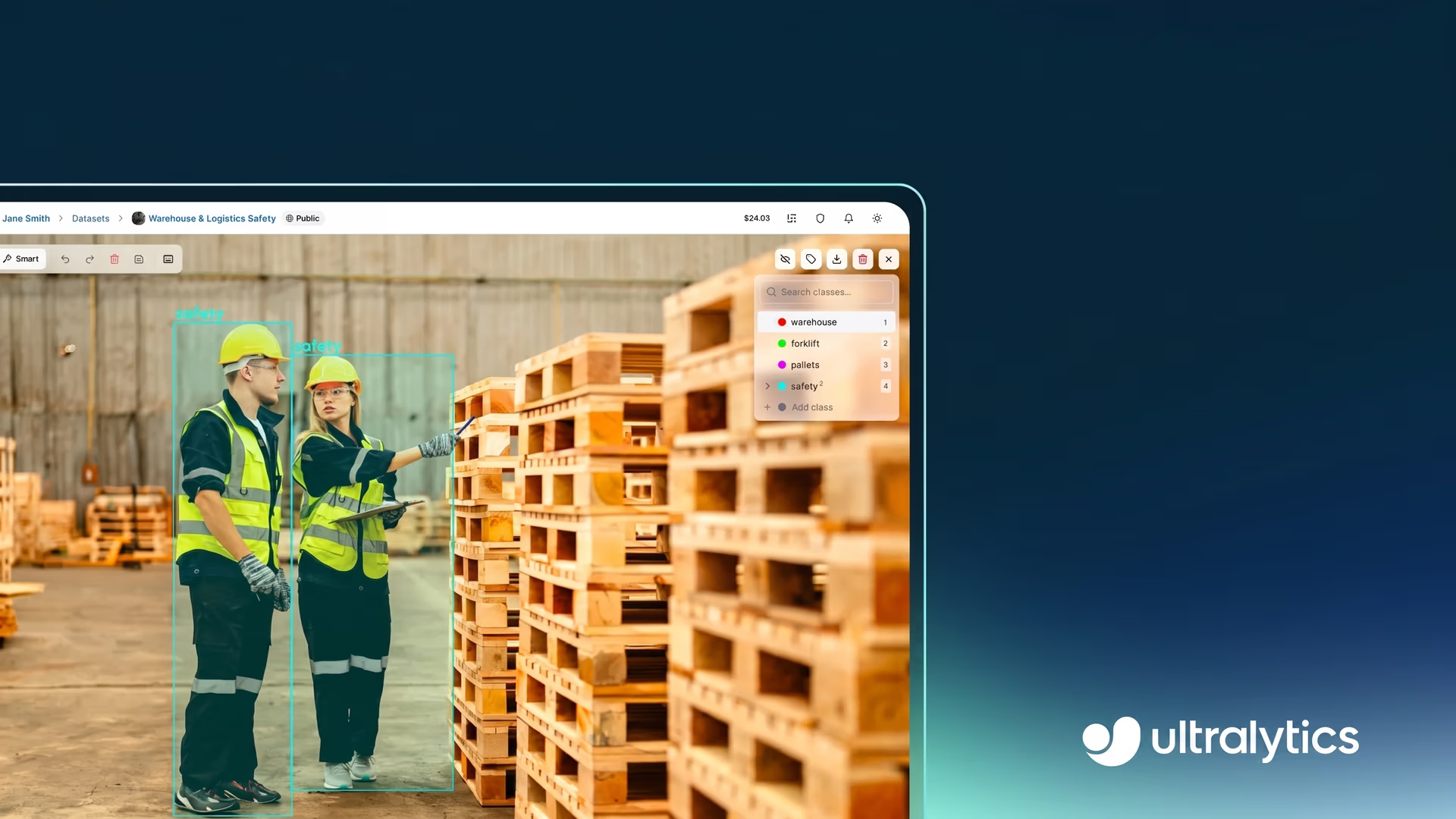
Computer vision solutions that analyze images and videos are becoming a regular part of workflows across many industries, from manufacturing to medical imaging. In manufacturing, for example, detecting surface defects on products moving along a conveyor belt depends on computer vision models that can spot subtle patterns.
For such models to work well, they have to be trained on labeled data where each defect is clearly identified. This enables these models to learn what to look for and recognize similar patterns.
The process of creating these labels is called data annotation. In particular, image annotation and video annotation involve drawing bounding boxes, outlining shapes, or labeling specific regions within images and video frames.
While this is manageable for small datasets, it quickly becomes harder to handle as data grows. Labeling thousands of images takes consistent manual effort, making annotation a major bottleneck. Traditional tools are often slow, fragmented, and difficult to scale.
Ultralytics Platform, the all-in-one vision AI platform, helps solve these challenges with AI-assisted annotation. By using AI to automatically generate initial labels that can be quickly reviewed and refined, it reduces manual effort and improves efficiency.
In this article, we’ll explore how AI-assisted annotation works within Ultralytics Platform and how it improves the labeling process. Let's get started!
An overview of the data annotation process#
Before diving into how AI-powered annotation works on Ultralytics Platform, let’s first take a closer look at data annotation.
Data annotation, also known as data labeling, is the process of assigning structured labels to raw data so it can be used to train machine learning models. In computer vision, these labels define the objects, regions, or features of interest within images or videos.
During training, models or algorithms learn to map input data to these labels, making annotation quality a key factor in model performance. Accurate and consistent labeled datasets make it possible for the model to learn correct patterns, while poor or inconsistent annotations can lead to unreliable predictions.
For instance, in a defect detection use case, an image of a product on a conveyor belt can be annotated by marking where defects appear and labeling what kind of defect they are. This helps the model learn what defects look like so it can identify them in new images.
A look at common annotation tasks#
Next, let’s look at some common ways images are annotated in computer vision. These methods are used to label visual data for tasks like object detection, instance segmentation, and image classification. Each annotation method serves a different function, such as locating objects, capturing shapes, or identifying key structures.
Bounding boxes#
Bounding boxes are simple rectangles drawn around objects in an image to show where they are. They are one of the most common ways to label data in computer vision.
By training on images with these boxes, object detection models learn to recognize different objects and understand their location within an image. This allows them to detect multiple objects at once and identify where each one appears.
For example, consider a game of baseball being analyzed using computer vision. Boxes can be drawn around players, the bat, and the ball in each frame, letting the model detect and identify these objects throughout the game.
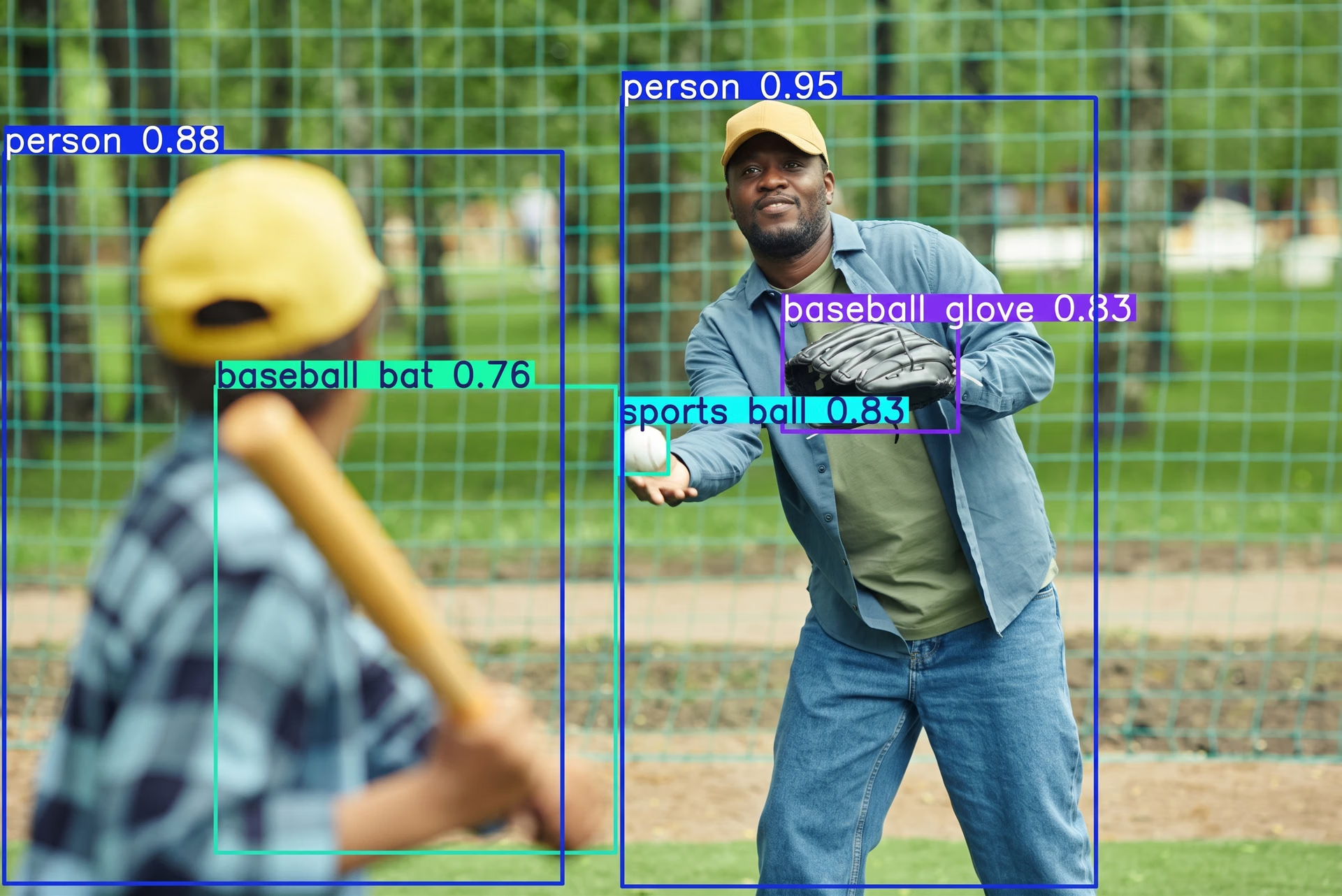
Fig 1. Bounding boxes can be used to label and locate multiple objects. (Source)
Polygons or segmentation masks#
Polygons, also referred to as segmentation masks, go a step further than bounding boxes by labeling objects at the pixel level. Instead of drawing a rough rectangle, they capture the exact shape and edges of each object in an image. This makes them useful for tasks that require a more detailed understanding.
For example, in autonomous driving, segmentation masks are used in tasks like semantic segmentation, where each pixel is assigned a category such as road or sky, and instance segmentation, where individual objects like vehicles or pedestrians are identified separately.
They are also used for tasks like background removal, where an object, such as a person, needs to be isolated from the rest of the image.
Keypoints#
Keypoints are used to mark specific points on an object, such as joints in the human body or parts of an animal. By identifying these points, models can understand the structure of an object and how its parts are positioned relative to each other.
In computer vision, this is known as pose estimation, where the goal is to identify the location of these keypoints and understand how they relate to one another. Tracking these points over time makes it possible to analyze movement and changes in posture.
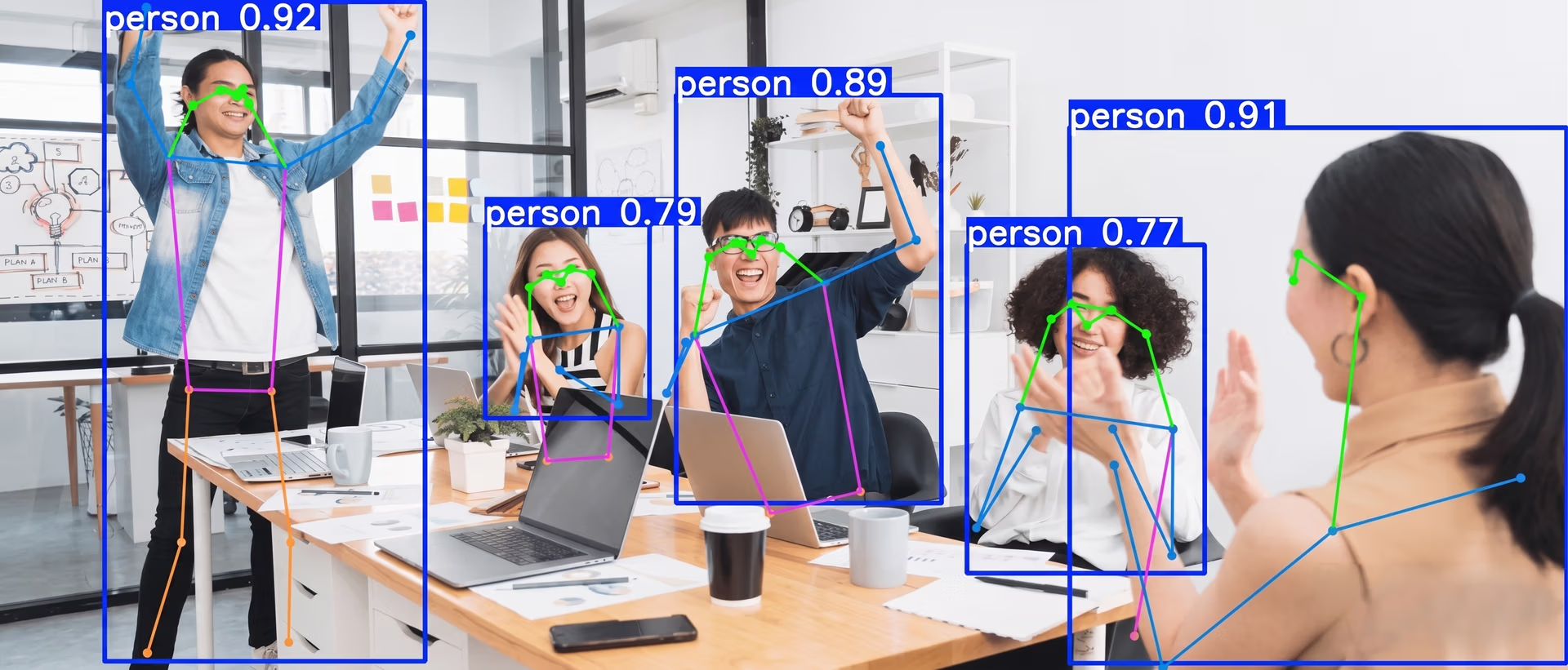
Fig 2. Keypoint annotations can be used to mark joints for human pose estimation. (Source)
A common example is marking body joints in a video to analyze human movement. By focusing on these key points, models can capture how a person is positioned and how their posture changes over time.
Oriented bounding box (OBB)#
Not all objects in an image are perfectly aligned. In many real-world scenarios, objects appear tilted, rotated, or are viewed from different angles.
Standard bounding boxes often struggle in these cases, as they can include unnecessary background or fail to match the object closely. Oriented bounding boxes address this by using rotated rectangles that align with the object’s direction. This results in tighter and more accurate annotations.
This approach is used in oriented bounding box (OBB) detection, where models identify both the location of an object and its orientation. An example is aerial imagery, where objects like buildings, ships, or vehicles often appear at different angles. Rotated boxes make it easier to capture their true shape and direction within the scene.
Classification labels#
Classification labels take a different approach from other annotation methods by assigning a single label to an entire image, rather than marking specific objects or regions. They are used when the goal is to identify what is present in an image, without focusing on where it appears.
For example, an image can be labeled as “cat” or “dog” based on its overall content. This makes image classification useful for tasks where a high-level understanding of the image is enough.
Limitations of traditional annotation tools#
Many traditional labeling tools rely on multiple steps and disconnected workflows. AI development teams often have to switch between annotation platforms for labeling, storage, and validation, which slows down AI projects.
Most tools support only a limited set of annotation types and data types, so teams end up using different tools for bounding boxes, segmentation, and keypoints. This fragmented setup can be difficult to manage, especially for teams new to computer vision.
Manual effort is another major challenge. While annotating a single image may take only a few minutes, working with large datasets quickly becomes time-consuming, especially when similar images involve repetitive tasks.
As datasets grow, teams have to also manage files, track dataset versions, and maintain consistency across annotations. This adds to the workload, with more time spent managing data and less time improving model performance.
A more efficient approach is to use AI-assisted annotation within the Ultralytics Platform, which uses AI to generate and refine labels, reducing manual effort while improving speed and consistency, all within a single environment that brings dataset management, annotation, model training, deployment, and monitoring together.
How Ultralytics Platform enables the annotation process#
Ultralytics Platform simplifies annotation by connecting it directly with the rest of the computer vision workflow. Instead of relying on separate tools, teams can work with data, annotations, and models in a single environment.
It supports a range of computer vision tasks, including object detection, image classification, instance segmentation, pose estimation, and oriented bounding box detection.
Within this setup, annotation can be done in multiple ways. Teams can label data manually for full control, use SAM-powered smart annotation for interactive, point-based labeling, or apply YOLO-driven smart annotation to generate annotations automatically that can be reviewed and refined. This flexibility makes it easier to work with different datasets and annotation requirements.
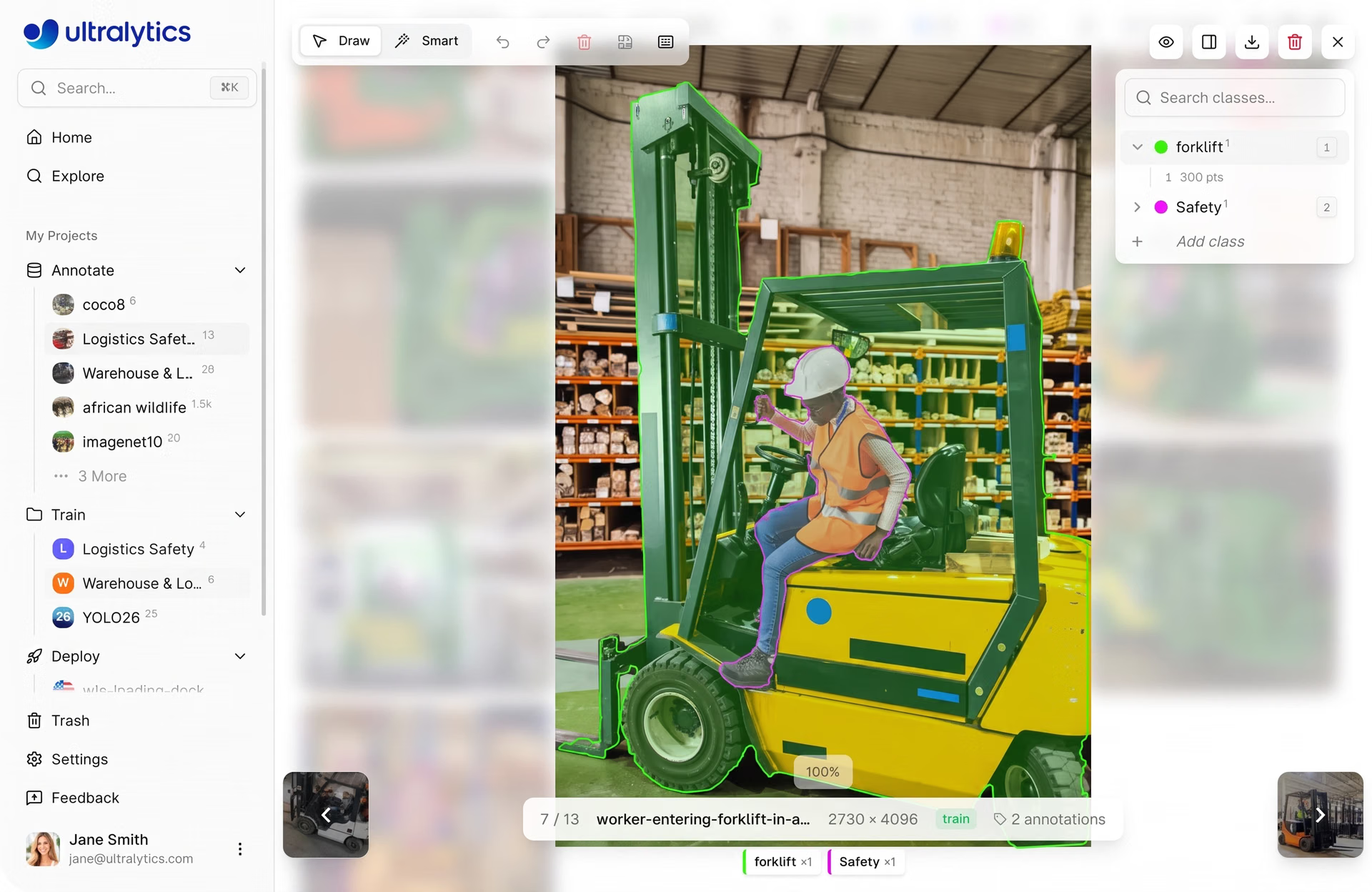
Fig 3. A look at annotation within Ultralytics Platform (Source)
Since AI-assisted and manual annotation are integrated with dataset management and model training, teams can move seamlessly from labeling data to organizing datasets and training models. This keeps workflows structured and removes the need to switch between tools or reformat annotations.
The platform also supports Ultralytics YOLO models such as Ultralytics YOLO11 and Ultralytics YOLO26, enabling annotated data to be used directly for training and testing. This makes it easier to identify gaps in datasets, refine annotations, and retrain models through continuous iteration.
Key features of SAM smart annotation on Ultralytics Platform#
SAM-powered smart annotation on Ultralytics Platform is designed to speed up annotation for object detection, instance segmentation, and oriented bounding box (OBB) tasks.
The platform provides multiple SAM model variants, including SAM 2.1 Tiny, SAM 2.1 Small, SAM 2.1 Base, SAM 2.1 Large, and SAM 3, giving users the option to choose between speed and accuracy.
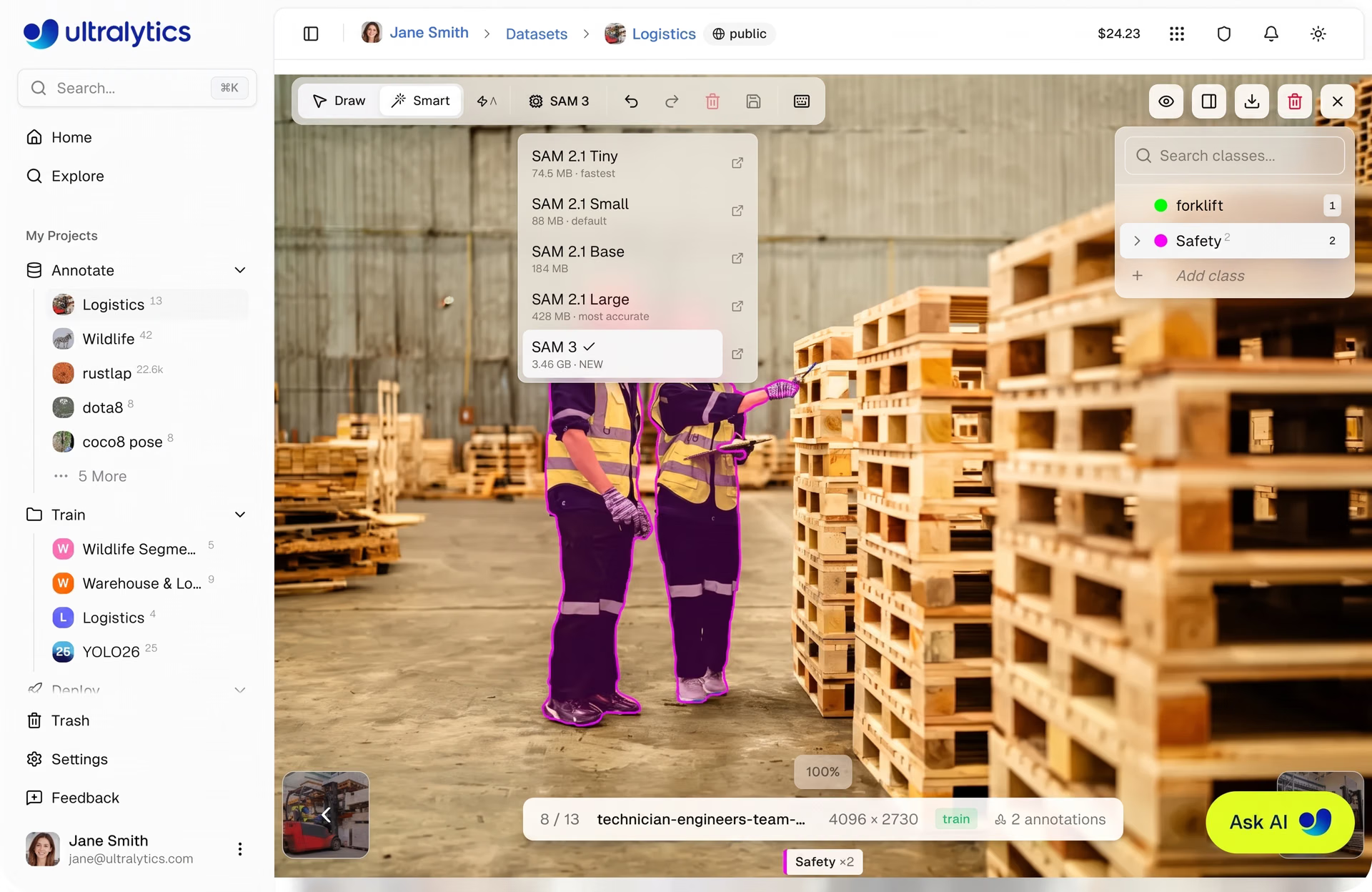
Fig 4. SAM-powered smart annotation on Ultralytics Platform (Source)
Smaller models, such as Tiny and Small, are faster and well-suited for quick annotation workflows, while larger models like Large and SAM 3 provide higher accuracy for more complex scenes. Switching between models updates the annotation behavior immediately.
Within the annotation editor, once a SAM model is selected, human annotators can enter Smart mode to begin labeling. Instead of drawing shapes manually, the model is guided using simple point-based inputs.
A left-click adds a positive point to include a region, while a right-click adds a negative point to exclude unwanted areas. Based on these inputs, the model generates a precise mask in real time.
To speed up the workflow, auto-apply mode can be enabled. When active, each click automatically generates and saves an annotation without requiring manual confirmation. For more complex objects, annotators can either hold "Shift" to place multiple points before the mask is applied or disable auto-apply to freely add points and then press "Enter" to apply the mask.
Understanding YOLO smart annotation on Ultralytics Platform#
Similar to SAM-powered smart annotation, YOLO smart annotation on the Ultralytics Platform uses AI to speed up the labeling process. Instead of guiding the model with clicks, it uses model predictions to automatically generate annotations.
This approach supports tasks such as object detection, instance segmentation, and oriented bounding box (OBB) annotation. It works specifically with Ultralytics YOLO models, including pretrained models provided by Ultralytics and custom-trained YOLO models.
Within the annotation editor, annotators can enter Smart mode, select a YOLO model from the model picker, and click Predict. The model picker only shows YOLO models that match the current dataset task, ensuring that generated annotations are compatible.
The model analyzes the image and generates annotations based on its predictions, which are then added directly to the image. If predictions overlap with existing annotation outputs of the same class, duplicate detections are automatically skipped when the overlap exceeds a set threshold, helping maintain clean and consistent labels.
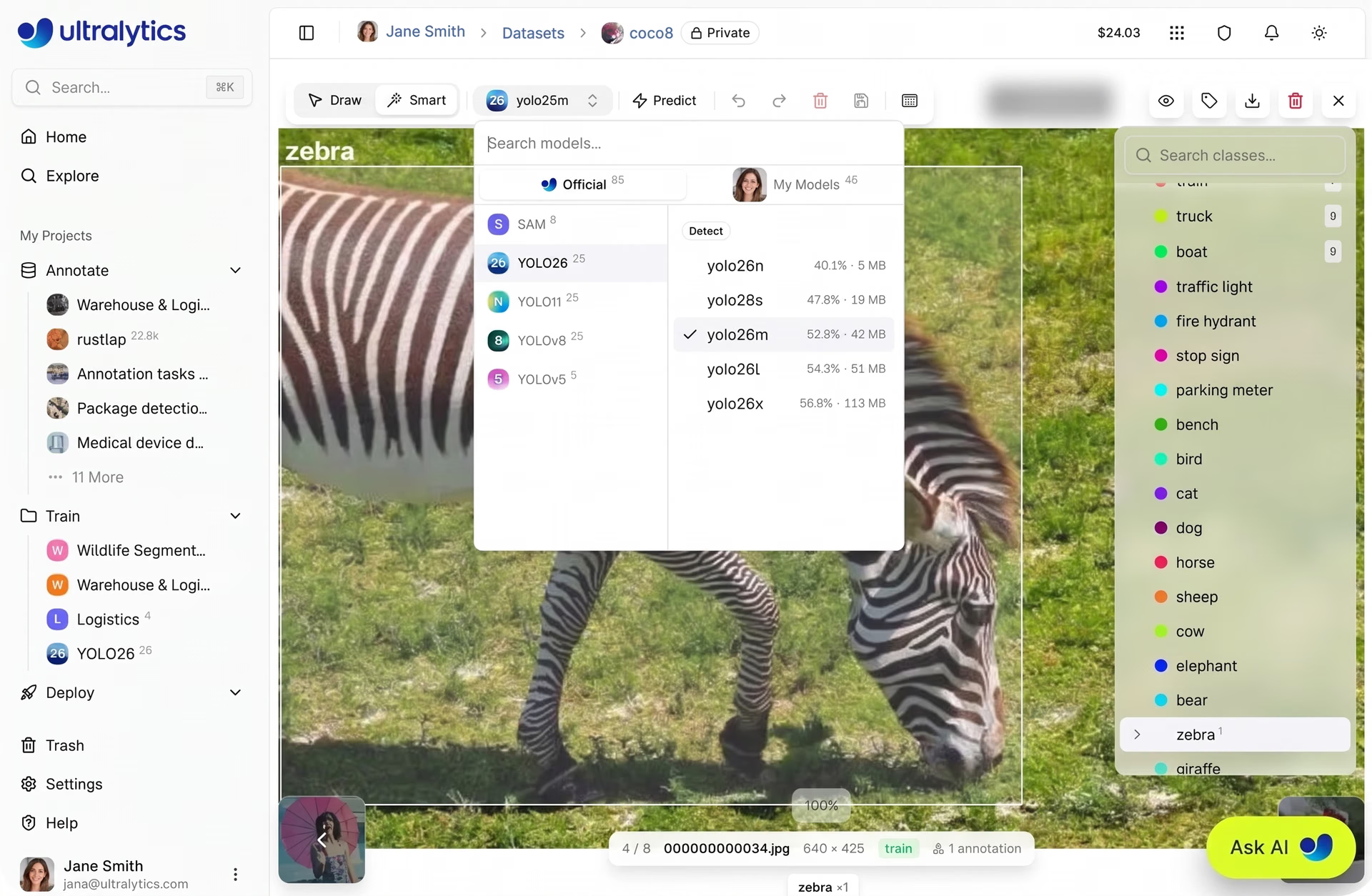
Fig 5. Smart annotation enabled by Ultralytics YOLO models on Ultralytics Platform (Source)
Once predictions are generated, human-in-the-loop annotators can review, adjust, or remove them as needed. This makes it easier to quickly label large datasets by starting with model-generated annotations and refining them instead of annotating everything manually.
Over time, improved YOLO models can be reused to generate better predictions, supporting an iterative auto-labeling workflow.
Applying AI-assisted labeling in real-world pipelines#
Next, let’s walk through examples of how the Ultralytics Platform enables data annotation across real-world use cases.
Segmentation in autonomous driving#
Autonomous vehicles integrated with computer vision models rely on well-annotated visual data to understand their surroundings in real time. Models trained on this data can detect and segment vehicles, pedestrians, traffic signs, and road boundaries.
Segmentation tasks require precise, pixel-level boundaries, which makes annotation both critical and time-consuming. Manually labeling large volumes of sensor data can quickly become a bottleneck, especially in complex driving scenes.
Ultralytics Platform streamlines this process with AI-assisted annotation using both SAM and YOLO models. SAM-powered smart annotation enables fast, click-based segmentation with precise masks, while YOLO models can be used to automatically generate annotations across images.
Together, these approaches make it easier to handle complex scenes with overlapping objects.
Because annotation is directly connected to model training, updated large-scale datasets can be used immediately to retrain and evaluate models. This allows teams to continuously improve performance and adapt to new driving conditions more efficiently.
Enhancing quality assurance systems in manufacturing#
In manufacturing, maintaining consistent quality control depends on accurately detecting defects during production. Computer vision models are often used to identify issues in real time, but their performance depends on how well the training data reflects actual production conditions.
Changes in manufacturing environments, such as variations in raw materials, machine settings, or lighting, can introduce new and rare defect types that weren’t part of the original training data. This creates a gap between what the model has learned and what appears on the production line.
To stay aligned, datasets need to be regularly updated with high-quality, in-house annotations. Ultralytics Platform makes it simple to update annotations and expand datasets as new defect patterns emerge. These updated datasets can then be used to retrain models, helping teams adapt more quickly to changing production conditions.
Site monitoring and safety in construction#
Construction sites are dynamic environments, with multiple teams, moving equipment, and constantly changing layouts. Maintaining safety in these conditions depends on clear, well-annotated visual data.
Accurate annotations can boost data quality and help AI systems identify workers, equipment, safety gear, and potential risks across a range of site conditions, including crowded scenes, shifting backgrounds, and varying lighting.
Ultralytics Platform supports this by making it easy to update and refine annotations as site conditions evolve. New images can be captured and added to the dataset as they appear, keeping it aligned with real-world scenarios.
Key takeaways#
High-quality annotation is essential for building reliable computer vision and AI models, but traditional workflows often slow teams down. Ultralytics Platform streamlines this process with automated annotation tools and a scalable workflow. As a result, teams can move faster from data to model while maintaining accuracy and consistency.
Check out our growing community and GitHub repository to learn more about computer vision. If you're looking to build vision solutions, take a look at our licensing options. Explore our solution pages to know more about the benefits of computer vision in manufacturing and AI in healthcare.








