How to tune the NMS IoU threshold in Ultralytics YOLO
Tune the NMS IoU threshold in Ultralytics YOLO: why prediction now defaults to 0.5, when to change iou vs. conf, and when to skip NMS with YOLO26.
 Jing Qiu13 min de lectura
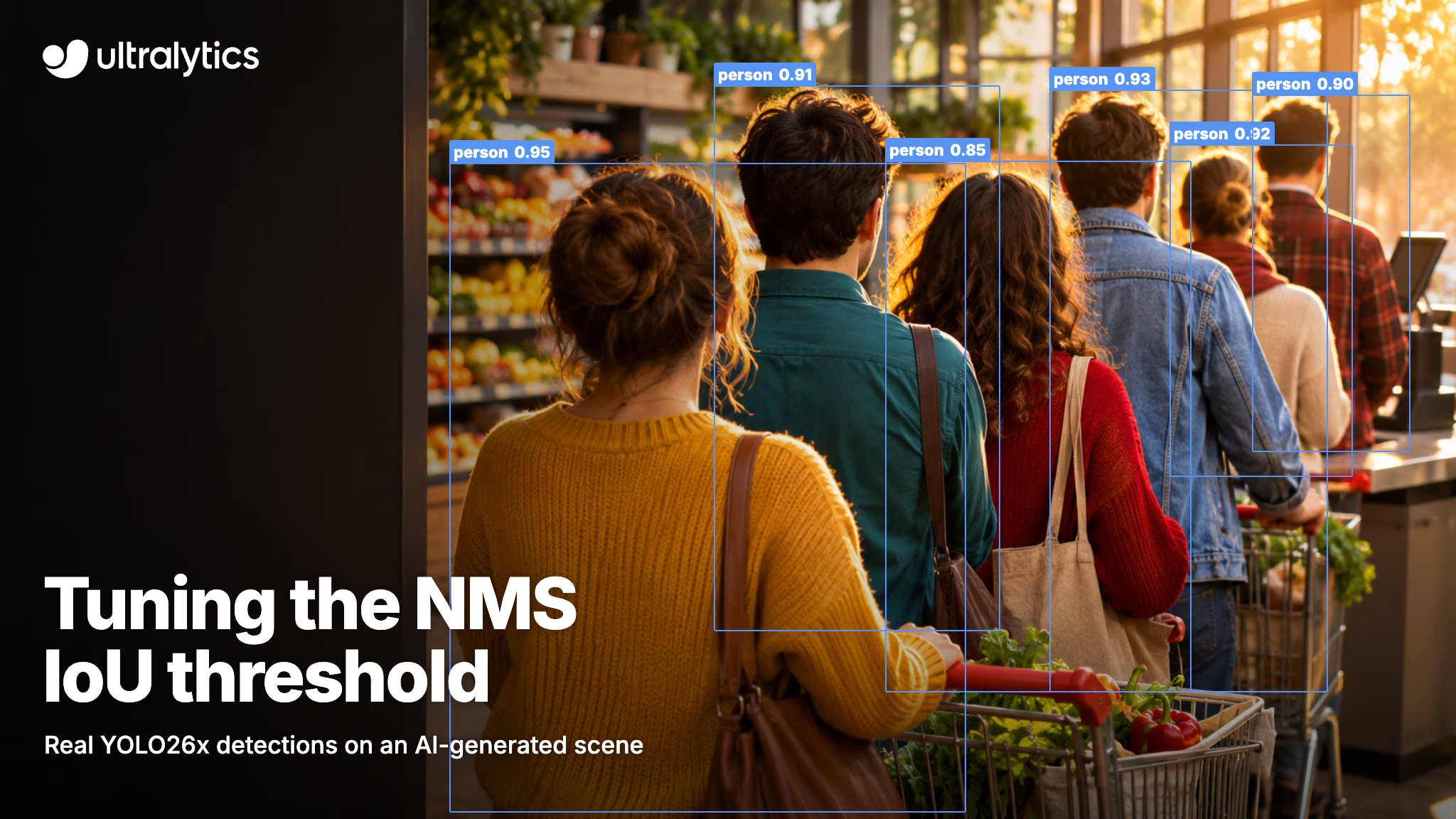
The IoU threshold decides when a detector treats two overlapping boxes as the same object. In Ultralytics YOLO, non-maximum suppression (NMS) keeps the highest-confidence box and deletes any other box of the same class that overlaps it by more than iou. Set it too high and one object gets two boxes; set it too low and the second of two objects sitting side by side disappears.
As of Ultralytics 8.4.208, released November 8, 2026, prediction and tracking default to iou=0.5 instead of 0.7, while validation keeps 0.7. This guide explains what changed and why, how the threshold interacts with conf, how to tune both for your own camera, and when to drop NMS entirely with YOLO26's end-to-end head.
Ultralytics YOLO now predicts and tracks at IoU 0.5 by default#
When you don't pass iou and NMS applies, predict mode and track mode now use 0.5. Any value you pass explicitly still wins, so pipelines that already set iou behave exactly as before. The predict settings reference lists the new default next to conf=0.25.
These workflows pick up 0.5 when iou is unset:
- Python and CLI prediction and tracking, including reused predictors and an explicit
iou=None. - Solutions such as object counting, queue management and TrackZone, which inherit the predictor's value.
- New exports with embedded NMS (
nms=True). A model you exported earlier keeps its export-time default. - Ultralytics Platform, where the inference docs list the IoU slider and the
ioufield on deployed endpoints at 0.5. - Mobile packages: the Ultralytics YOLO iOS package defaults to 0.5 in release 8.9.20, as does the Flutter plugin in release 0.7.2; app-store defaults depend on the installed version.
Two things deliberately stay at 0.7: validation, so published mAP doesn't move, and the SAM, SAM 2, SAM 3 and FastSAM predictors, whose heavily overlapping masks were not part of the measurement.
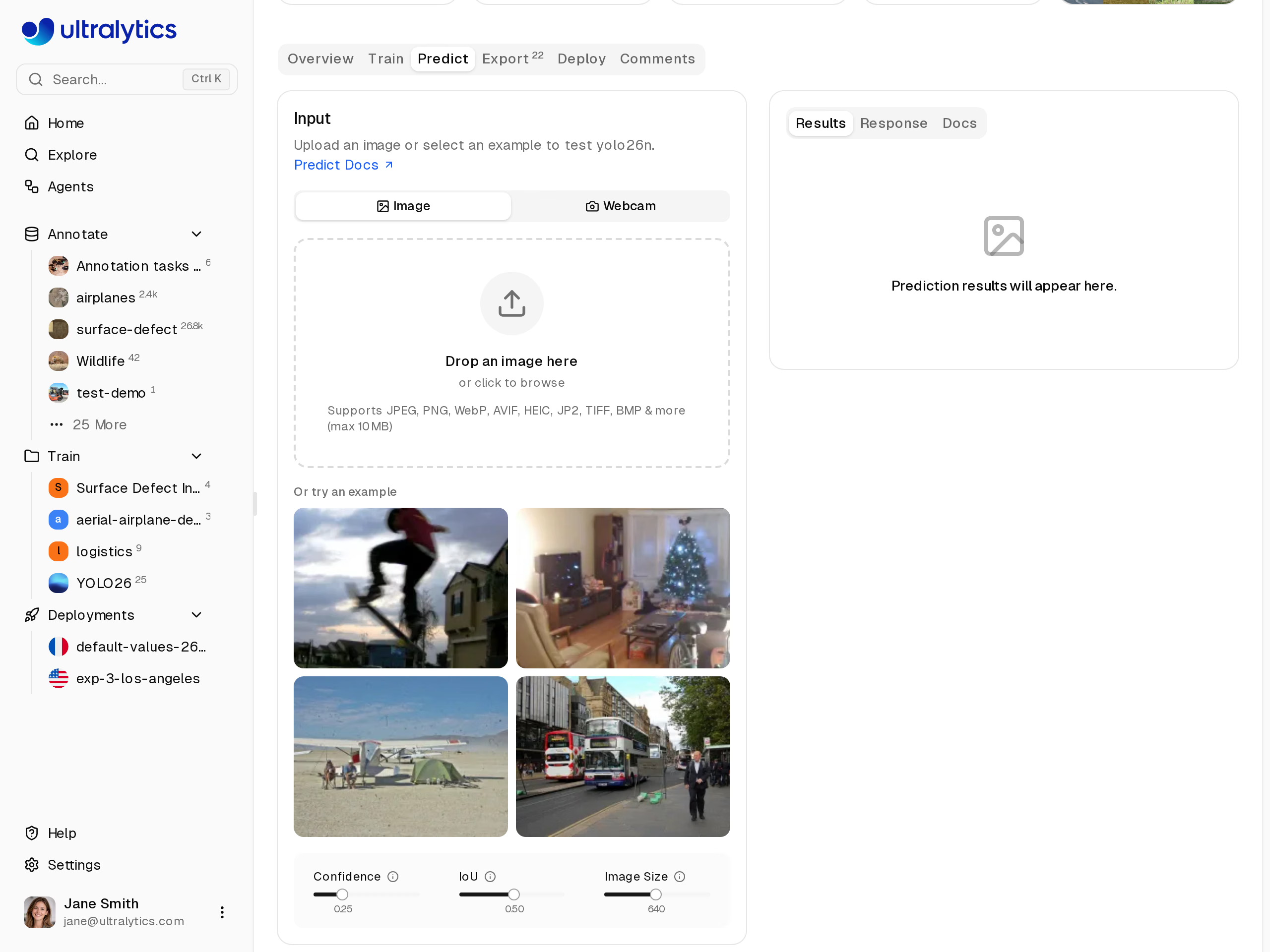
The Predict tab on the YOLO26n model page in Ultralytics Platform. Its IoU slider now starts at 0.5.
Why the old 0.7 default didn't fit prediction#
Before this release, iou had one default shared by predict and val. According to PR #27084, that value moved from 0.6 to 0.7 in a one-line config change in December 2022, inside an unrelated dataloader pull request, and the mobile apps later followed it only for consistency.
The two modes do different jobs:
- Validation scores the whole ranked list of boxes, down to a confidence of 0.001. A duplicate usually ranks below the true box and costs little, while a suppressed real object costs recall at every threshold. A permissive threshold preserves overlapping candidates for evaluation.
- Prediction returns one final set of boxes at
conf=0.25. Every duplicate NMS lets through is a visible false positive in your output, your count or your alert. At 0.7, two same-class boxes overlapping by up to 70% both survive.
conf already had separate defaults for exactly this reason: 0.25 for prediction and 0.001 for validation. iou now follows the same pattern.
What the measurement showed#
PR #27084 reports the following detection F1 scores across NMS thresholds on COCO val2017 using an RTX PRO 6000. F1 summarizes precision and recall; the values below are per-class means, expressed as percentages:
| Model | F1 (%) at IoU 0.45 | IoU 0.5 | IoU 0.7 |
|---|---|---|---|
| YOLO11n | 56.2 | 56.2 | 55.3 |
| YOLO11x | 69.7 | 69.8 | 69.2 |
| YOLO26n | 56.8 | 56.8 | 56.2 |
| YOLO26x | 71.8 | 71.7 | 71.1 |
Every model scores higher at 0.45 or 0.5 than at 0.7, and 0.5 sits at or within 0.1 of each model's best result in the table. The gaps are under one point on the COCO val2017 per-class average; on your own camera, the size of the gap depends on how often same-class boxes overlap.
What a lower IoU threshold does to duplicates and to close neighbors#
NMS measures overlap with intersection over union: the shared area divided by the combined area of two boxes. It sorts boxes by confidence, keeps the best one, and deletes every other box of the same class whose IoU with it exceeds the threshold. Then it repeats with the next surviving box.
That single number cuts both ways:
- Lower
ioudeletes more overlapping boxes. Duplicates on one object disappear sooner, but two real objects that overlap heavily, such as cars bumper to bumper, packages on a conveyor or people in a queue, can be reduced to one. - Higher
ioukeeps more overlapping boxes. Close neighbors survive, but so do near-duplicate boxes on a single object.
The Academy object detection lesson shows the effect on the standard bus.jpg test image with YOLO26n:
iou | Boxes on bus.jpg | Effect |
|---|---|---|
| 0.3 | 5 | Strict: overlapping boxes are suppressed |
| 0.5 | 5 | Default |
| 0.95 | 8 | Permissive: near-duplicates survive |
On this image, going from 0.5 down to 0.3 leaves the count unchanged, while going up to 0.95 lets three more boxes through. The effect will differ on your footage, so test several thresholds on your own frames.
Two related settings shape the same output. agnostic_nms=True suppresses overlapping boxes across classes as well, which helps when one object gets two labels such as car and truck. max_det caps detections per image at 300 by default, so very dense scenes may need it raised.
YOLO confidence vs. IoU threshold: when to change each#
conf and iou answer different questions. conf asks whether a box is confident enough to keep; iou asks whether two kept boxes are really one object. Change conf first when your problem is weak or spurious boxes, and change iou only when the problem is overlap. The confidence score in YOLO26 is a ranking score, not a calibrated probability, so pick both values from validation data rather than intuition.
Use the symptom in your output to choose the knob:
- The same object gets two boxes. Lower
iou, for example from 0.5 to 0.4. - One of two neighbors vanishes in crowds. Raise
iou, for example from 0.5 to 0.7, the old default. - Boxes appear on background. Raise
conffirst; changingiouonly affects boxes that overlap. - Real objects are missed entirely. Lower
conf, and check the common issues guide if the model never fires. - You report counts. Sweep both on frames from the counting camera and keep the pair with the smallest count error.
Camera geometry matters as much as the scene. A high, top-down view tends to separate people and vehicles, so their boxes overlap less and a lower threshold is more practical. A low, oblique camera along a queue, a lane or an aisle stacks objects behind each other, and boxes for different objects can overlap well beyond 50%. That is the case where raising iou back toward 0.7 may preserve real detections.
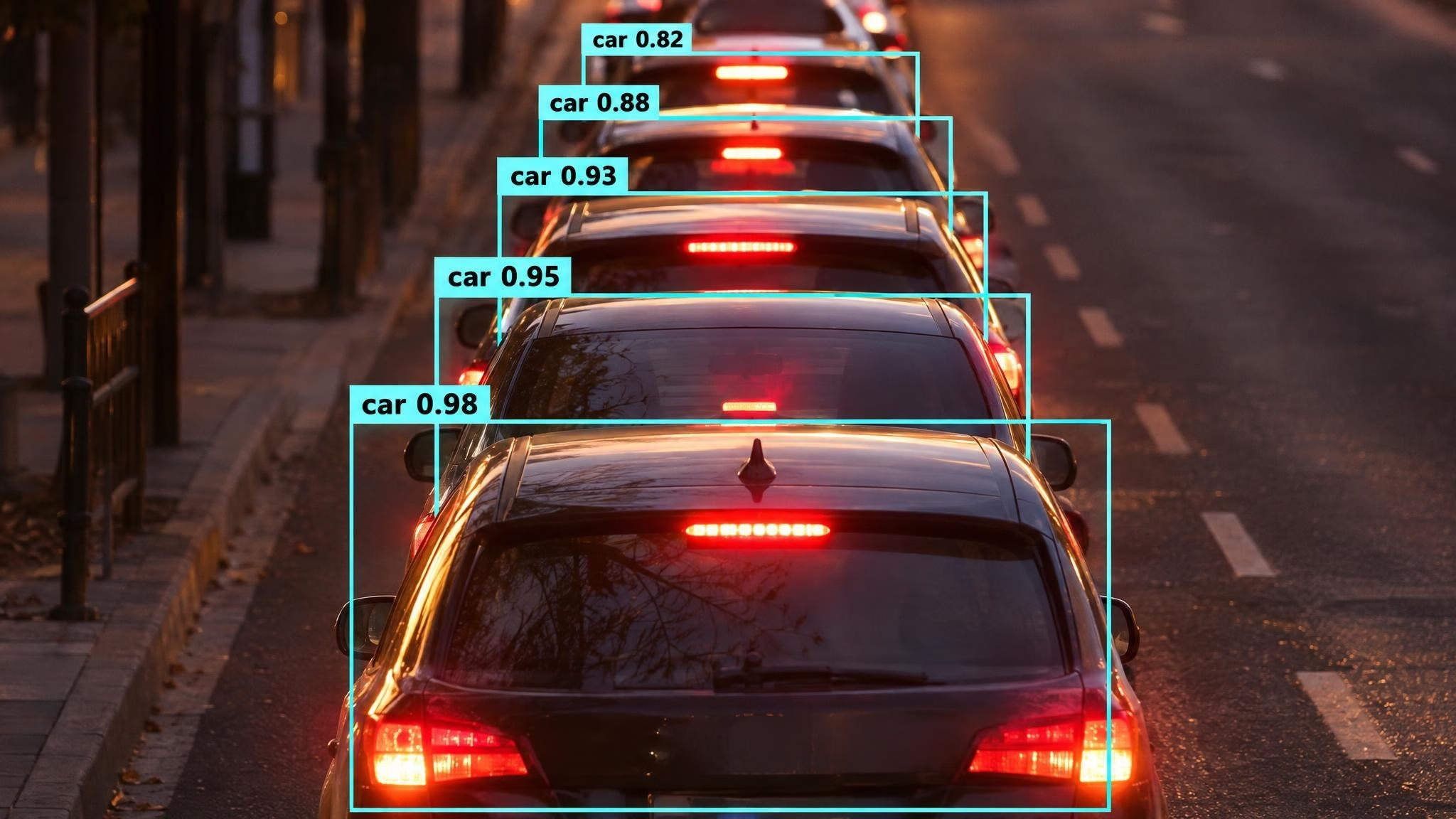
Illustrative. Oblique views of queued objects produce heavily overlapping boxes for different objects, the case where a higher iou keeps real neighbors.
Tune the IoU threshold on your own camera#
A threshold that looks right on one image can fail on a live camera. Tune on a few dozen frames from the deployment camera, at the resolution and angle you will run, and compare against what a person counts by eye.
For a first pass without code, upload a few of those frames to the Predict tab on the YOLO26n model page in Ultralytics Platform and move the confidence and IoU sliders to spot duplicates and missed neighbors. Then run the sweep below to pick values you can defend.
- Collect frames. Save frames from the real camera that cover your busiest and emptiest moments. If you already label them in Ultralytics Platform, use a dataset version as your reference set.
- Count by hand. Note the true number of target objects in each frame, or label them fully if you plan to train.
- Sweep
confandioutogether. Run the script below, which compares each frame's count with yours. - Pick the pair with the smallest mean error, then open the frames where it still fails: duplicates mean go lower on
iou, merged neighbors mean go higher. A count can look right while a duplicate and a miss cancel out in the same frame, so check the drawn boxes too, and confirm the chosen pair on a few frames you didn't tune on. - Set both explicitly everywhere the model runs, including exports with embedded NMS, so a future default change never moves your results.
from pathlib import Path

from ultralytics import YOLO

model = YOLO("yolo26n.pt")  # or your trained weights
hand_counts = {"frame_001.jpg": 12, "frame_002.jpg": 7}  # your count per frame
frames = [str(Path("path/to/camera_frames") / name) for name in hand_counts]

for conf in (0.25, 0.35, 0.5):
    for iou in (0.3, 0.4, 0.5, 0.6, 0.7):
        errors = []
        print(f"conf={conf} iou={iou}")
        for r in model.predict(frames, conf=conf, iou=iou, classes=[0], stream=True, verbose=False):
            name = Path(r.path).name
            predicted, expected = len(r.boxes), hand_counts[name]
            errors.append(abs(predicted - expected))
            print(f"  {name}: predicted {predicted}, hand count {expected}")
        print(f"  mean count error {sum(errors) / len(errors):.2f}")
Mean absolute error prevents overcounts in one frame from canceling undercounts in another. The classes=[0] argument limits the count to one class (person in COCO); use your own class index. The tuned values then go into tracking and export:
# Tracking applies the detector's NMS threshold before association
results = model.track("path/to/video.mp4", conf=0.35, iou=0.6, persist=True)

# Embed NMS in a new export with both tuned thresholds
model.export(format="onnx", nms=True, conf=0.35, iou=0.6)
For tracking, a stable threshold matters twice. A duplicate box that survives NMS can start a second track ID on the same object, and a suppressed neighbor can drop out of association for that frame; for detection and OBB, the default TrackTrack tracker can recover some of those candidates through its own looser pass. Our tracking lesson on ByteTrack and BoT-SORT covers the tracker's own matching thresholds, which are separate from iou.
Serving the model from a dedicated endpoint in Ultralytics Platform? Pass your tuned conf and iou explicitly on each request.
Why validation stays at IoU 0.7#
If you validate with model.val(), nothing changed: the validator still fills iou=0.7. Validation works through the full ranked list of boxes at a very low confidence, where a permissive threshold keeps overlapping candidates available for matching against labels. Keeping 0.7 also means mAP figures you already published, and the ones in our model tables, stay comparable to new runs.
One related validation detail did change. The confusion matrix now matches predictions to labels at IoU 0.5 instead of 0.45, the same IoU threshold used for mAP50. That is a matching threshold, not NMS: it decides which boxes count as correct, not which boxes survive. The performance metrics guide explains how each metric is computed.
The validation setting optimizes a ranked metric over thousands of low-confidence boxes, not the handful of boxes your application acts on. If you want to try 0.7 in production, include it in the camera sweep above and let your count error decide.
When to use YOLO26 without NMS#
Ultralytics YOLO26 trains two heads at once. The one-to-many head proposes several candidates per object and relies on NMS, and it is what prediction and validation use by default. The one-to-one head learns to produce a single prediction per object, so it needs no IoU suppression. Pass nms=False to use it, as the end-to-end detection guide shows:
results = model.predict("image.jpg", nms=False)  # NMS-free one-to-one head
model.export(format="onnx", nms=False)  # outputs (N, 300, 6): xyxy, confidence, class
With nms=False, the detector applies no IoU suppression, so iou has nothing to act on. Only conf, classes and max_det filter the output. With agnostic_nms=True, each candidate keeps only its highest-scoring class; distinct boxes still get no IoU suppression. A tracker such as TrackTrack can still suppress duplicate track starts on its own.
The trade-off is a small accuracy cost. On COCO val2017 at 640 pixels, single-model and single-scale, YOLO26n scores 40.9 mAP50-95 with NMS and 40.1 end to end; YOLO26x scores 57.5 and 56.9, per the YOLO26 model docs. In return, a supported export emits final detections, so you don't implement or tune suppression on the target device.
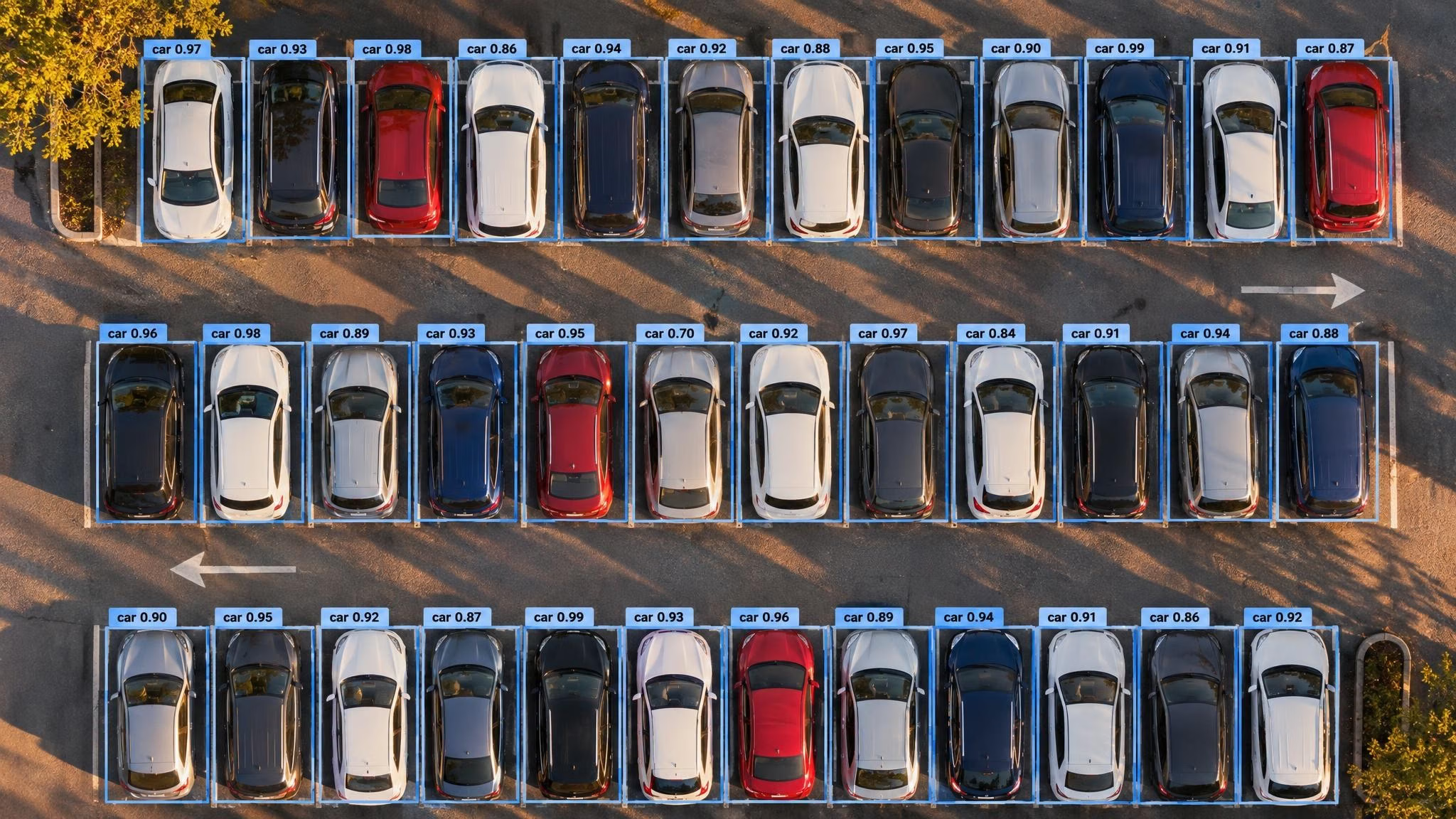
Illustrative. A top-down view of parked cars, each with one separate box.
Choose the NMS-free head when:
- You deploy to an edge runtime where implementing NMS is awkward or slow. Not every format supports it: some fall back to one-to-many outputs or require NMS, so read the export warnings and compare results on the target runtime. For the deployment side, see how YOLO26's NMS-free head changes deployment.
- Your scenes are crowded and no single
iouboth removes duplicates and keeps neighbors on your camera frames. - You want fewer moving parts between model and code, with no runtime-specific NMS to configure.
Keep the default NMS path when the last fraction of mAP matters more than deployment simplicity, or when you use YOLO11 or YOLOv8, which have no one-to-one head.
Whichever head you ship, check the license before the model goes into a product. Ultralytics YOLO models are available under AGPL-3.0 and an Ultralytics Enterprise License; proprietary deployments that can't meet the AGPL-3.0 obligations need the Enterprise License.
Who should change their iou setting#
If you rely on the default and your results looked right at 0.7, re-check them after upgrading: expect fewer duplicate boxes and, in crowded oblique scenes, occasionally a lost neighbor. If you count objects, compare counts before and after on a few known frames.
If you already pass iou explicitly, nothing changes for you. If you never chose a value on purpose, the new default is a measured starting point, and a short sweep on your own frames will tell you whether to keep it. Teams building new edge pipelines on YOLO26 should test nms=False on their target runtime first. To test thresholds on frames from your own camera, open the YOLO26n model page in Ultralytics Platform and select Predict; if your scenes need a model trained on your own data, you can train it in Ultralytics Platform and test it in the Predict tab on your trained model's page. Every inference argument is listed in the predict settings reference.
Preguntas frecuentes
It is the overlap above which non-maximum suppression treats two boxes of the same class as one object and deletes the lower-confidence box. IoU is the shared area of two boxes divided by their combined area, from 0 to 1. The same term also describes the overlap a prediction needs with a label to count as correct during evaluation, such as 0.5 for mAP50.
Since Ultralytics 8.4.208, prediction and tracking default to 0.5, and validation defaults to 0.7. SAM-family predictors keep 0.7. Ultralytics Platform inference also defaults to 0.5; an existing endpoint deployment keeps its deployed runtime until you redeploy it.
Lower it when one object gets two boxes, and raise it when one of two overlapping objects disappears, as in crowds, traffic queues or dense shelves. If your problem is weak or spurious boxes rather than overlap, adjust
confinstead. Tune both on frames from your deployment camera.confdrops boxes whose confidence is below a threshold, 0.25 by default for prediction.ioudecides which of the remaining boxes are duplicates during NMS. One controls how sure the model must be, the other how much overlap counts as the same object.Only on its default NMS path. With
nms=False, YOLO26 uses its one-to-one head, which learns to produce one prediction per object without IoU suppression, soiouhas no effect. On COCO val2017 at 640 pixels, single-model and single-scale, this costs 0.6 to 0.8 mAP50-95 points across model sizes, per the YOLO26 docs.
Escrito por
Senior Machine Learning Engineer · Ultralytics
Comentarios
Haz una pregunta, comparte tus resultados o ayuda a otra persona.