Understanding AI bias and dataset bias in vision AI systems
Learn how dataset bias impacts computer vision models and how Ultralytics YOLO11 helps reduce bias with smart augmentation and flexible training tools.
 Abdelrahman Elgendy10 min read
Listen to this article
Artificial intelligence (AI) models are changing how we solve problems, but they’re not perfect. From self-driving cars to diagnostic tools in healthcare, we rely on AI to interpret data and make decisions. What happens when the data itself is flawed?
Bias in AI refers to patterns of inconsistency that develop in models, often without anyone realizing it. These biases can cause models to make inaccurate, inconsistent, or even harmful predictions. In computer vision, bias usually traces back to one key source: the dataset. If the data used to train the model is unbalanced or unrepresentative, the model will reflect those gaps.
Let’s take a closer look at how dataset bias forms, how it impacts computer vision models, and the steps developers can take to detect and prevent it. We’ll also show how models like Ultralytics YOLO11 can support efforts to build fairer AI systems that generalize better, meaning they perform well on new, unseen data and serve everyone more equally.
What is AI bias and why does it matter?#
AI bias refers to consistent errors in an AI system that result in skewed or inaccurate outcomes. In simpler terms, the model starts favoring one type of visual input over others, which affects the fairness of the model, not because it performs better but rather, due to how it was trained.
This can be especially common in computer vision, where models learn from visual data. If a dataset mostly includes one kind of object, scene, or person, the model learns patterns that only work well for those cases.
Imagine a model trained mostly on traffic images from big cities. If deployed in a rural area, it might misclassify unusual road layouts or fail to detect types of vehicles it has never seen before. That is AI bias in action. It leads to lower accuracy and limited generalization, which refers to a model’s ability to perform well on new or diverse inputs.
In applications where accuracy is essential, like healthcare or security, these missteps are not just frustrating; they can be dangerous. Addressing bias is about performance, reliability, and safety.
How dataset bias influences model behavior#
When we talk about dataset bias, we refer to the imbalance or limitation in the data used to train a model. Dataset bias occurs when the training data does not adequately reflect the real-world diversity it is meant to model.
Computer vision models do not understand the world. They understand patterns. If the only images of dogs they see are golden retrievers in backyards, they might not recognize a husky on a snowy trail.
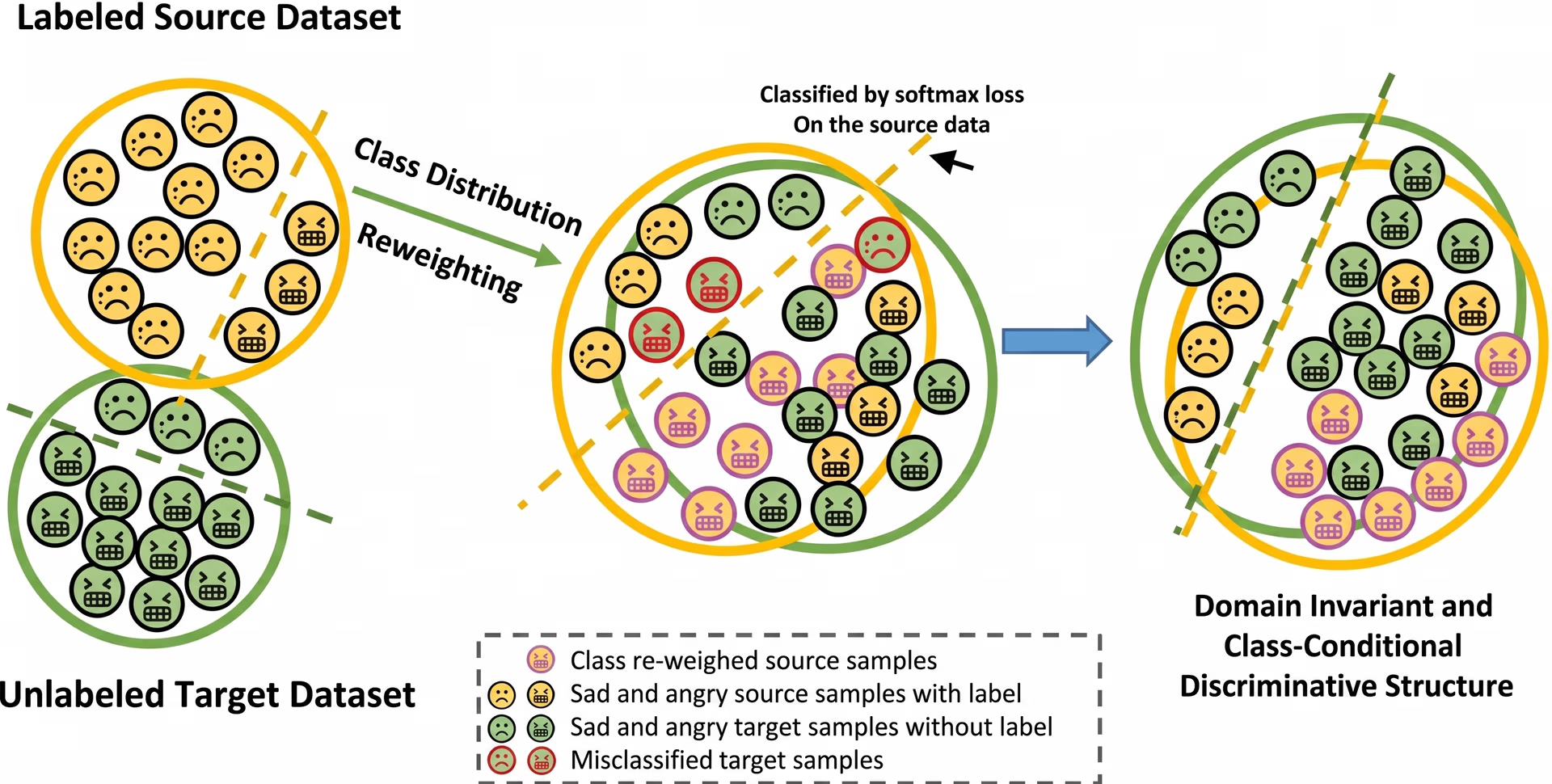
Fig 1. Reweighting source data helps achieve better model accuracy.
This highlights one of the main challenges caused by dataset bias. The model builds its understanding based on what it is shown. If that training data does not reflect real-world variety, the model’s behavior becomes narrow and less effective in unfamiliar conditions.
Image classifiers often perform significantly worse when tested on a different dataset than the one they were trained on, even if both datasets are built for the same task. Small changes in lighting, backgrounds, or camera angles can lead to noticeable drops in accuracy. This shows how easily dataset bias can affect a model’s ability to generalize.
These are not edge cases. They are signals that your data pipeline matters just as much as your model architecture.
Types of bias in AI training data#
Bias can be seen in the development process in subtle ways, often during data collection, labeling, or curation. Below are three major types of bias that can affect your training data:
Selection bias#
Selection bias can happen when the dataset does not represent the variety seen in real-world use. If a pedestrian detection model is trained only on clear, daytime images, it will not perform well at night or in fog. The selection process has, therefore, missed crucial cases.
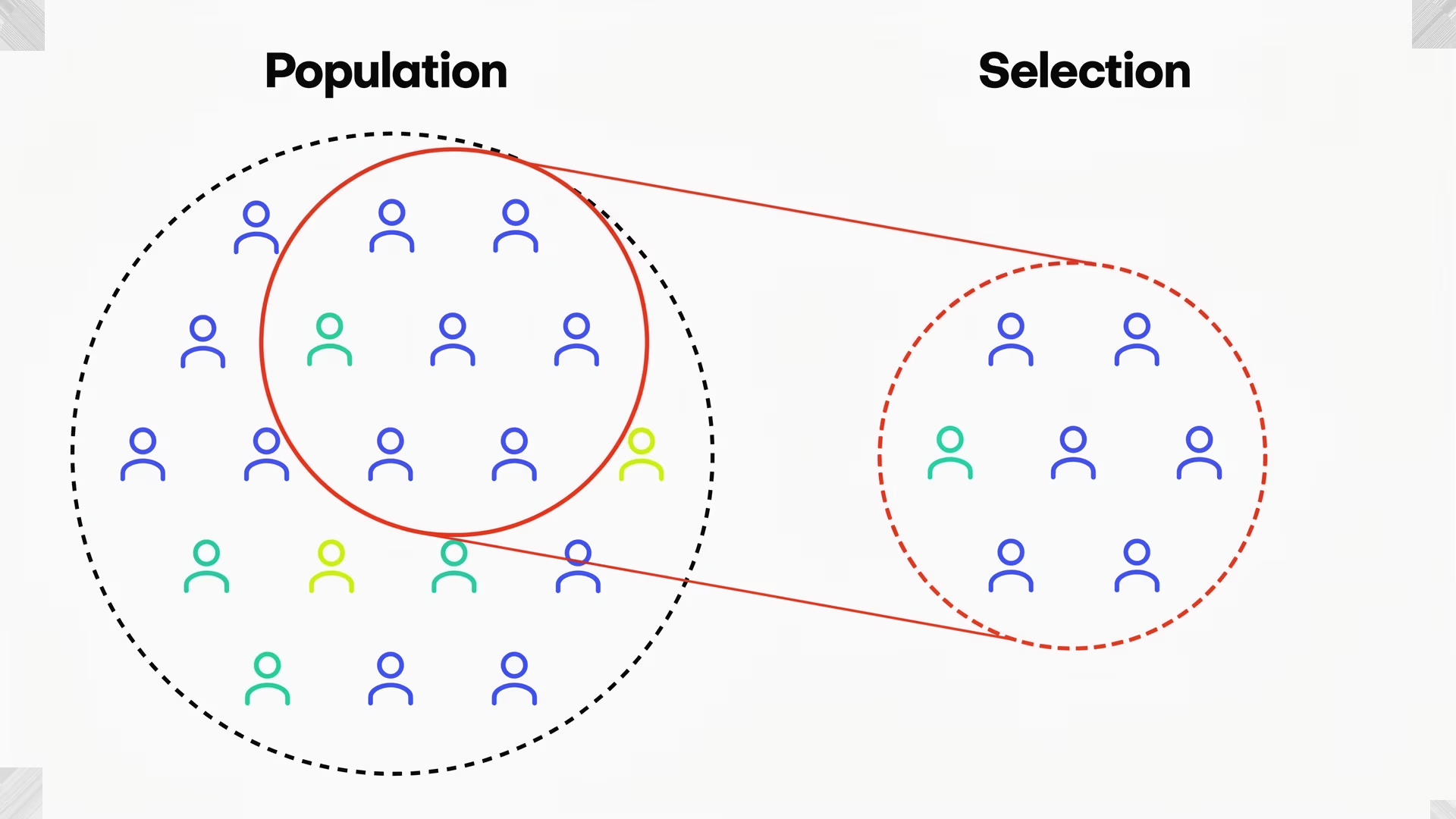
Fig 2. A visual representation of selection bias where only a non-diverse subset is chosen.
This bias happens when the dataset does not capture the full range of real-world scenarios due to how data was collected. It often occurs when data is gathered under ideal or convenient conditions, limiting the model's ability to perform in varied environments. Expanding collection efforts to include more diverse settings helps reduce this kind of bias.
It can also arise in datasets built from online sources, where the content may be heavily skewed toward certain locations, languages, or socioeconomic contexts. Without a deliberate effort to diversify the dataset, the model will inherit these limitations.
Label bias#
Label bias occurs when human annotators apply incorrect or inconsistent labels. A mislabel might seem harmless, but if it happens often, the model starts learning the wrong associations.
Inconsistent labeling can confuse the model during training, especially in complex tasks like object detection. For example, one annotator may label a vehicle as a "car" while another labels a similar one as a "truck." These inconsistencies impact the model’s ability to learn reliable patterns, leading to reduced accuracy during inference.
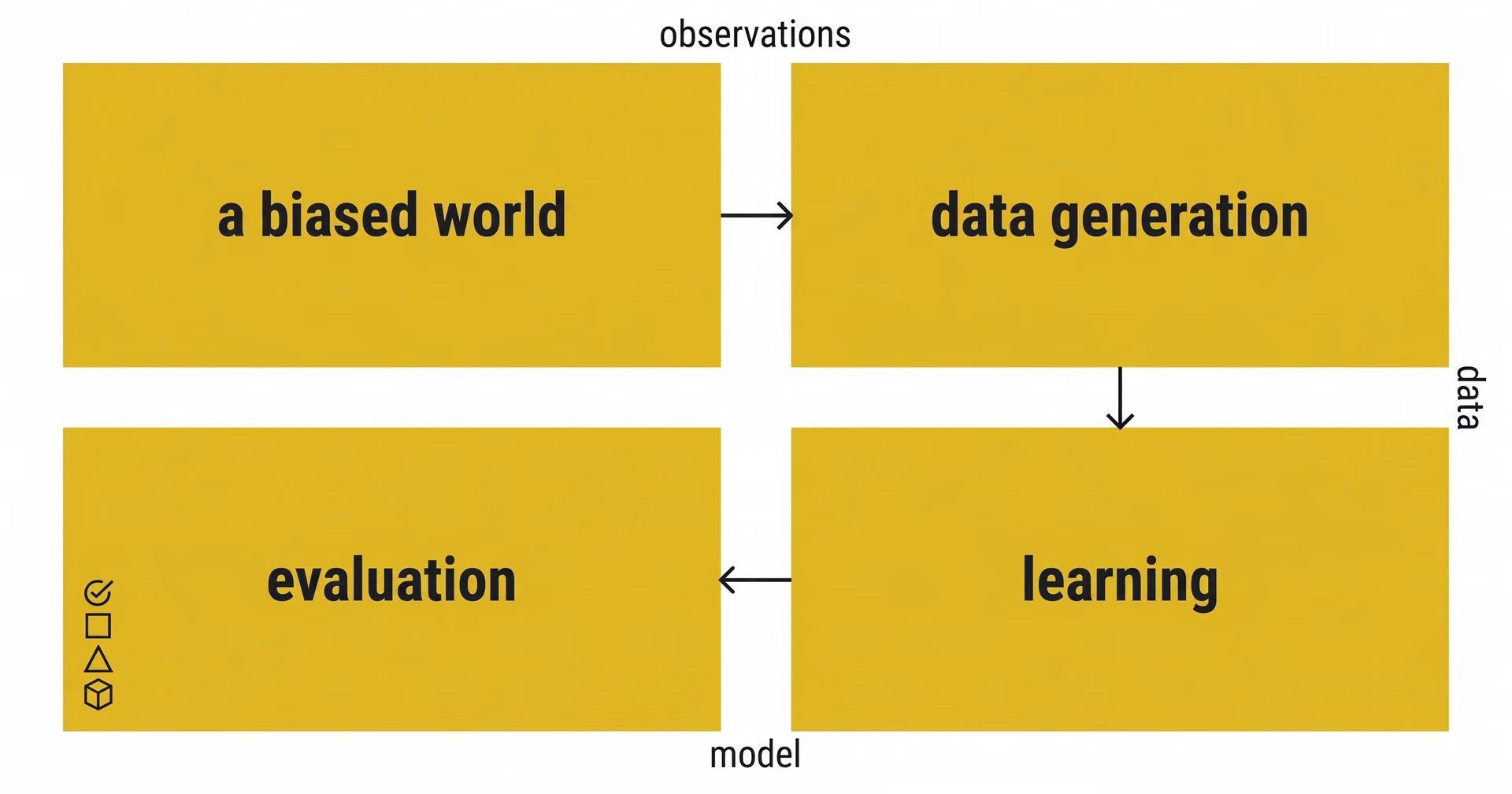
Fig 3. Bias in data pipelines originates from real-world imbalances.
Label bias may also emerge from unclear annotation guidelines or varying interpretations of the same data. Establishing well-documented labeling standards and performing quality control checks can significantly reduce these challenges.
Ongoing training for annotators and the use of consensus labeling, where multiple annotators review each sample, are two effective strategies for minimizing label bias and improving dataset quality.
Representation bias#
Representation bias often reflects broader societal inequalities. Data collected in wealthier or more connected regions may fail to capture the diversity of less-represented populations or environments. Addressing this bias requires the intentional inclusion of overlooked groups and contexts.
Representation bias happens when certain groups or classes are underrepresented in the dataset. These may include demographic groups, object categories, or environmental conditions. If a model only sees one skin tone, one type of object, or one background style, its predictions will reflect that imbalance.
We can observe this type of bias when certain groups or categories are included in much smaller quantities than others. This can skew the model’s predictions toward the dominant examples in the dataset. For instance, a facial recognition model trained primarily on one demographic may struggle to perform accurately across all users. Unlike selection bias, which is tied to data variety, representation bias concerns the balance between groups.
Diversity audits and targeted data expansion strategies can help ensure that all relevant demographics and categories are properly represented throughout the training dataset.
How to detect and mitigate dataset bias#
In real-world deployments, AI bias does not just mean a few incorrect predictions. It can result in systems that work well for some people but not for everyone.
In automotive AI, detection models may perform inconsistently across pedestrian groups, leading to lower safety outcomes for underrepresented individuals. The issue is not the model’s intent. It is the visual inputs it has been trained on. Even in agriculture, bias in object detection can mean poor identification of crops under different lighting or weather conditions. These are common consequences of training models on limited or unbalanced datasets.
Fixing AI bias starts with knowing where to look. If your training set is missing key examples or over-representing a narrow range, your model will reflect those gaps. That is why bias detection in AI is a critical step in every development pipeline.
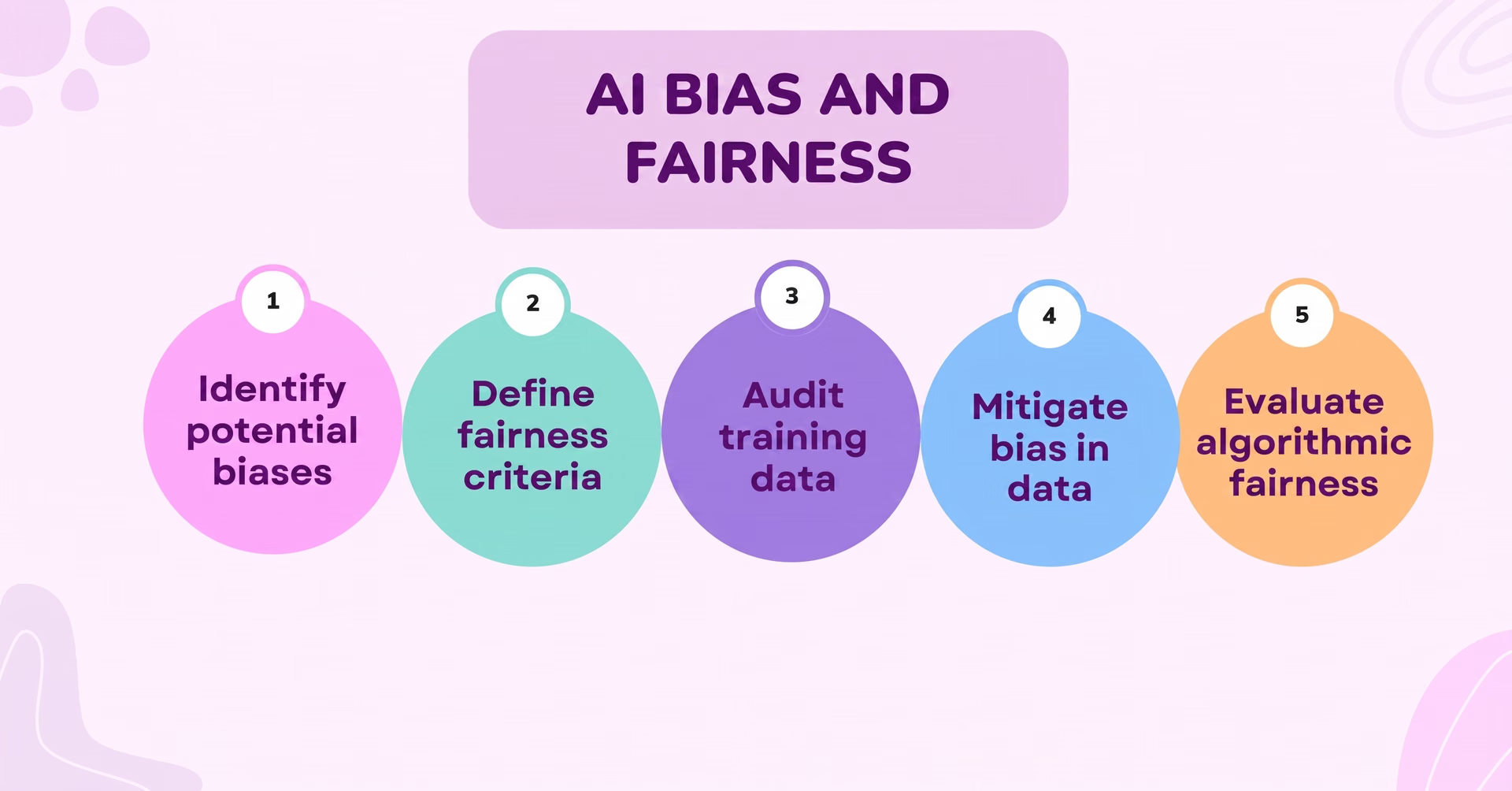
Fig 4. Key steps in reducing AI bias and improving fairness.
Start by analyzing your dataset. Look at the distribution across classes, environments, lighting, object scales, and demographics. If one category dominates, your model will likely underperform on the others.
Next, look at performance. Does the model do worse in certain settings or for specific object types? If so, that is a sign of learned bias, and it usually points back to the data.
Slice-level evaluation is key. A model might report 90% accuracy on average but only 60% on a specific group or condition. Without checking those slices, you would never know.
Using fairness metrics during training and evaluation is another powerful tool. These metrics go beyond standard accuracy scores and evaluate how the model behaves across different subsets of data. They help surface blind spots that might otherwise go unnoticed.
Transparency in dataset composition and model testing leads to better models.
Improving fairness through data diversity and augmentation#
Once you have identified bias, the next step is to close the gap. One of the most effective ways to do this is by increasing data diversity in AI models. That means collecting more samples from underrepresented scenarios, whether it is medical images from different populations or unusual environmental conditions.
Adding more data can be valuable, especially when it increases diversity. However, improving fairness also depends on collecting the right kinds of examples. These should reflect the real-world variation your model is likely to encounter.
Data augmentation is another valuable strategy. Flipping, rotating, adjusting lighting, and scaling objects can help simulate different real-world conditions. Augmentation not only increases dataset variety but also helps the model become more robust to changes in appearance, lighting, and context.
Most modern training pipelines include augmentation by default, but strategic use, such as focusing on adjusting based on task-specific needs, is what makes it effective for fairness.
Using synthetic data to fill the gaps#
Synthetic data refers to artificially generated data that mimics real-world examples. It can be a helpful tool when certain scenarios are too rare or too sensitive to capture in the wild.
For example, if you are building a model to detect rare defects in machinery or edge-case traffic violations, you can simulate those cases using synthetic data. This gives your model the opportunity to learn from events it may not encounter often in your training set.
Studies have found that introducing targeted synthetic data into training can reduce dataset bias and improve performance across demographic groups and environments.
Synthetic data performs best when paired with real-world samples. It complements your dataset; it does not replace it.
How Ultralytics YOLO11 supports ethical AI#
Building unbiased AI models also depends on the tools you use. Ultralytics YOLO11 is designed to be flexible, easy to fine-tune, and highly adaptable, which makes it a strong fit for reducing dataset bias.
Ultralytics YOLO11 supports advanced data augmentation techniques while training the model, which introduce varied image contexts and blended examples to improve model generalization and reduce overfitting.
Ultralytics YOLO11 also features an improved backbone and neck architecture for more effective feature extraction. This upgrade enhances the model’s ability to detect fine-grained details, which is critical in underrepresented or edge-case scenarios where standard models may struggle.
Because Ultralytics YOLO11 is simple to retrain and deploy across edge and cloud environments, teams can identify performance gaps and quickly update the model when bias is discovered in the field.
Fair AI is not a one-time goal. It is a cycle of evaluation, learning, and adjustment. Tools like Ultralytics YOLO11 help make that cycle faster and more productive.
Key takeaways#
AI bias affects everything from fairness to performance. Computer vision bias often stems from how datasets are collected, labeled, and balanced. Fortunately, there are proven ways to detect and mitigate it.
Start by auditing your data and testing model performance across different scenarios. Use targeted data collection, augmentation, and synthetic data to create better training coverage.
Ultralytics YOLO11 supports this workflow by making it easier to train custom models, apply strong augmentation techniques, and respond quickly when bias is found.
Building fair AI is not just the right thing to do. It is also how you build smarter, more reliable systems.
Join our growing community! Explore our GitHub repository to learn more about AI. Ready to start your own computer vision projects? Check out our licensing options. Discover AI in manufacturing and vision AI in agriculture by visiting our solutions pages!
Written by
Author · Ultralytics
Comments
Ask a question, share your results, or help someone else.