License YOLO
Vision AI

How AI can help students transform their learning experience

Learn how AI helps students with homework, translation, AR lessons, and accessibility, with examples like Photomath and Google Lens, plus the pros and cons.

Abirami Vina8 min read

Listen to this article

How AI helps students transform their learning experience

As artificial intelligence (AI) continues to grow and becomes more commonly accepted and adopted, we are starting to see AI innovations pop up more regularly in our daily lives. One exciting example is the use of AI in education to improve how students learn. From creating interactive and personalized learning tools to making lessons more engaging, AI is taking a big step forward from traditional blackboards and textbooks. Interestingly, it’s not just happening in the classroom; AI is also helping students at home through apps and virtual tutors.

Beyond this, AI can give educators valuable insights into students’ learning patterns, common mistakes, and study habits. With the help of AI, teachers can create study plans designed to focus on each student’s strengths and areas for improvement. According to Forbes Advisor, 60% of educators are already using AI tools to enhance their teaching methods. Let’s explore how AI is transforming students’ learning experiences and the benefits and challenges that come with such technological advancements.
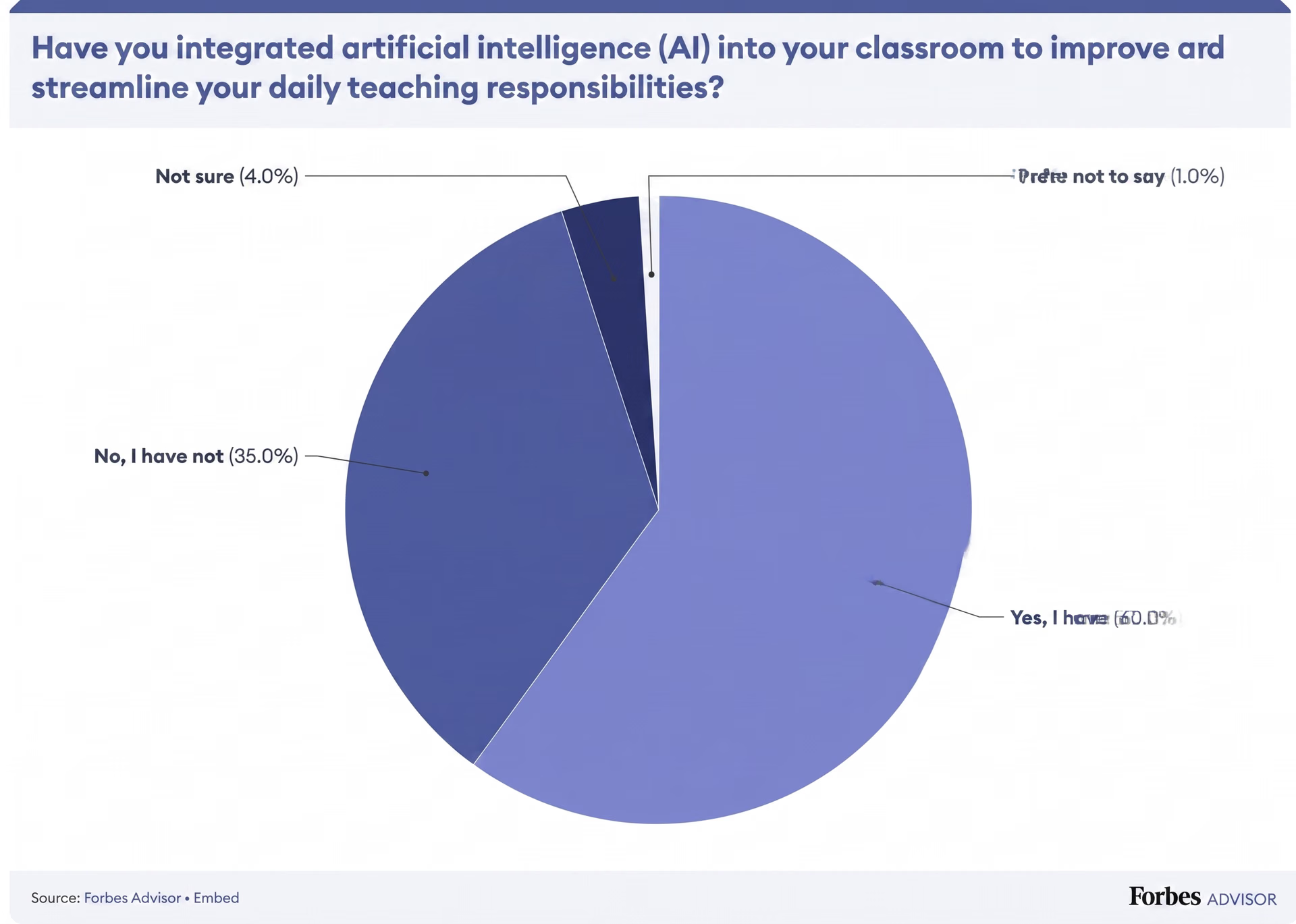
The adoption of AI in classrooms by teachers

Fig 1. The adoption of AI in classrooms by teachers.

The role of AI-powered learning tools in a student’s life#

AI technologies, like computer vision, natural language processing, and machine learning, can help machines understand and interpret visual information, text, and data. In education, these tools can make a big difference by offering new ways for students to learn, collaborate, and engage with content. Let’s take a look at some real-world examples of how students can use AI.

How AI can help with homework#

Homework is a daily task that can often overwhelm students, but AI can make it much more manageable and enjoyable. For example, OCR (Optical Character Recognition) can quickly extract text from textbooks or scanned documents and turn it into a digital format. Students can then easily organize, search, and access this information on their devices anytime. Also, AI tools can help students stay on track by offering personalized study tips or reminders. Thanks to AI, homework materials can become more interactive, making studying, reviewing, and getting additional support like summaries or translations simpler.

A great example of this is Photomath, an AI-powered app that helps students solve math problems by providing instant solutions and explanations. When doing homework, students often have doubts and questions that traditionally would have to wait until the next day to be answered by a teacher. Apps like Photomath can give students step-by-step explanations, visual tips, and references to solutions. Using computer vision techniques like OCR, the app scans and recognizes mathematical equations and problem statements. It can then analyze the problem and generate a detailed, step-by-step solution. The app can even provide multiple methods to solve the same problem and offer students a deeper understanding of the material.
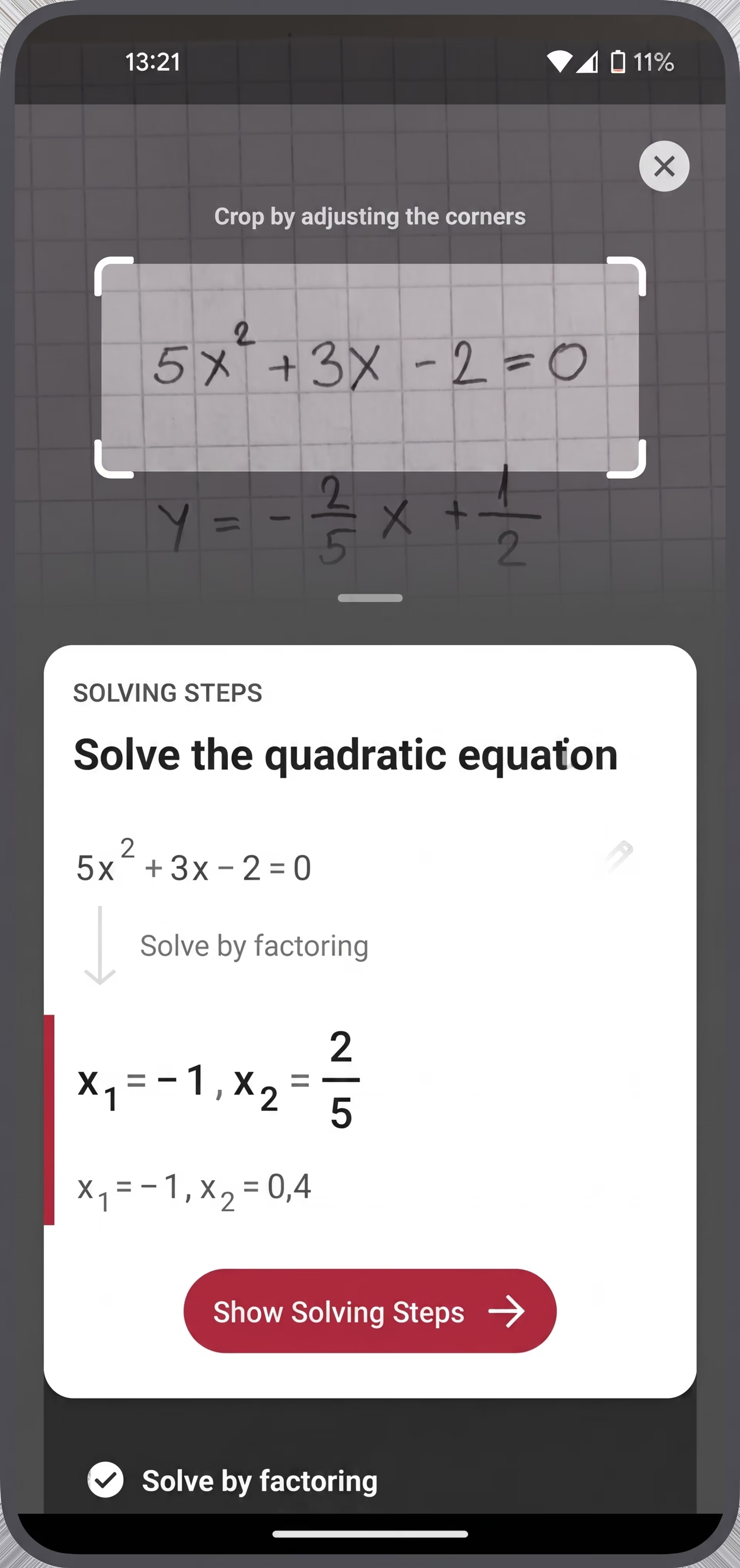
An example of using the Photomath app to solve a quadratic equation

Fig 2. An example of using the Photomath app to solve a quadratic equation.

How AI is changing higher education by bridging language gaps#

AI tools can also come in handy for students in everyday situations, like breaking down language barriers. Nowadays, it’s quite common for students to pursue higher education in different countries, where they may face language challenges both in and outside of the classroom. Whether it's reading street signs, understanding menus, or following lecture notes in a foreign language, these situations can be difficult for students adjusting to a new environment.

With apps like Google Lens, students can easily translate text from an image or poster just by snapping a picture. The app first uses OCR to detect the text in the image. Then, it relies on natural language processing to understand the context and structure of the language before providing an instant translation. The translated text is overlaid directly on the original image, making it easy for students to quickly grasp the meaning of signs, menus, or textbooks in a foreign language. With such AI tools, students can quickly overcome language barriers in a classroom or when exploring a new city.
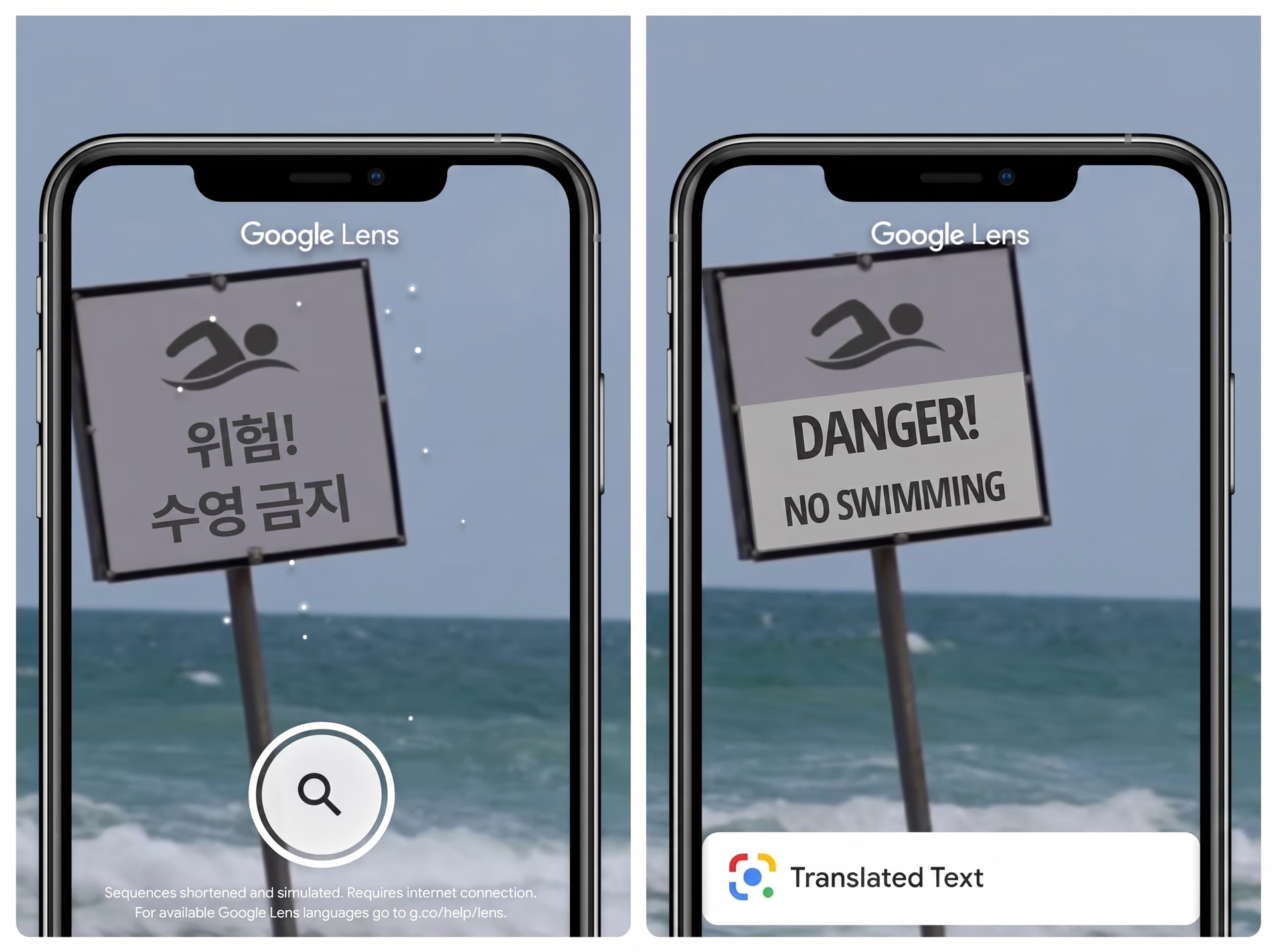
An example of using Google Lens to translate a sign

Fig 3. An example of using Google Lens to translate a sign.

AI in the classroom: Using AR technology to teach#

With technologies like augmented reality (AR), students can interact with study materials in a way that makes learning more engaging and memorable. AR uses computer vision to scan and understand the real world and overlay digital images onto physical objects in the classroom. This creates a blended environment where students can see and interact with both real and virtual elements, making lessons more dynamic and interactive.

Many AR-based tools are already being used in schools and universities. One example is Assemblr EDU, which helps students and teachers create 3D and AR learning experiences. Teachers can use pre-made 3D assets and animations to build lessons or even create their own interactive materials using a simple drag-and-drop editor. By bringing visual and practical information to life, AR makes it easier for students to understand complex concepts while making learning more fun.
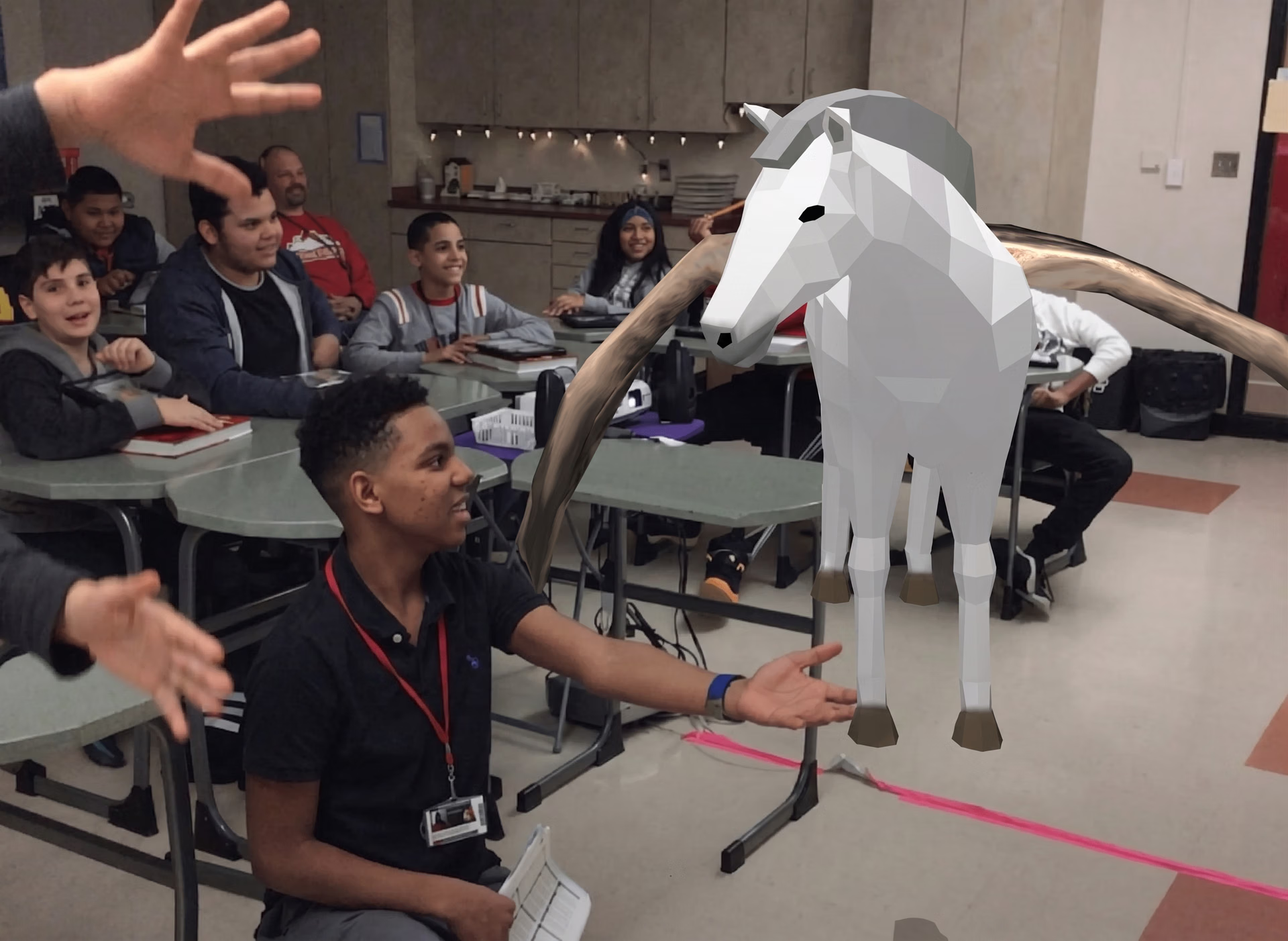
Students interacting with an Assemblr 3D model using AR

Fig 4. Students interacting with an Assemblr 3D model using AR.

How AI can be used to help students with special needs#

Studies show that an estimated 216.6 million people have visual impairments, and the rate of visual impairments among young people is rising. Smart glasses integrated with AI can offer a better learning experience for visually impaired students by recognizing faces, texts, images in books, and colors. It is a great example of how AI is making education more accessible.

For example, Envision Glasses are smart glasses integrated with ChatGPT that can convert visual information into speech. These glasses can describe what students are seeing in the real world. The built-in camera captures real-world environments and uses computer vision techniques like object detection to process them. Then, through natural language processing, the processed information is conveyed via audio through the glasses’ speaker. It gives visually impaired students more autonomy in daily tasks such as reading, writing, or even recognizing people and places.

The Envision Glasses use GPT-4 by OpenAI

Fig 5. The Envision Glasses use GPT-4 by OpenAI.

Pros and cons of using AI in students’ lives#

AI offers many benefits to students, making studying and student life in general easier. This is true across different age groups as well. For instance, more than 56% of Duolingo users are under 24, and the app uses AI features like GPT-4-powered roleplay to allow students to practice real-world conversations with AI. Such AI-enhanced tools make learning languages more interactive.

In higher education, tools like ChatGPT (an AI chatbot for generating text), Grammarly (an AI writing assistant for grammar and style), and Consensus (an AI academic search engine) support students with tasks like research and writing. A study found that 70% of university students feel that AI positively impacts their studies, though 40% expressed concerns about the ethical implications. To truly understand AI’s impact on students, it’s essential to look at both its advantages and drawbacks.

With AI becoming more common in education, students are experiencing new ways to learn, manage their time, and enhance their academic success. Here are some of the positive impacts AI can have on students:

  • Instant feedback: Students can get answers to their questions right away, which boosts productivity and encourages them to learn on their own.
  • Enhanced collaboration: AI tools can facilitate collaboration among students, even if they are in different locations, by providing shared platforms for projects, discussions, and learning resources.
  • Automated administrative tasks: AI can automate grading, attendance, and scheduling tasks, freeing up teachers to focus more on engaging with students and enhancing lesson quality.

While AI improves learning and makes studying more convenient, there are also some limitations to consider. Relying too much on AI can impact students' creativity and problem-solving abilities. Here are a few cons to keep in mind:

  • Privacy concerns: The use of AI requires collecting and processing large amounts of data, raising concerns about how students' personal information is stored and used.
  • Decreased human interaction: Excessive use of AI tools might reduce valuable teacher-student interaction, which is important for personal development and guidance.
  • Digital divide: Certain AI tools may be costly and hard to access for students who can't afford expensive subscriptions or devices.

Key takeaways#

AI can redefine how students learn by helping them build better study habits, sharpening their techniques, and boosting productivity. By personalizing lessons and offering around-the-clock support, AI makes it possible for students to take control of their education and learn at their own pace. But with these advantages come important considerations, like ethical concerns and privacy risks. As AI becomes more commonly integrated into the classroom, it's crucial that we make sure it's used responsibly. Ultimately, finding the right balance will likely shape the future of education for both students and educators.

If you are interested in diving deeper into AI, you can check our GitHub repository and join our community. You can also explore AI applications in sectors like healthcare and agriculture.

Written by

Abirami Vina
Abirami Vina

Content Creator · Ultralytics

Starting her career as a computer vision engineer, Abirami Vina built a strong foundation in vision AI and machine learning. She is a Content Creator for Ultralytics and the Founder and Chief Writer at Scribe of AI, where she crafts high-quality technical content for AI-focused companies. Driven by a passion for making AI both understandable and engaging, her work bridges the gap between cutting-edge technology and real-world impact.

Comments

Ask a question, share your results, or help someone else.
Similar articles

Macro view of chip pins on a circuit board, with four pins marked OK and one bent pin flagged as a defect

Automated Defect Detection for Manufacturing: Platforms Compared

Compare automated defect-detection platforms: Cognex, Instrumental, Keyence, Landing AI, Overview and Ultralytics, plus how to match model task to defect.
Learn more
An engine cover segmented by a computer vision model in an engine bay, beside assembly checks: present, positioned, oriented and in sequence

Assembly Verification and Error-Proofing with Computer Vision

How computer vision verifies assembly completeness, correctness and sequence: imaging station design, model task choice, PLC integration and validation.
Learn more
An autonomous forklift carrying a pallet of boxes, with the load segmented by a computer vision model

How Computer Vision Guides AMRs, AGVs and Autonomous Forklifts

What computer vision contributes to AMR, AGV and autonomous forklift navigation, how camera, lidar and depth complement each other, and where safety sits.
Learn more
A robot arm presenting a solar panel in a modern inspection cell, with both panels detected by Ultralytics YOLOE

Robotic Quality Inspection: Why Coverage Is the Hard Part

How robotic quality inspection works: scan planning, calibration, robot and vision synchronization, multi-view fusion, coverage proof and quality records.
Learn more
The Ultralytics Platform Batch Annotation dialog running on construction PPE images, with detection boxes on workers wearing hard hats and vests

PPE Detection and Workplace Safety with Ultralytics

Build PPE detection with Ultralytics Platform: annotate site images, train YOLO26, deploy to cloud or edge, and validate workplace safety monitoring.
Learn more
Reasons why computer vision models fail in production

5 reasons why computer vision models fail in production

Learn why computer vision models fail in production, from data mismatch to latency, and how teams can improve model performance in real-world vision AI systems.
Learn more
Four computer vision projects built with Ultralytics YOLO: speed estimation on a highway, a push-up workout counter, parking management and worker safety pose estimation

10 easy computer vision projects for hands-on learning

Explore 10 beginner-friendly computer vision projects, from security alarms to speed estimation, and learn how to build each one with Ultralytics YOLO26.
Learn more
Vision AI detecting product defects on a manufacturing production line

How vision AI enhances defect detection on production lines

Learn how computer vision systems enable real-time defect detection, improve quality control, and reduce manufacturing errors on fast-moving assembly lines.
Learn more
Computer vision monitoring water quality and detecting floating waste

Exploring computer vision in water quality monitoring

Learn how computer vision in water quality monitoring enables real-time detection, AI-driven insights, and smarter water management solutions.
Learn more
Computer vision detecting wildlife for biodiversity surveillance

Redefining biodiversity surveillance with computer vision

Learn how computer vision enables biodiversity monitoring by detecting species, tracking habitat change, and supporting modern global conservation efforts.
Learn more
Vision AI detecting wildlife visiting a residential backyard

Wildlife detection for your backyard: Powered by vision AI

Discover how vision AI improves wildlife detection for your backyard, helping protect plants, pets, and people through intelligent visual analysis.
Learn more
Using vision AI to create smarter product experiences

Using vision AI for smarter product experiences

See how product teams use vision AI and Ultralytics YOLO26 for real-time product recognition, AR shopping, healthcare labels, and smart home appliances.
Learn more
Computer vision analyzing aerial drone and satellite imagery

12 aerial imagery use cases powered by computer vision

Explore 12 aerial imagery use cases where computer vision turns drone and satellite data into insights, from precision farming to oil spill detection.
Learn more
Vision AI turning enterprise visual data into business decisions

From data to decisions: Using vision AI for enterprise strategy

Explore how an enterprise vision AI strategy helps organizations turn visual data into faster decisions, scalable operations, and lasting competitive advantage.
Learn more
Vision AI analyzing medical images for healthcare diagnostics

Vision AI tools for healthcare diagnostics

Explore AI tools for healthcare diagnostics, from Ultralytics YOLO models to Viz.ai, PathAI, Aidoc, Tempus, and Cleerly, and how they help clinicians.
Learn more
Vision AI detecting objects in real-world visual data

A quick overview of vision AI and how it works

Explore how vision AI turns images and video into real-time insights using modern models, curated datasets, and end-to-end workflows across industries.
Learn more
Computer vision analyzing satellite imagery for environmental monitoring

The best computer vision tools for environmental monitoring

Explore the best computer vision tools for environmental monitoring that support scalable analysis of satellite imagery and environmental visual data.
Learn more
Promptable concept segmentation of objects in an image

Understanding promptable concept segmentation

Explore promptable concept segmentation, how it differs from traditional methods, and how related models such as YOLOE-26 enable open-vocabulary capabilities.
Learn more
Computer vision applications across many industries

60 impactful computer vision applications

Explore 60 real-world computer vision applications, from healthcare to retail, and see how Vision AI is making an impact across industries.
Learn more
Computer vision analyzing shoppers and products in a retail store

Top 8 benefits of using computer vision in retail!

Explore 8 benefits of computer vision in retail, from automated checkout and loss prevention to shelf monitoring, inventory visibility, and safer stores.
Learn more
Chart of COCO mAP versus T4 TensorRT latency comparing Ultralytics YOLO26 with YOLOv10 and RT-DETR model families

Best object detection models

Explore the best object detection models in 2026, from Ultralytics YOLO to RT-DETR, with architectures, performance trade-offs and deployment factors compared.
Learn more
Using YOLO11 to detect plastic waste for environmental monitoring

How does AI affect the environment and drive sustainability?

How does AI affect the environment? Learn how computer vision monitors ecosystems, emissions, and solar farms, and how efficient AI reduces its own footprint.
Learn more
Vision AI powering touch-free gesture recognition

Vision AI enables touch-free gesture recognition technology

Explore how computer vision powers gesture recognition technology to detect, track, and understand hand gestures across various applications.
Learn more
Computer vision tracking moving objects across video frames

Computer vision makes motion tracking more reliable

Learn how AI and computer vision make motion tracking smarter, faster, and more reliable across sports, robotics, mobile apps, and other real-world workflows.
Learn more
Aerial view of road traffic with each vehicle assigned a persistent track ID, with a magnified view of the IDs

Top 8 open source object tracking tools and algorithms

Explore 8 top open-source object tracking tools for real-time video analysis. See how each one works and how to choose the right fit for your project.
Learn more
Human-in-the-loop annotation for computer vision

Understanding why human-in-the-loop annotation is key

See how human-annotated data improves the accuracy of computer vision models, and why human expertise is still essential for reliable vision AI systems.
Learn more
Oakley Meta AI glasses powered by computer vision

Oakley Meta AI glasses are redefining eyewear with vision AI

See how Oakley Meta AI glasses use computer vision and AI to deliver hands-free assistance, performance tracking, and effortless content capture.
Learn more
Computer vision powering smart birdwatching binoculars

Computer vision is powering smarter birdwatching binoculars

Explore how computer vision in smart birdwatching binoculars enables real-time bird detection, tracking, and species identification in the field.
Learn more
Future object detection trends in computer vision

Future object detection trends: 7 key things to look out for

Learn about seven future object detection trends driving advances in computer vision, enabling faster, smarter, and more reliable AI-powered systems.
Learn more
AI in soccer analyzing player performance and team strategy

Scoring smarter goals with the help of AI in soccer

See how AI and computer vision in soccer enable real-time player tracking, offside detection, and injury prevention to improve performance and strategy.
Learn more

Let's build the future of AI together!

Begin your journey with the future of machine learning